Equanim Account Shield
- Utilità
- Versione: 1.1
- Attivazioni: 10

Discipline you don't have to hold by willpower. Account Shield controls the risks on your account — per trade, per day, in total, drawdown, stops, overtrading, trading after a loss — and helps stop you before a bad moment becomes a lost account. Own account or prop firm (15 firm presets included). Never opens trades by itself.
Why
Most accounts are not lost to bad analysis. They are lost to a moment: the daily loss counted on equity, the stop set a minute late, the fourth trade after two losses, the bigger lot to win it back. Account Shield watches all of that — for manual trades, copied trades and other EAs — and makes switching the rules off in the heat of the moment wait until the next trading day.
What it guards
The trade
- Risk per trade and the max risk of a trade — by the widest stop a trade ever had, with commission in and out; risk per trade idea (where the firm has this rule).
- A trade above your risk limit: warn only, trim the lot, or do not allow — your choice on an own account; on a prop the lot is always trimmed.
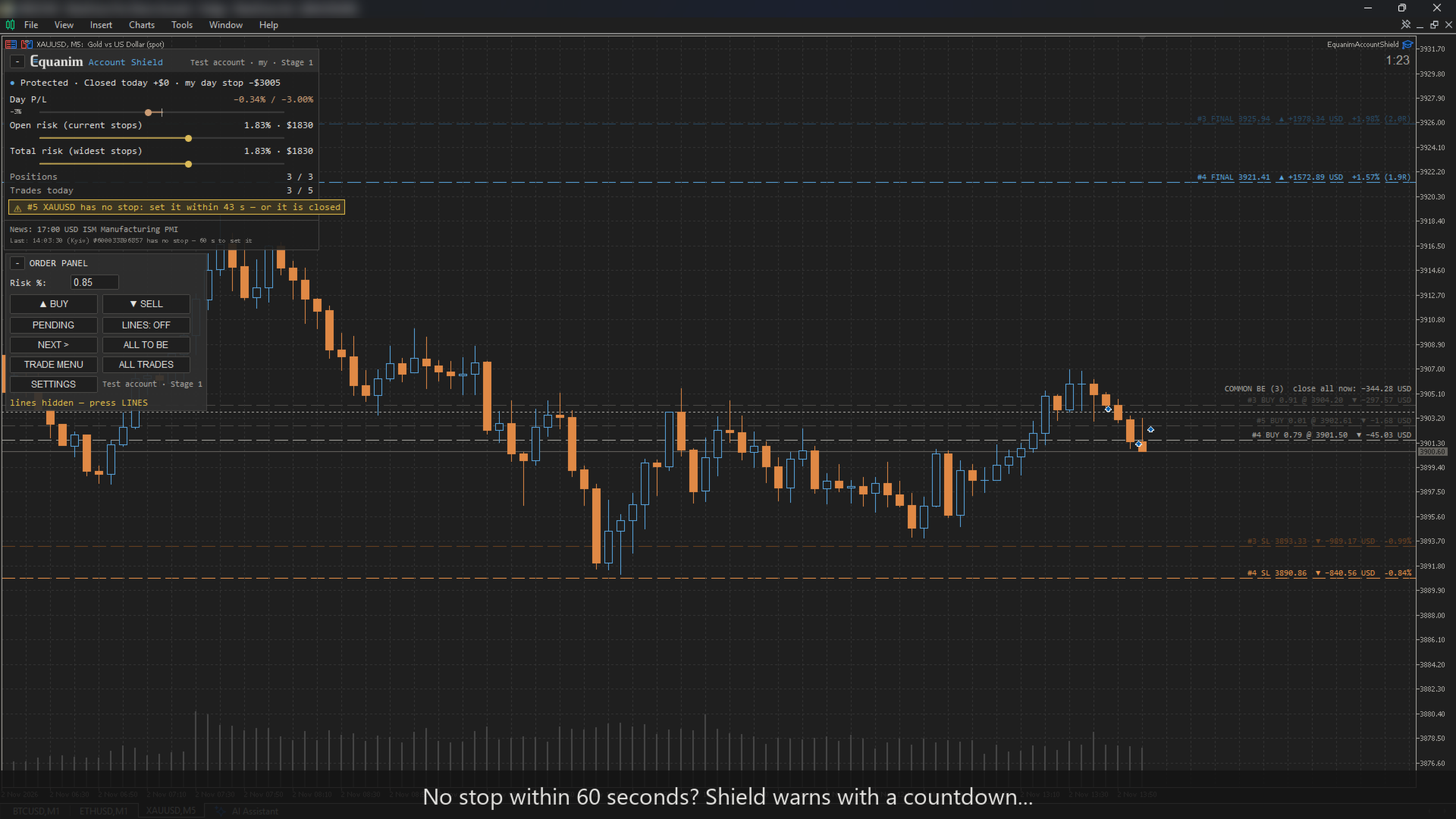
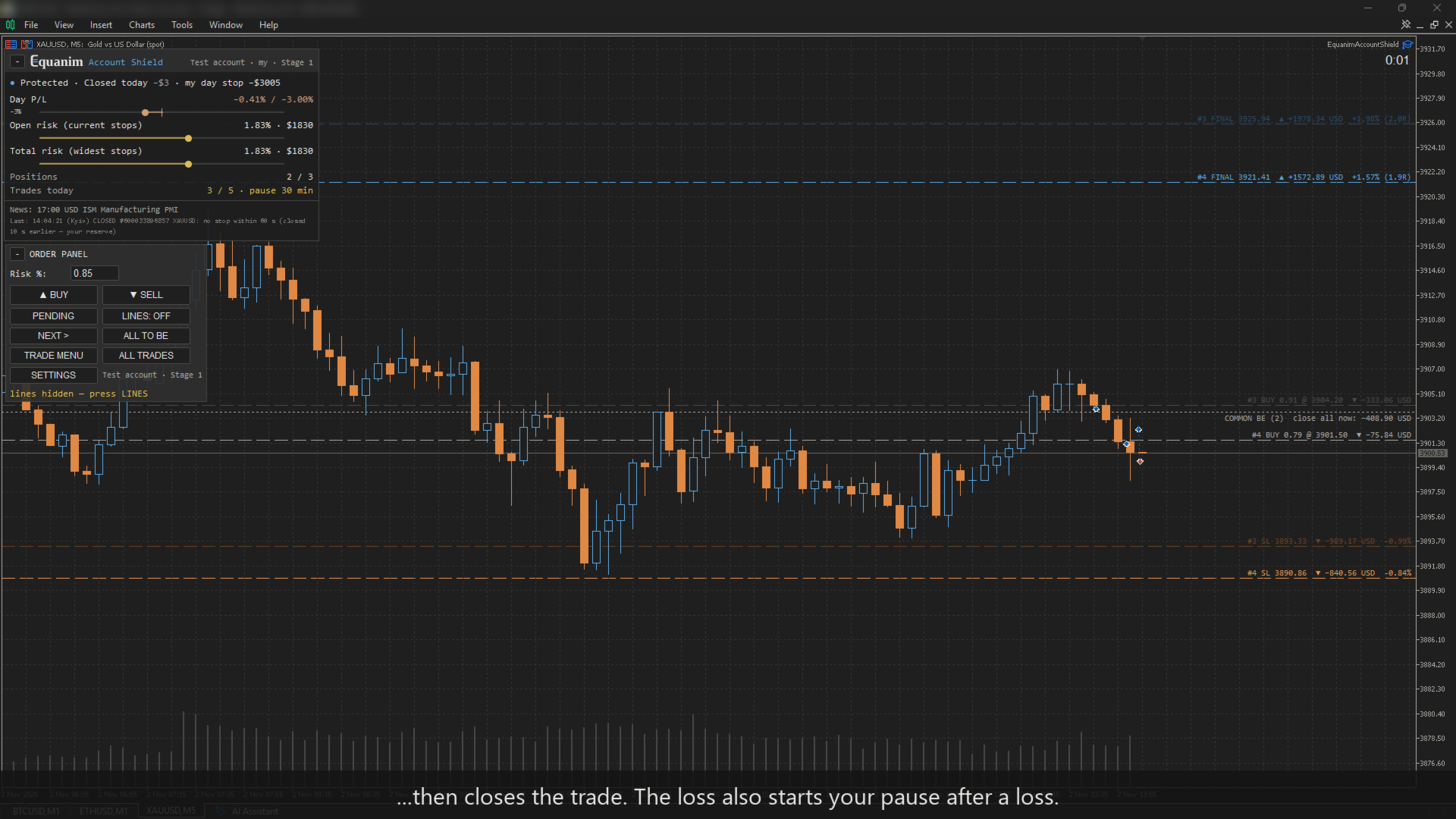
- Stop loss within N seconds — counted from the position's open time, so a restart of the terminal does not reset it.
- Minimum trade duration (where the firm has this rule).
- A trade without a stop: the lot is trimmed at once as if the stop stood 1 ATR away, while you still have the firm's seconds to set it. Shield only ever reduces a lot, never adds to it.
The day
- Daily loss exactly as your firm counts it: base (initial balance / day-start balance / higher of balance and equity), the firm's reset time and time zone with daylight saving. If Shield was not running at the firm's midnight, the day-start equity is rebuilt from prices.
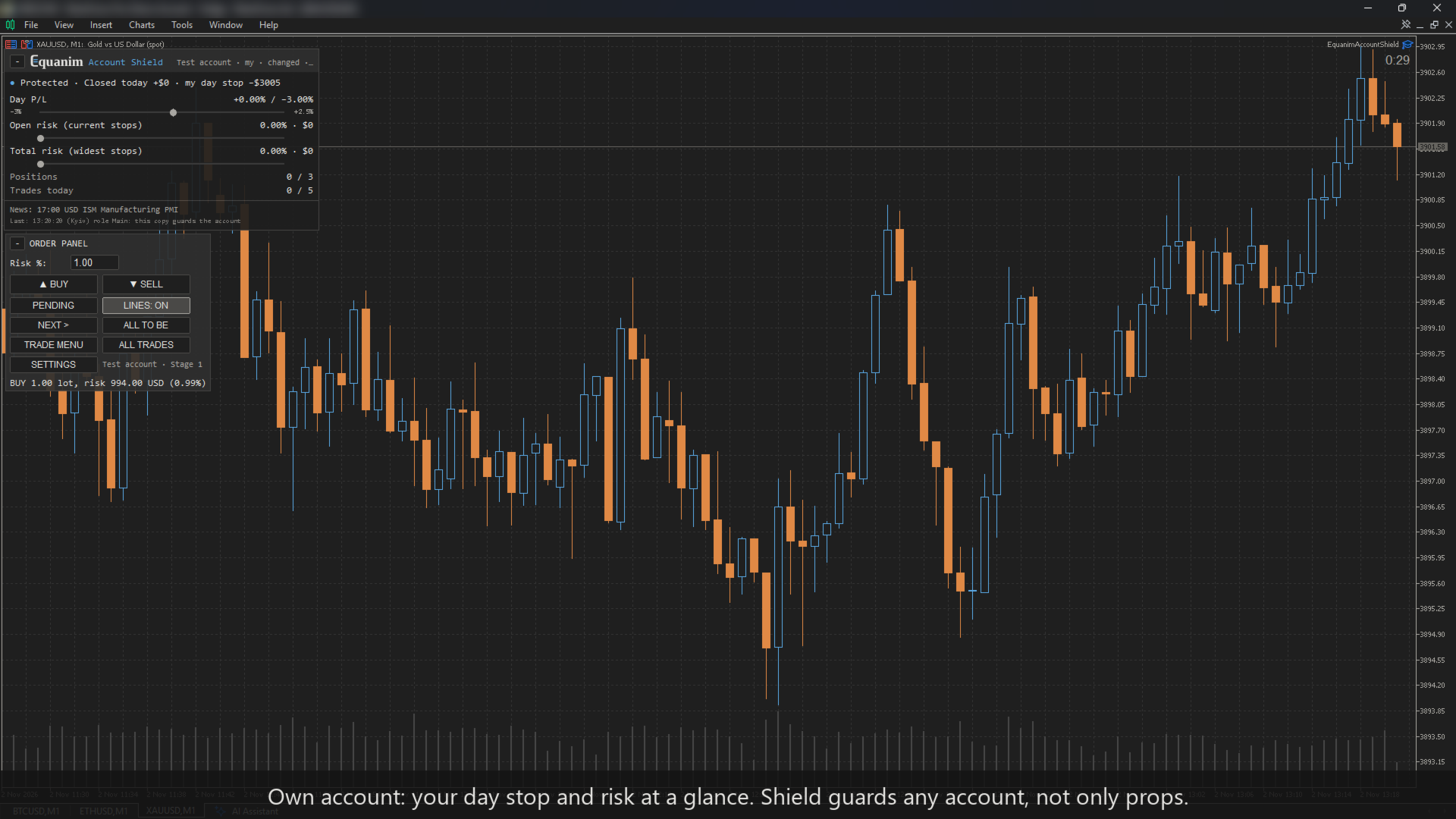
- Your personal daily stop (closed trades; the daily limit counts open ones too).
- News windows (when the news rule blocks, pending orders are cancelled before the window), weekend, gap and long market-break windows for funded accounts.
- The next important news (MT5 calendar) is always shown at the bottom of the panel — even on an account where the news window is off and nothing is blocked: volatility around a release affects any strategy.
The account
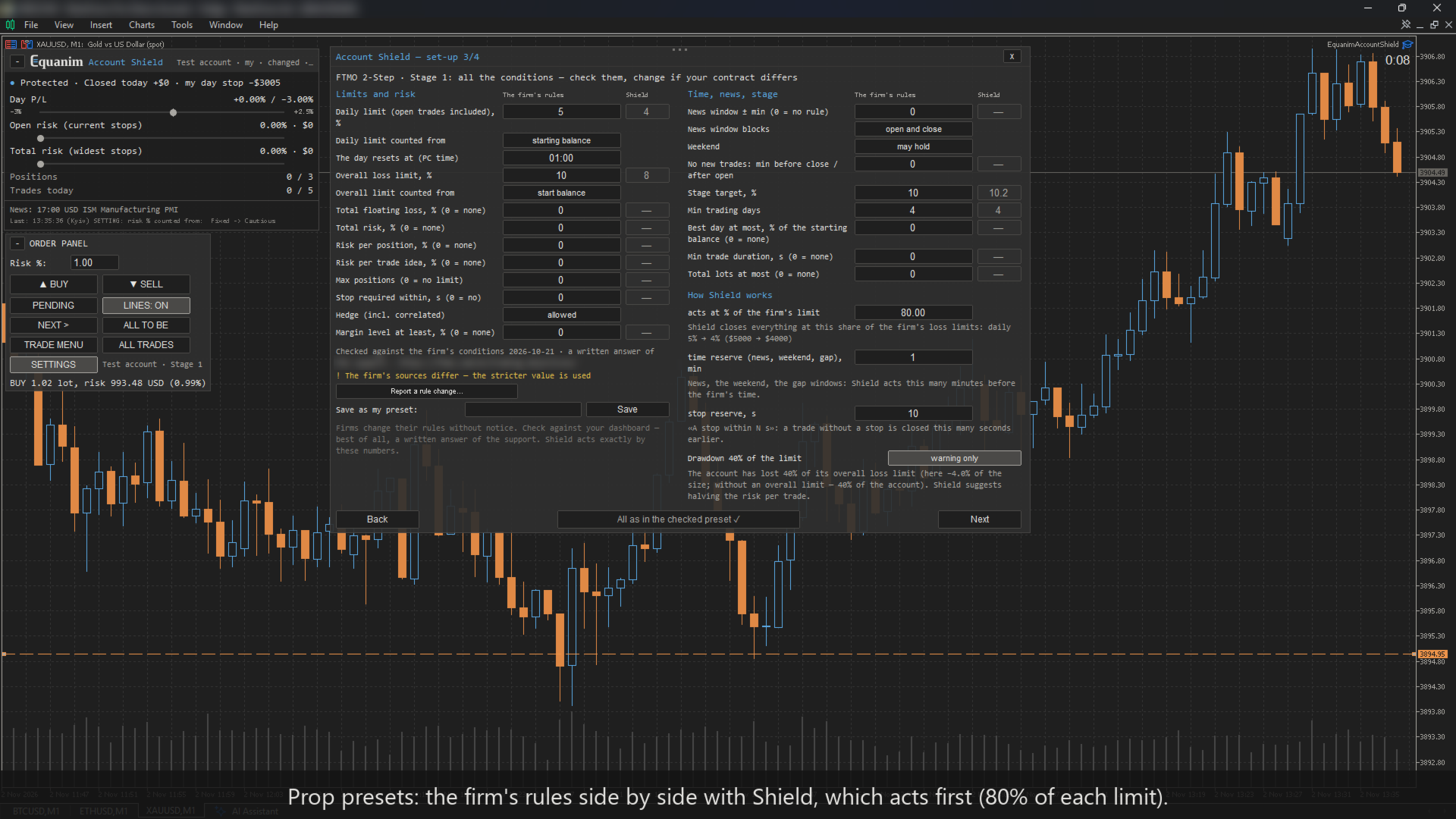
- Max drawdown: static or trailing (also trailing from the highest closed balance). A safety buffer (80% of the firm's limit by default) stops you before the firm does.
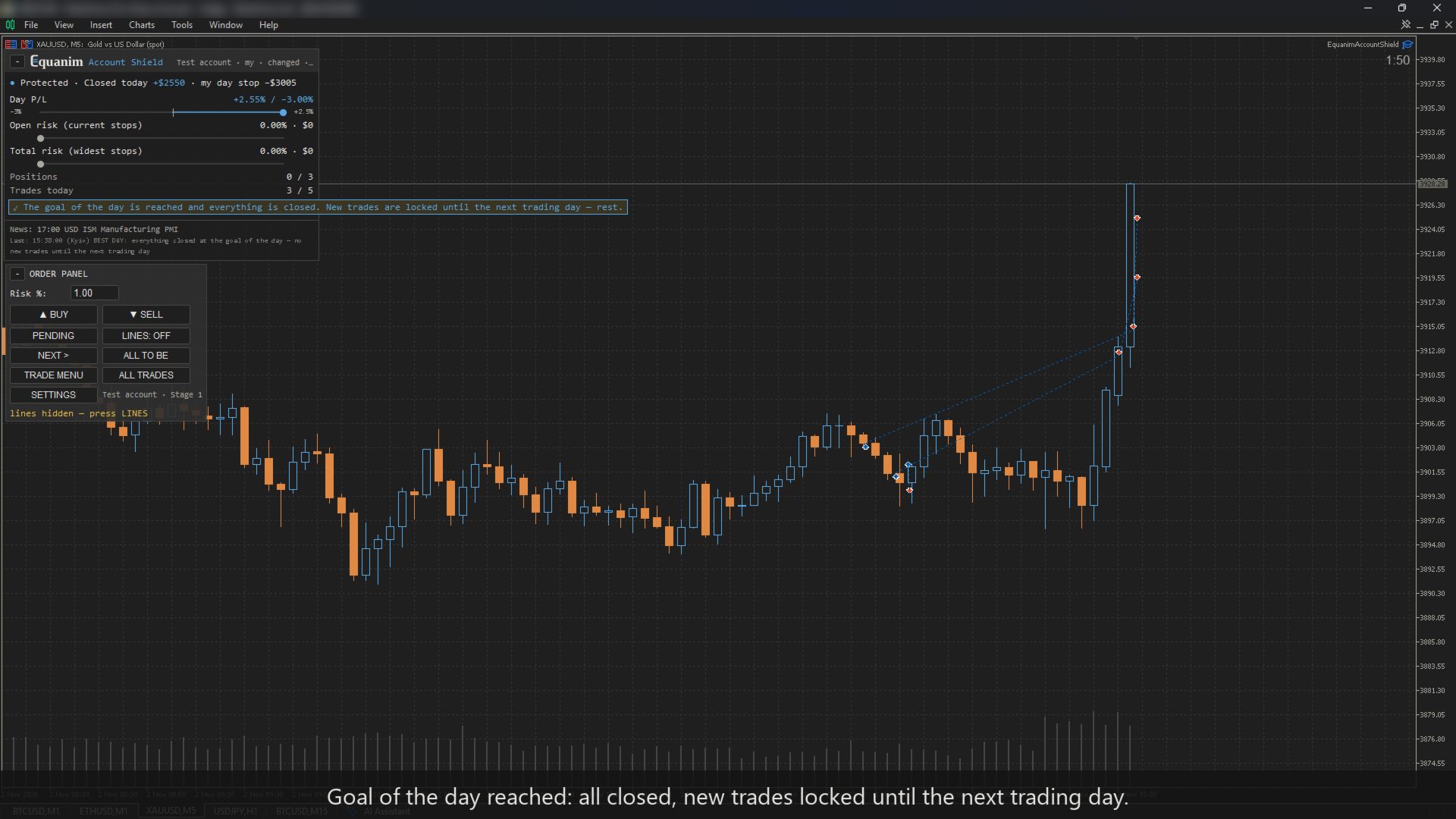
- Total open risk, max open positions (only the extra ones are closed). By the firm's rules or your own in «Conditions»: hedging on the same and correlated symbols, margin level, total lots. Best day, % of the starting balance — you turn the firm's consistency rule into a day's number yourself (35% of a 10% month = 3.5%): once the day's result by equity (closed and open) reaches it, Shield recommends closing your trades and resting until tomorrow — whether to close or wait for your take is your call; when everything is closed with the day's result still at the goal, new trades are locked until the next trading day (only if you set it in «Conditions»).
- A warning (or a forced halving) of the risk once the drawdown reaches 40% of the max-drawdown limit (−4% on most props; on an own account without a drawdown limit — −40%). Or, instead, Room to the limit: the risk of a trade shrinks with the room left to the overall limit, never below a floor (0.25% by default) — at −4% of a 10% limit a 1% trade becomes 0.5%, at −8% the floor.
Your behaviour
- Trades per day, pause after a loss; with Trade Journal also a smaller risk after a loss, trading hours (a trade outside the window is closed) and no stop widening after N seconds (a widened stop is put back) — rules the journal proposes.
The discipline lock
A stricter value acts immediately. A looser one acts from the next trading day, and the panel shows what changes and when; softening a firm's rule in «Conditions» also needs an explicit «I confirm». The same lock applies to the settings window, the «Conditions» window, the order panel and to rules accepted from Trade Journal. «Watch only» and a set-up run again with another firm, stage or size also act from the next trading day. Until your first trade every change acts at once, so the set-up is free. The EA's inputs in the F7 window (including «Watch only» and other robots' magic numbers there) and removing Shield from the chart stay in your hands — MetaTrader does not let an EA forbid that.
Four ways to use it
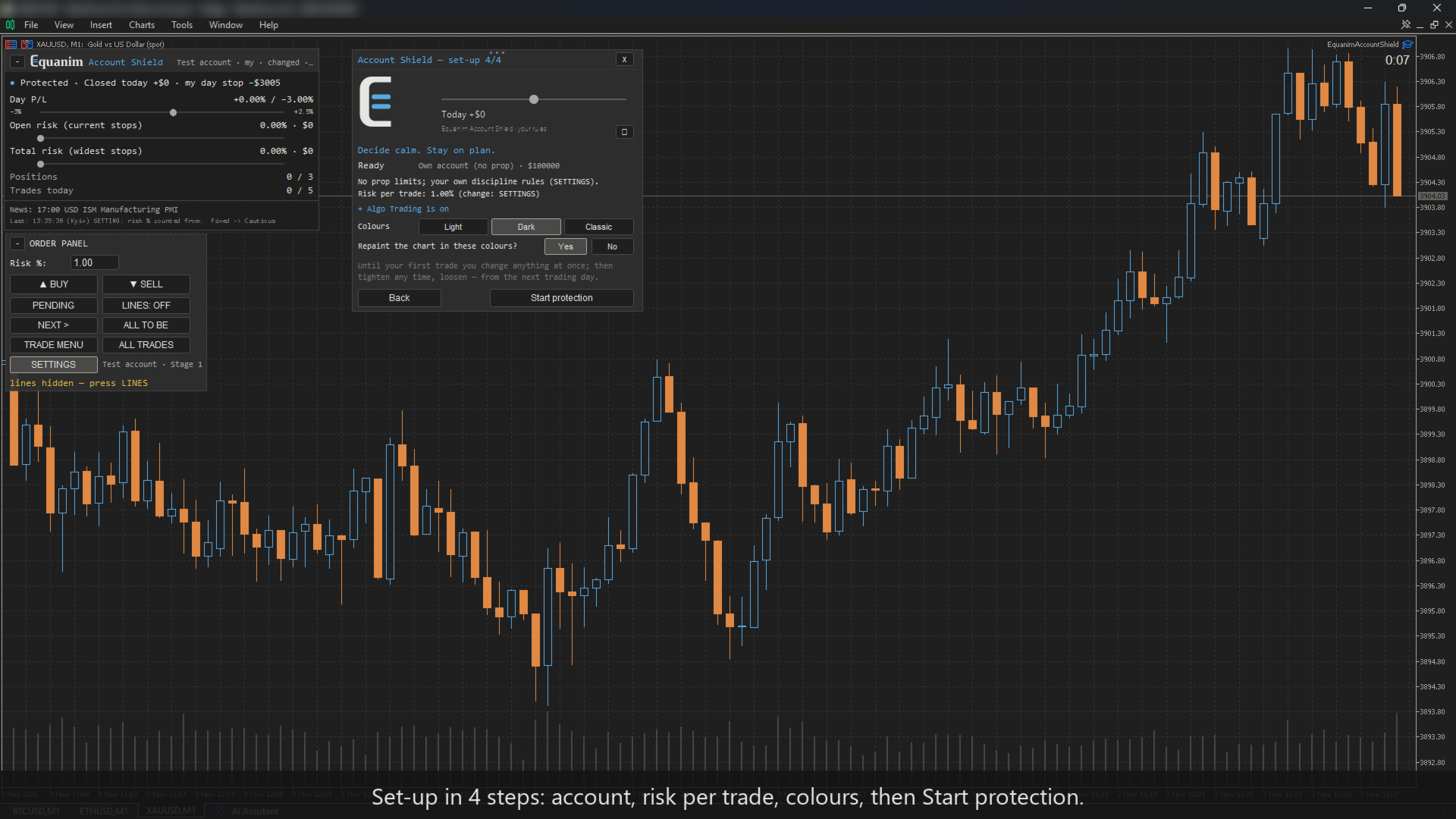
A short setup on the chart — any amount works as the account size, and everything can be changed later from the SETTINGS button on the panel (the firm, stage and size — on a day without trades; after your first trade they act from the next trading day).
- Own account. Your base rules: risk per trade, max risk of a trade, daily stop, trades per day, pause after a loss, max positions — sensible defaults, adjusted when even the minimum lot is too big for your risk; then any extra rules. The panel shows your own limits ("my day limit").
- Prop challenge. Choose your firm (15 presets with the firm's numbers and the date they were checked), the stage and the account size, then one window with all the firm's rules — check them and correct any if needed; for another firm, fill in the same window. The conditions window shows two columns side by side: the firm's rules and what Shield actually acts on with your reserves (the share of the firm's limit, minutes before news, weekend and gap windows, seconds before the stop deadline) — check them against your contract. When equity reaches the phase target (+0.2% buffer), Shield closes everything so the target is locked in, and that day counts. If the firm still needs trading days, by default the next days run in Economy mode (or your usual rules — your choice in the set-up and in SETTINGS; switching to the usual rules acts from the next trading day): minimum lot only, each day's trade is closed once it is net positive, and the day is counted. When the days are done, the phase is marked passed and the next phase's rules switch on (on the same account).
- Your presets and letters. Another firm or your own corrections — save them as "My preset" and choose it in the set-up on any account. A firm that restricts EAs — Shield prepares a letter to its support. A firm's rule has changed — "Report a rule change" prepares a message to the author.
- Funded. News windows, weekend and gap windows, the firm's risk per position. There is no target on funded: nothing is closed for profit.
The firm compatibility table is in the comments.
In numbers
- Stops at 80% of the firm's limit by default (your own account: at your numbers as entered).
- The day resets in the firm's own time zone, with daylight saving.
- Risk by the widest stop a trade ever had, commission in and out.
- The stop deadline is counted from the open time, so a restart does not reset it.
How the risk % is counted (risk 1%, start size $1000)
| Choice | Balance $800 | Balance $1500 | For whom |
|---|---|---|---|
| Cautious — the lower of the start and the balance | $8 | $10 | own account, default: smaller in a loss, not bigger in a profit |
| Progressive — the current balance | $8 | $15 | own account: grows with profit |
| Fixed — the start size | $10 | $10 | prop default: the firm's limits count from the start too |
| Equity — open trades included | $8 ± open | $15 ± open | own account |
| Room to the limit (limit −10%, Shield stops at −8%) | — Shield stopped at $920; at $940 → $2.50 (0.25% floor) | $10 | prop or own: shrinks with the room, never below the floor |
The daily and the overall limit are counted the way your firm counts them (start balance, day-start balance or the higher of balance and equity; start balance, the highest day-end equity or the highest equity) — the conditions window shows all three with the money of now.
A full trade panel — not an add-on
Shield is two tools in one: the rule guard and a complete trade manager.
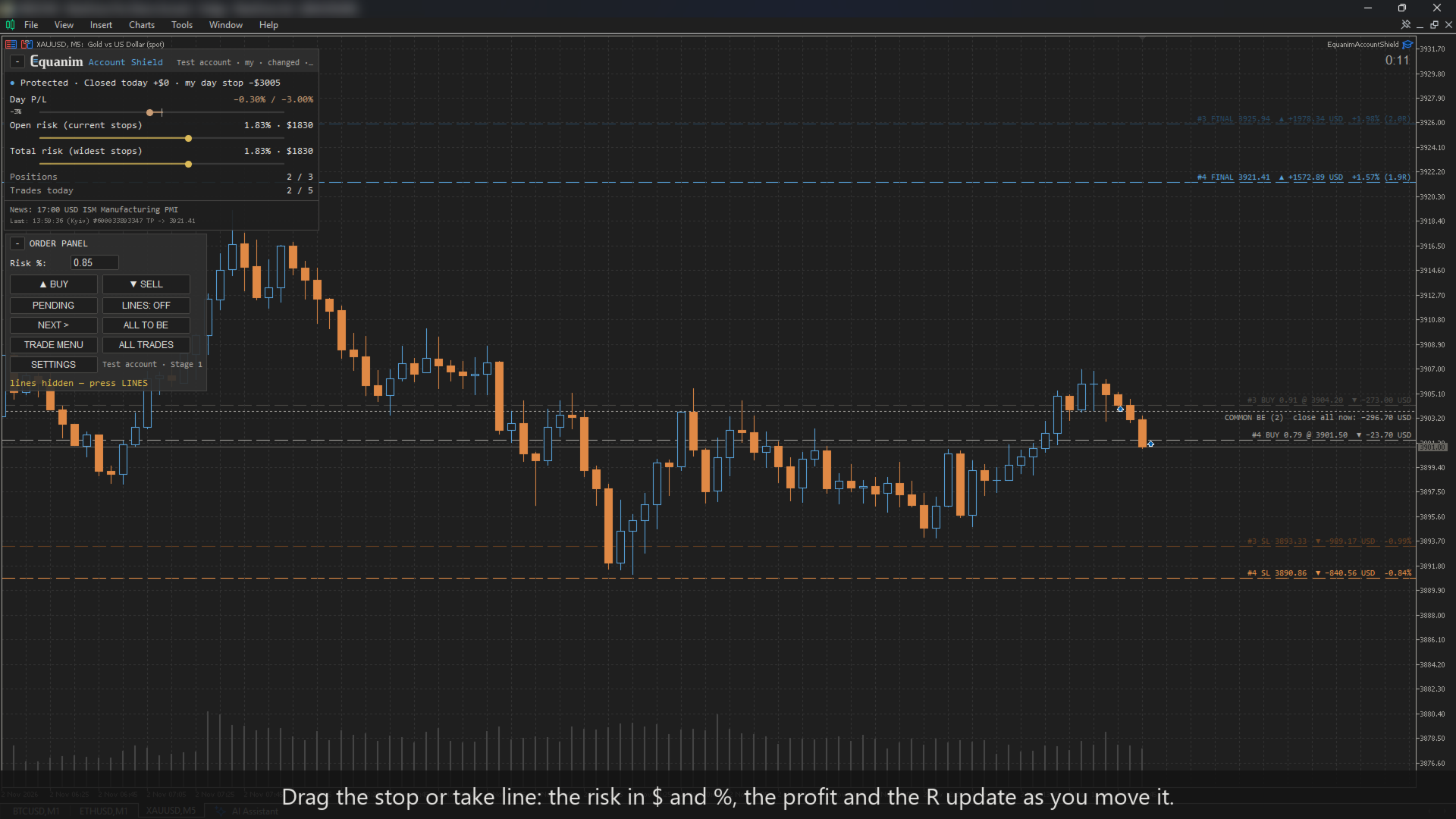
- Lot from risk: drag the stop line — the lot, the risk in money and in %, and the take in R are shown before you click. Risk as % — own account: Cautious (the lower of the start size and the balance: smaller in a loss, not bigger in a profit), Progressive (the current balance), Fixed (the start size), Equity, or Room to the limit; prop: Fixed or Room to the limit. Or a fixed amount or a fixed lot; commission per lot included (enter it in the inputs).
- Orders: BUY / SELL at market, or a pending order from an entry line (Limit or Stop chosen by itself); take profit in R; margin and broker stop-level checks; the point value from the terminal's own P/L — correct even where a broker's tick value is wrong.
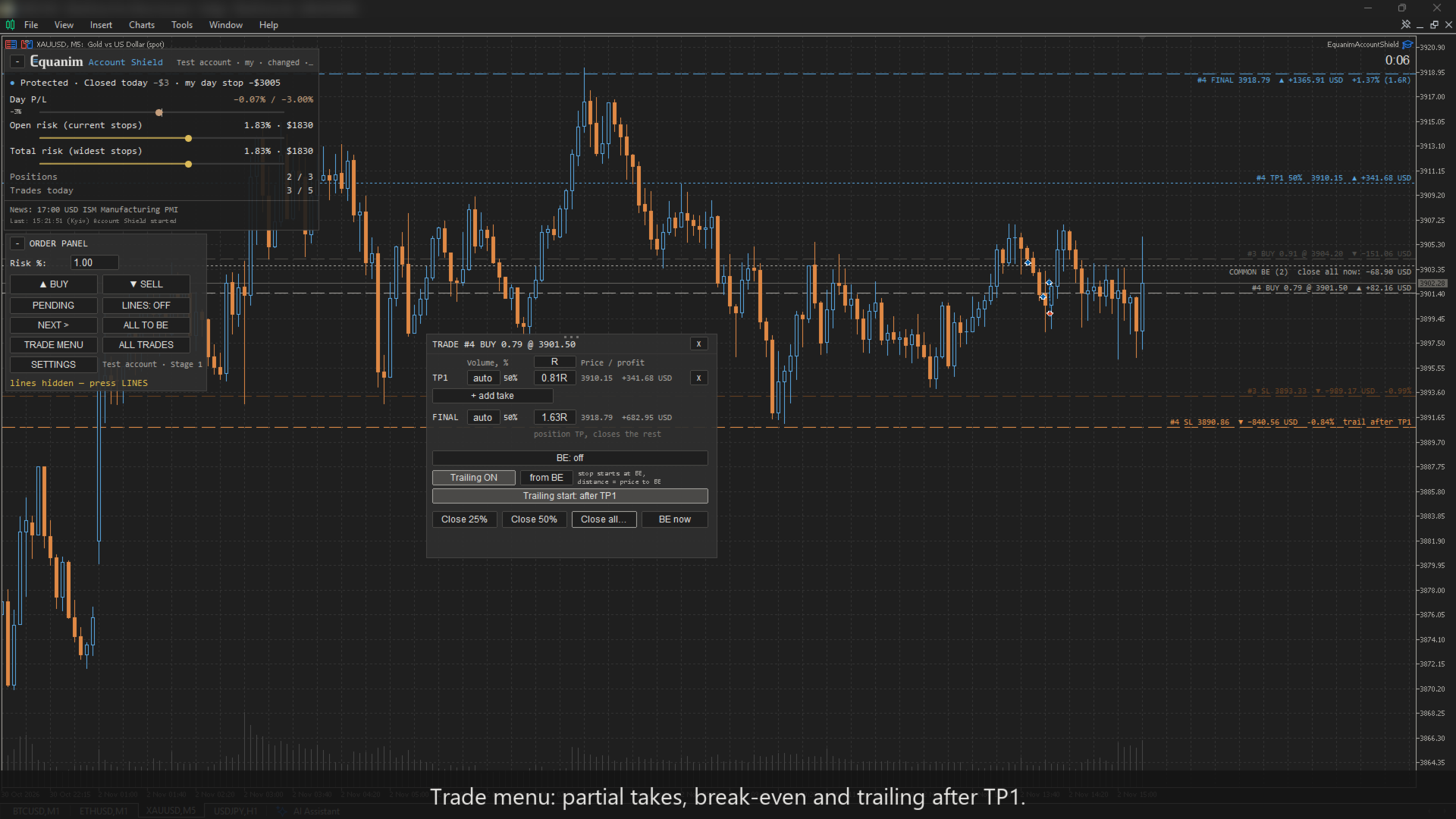
- Trade menu: any number of partial takes (TP1, TP2 …), each with its volume and a distance in R, points or ATR; the final take moved from the same menu.
- Break-even after a chosen take or at a level line — entry plus every cost (commission in and out, typical spread, negative swap) plus 0.1 ATR.
- Trailing stop: points, ATR, the low / high of the last N candles, or from break-even; starts at once, after a take or from a level line; never closer than 3 spreads.
- One click: close 25 / 50 % / all, all to break-even; the all-trades menu (this symbol or the whole account) — only profitable, only losing, delete pending orders; «close all» asks for a confirmation.
- Hotkeys (switch on in the inputs): Shift+B buy, Shift+S sell, Shift+L lines, Shift+E all to break-even, Shift+X twice — close all on this symbol.
- Clean position lines with price, money, % and R that never overlap; a stable number and colour for every trade; candle timer.
- A stop line dragged beyond a limit is checked before it moves; if a trade does not fit a rule, the lot is reduced and you are told why.
Works with Equanim Trade Journal
The journal finds what costs money. Shield turns it into a rule. You trade. Each works on its own; together the journal proposes a rule, Shield asks you to confirm it, and the journal shows the result before / after.
Try it in the Strategy Tester
The tester demo uses a generic "Demo prop 2-Step" (no real firm) and a built-in trader with bad habits — or a gambler. Every reaction of Shield is shown on the chart. The result depends on the market: Shield does not make trading profitable — it keeps you within the rules.
Who the two demo traders are (built into the EA, they trade the chart's symbol by themselves in the tester (the numbers below were counted on XAUUSD), Monday–Friday 08:00–22:00 server time, deciding on every closed M15 candle; the same pseudo-random sequence in every run)
The trader with bad habits — a trend system that could be decent, spoiled by habits:
- The plan: trade with the H1 trend (close above / below EMA 50) on a pullback to the M15 EMA 20; stop 1.2 ATR, take 2R; risk 0.3% of the balance; 2 trades a day (3 in the first trading days of a stage).
- The habits, at random: one trade in seven without a stop; about one in eight with the risk ×4 (1.2%); after a loss — a third of the time «win it back» at once with the risk ×2, even without a signal; one in ten — a second trade at once; after the plan is done, still one signal in four is taken; the first trading days of a stage — the risk ×3.
- Two tilt days (the 8th and the 30th trading day): against the trend, 1% a trade, often two at once.
- With Shield he tries twice after a block, then gives up for the day; without Shield he does not know about blocks.
The gambler — no system and no edge:
- A coin: on about one M15 candle in fourteen (≈ 4 trades a day) a random direction; risk 1–4% of the balance at random; 40% of the trades without a stop (a take of 2R is always set).
- After a loss — 60% of the time «win it back»: two or three trades at once in one direction, each with the risk ×2–3 (up to ~12%).
- «It will come back»: now and then he moves an open stop further away by half its distance.
- He never stops by himself — after any block he keeps opening trades.
Neither of them is a real person. The trader with bad habits is a disciplined plan with typical mistakes; the gambler is the worst case — he shows where Shield's protection ends.
With and without Shield — the same trader, 12 months of the tester (a demo of built-in traders: not real results and not a promise of results)
| Built-in trader | Shield | Challenges | Passed | Blown | Lost on blown | Fees of blown ($100) |
|---|---|---|---|---|---|---|
| Bad habits | without Shield | 122 | 1 | 115 | $40 467 | $11 500 |
| Bad habits | after the set-up | 30 | 3 | 21 | $13 357 | $2 100 |
| Bad habits | + Room to the limit | 27 | 4 | 17 | $12 050 | $1 700 |
| Bad habits | + strict discipline* | 11 | 1 | 4 | $2 408 | $400 |
| Gambler | without Shield | 216 | 0 | 211 | $103 512 | $21 100 |
| Gambler | after the set-up | 83 | 1 | 76 | $43 843 | $7 600 |
| Gambler | + Room to the limit | 70 | 2 | 63 | $36 479 | $6 300 |
| Gambler | + strict discipline* | 72 | 0 | 67 | $45 668 | $6 700 |
\* a stricter set the trader may choose; it did not pass our selection rule (fewer passed challenges), shown for comparison.
How it was counted: XAUUSD, six two-month periods of 2023–2026 (12 months), a "Demo prop 2-Step" $10 000 (target 10% / 5%, daily −5%, overall −10%, 4 trading days). A blown or a passed challenge is followed by a new one from $10 000. The same firm rules judge both runs; Shield's own stop at −8% counts as blown. "Room to the limit" is the recommended setting: chosen on four periods by a rule written down before the runs and confirmed once on two new ones; the tester demo starts with it. "Strict discipline" = Room to the limit + risk 0.3% a trade, max risk of a trade 1%, a personal daily stop of 2%, 5 trades a day and a 30-minute pause after a loss, all blocking. In the tester the halving of the risk at 40% of the drawdown limit is enforced; a buyer gets only a warning by default.
Read it honestly: these are built-in traders, not people; the tester has no news. Shield does not make trading profitable — the gambler still almost never passes. Part of the blown challenges with Shield are the trader's own: after the daily stop he keeps opening trades outside the panel, each one is closed at once, but every close costs the spread. The extra rules are your choice: stricter ones blow far fewer challenges but pass slower; Room to the limit keeps the pace and blows fewer.
Good to know
- MetaTrader must be running (a VPS is recommended). Your stop and final take are on the broker's server and work anyway.
- Hedging and netting accounts. On netting MetaTrader merges the trades on a symbol into one position: Shield checks every add as a new trade and, if it breaks a rule, closes only the added volume; a reversal is a new trade too.
- Shield keeps its records (events, the profile, the exchange with Trade Journal) in the terminal's shared folder Common\Files\PGJ; letters to a firm — in MQL5\Files\Equanim.
- Shield does not open trades and gives no signals. It does not guarantee passing a challenge or a profit.
- Firms differ in how they treat third-party EAs — see the compatibility table in the comments and ask your firm before buying. For firms that restrict EAs, Shield shows a warning and a ready question for their support, and works in "watch only" mode until you confirm.
- What Shield cannot protect from — see the FAQ.
- Not affiliated with, endorsed or sponsored by any prop firm. Firm names are used only to identify their published rules. Rules as of 2026-10 — firms change them; check yours.
Inputs (F7; most settings are made on the chart in the set-up and in SETTINGS)
Setup
- Account setup — on the chart (prop firm, stage, size; recommended), prop challenge, prop funded, own account, small own account, custom (the fields below).
- Initial balance — 0 = from the set-up / first deposit.
- Watch only — warn, never close.
- Stage target buffer, % of the size — everything is closed at the target + this (commission, slippage).
- Time reserve before the firm's time rules, min — news, weekend, gap.
- Other robots on this account — their magic numbers, comma separated; never touched, counted in the account limits.
- Tester demo: on/off, style (bad habits / gambler), Shield protects or only watches, a new challenge after each one, the price of a challenge, the set-up defaults or the recommended setting, own settings over them («key=value;…»).
Order panel
- Risk per trade: as %, money or a fixed lot, and its value.
- Commission per 1 lot, round turn — added to the risk.
- Take profit, R (0 = none).
- Push notifications; time until the candle closes; colours; hotkeys (off by default); clock of the panel and trading hours.
Trade Journal
- Rules proposed by Trade Journal — off, ask me, apply automatically (only ever stricter than yours).
Custom rules (used only for «Custom»; a preset sets them otherwise)
- Daily loss limit, % — of the starting balance or of a day-start base (day-start balance / higher of balance and equity / equity / day peak), counted on equity or closed trades; personal daily stop, %; trading day start hour.
- Max drawdown, % and its type (static, trailing intraday, trailing end of day, trailing to the initial balance).
- Max risk per trade, %; total risk of all positions, %; max open positions; seconds to set a stop.
- Max trades per day; no positions N hours around the weekend; min trade duration; best day at most, % of the starting balance (advice to close; once all is closed at the goal, no new trades until tomorrow); profit target, %; min trading days; inactivity warning, days; funded rules.
- Hedge detection (by price correlation / list / both / off); economic news (MT5 calendar) and what happens inside the news window (warn / block new orders / block opening and closing).
Languages: English, Ukrainian, Russian. Colours: light, dark or classic (bright).