ForexDevice GoldPulse Pro Plus
- Experts
-
Pranjali Agarwal
 Sou desenvolvedora de software de trading algorítmico, focada no desenvolvimento de soluções de trading automatizado para as plataformas MetaTrader.
 - Versão: 1.0
- Ativações: 5
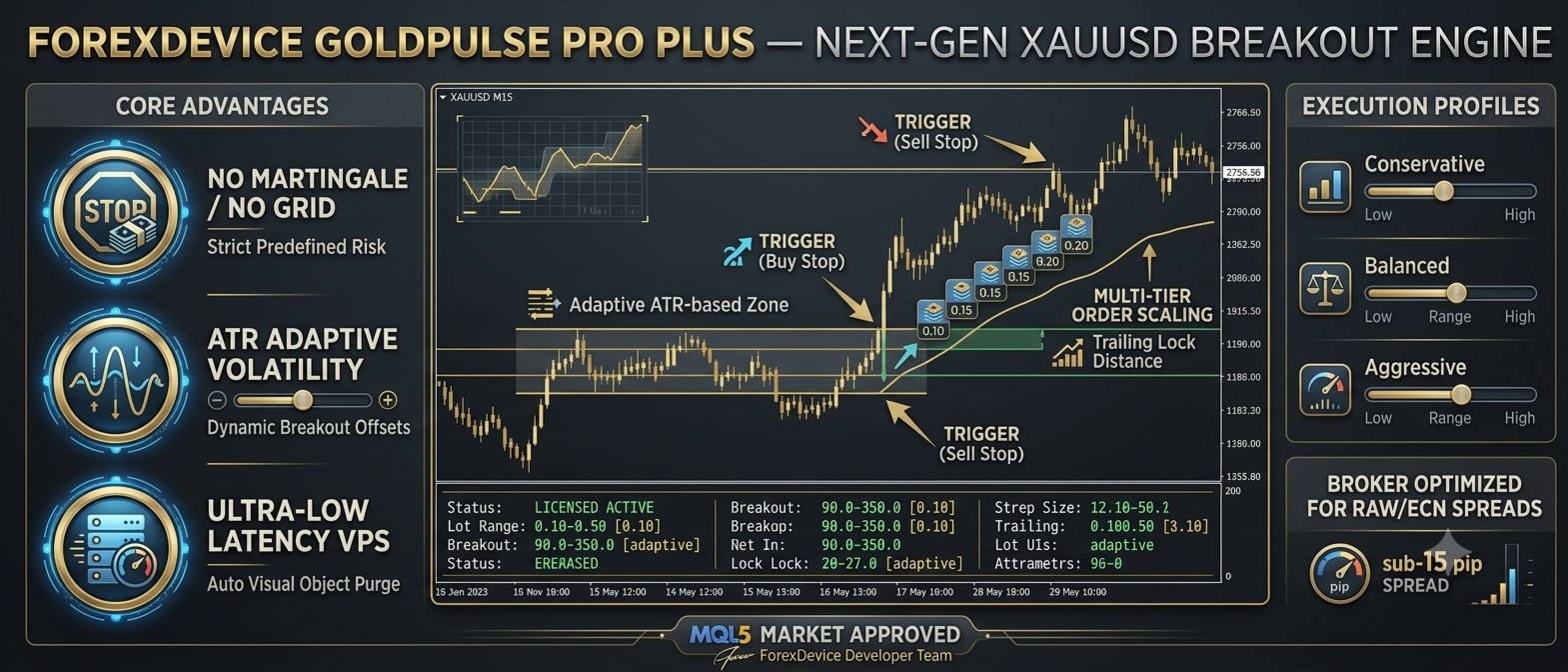
ForexDevice GoldPulse Pro Plus is an automated trading Expert Advisor designed for Gold (XAUUSD), with M15 as the recommended timeframe. It uses volatility-based breakout entries, adaptive position sizing, trend analysis, and automated trade management to respond to short-term price movements.
Rather than predicting an exact market direction, the EA evaluates volatility and recent price activity before considering new breakout orders. Once a trade is triggered, predefined stop-loss, take-profit, trailing-stop, and partial-close rules manage the position according to the configured parameters.
GoldPulse Pro Plus is designed for traders who want a systematic approach to Gold trading, with configurable execution rules and on-chart information about current trading conditions.
How the Trading Strategy Works
1. Volatility-Based Breakout Entries
Gold can experience rapid price movements, changing spreads, and periods of low activity. GoldPulse Pro Plus uses Average True Range (ATR) calculations and recent candle activity to evaluate market conditions before placing breakout orders.
When the entry conditions are satisfied, the EA calculates a breakout distance and places Buy Stop and Sell Stop pending orders around the current market price. The distance is adjusted according to volatility, within the configured minimum and maximum breakout boundaries.
The objective is to participate in a price expansion when the market moves far enough to trigger a pending order. Actual execution depends on market conditions, available liquidity, broker execution rules, and price movement.
2. Adaptive Breakout Distance
The EA compares the current ATR with a longer-period ATR to estimate the relative level of market volatility. This calculation helps determine the distance used for breakout order placement.
The Minimum Breakout Step and Maximum Breakout Step parameters define the intended operating range. These settings allow traders to adjust how close to or far from the current price the EA places its pending orders.
3. Trend Analysis
GoldPulse Pro Plus includes a configurable moving-average trend filter. The default period is 50, and the EA compares the current market price with the moving average to identify directional bias.
The trend calculation also influences the lot size assigned to the counter-directional pending order. This creates a distinction between orders aligned with the detected bias and orders placed against it.
Automated Position Sizing
Position sizing is an important part of any automated trading strategy. GoldPulse Pro Plus offers an ATR-based dynamic lot-sizing option that adjusts the calculated trade volume according to the relationship between recent volatility and a longer-term volatility baseline.
Traders can configure the following parameters:
- Enable Dynamic Lot Sizing: Enables or disables the volatility-based calculation.
- Minimum Lot Size: Defines the lower input boundary for calculated trade volume.
- Maximum Lot Size: Defines the intended upper input boundary for calculated trade volume.
When dynamic lot sizing is enabled, the EA calculates a volume within the configured range before applying its additional position-sizing logic. The resulting order volume is also subject to broker minimum-volume, maximum-volume, and volume-step requirements.
Traders who prefer a consistent nominal lot size can set the minimum and maximum lot inputs to the same value and disable dynamic lot sizing. The resulting order volume should still be checked against the broker's volume requirements and the EA's other sizing adjustments.
Dynamic lot sizing does not guarantee a fixed monetary risk per trade. Actual risk also depends on the stop-loss distance, instrument specifications, account currency, leverage, and execution conditions.
Trade Management and Exit Rules
Initial Stop Loss and Take Profit
Each breakout order is configured with an initial stop-loss distance and a take-profit target. These parameters define the planned exit levels when an order is placed.
The stop loss is intended to limit exposure if the market moves against a position, while the take-profit target specifies the intended price objective. Neither level guarantees the exact final execution price in fast or gapping markets.
Partial Take Profit
When partial take-profit management is enabled, the EA monitors an intermediate target calculated from the configured take-profit distance. At that target, it attempts to close the specified percentage of the position and move the stop loss on the remaining position to the entry price.
This approach is designed to reduce the remaining position size after the first profit objective is reached while allowing the balance of the trade to remain open for a possible further move.
Partial closing is subject to the broker's minimum lot size, volume step, and order-execution conditions.
Trailing Stop Management
The trailing-stop engine monitors open positions and begins adjusting the stop loss after the configured activation threshold has been reached. The stop is maintained at the specified distance from the current market price when the modification is permitted.
The EA also applies a minimum holding interval of 60 seconds before its trailing logic modifies an open position. This helps avoid immediate trailing adjustments directly after entry.
Traders can enable or disable the trailing engine and configure its activation threshold and trailing distance.
Automated Risk Controls
Daily Drawdown Monitoring
The Daily Risk Guardian compares current account equity with the equity recorded at the start of the EA's trading day. If the configured daily drawdown threshold is reached, the EA activates a daily lockout and attempts to remove its pending breakout orders.
The default daily drawdown threshold is 4.5%. Once the lockout is activated, the EA stops deploying new breakout orders until its daily reset logic clears the lockout.
This feature is a drawdown monitoring mechanism, not a guarantee against losses. It does not automatically close all existing market positions when the threshold is reached, and it cannot prevent losses caused by gaps, slippage, or other execution conditions.
Pending Order Expiration
Pending breakout orders are automatically removed when they remain unexecuted beyond the configured timeout, provided the broker permits the deletion.
The default timeout is 35 seconds. This short order lifetime is intended to reduce the time that an untriggered breakout setup remains active after the conditions that produced it may have changed.
As a result, pending orders may disappear quickly without opening a trade. This is normal when the expiration rule is reached before the market triggers the order.
Spread Protection
Before deploying a new breakout setup, the EA checks the current spread against the configured maximum spread threshold. If the spread exceeds the permitted value, the new setup is skipped.
This filter is intended to avoid placing new orders when transaction costs are above the selected limit. It is not an economic news calendar and does not independently identify every scheduled news event.
Trading Session Filter
The session filter allows traders to define the hours during which new breakout setups may be deployed. The start and end hours are based on broker server time, not necessarily the trader's local time.
The filter can be disabled when broader trading-hour coverage is preferred. The availability of trading opportunities will depend on the selected session and the market conditions.
Friday and Weekend Controls
When the Friday close feature is enabled, the EA attempts to close its open positions and delete its pending orders from the configured Friday cutoff hour onward.
The default cutoff is 21:00 broker server time. Traders should verify their broker's trading schedule and server time when configuring this option.
These controls are intended to reduce exposure to weekend gaps. Successful execution is still subject to market availability, broker restrictions, and order-processing conditions.
Performance-Based Adjustment Logic
GoldPulse Pro Plus includes a rolling performance review that examines the EA's closed trades over the preceding 15 days. When at least three qualifying closed trades are available, the EA evaluates the recorded win rate and net trading result.
Depending on these observations, the internal adjustment logic changes the multipliers used in its lot-sizing and breakout-distance calculations. If there is insufficient trade history, the default multipliers are used.
This mechanism is a rule-based adjustment to the EA's calculations. It does not guarantee that the system will adapt successfully to every market regime or improve future trading results.
On-Chart Trading Dashboard
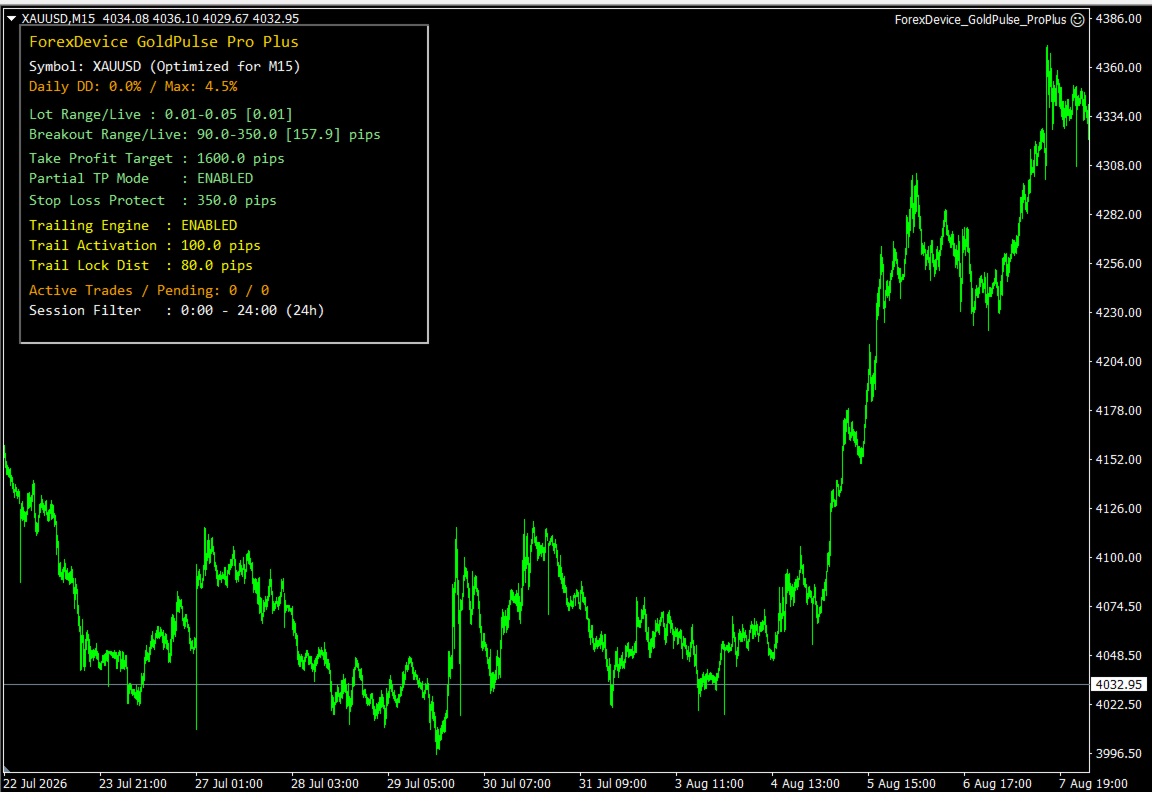
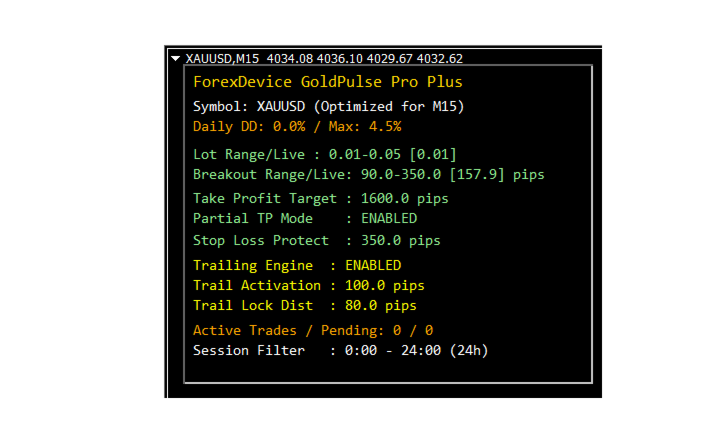
The built-in dashboard provides a convenient overview of important EA parameters and account-related information directly on the chart.
Depending on the current state of the EA, the dashboard displays:
- Current trading symbol and recommended timeframe.
- Daily drawdown and configured drawdown threshold.
- Configured minimum and maximum lot sizes and the calculated live lot size.
- Configured breakout distance range and the calculated breakout distance.
- Take-profit and initial stop-loss settings.
- Partial take-profit and trailing-stop status.
- Current active trade and pending-order counts.
- Configured trading session.
This information helps traders inspect the EA's current calculations and configuration without opening each input parameter individually.
Configurable Parameters
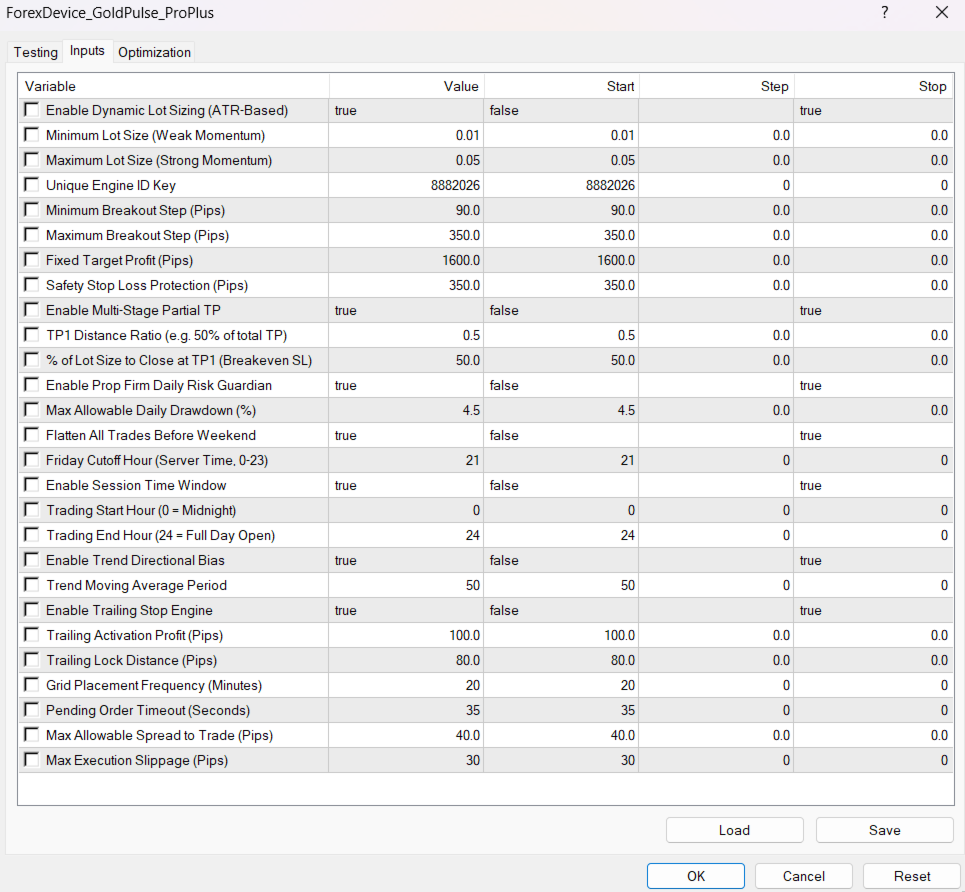
GoldPulse Pro Plus provides input parameters grouped by their trading function.
| Category | Parameter | Default |
|---|---|---|
| Position Sizing | Enable Dynamic Lot Sizing | true |
| Position Sizing | Minimum Lot Size | 0.01 |
| Position Sizing | Maximum Lot Size | 0.05 |
| Breakout | Minimum Breakout Step | 90 pips |
| Breakout | Maximum Breakout Step | 350 pips |
| Trade Exits | Fixed Target Profit | 1600 pips |
| Trade Exits | Initial Stop Loss | 350 pips |
| Partial Take Profit | Enable Partial TP | true |
| Partial Take Profit | TP1 Distance Ratio | 0.5 |
| Partial Take Profit | Percentage to Close at TP1 | 50% |
| Risk Management | Enable Daily Risk Guardian | true |
| Risk Management | Maximum Daily Drawdown | 4.5% |
| Weekend Control | Enable Friday Close | true |
| Weekend Control | Friday Cutoff Hour | 21:00 server time |
| Session Filter | Enable Session Filter | true |
| Session Filter | Start Hour | 00:00 server time |
| Session Filter | End Hour | 24:00 server time |
| Trend Analysis | Enable Trend Filter | true |
| Trend Analysis | Moving Average Period | 50 |
| Trailing Stop | Enable Trailing Stop | true |
| Trailing Stop | Activation Threshold | 100 pips |
| Trailing Stop | Trailing Distance | 80 pips |
| Order Management | Grid Placement Interval | 20 minutes |
| Order Management | Pending Order Timeout | 35 seconds |
| Execution | Maximum Spread | 40 pips |
| Execution | Maximum Slippage Setting | 30 pips |
Recommended Setup
GoldPulse Pro Plus is designed with Gold trading in mind, with M15 as the recommended timeframe. Begin with the default parameters and test the EA on a demo account using the same broker, account type, symbol specifications, and approximate trading conditions intended for live use.
Before trading live, verify the meaning of the broker's XAUUSD price digits, contract size, minimum volume, volume step, spread, and execution rules. Pip-based settings may behave differently across symbol specifications, so confirm the actual price distances in the Strategy Tester and on a demo account.
Adjust one group of parameters at a time and evaluate the effect over a sufficiently representative period. Changing lot sizes, stop distances, breakout steps, and spread thresholds can materially change both trading activity and account exposure.
Important Risk Information
GoldPulse Pro Plus is an automated trading tool, not a guarantee of profitability. Trading Gold involves substantial risk, and losses can exceed expectations during fast markets, gaps, spread widening, or execution delays.
Risk-management features reduce or manage certain predefined exposures but cannot eliminate trading risk. The daily drawdown monitor does not automatically close all open positions, and stop-loss execution may differ from the requested price.
Historical tests and past trading performance, where available, do not guarantee future results. Always conduct your own testing, understand the EA's settings, and choose position sizes appropriate for your account and risk tolerance.
ForexDevice GoldPulse Pro Plus provides a configurable framework for automated Gold breakout trading, combining volatility analysis, pending-order management, position-sizing controls, and predefined exit rules within MetaTrader.