TradeFlow Assistant MT5

TradeFlow Assistant MT5
A chart trading panel for risk sizing, position management, Expert Advisor monitoring and economic news lines.

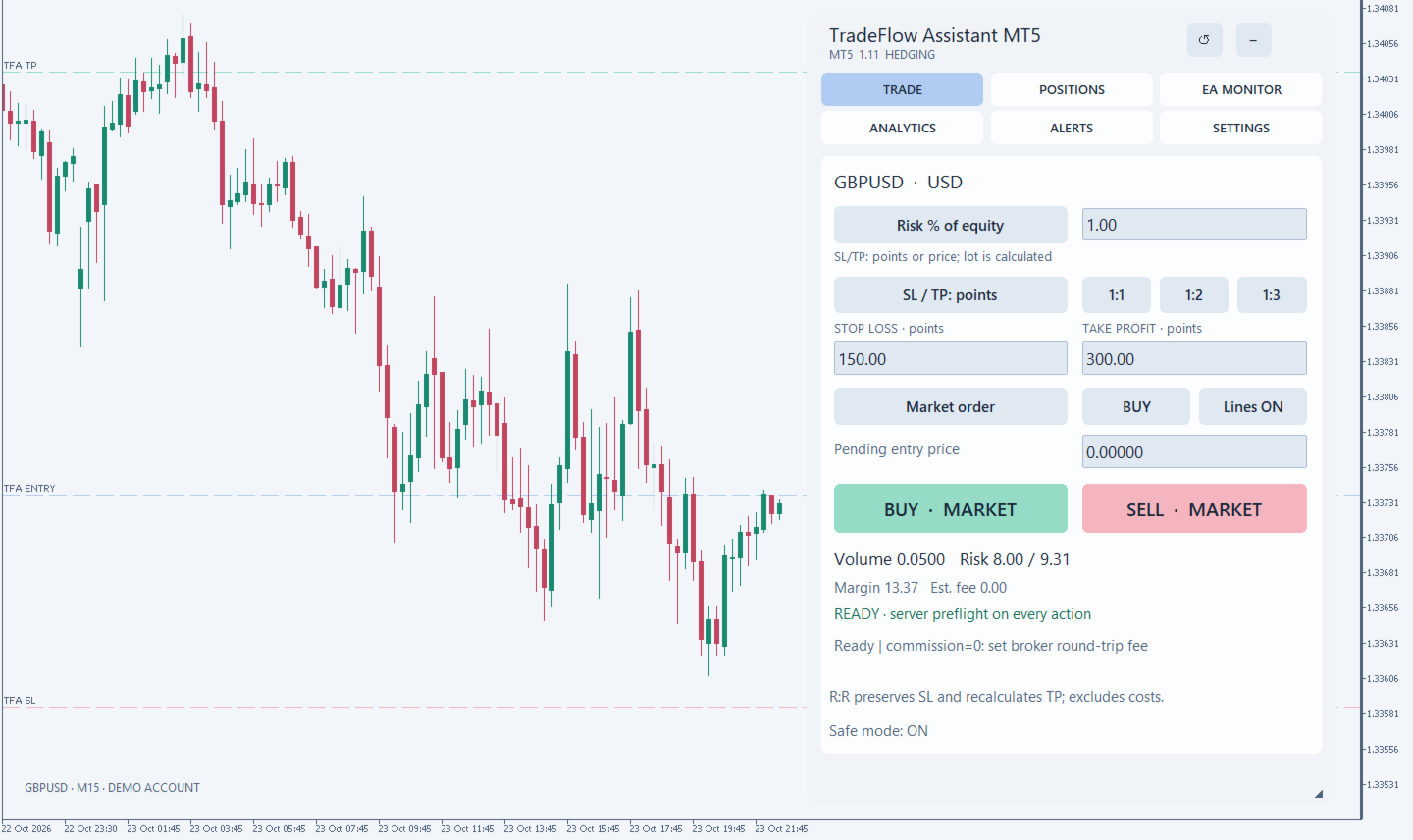
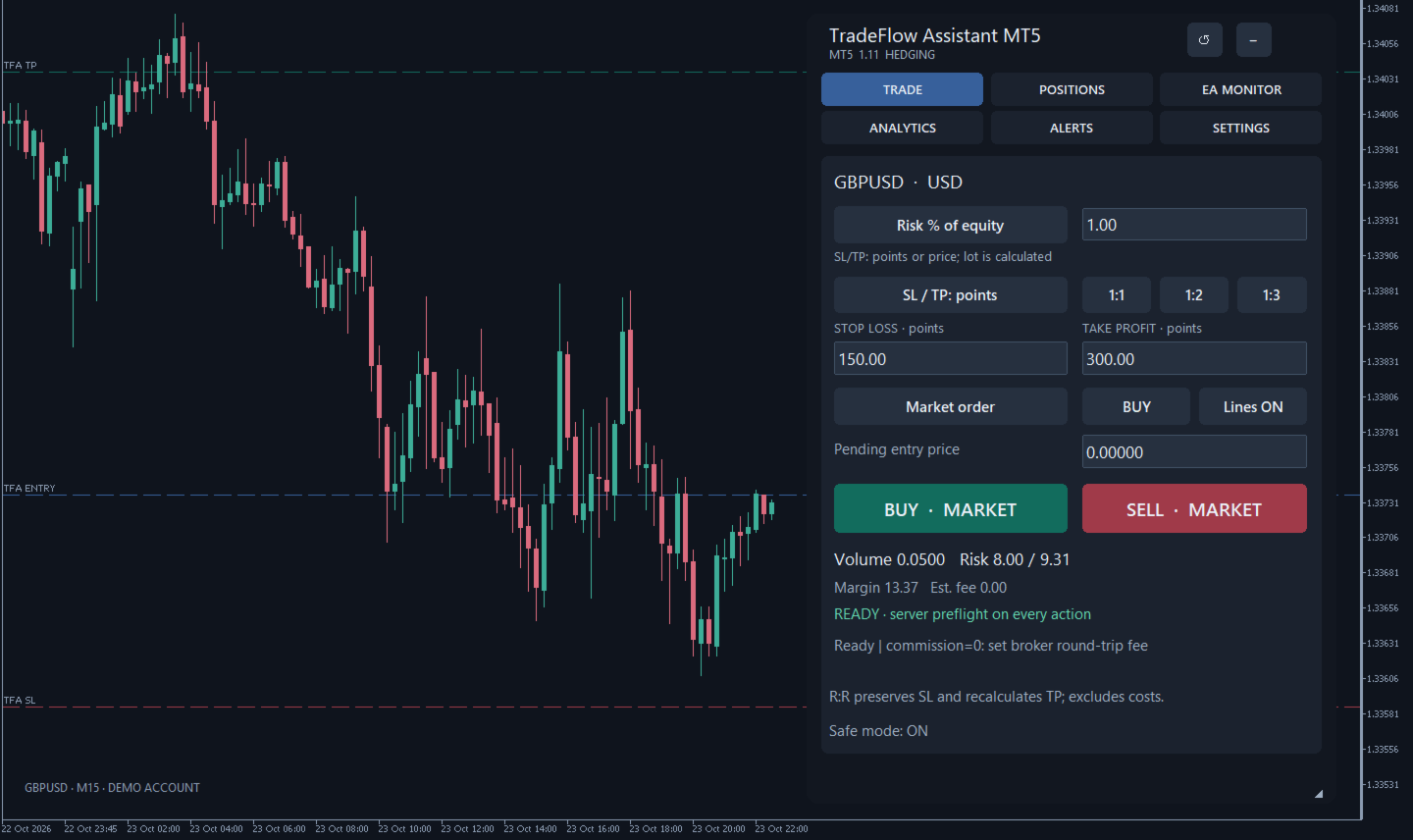
TradeFlow Assistant MT5 brings everyday trading tasks into one panel on your MetaTrader 5 chart. Prepare an entry, estimate volume and risk, manage positions and review your account through six tabs: TRADE, POSITIONS, EA MONITOR, ANALYTICS, ALERTS and SETTINGS.

The trader chooses the direction and timing of entries. Enabled management rules run automatically when their conditions are met. The utility is written in MQL5, uses no DLLs and requires no separate external service. Calendar data and push messages use MetaTrader's built-in features.

Trade planning and risk sizing

- Market BUY and SELL orders, plus BUY LIMIT, SELL LIMIT, BUY STOP and SELL STOP pending orders.
- Fixed lot size, a percentage of current account equity or a cash risk budget in the account currency.
- For percentage or cash-budget risk, set SL/TP in points or at exact prices. Fixed lots also support cash-based SL/TP. Compatible modes and units are labelled in the panel; SL is required and TP is optional.
- Switching BUY/SELL mirrors price-based SL/TP around the new entry while preserving distances. A pending order's entered entry price is not moved automatically.
- Chart lines and quick 1:1, 1:2 and 1:3 controls: SL stays unchanged and TP is recalculated from it, before costs.

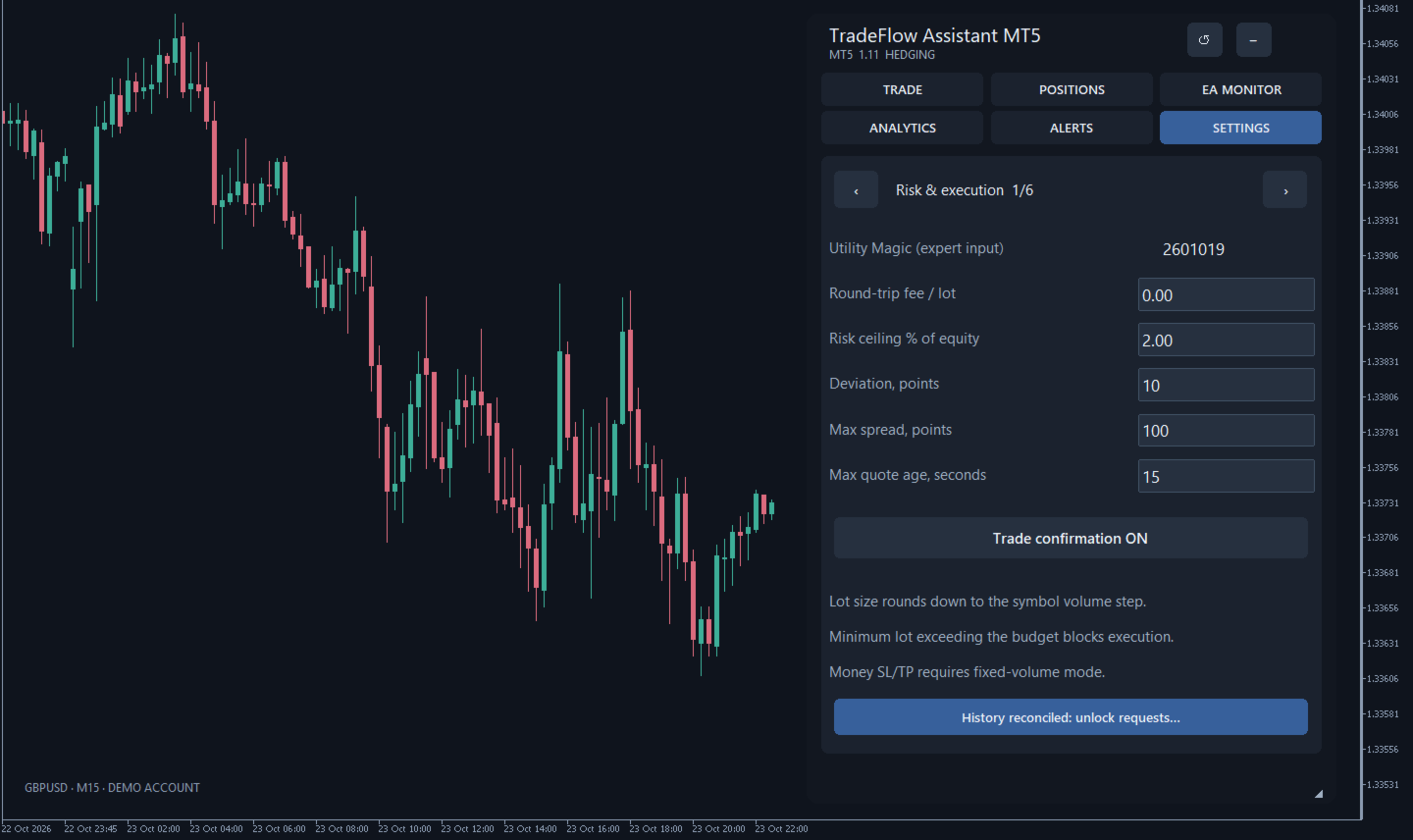
Volume is rounded down to the symbol's lot step within its minimum and maximum limits. If the minimum permitted lot exceeds the estimated risk budget, the entry is blocked. The maximum risk limit also applies to fixed lots. Available trading conditions, quotes, symbol restrictions and margin are checked before a request; the broker's server makes the final decision.

Enter the estimated round-trip commission per lot in the account currency. This commission and an entry price deviation allowance are included in the risk estimate. Cash-based SL/TP represents price profit or loss before commission. The estimate uses terminal data in the account currency and does not lock in future conversion rates.

Points refer to the symbol's quotation point in the terminal and may differ from pips. Dragging chart lines changes the plan for a new trade; it does not send an order or modify existing positions.

When switching from cash-based SL/TP to percentage or cash-budget risk, stops are converted to points and the chosen risk mode is preserved. A budget or minimum-lot block does not prevent changing SL/TP units when the required conversion data is available.

Economic calendar on the chart

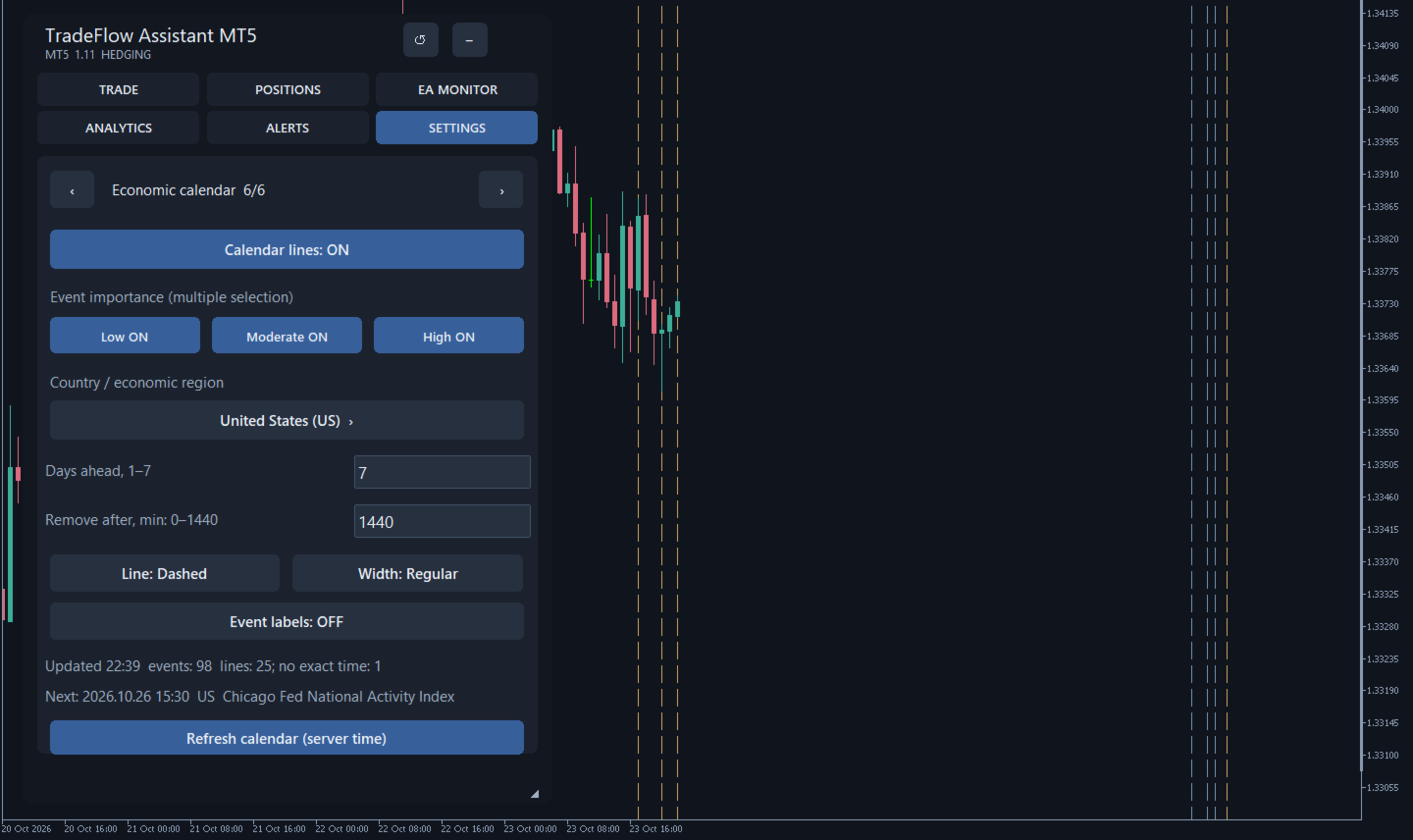
Vertical lines mark events from MT5's built-in economic calendar. Choose Australia, China, the European Union (EU), Japan, the United Kingdom or the United States, or all six regions. Names and alphabetical order follow the panel language; Chinese uses pinyin order. Other countries are excluded in all-six mode too. Combine low, moderate and high importance levels.

- Schedule horizon: 1 to 7 days ahead.
- Remove a line 0–1440 minutes after the event. Zero removes it when the event occurs, on the next available timer cycle.
- Solid or dashed lines, with regular or bold width.
- Optional event labels; colour indicates importance.
- Events sharing a release time use one line. Markers remain when switching tabs or collapsing the panel.

Times follow the trading server. Events without an exact time are omitted. Calendar settings are on the sixth SETTINGS page and are saved in profiles. The calendar is a visual reference and does not block trading around news.

A connected terminal is required; the calendar module is unavailable in Strategy Tester. Native requests can wait for the service and delay the utility's processing. Cached lines are hidden after 15 minutes without an update. Future markers may be outside the visible chart area; the utility does not scroll the chart automatically. MT5 may truncate long tooltips; use the terminal's built-in calendar for the complete schedule.

Position management

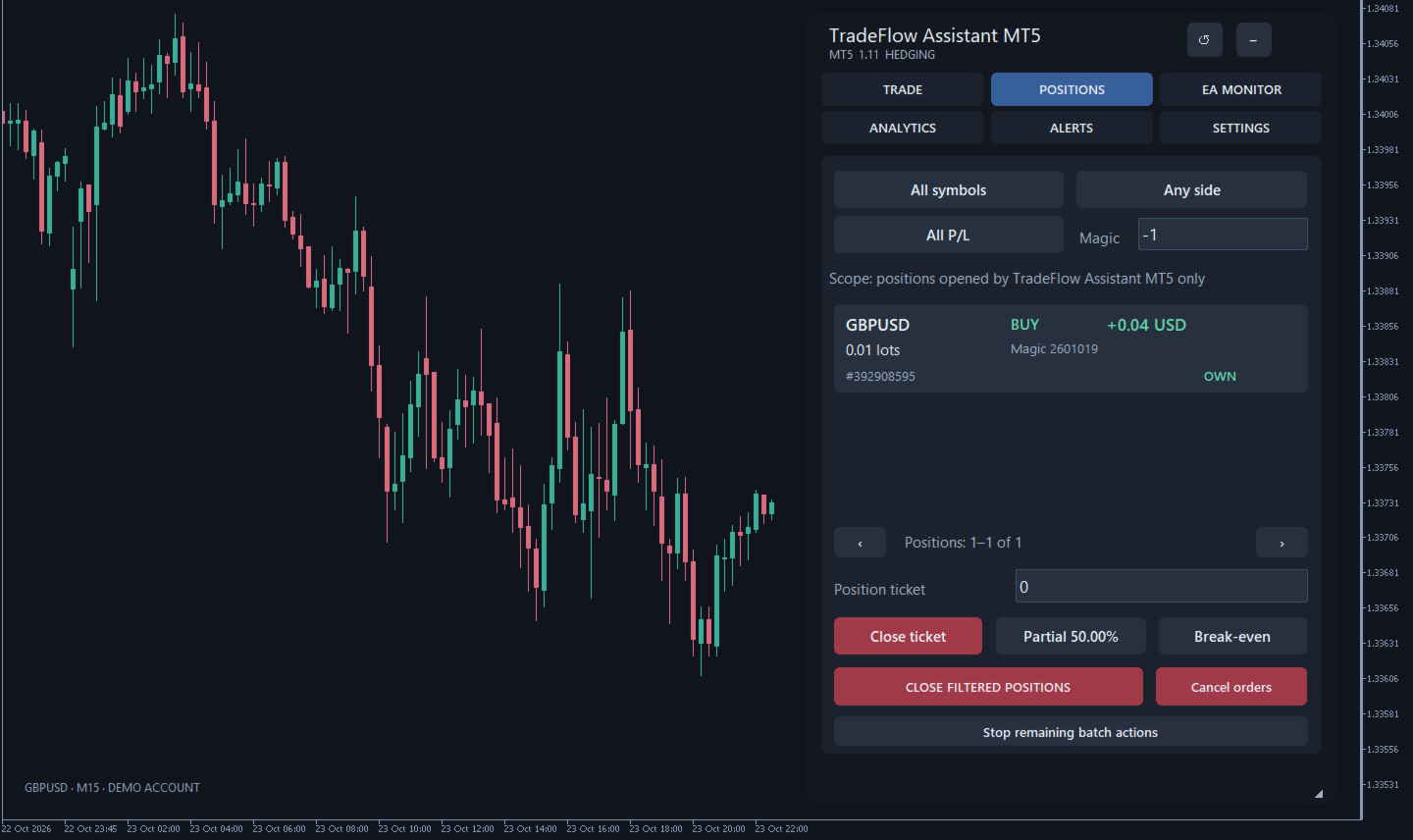
Open positions appear as individual cards showing symbol, direction, volume, P/L, Magic, ticket and management permissions. Filter by symbol, direction, profit/loss and Magic Number. Available actions include full or partial closing by ticket, closing a filtered group, deleting pending orders and manually moving SL to a break-even level. Closing and bulk actions require confirmation. Partial volume and the remainder are checked against symbol limits.

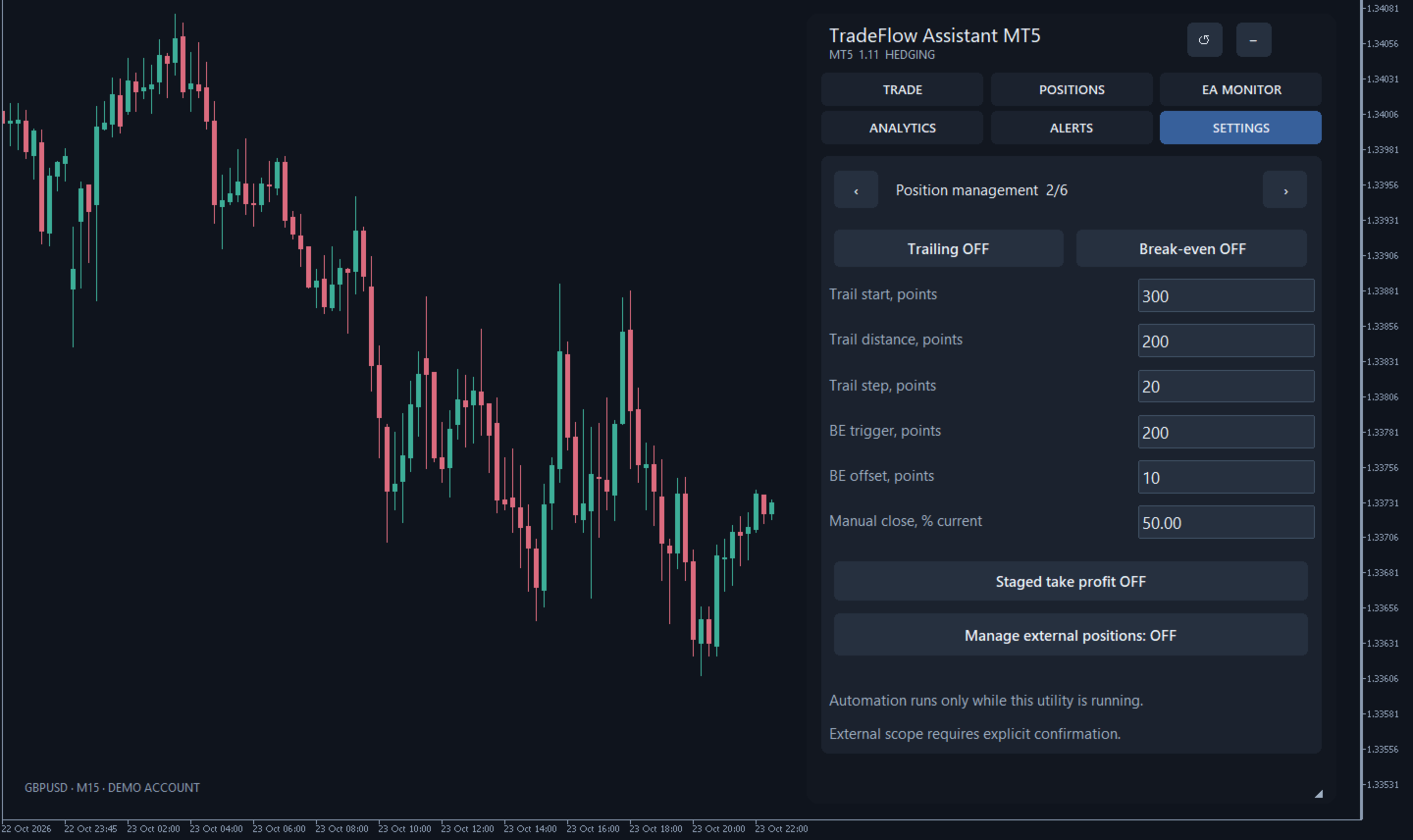
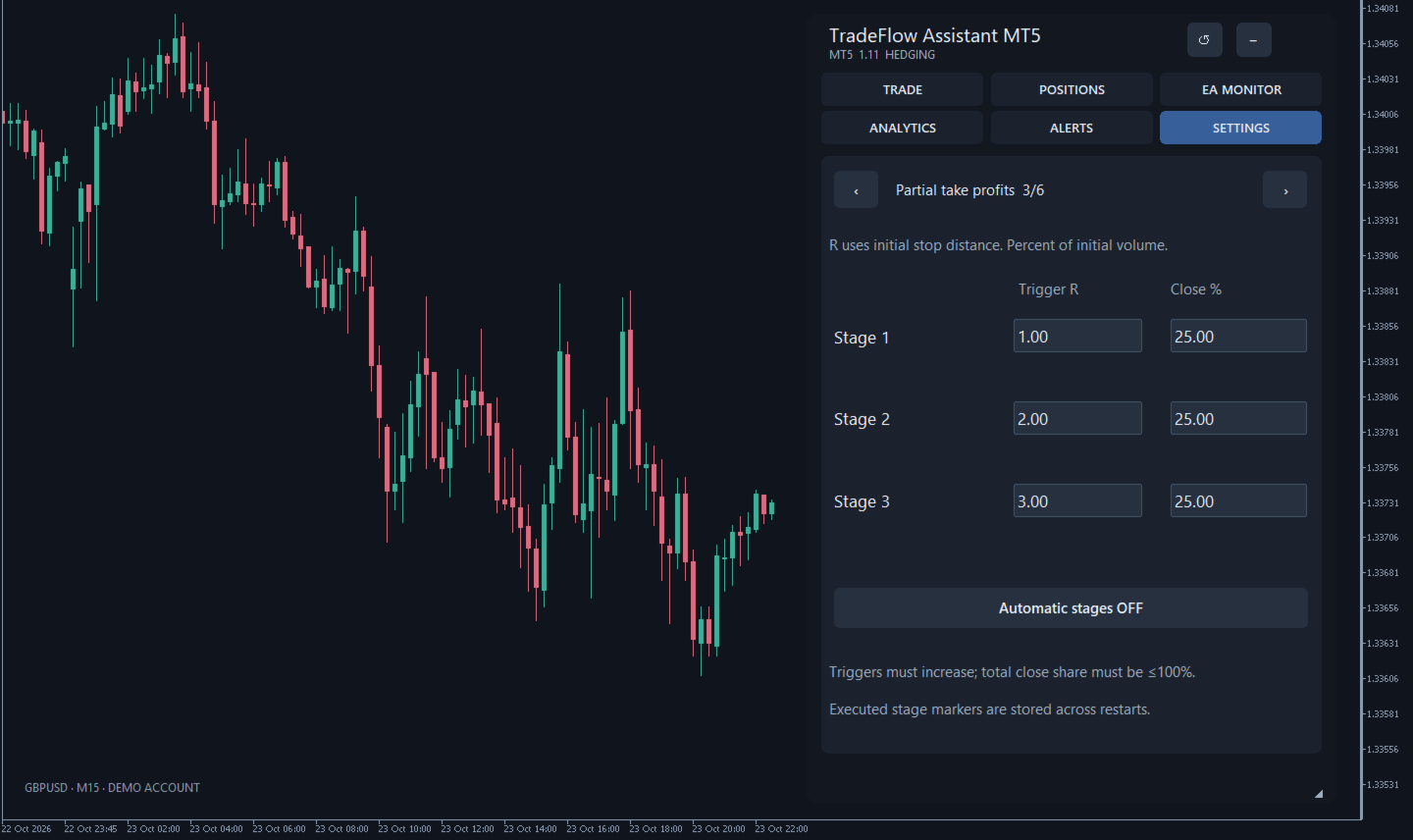
Automatic management includes a trailing stop, break-even with an adjustable offset and three R-based partial exit levels. R is the distance from the original entry to the initial SL; exit percentages refer to the initial volume. R-based exits require reliable original trade data. Each level has one persisted attempt, including a rejection or an uncertain response, so a missed exit is not retried automatically.

By default, management is limited to trades carrying the utility's Magic Number. Managing other trades requires separate consent for the current session; this also extends enabled automatic management to eligible external trades. List filters affect the displayed selection and bulk actions, but do not restrict automatic management. Assign different Magic Numbers to different trading systems.

MT5 hedging and netting accounts are supported with different ownership rules. On netting accounts, a new entry is blocked if any position or active order already exists for the symbol. A shared position with multiple Magic Numbers or unverified history is not managed by the utility, even after consent to manage external trades.

Expert Advisor monitoring and analytics

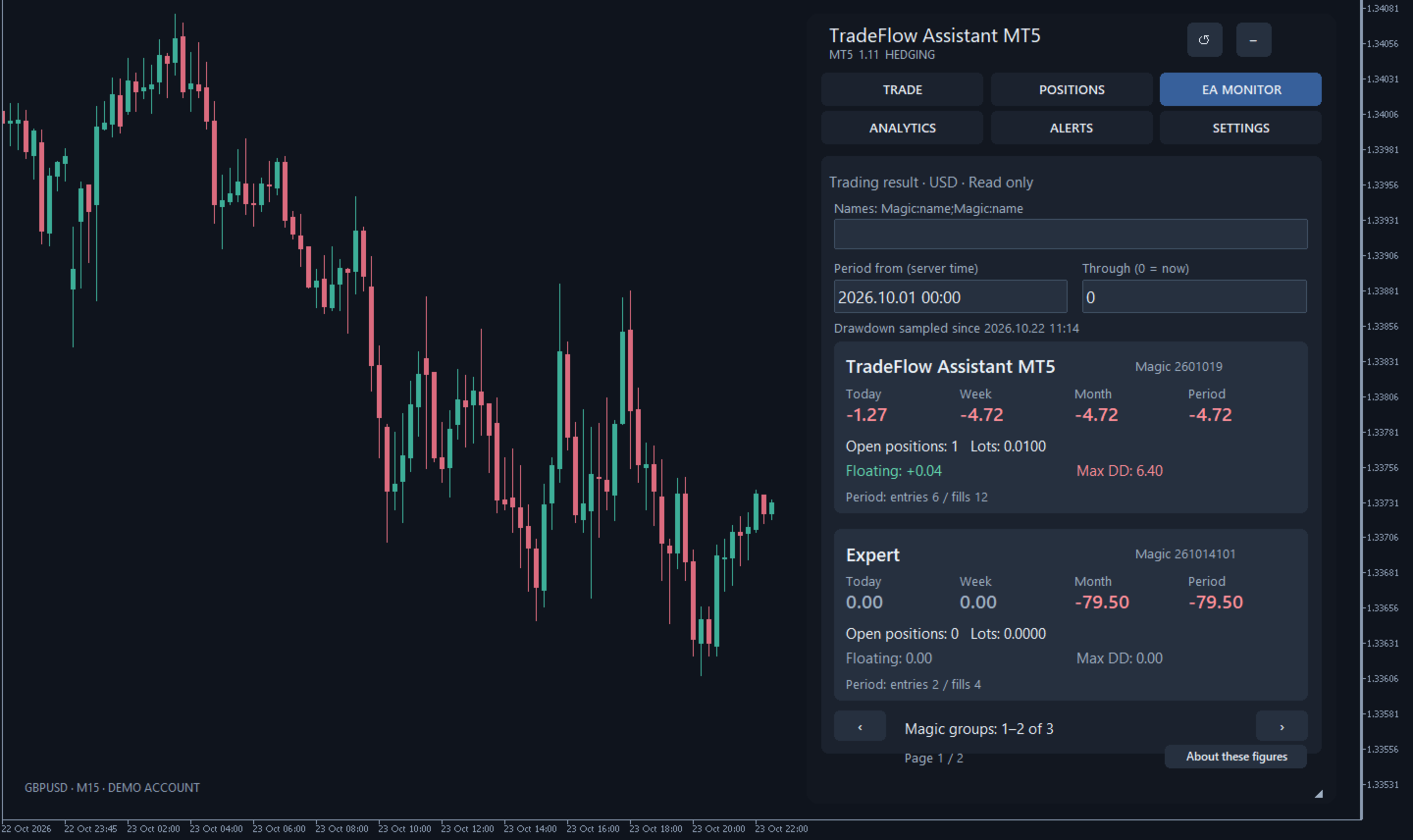
EA MONITOR groups results by Magic Number with custom names. It displays trading profit for the day, week, month and a selected period, the number of trade records, open positions, volume and observed drawdown since monitoring began. Dates use the trading server's time. The monitor is read-only and does not itself modify the trades of monitored Expert Advisors.

Calculations use history available to the terminal. On netting accounts, an exact split of a shared position and its floating result between Expert Advisors may be impossible; the monitor displays a warning. Separate broker accounting adjustments are not allocated by Magic. Systems sharing a Magic Number cannot be reliably separated. Drawdown is sampled periodically; periods missed while the terminal is off are not reconstructed.

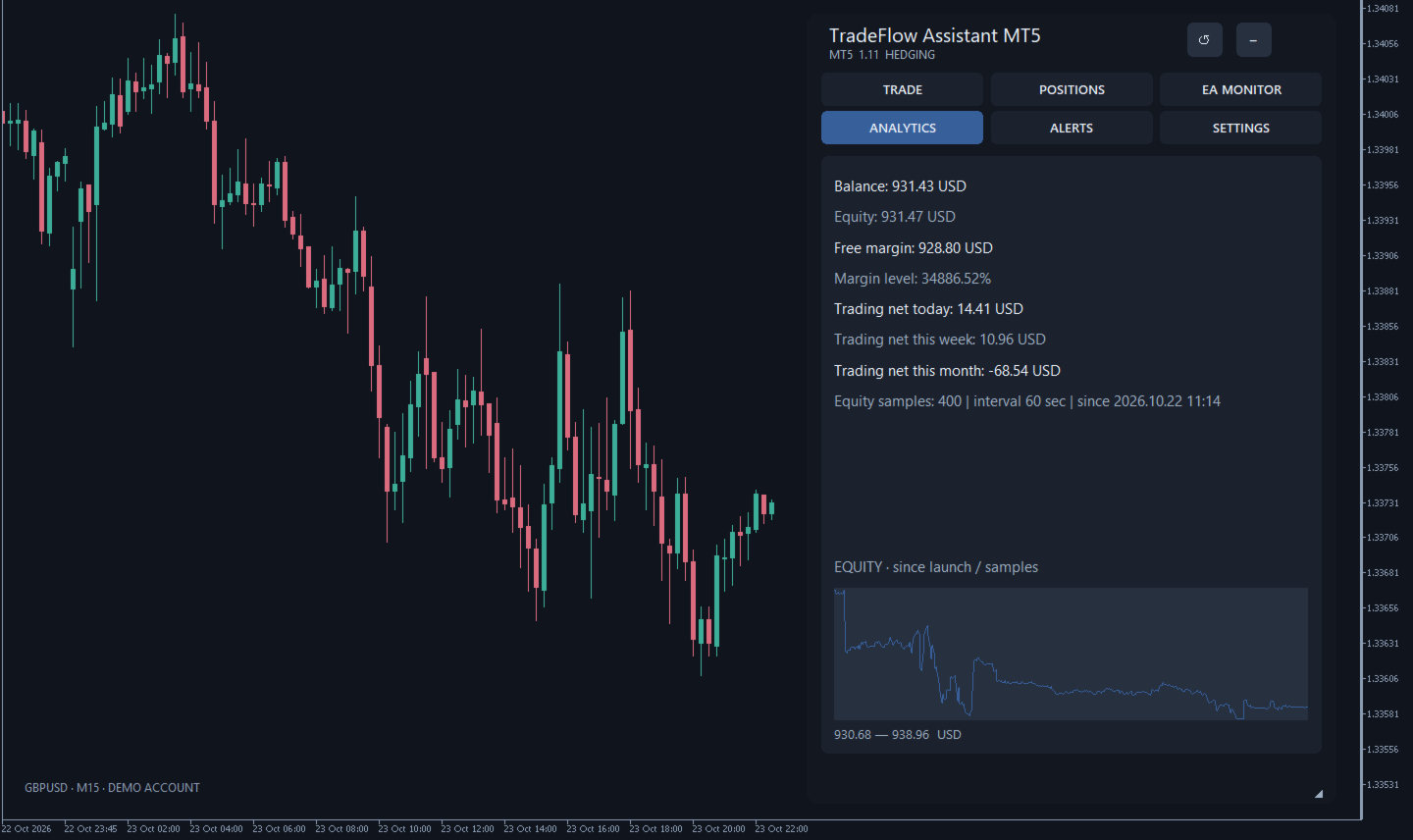
ANALYTICS displays balance, equity, free margin, margin level and daily, weekly and monthly trading profit. A compact equity curve uses samples collected since monitoring first started. It is an observed account history rather than a reconstructed tick-by-tick curve.

Notifications

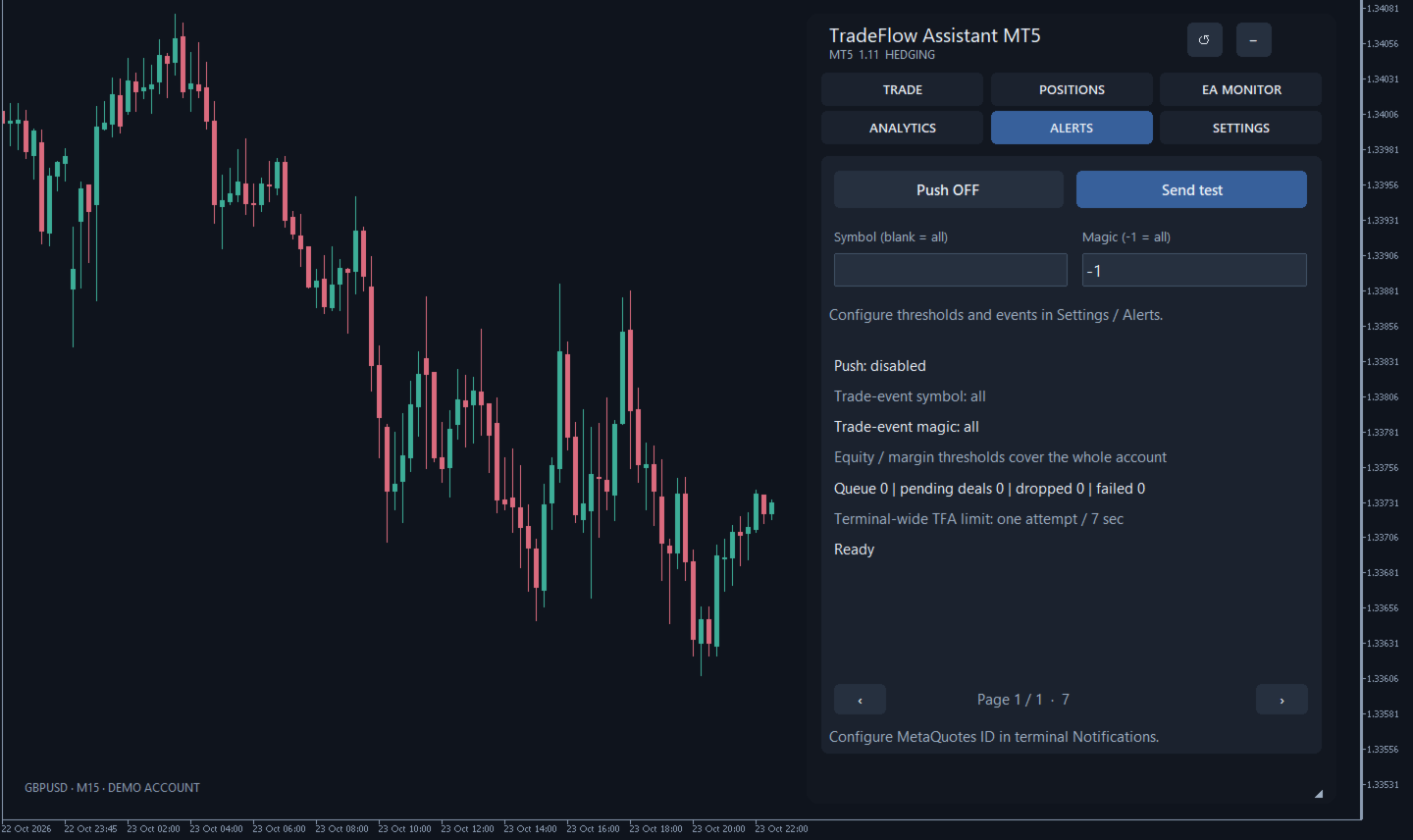
Push events are provided for opening, closing and partial closing, crossing equity thresholds and a margin level falling below its threshold. Symbol and Magic filters apply to trade events; equity and margin thresholds apply to the whole account. A message queue and repeat limits control sending frequency.

Configure your MetaQuotes ID and notifications in the terminal, then enable push in the panel and check a test message on your phone. Acceptance by the terminal does not confirm delivery to the device. Push messages are not sent in Strategy Tester.

Interface and saved settings

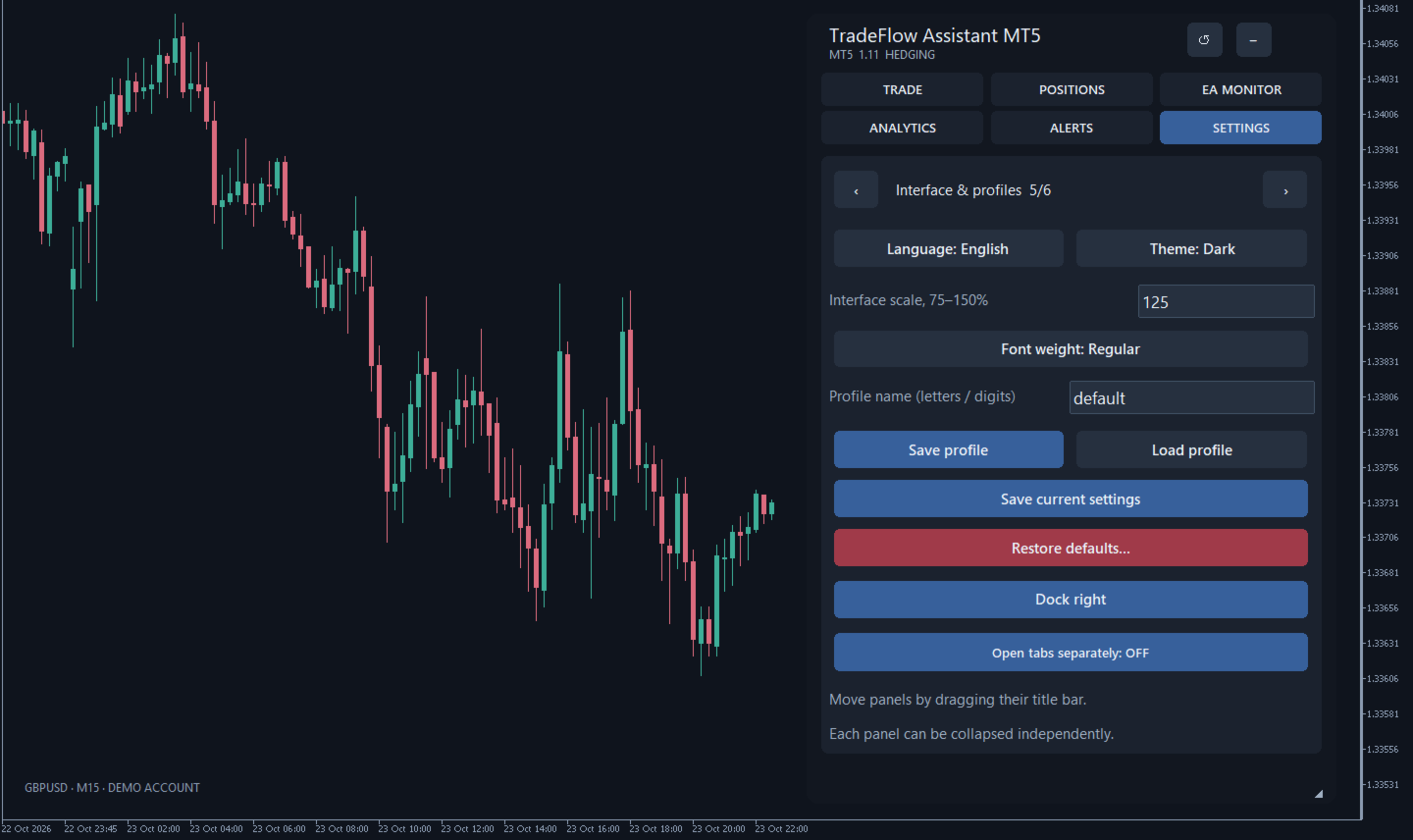
Dark and light themes, English, Russian, Turkish and Simplified Chinese interface languages, 75–150% scaling, and regular, semibold or bold text. Drag the panel by its title bar, collapse it or resize it from the bottom-right corner.

Tabs can open as separate panels within the same chart. Click a section button to open its panel; click again to close it, including a collapsed panel. Each section's size and position are saved. Closing a view does not disable shared position management rules. Appearance and working parameters are saved locally; named profiles let you switch settings. When docked on the right, the main panel uses chart shift to leave space around the latest candles.

The product description is available in four languages; the interface supports English, Russian, Turkish and Simplified Chinese. Management state is stored separately from profiles and is not synchronized between computers.

Before use

- Attach the panel to the instrument you want to trade: new requests use that chart's symbol. Eligible position management and monitoring can cover other symbols on the account.
- Set a unique Magic Number, commission estimate, risk limit and management rules. One active utility instance is allowed per account, server and Magic Number.
- Check the chosen symbols, account currency and execution on your broker's demo account first. Symbol availability does not mean that all its trading conditions have been validated.
- Keep the terminal and utility running, connected and permitted to trade for automatic management. Review restored settings before resuming work.

Duplicate-click protection and request result checks reduce the risk of repeated actions. An uncertain result blocks new trading requests until orders, positions and history have been reconciled manually. Bulk operations run sequentially and may complete only in part.

Risk

Trading involves the risk of capital loss. Lot sizing, Stop Loss and break-even do not guarantee a cash loss limit: gaps, slippage, commission, swaps and changing conversion rates can affect the outcome. TradeFlow Assistant MT5 promises no returns or protection against losses. Trading decisions and risk settings remain the user's responsibility.

#Tags:
Trade Assistant, Trade Panel, Trade Manager, Risk Management, Economic Calendar
Produtos recomendados
Guardian Magic GT
Carlos Eduardo Rivas Istacuy
Guardian Magic GT - Risk Management Expert Advisor for MetaTrader 5 PROTECT YOUR TRADING CAPITAL WITH INTELLIGENT RISK MANAGEMENT Guardian Magic GT is a professional-grade Expert Advisor designed to safeguard your trading operations by implementing sophisticated risk control mechanisms. Whether you run a single bot or manage multiple automated trading systems simultaneously, Guardian Magic GT provides real-time monitoring and automatic position management to ensure your account stays within your
Grid Manager — Assistente Manual de Grid Multi-Cesta para MT5 O Grid Manager é um painel de controle para montar e gerenciar "cestas" de grid direto no gráfico. Você decide a direção e o momento; a ferramenta abre o grid, gerencia cada perna e protege a posição com controles de risco em dólar, linhas de breakeven/SL/TP no gráfico e ações de um clique. É um assistente de execução e gestão — rápido, visual e totalmente sob o seu comando. O que é — e o que não é O Grid Manager é um assistente manua
Smart Trading Panel — Full Control & Maximum Efficiency Tired of monotonous and routine trading? It's time to take your results to the next level. The Trading Panel for MetaTrader 5 manages risk, position size, and trade supervision in a single click. No errors. No clutter. • User Guide • Demo Version for Demo Account Key Features One-Click Trading — instant order execution with a single click. No confirmations, no delays. Multi-Symbol Monitoring — simultaneous tracking and management of up to 1
SC Copier Starter
Nino Rosano Calabro'
SC-Copier Starter is the operational component of the SC-Copier system: it receives trading operations from the Master and replicates them on the Slave account. It is installed on a second MetaTrader 5 client running on the same computer or VPS as the Master account. Communication takes place locally between the two terminals, without web services, DLLs, or external infrastructure. The Receiver handles position openings, complete and partial closings, and Stop Loss or Take Profit modifications.
Este EA é usado principalmente para scalping de XAUUSD. Propósito   Remove a emoção da gestão de operações — protege automaticamente posições e realiza lucros para que você não precise tomar decisões difíceis sob pressão. O que faz   ️ Stop Loss automático   Define SL com base em máximos/mínimos recentes + buffer   Nada mais de estresse ao posicionar manualmente   Lucros parciais automáticos   Dois modos:   Movimento fixo: Fecha 50% após X de movimento de preço   R-Relação: Fecha 50% no
Check Execution
Ivan Zaidenberg
1 (1)
This script will show you information about the execution speed of market orders. Instruction 1. Press " File/Open Data Folder " 2. Copy the log-files from  ../Logs   to   ../MQL5/Files 3. Run the CheckExec script on EURUSD chart, for example 4. Select parameters: AllOrders - check execution time of all market orders for EURUSD, OpenOrders - check execution time of market orders which where used to open positions on EURUSD, CloseOrders - check execution time of market orders which where used to
Account Protector Metatrader 5
Emmanuel Lovski Ijeawele Maduagwuna
Account Protector Meta Trader 5 This utility prevents risk of ruin per trading cycle. Retail forex trading accounts are designed with stop-out levels that make it nearly impossible to restore lost capital after a trader — human or algorithmic — blows an account . This is especially frustrating for traders who have grown their account to multiples of its starting value, only to suffer irreparable losses from a series of bad trade entries. The Account Protector solves this by enforcing a specified
Spread Spike and Alert MT5
AL MOOSAWI ABDULLAH JAFFER BAQER
• Please test the product in the Strategy Tester before purchasing to understand how it works. • If you face any issues, contact me via private message—I’m always available to help. • After purchase, send me a screenshot of your order to receive a   FREE EA   as a gift. Spread Spike & Alert – The Ultimate Spread Monitoring Tool In the world of trading, spread spikes can be the difference between profit and loss. Unexpectedly high spreads can eat into your gains and make trading conditions unfav
MA Flow No.2 See the Flow of Bulls & Bears at a Glance, and Keep the Rhythm of the Market in Your Hands Tired of staring at dozens of moving averages until your eyes blur? Unsure when to enter, or where to place your stop? MA Flow No.2 upgrades the humble moving average into a complete trend-trading system. No more scattered lines on your chart — instead, a living "river of bulls and bears". Up to 100 moving averages roll together in real time. On every single bar, you can see at a glance w
Informe uma única vez os limites de perda diária e de drawdown da sua mesa. O Multi-Account Risk Sync Panel verifica a sua conta em relação a eles durante todo o dia e, no momento em que um limite é atingido, fecha as suas posições abertas, exclui as suas ordens pendentes e para por conta própria. Criado para desafios de prop firms, contas financiadas e qualquer conta com um limite de perda rígido. Ele não abre operações, não copia operações e não mexe em nenhuma outra conta. Todas as capturas d
The script displays the following information: Maximum possible lot for a Buy or Sell deal at the moment; Daily, weekly, monthly and yearly profit; Maximal and minimal lot allowed by dealer; Account type (real, demo); The number of open positions and orders. Swap (long and shoet), текущий инструмент, текущее плечо, уровень Stop (stop level). Tick value and Pip value.
MT5 Drawdown Tracker – Track Your EA’s Performance with Precision! Take your trading analysis to the next level with our MT5 indicator designed to monitor, record, and report the drawdown of any Expert Advisor. Whether you’re fine-tuning your strategies or optimizing risk management, this tool gives you the insights you need. Key Features: Effortless Tracking: Automatically monitors the drawdown levels of your EAs with precision. Comprehensive Data Storage: Accurately logs each drawdown event,
Target Smart Order
Markeysuel De Sousa Ferreira
Indicador TARGET SMART ORDER Indicador personalizado para MetaTrader 5 que exibe informações detalhadas de cada operação diretamente no gráfico, mostrando lucro/prejuízo em tempo real, níveis de Take Profit e Stop Loss para cada ordem ativa. Funcionalidades Principais: Exibição de Lucro Real Lucro/Prejuízo em Tempo Real: Mostra o valor atual de cada posição. Atualização Contínua: Valores são atualizados tick a tick Cores Dinâmicas: Verde para lucro, vermelho para prejuízo. Linhas de TP/SL: Dese
Consultor de comércio: dominando o gráfico O melhor assistente de Expert Advisor (EA) para traders profissionais VERSÃO Versão MT4 | Versão MT5 | Blogs v.3.0 - Integração com o bot do Telegram Nota: A versão MT4 é mais leve que a versão MT5 Consultor de comércio: dominando o gráfico O Trade Advisor é um assistente de trading avançado concebido para melhorar as estratégias de trading integrando importantes ferramentas de análise de mercado e funcionalidade perfeita para traders. Aqui e
The “Summary Risk Target” indicator is designed to show the total number of transactions made on a single pair. The transactions counted include active positions as well as pending orders . By setting a stop loss for each trade, this indicator displays the total potential risk (loss) that may be incurred. This helps traders easily understand their overall risk exposure without the need for manual calculations. Likewise, for take profit , if the TP level is defined—either in terms of pips or at a
FREE
ARIPoint
Temirlan Kdyrkhan
1 (4)
ARIPoint is a powerful trading companion designed to generate high-probability entry signals with dynamic TP/SL/DP levels based on volatility. Built-in performance tracking shows win/loss stats, PP1/PP2 hits, and success rates all updated live. Key Features: Buy/Sell signals with adaptive volatility bands Real-time TP/SL/DP levels based on ATR Built-in MA Filter with optional ATR/StdDev volatility Performance stats panel (Success, Profit/Loss, PP1/PP2) Alerts via popup, sound, push, or email Cu
TradeDesk EA — Semi-Automatic Trading and Account Discipline Panel for MT5 English Description Faster execution with rules that remain in force TradeDesk EA is a bilingual semi-automatic trading assistant for MetaTrader 5. It combines order execution, position sizing, trade management, conditional tasks, account statistics, and optional discipline controls in one compact panel. It can be used with Forex, metals, indices, energy products, stocks, and other CFD instruments made available by th
Meridia Session Suite
Marco Lorenzo Gerbino
Meridia Session Suite reúne num painel organizado as ferramentas que um trader de sessões usa todos os dias. Cada ferramenta liga ou desliga com um clique, e o painel lembra as suas escolhas. Velas multi-timeframe Desenha velas M15, M30, H1, H4, D1 e W1 diretamente no gráfico atual, até 500 por timeframe. A vela H1 em curso mostra uma contagem regressiva até o fechamento. Quando abre uma vela nova, a mais antiga é removida, e o gráfico continua leve. Sessões com horário de verão automático Ásia,
Trader Evolution
Siarhei Vashchylka
5 (7)
" Trader Evolution " - A utility designed for traders who use wave and technical analysis in their work. One tab of the utility is capable of money management and opening orders, and the other can help in making Elliott wave and technical analysis. Manual (Be sure to read before purchasing) | Version for MT4 Advantages 1. Trading in a few clicks. Immediate and pending orders are available in the panel 2. Money management. The program automatically selects the appropriate lot size 3. Simplifies
Chart EA Builder
Mostafa Saad Saeed Shawara
Chart EA Builder — Construtor visual de EA diretamente do gráfico Mais informações e uma versão de teste para contas demo Preço: O preço atual de $30 é uma oferta de abertura por tempo limitado para os primeiros 10 compradores. O preço normal é $99. Visão geral: A ponte para a automação Todo trader quer automatizar estratégias bem-sucedidas, mas o processo frequentemente envolve uma curva íngreme de aprendizado de MQL5, custos recorrentes de desenvolvimento, riscos de código gerado por IA não ve
Fenix Trade Manager
Kevin Leonardo Sanchez Hernandez
Fenix ​​Trade Manager es una herramienta profesional de ejecución y gestión de operaciones para MetaTrader 5, diseñada específicamente para operar con el par XAUUSD (oro) . Proporciona a los operadores un panel operativo centralizado para ejecutar y gestionar posiciones rápidamente, manteniendo al mismo tiempo un control de riesgos estructurado durante toda la operación. CARACTERÍSTICAS PRINCIPALES • Compra y venta con ejecución rápida • Gestión de riesgos basada en porcentajes • Ejecución d
TrailingStop
Andrej Nikitin
5 (6)
This utility is used to visually choose an indicator for trailing stop and select its parameters. The Expert Advisor modifies the Stop Loss order position opened for the instrument of the current chart based on indicator values. Uses indicators Parabolic SAR , NRTR (Nick Rypock Trailing Reverse) , Moving Average or linear regression channel. The indicators are added to or removed from the chart using the 'show' checkbox. The following options are available: Parabolic - trailing stop based on th
Trade Assistant For MT5
Abdelkhabir Yassine Alaoui
Assistente de Negociação para MT5 Painel de Gerenciamento de Negociações de Nível Institucional para Precisão e Controle Assuma o controle total de suas negociações com o Assistente de Negociação para MT5 — um painel de execução e gerenciamento de nível profissional, projetado para traders que exigem velocidade, precisão e controle de risco disciplinado. Construído com foco em desempenho e usabilidade, esta ferramenta transforma seu gráfico MetaTrader 5 em uma estação de trabalho completa p
Execution Guard
Joao Matheus Melo Soares
Execution Guard “Coloque Ordens diretamente no gráfico com apenas um clique.” Uma ferramenta profissional de gestão de risco e controle de execução , projetada para traders que valorizam precisão, disciplina e segurança operacional . Em vez de focar em sinais ou estratégias, o Execution Guard atua como uma camada protetora sobre o seu processo de trading , ajudando você a manter controle total sobre as execuções, reduzir erros humanos e reforçar regras de operação — especialmente em mercados ráp
NNArbitrage
Marius Ovidiu Sunzuiana
In a market flooded with lagging indicators and overfit strategies, this utility offers a fresh edge: real-time statistical arbitrage powered by an adaptive neural network , built entirely in MQL5—no DLLs, no external dependencies. Key Advantages Smart Spread Modeling It dynamically calculates a hedge ratio between two correlated instruments (like EURUSD vs GBPUSD), forming a synthetic spread that reflects true relative value. This isn’t just correlation—it’s cointegration-aware logic. Neur
This tool can help you close all open orders with one click, just click "Close all". If you only want to close profitable orders, click the "Close profitable" button. After clicking, all floating orders will be closed; If you only want to close the orders with floating losses, click the "Close losable" button. After clicking, all orders with floating losses will be closed. This tool has been tested for a year. The one-click position closing function is very complete, the position closing is time
Global Stop Loss and Take Profit Manager Drag Lines Auto Apply Already using my free Global Stop Loss and Take Profit Setter? This is the always on version. Instead of setting levels once, you drag two lines on the chart and every manual position on that symbol — plus every new one you open — instantly inherits the Stop Loss and Take Profit. No clicking into each order. No forgetting a stop. Global Stop Loss and Target Manager is a drag-and-drop risk tool for manual traders on MetaTrader 5. Pu
This tool will help you calculate position size based on the lines that you draw on the chart. It will automatically create the trading setup in the background and provide adaptive buttons for market and pending order confirmation. The design is very simple and straightforward, with just a single click you will be able to place the trading setup. Features Set your risk based on your predefined amount or percent of your account balance. Drag the lines to define the entry, take profit target and s
Manual trade and group management
Gayan Indika Honnanthara Acharige
GTM PANEL PRO é um painel de controle para gestão manual de operações no MetaTrader 5. Ele não abre operações sozinho e não prevê nada. Ele te dá um cockpit: você decide, e o painel executa, protege e informa — com um clique em vez de dez. Foi criado para o trader que já lê bem um gráfico, mas continua perdendo dinheiro na mecânica do trading: o stop que nunca foi colocado, a cesta que precisou ser fechada uma operação por vez, a ordem pendente digitada no preço errado, a operação vencedora que
BUY SELL  MOUSE KEYBOARD – A Velocidade do Click no Coração do Mercado Financeiro.  No turbilhão do mercado financeiro atual, onde cada fração de segundo pode definir o lucro ou a perda, contar com ferramentas ultrapassadas é simplesmente inviável. A tecnologia avança em ritmo exponencial, e suas operações precisam acompanhar esse mesmo dinamismo. Apresentamos o    BUY SELL  MOUSE KEYBOARD , a ferramenta inteligente que transforma a complexidade da mesa de operações em agilidade pura. Chega de p
Os compradores deste produto também adquirem
Trade Assistant MT5
Evgeniy Kravchenko
4.43 (216)
Ajuda a calcular o risco por comércio, a fácil instalação de uma nova encomenda, gestão de encomendas com funções de fecho parcial, trailing stop de 7 tipos e outras funções úteis. Materiais e instruções adicionais Instruções de instalação   -   Instruções para a aplicação   Função de linha Mostra no gráfico a linha de Abertura, Stop Loss, Take Profit. Com esta função é fácil definir uma nova ordem e ver as suas características adicionais antes da abertura.   Gestão de risco A função de cálcul
Bem-vindo ao Trade Manager EA—uma ferramenta de gestão de risco criada para tornar o trading mais intuitivo, preciso e eficiente. Não é apenas uma ferramenta para executar ordens, mas uma solução abrangente para planejamento de operações, gerenciamento de posições e controle de risco. Seja você um iniciante, trader avançado ou scalper que precisa de execução rápida, o Trade Manager EA adapta-se às suas necessidades, oferecendo flexibilidade em todos os mercados, desde forex e índices até commodi
Local Trade Copier EA MT5
Juvenille Emperor Limited
4.94 (149)
Local Trade Copier EA MT5 é um copiador de operações rápido e flexível para copiar e gerenciar operações entre várias contas MetaTrader 5 no mesmo computador Windows ou Windows VPS. Ele combina a sincronização local de operações com controles no lado do Receiver para tamanho de lote, gerenciamento de risco, filtragem de operações, mapeamento de símbolos, gerenciamento de operações e proteção da conta. Configure seus terminais Transmitter e Receiver em aproximadamente 1 minuto e copie operações
O Telegram to MT5 Multi-Channel Copier copia automaticamente os sinais de trading dos seus canais de Telegram e Discord diretamente para o MetaTrader 5. Sem bots, sem extensões de navegador, sem copiar à mão. O sinal chega ao Telegram ou ao Discord e o EA abre a operação no seu terminal em poucos segundos. E antes de copiar um canal, o backtester integrado mostra o que esse canal teria feito na sua conta. O produto inclui dois componentes: um aplicativo de Windows que escuta os seus canais de Te
Farmed Hedge Yield Farming | All Markets (Manual - Hybrid - Semi/Automated EA) VERIFIED TRADING RESULTS - Farmed Hedge Yield Axi Copy:  https://www.mql5.com/en/signals/2356376 - Farmed Hedge Yield Exn Copy:   https://www.mql5.com/en/signals/2356404 - Farmed Hedge Yield V Copy:  https://www.mql5.com/en/signals/2357156 IMPORTANT NOTICE: FarmedHedge is a MANUAL-FOCUSED TRADING UTILITY ,not a fully automated EA. Results shown on this Signal include manual trades and overall strategic management.
Copie sinais do Telegram com suas próprias regras de negociação Telegram to MT5 Signal Trader copia automaticamente sinais de negociação em texto de canais e grupos públicos e privados do Telegram para o MetaTrader 5. Gerencie vários provedores e contas MT5 em um único aplicativo para desktop, com configurações individuais de risco e de negociação para cada provedor . Você não precisa de um bot do Telegram nem configurar uma API para copiar sinais. Basta entrar com sua própria conta do Telegram
TradePanel MT5
Alfiya Fazylova
4.88 (170)
Trade Panel é um assistente de negociação multifuncional. O aplicativo contém mais de 50 funções de negociação para trading manual e permite automatizar a maioria das tarefas de negociação. Instruções para o aplicativo: https://www.mql5.com/pt/blogs/post/762435 Versão de teste do aplicativo para conta demo: https://www.mql5.com/pt/blogs/post/762547 Como instalar o aplicativo: https://www.mql5.com/pt/blogs/post/762548 Como testar o aplicativo no modo visual: https://www.mql5.com/pt/blogs/post/770
================================================================================ POC BREAKOUT - V20.72. Full Professional Grade Toolkit ================================================================================ POC Breakout is a full MetaTrader 5 trading dashboard for discretionary traders who want breakout signals, Point of Control (POC) context, volume profiles, order flow, market structure, news, alerts, and advanced trade planning in one professional workspace. Attached directly to you
News Trade EA MT5
Konstantin Kulikov
4.55 (11)
Apresento um robô útil que eu mesmo uso há vários anos. Pode ser usado nos modos semiautomático e totalmente automático. >>> Chat <<< O programa contém configurações flexíveis para negociação nas notícias do calendário econômico. Não pode ser verificado no testador de estratégia. Somente trabalho real. Nas configurações do terminal, você precisa adicionar o site de notícias à lista de URLs permitidos. Clique em Serviço > Opções > Conselheiros. Marque com V a caixa "Permitir WebRequest para os
Master Your Trading Discipline   Stop losing your hard-earned gains to overtrading and emotional decisions. The Discipline Tool is your ultimate trading assistant, ensuring strict risk management in real-time. Key Protection Features: Advanced Drawdown Defense : Automatically halts trading if your daily drawdown exceeds a preset threshold (percentage or dollar amount). Real-Time Equity Lock : Safeguard profits by referencing peak equity, ensuring drawdown stays within control. Hard Profit Target
Dealer's Panel No signal decides anything here — a hand does. One click, and the panel calculates what's underneath: lot size from risk, target from a 30-step balance ladder that remembers exactly how far an account has climbed. Toggle between market and pending without touching an input field. Set a stop, and the take-profit can write itself — a fixed share of the balance, translated into price with no arithmetic left for the trader to get wrong. One trade live at a time; it won't let a seco
Exp COPYLOT CLIENT for MT5
Vladislav Andruschenko
3.97 (35)
Copiador profissional de operações para MetaTrader 5 Um copiador de operações rápido, profissional e confiável para MetaTrader . COPYLOT permite copiar operações de Forex entre terminais MT4 e MT5 com suporte para contas Hedge e Netting . A versão MT5 do COPYLOT oferece suporte a: - MT5 Hedge → MT5 Hedge - MT5 Hedge → MT5 Netting - MT5 Netting → MT5 Hedge - MT5 Netting → MT5 Netting - MT4 → MT5 Hedge - MT4 → MT5 Netting Versão MT4 Descrição completa + DEMO + PDF Como comprar Como instalar Como
Get Ready for Major New Features in Our Next Update — Version 2.52 Coming Soon! [NEW]  We’re taking market analysis to the next level with 4   new features designed to meet your trading needs. Introducing: TRADE OVERVIEW DASHBOARD  CONFLUENCE AT ZONE  OTE   Strong & Weak High/Low  1. TRADE OVERVIEW DASHBOARD A dashboard that helps you see the overall market picture more easily, with key information from multiple timeframes and trading guidance to support your trading decisions, helping you an
The product will copy all telegram signal to MT5 ( which you are member) , also it can work as remote copier.  Easy to set up, copy order instant, can work with almost signal formats, image signal,  s upport to translate other language to English Work with all type of channel or group, even channel have "Restrict Saving Content", work with  multi channel, multi MT5 Work as remote copier: with signal have ticket number, it will copy exactly via ticket number. Support to backtest signal. How to s
EasyInsight AIO MT5
Alain Verleyen
4.92 (12)
EASY Insight AIO – A solução tudo-em-um para trading inteligente e sem esforço Visão geral Imagine analisar todo o mercado — Forex, Ouro, Cripto, Índices e até Ações — em segundos, sem precisar examinar gráficos manualmente, instalar indicadores ou lidar com configurações complicadas. EASY Insight AIO é sua ferramenta definitiva de exportação para trading com IA, pronta para usar. Ela oferece um panorama completo do mercado em um único arquivo CSV limpo — pronto para análise imediata no ChatGP

MT5 to Telegram Signal Provider é uma utilidade fácil de usar e totalmente personalizável que permite o envio de sinais especificados para o chat, canal ou grupo do Telegram, tornando sua conta um fornecedor de sinais . Ao contrário da maioria dos produtos concorrentes, ele não usa importações de DLL. [ Demonstração ] [ Manual ] [ Versão MT4 ] [ Versão Discord ] [ Canal do Telegram ]  New: [ Telegram To MT5 ] Configuração Um guia do usuário passo a passo está disponível. Não é necessário conhec

Power Candles Strategy Scanner - Localizador de configurações multissímbolo com auto-otimização O Power Candles Strategy Scanner utiliza o mesmo motor de auto-otimização que alimenta o indicador Power Candles — em todos os símbolos da sua lista de observação, lado a lado. Um painel indica-lhe quais os símbolos que são estatisticamente negociáveis neste momento, qual a estratégia vencedora para cada um, o par ideal de Stop Loss / Take Profit, e avisa-o assim que um novo sinal é emitido. Esta ferr
The Patch
Mian Rameez Ali
The Patch It never opens a trade. It walks behind the ones that did. Every open position, every pending order — checked twice a second for the one thing that's easy to forget: a stop, a target. Found bare, it doesn't ask. It writes the missing number in, measured in points from wherever the position began, and moves on to the next. No strategy, no opinion on direction. Just the quiet assumption that nothing should ever sit on the market unprotected — not because someone decided it shouldn't,
Grid Manual MT5
Alfiya Fazylova
4.73 (22)
"Grid Manual" é um painel comercial para trabalhar com uma grade de ordens. O utilitário é universal, possui configurações flexíveis e uma interface intuitiva. Ele trabalha com uma grade de ordens não apenas na direção da média das perdas, mas também na direção do aumento dos lucros. O trader não precisa criar e manter uma grade de ordens, tudo será feito pelo ""Grid Manual". Basta abrir um orden e o "Grid manual" criará automaticamente uma grade de ordens para ele e trabalhará com ele até que s
Signal TradingView to MT5 Pro Automator Execução profissional instantânea entre TradingView e MetaTrader 5 Automatize a sua estratégia de trading com a ponte de comunicação mais robusta entre os alertas do TradingView e a execução real no MT5. Concebido para traders que exigem velocidade, flexibilidade e uma gestão de risco impecável, este Expert Advisor transforma qualquer mensagem de alerta numa ordem de mercado ou de limite precisa. PONTOS FORTES E VANTAGENS Motor de Parsing Universal (Propri
Precisa de suporte? Como configurar? Tem dúvidas? Pergunte aqui no seu idioma, resposta rápida: https://www.mql5.com/en/market/product/139088/comments Baixar demo funcional Copy Cat More (Gato Copião) — Copiador de Trades (Trade Copier) MT5 é um copiador local de trades e um completo framework de gerenciamento de risco e execução, projetado para os desafios de trading de hoje. De desafios de prop firm ao gerenciamento de portfólio pessoal, ele se adapta a cada situação com uma combinação de ex
Anchor Trade Manager
Kalinskie Gilliam
5 (9)
Your EAs cannot see each other, but Anchor can. Anchor gives you one place to coordinate your EAs, manage risk, and decide when trading is allowed. It works alongside the trading bots you already use without any changes to them. The Problem One EA opens a trade. Then another starts trading. The next thing you know, you wake up to multiple grids built across your account. Each EA may be doing exactly what it was designed to do, but together they can place far more risk on your account than you in
The News Filter MT5
Leolouiski Gan
4.79 (24)
Este produto filtra todos os consultores especializados e gráficos manuais durante o horário das notícias, para que você não precise se preocupar com picos de preços repentinos que possam destruir suas configurações de negociação manuais ou negociações realizadas por outros consultores especializados. Este produto também vem com um sistema de gerenciamento de pedidos completo que pode lidar com suas posições abertas e ordens pendentes antes do lançamento de qualquer notícia. Depois de comprar o
Painel de Trading para MetaTrader 5 — controle profissional de trading em um clique a partir do gráfico e do teclado Um painel de trading avançado para traders ativos, criado para abrir, gerenciar e fechar operações muito mais rápido do que com a interface padrão do MetaTrader. Esta solução foi desenvolvida para quem deseja controlar posições, ordens pendentes, lucro total e execução em um único espaço de trabalho profissional. Não se trata apenas de mais um utilitário. É um verdadeiro cockpit
Floor Watch
Syed Tauqeer Hussain Shah
Floor Watch One number, watched every thirty seconds: how far equity has fallen since the day began — or since its highest point, if it's told to trail the peak instead of the open. Cross the line and it doesn't argue. Every open position closes, every pending order vanishes, and anything that slips through afterward gets shut the moment it appears. Not asked. Removed. The floor holds until the clock turns 5 AM Pakistan time — then, and only then, does the day start over. One rule. No except
RETAILBERG FOOTPRINT CHART PRO — Order-Flow Workspace for MetaTrader 5 Version 7.00  |  Professional System  |  31 tools  |  One chart A full 150-page illustrated User Manual is included. Please read the full manual to understand this feature packed footprint chart elements and ui. https://www.mql5.com/en/blogs/post/777982 DEMO / STRATEGY TESTER — PLEASE READ FIRST
Seconds Chart MT5
Boris Sedov
4.61 (18)
Seconds Chart - uma ferramenta exclusiva para criar gráficos de segundos no MetaTrader 5 . Com o Seconds Chart , você pode criar gráficos com períodos definidos em segundos, proporcionando flexibilidade e precisão ideais para análise, indisponíveis em gráficos padrão de minutos ou horas. Por exemplo, o período S15 indica um gráfico com velas de 15 segundos. Você pode usar qualquer indicador ou Expert Advisor com suporte a símbolos personalizados. Trabalhar com eles é tão conveniente quanto negoc
RS Trade Copier - o local trade copier ultrarrápido com uma interface gráfica verdadeira . Pare de digitar números de conta manualmente. Chega daquela lista enorme de 200+ parâmetros de entrada incompreensíveis. Uma ferramenta confiável e flexível para cópia de operações comerciais entre múltiplos terminais MT5 e MT4. Atende tanto traders experientes e serviços de sinais quanto investidores individuais. Permite sincronizar negociações de um ou múltiplos Provedores para um ou múltiplos Clientes c
Uma única compra. Todos os meus indicadores para MT4 e MT5, atuais e futuros, sem custo adicional. Após a compra, entre em contato comigo para saber como recebê-los. Está previsto aumentar o preço em 50$ a cada 10 compras, até 999$. Vale o preço do Market no momento do pagamento. Mantenha o indicador em que você confia. Automatize o trabalho ao redor dele. Seu sinal. Suas regras. Sua execução. Você já tem um indicador MT5 em que confia, mas ainda precisa acompanhar o gráfico, esperar sinais, ca
Os sinais dos seus canais do Telegram, copiados para o MetaTrader 4 e o MetaTrader 5 em poucos segundos. O TradingMind Signal Bridge lê os canais e grupos que você escolhe, reconhece cada sinal com regras rápidas embutidas, repassa os mais bagunçados a um modelo de IA, incluindo sinais publicados como capturas de tela, e entrega a ordem a um expert advisor no seu terminal. Um filtro de notícias, a proteção de contas de mesa proprietária e um bot do Telegram para controle remoto garantem que a de
Mais do autor
OnePunchBuddy
Kairat Sitinov
OnePunchBuddy No grids. No martingale. No averaging down. At most one daily entry per currency pair. One Punch Buddy is a MetaTrader 5 Expert Advisor with a nighttime trading schedule in UTC and a selective approach to entries. Its model is intended for comparatively quiet market conditions. The advisor waits for its internal price and timing criteria to align before opening a position. Nighttime trading does not exclude news events, sharp price moves or wider spreads. The advisor opens one po
Filtro:
Sem comentários
Responder ao comentário