Timeframes Hotkeys
- Indicadores
- Versão: 1.2

Fast and Customizable Timeframe Switching for MetaTrader 5.
Timeframes Hotkeys is a lightweight MetaTrader 5 indicator that allows you to change the timeframe of the current chart instantly using keyboard shortcuts.
Instead of moving the mouse to the MT5 timeframe toolbar or opening timeframe menus, you can move between your preferred chart periods with a single key or keyboard combination.
The indicator is designed for scalpers, day traders, swing traders, price-action traders, and technical analysts who regularly switch between multiple timeframes during market analysis.
QUICKER MULTI-TIMEFRAME ANALYSIS
Multi-timeframe analysis normally requires repeatedly selecting different periods from the MT5 toolbar.
Timeframes Hotkeys makes this process faster.
After attaching the indicator to a chart, click the chart to give it keyboard focus and press the configured shortcut. The timeframe of that chart changes immediately.
Only the currently active chart is affected. Other open MT5 charts remain unchanged.
DEFAULT HOTKEYS
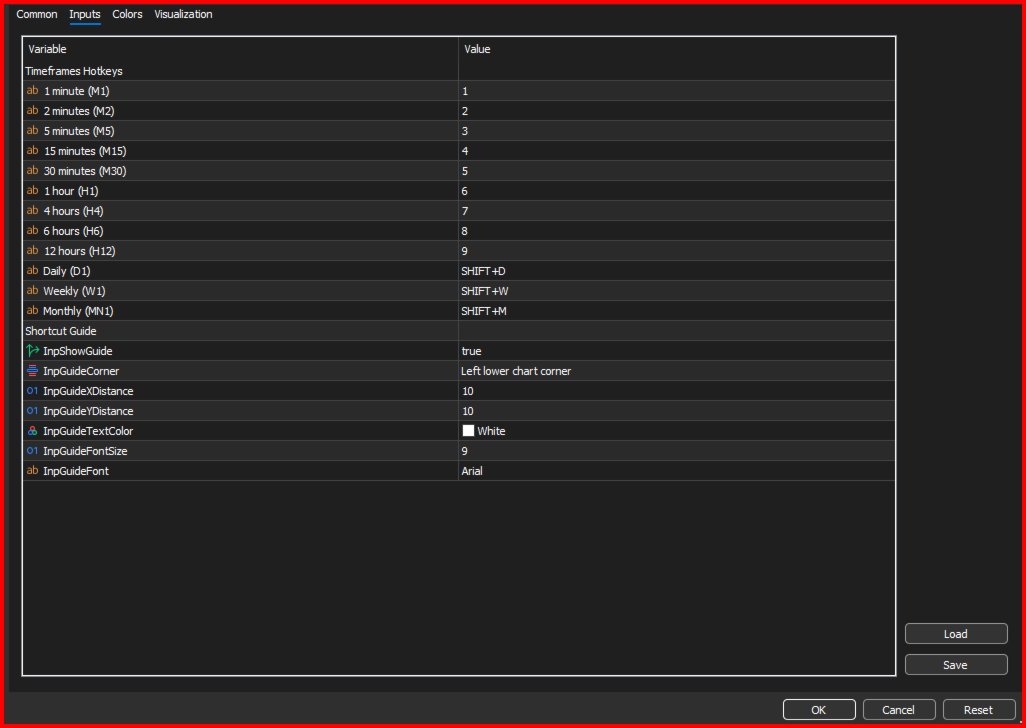
The indicator includes the following default shortcuts:
1 = 1 Minute — M1
2 = 2 Minutes — M2
3 = 5 Minutes — M5
4 = 15 Minutes — M15
5 = 30 Minutes — M30
6 = 1 Hour — H1
7 = 4 Hours — H4
8 = 6 Hours — H6
9 = 12 Hours — H12
Shift + D = Daily — D1
Shift + W = Weekly — W1
Shift + M = Monthly — MN1
Both the top-row number keys and the numeric keypad keys are supported.
EDITABLE HOTKEYS
Every shortcut can be changed from the indicator’s Inputs tab.
You are not required to use the default 1–9, Shift+D, Shift+W, or Shift+M assignments. Each supported timeframe has its own editable hotkey field.
This allows you to create a shortcut layout that matches your personal trading workflow.
For example:
F1 = M1
F2 = M5
F3 = M15
Ctrl + 1 = H1
Ctrl + Shift + D = Daily
Shift + W = Weekly
SUPPORTED HOTKEY FORMATS
Timeframes Hotkeys supports:
• Letters from A to Z
• Numbers from 0 to 9
• Function keys from F1 to F12
• Shift combinations
• Ctrl combinations
• Ctrl + Shift combinations
Valid examples include:
• D
• 1
• F5
• Shift + D
• Ctrl + 1
• Ctrl + Shift + M
Spaces and letter capitalization are ignored.
For example, all the following entries are interpreted as the same shortcut:
SHIFT+D
Shift + D
shift+d
The order of Ctrl and Shift is also flexible.
For example:
CTRL+SHIFT+M
SHIFT+CTRL+M
Both entries are accepted.
DISABLING INDIVIDUAL SHORTCUTS
Any timeframe shortcut can be disabled without removing the indicator.
To disable a shortcut, enter one of the following values in its input field:
• OFF
• NONE
• Leave the field empty
This is useful when you only want to keep a selected group of timeframes active.
DUPLICATE AND INVALID HOTKEY PROTECTION
The indicator validates the configured shortcuts when it starts.
If the same shortcut is assigned to more than one timeframe, the first assignment remains active and the later conflicting assignment is disabled.
If an unsupported or incorrectly formatted shortcut is entered, that assignment is disabled.
Duplicate and invalid shortcut information is reported in the MT5 Experts log, helping you identify and correct the affected setting.
ON-CHART SHORTCUT GUIDE
Timeframes Hotkeys can display a compact shortcut guide directly on the chart.
The guide shows the currently active shortcut assignments and their corresponding timeframes.
It automatically reflects valid customized hotkeys, so the displayed information stays consistent with the indicator’s Inputs settings.
The shortcut guide can be customized using the following settings:
• Show or hide the guide
• Select the chart corner
• Adjust the horizontal position
• Adjust the vertical position
• Change the text color
• Change the font
• Change the font size
The guide is displayed in the lower-left corner by default.
If you prefer a clean chart, it can be completely hidden by setting “Show Guide” to false.
MAIN FEATURES
• Instant timeframe switching using keyboard shortcuts
• Changes only the current chart
• Twelve supported timeframe targets
• Fully editable shortcut assignments
• Support for top-row numbers and numeric keypad numbers
• Support for letters, numbers, and F1–F12 function keys
• Support for Shift, Ctrl, and Ctrl+Shift combinations
• Optional on-chart shortcut guide
• Customizable guide position, color, font, and size
• Individual shortcut disabling
• Duplicate shortcut detection
• Invalid shortcut detection
• Lightweight indicator with no indicator plots
• No trading operations
• No automated orders
• No external data connection required
SUPPORTED TIMEFRAMES
Timeframes Hotkeys provides shortcut access to:
• M1 — 1 Minute
• M2 — 2 Minutes
• M5 — 5 Minutes
• M15 — 15 Minutes
• M30 — 30 Minutes
• H1 — 1 Hour
• H4 — 4 Hours
• H6 — 6 Hours
• H12 — 12 Hours
• D1 — Daily
• W1 — Weekly
• MN1 — Monthly
The target timeframes are predefined, while the keyboard shortcut assigned to each timeframe is fully editable.
HOW TO USE
-
Install Timeframes Hotkeys in MetaTrader 5.
-
Attach the indicator to the chart you want to control.
-
Open the Inputs tab if you want to customize the default shortcuts.
-
Click OK to start the indicator.
-
Click anywhere on the chart to give it keyboard focus.
-
Press one of the configured shortcuts.
-
The current chart will immediately switch to the selected timeframe.
If you want to use the hotkeys on several separate charts, attach the indicator to each chart where you want the shortcuts to work.
IMPORTANT KEYBOARD REQUIREMENTS
MetaTrader 5 must be the active application when a shortcut is pressed.
The relevant chart must also have keyboard focus.
If a shortcut does not respond, click the chart once and then press the shortcut again.
The indicator responds only to keyboard events received by the chart on which it is attached.
VERSION 1.02
Version 1.02 improves the detection of Shift and Ctrl keyboard combinations.
This provides reliable operation for the default higher-timeframe shortcuts:
• Shift + D for Daily
• Shift + W for Weekly
• Shift + M for Monthly
The same improved modifier detection also applies to customized shortcuts containing Shift, Ctrl, or Ctrl+Shift.
WHO IS THIS INDICATOR FOR?
Timeframes Hotkeys is suitable for:
• Scalpers who need fast chart navigation
• Day traders using several confirmation timeframes
• Swing traders performing top-down analysis
• Price-action traders
• Technical analysts
• Multi-timeframe strategy users
• Traders working with non-standard MT5 periods such as M2, H6, and H12
• Traders who want to reduce repeated mouse movement
• Traders using multi-monitor chart layouts
The indicator is especially useful when fast execution and efficient chart navigation are important.
IMPORTANT INFORMATION
Timeframes Hotkeys is a chart-control utility.
It does not:
• Open trades
• Modify trades
• Close trades
• Calculate trading signals
• Provide entry or exit recommendations
• Change the timeframe of unrelated charts
• Control charts when MetaTrader 5 is not receiving the keyboard input
The indicator only changes the timeframe of the chart on which it is running.
Timeframes Hotkeys v1.02 provides a simple and customizable way to navigate MetaTrader 5 timeframes directly from your keyboard, helping you perform multi-timeframe analysis faster and with fewer interruptions.