Edge Snap
- Experts
- Versão: 1.1
- Ativações: 5

One purchase. Two professional trading tools.
Buy EdgeSnap EA today and receive this
Edge Snap Indicator as a complimentary bonus.Simply contact me on MQL5 after your purchase, and I'll send it to you personally.
FOX WAVE — EDGESNAP EA
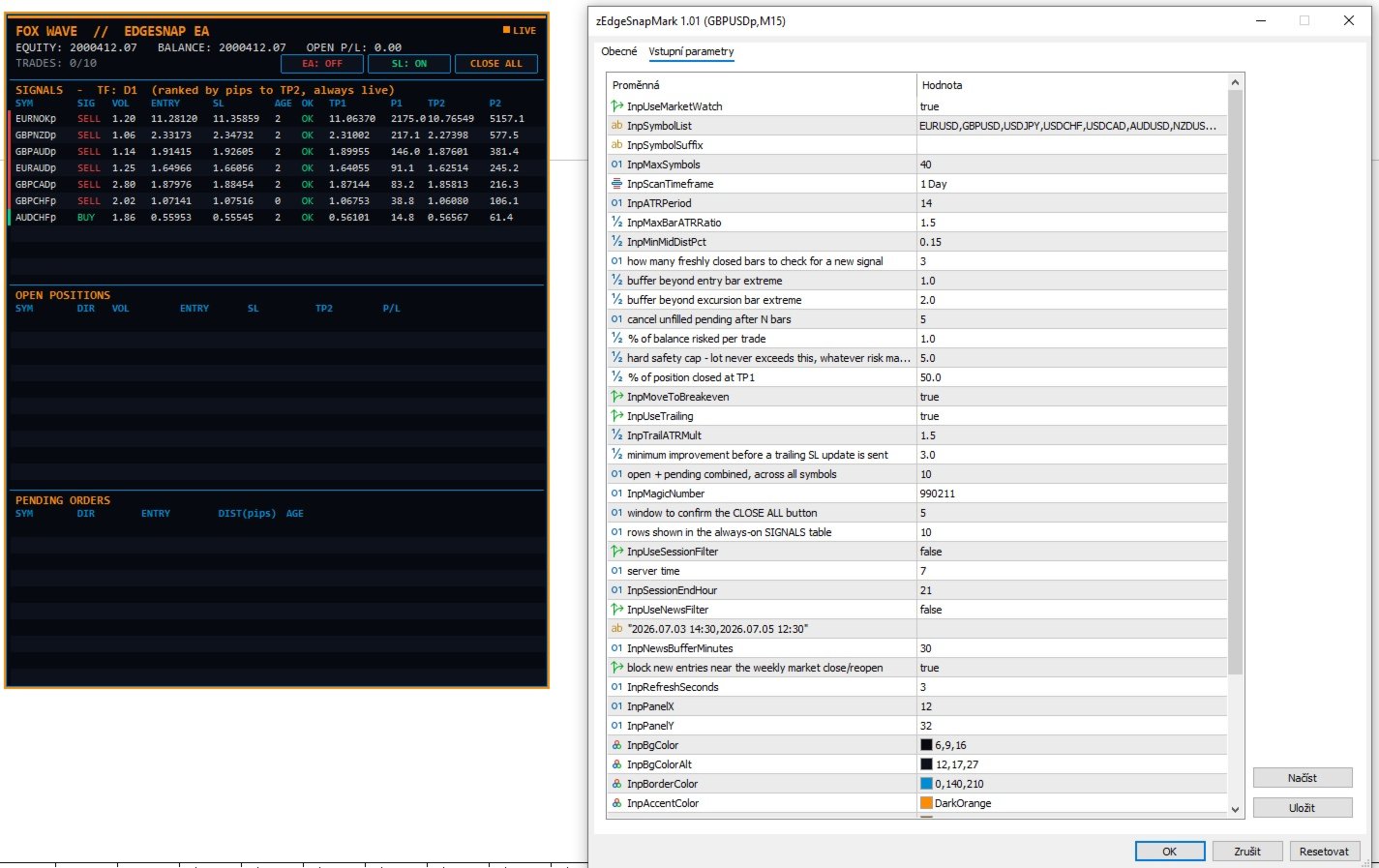
A fully automated multi-symbol trading robot that scans your entire Market Watch for price-reversal setups, sizes every trade from account risk with built-in margin and volume safety caps, manages partial profit-taking and trailing on its own, and shows you everything it's doing on a live, always-on dashboard — right on the chart.
Stop watching twenty charts for the same setup. EdgeSnap EA scans every symbol you give it, ranks every opportunity by size, and only acts on the ones that pass its own quality filter — while you stay in control with on-chart buttons for trading on/off, stop-loss on/off, and instant close-all.
Key Features
- Multi-symbol scanning, either auto-loaded from your Market Watch (broker suffixes like "p" handled automatically) or from your own manual symbol list.
- Always-on SIGNALS table, ranked by pip-distance to target, largest opportunity first — updates continuously whether trading is switched on or off, so you always see what the EA would do before it does it.
- Risk-based position sizing. Lot size is calculated from a percentage of account balance and the distance to the stop-loss — then automatically checked against free margin and the broker's per-symbol volume limit, with a configurable hard lot cap on top.
- Logic-based stop-loss placement, anchored to the price extreme that invalidates the setup — not an arbitrary multiple of a generic volatility measure.
- Two-stage exit management: partial close at the first target with automatic move-to-breakeven, then optional ATR-based trailing toward the second target with a minimum trailing step to avoid over-trading tiny price wiggles.
- One trade per symbol, hard cap on total concurrent trades (pending + open combined) across the whole scanned universe.
- Stop-loss toggle. Switch SL placement off and the EA still uses it internally to size every position correctly by risk — it just won't be attached to the order sent to the broker. Full control over whether you want a hard stop live in the market.
- Trading on/off toggle, directly on the chart. Starts OFF by default so nothing trades the moment you attach it — you decide when to go live.
- Close-all with confirmation. One click arms it, a second click within a few seconds confirms — no accidental flattening of your account.
- Session filter, news blackout (your own list of times, no external feed or DLL required), and a built-in weekend filter that blocks new entries near the weekly close/reopen, when spreads widen and behaviour gets unreliable.
- Live dashboard: equity, balance, floating P/L, open trade count against your limit, an open-positions table, and a pending-orders table — all in one panel.
- Lightweight: pure chart-object panel and standard trade functions, no DLLs, no external dependencies.
How It Works
Signal detection
Every scanned symbol is checked for a specific price-reversal pattern: an excursion beyond a defined range followed by a snap-back close inside it. Each candidate is scored — the size of the excursion bar relative to recent volatility, and its distance from the mid-point of the range — and only setups that pass every check are considered tradeable. Everything else is discarded automatically, no manual filtering needed.
Entry
A pending stop order is placed just beyond the signal bar's extreme, in the direction of the reversal. If several qualifying signals appear in the same scan cycle, the EA fills them in order of opportunity size (distance to target) rather than whichever symbol happened to come first in the list — so your trade slots always go to the strongest setups available at that moment.
Stop-loss
Placed beyond the extreme of the bar that caused the original excursion — the level at which the reversal thesis is actually invalidated, not a generic distance.
Exit management
Once price reaches the first target, part of the position (percentage configurable) is closed and the remaining stop is moved to breakeven. From there, the remainder can trail toward the second, farther target using an ATR-based distance, re-evaluated once per closed bar with a minimum step requirement, so the stop doesn't churn on every tick.
Dashboard
The panel shows three things at all times: the ranked list of every currently qualifying signal across your whole symbol universe (with entry price, calculated lot, stop-loss, both targets, and pip distances to each), your currently open positions, and your pending orders — plus account equity, balance, and floating P/L.
Inputs
Symbol universe
- Use Market Watch automatically (on/off)
- Manual symbol list + broker suffix
- Maximum number of symbols scanned
Strategy
- Timeframe
- Range/volatility period and sensitivity
- Excursion quality filters (max bar size vs. volatility, minimum distance from mid-point)
- Lookback bars for signal detection
Order construction
- Entry buffer beyond the signal bar
- Stop-loss buffer beyond the excursion bar
- Pending order expiry (bars)
Money management
- Risk % per trade
- Hard maximum lot size
- % of position closed at first target
- Move to breakeven (on/off)
- ATR trailing (on/off), multiplier, minimum trailing step
Trade limits
- Maximum total trades (open + pending, across all symbols)
- Magic number
Filters
- Trading session hours (on/off)
- News blackout list and buffer window (on/off)
- Weekend filter (on/off)
Panel
- Position, size, colors, font — fully customizable to match your chart theme
Notes
- Compatible with both netting and hedging accounts.
- Trading starts OFF by default on every attach — you switch it on manually from the chart panel.
- The stop-loss toggle controls whether SL is sent with the order; it never affects how the position is sized, which always accounts for the full calculated risk distance.
- Margin and volume-limit checks run before every order is sent, so position size automatically scales down — or the trade is skipped — if the account can't safely support the calculated size.
- No grid, no martingale, no averaging into losing positions.
https://www.mql5.com/en/market/product/184985?source=Unknown%3Ahttps%3A%2F%2Fwww.mql5.com%2Fen%2Fmarket%2Fwidgets