Unified Local Copier for MT4
- Utilitários
- Versão: 1.30
- Atualizado: 6 junho 2026

Unified Local Copier (ULC) — Copiador local de operações
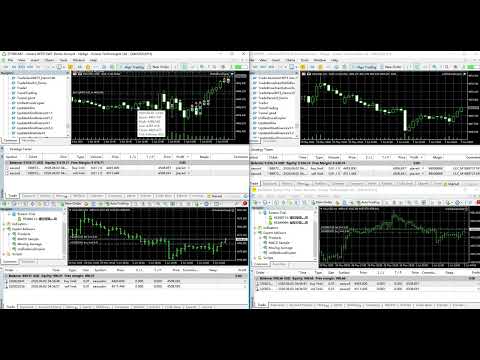
Unified Local Copier é um Expert Advisor para cópia local de operações no MetaTrader 4 e MetaTrader 5. Não depende de DLLs externas e oferece sincronização de ordens rápida e confiável entre terminais Master e Slave no mesmo computador. É possível combinar MT4 e MT5 em configurações multiplataforma.
Versão atual: v1.30 (MT5 / MT4)
1. Funcionamento e escopo da cópia
O sistema utiliza arquitetura Master-Slave (mestre-escravo). Um canal suporta um Master e vários Slaves: uma conta Master sincroniza instruções de trading com várias contas Slave.
Master (mestre)
Monitora em tempo real toda a atividade da conta, incluindo:
- Colocação, modificação e exclusão de ordens pendentes (Buy/Sell Limit, Stop, etc.)
- Aberturas a mercado
- Alterações de stop-loss / take-profit em posições abertas
- Fechamento de posições (incluindo fechamentos parciais e Close By em hedge)
Slave (escravo)
Recebe instruções do Master e as replica na conta local. O sistema trata automaticamente a correspondência de símbolos, a normalização do lote e o controle de slippage, e vincula cada ordem do Master à contraparte no Slave para manter o alinhamento após reconexões.
Compatibilidade multiplataforma
Combinações suportadas:
- MT5 Master → MT4 Slave
- MT4 Master → MT5 Slave
- Master e Slave na mesma plataforma
Escopo da cópia
O Slave replica integralmente: colocação / modificação / exclusão de pendentes, aberturas a mercado, alterações de SL/TP, fechamentos e Close By. Ordens de trading manual, EAs e pendentes acionadas são todas suportadas.
2. Filtro de direção (InpSlaveCopySide)
O Slave pode filtrar as operações copiadas por direção. Isso é útil quando você deseja apenas um lado da estratégia do Master (por exemplo, somente compras ou somente vendas).
Opções:
SLAVE_COPY_BOTH (padrão) — copiar Buy e Sell
SLAVE_COPY_BUY — somente Buy
SLAVE_COPY_SELL — somente Sell
Regras do filtro:
1. Aberturas e colocação de pendentes: apenas ordens da direção selecionada são copiadas (incluindo Buy/Sell Limit, Stop e outros tipos pendentes).
2. Fechamentos e alterações de posição: apenas posições do lado selecionado são processadas. Com «somente Buy», um fechamento Sell do Master não fecha nada no Slave; um fechamento Buy do Master fecha a posição Buy correspondente no Slave.
3. Modificação e exclusão de pendentes: se o Slave já copiou uma ordem pendente do Master, modificação e exclusão continuam sincronizadas para evitar pendentes órfãs.
Observação: o filtro de direção aplica-se somente ao Slave. No Master, mantenha os valores padrão.
3. Parâmetros de entrada
Parâmetros comuns (Master e Slave)
Parâmetro Tipo / padrão Descrição
-------------------------------------------------------------------------
InpRole ROLE_MASTER Função. ROLE_MASTER = enviar instruções;
ROLE_SLAVE = receber e copiar.
InpChannelID 8888 (int) ID do canal. Deve ser idêntico no Master e Slave.
Com vários copiadores no mesmo PC, use um
Channel ID diferente para cada um (ex.: 8888, 9999).
Parâmetros exclusivos do Slave
Parâmetro Tipo / padrão Descrição
-------------------------------------------------------------------------
InpLotSize 0.01 (double) Lote de cópia. Lote fixo para cada ordem
copiada (sem escala ao volume do Master).
Normalizado automaticamente ao mín./máx. e
passo do corretor.
InpComment "ULC" (string) Prefixo do comentário das ordens copiadas.
O sistema adiciona um identificador do ticket
Master para rastreamento e deduplicação.
InpSymbolSuffix "" (string) Sufixo do símbolo para diferenças entre
corretoras. Ex.: Master XAUUSD / Slave XAUUSDm —
deixe vazio para correspondência automática ou
informe "m" manualmente.
InpSlaveCopySide SLAVE_COPY_BOTH Filtro de direção. Veja seção 2. Somente Slave.
InpReplayHistoryOnStart false (bool) Recuperar instruções anteriores na inicialização.
false (recomendado): entrar na sincronização
atual e ignorar instruções antigas.
true: processar todo o histórico pendente.
Somente MT5 Slave
Parâmetro Tipo / padrão Descrição
-------------------------------------------------------------------------
InpDeviation 30 (points) Desvio máximo de preço em pontos para ordens
a mercado. A ordem pode ser rejeitada se o
preço ultrapassar essa tolerância.
Somente MT4 Slave
Parâmetro Tipo / padrão Descrição
-------------------------------------------------------------------------
InpSlippage 30 (points) Slippage permitido em pontos para aberturas
e fechamentos a mercado.
Parâmetros exclusivos do Master
Parâmetro Tipo / padrão Descrição
-------------------------------------------------------------------------
InpClearQueueOnStart false (bool) Limpar histórico de sincronização na inicialização.
false (recomendado): manter o estado para o Slave
retomar após mudança de timeframe ou recarga do EA.
true: começar do zero em uma nova sessão.
Somente MT4 Master
Parâmetro Tipo / padrão Descrição
-------------------------------------------------------------------------
InpMasterPollSec 1 (int) Intervalo de verificação do Master em segundos.
Em símbolos com poucos ticks ou gráficos H1,
use 1 segundo ou mais para detectar alterações
de ordens com rapidez.
4. Guia de instalação
1. Instalar o Master
(1) Abra o terminal MT4 ou MT5 que enviará sinais e anexe o EA a qualquer gráfico (símbolo e timeframe não importam; recomenda-se um gráfico sempre aberto).
(2) Arraste UnifiedLocalCopier para o gráfico.
(3) Defina InpRole = ROLE_MASTER e configure InpChannelID.
(4) Ative o interruptor principal de Trading algorítmico / AutoTrading.
Importante:
- Apenas um EA Master por conta e Channel ID.
- Não execute vários Masters com o mesmo Channel em gráficos diferentes da mesma conta, ou podem ocorrer conflitos e cópias duplicadas.
- O Master monitora toda a conta; um gráfico é suficiente.
2. Instalar o Slave
(1) Anexe o EA no terminal MT4 ou MT5 receptor (pode ser outro cliente ou conta).
(2) Defina InpRole = ROLE_SLAVE e InpChannelID idêntico ao do Master.
(3) Configure os parâmetros Slave conforme necessário: InpLotSize, InpSlaveCopySide, InpSymbolSuffix, etc.
(4) Ative o trading algorítmico; o EA entra em modo de espera de sincronização.
Importante:
- Recomenda-se um único EA Slave por conta de cópia e Channel.
- Se os nomes dos símbolos forem diferentes, verifique InpSymbolSuffix ou a correspondência automática no log Experts.
5. Recursos do produto
Sem dependência de DLL
Toda a funcionalidade está integrada ao EA. Não requer componentes externos — instalação mais simples e ampla compatibilidade.
Deduplicação precisa
O Slave valida antes de abrir para evitar cópias duplicadas por latência ou acionamentos repetidos.
Filtragem inteligente de eventos
O Master filtra atualizações redundantes após execuções a mercado, reduzindo instruções de modificação desnecessárias no Slave.
Sincronização confiável em alta atividade
Tolerância a falhas e novas tentativas integradas para rajadas de ordens (ex.: grid ou martingale), ajudando a reduzir operações não copiadas.
Ciclo de vida completo de pendentes
Colocação, modificação e exclusão são totalmente sincronizadas. Quando o Master cancela uma pendente copiada, o Slave também a remove.
Vinculação um a um
Cada ordem copiada é vinculada à origem no Master para que fechamentos, modificações e exclusões atinjam a ordem Slave correta.
Retomada após desconexão
Com InpClearQueueOnStart = false (recomendado), o Slave pode retomar com segurança após recarregar o EA ou trocar de gráfico sem recomeçar do zero.
6. Operações suportadas
Operação Ação do Slave
-------------------------------------------------------------------------
Colocar pendente Colocar pendente equivalente no Slave
Modificar pendente Modificar preço / SL / TP da pendente
Excluir pendente Excluir a pendente correspondente
Abertura a mercado Abertura Buy / Sell a mercado no Slave
Alteração SL/TP Modificar SL / TP da posição correspondente
Fechamento Fechar a posição correspondente
Close By (hedge) Fechar a posição conforme a lógica Close By
7. Perguntas frequentes
P: O log do Slave indica que está aguardando o Master?
R: Inicie primeiro o EA Master e confirme que InpChannelID coincide em ambos os lados.
P: Falha no mapeamento de símbolos no Slave?
R: Verifique InpSymbolSuffix ou adicione o símbolo à Observação do Mercado no terminal Slave.
P: Com «somente Buy», por que as pendentes Sell do Master não são copiadas?
R: Comportamento esperado. O filtro copia apenas o lado selecionado. Pendentes já copiadas continuam sendo modificadas ou excluídas quando o Master as altera.
P: É possível misturar MT4 e MT5?
R: Sim. Use o mesmo Channel ID com Master e Slave no mesmo computador.
P: Master e Slave podem usar contas de corretoras diferentes?
R: Sim. Use InpSymbolSuffix para diferenças de nome de símbolo e InpLotSize para lote independente no Slave.
P: O lote de cópia é proporcional ao do Master?
R: Não. O Slave usa o InpLotSize fixo. Ajuste conforme o tamanho da conta Slave e seu risco.