Unified Local Copier for MT4

Cross-Platform, Highly Reliable Local Trade Copier (Unified MT4 / MT5 Manual)

UnifiedLocalCopier (ULC) is a high-concurrency, ultra-low latency, local intelligent trade copying tool tailored specifically for MetaTrader platforms, with zero DLL dependencies. Built upon a robust sandbox file-queue IPC (Inter-Process Communication) mechanism, it bypasses third-party Dynamic Link Libraries (DLLs) entirely.

This guarantees a higher execution security level and ensures 100% compliance with strict security audits from brokers and the MQL5 Market—eliminating the risk of crossing platform security red lines. MT4   MT5

🔥 Limited-Time Free Trial Live Now!

To gather comprehensive user feedback under diverse live trading environments (multi-broker, cross-platform, high-concurrency), this system is currently open for a limited-time free trial! Traders and quantitative teams are welcome to download and test it.

  • 🎁 Free spots are limited to the first 20 users. Once filled, the price will return to its regular rate of $30.

  • 💡 Join our beta test now and submit your valuable feedback or one-click optimization suggestions directly to the developer!

1. Core Architecture & Copying Logic

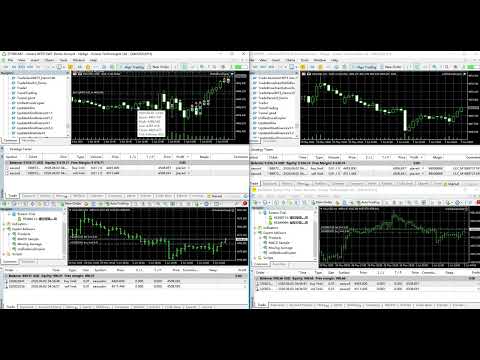
The system utilizes a classic Master-Slave pattern to achieve seamless synchronization through high-speed polling. A single channel supports the "One Master, Multiple Slaves" configuration:

  • Master (Signal Provider): Monitors all order actions on the master trading account in real time (including manual trades, EA executions, pending order triggers/modifications, and partial/full closures). Upon capturing a transaction, it instantly writes standardized binary signal records into the terminal's common data folder ( FILE_COMMON ).

  • Slave (Signal Receiver): Deep-polls the signal file at an ultra-high frequency (50ms by default). Once a new sequence is detected, it instantly triggers local risk management, slippage calculation, and 1:1 order mapping, passing the data to the execution engine to mirror the trade.

  • Cross-Platform Interoperability: Since the underlying data format is fully standardized, the system seamlessly supports an MT5 Master guiding multiple MT4 Slaves, or an MT4 Master guiding MT5 Slaves. No matter which platform your strategy runs on, it copies flawlessly.

2. Core Input Parameters

When loading the EA onto a chart, carefully configure the parameters below based on the account's designated role (Master or Slave):

Parameter Name Default / Type Applicable Role Description & Configuration Advice
InpRole ROLE_MASTER Universal Role Switch: Select whether the EA on the current chart acts as the signal provider ( ROLE_MASTER ) or the signal receiver ( ROLE_SLAVE ).
InpChannelID 8888 (int) Universal Channel ID: The unique credential for Master-Slave pairing. The Channel ID on the Master and Slave sides must match exactly. To run multiple independent copying systems on the same PC, simply assign different IDs (e.g., 8888, 9999).
InpLotSize 0.01 (double) Slave Copy Lot Size: Defines the fixed lot size used by this receiver terminal. The system includes built-in normalization to auto-check and round orders toward the broker's min/max lots and step sizes.
InpDeviation 30 (ulong) Slave Max Allowed Slippage (Points): The maximum price difference allowed during copying. If the current local market price deviates from the Master's execution price by more than this value, risk protection triggers and rejects the trade.
InpComment "ULC" (string) Slave Order Comment Prefix: The comment prefix attached to copied trades. The system automatically appends the master ticket number (e.g., ULC_M123456 ) to enable precise order tracking and position alignment after unexpected network reconnections.
InpSymbolSuffix "" (String) Slave Symbol Suffix: Used to handle symbol name variations across different brokers (e.g., Master uses XAUUSD , Slave uses XAUUSDm ). Leave empty for smart automatic fuzzy matching; if matching fails across brokers, enter the suffix manually (e.g., "m" or ".m").
InpClearQueueOnStart false (bool) Master Clear Queue on Startup: If set to true, the EA wipes out historical channel data when reloaded. Keeping this at false is highly recommended to safeguard history across chart period switches or power resets, allowing Slaves to reconnect safely.
InpReplayHistoryOnStart false (bool) Slave Replay History on Startup: If set to false , the Slave directly joins the current live sync and skips backed-up old signals (preventing margin calls upon reconnection). If set to true , it fills pending historical signals in order.

3. Step-by-Step Deployment Guide

1. Deploying the Master (Signal Provider)

  1. Open the MT4 or MT5 terminal from which you want to export signals, and open any single symbol chart (any instrument, any timeframe; attaching it to a permanent chart like EURUSD or XAUUSD is recommended).

  2. Drag and drop the compiled UnifiedLocalCopier EA onto the chart.

  3. Under the Inputs tab, set InpRole to ROLE_MASTER and configure your InpChannelID (e.g., 8888).

  4. Ensure the terminal's "Algo Trading" (or "AutoTrading") master switch is turned on.

⚠️ The Golden Rule of Master Deployment: Within the same trading account, one specific Channel ID can only and must only be assigned to a single Master EA! Never attach two Master EAs to different timeframes (like M15 and H1) on the same account simultaneously; doing so causes write conflicts and double signal broadcasts. A single Master EA listens to the entire account's order stream globally.

2. Deploying the Slave (Signal Receiver)

  1. Open one or multiple receiving terminals (can be another MT4/MT5 client on the same PC, logged into a different account).

  2. Similarly, open any single chart and drag the same UnifiedLocalCopier EA onto it.

  3. Under the Inputs tab, switch InpRole to ROLE_SLAVE .

  4. Change InpChannelID to match the Master side exactly (e.g., 8888). Adjust your InpLotSize (copy volume) as needed.

  5. Enable algorithmic trading permissions. The EA will enter a 50ms high-frequency polling state, waiting for inbound Master signals.

4. Key Highlights & Risk Controls

  • 🚀 Zero DLL Dependencies (Market-Safe): Utilizing native sandbox shared-channel architecture, it completely avoids risks associated with external DLL injections, such as antivirus false positives or backend rejections by strict brokers.

  • 🔒 Deduplication Engine: Before executing an opening order, the Slave processes a triple-verification chain ( Map record checks -> Live position comment scanning -> Order underlying feature analyses ) to ensure that rapid polling under network delays never leads to accidental double-copying.

  • ⏱️ Modify Suppression: To address frequent, trivial update events triggered during market order matching on MT5 (e.g., rapid shifting between ORDER_ADD and DEAL_ADD ), the EA features an internal 800ms suppression window. It filters out redundant modification requests, reducing unnecessary CPU load and VPS bandwidth consumption.

  • 🛠️ File-Lock Self-Healing (Retry Logic): When multiple orders fire simultaneously (e.g., during grid or martingale basket executions), file access conflicts (Error 5004) may occur. The Master automatically triggers a high-frequency retry chain up to 5 times at 25ms intervals, ensuring zero dropped signals even during extreme market spikes.


作者のその他のプロダクト
We apologize, but we are unable to provide service due to network issues. If you encounter any problems during installation or use, please contact 9048914@qq.com. Thank you. Broken Scapling is a breakthrough scalping strategy, through long-term support pressure breakthrough transactions, avoid too many false breakthroughs, thereby increasing the winning rate. The Broken Scapling strategy will automatically judge the current support pressure level. At the same time, there are three built-in fund
FREE
Binanceは世界的に有名な暗号通貨取引所です!暗号化されたデジタル通貨市場のリアルタイムデータ分析を容易にするために、プログラムは分析のためにBinanceリアルタイムトランザクションデータをMT5に自動的にインポートできます。主な機能は次のとおりです。 1.通貨セキュリティ部門でのスポット取引ペアの自動作成をサポートします。また、利益通貨と基本通貨を別々に設定することもできます。たとえば、ProfitCurrencyが空の場合、すべての取引エリアを意味します。オプション:USDT、BTC、DAI、およびBinanceでサポートされているその他の取引エリア(契約取引は現在サポートされていません)。BaseCurrencyは空で、すべての通貨を示します。BNBおよびETCも可能です。個別に設定するBinanceでサポートされている暗号通貨を待ちます。 2. Binanceの各通貨の価格精度、取引量の精度、および最大取引量を同期します。 3. WebSocketを介してBinanceをリンクすると、すべてのトランザクションをMt5にプッシュして市場を更新できます。 4.すべての
FREE
Binanceは世界的に有名な暗号通貨取引所です!暗号化されたデジタル通貨市場のリアルタイムデータ分析を容易にするために、プログラムは分析のためにBinanceFuturesのリアルタイムトランザクションデータをMT5に自動的にインポートできます。主な機能は次のとおりです。 1.通貨セキュリティ省のUSD-M先物取引ペアの自動作成をサポートし、基本通貨を個別に設定することもできます。基本通貨BaseCurrencyは空で、すべての通貨を示します。BNBやETCなど、Binanceでサポートされている暗号通貨も個別に設定できます。 2. Binanceの各通貨の価格精度、取引量の精度、および最大取引量を同期します。 3. WebSocketを介してBinanceをリンクすると、すべての先物取引をMt5にプッシュして市場を更新できます。 4.同時に更新されるすべての先物の種類をサポートします。リアルタイムのデータ効率を向上させるために、最大更新グループをカスタマイズできます(更新するには対応するウィンドウを開く必要があります)。ツールのデフォルトは最大数です。グループは4つのグル
FREE
Binanceは世界的に有名な暗号通貨取引所です!暗号化されたデジタル通貨市場のより正確な分析を容易にするために、プログラムは分析のためにBinanceの先物K-lineデータをMT5に自動的にインポートできます。主な機能は次のとおりです。 1. Binance USD-Mでのすべての先物取引ペアの自動作成をサポートします。または、基本通貨を個別に設定することもできます。たとえば、基本通貨BaseCurrencyが空の場合、それはすべての通貨を意味し、BNBやBTCなどのBinanceUSD-M先物でサポートされている暗号通貨も個別に設定できます。 2. Binanceの先物通貨の価格精度、取引量の正確性、および最大取引量を同期します。 3.テクニカル分析を容易にするために、リスト内のBinanceでサポートされているすべてのリストされた先物の見積もりデータを自動的に更新します。 4. 7 * 24時間の先物市場データをサポートします。最初のトランザクションは、最初にインポートされたときにデフォルトでBinanceから同期され、データは将来、最新のK-lineから自動的に同期
FREE
Binanceは世界的に有名な暗号通貨取引所です! 深度情報とティックの変更の追跡を容易にするために、プログラムは次の機能を提供します。 1.カスタマイズ可能な製品プレフィックス(既存の製品名との競合を避けるため)を使用して、Binance USD-M先物取引ゾーンのすべての取引品種を自動的にインポートするか、特定の品種をカスタムインポートします。 2. WebSocketを使用してBinance先物取引をリンクし、市場情報のプッシュが深さとティックをサポートします。 3.切断後のソケットの再接続をサポートします。 4.サブスクライブする必要のある深度データが多数ある場合、複数のチャートウィンドウで取得でき、プログラムは深度やトランザクションティックなどを取得するためのグループ化をサポートします。 5.プロキシをサポートします。Binanceの市場データは、プロキシのAPIとWebSocketを接続することで取得できます。プロキシアドレスは次のように記述する必要があることに注意してください。Tools-Options-EA-WebRequest;(私たちが提供するエージェン
FREE
Binanceは世界的に有名な暗号通貨取引所です! MT5ユーザーがBinanceFuturesを直接取引できるようにするために、このプログラムは次の取引機能を提供します。 1. Binance Futuresの取引スタイルを模倣し、フレンドリーな操作パネルを提供します。 2.レバレッジ、バランス、その他の情報を取得するには、自分でapiとsecretを入力します(Binance apiで先物取引の許可を開く必要があります)。 3. limitOrder(指値注文)、marketOrder(成行注文)、stopLimit(ストップ利益の制限とストップロス注文)、stopMarket(マーケットストップ利益とストップロス注文)をサポートします。 4.成行注文の場合、最大オープンポジションとコスト情報は最新の価格に基づいて計算できます。 5.すべての注文のリストを表示したり、注文をキャンセルしたりできます。 6.すべてのポジションのリストを表示でき、成行注文に従ってポジションを空にすることができます。 7. Deepin情報の自動表示のサポート(Deepin Websock
FREE
Phantom’s Gift Pure Medium-to-Long Term Swing Frequency-Reduction & Adaptive Risk Management System: A "Dehydrated" Trend Weapon Tailored for High-Net-Worth Capital and Institutional Funds Why We Strongly Recommend Trading Gold (XAUUSD)? In the quantitative trading domain, Gold (XAUUSD) is universally acclaimed as the "King of Trends." The core algorithm of   Phantom’s Gift   is natively engineered with a flawless synergy for Gold due to the following structural dynamics: Explosive Monodirection
Alpha Channel — Professional Adaptive Volatility Corridor Indicator Eliminate Lag. Capture Institutional Edge ( $Alpha$ ). In quantitative trading, traditional channel indicators (like Bollinger Bands or Keltner Channels) severely lag or become "flat" during periods of extreme market volatility or prolonged consolidation.   Alpha Channel   is an adaptive volatility envelope indicator engineered specifically for the MT4 platform. By utilizing deep mathematical matrix calculations, it provides
Sharpen Your Edge: Backtest Trade Simulator (BTS)  Lightweight Manual Backtesting & Trade Simulation Panel for MT4 / MT5 Are you looking for an efficient, intuitive way to replay historical price action, backtest your setups, and sharpen your market intuition? Backtest Trade Simulator (BTS) is a lightweight manual backtesting and trade simulation panel designed explicitly for MetaTrader platforms. By integrating full simulation capabilities directly into a clean, native chart-based interface,
FREE
Phantom’s Gift 純粋中長線スイング減頻・適応型リスク管理システム:大口資本および機関投資家向けに開発された、無駄を削ぎ落とした「脱水型」トレンド兵器 なぜゴールド(XAUUSD)の取引を強く推奨するのか? 量化(クオンツ)トレード界において、ゴールド(XAUUSD)は「トレンドの王様」と称されます。本システム『Phantom’s Gift』の根幹アルゴリズムがゴールドと極めて高い親和性を持つ理由は、以下の構造的要因にあります。 圧倒的な単辺ボラティリティとモメンタム: 地政学リスク、世界的なインフレ、中央銀行による金買いなどのマクロ要因に駆動されるゴールドは、ひとたび中長期のトレンドが勃発すると、極めて爆発的な一方向への値動き(主上昇波または急落トレンド)を示します。この挙動が、本システムの「ルール2:3:2:1正ピラミッド増し玉メカニズム」を完璧に誘発し、短期間で含み益を利用した増し玉(ピラミッディング)を行うことで、資産純資産を爆発的に押し上げます。 無効なレンジ相場のフィルタリング: 本システムは純粋な中長期スイング戦略です。値動きが細かく、ランダムな乱高下が発生
Alpha Channel — Professional Adaptive Volatility Corridor Indicator Eliminate Lag. Capture Institutional Edge ( $Alpha$ ). In quantitative trading, traditional channel indicators (like Bollinger Bands or Keltner Channels) severely lag or become "flat" during periods of extreme market volatility or prolonged consolidation. Alpha Channel is an adaptive volatility envelope indicator engineered specifically for the MT5 platform. By utilizing deep mathematical matrix calculations, it provides intr
Cross-Platform, Highly Reliable Local Trade Copier (Unified MT4 / MT5 Manual) UnifiedLocalCopier (ULC) is a high-concurrency, ultra-low latency, local intelligent trade copying tool tailored specifically for MetaTrader platforms, with zero DLL dependencies . Built upon a robust sandbox file-queue IPC (Inter-Process Communication) mechanism, it bypasses third-party Dynamic Link Libraries (DLLs) entirely. This guarantees a higher execution security level and ensures 100% compliance with strict sec
FREE
Sharpen Your Edge: Backtest Trade Simulator (BTS) 2.03 Lightweight Manual Backtesting & Trade Simulation Panel for MT4 / MT5 Are you looking for an efficient, intuitive way to replay historical price action, backtest your setups, and sharpen your market intuition? Backtest Trade Simulator (BTS) is a lightweight manual backtesting and trade simulation panel designed explicitly for MetaTrader platforms. By integrating full simulation capabilities directly into a clean, native chart-based interf
FREE
フィルタ:
レビューなし
レビューに返信