Nexus Apex Trade Manager
- Utilitários
-
Gayathiri Gopalakrishnan
 I am an independent MQL5 developer focused on creating practical trading tools for MetaTrader 5.
My work includes Expert Advisors, trading indicators, analytical tools and trading utilities designed to help traders analyze the market, manage trades and automate specific trading tasks. - Versão: 5.20
- Atualizado: 9 maio 2026
- Ativações: 5
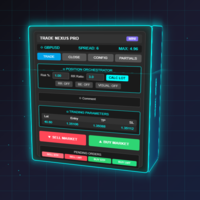
Nexus Apex System is a professional MetaTrader 5 trade assistant for visual trade planning, position sizing, risk management and multi-target analysis. It helps traders prepare trades with clear Entry, Stop Loss, Take Profit, lot size, risk amount, reward estimate and account-currency information directly on the chart.
The product is designed for traders who want a structured way to review trades before execution. It provides a dashboard with trade direction, entry mode, stop-loss method, position sizing, multi-TP levels, breakeven reference, risk/reward information and optional hedge scenario analysis.
Nexus Apex System supports both automatic risk-based lot calculation and manual lot mode. The user can select risk percentage, adjust trade levels on the chart, review risk and reward values, and execute trades from the panel if trading is enabled.
The system includes multiple planning sections, including Mission, Neural, Quant, Edge, SMC, Defense and Hedge views. These sections provide additional market, risk and scenario information for decision support. The product does not guarantee trade results and should be used together with the trader’s own analysis.
Main features:
Visual Entry, Stop Loss and Take Profit planning
TP1, TP2 and TP3 multi-target structure
Risk-based position size calculation
Manual lot mode
Account currency and optional display currency support
Breakeven planning
Optional hedge scenario view
Chart risk and reward zones
Clean dashboard interface
Support for different broker symbols depending on symbol specifications
Designed for discretionary and semi-automatic trade planning
How to use:
Attach Nexus Apex System to a MetaTrader 5 chart.
Select LONG or SHORT direction.
Choose Instant or manual entry planning.
Set Stop Loss method: Manual, ATR, Fractal or PSAR.
Review Entry, Stop Loss, TP1, TP2 and TP3 levels.
Check lot size, risk amount, reward amount and margin information.
Adjust chart levels if needed.
Use demo testing before live trading.
Execute only after confirming the complete trade plan.