TradeManager by theponzETH
- Experts
- Versão: 1.49
- Atualizado: 17 setembro 2026
- Ativações: 5

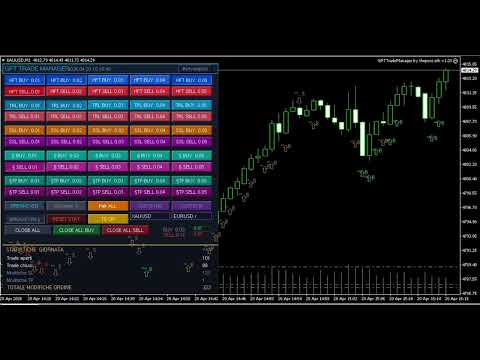
GPT Trade Manager is an operational control panel (dashboard) for MetaTrader 4, designed for traders who trade manually but want the speed, precision and discipline of an automated system. It is not a "black box" Expert Advisor: it is an advanced order management tool, with independent engines for trade opening, trailing stop, break even and capital protection, all controllable with a single click directly from the chart.
Designed for intraday trading and scalping, GPT-TM lets you split your trading activity into independent trade groups (identified by Magic Number and dedicated comment), each with its own lot size, its own trailing logic and its own break even, so you can manage fast scalping, medium-term trades and manual trading in parallel without the logics overlapping or interfering with each other.
Order opening modules
GPT-TM offers several independent operational modules, each with its own Magic Number, comment and set of 5 preconfigured lot sizes, selectable directly from the panel buttons:
- HFT: fast opening for scalping/high frequency trading, with trailing stop and break even set to very tight steps.
- TRL: module for trades with more room to breathe, with trailing stop and break even calibrated on wider distances.
- HSL (Hard Stop Loss): opening with a fixed Stop Loss automatically set in pips at the moment of entry.
- Manual: quick manual opening module with dedicated break even via button.
- TP Manual: manual opening with Take Profit (and optionally Stop Loss) automatically set in pips.
- SL Manual: manual opening with automatic Stop Loss in pips.
- AltMagic: lets you "adopt" up to 10 external Magic Numbers (e.g. other EAs running on the same account), applying the panel's same trailing/break even logic to them.
Each module works completely independently from the others: you can have HFT, TRL and manual positions open at the same time, each managed according to its own rules.
Smart automations
- AUTO HFT: optional automatic scalping mode that opens one trade at a time only when the HFT signal (arrows on the chart) and the multi-timeframe confluence LED are aligned and confirmed, with a configurable cooldown between operations.
- LIMIT FOLLOW: a function dedicated to traders working with pending orders. It detects a manually placed Buy Limit / Sell Limit and repeatedly opens HFT trades in the direction indicated by the pending order, until it is triggered or cancelled. Includes an optional filter "only if the confluence LED is favorable".
HFT signal and multi-timeframe confluence LED
A built-in technical analysis engine identifies and signals entry opportunities on the chart based on a confluence system (ATR, RSI, exponential moving average crossover, candle body strength). Each signal visually shows its own strength level. The MTF LED panel summarizes in real time the alignment of signals across 9 different timeframes, offering an immediate view of the overall market context before opening a position, both for manual trading and as a filter for the automations.
Risk management
- Independent Trailing Stop per module, with customizable activation distance and step, can be enabled/disabled with a single click.
- Automatic and manual Break Even, with configurable activation threshold and offset for each module.
- Equity Stop: automatic closing of all positions once a percentage drawdown threshold or an absolute equity value is reached, a safety net against emotional decisions or abnormal market events.
- NoComm: mode that allows removing/restoring the identifying comment on open orders, with a configurable application delay.
Push notifications
A push notification system on MetaTrader with filters for each individual module (HFT, TRL, HSL, Manual, TP, SL, NoComm, AltMagic), trade opening/closing notifications and scheduled notifications: up to 10 customizable time-based reminders (e.g. "H4 candle closing in 10 minutes", "markets reopening"), useful for not missing the key moments of the session.
Statistics panel and multi-symbol support
An expandable/collapsible/hideable statistics panel, with a selectable scope: EA only (filtered by Magic Number/comment) or all trades present on the account. Multi-symbol management with up to 10 custom symbols recallable directly from the panel buttons, with symbol change on the chart and dedicated lot count. THIS/ALL mode to decide whether button operations act only on the current symbol or on all configured symbols. CLOSE ALL / CLOSE ALL BUY / CLOSE ALL SELL buttons for quick and selective closures.