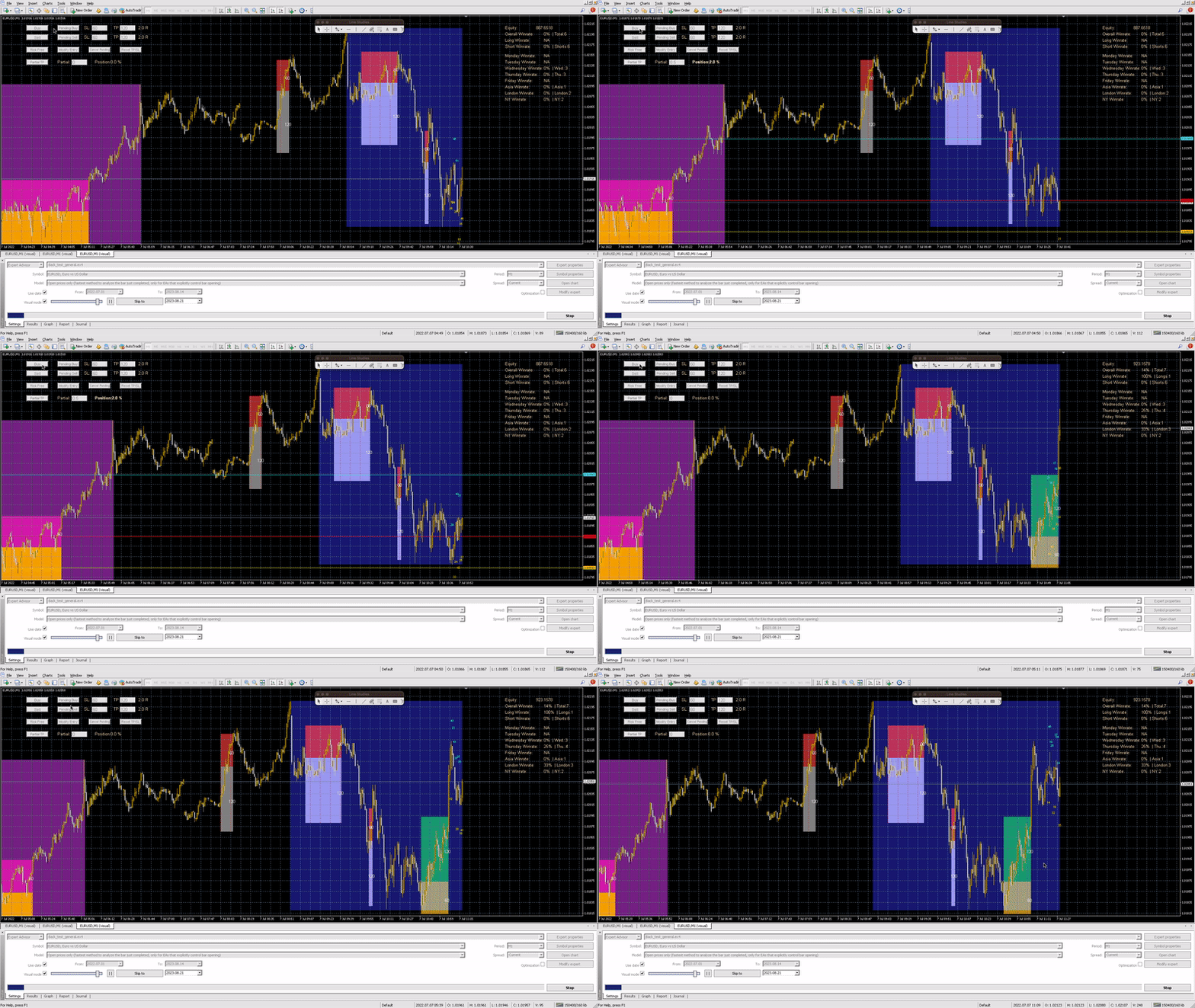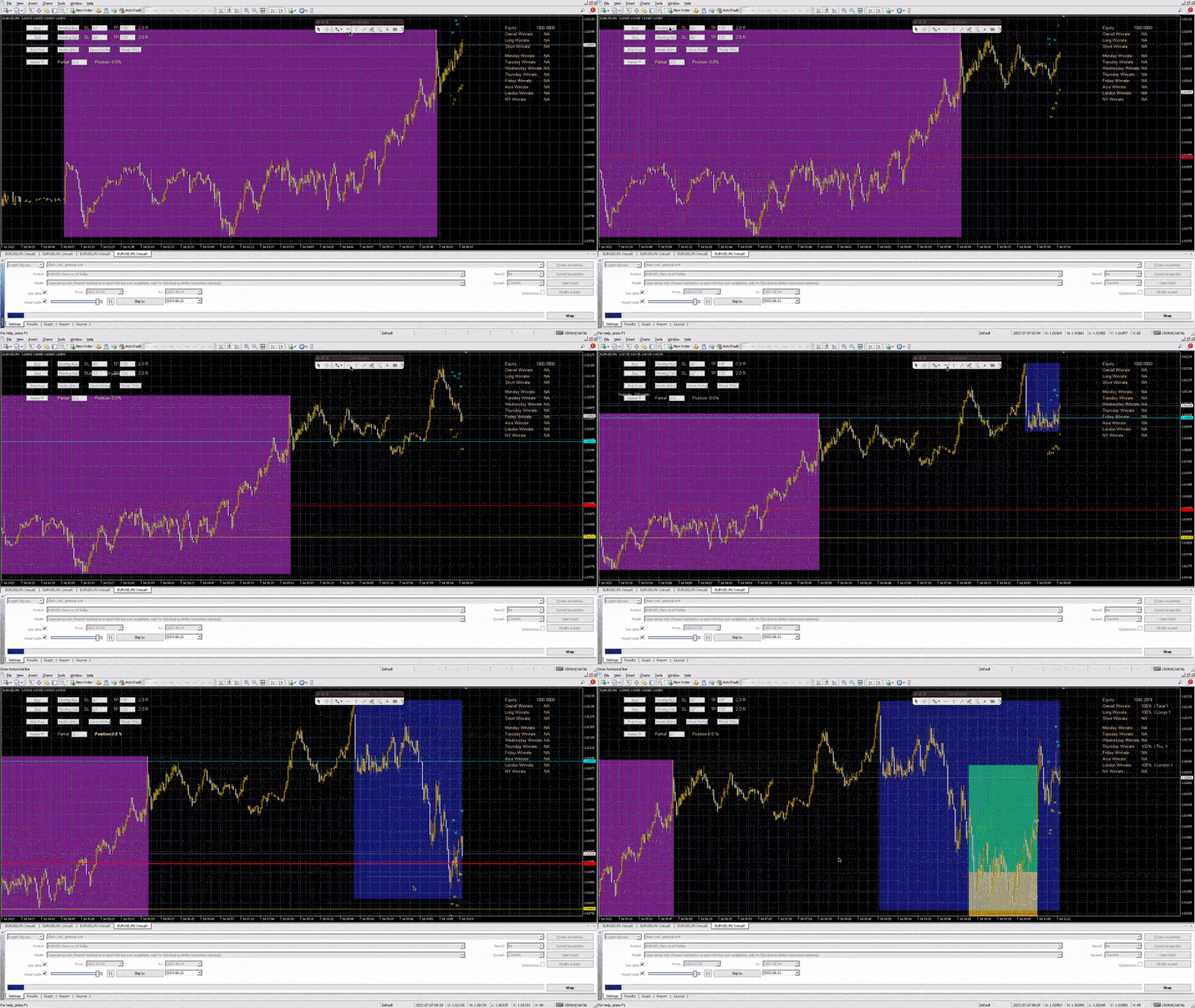
Smart Backtest Trainer

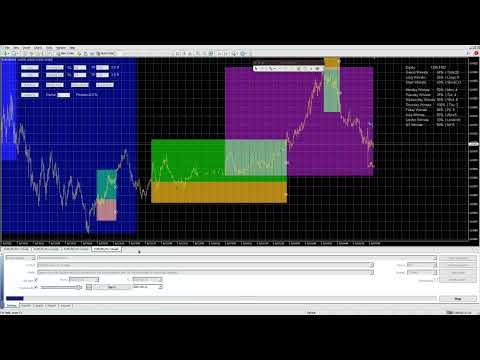
Manually backtesting your strategy or trading system on MT4 Strategy Tester like you do on TradingView, but with free offline history data provided by MT4 or your broker, which means more resposive and much more lower timeframe data available.  Because MT4 Strategy Tester doesn't detect mouse events, we will use the MT4 Horizontal Line tool and Arrows tool to modify the TP/SL/Entry and etc. on the screen.


Features:

70% TradingView backtesting user experience,  due to the Strategy Tester's limitation.
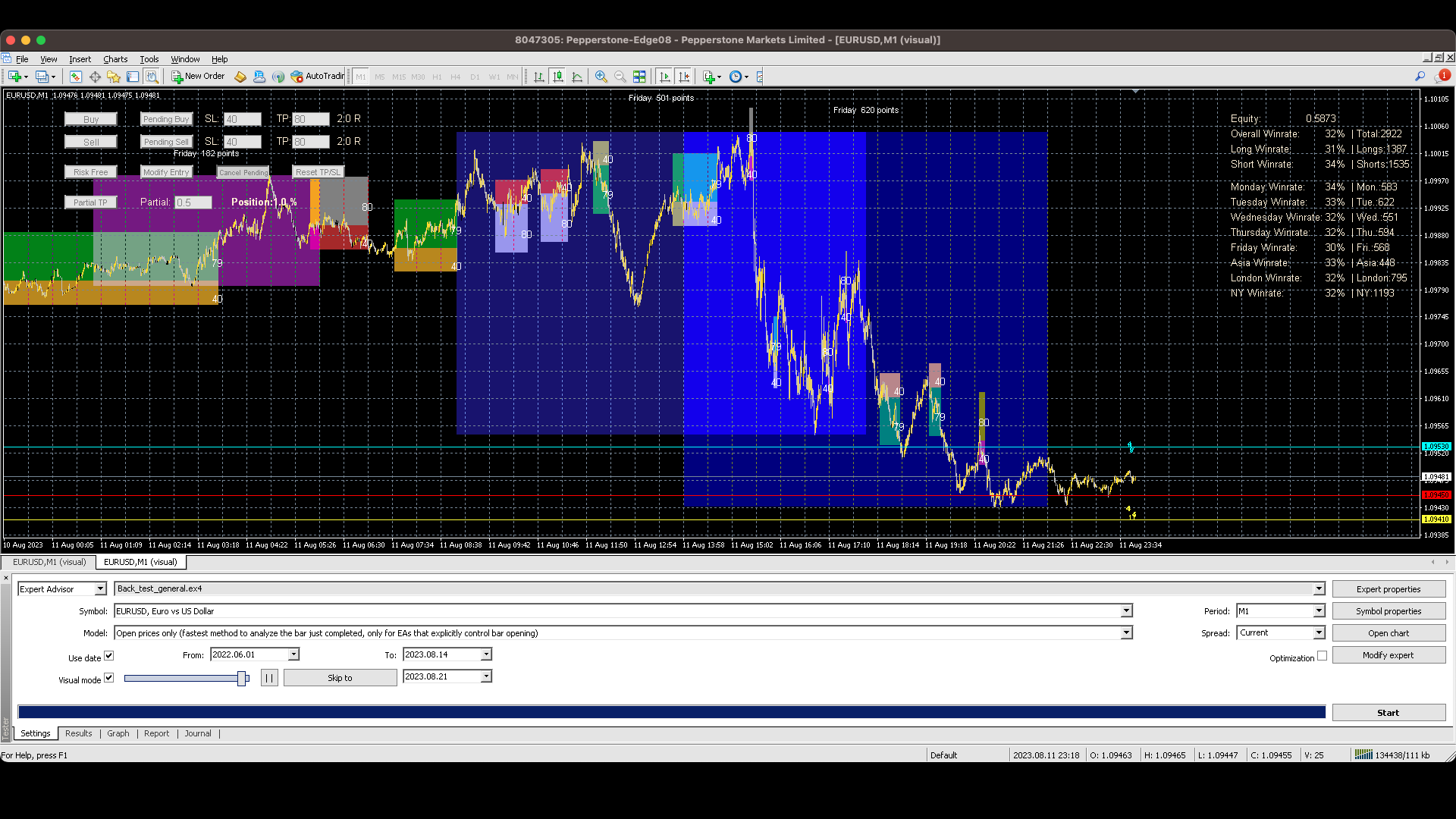
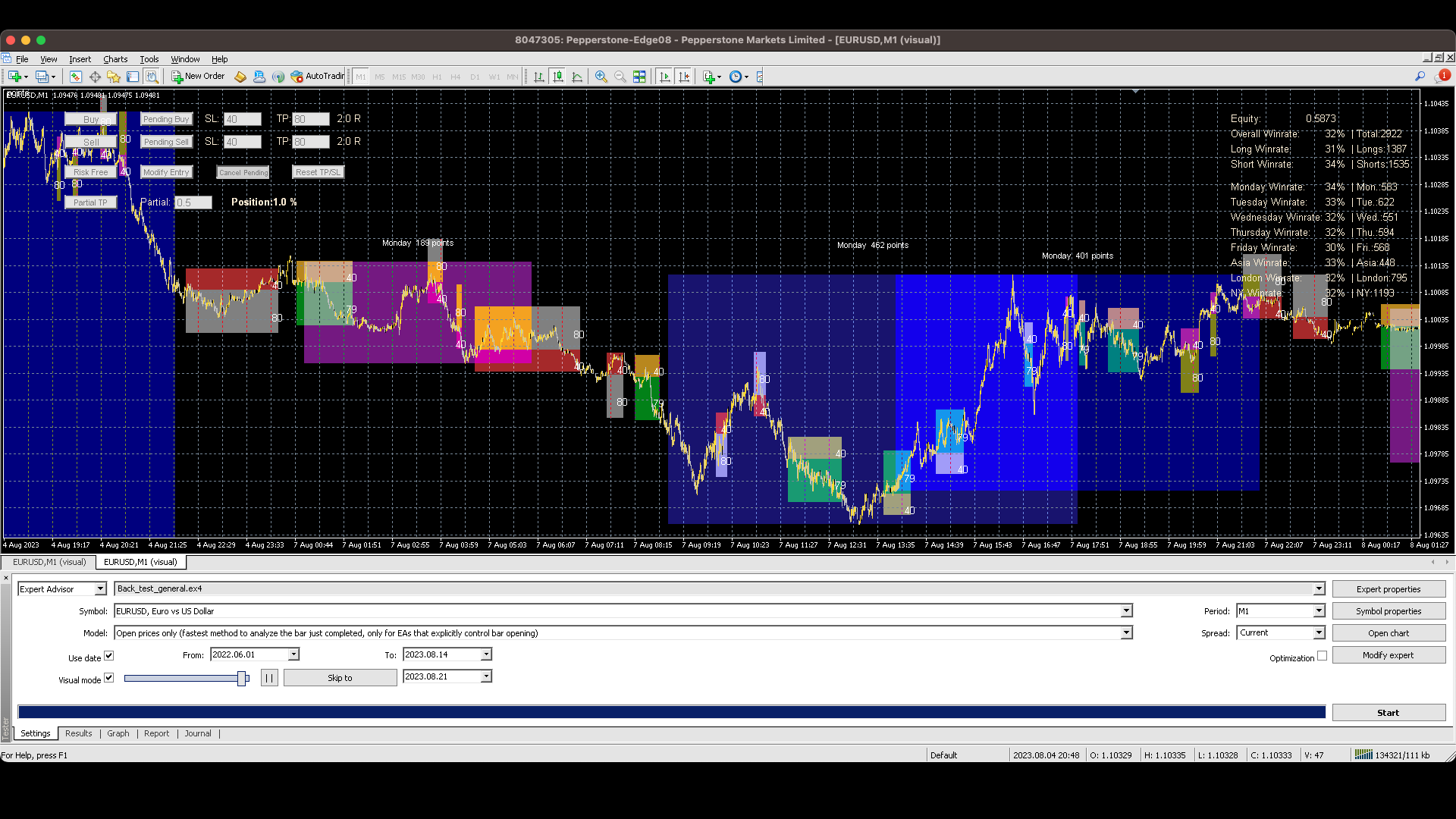
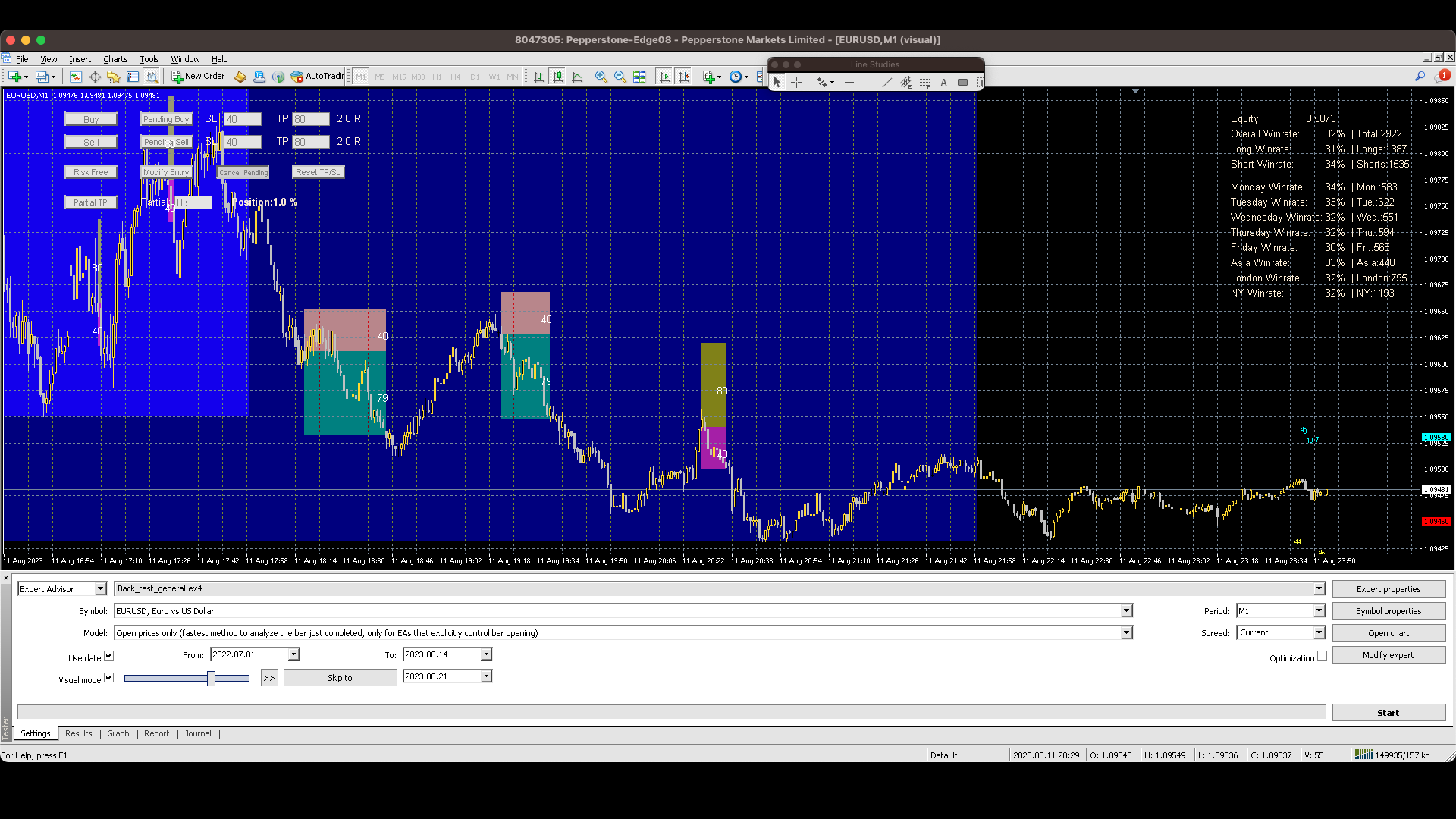
With trading result panel that shows total profit or loss and winrates to benchmark your performace.
With the simulation of Buy Limit/Buy Stop/Sell Limit/Sell Stop orders. 
With thte simulation of setting a Partial TP target. 
With the simulation of moving Stoploss over Entry price.
With the simulation of one click Buy/Sell Market Order.
With responsiveness and more lower timeframe history data to play with.
With transparent color marks for Asian/London/New York and custom session, and text to show the session's weekday.(You need to input the open and close time based on your timezone at the moment)
With bar strengh text to show the latest bars' span points from high to low.
You can even see your winrates by weekdays and sessions 
Available without internet if it's not the first time you run backtest on the pair.
You can set a fixed percentage of your equity to risk per trade, only available in this way though.
And you could adjust your Take Profit/Stoploss/Entry as your initial TP/SL which means it will re-calculate your Risk Reward Ratio (P.S. Moving stoploss over entry price doesn't re-calculate your Risk Reward Ratio).


                            How to use:

                            Market Orders: Just click Buy/Sell and you can simulate Market orders with your preset SL/TP points. You can change the SL/TP by inputting the number or using the MT4 Horizontal Line tool.

                            Buy Limit/Buy Stop/Sell Limit/Sell Stop Orders: These orders need to place in 2 steps: Step 1, use the MT4 Horizontal Line tool to set your entry price. Step 2, click Pending Buy/Pending Sell order, and wait for the price to tap the Entry Line.

                            Modifying TP/SL: Just use the MT4 Horizontal Line tool again. The TP or SL will move to the Horizontal Line's price. You can drag the Horizontal Line until you get your price.  P.S. Modifying TP/SL will change the Risk Reward Ratio(Unless you use the "Move Risk Free" feature). Because we think that traders may need a little time to set order as decided.

                            Reset TP/SL:Reset the TP/SL points to your preset points.

                            Moving Stoploss to Risk Free: There are 2 states for this feature.

                                      • Feature 1: When the Stoploss is behind your entry, clicking the Risk Free button will directly move the stoploss right before your entry price.

                                      • Feature 2: This is a two-step feature. If your stoploss is already protecting your entry price. Step 1: Click Risk Free , Step 2: Use the Horizontal Line to more your Stoploss further to protect more profit.

                                    Modifying Entry: If you think that the entry was not what you decided to enter, you could modify your entry. There are 2 ways to modify your entry.

                                        • Method 1: Use the one of the MT4 Arrows tool to move the entry, you can drag the arrow until it reaches your price. Your SL/TP will also be modified accordingly.

                                        • Method 2: Use the Modify Entry Button, but since MT4 Strategy Tester doesn't detect mouse clicks, you need to wait one tick to have the button activated, and then use the MT4 Horizontal Line to again to modify your decided price. 


                                      Partial Taker: This is also a two-step feature, Step 1, click the Partial TP button first. Step 2, use the MT4 Horizontal Line tool to set your second TP. You can preset the percentage of your active position to take partial profit.


                                        EA Properties:

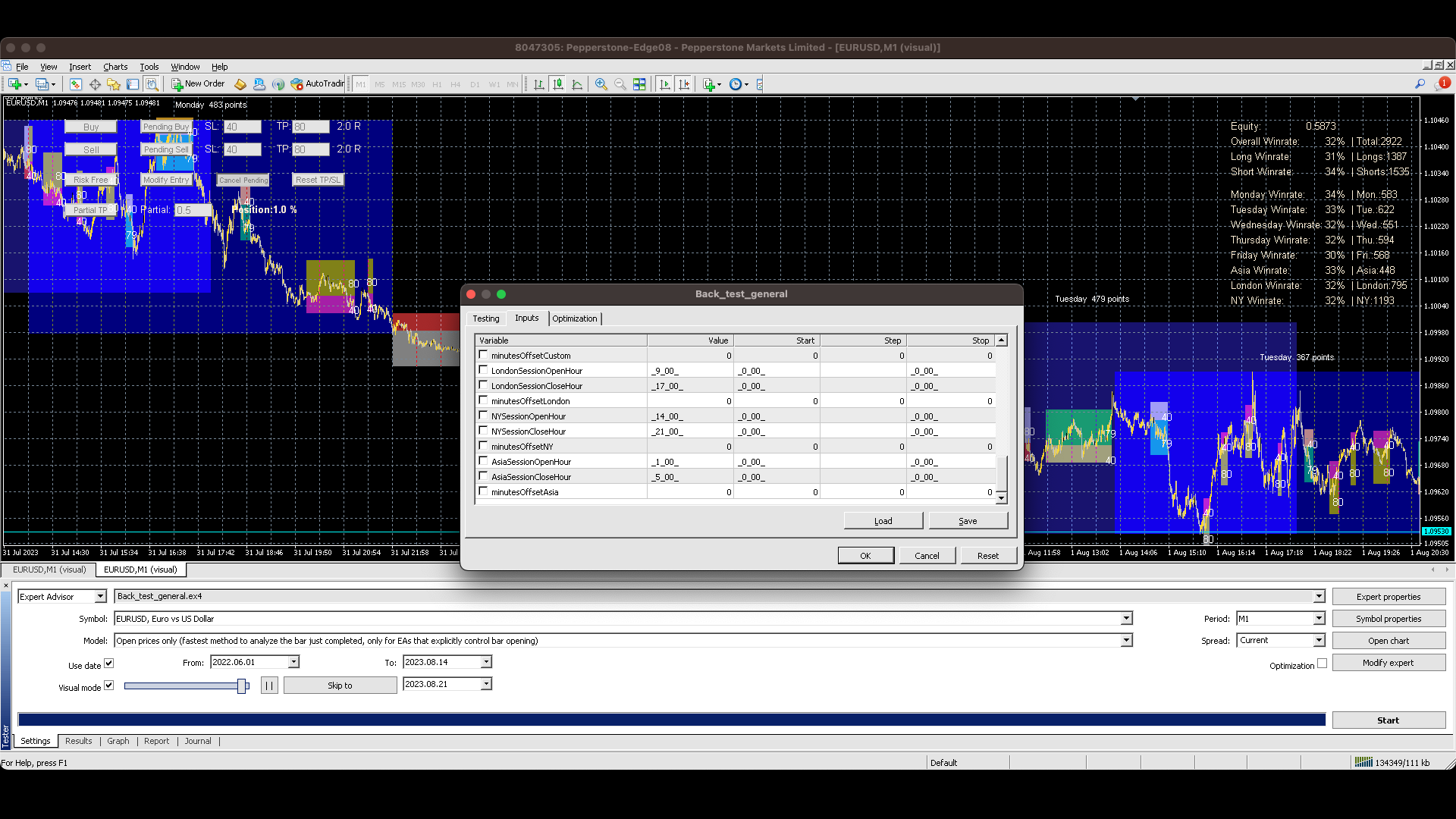
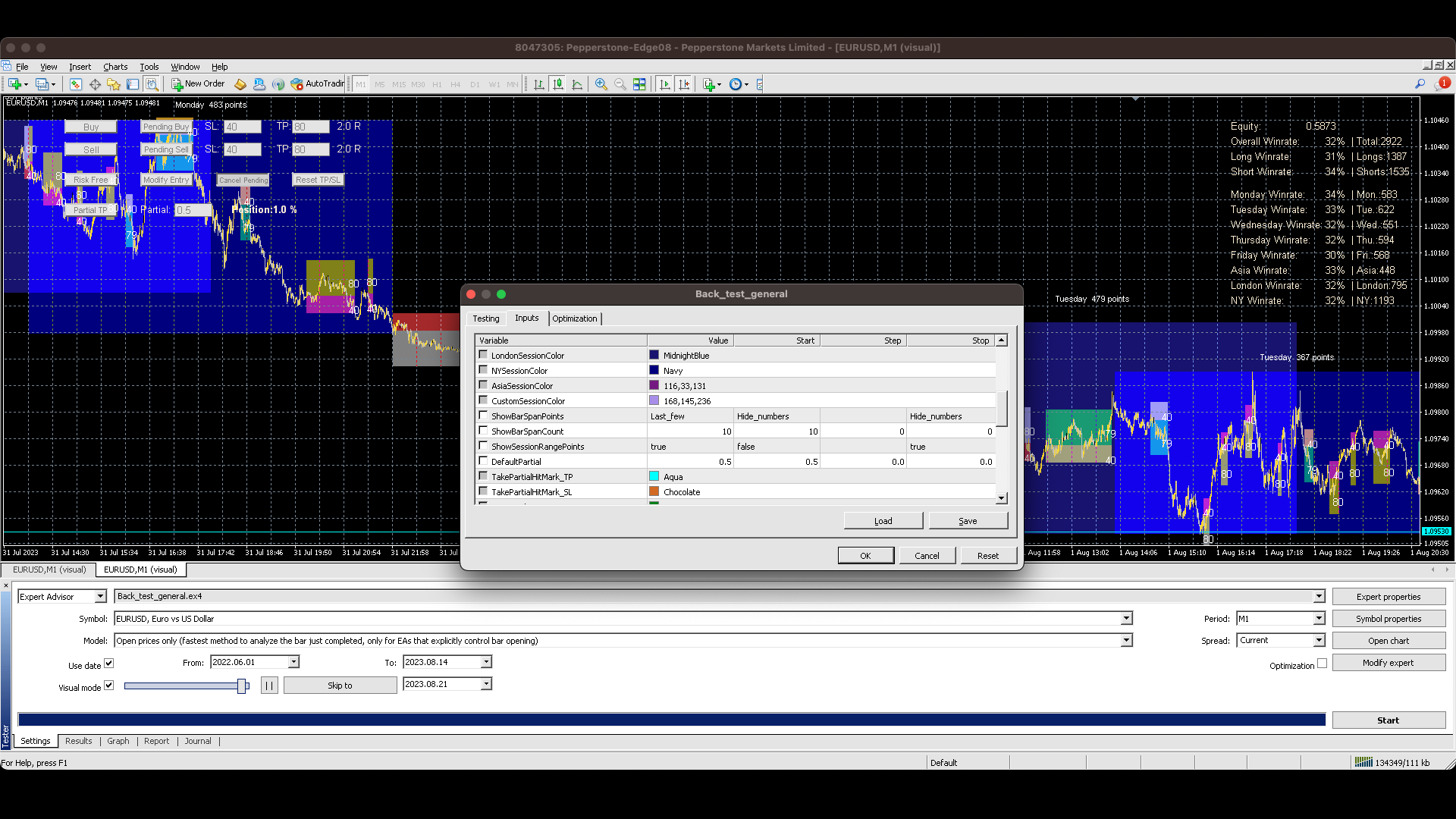
                                        Marking Exchange Sessions(session open hours, close hours, minutes offset): You could set the time in the properties, you can set the opening and closing hour for each session based on your timezone. For US stock markets, you could set the minutesOffSet to fit the 30 min opens.

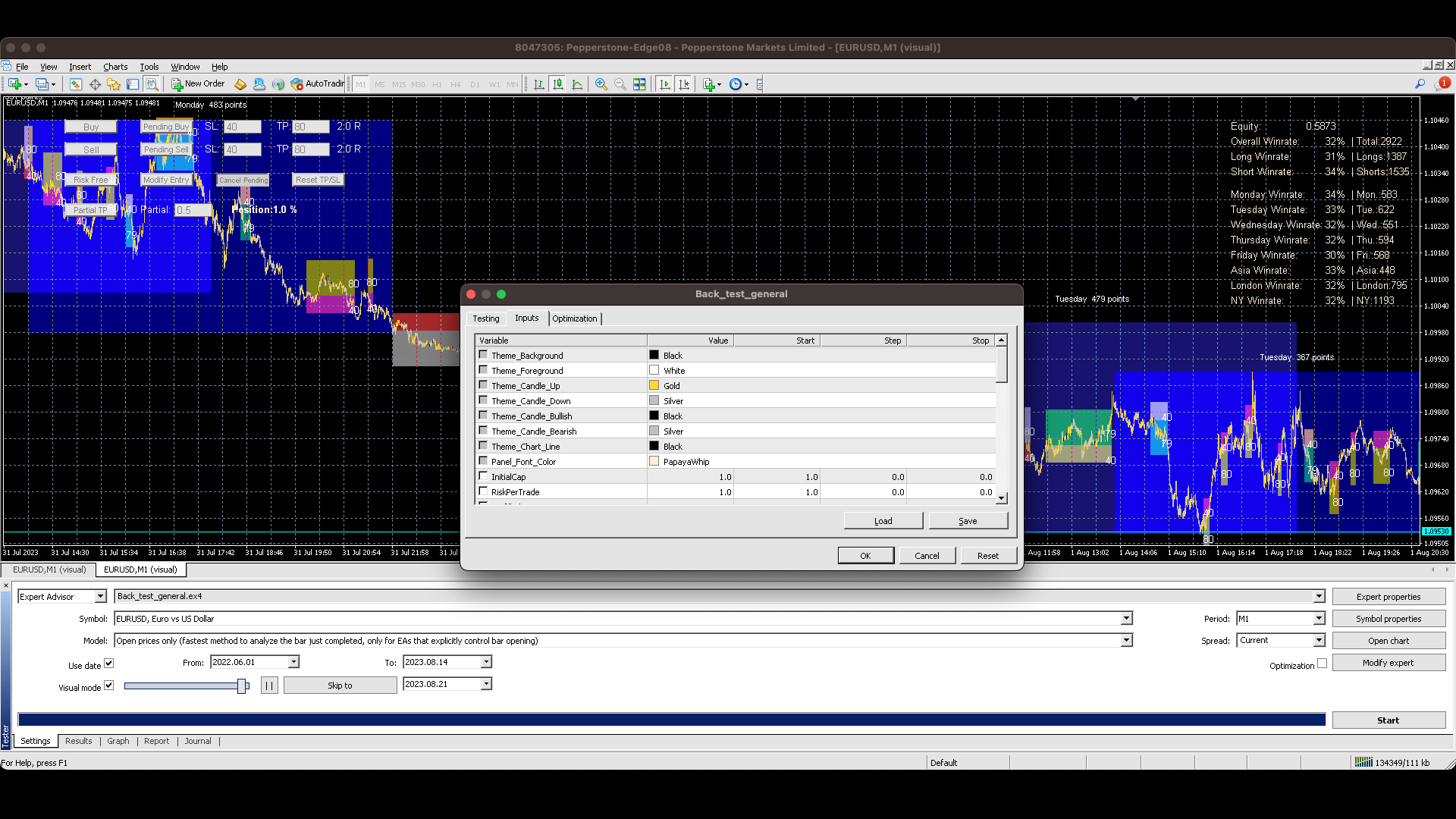
                                        InitialCap:  You can set the starting Equity here. Default is 1. You can set as big as you want. But using 1 is easier for you to see your performance. 

                                        RiskPerTrade:  This means the percentage of your Equity you will lose if you lose a trade. Multiplying the Risk Reward Ratio is how much you can get by winning a trade.

                                        Prefilled_SL/Prefilled_TP:  The preset SL/TP for your Buy/Sell market and limit/stop orders.

                                        ShowBarSpanPoints:  Let you know how strong the latest bars so that you can set a proper SL/TP, or to enter or not.

                                        ShowBarSpanCount:  When you use Last_few for  ShowBarSpanPoints, you can select how many bars that you want to see their strength.

                                        ShowSessionRangePoints:  When the session color mark is shown, you can see the difference in points for the exchange session high and session low.

                                        HideSessionColor: Show/Hide the Session Color markings.

                                        DefaultPartial:  Prefilled number for Partial TP feature.

                                        ShowWeekdayAndSectionWinrate:  Additional winrates to see when you perform better or worse.

                                        TickMode: Used to match the Strategy Tester's tickmode. 


                                          Produtos recomendados
                                          SnowyOwlFree
                                          RODION SLOTIN
                                          3 (2)
                                          The free version of the snowyowl trend adviser, which is based on determining combinations of candle patterns. A virtual trailing stop tracks each open order and groups open orders to close them simultaneously. In the free version, you can only work on one timeframe, while in the paid version, opening orders on the selected TF is a signal to open orders on lower TF.
                                          FREE
                                          PatternVol EA
                                          Alexandr Gribanov
                                          4.5 (2)
                                          O EA PatternVol é criado com base em suas próprias observações do mercado e consiste em padrões, análise de velas, análise de volumes de velas e, também, a EA não contém indicadores. No momento, o advisor é um pequeno construtor de minhas estratégias não indicadoras, você pode desabilitar e habilitar cada estratégia separadamente, ou fazer uma montagem a partir de várias estratégias. O trabalho no consultor continua até hoje, novas estratégias são adicionadas, algoritmos são aprimorados. No fut
                                          FREE
                                          Scalping Day Trading Support Utility Scalping One MT4 free One position is displayed with one button. View P & L, Lot, and Point in real time. It is possible to switch the display of positions of only chart currencies and all currency pairs.  (The free version has only 3 positions) Supports automatic identification in Japanese and English   Account currency notation corresponds to dollar, euro, pound, yen (automatic identification) The timeline drawing function can be linked with the clock disp
                                          FREE
                                          NAS100 Auto Sl And TP
                                          Moustapha Boulouz
                                          5 (2)
                                          Apresentando o NAS100 Auto SL e TP Maker para MT4: Nunca mais perca a definição de StopLoss e TakeProfit com o nosso NAS100 Auto SL e TP Maker, um assistente indispensável para os traders que navegam no mercado Nasdaq 100 no MetaTrader 4. Esta ferramenta foi concebida para aqueles que procuram uma solução perfeita para automatizar a gestão dos níveis de StopLoss e TakeProfit. Caraterísticas principais: Automação sem esforço: Monitoriza automaticamente as transacções Nasdaq 100 sem StopLoss e/ou
                                          FREE
                                          Period Change Button
                                          Rainer Albrecht
                                          3 (1)
                                          Fastest way to change the period. Suitable for traders who use many charts and timeframes. Size, shape and color can be customized. Inputs Parameters Corner — Choose corner placement Standart is "Right lower chart corner" Color — Background color of the button ColorText — Text color of the button ColorOn — Background color of the button for the current period ColorOnText — Text color of the button for the current period Font — Arial, Verdana... FontSize — Size of the font in pixels DistanceX —
                                          FREE
                                          Free automatic Fibonacci is an indicator that automatically plots a Fibonacci retracement based on the number of bars you select on the BarsToScan setting in the indicator. The Fibonacci is automatically updated in real time as new highest and lowest values appears amongst the selected bars. You can select which level values to be displayed in the indicator settings. You can also select the color of the levels thus enabling the trader to be able to attach the indicator several times with differe
                                          FREE
                                          一键平仓小工具,可以针对买单、卖单和挂单进行批量操作,可以操作当前图表订单和所有订单,简单高效。 第一行第一个按钮是关闭当前图表 品种 所有买单,第二个按钮是关闭当前图表品种的所有卖单,第三个按钮是关闭当前图表 品种 的所有订单; 第二行 第一个按钮是删除当前图表 品种 所有买单挂单,第二个按钮是 删除 当前图表品种的所有卖单 挂单 ,第三个按钮是 删除 当前图表 品种 的所有 挂单 ; 第三行第一个按钮是关闭所有 品种的全部买单,第二个按钮是关闭所有 品种的全 卖单,第三个按钮是关闭所有 品种的全部订单; 第四行第一个按钮是删除所有 品种全部买单挂单 ,第二个按钮是 删除 全部品种 的全部卖单挂单 ,第三个按钮是删除 全部品种 的全部挂单 。 希望此程序能对您有用
                                          FREE
                                          SL and TP Setter
                                          Giacomo Barone
                                          4 (1)
                                          You can manually open a trade (one click), and this EA will take care of setting the SL and TP. SL and TP are set based on the number of pips you specify in the input screen. You can also choose monetary SL and TP. SL and TP are determined based on the weighted average price (WAP), so if you open a new trade, SL and TP will be updated according to the new WAP. The WAP is not unique but differentiated between buy and sell trades (this is useful only if you open opposite trades on the same chart)
                                          FREE
                                          Server Time On Chart
                                          Joaquin Nicolas Metayer
                                          Server Time On Chart is a simple indicator that shows the time of the broker's server with hours, minutes and seconds in the lower left corner of the chart's. Within the inputs you can only change the size of the font and the color you want depending on your taste. You can see more of my publications here: https://www.mql5.com/en/users/joaquinmetayer/seller
                                          FREE
                                          This MQL4 indicator creates a customizable grid of horizontal lines on your trading chart. Here's what it does: **Main Functions:** - Draws equally spaced horizontal lines across the visible price range - Supports two line types: horizontal lines or trend lines with forward projection - Automatically adjusts to price scale changes **Key Features:** 1. **Customizable Spacing**: Set grid distance in pips (20 pips by default) 2. **Flexible Starting Point**: Auto-calculates starting price or lets
                                          FREE
                                          Grid Assistant Pro
                                          Alessandro De Cristofaro
                                          Grid Assistant Pro – Utility for Managing Grid Strategies on MetaTrader 4 Grid Assistant Pro is a professional utility that helps traders manage and monitor unidirectional grid strategies directly from the MT4 chart. It provides a visual dashboard , clear controls, and automated risk protection features for precise and efficient grid operation. Key Features Visual Dashboard Real-time metrics: Balance, Equity, Floating P/L, Drawdown %, Free Margin Grid status: active and pending or
                                          FREE
                                          Fully functional manual trade panel with risk/reward, auto SL, lot size calculation, one-click trading, hidden (virtual) stop loss/take profit and pending orders, scale in and out of trades (partial close), news events and more. Works with all symbols not just currency pairs. Brings an incredible amount of functionality to MetaTrader for free and for both demo and live accounts. Features Lot size calculation - based on % of account to risk, fixed amount or dynamic lots Automatic take profit base
                                          FREE
                                          IceFX TradeInfo
                                          Norbert Mereg
                                          4.77 (44)
                                          IceFX’s TradeInfo é um indicador de utilidade que exibe as informações mais importantes da conta e a posição atual. Informações exibidas: Informações sobre a conta (saldo, capital líquido, Margem Livre). spread, rebaixamento (DD), objetivos de lucro, expectativas de perdas, etc. Número de posições abertas, volume (LOTES), lucro. Intervalo diário e o de ontem. Tempo restante para o próximo candle. Informações de lucro do último dia (com indicador integrado IceFX ProfitInfo). Risco - informações b
                                          FREE
                                          Auto TP SL Manul Open Panding Orders Overview: AUto TP SL Manul Open Panding Orders is an innovative trading platform designed to enhance trading efficiency and effectiveness in managing financial investments. Key Features: Automated Management : Seamlessly manage take-profit (TP) and stop-loss (SL) orders with our advanced automation tools. Manual Adjustments : Maintain control with manual options, allowing traders to adjust orders according to market conditions.
                                          FREE
                                          This simple but useful script calculates the lot in % of the deposit. It is indispensable for risk management. There is only one customizable parameter: MaxRisk - risk in % for lot calculation. The product works as a standard script. Launch it once on an appropriate chart and start trading using the calculated lot value. Genious is simplicity! Happy trading!
                                          FREE
                                          This MQL4 code is a custom indicator that draws multiple colored rectangles on a chart, spaced apart by a defined pip distance, and projected into the future. Here's a brief breakdown: Purpose: Draws several horizontal rectangles (zones) starting from a specified price. Rectangles are spaced apart vertically by a pip distance. Colors alternate between FirstColor and SecondColor . Rectangles can be drawn behind candles and optionally filled. Each rectangle extends into the future for a specified
                                          FREE
                                          Simple RSI Forex Trading Strategy
                                          Victor Manuel Valderrama Zamora
                                          4 (1)
                                          Diversify the risk in your trading account by combining our Expert Advisors. Build your own custom trading system here:   Simple Forex Trading Strategies The expert advisor opens trades when RSI indicator enter in oversold or overbought areas. The Stop Loss, Take Profit, and Trailing Stop are calculated based on the ATR indicator. The recommended currency pair is EURGBP and the recommended timeframe to operate and to do backtests is H4. This Expert Advisor can be profitable in any TimeFrame an
                                          FREE
                                          OTRX Fimathe Backtest é uma ferramenta para o Trader ou Entusiasta que utiliza a técnica Fimathe criada pelo Trader Marcelo Ferreira realizar seu treinamento e validar se consegue obter lucratividade. Nesta ferramenta você vai conseguir: 1. Definir se esta buscando uma entrada de compra ou de venda. (Tendência). 2. Definir clicando 2 vezes sobre as linhas horizontais onde ficará a sua Zona de Referência e sua Zona Neutra. 3. Acompanhar a entrada, subiciclo e saída da negociação. 4. Resumo de Tra

                                          FREE
                                          Trendline indicator
                                          David Muriithi
                                          2 (1)
                                          Are you tired of drawing trendlines every time you're analyzing charts? Or perhaps you would like more consistency in your technical analysis. Then this is for you. This indicator will draw trend lines automatically when dropped on a chart. How it works Works similar to standard deviation channel found on mt4 and mt5. It has 2 parameters: 1. Starting Bar 2. Number of bars for calculation The   starting bar   is the bar which drawing of the trend lines will begin, while the   number of bars for c
                                          FREE
                                          Activation initiates the sequence from the initial symbol in the Market Watch roster, forming a perpetual loop that continues until deactivation. The system employs global terminal variables to sustain operational continuity amid symbol-induced reinitializations, thereby ensuring uninterrupted performance. This EA should not be checked off as 'Allowed live Trading' and is functional with that checkmark box, when uploading the EA. Principal advantages encompass augmented productivity in overseein

                                          FREE
                                          A simple button to completely close   all existing open trades   (both Buy and Sell) on the   current chart . Warning : Once the button is pressed, all open trades on the current chart will be deleted immediately without any more questions or dialogue. Use this utility very carefully. We recommend that you do a trial of removing open trades on a demo account first, before trying to use this utility on a real account.
                                          FREE
                                          SX Supply Demand Zones accurately identifies and draws high-probability Supply and Demand zones using a sophisticated algorithm. Unlike traditional indicators that clutter your chart, this indicator is designed with a focus on performance and a clean user experience. New Unique Feature: Interactive Legend System What truly sets this indicator apart from everything else is the Interactive Control Legend. You have a professional dashboard directly on your chart that allows you to: Show/Hide: Ins
                                          FREE
                                          Safety
                                          Sergey Ermolov
                                          5 (2)
                                          Eu acho que todo mundo conhece a regra da Gestão de dinheiro como "cofre". Para aqueles que não estão cientes, o cofre envolve o fechamento de metade da posição depois que o lucro da transação foi igual ao tamanho da parada. Assim, mesmo que o preço se desdobre e pegue o stop, você não perderá dinheiro, porque exatamente o mesmo tamanho de lucro foi obtido ao fechar parte da posição anteriormente. O Safety Advisor tem apenas uma configuração-Um lote de fechamento. Deixando - o na posição 0, O
                                          FREE
                                          The utility TradeKeeper Lite can show your profits for different periods and bip a sound when you reach a profit target value. Click the tachometer to quickly switch to the next profit period. There are 5 of them: This Day, This Week, This Month, Last 90 Days and All I Made. With the utility TradeKeeper Pro , available at this link , you can also open trades with a magic number and volume of your choice, trail any orders with a simple trail or iSAR-based trail, as well as close any open trades a
                                          FREE
                                          Account Info EA It is a tool that presents on the graph all the positions of the account, and specific information concerning the positions, but also the account. It enables the user to have an image of his account at a glance. Use like any expert advisor. You can't attach it in the same chart with other expert advisor. It does not have the ability to open or manage positions. You can attach it on any chart and any timeframe.
                                          FREE
                                          MQLTA Auto Close Demo
                                          MQL4 Trading Automation
                                          Auto Close is an expert advisor that can assist you with your money and risk management rules. The EA can monitor your Balance, Equity, Margin, Global Profit and Global Loss and alert you in case any of these reaches a specified threshold. This Demo Version has Notification and Close features disabled, full version can be found https://www.mql5.com/en/market/product/29141 How does it work? Load the Auto Close EA in the chart and set the parameters you want to keep monitored. If any of the risk
                                          FREE
                                          AutoClusterEdge
                                          Hoang Loc Tran
                                          AutoClusterEdge – Nguồn điện có cấu trúc. Phục hồi chiến lược. AutoClusterEdge là một hệ thống tự động dịch hoàn toàn được thiết kế cho các giao dịch dựa trên hệ thống mạng. Hệ thống tích hợp Chỉ số sức mạnh tương đối (RSI), Đường trung bình động (MA) và Phạm vi biến động thực trung bình (ATR) để khởi tạo và quản lý các cụm giao dịch, điều chỉnh mô-đun thế một cách hoạt động bằng cách sử dụng chuỗi Fibonacci và thực hiện lệnh thoát chiến lược có điều kiện. Hệ thống này đặc biệt phù hợp với nhữn
                                          FREE
                                          Profitstat é um indicador livre que varre o seu histórico e exibe-o no gráfico. A versão gratuita mostra o número de negócios e de lucro feitas no dia atual e anterior. Os dados são atualizados instantaneamente, logo quando uma negociação é fechada. Basta anexá-lo a qualquer gráfico e ele dá os dados da conta, independentemente da moeda do gráfico o período.
                                          FREE
                                          The Saz_Timer indicator belongs to the Saz_Forex suite of professional indicators designed by Traders, for Traders. This indicator will show minutes and seconds of real time on the chart window. The indicator uses the OnTimer() event so it can update even while no ticks received on the chart. The text is shown toward the bottom right of the chart, encircled red in the screenshot. Inputs: Text Colour, allows selection of the colour for the text.
                                          FREE
                                          MASi Three Screens
                                          Aleksey Terentev
                                          5 (2)
                                          MASi Three Screens is based on the trading strategy by Dr. Alexander Elder. This indicator is a collection of algorithms. Algorithms are based on the analysis of charts of several timeframes. You can apply any of the provided algorithms. List of versions of algorithms:     ThreeScreens v1.0 - A simple implementation, with analysis of the MACD line;     ThreeScreens v1.1 - A simple implementation, with analysis of the MACD histogram;     ThreeScreens v1.2 - Combines the first two algorithms in
                                          FREE
                                          Os compradores deste produto também adquirem
                                          Local Trade Copier EA MT4
                                          Juvenille Emperor Limited
                                          4.96 (108)
                                          Experimente uma cópia de negociação excepcionalmente rápida com o Local Trade Copier EA MT4 . Com sua fácil configuração de 1 minuto, este copiador de negociações permite que você copie negociações entre vários terminais MetaTrader no mesmo computador Windows ou em um Windows VPS com velocidades de cópia ultra rápidas de menos de 0.5 segundos. Seja você um trader iniciante ou profissional, o Local Trade Copier EA MT4 oferece uma ampla gama de opções para personalizá-lo de acordo com suas necess
                                          Trade Assistant MT4
                                          Evgeniy Kravchenko
                                          4.42 (193)
                                          Ajuda a calcular o risco por comércio, a fácil instalação de uma nova encomenda, gestão de encomendas com funções de fecho parcial, trailing stop de 7 tipos e outras funções úteis. Materiais e instruções adicionais Instruções de instalação - Instruções para a aplicação - Versão de teste da aplicação para uma conta de demonstração Função de linha Mostra no gráfico a linha de Abertura, Stop Loss, Take Profit. Com esta função é fácil definir uma nova ordem e ver as suas características adicionais
                                          Exp COPYLOT CLIENT for MT4
                                          Vladislav Andruschenko
                                          4.69 (65)
                                          Copiadora comercial para MetaTrader 4. Ele copia negociações, posições e pedidos em forex de qualquer conta. É uma das melhores copiadoras comerciais  MT4 - MT4, MT5 - MT4 para a versão COPYLOT MT4  (ou MT4 - MT5 MT5 - MT5 para a versão COPYLOT MT5 ). Versão MT5 Descrição completa +DEMO +PDF Como comprar Como instalar    Como obter arquivos de log    Como testar e otimizar    Todos os produtos da Expforex Versão da copiadora para o terminal MetaTrader 5 ( МТ5 - МТ5, МТ4 - МТ5 ) -  Copylot Cli
                                          Bem-vindo ao Trade Manager EA—uma ferramenta de gestão de risco criada para tornar o trading mais intuitivo, preciso e eficiente. Não é apenas uma ferramenta para executar ordens, mas uma solução abrangente para planejamento de operações, gerenciamento de posições e controle de risco. Seja você um iniciante, trader avançado ou scalper que precisa de execução rápida, o Trade Manager EA adapta-se às suas necessidades, oferecendo flexibilidade em todos os mercados, desde forex e índices até commodi
                                          Copy Cat More Trade Copier MT4 (Cópia Gato MT4) não é apenas um simples copiador local de operações; é uma estrutura completa de gestão de risco e execução, projetada para os desafios atuais do trading. Desde desafios de prop firms até a gestão de contas pessoais, adapta-se a cada situação com uma combinação de execução robusta, proteção de capital, configuração flexível e tratamento avançado das operações. O copiador funciona tanto no modo Master (emissor) quanto no modo Slave (receptor), sincr
                                          Trade copier MT4
                                          Alfiya Fazylova
                                          4.58 (33)
                                          Trade Copier é um utilitário profissional projetado para copiar e sincronizar negociações entre contas de negociação. A cópia ocorre da conta / terminal do fornecedor para a conta / terminal do destinatário, instalada no mesmo computador ou vps. Antes de comprar, você pode testar a versão demo em uma conta demo. Versão de demonstração aqui . Instruções completas aqui . Principais funcionalidades e benefícios: Suporta a cópia de MT4> MT4, MT4> MT5, MT5> MT4, incluindo contas "MT5 netting". Os mod
                                          Trade Dashboard MT4
                                          Fatemeh Ameri
                                          4.96 (53)
                                          Tired of complex order placement and manual calculations? Trade Dashboard is your solution. With its user-friendly interface, placing orders becomes effortless, by a single click, you can open trades, set stop loss and take profit levels, manage trade lot size, and calculate risk to reward ratios, allowing you to only focus on your strategy. Say goodbye to manual calculations and streamline your trading experience with Trade Dashboard. Download  Demo Version  right now. You can find  Details of
                                          O MT4 para Telegram Signal Provider é uma ferramenta fácil de usar e totalmente personalizável que permite o envio de sinais para o Telegram, transformando sua conta em um provedor de sinais. O formato das mensagens é totalmente personalizável! No entanto, para uso simples, você também pode optar por um modelo predefinido e habilitar ou desabilitar partes específicas da mensagem. [ Demonstração ]   [ Manual ] [ Versão MT5 ] [ Versão Discord ] [ Canal do Telegram ]  New: [ Telegram To MT5 ] Conf
                                          The product will copy all telegram signal to MT4   ( which you are member  ) , also it can work as remote copier.  Easy to set up, copy order instant, can work with almost signal formats, image signal, s upport to translate other language to English Work with all type of channel or group, even channel have "Restrict Saving Content", work with  multi channel, multi MT5 Work as remote copier: with signal have ticket number, it will copy exactly via ticket number. Support to backtest signal. How to
                                          TradePanel MT4
                                          Alfiya Fazylova
                                          4.85 (92)
                                          O Trade Panel é um assistente comercial multifuncional. A aplicação contém mais de 50 funções de negociação para negociação manual e permite automatizar a maioria das operações de negociação. Atenção, a aplicação não funciona no testador de estratégia. Antes de comprar, pode testar a versão de demonstração numa conta de demonstração. Versão de demonstração aqui . Instruções completas aqui . Comércio. Permite realizar operações de negociação com um clique: Abra as ordens e posições pendentes com
                                          Riskless Pyramid
                                          Snapdragon Systems Ltd
                                          5 (1)
                                          Introduction This powerful MT4 trade mangement EA offers a way potentially to aggressively multiply trade profits in a riskfree manner. Once a trade has been entered with a defined stoploss and take profit target then the EA will add three pyramid add-on trades in order to increase the overall level of profit. The user sets the total combined profit target to be gained if everything works out. This can be specified either as a multiple of the original trade profit or as a total dollar amount. Fo
                                          Smart Channel M4
                                          Vahidreza Heidar Gholami
                                          The trend in the market can be predicted using trend lines but the problem is you don’t know where exactly the price is going to touch the trend line where you can put your pending orders on. Smart Channel Expert Advisor makes it possible to put an advanced channel around the price data, which can be configured to handle placing orders, opening and closing positions, managing risk per trade, spread, slippage, and trailing stop-loss and take-profit automatically. Features Money Management (Calcul
                                          Equity Protect Pro: Seu Especialista em Proteção de Contas Abrangente para Negociação Tranquila Se você está procurando recursos como proteção de conta, proteção de patrimônio, proteção de portfólio, proteção de múltiplas estratégias, proteção de lucro, coleta de lucro, segurança de negociação, programas de controle de risco, controle automático de risco, liquidação automática, liquidação condicional, liquidação programada, liquidação dinâmica, trailing stop loss, fechamento com um clique, liqu
                                          Seconds Chart — uma ferramenta exclusiva para criar gráficos de segundos no MetaTrader 4 . Com o Seconds Chart , você pode criar gráficos com períodos definidos em segundos, proporcionando flexibilidade e precisão ideais para análise, indisponíveis em gráficos padrão de minutos ou horas. Por exemplo, o período S15 indica um gráfico com velas de 15 segundos. Você pode usar quaisquer indicadores, Expert Advisors e scripts com a mesma facilidade dos gráficos padrão. Diferente das ferramentas padrão
                                          Take a Break
                                          Eric Emmrich
                                          5 (31)
                                          One tool to protect all your EAs — news filter, equity protection, time filter and more — free demo available Take a Break has evolved from a basic news filter into a comprehensive account protection solution. It pauses your other Expert Advisors during news events or based on custom filters. When trading resumes, it automatically restores your entire chart setup , including all EA settings. Typical use cases: One news filter for all your EAs. Pause trading during news or high volatility — and c
                                          Exp Averager
                                          Vladislav Andruschenko
                                          4.82 (22)
                                          Exp-Averager   foi projetado para calcular a média de suas negociações que receberam um certo rebaixamento, abrindo negociações de média. O consultor tem a capacidade de abrir novas posições na tendência ou contra a tendência atual. Ele também inclui um recurso de parada móvel inteligente que se aplica a uma série de posições. O orientador pode aumentar ou diminuir o tamanho do lote das posições. Esta é uma estratégia amplamente utilizada para trazer posições perdedoras ao preço médio. Versão M
                                          Here is the translation in Brazilian Portuguese, keeping the HTML code structure and technical variable names intact: Descrição O TradeSync Pro é um utilitário técnico projetado para a sincronização local de negociações entre terminais MetaTrader rodando no mesmo computador. É otimizado para gestão de contas, comparação de execução entre diferentes corretoras e replicação estratégica de negociações. Licenciamento e Compatibilidade Multiplataforma O software suporta vários cenários de sincronizaç
                                          Comprehensive on chart trade panel with the unique ability to be controllable from mobile as well. Plus has a library of downloadable configuration, e.g. exit rules, extra panel buttons, pending order setup and more. Please see our product video. Works with all symbols not just currency pairs. Features On chart panel plus controllable from free app for Windows, iPhone and Android Built-in script engine with library of downloadable configuration, e.g. add 'Close All Trades in Profit' button, exit
                                          Trading History MT4
                                          Siarhei Vashchylka
                                          5 (9)
                                          Trading History - A program for trading and money management on the history of quotes in stratagy tester. It can work with pending and immediate orders, and is equipped with trailing stop, breakeven and take profit functions. Very good for training and testing different strategies. Manual (Be sure to read before purchasing) Advantages 1. Allows you to test any trading strategy in the shortest possible time 2. An excellent simulator for trading training. You can gain months of trading experience
                                          --------------Welcome to use [MQL5 Signal Analyze Master]------------------  Function: Draw order tracks of MQL5 MT4 and MT5 signal on MT4 chart. [Using guide] 1.Use it as Experts. 2.Download history record from MQL5 signal(MT4 signal or MT5 signal).  3.Paste history record file below "MQL4/Files/" 4.Load [Signal Analyze Master] on the symbol chart what you want to analyze. 5.Paste the history record file name to parameter 'FileName' 6.Select  SignalType  match the history you download on MT4
                                          News Filter EA that send you a Push notification to your MT4 phone APP and TURN OFF MT4 Automatically Before News.  This EA doesn't work in backtest From 1.7 version  the EA have  Close all trades before news functions added. You only need to allow that url in MT4 options: To see the url and how to add it to MT4, visit this post: https://www.mql5.com/en/blogs/post/754402 When Metatrader is turned off, it saves the status of all the charts, indicators and Expert Advisors that you have in them
                                          RSI Divergence Scanner is a multi-timeframe and multi-symbol dashboard and alert that checks all timeframes and symbols to find divergences between price chart and RSI indicator. This divergence scanner is integrated with support and resistance zones so you can check the RSI divergences in the most important areas of the chart to find trend reversals in the price chart. Download demo version   (works on M 1,M5,M30,W1 timeframes) Full description of scanner parameters ->   click here . How to get
                                          EA Hedger
                                          Sergej Chukhista
                                          4 (4)
                                          Você comprou um consultor de negociação, assinou um sinal ou está negociando manualmente? Não se esqueça da gestão de riscos. EA Hedger   é um utilitário de negociação profissional com muitas configurações que permite gerenciar riscos usando cobertura. Hedging é uma técnica de negociação que envolve a abertura de posições opostas às posições já abertas. Com a ajuda da cobertura, a posição pode ser bloqueada total ou parcialmente (travada). Por que é lucrativo comprar este produto: Confiabilidad
                                          Simple and Easy MT4 Trade Panel by Winidecorw I created this EA to make your life easier by making it easier and faster to open your trades. The price will increase progressively, take advantage now! Simplify Your Trading with the Simple and Easy MT4 Trade Panel Are you tired of wasting time setting up each trade in MetaTrader 4? With the simple and easy MT4 trading dashboard, taking your trading to the next level has never been so quick and easy! This Trade Assistant dashboard is the Simple an
                                          O MT4 to Discord Signal Provider é uma ferramenta fácil de usar e totalmente personalizável, projetada para enviar sinais de negociação diretamente para o Discord. Esta ferramenta transforma sua conta de negociação em um provedor de sinais eficiente. Personalize os formatos de mensagens para se adequar ao seu estilo! Para facilitar o uso, selecione entre modelos pré-desenhados e escolha quais elementos da mensagem incluir ou excluir. [ Demo ] [ Manual ] [ Versão MT5 ] [ Versão Telegram ]  New: [
                                          EasyInsight AIO MT4
                                          Alain Verleyen
                                          4 (2)
                                          EASY Insight AIO – A solução tudo-em-um para trading inteligente e sem esforço Visão geral Imagine analisar todo o mercado — Forex, Ouro, Cripto, Índices e até Ações — em segundos, sem precisar examinar gráficos manualmente, instalar indicadores ou lidar com configurações complicadas. EASY Insight AIO é sua ferramenta definitiva de exportação para trading com IA, pronta para usar. Ela oferece um panorama completo do mercado em um único arquivo CSV limpo — pronto para análise imediata no ChatGP
                                          Telegram to MT4 Coppy
                                          Sergey Batudayev
                                          3.75 (8)
                                          Telegram para MT4:   A solução definitiva para cópia de sinais Otimize suas negociações com   o Telegram para MT4   , o utilitário de última geração desenvolvido para copiar sinais de negociação diretamente de canais e chats do Telegram para sua plataforma MetaTrader 4 — sem a necessidade de DLLs. Esta solução robusta garante a execução perfeita de sinais com precisão incomparável e opções de personalização, economizando seu tempo e aumentando sua eficiência. [ Instructions and DEMO ] Principais
                                          ManHedger MT4
                                          Peter Mueller
                                          5 (1)
                                          THIS EA IS A SEMI-AUTO EA, IT NEEDS USER INPUT. Manual & Test Version Please TEST this product before   BUYING  and watch my video about it. Contact me for user support or bug reports, or if you want the MT5 version! MT5 Version I do not guarantee any profits or financial success using this EA. With this Expert Advisor, you can: Implement your own   Zone Recovery   strategy to capitalize on trending markets. Create   Grid   trading strategies, to profit from ranging markets. Place orders easil
                                          KopirMT4 Copy trades for MT4
                                          Alexandr Gavrilin
                                          4.54 (82)
                                          KopirMT4 (CopierMT4) - transaction copier for the MetaTrader 4 terminal, copies (synchronizes, duplicates) transactions from any accounts (copier, copy dealers).  Supports copying: MT4 <-> MT4, MT4 -> MT5 Hedge, MT5 Hedge -> MT4 Free version for test Why exactly our product? The copier has a high speed and is not dependent on ticks. Copy speed - less than 0.5 sec. Transactions are copied with high accuracy, the scalper mode allows you to copy only at the best price. Able to increase transaction
                                          Este é um painel de negociação visual que ajuda você a realizar e gerenciar operações facilmente, evitando erros humanos e aprimorando sua atividade comercial. Ele combina uma interface visual fácil de usar com uma abordagem sólida de gerenciamento de riscos e posições. [ Guia de instalação | Guia de atualização | Solução de problemas | FAQ | Todos os produtos ] Surpreendentemente fácil de usar Negocie facilmente a partir do gráfico Negocie com gerenciamento preciso de riscos, sem complicações
                                          Filtro:
                                          Sergei Lebedev
                                          1766
                                          Sergei Lebedev 2023.11.18 22:17 
                                           

                                          O usuário não deixou nenhum comentário para sua avaliação

                                          Responder ao comentário