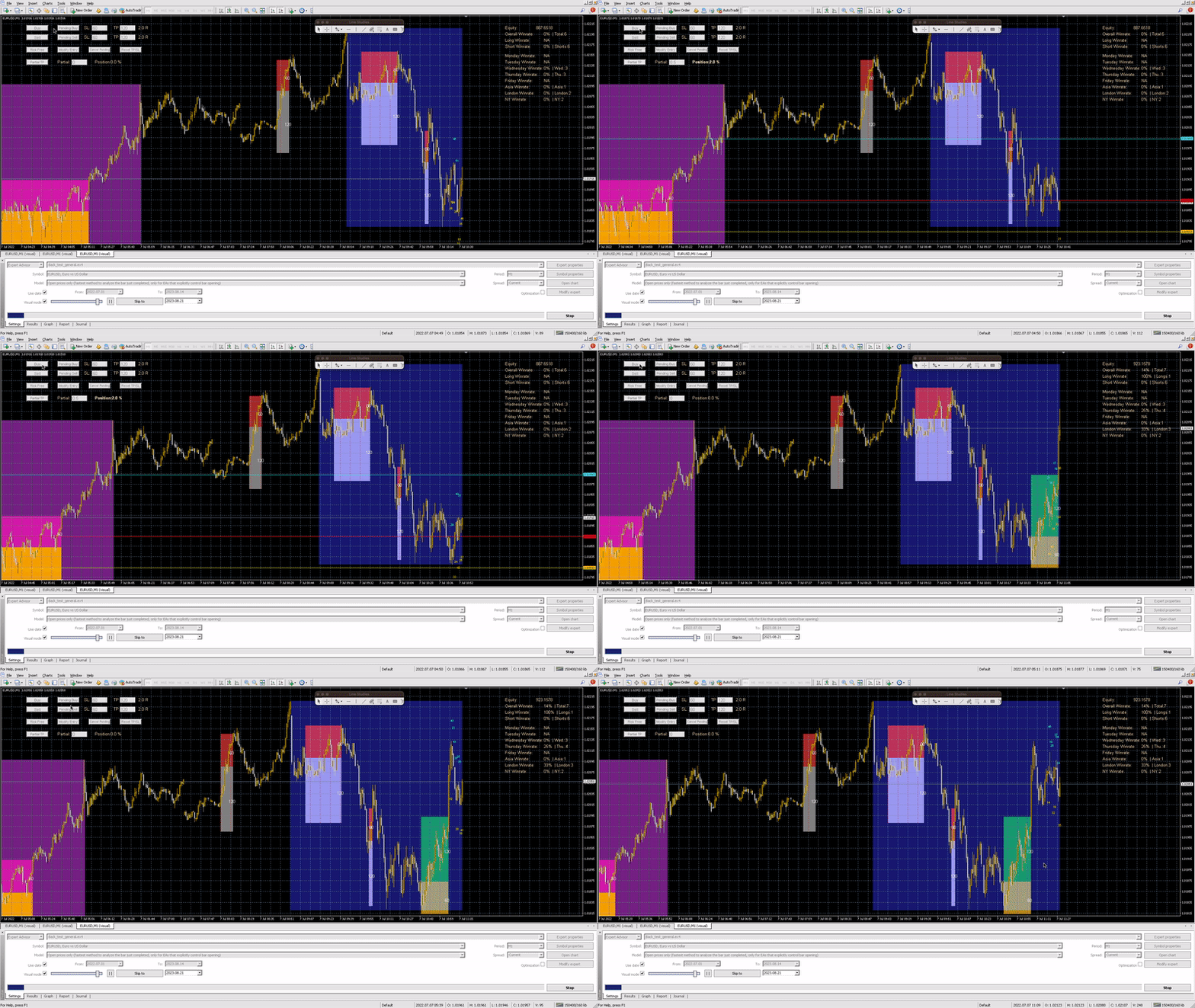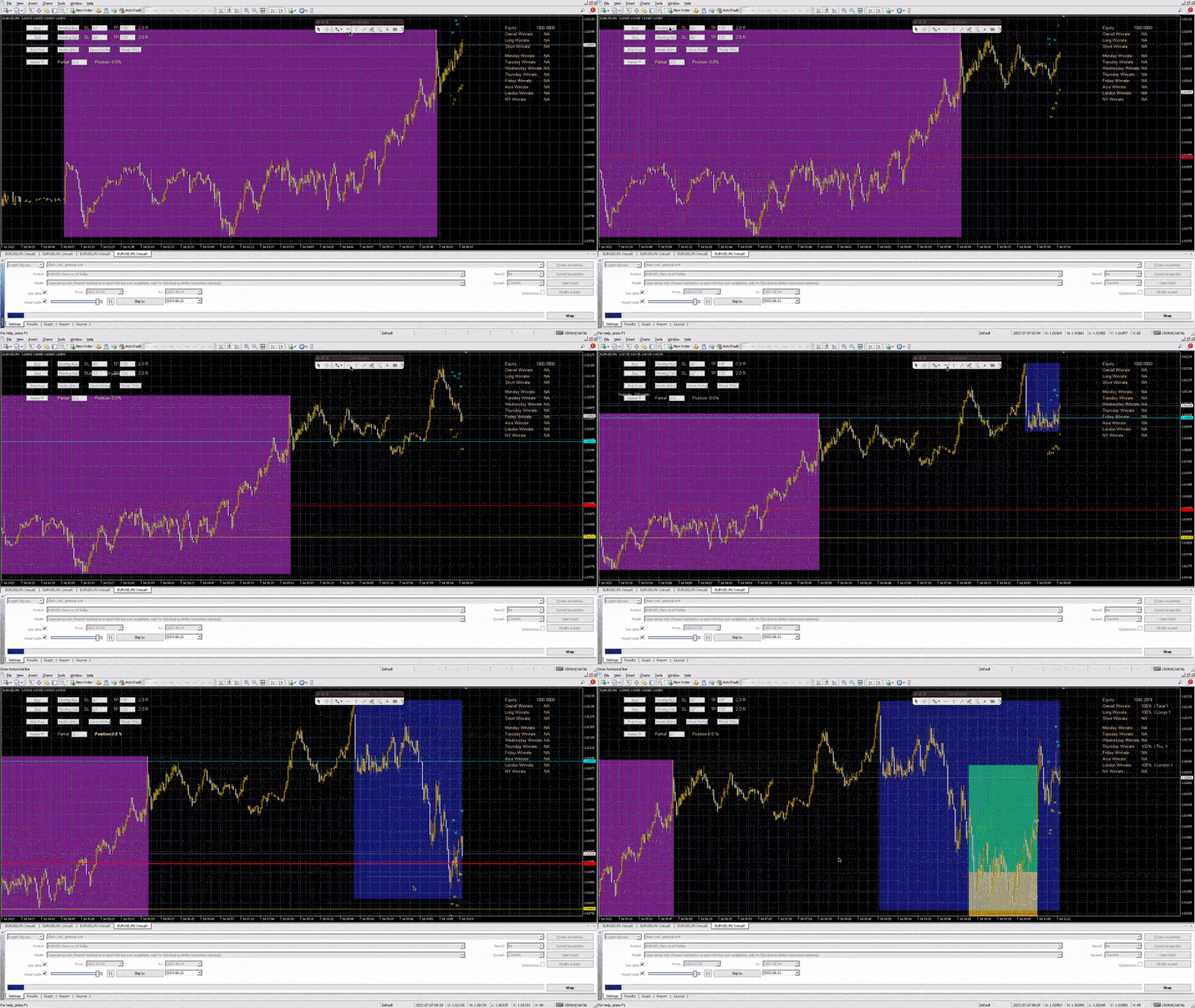
Smart Backtest Trainer

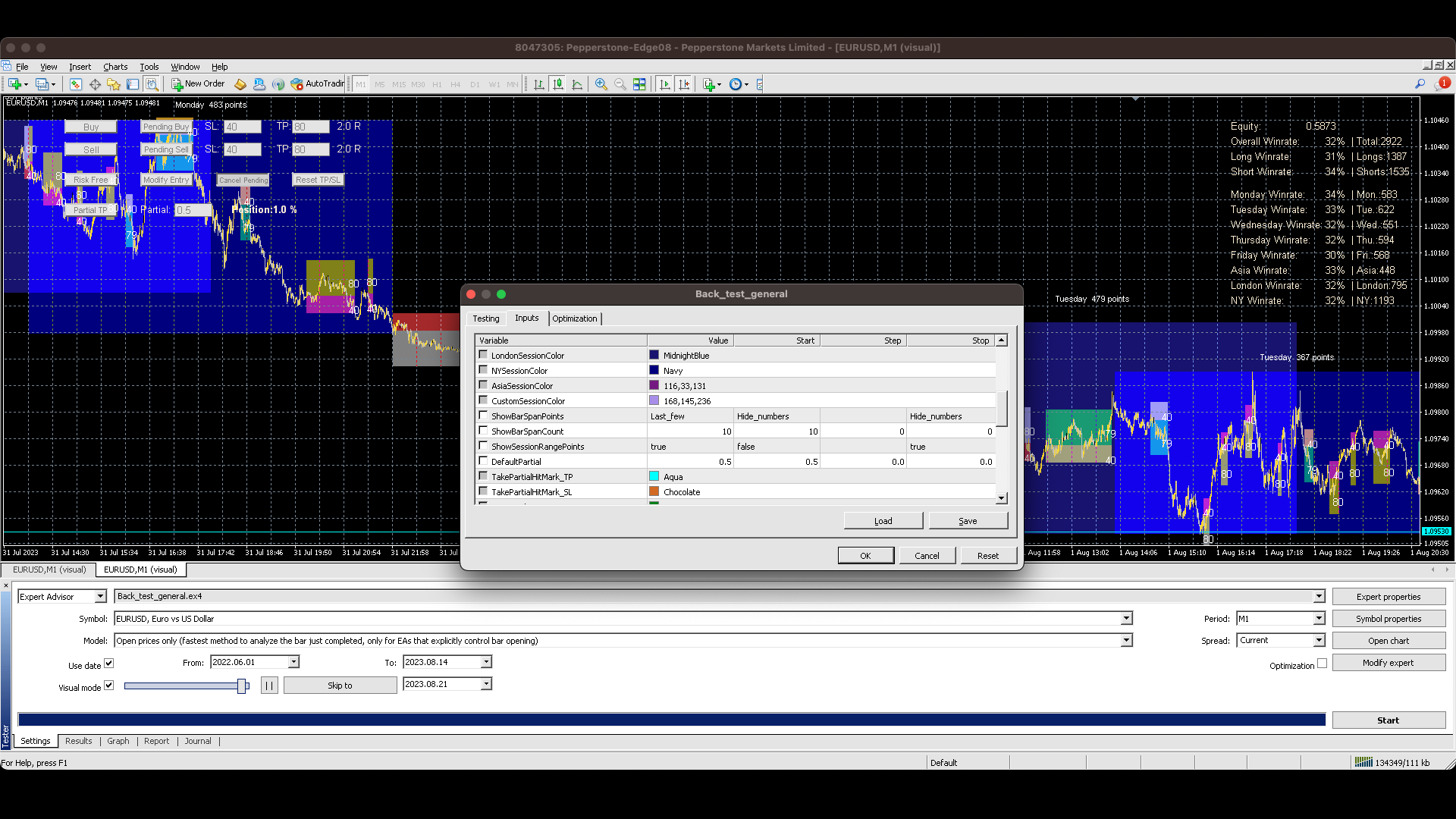
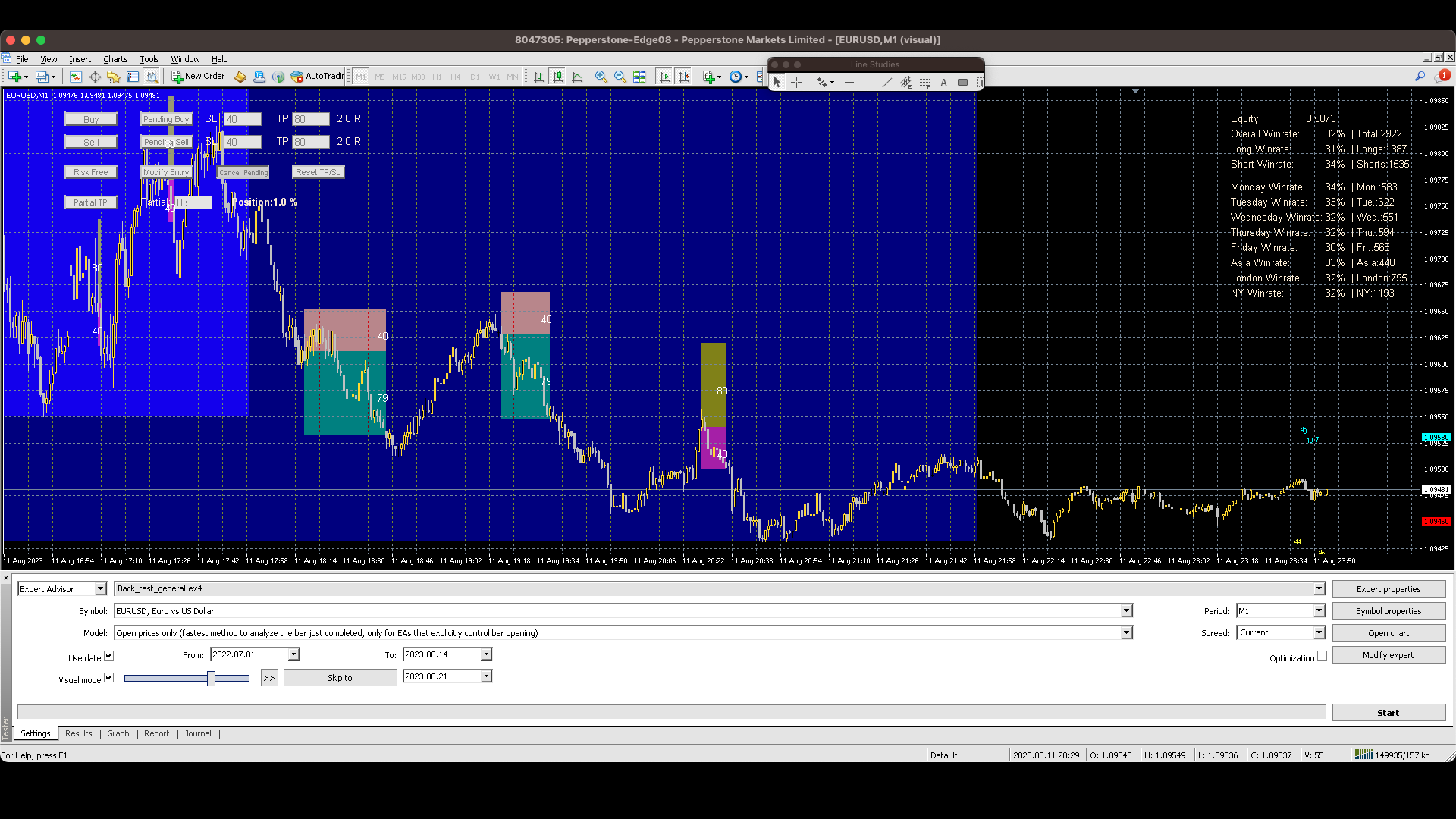
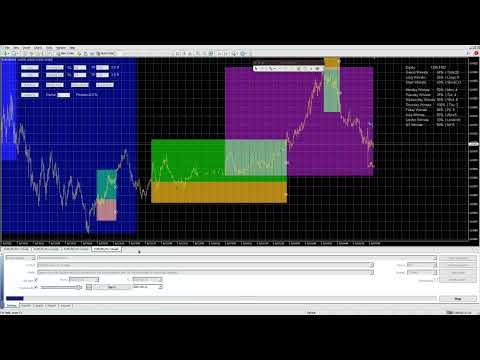
Manually backtesting your strategy or trading system on MT4 Strategy Tester like you do on TradingView, but with free offline history data provided by MT4 or your broker, which means more resposive and much more lower timeframe data available.  Because MT4 Strategy Tester doesn't detect mouse events, we will use the MT4 Horizontal Line tool and Arrows tool to modify the TP/SL/Entry and etc. on the screen.


Features:

70% TradingView backtesting user experience,  due to the Strategy Tester's limitation.
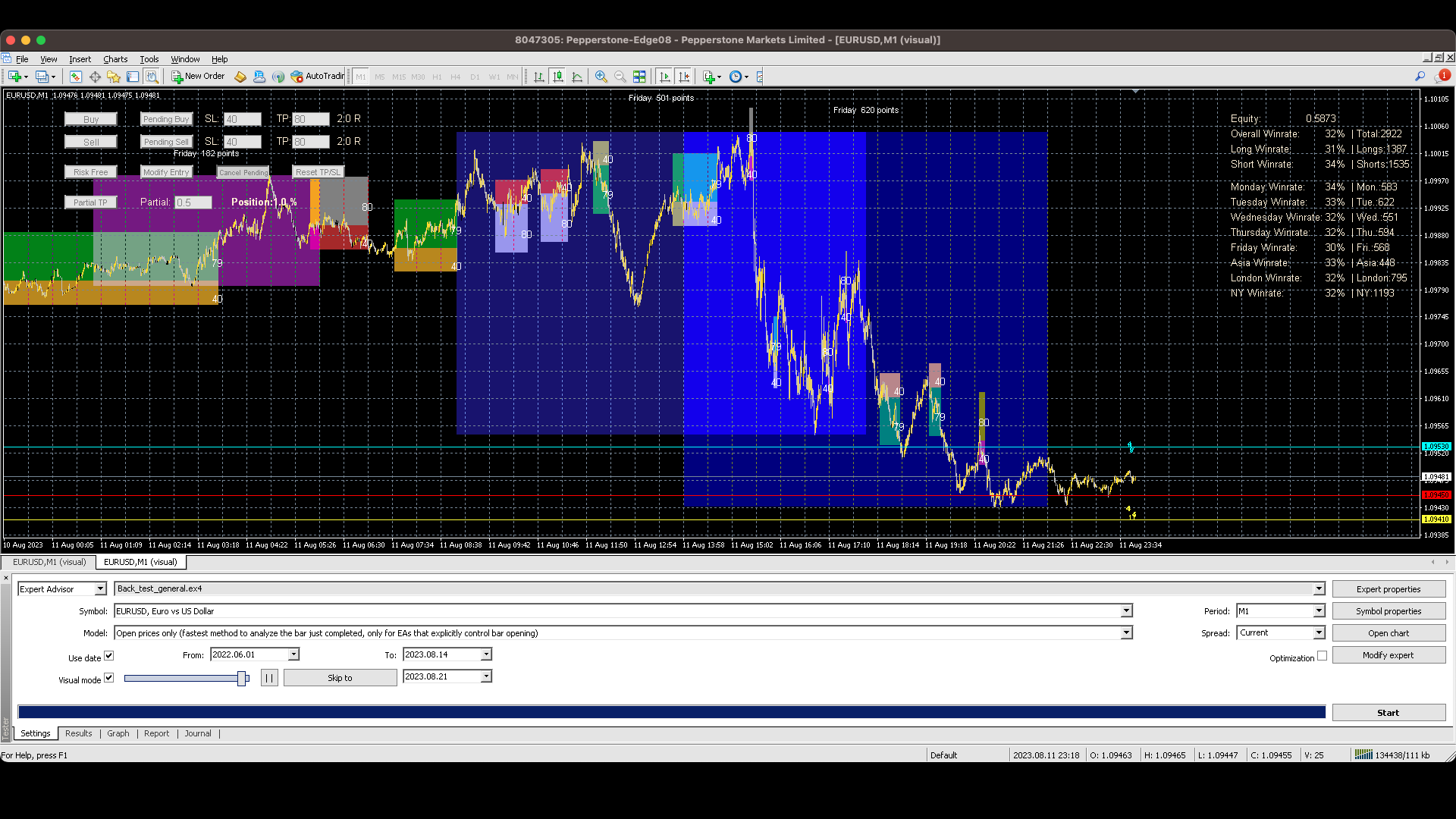
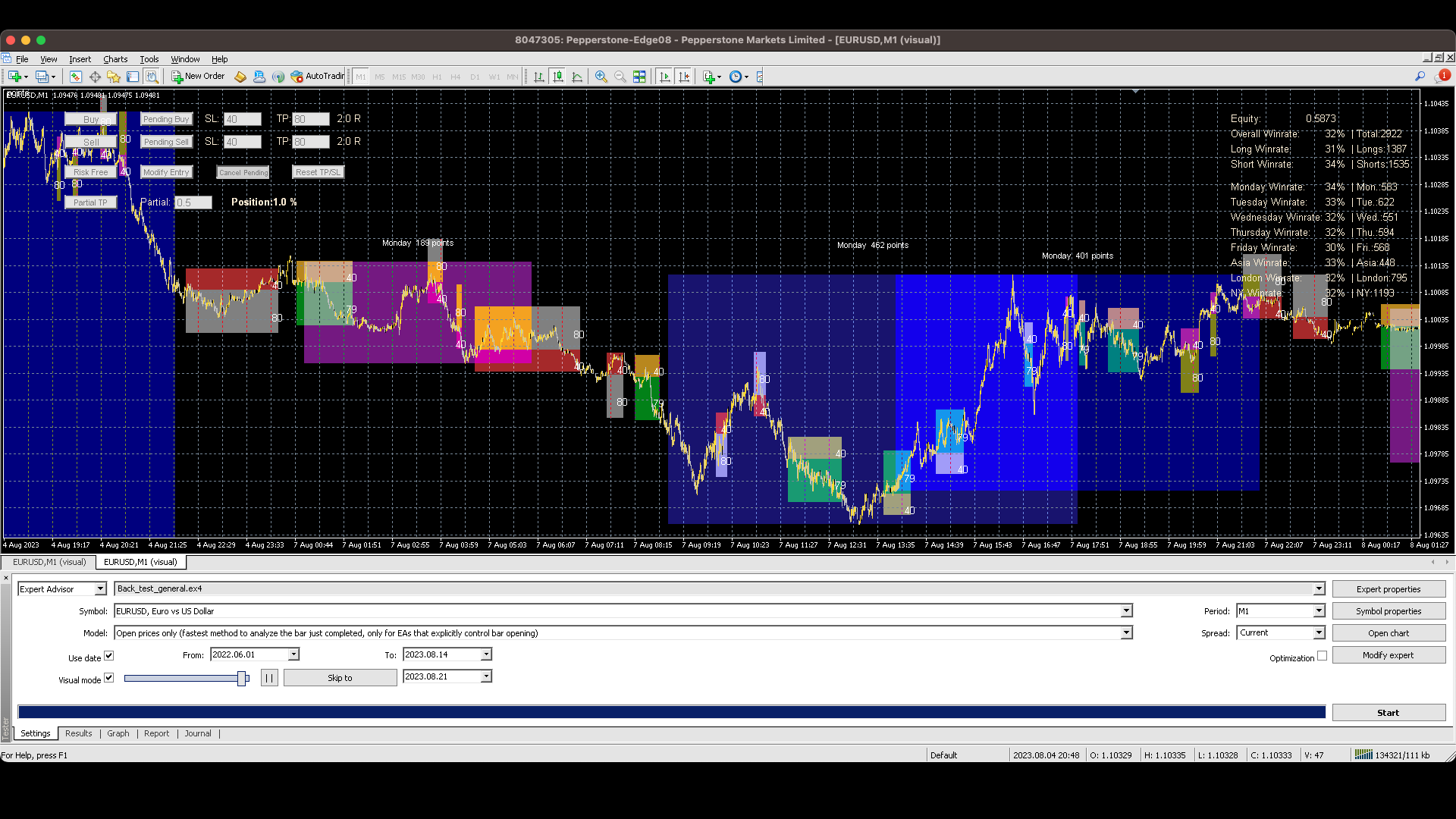
With trading result panel that shows total profit or loss and winrates to benchmark your performace.
With the simulation of Buy Limit/Buy Stop/Sell Limit/Sell Stop orders. 
With thte simulation of setting a Partial TP target. 
With the simulation of moving Stoploss over Entry price.
With the simulation of one click Buy/Sell Market Order.
With responsiveness and more lower timeframe history data to play with.
With transparent color marks for Asian/London/New York and custom session, and text to show the session's weekday.(You need to input the open and close time based on your timezone at the moment)
With bar strengh text to show the latest bars' span points from high to low.
You can even see your winrates by weekdays and sessions 
Available without internet if it's not the first time you run backtest on the pair.
You can set a fixed percentage of your equity to risk per trade, only available in this way though.
And you could adjust your Take Profit/Stoploss/Entry as your initial TP/SL which means it will re-calculate your Risk Reward Ratio (P.S. Moving stoploss over entry price doesn't re-calculate your Risk Reward Ratio).


                            How to use:

                            Market Orders: Just click Buy/Sell and you can simulate Market orders with your preset SL/TP points. You can change the SL/TP by inputting the number or using the MT4 Horizontal Line tool.

                            Buy Limit/Buy Stop/Sell Limit/Sell Stop Orders: These orders need to place in 2 steps: Step 1, use the MT4 Horizontal Line tool to set your entry price. Step 2, click Pending Buy/Pending Sell order, and wait for the price to tap the Entry Line.

                            Modifying TP/SL: Just use the MT4 Horizontal Line tool again. The TP or SL will move to the Horizontal Line's price. You can drag the Horizontal Line until you get your price.  P.S. Modifying TP/SL will change the Risk Reward Ratio(Unless you use the "Move Risk Free" feature). Because we think that traders may need a little time to set order as decided.

                            Reset TP/SL:Reset the TP/SL points to your preset points.

                            Moving Stoploss to Risk Free: There are 2 states for this feature.

                                      • Feature 1: When the Stoploss is behind your entry, clicking the Risk Free button will directly move the stoploss right before your entry price.

                                      • Feature 2: This is a two-step feature. If your stoploss is already protecting your entry price. Step 1: Click Risk Free , Step 2: Use the Horizontal Line to more your Stoploss further to protect more profit.

                                    Modifying Entry: If you think that the entry was not what you decided to enter, you could modify your entry. There are 2 ways to modify your entry.

                                        • Method 1: Use the one of the MT4 Arrows tool to move the entry, you can drag the arrow until it reaches your price. Your SL/TP will also be modified accordingly.

                                        • Method 2: Use the Modify Entry Button, but since MT4 Strategy Tester doesn't detect mouse clicks, you need to wait one tick to have the button activated, and then use the MT4 Horizontal Line to again to modify your decided price. 


                                      Partial Taker: This is also a two-step feature, Step 1, click the Partial TP button first. Step 2, use the MT4 Horizontal Line tool to set your second TP. You can preset the percentage of your active position to take partial profit.


                                        EA Properties:

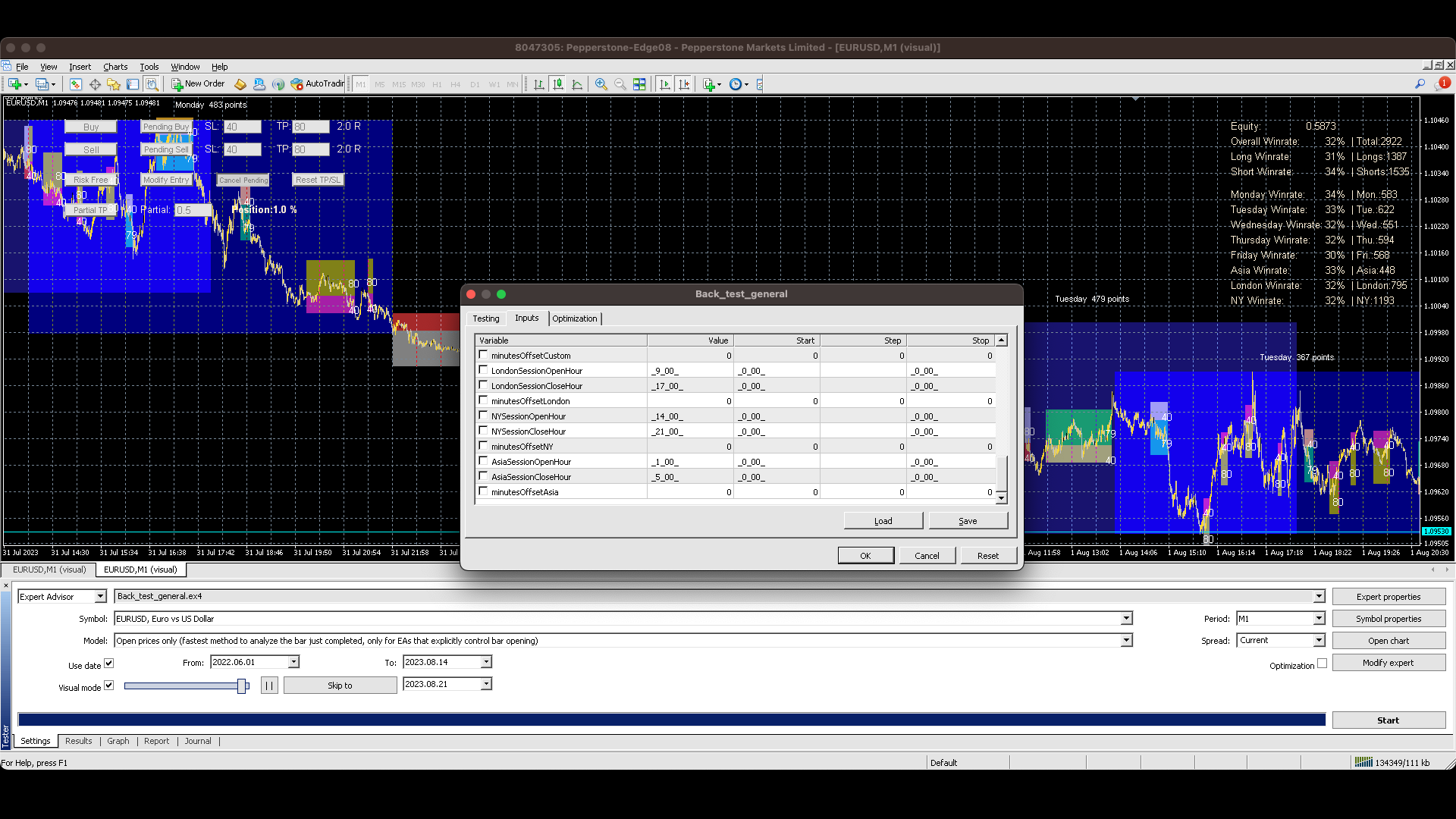
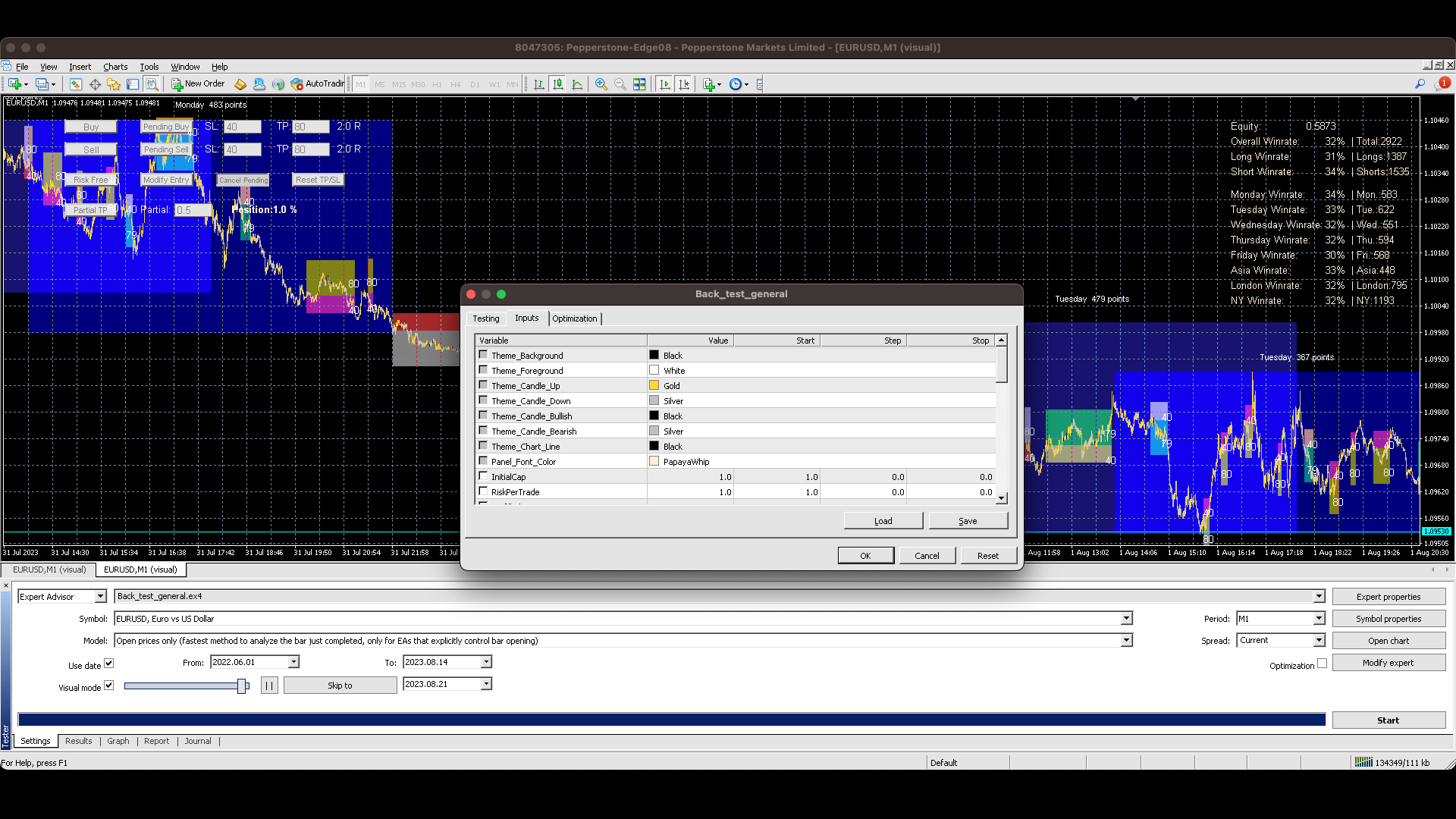
                                        Marking Exchange Sessions(session open hours, close hours, minutes offset): You could set the time in the properties, you can set the opening and closing hour for each session based on your timezone. For US stock markets, you could set the minutesOffSet to fit the 30 min opens.

                                        InitialCap:  You can set the starting Equity here. Default is 1. You can set as big as you want. But using 1 is easier for you to see your performance. 

                                        RiskPerTrade:  This means the percentage of your Equity you will lose if you lose a trade. Multiplying the Risk Reward Ratio is how much you can get by winning a trade.

                                        Prefilled_SL/Prefilled_TP:  The preset SL/TP for your Buy/Sell market and limit/stop orders.

                                        ShowBarSpanPoints:  Let you know how strong the latest bars so that you can set a proper SL/TP, or to enter or not.

                                        ShowBarSpanCount:  When you use Last_few for  ShowBarSpanPoints, you can select how many bars that you want to see their strength.

                                        ShowSessionRangePoints:  When the session color mark is shown, you can see the difference in points for the exchange session high and session low.

                                        HideSessionColor: Show/Hide the Session Color markings.

                                        DefaultPartial:  Prefilled number for Partial TP feature.

                                        ShowWeekdayAndSectionWinrate:  Additional winrates to see when you perform better or worse.

                                        TickMode: Used to match the Strategy Tester's tickmode. 


                                          Recommended products
                                          SnowyOwlFree
                                          RODION SLOTIN
                                          3 (2)
                                          The free version of the snowyowl trend adviser, which is based on determining combinations of candle patterns. A virtual trailing stop tracks each open order and groups open orders to close them simultaneously. In the free version, you can only work on one timeframe, while in the paid version, opening orders on the selected TF is a signal to open orders on lower TF.
                                          FREE
                                          PatternVol EA
                                          Alexandr Gribanov
                                          4.5 (2)
                                          The PatternVol EA is based on its own observations of the market and consists of patterns, candlestick analysis, analysis of candlestick volumes, and also, the EA does not contain indicators. At the moment, the advisor is a small constructor of my non-indicator strategies, you can disable and enable each strategy separately, or make an assembly from several strategies. The work on the advisor continues to this day, new strategies are added, algorithms are improved. In the future, it will be a l
                                          FREE
                                          Scalping Day Trading Support Utility Scalping One MT4 free One position is displayed with one button. View P & L, Lot, and Point in real time. It is possible to switch the display of positions of only chart currencies and all currency pairs.  (The free version has only 3 positions) Supports automatic identification in Japanese and English   Account currency notation corresponds to dollar, euro, pound, yen (automatic identification) The timeline drawing function can be linked with the clock disp
                                          FREE
                                          Apex Origin MT4
                                          Yi Hsiu Tsai
                                          5 (2)
                                          Trading is a process based on probability. Precise logic and rigorous discipline are the core foundations of the Apex series strategies. Official Live Signals (MT5 Flagship) To demonstrate long-term stability, our official live account operates in an MT5 environment. MT4 version shares the exact same core logic and algorithms: View Signal Details Design Philosophy Apex Origin is built on mathematical and statistical principles, designed to maintain logical integrity across various market enviro
                                          FREE
                                          NAS100 Auto Sl And TP
                                          Moustapha Boulouz
                                          5 (2)
                                          Introducing NAS100 Auto SL and TP Maker for MT4: Never miss setting StopLoss and TakeProfit again with our NAS100 Auto SL and TP Maker, an indispensable assistant for traders navigating the Nasdaq 100 market on MetaTrader 4. This tool is designed for those who seek a seamless solution to automate the management of StopLoss and TakeProfit levels. Key Features: Effortless Automation: Automatically monitors Nasdaq 100 trades without StopLoss and/or TakeProfit. Dynamically adjusts levels based on us
                                          FREE
                                          Period Change Button
                                          Rainer Albrecht
                                          3 (1)
                                          Fastest way to change the period. Suitable for traders who use many charts and timeframes. Size, shape and color can be customized. Inputs Parameters Corner — Choose corner placement Standart is "Right lower chart corner" Color — Background color of the button ColorText — Text color of the button ColorOn — Background color of the button for the current period ColorOnText — Text color of the button for the current period Font — Arial, Verdana... FontSize — Size of the font in pixels DistanceX —
                                          FREE
                                          Free automatic Fibonacci is an indicator that automatically plots a Fibonacci retracement based on the number of bars you select on the BarsToScan setting in the indicator. The Fibonacci is automatically updated in real time as new highest and lowest values appears amongst the selected bars. You can select which level values to be displayed in the indicator settings. You can also select the color of the levels thus enabling the trader to be able to attach the indicator several times with differe
                                          FREE
                                          一键平仓小工具,可以针对买单、卖单和挂单进行批量操作,可以操作当前图表订单和所有订单,简单高效。 第一行第一个按钮是关闭当前图表 品种 所有买单,第二个按钮是关闭当前图表品种的所有卖单,第三个按钮是关闭当前图表 品种 的所有订单; 第二行 第一个按钮是删除当前图表 品种 所有买单挂单,第二个按钮是 删除 当前图表品种的所有卖单 挂单 ,第三个按钮是 删除 当前图表 品种 的所有 挂单 ; 第三行第一个按钮是关闭所有 品种的全部买单,第二个按钮是关闭所有 品种的全 卖单,第三个按钮是关闭所有 品种的全部订单; 第四行第一个按钮是删除所有 品种全部买单挂单 ,第二个按钮是 删除 全部品种 的全部卖单挂单 ,第三个按钮是删除 全部品种 的全部挂单 。 希望此程序能对您有用
                                          FREE
                                          SL and TP Setter
                                          Giacomo Barone
                                          4 (1)
                                          You can manually open a trade (one click), and this EA will take care of setting the SL and TP. SL and TP are set based on the number of pips you specify in the input screen. You can also choose monetary SL and TP. SL and TP are determined based on the weighted average price (WAP), so if you open a new trade, SL and TP will be updated according to the new WAP. The WAP is not unique but differentiated between buy and sell trades (this is useful only if you open opposite trades on the same chart)
                                          FREE
                                          Server Time On Chart
                                          Joaquin Nicolas Metayer
                                          Server Time On Chart is a simple indicator that shows the time of the broker's server with hours, minutes and seconds in the lower left corner of the chart's. Within the inputs you can only change the size of the font and the color you want depending on your taste. You can see more of my publications here: https://www.mql5.com/en/users/joaquinmetayer/seller
                                          FREE
                                          This MQL4 indicator creates a customizable grid of horizontal lines on your trading chart. Here's what it does: **Main Functions:** - Draws equally spaced horizontal lines across the visible price range - Supports two line types: horizontal lines or trend lines with forward projection - Automatically adjusts to price scale changes **Key Features:** 1. **Customizable Spacing**: Set grid distance in pips (20 pips by default) 2. **Flexible Starting Point**: Auto-calculates starting price or lets
                                          FREE
                                          Grid Assistant Pro
                                          Alessandro De Cristofaro
                                          Grid Assistant Pro – Utility for Managing Grid Strategies on MetaTrader 4 Grid Assistant Pro is a professional utility that helps traders manage and monitor unidirectional grid strategies directly from the MT4 chart. It provides a visual dashboard , clear controls, and automated risk protection features for precise and efficient grid operation. Key Features Visual Dashboard Real-time metrics: Balance, Equity, Floating P/L, Drawdown %, Free Margin Grid status: active and pending or
                                          FREE
                                          Grid Starter
                                          Vitali Platonov
                                          The path of any trader is winding, and virtually everyone who has brought this craft into their life has faced the need to work with more than just one order. This applies to adding orders both to losing positions and to winning ones. Even if you work from order to order with the same lot size, you still have to calculate the distance between market positions. And if the grid is meant to be long, this is no simple task. But if, from lot to lot, a person turns to progression (whether arithmetic o
                                          FREE
                                          Trade Panel Pro by RunwiseFX
                                          Runwise Limited
                                          4.86 (35)
                                          Fully functional manual trade panel with risk/reward, auto SL, lot size calculation, one-click trading, hidden (virtual) stop loss/take profit and pending orders, scale in and out of trades (partial close), news events and more. Works with all symbols not just currency pairs. Brings an incredible amount of functionality to MetaTrader for free and for both demo and live accounts. Features Lot size calculation - based on % of account to risk, fixed amount or dynamic lots Automatic take profit base
                                          FREE
                                          IceFX TradeInfo
                                          Norbert Mereg
                                          4.77 (44)
                                          IceFX’s TradeInfo is an utility indicator which displays the most important information of the current account and position. Displayed information: Information about the current account (Balance, Equity, Free Margin). Current spread, current drawdown (DD), planned profit, expected losses, etc. Number of open position(s), volume (LOT), profit. Today’s and yesterday’s range. Remaining time to the next candle. Last day profit information (with integrated IceFX ProfitInfo indicator). Risk-based LOT
                                          FREE
                                          Auto TP SL Manul Open Panding Orders Overview: AUto TP SL Manul Open Panding Orders is an innovative trading platform designed to enhance trading efficiency and effectiveness in managing financial investments. Key Features: Automated Management : Seamlessly manage take-profit (TP) and stop-loss (SL) orders with our advanced automation tools. Manual Adjustments : Maintain control with manual options, allowing traders to adjust orders according to market conditions.
                                          FREE
                                          Lot Calculate
                                          Maksim Neimerik
                                          This simple but useful script calculates the lot in % of the deposit. It is indispensable for risk management. There is only one customizable parameter: MaxRisk - risk in % for lot calculation. The product works as a standard script. Launch it once on an appropriate chart and start trading using the calculated lot value. Genious is simplicity! Happy trading!
                                          FREE
                                          This MQL4 code is a custom indicator that draws multiple colored rectangles on a chart, spaced apart by a defined pip distance, and projected into the future. Here's a brief breakdown: Purpose: Draws several horizontal rectangles (zones) starting from a specified price. Rectangles are spaced apart vertically by a pip distance. Colors alternate between FirstColor and SecondColor . Rectangles can be drawn behind candles and optionally filled. Each rectangle extends into the future for a specified
                                          FREE
                                          Simple RSI Forex Trading Strategy
                                          Victor Manuel Valderrama Zamora
                                          4 (1)
                                          Diversify the risk in your trading account by combining our Expert Advisors. Build your own custom trading system here:   Simple Forex Trading Strategies The expert advisor opens trades when RSI indicator enter in oversold or overbought areas. The Stop Loss, Take Profit, and Trailing Stop are calculated based on the ATR indicator. The recommended currency pair is EURGBP and the recommended timeframe to operate and to do backtests is H4. This Expert Advisor can be profitable in any TimeFrame an
                                          FREE
                                          OTRX Fimathe Backtest is a tool for the Trader or Enthusiast who uses the Fimathe technique created by Trader Marcelo Ferreira to carry out his training and validate if he can obtain profitability. In this tool you will be able to: 1. Define whether you are looking for a buy or sell entry. (Trend). 2. Define by clicking twice on the horizontal lines where your Reference Zone and your Neutral Zone will be. 3. Monitor the entry, subcycle and exit of the trade. 4. Trading Summary, Daily, Week

                                          FREE
                                          Trendline indicator
                                          David Muriithi
                                          2 (1)
                                          Are you tired of drawing trendlines every time you're analyzing charts? Or perhaps you would like more consistency in your technical analysis. Then this is for you. This indicator will draw trend lines automatically when dropped on a chart. How it works Works similar to standard deviation channel found on mt4 and mt5. It has 2 parameters: 1. Starting Bar 2. Number of bars for calculation The   starting bar   is the bar which drawing of the trend lines will begin, while the   number of bars for c
                                          FREE
                                          Activation initiates the sequence from the initial symbol in the Market Watch roster, forming a perpetual loop that continues until deactivation. The system employs global terminal variables to sustain operational continuity amid symbol-induced reinitializations, thereby ensuring uninterrupted performance. This EA should not be checked off as 'Allowed live Trading' and is functional with that checkmark box, when uploading the EA. Principal advantages encompass augmented productivity in overseein

                                          FREE
                                          A simple button to completely close   all existing open trades   (both Buy and Sell) on the   current chart . Warning : Once the button is pressed, all open trades on the current chart will be deleted immediately without any more questions or dialogue. Use this utility very carefully. We recommend that you do a trial of removing open trades on a demo account first, before trying to use this utility on a real account.
                                          FREE
                                          SX Supply Demand Zones accurately identifies and draws high-probability Supply and Demand zones using a sophisticated algorithm. Unlike traditional indicators that clutter your chart, this indicator is designed with a focus on performance and a clean user experience. New Unique Feature: Interactive Legend System What truly sets this indicator apart from everything else is the Interactive Control Legend. You have a professional dashboard directly on your chart that allows you to: Show/Hide: Ins
                                          FREE
                                          Safety
                                          Sergey Ermolov
                                          5 (2)
                                          I think everyone knows such a rule of money management as "Safe". For those who are not aware, the safe assumes closing half of the position after the profit on the transaction has equaled the size of the stop. Thus, even if the price reverses and catches the stop, you will not lose money, because exactly the same amount of profit was received when closing part of the position earlier. The Safety Expert Advisor has only one setting – the closing lot. Leaving it at position 0, the adviser will
                                          FREE
                                          TradeKeeper Lite
                                          Evgeniy Scherbina
                                          The utility TradeKeeper Lite can show your profits for different periods and bip a sound when you reach a profit target value. Click the tachometer to quickly switch to the next profit period. There are 5 of them: This Day, This Week, This Month, Last 90 Days and All I Made. With the utility TradeKeeper Pro , available at this link , you can also open trades with a magic number and volume of your choice, trail any orders with a simple trail or iSAR-based trail, as well as close any open trades a
                                          FREE
                                          Account Info EA It is a tool that presents on the graph all the positions of the account, and specific information concerning the positions, but also the account. It enables the user to have an image of his account at a glance. Use like any expert advisor. You can't attach it in the same chart with other expert advisor. It does not have the ability to open or manage positions. You can attach it on any chart and any timeframe.
                                          FREE
                                          Trailing by SAR
                                          Konstantin Kulikov
                                          5 (1)
                                          Tracking positions using trailing on the Parabolic SAR indicator. It is necessary to allow automated trading in the terminal settings. In testing mode, the utility opens Buy or Sell positions on the first ticks, which allows you to visually observe the given logic, changing the utility parameters. In real mode, the utility does not open positions. Discuss the complexities of Forex trading here:  chat "Age of Expert Advisors" . Parameters Select_Magic - selection of magic numbers. Positions with
                                          FREE
                                          MQLTA Auto Close Demo
                                          MQL4 Trading Automation
                                          Auto Close is an expert advisor that can assist you with your money and risk management rules. The EA can monitor your Balance, Equity, Margin, Global Profit and Global Loss and alert you in case any of these reaches a specified threshold. This Demo Version has Notification and Close features disabled, full version can be found https://www.mql5.com/en/market/product/29141 How does it work? Load the Auto Close EA in the chart and set the parameters you want to keep monitored. If any of the risk
                                          FREE
                                          Signalator Lot Size Evaluator MT4 is a free local MetaTrader 4 utility for manual traders. It helps calculate an estimated lot size before opening a trade manually. The calculation is based on account size, trade direction, entry price, stop loss, risk percentage or fixed money risk, and broker symbol settings. The main purpose is simple: Enter your setup → define your risk → get the suggested lot size. The panel also shows useful pre-trade information such as spread, risk amount, SL/TP distance
                                          FREE
                                          Buyers of this product also purchase
                                          Trade Assistant MT4
                                          Evgeniy Kravchenko
                                          4.43 (195)
                                          It helps to calculate the risk per trade, the easy installation of a new order, order management with partial closing functions, trailing stop of 7 types and other useful functions. Additional materials and instructions Installation instructions   -   Application instructions   -   Trial version of the application for a demo account Line function -   shows on the chart the Opening line, Stop Loss, Take Profit. With this function it is easy to set a new order and see its additional characteris
                                          Local Trade Copier EA MT4
                                          Juvenille Emperor Limited
                                          4.96 (110)
                                          Experience exceptionally  fast trade copying with the Local Trade Copier EA MT4 . With its easy 1-minute setup, this trade copier allows you to copy trades between multiple MetaTrader terminals on the same Windows computer or Windows VPS with lightning-fast copying speeds of under 0.5 seconds. Whether you're a beginner or a professional trader, the Local Trade Copier EA MT4 offers a wide range of options to customize it to your specific needs. It's the ultimate solution for anyone looking to inc
                                          Forex Trade Manager MT4
                                          InvestSoft
                                          4.98 (439)
                                          Welcome to Trade Manager MT4 - the ultimate   risk management tool   designed to make trading more intuitive, precise, and efficient. This is not just an order placement tool; it's a comprehensive solution for seamless trade planning, position management, and enhanced control over risk. Whether you're a beginner taking your first steps, an advanced trader, or a scalper needing rapid executions, Trade Manager MT4 adapts to your needs, offering flexibility across all markets, from forex and indice
                                          Custom Alerts AIO: All-in-One Market Scanner – No Setup Required Overview Custom Alerts AIO is the fastest and easiest way to monitor multiple markets for real-time trading signals—without any setup or extra licenses. It comes with all required Stein Investments indicators already embedded, making it the perfect plug-and-play solution for traders who value simplicity and performance. Just load it to any chart and start receiving alerts across Forex, Metals, Crypto, and Indices. Shares can be a
                                          Unlimited Trade Copier Pro is a tool to copy trade remotely to multiple MT4, MT5 and cTrader accounts at different computers/locations over internet. This is an ideal solution for you if you are a signal provider and want to copy your trades to other receivers globally on your own rules. One provider can copy trades to multiple receivers and one receiver can get trade from multiple providers as well. The provider can even set the subscription expiry for each receiver, so that receiver will not b
                                          TradePanel MT4
                                          Alfiya Fazylova
                                          4.84 (95)
                                          Trade Panel is a multi-functional trading assistant. The app contains over 50 trading functions for manual trading and allows you to automate most trading tasks. Before making a purchase, you can test the demo version on a demo account. Download the trial version of the application for a demonstration account: https://www.mql5.com/en/blogs/post/750865 . Full instructions here . Trade. Allows you to perform trading operations in one click: Open pending orders and positions with automatic risk cal
                                          CloseIfProfitorLoss with Trailing
                                          Vladislav Andruschenko
                                          4.87 (31)
                                          Close If Profit or Loss with Trailing for MetaTrader 4 — automatic closing by total profit or loss A reliable trade-management utility for MetaTrader 4 that automatically closes positions when the total profit or total loss reaches the level you set. The Expert Advisor monitors open trades, calculates floating profit and loss, can trail profit, and helps close positions faster than manual reaction. MetaTrader 4 is still used by many manual traders, grid traders, scalpers, and Expert Advisor use
                                          Telegram to MT4 Coppy
                                          Sergey Batudayev
                                          4 (10)
                                          Telegram to MT4: The Ultimate Signal Copying Solution Streamline your trading with Telegram to MT4 , the cutting-edge utility designed to copy trading signals directly from Telegram channels and chats to your MetaTrader 4 platform—without the need for DLLs. This robust solution ensures seamless execution of signals with unparalleled precision and customization options, saving you time and boosting your efficiency. [ Instructions and DEMO ] [ FAQ ] [ How atach logs properly ] [Settings descrition
                                          Exp COPYLOT CLIENT for MT4
                                          Vladislav Andruschenko
                                          4.69 (65)
                                          Professional Trade Copier for MetaTrader 4 Fast, professional, and reliable trade copier for MetaTrader 4 . COPYLOT helps you copy Forex trades between MetaTrader 4 and MetaTrader 5 terminals with flexible synchronization for different account setups. COPYLOT MT4 version supports: MetaTrader 4 to MetaTrader 4 MetaTrader 5 Hedge to MetaTrader 4 MetaTrader 5 Netting to MetaTrader 4   MT5 version Full Description + DEMO + PDF How To Buy How To Install How to get Log Files How To Test and Optimize A
                                          Copy Cat More Trade Copier MT4 is not just a simple local trade copier; it is a complete risk management and execution framework designed for today’s trading challenges. From prop firm challenges to personal portfolio management, it adapts to every situation with its blend of robust execution, capital protection, flexible configuration, and advanced trade handling. The copier works in both   Master (sender) and Slave (receiver)   modes, with real-time synchronization of market and pending orders
                                          Seconds Chart is a unique tool for creating second-based charts in MetaTrader 4 . With Seconds Chart , you can construct charts with timeframes set in seconds, providing unparalleled flexibility and precision in analysis that is unavailable with standard minute or hourly charts. For example, the S15 timeframe indicates a chart with candles lasting 15 seconds. You can use any indicators, Expert Advisors (EAs), and scripts, operating as conveniently as with standard charts. Unlike standard tools,
                                          Coppy Master MT4
                                          Sergey Batudayev
                                          4 (3)
                                          Coppy Master MT4   is a trade copier tool for MetaTrader 4 and MetaTrader 5 terminals. It supports copying in both directions: from MT4 to MT5, from MT5 to MT4, as well as between accounts of the same type MT4 to MT4. To work correctly, all terminals must be running on the same PC or VPS. [ Instruction  and Demo ]  For copying to MetaTrader 4, a separate version —   Coppy Master MT5   — is required. Main Features: Copying Modes Supports both Master and Receiver roles. Flexible setup for sending
                                          Trade copier MT4
                                          Alfiya Fazylova
                                          4.58 (33)
                                          Trade Copier is a professional utility designed to copy and synchronize trades between trading accounts. Copying occurs from the account / terminal of the supplier to the account / terminal of the recipient, which are installed on the same computer or VPS . PROMOTION - If you have already purchased the "Trade Copier MT5," you can receive the "Trade Copier MT4" for free (for copying MT4 > MT5 and MT4 < MT5). For more detailed information about the conditions, please contact us via private message
                                          The product will copy all telegram signal to MT4   ( which you are member  ) , also it can work as remote copier.  Easy to set up, copy order instant, can work with almost signal formats, image signal, s upport to translate other language to English Work with all type of channel or group, even channel have "Restrict Saving Content", work with  multi channel, multi MT5 Work as remote copier: with signal have ticket number, it will copy exactly via ticket number. Support to backtest signal. How to
                                          Trading History MT4
                                          Siarhei Vashchylka
                                          5 (9)
                                          Trading History - A program for trading and money management on the history of quotes in stratagy tester. It can work with pending and immediate orders, and is equipped with trailing stop, breakeven and take profit functions. Very good for training and testing different strategies. Manual (Be sure to read before purchasing) Advantages 1. Allows you to test any trading strategy in the shortest possible time 2. An excellent simulator for trading training. You can gain months of trading experience
                                          MT4 Local Trade Copier Pro
                                          Biswarup Banerjee
                                          3.82 (11)
                                          Introducing Local Trade Copier Pro MT4, the ultimate utility for traders looking to efficiently copy trades between different MT4 accounts. This powerful tool is designed for traders who want to automate their trading strategy and enhance their performance by leveraging multiple accounts seamlessly. Experience the benefits of real-time trade copying with minimal delay, ensuring that you never miss a profitable opportunity. Whether you're managing multiple accounts or working with different broke
                                          KT Equity Protector MT4
                                          KEENBASE SOFTWARE SOLUTIONS
                                          3.4 (5)
                                          The one EA every MetaTrader trader should be running, but isn't. Most accounts don't blow up because the strategy was wrong. They blow up because, in a bad moment, a trader let a loss run, doubled down, held trades into the weekend, gave back a winning week, or forgot the daily prop-firm limit by one bad click. KT Equity Protector is the automated guardian that won't let that happen. Install it on one chart. Set your rules once in a guided, plain-English wizard: daily loss, max drawdown, profit
                                          Price Action Trade Panel EA MT4
                                          Juvenille Emperor Limited
                                          5 (2)
                                          Price Action Trade Panel MT4  calculates the buying/selling force level balance of any symbol/instrument, based on pure price action data of the specified (8 by default) past candles. This will give you the closest market sentiment possible by monitoring the price action of 32 symbols/instruments that are available on the indicator's panel. A buying/selling force level over 60% gives a quite solid level for buy/sell the specific symbol (using the default settings).  Price Action Trade Panel MT4
                                          Trendline EA
                                          Carlos Oliveira
                                          4.5 (10)
                                          Trendline EA MT4 Trendline EA MT4 is a semi-automated Expert Advisor for MetaTrader 4 designed to execute trading actions or alerts based on trendlines drawn by the user. MetaTrader 4 does not provide native functionality to place or manage trades directly from trendlines. This Expert Advisor extends standard platform behavior by monitoring user-defined trendlines and executing predefined actions when price interacts with them. The Expert Advisor does not define or apply any trading strategy. Al
                                          Trade Dashboard MT4
                                          Fatemeh Ameri
                                          4.96 (53)
                                          Trade Dashboard simplifies how you open, manage, and control your trades, with built-in lot size calculation. It allows you to execute trades, manage risk, and control positions directly on the chart, with tools such as partial close, breakeven, and trailing stop. Designed to reduce manual work and help you stay focused on your trading decisions. A demo version is available for testing. Detailed explanations of features are provided within the MQL5 platform. Installation instructions are include
                                          The News Filter
                                          Leolouiski Gan
                                          5 (25)
                                          This product filters all expert advisors and manual charts during news time. It is able to remove any of your EA during news and automatically reattach them after news ends. This product also comes with a complete  order management system that can handle your open positions and pending orders before the release of any news. Once you purchase The News Filter , you will no longer need to rely on built-in news filters for future expert advisors, as this product can filter them all from here onwards
                                          Fibo Alert Ultimate
                                          ISO Financial Services
                                          3.71 (7)
                                          This tool adds alerts to your Fibo Retracement and Fibo Expansion objects on the chart. It also features a handy menu to change Fibo settings easily and quickly! Features Alert for Fibo Retracement and Fibo Expansion levels. Sound, Mobile and Email alert. Up to 20 Fibo Levels. Continuous sound alert every few seconds till a user clicks on the chart to turn it OFF. Single sound alert with pop-up window. Keeping all user settings even after changing timeframes. New handy menu to change Fibo setti
                                          RRBCTC uses real Tick data to create custom Range, Time, Renko and Volume bar charts for MT4. Tick data use is RRBCTC unique feature, which allows highest quality charting of current and historical price movement. Custom inputs provide option to create range bars with sizes from 0.1 pip all the way to 100+ pip and time bars periods from second all the way to a month. Charts are updated with new data in real time, allowing user use of MT4 indicators and advisors (EA). RRBCTC greatly extends MT4 c
                                          Smart Channel M4
                                          Vahidreza Heidar Gholami
                                          The trend in the market can be predicted using trend lines but the problem is you don’t know where exactly the price is going to touch the trend line where you can put your pending orders on. Smart Channel Expert Advisor makes it possible to put an advanced channel around the price data, which can be configured to handle placing orders, opening and closing positions, managing risk per trade, spread, slippage, and trailing stop-loss and take-profit automatically. Features Money Management (Calcul
                                          Auto Trade Copier
                                          Vu Trung Kien
                                          4.76 (85)
                                          Auto Trade Copier is designed to copy trades to multiple MT4, MT5 and cTrader accounts/terminals with 100% accuracy. The provider and receiver accounts must be on the same PC/VPS. With this tool, you can copy trades to receiver accounts on the same PC/VPS. All trading actions will be copied from provider to receiver perfectly. This version can be used on MT4 accounts only. For MT5 accounts, you must use Auto Trade Copier for MT5 . Reference: - For MT4 receiver, please download Trade Receiver Fre
                                          StopLoss and TakeProfit Utility MT4 for automatic setting of stop loss and take profit levels. Created by a professional trader for traders.   The utility   works with any market orders opened by a trader manually or using advisors. Can filter trades by magic number. The utility can work with any number of orders simultaneously. WHAT THE UTILITY CAN DO: Set virtual stop loss and take profit from 1 pip Real   stop loss and take profit W ork with each order separately (   stop loss and take prof
                                          Take a Break
                                          Eric Emmrich
                                          5 (31)
                                          News filter, equity guard & session control for all your EAs — one tool, full protection Take a Break has evolved from a basic news filter into a comprehensive account protection solution . It pauses your other Expert Advisors during news events or based on custom filters. When trading resumes, it automatically restores your entire chart setup , including all EA settings. Why traders choose Take a Break One news filter for all your EAs — no more relying on individual built-in filters that may o
                                          Ultimate Trailing Stop EA
                                          BLAKE STEVEN RODGER
                                          4.33 (15)
                                          This EA Utility allows you to manage (with advanced filtering) unlimited open orders (manual or EA) with 16 trailing stop methods: fixed, percent, ATR Exit, Chandelier Exit, Moving Average, Candle High Low Exit, Bollinger Bands, Parabolic, Envelope, Fractal, Ichimoku Kijun-Sen, Alligator, Exit After X Minutes or Bars, RSI and Stochastic. The trailing stop can be either real or virtual, and you can exit fully or with a partial close percent on touch or bar close.  Moreover, you can add (overrid
                                          Telegram to MT4 Multi-Channel Copier automatically copies trading signals from your Telegram channels directly into MetaTrader 4. No bots, no browser extensions, no manual copying. You receive a signal on Telegram and the EA opens the trade on your terminal in a few seconds. The product includes two components: a Windows application that listens to your Telegram channels, and this Expert Advisor that executes the signals on your MT4 terminal. An MT5 version is also available. Setup guide and app
                                          Edge Zone EA
                                          FXsolutions
                                          5 (1)
                                          With this Expert Advisor you will follow the sound trading principle Buy Low and Sell High by default ! And you can do that even with a normal day job . You will be even able to trade on lower timeframes which you could never do without such an Expert Advisor. And the best thing is that you are in control! You can tell the Edge Zone EA where it has to enter and where it has to exit. And you can do that even many hours before the trade will occur . This EA is therefore an excellent assistant for
                                          Filter:
                                          Sergei Lebedev
                                          1766
                                          Sergei Lebedev 2023.11.18 22:17 
                                           

                                          User didn't leave any comment to the rating

                                          Reply to review