OneClick Auto Close MT5

5
A utility to close all orders automatically when conditions meet.


Various options are available to filter or select orders :

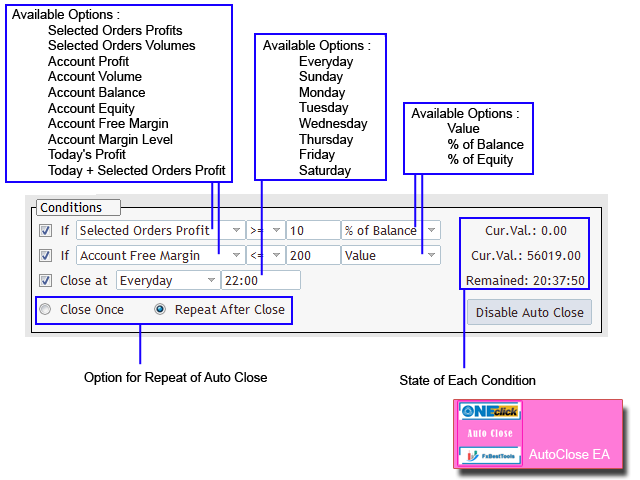
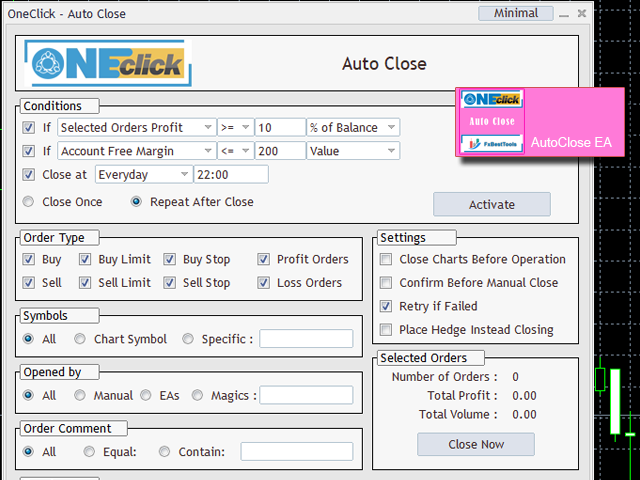
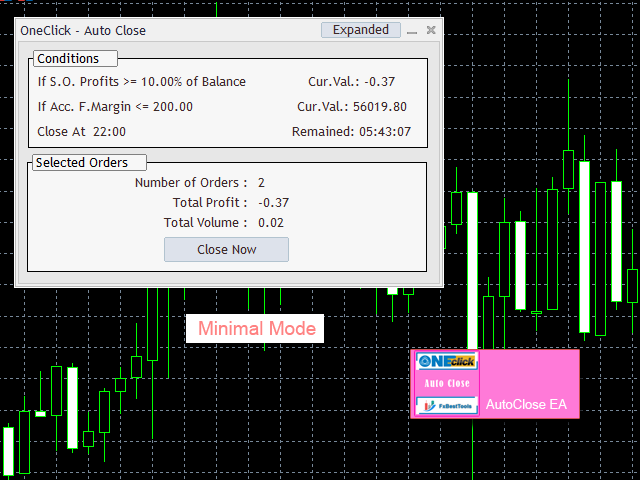
Conditions : Closing conditions. 3 different conditions can be defined. EA will close orders anytime one or more defined conditions meet. Conditions can be defined based on account properties or selected orders properties. Also a fixed time to close orders is available.

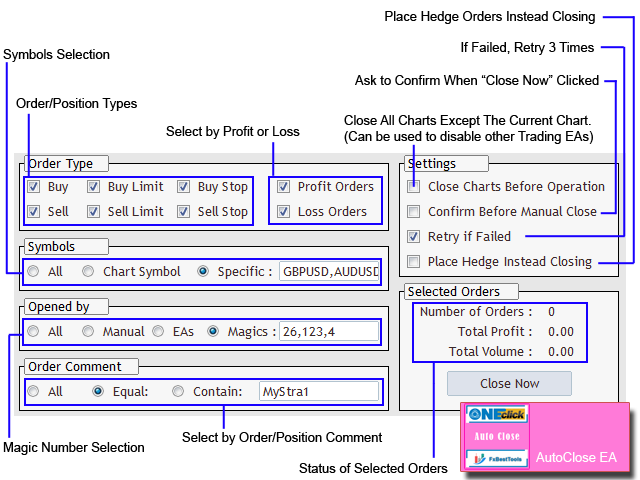
Type of orders : Buy / Sell / Buy Limit / Sell Limit / Buy Stop / Sell Stop

Symbol Selection : All / Chart Symbol / Custom Symbols. You can enter custom symbols separated by comma. (for example you can enter EURUSD,GBPUSD,AUDJPY)

Order Open Type : Manual Opened / Opened by EA

Magic Number : You can enter more than one magic number separated by comma. (for example you can enter 532585,253,6558,2254)

Order Comments : Option to select orders by exact comment or select them containing a text is available.

Profit or Loss State : Can close orders on profit or on loss or both

Retry Option : If closing failed, EA will retry to close the order 3 times.

Hedging : If the option enabled, EA will open hedge orders instead of closing the order

Disable other EAs after closing orders : With this option, EA will close all other charts to avoid opening orders by other EAs, After the orders are closed.

Confirm Manual Closing : If the option enabled, EA will ask for confirmation of closing orders.

Status : EA will show the number of orders and profit and volumes of orders you selected for closing.

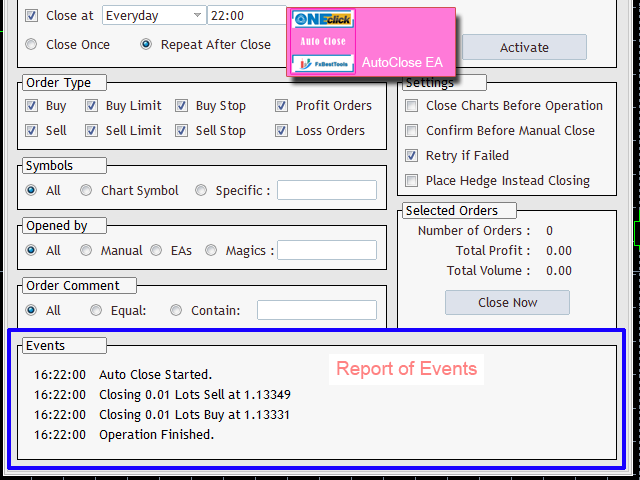
Events : Detailed reports of EA operations.

Minimal Mode : The option to make the panel smaller, if you want to see more areas of the chart.

Panel : All above options are designed as a user friendly input panel.


We are ready to help you about using the EA, Please don't hesitate to contact us.
Visit our other useful utilities, Indicators and experts here.
리뷰 2
CrazyFX
65
CrazyFX 2024.11.30 16:31 
 

Excelent customer support

Robert Torres Jr
1922
Robert Torres Jr 2022.04.01 13:23 
 

5 Stars on an amazing utility and 5 stars to Kyra and his customer support. I can trust anything he develops.

추천 제품
Bober Real MT5
Arnold Bobrinskii
4.88 (16)
Bober Real MT5 is a fully automatic Forex trading Expert Advisor. This robot was made in 2014 year and did a lot of profitbale trades during this period. So far over 7000% growth on my personal account. There was many updates but 2019 update is the best one. The robot can run on any instrument, but the results are better with EURGBP, GBPUSD, on the M5 timeframe. Robot doesn't show good results in tester or live account if you run incorrect sets. Set files for Live accounts availible only for cu
Apex Zone Reversal
Joseph Muguai Nguru
Apex Zone Reversal 제품 개요 Apex Zone Reversal은 MetaTrader 5(MT5)용으로 개발된 기술적 분석 지표입니다. ZORRO 프레임워크와 시장 구조 반전을 기반으로 트레이더가 시장 지지, 저항 및 반전 영역을 식별하는 데 도움을 주도록 설계되었습니다. 주요 기능 영역 매핑 : ZORRO 프레임워크에서 파생된 체계적인 로직을 사용하여 지지, 저항 및 반전 영역을 자동으로 식별합니다. 타임프레임 필터링 : 차트를 깨끗하게 유지하기 위해 M1, M2, M3과 같은 하위 타임프레임의 드로잉을 제한하는 내장 파라미터가 포함되어 있습니다. 되돌림 스케일링 : 시작점에서 끝점까지 내부 분석 오버레이를 올바르게 플롯합니다. 다중 자산 호환성 : 금(XAUUSD) 및 통화쌍과 같은 주요 자산을 포함하여 다양한 금융 상품에서 작동하도록 설계되었습니다. 사양 플랫폼 : MetaTrader 5(MT5) 제품 유형 : 사용자 정의 기술적 지표(EX5 파일로 컴파일됨) 언
TradingCoPilot
Viktor Mitrofanov
Trading Co-Pilot for MetaTrader 5 Advanced Position Management for Manual Traders Trading Co-Pilot is a professional trade management assistant designed for traders who open positions manually and want precise, automated control over risk and profit handling. It does not open trades. It manages them intelligently. You focus on entries. The Co-Pilot protects and optimizes the exit. How It Works Once you open a manual position, Trading Co-Pilot automatically: • Applies Stop Loss • Sets Take Profit
FREE
Basic working principles of EA will have 2 main systems. 1. Timed order opening means that at the specified time the EA will open 1 Buy order and 1 Sell order. 2. When the graph is strong, the EA will remember the speed of the graph. is the number of points per second which can be determined You can set the number of orders in the function ( Loop Order ). The order closing system uses the trailling moneym Loss system, but I set it as a percentage to make it easier to calculate when the capital
HedgeSafe Trade Assistant 위험 관리를 우선하는 MetaTrader 5용 수동 매매 패널입니다. HedgeSafe는 BUY 또는 SELL을 누르기 전에 차트에서 거래를 준비하고 검증하며 관리할 수 있도록 돕습니다. HedgeSafe는 신호 서비스, 시장 예측 도구, AI 봇 또는 자동매매 전략이 아닙니다. 거래 방향을 선택하거나 수익을 보장하지 않습니다. 모든 거래 결정은 트레이더의 책임입니다. 주요 기능 계좌 잔액 비율 또는 계좌 통화의 고정 금액으로 랏 계산. Stop Loss를 포인트 또는 가격으로, Take Profit을 포인트, 가격 또는 R 배수로 설정. 금액 위험, 예상 보상, 거래량 및 위험/보상 비율 미리 보기. Entry, Stop Loss, Take Profit 차트 라인을 패널 값과 동기화. BUY와 SELL 준비 상태를 별도로 표시하고 실행 직전에 방향별 검증 수행. 최소/최대 거래량, 거래량 단계, tick size, tick value,
Execution Guard
Joao Matheus Melo Soares
Execution Guard  "Place orders directly on the chart with a single click.” A professional risk and execution management tool designed for traders who value precision, discipline, and operational safety. Instead of focusing on signals or strategies, Execution Guard acts as a protective layer over your trading process, helping you maintain control over executions, reduce human error, and enforce predefined trading rules — especially during faster or volatile market conditions. What is Execution G
BulkOp Trade Manager
Ahmed Jumaa Saif Ali Almheiri
BulkOp Trade Manager Trade faster. Manage smarter. Close with confidence. BulkOp Trade Manager is a powerful MT5 utility EA built for traders who need speed, control, and clean execution directly from the chart. It is designed for active manual traders, scalpers, gold traders, and anyone who wants to manage multiple positions with less delay and fewer clicks. Why BulkOp? Ultra-fast Buy and Sell execution One-click Bulk Close Profit One-click Bulk Close Loss Keyboard trading control Bulk order e
Trade Panel Pro — Professional Risk Management & Order Execution Terminal for MetaTrader 5 Trade Panel Pro is an advanced, all-in-one utility for MetaTrader 5, designed for active day traders and professionals. It combines precise risk calculation with lightning-fast order execution, helping you protect your capital and manage multi-target trades with ease. Main Advantages and Key Features Automated Lot Calculation: Forget manual volume calculations! The panel instantly calculates the exact
SlopeChannelB MT5
MIKHAIL VINOGRADOV
SlopeChannelB – 경사진 가격 이동 채널을 구축하는 기술 분석 도구로, 시장 현황을 평가하고 거래 신호를 찾는 데 독특한 기회를 제공합니다. 지표의 주요 특징: 경사진 가격 이동 채널 : 이 지표는 지지와 저항 수준을 시각화하는 데 도움을 주며, 이는 추세의 반전 또는 지속 가능성을 나타낼 수 있습니다. 다양한 선 색상 및 배경 강조 : 경사진 지지 및 저항 수준은 다양한 색상으로 표시되며, 채널 자체는 배경이 추가로 강조되어 차트의 시각적 분석을 단순화합니다. 선 계산을 위한 세 가지 옵션 : 지표는 회귀 분석을 사용하여 채널 라인을 구성합니다. 세 가지 방법 중 하나를 선택할 수 있습니다: Robust (기본값) – 이상치에 강한 방법입니다. OLS (최소제곱법) . Median (중앙값 계산) . 최적의 모델 선택 : SlopeChannelB는 다섯 가지 품질 기준의 분석을 기반으로 가장 적합한 채널 라인 변형을 자동으로 선택합니다. 품질 매개변수는 차트에
Non-Repainting. Non-Redrawing. Non-Lagging. Signals appear only on confirmed bars. What you see on history is exactly what appeared in real time. Built specifically for Gold (XAUUSD) traders. Gold ML Supertrend MT5 is the only Supertrend indicator on MQL5 that learns. Instead of using a fixed multiplier, it runs a K-means clustering algorithm on recent price data to find the optimal band width. Then it adapts that width per trading session (Asia/London/NY) based on what actually worked. The resu
GOLD/USDT M15 Dynamic ATR Expert Advisor Designed specifically for GOLD/USDT on the M15 timeframe, this Expert Advisor adapts perfectly to non-standard price scales, digits, and tick structures typical of crypto and synthetic gold contracts. By replacing fixed points with dynamic ATR volatility metrics, it delivers robust risk control and precision execution. Key Features Dynamic ATR Risk Management: Stop Loss, Take Profit, and Trailing Stop are calculated using ATR multipliers based on real-tim
Aurum Intraday EA
Rodrigo Leonardo Favreau Giuliodoro
Aurum Intraday EA – Advanced Gold Trading Algorithm The Aurum Intraday EA is a powerful automated trading system designed specifically for Gold (XAUUSD) traders who want to capture strong intraday movements while maintaining full control over risk and strategy configuration. Built with a robust algorithm and optimized for H1 and H4 timeframes (H4 recommended) , this Expert Advisor is capable of identifying high-probability opportunities in the gold market and executing trades with precision and
SolarTrade Suite Financial Robot: LaunchPad Market Expert - 거래를 시작하도록 설계되었습니다! 이 거래 로봇은 특별하고 혁신적이며 고급 알고리즘을 사용하여 가치를 계산합니다. 금융 시장의 세계에서 여러분의 조수입니다. SolarTrade Suite 시리즈의 지표 세트를 사용하여 이 로봇을 시작할 순간을 더 잘 선택하세요. 설명 하단에서 SolarTrade Suite 시리즈의 다른 제품을 확인하세요. 투자와 금융 시장의 세계를 자신 있게 탐색하고 싶으신가요? SolarTrade Suite Financial Robot: LaunchPad Market Expert는 정보에 입각한 투자 결정을 내리고 수익을 늘리는 데 도움이 되도록 만들어진 혁신적인 소프트웨어입니다. SolarTrade Suite Financial Robot: LaunchPad Market Expert의 장점: - 정확한 계산: 로봇은 고급 알고리즘과 분석 방법을 사
Global Stop Loss and Take Profit Manager Drag Lines Auto Apply Already using my free Global Stop Loss and Take Profit Setter? This is the always on version. Instead of setting levels once, you drag two lines on the chart and every manual position on that symbol — plus every new one you open — instantly inherits the Stop Loss and Take Profit. No clicking into each order. No forgetting a stop. Global Stop Loss and Target Manager is a drag-and-drop risk tool for manual traders on MetaTrader 5. Pu
MA Flow No.2 See the Flow of Bulls & Bears at a Glance, and Keep the Rhythm of the Market in Your Hands Tired of staring at dozens of moving averages until your eyes blur? Unsure when to enter, or where to place your stop? MA Flow No.2 upgrades the humble moving average into a complete trend-trading system. No more scattered lines on your chart — instead, a living "river of bulls and bears". Up to 100 moving averages roll together in real time. On every single bar, you can see at a glance w
Visual Dolphin Indicator
AL MOOSAWI ABDULLAH JAFFER BAQER
• Please test the product in the Strategy Tester before purchasing to understand how it works. • If you face any issues, contact me via private message—I’m always available to help. • After purchase, send me a screenshot of your order to receive a   FREE EA   as a gift. Visual Dolphin Indicator Unlock the rhythm of the market with the Visual Dolphin Indicator, your ultimate tool for identifying and capitalizing on market trends with clarity and confidence. Designed for both novice and experien
CosmiCLab FIBO
Kirils Subins
CosmiCLab SMC FIBO CosmiCLab SMC FIBO is a professional trading indicator designed for traders who use Smart Money Concepts (SMC), market structure analysis and Fibonacci retracement levels. The indicator automatically detects market swings and builds Fibonacci levels based on the latest impulse movement. It also identifies market structure changes such as BOS (Break of Structure) and CHOCH (Change of Character), helping traders understand the current market direction. CosmiCLab SMC FIBO also pr
Expert Trade Panel — Профессиональная панель ручной торговли и управления рисками **Expert Trade Panel** — это мощный и интуитивно понятный торговый терминал прямо на вашем графике MetaTrader 5. Панель разработана для трейдеров, которым необходим полный контроль над позициями, быстрое исполнение ордеров, автоматический расчет бесубытка и визуальный контроль уровней усреднения. ---   Ключевые возможности  1. Управление в один клик и каскадный Тейк-Профит * **Исполнение сделок:** Мгновенный вх
이 유틸리티는 수평선( Prof1, Prof2, Loss1, Loss2 )을 처리합니다. 이러한 선은 이름이 엄격하게 고정되어 있으며, 트레이더가 자신의 터미널에 있는 차트에 독립적으로 그을 수 있습니다. 모든 줄을 한 번에 만들거나 네 가지 줄 중 하나를 선택하는 옵션이 있습니다. 각 노선의 목적은 노선 이름을 보면 명백해집니다. Prof1 과 Prof2 선은 거래에 대한 이익실현 수준을 나타내지만 시각적 형태로 표시되어 거래자가 정보를 더 쉽게 파악할 수 있습니다. Loss1 과 Loss2 선은 손절매 수준을 반영하여 위험을 명확하고 시각적으로 표현합니다. 따라서 이 도구는 주요 수준을 명확하게 시각화하는 데 도움이 되며, 이를 통해 거래자는 더 정확한 결정을 내릴 수 있습니다. 이 유틸리티의 독특한 점은 단 하나의 차트에만 설치하면 모든 터미널 차트의 선으로 작업할 수 있다는 것입니다. 전문가 유틸리티는 터미널에서 모든 Prof1, Prof2, Loss1, Loss2 라인을
DR Trade and Risk Manager: The Foundational Algorithmic Risk Console for MT5 For the discretionary trader, the greatest adversary is not the market; it is the undisciplined self. You have a solid strategy, but in moments of high pressure, do you follow your rules with perfect consistency? Do you cut losses without hesitation? Do you let winners run without cutting them short out of fear? For most, the answer is no. This gap between strategy and execution is where profits are lost. DR Trade and R
The Trendline Trade Panel was created to make it easier to train forex trading skills in backtester and at the same time make it easier to live trade using trendlines with the push of a button. This ea is perfect for beginners who want to learn to trade manually because all of its features are equipped with basic tools for trading forex. Other uses for Trendline Trade Panel: + Can be used to perform recovering loss positions made by other EA or positions that open manually. Fill in magic number
SC Copier Starter
Nino Rosano Calabro'
SC-Copier Starter is the operational component of the SC-Copier system: it receives trading operations from the Master and replicates them on the Slave account. It is installed on a second MetaTrader 5 client running on the same computer or VPS as the Master account. Communication takes place locally between the two terminals, without web services, DLLs, or external infrastructure. The Receiver handles position openings, complete and partial closings, and Stop Loss or Take Profit modifications.

Adaptive Trade Manager TimeTH Professional Trade Management System for MetaTrader 5 One Expert Advisor. Four Operating Modes. Unlimited Trading Flexibility. Adaptive Trade Manager TimeTH is a professional MetaTrader 5 Expert Advisor designed to combine manual trading, automated execution, advanced trade management, basket protection, and intelligent recovery into one complete trading solution. Unlike traditional Expert Advisors that focus on only one trading style, Adaptive Trade Manager allows
The Gold Buyer
Moses Aboliwen Aduboa
Ride the Gold Trend with a Simple Buy-Only EA The  EA is a fully automated Buy-Only Expert Advisor for MetaTrader 5. It is designed to capture upward market opportunities with safe risk management and seamless execution. Why Traders Choose It: Best performance on Gold (XAUUSD) – highly liquid and trending. Buy-Only EA – focuses purely on long positions. Plug & Play setup – attach and let it trade automatically. Built-in Stop Loss & Take Profit protection. Smart one-position contro
Net Z
Sugianto
5 (1)
NET Z uses a very well-known trend reversal technique to determine position entry with slight modifications by using virtual trade techniques and virtual pending orders so that position entry is not too early or too late. Why NETZ? NET Z does not require complicated settings and is easy to use because user only need to upload a set file that is already available. Currently there are set files for 20 fx pairs. The best GRID EA with the ability to control risks. I will share my personal daily rou
HMA Scalper Pro EA
Vladimir Shumikhin
5 (2)
HMA Scalper Pro EA — Hull Moving Average (HMA) 지표 기반 MetaTrader 5 자동 거래 어드바이저 개요 HMA Scalper Pro EA는 Hull Moving Average (HMA) 방향으로 거래하는 MetaTrader 5용 전문 트레이딩 로봇(Expert Advisor)입니다. HMA 지표는 현재 추세 방향을 결정하며, 어드바이저는 Smart Risk 자본 관리, 적응형 그리드 거래, 트레일링 스톱, 브레이크 이븐 및 시간 필터로 보완된 해당 방향으로 거래를 실행합니다. 이 어드바이저는 Netting 및 Hedging 계정을 모두 지원하며 금(XAU/USD), 외환 통화쌍, 원유, 지수 및 암호화폐 거래에 적합합니다. HMA SCALPER PRO EA를 선택해야 하는 이유 - Hull Moving Average 신호 — 클래식 이동 평균보다 추세 변화에 더 빠르게 반응하는 HMA 방향 기반 진입 - 멀티 타임프레임 HMA 계산
Short Description Swing Timing Breakout EA is a smart Expert Advisor for MetaTrader 5 that combines trend filtering, momentum timing, and dynamic risk management to capture high-probability swing and breakout opportunities. Full Description Swing Timing Breakout EA is a professional trading robot designed for MetaTrader 5, suitable for traders who want a balance between automation, control, and disciplined risk management. This EA uses a trend-following and momentum confirmation approach ,
Introducing Neural Bitcoin Impulse - an innovative trading bot created using neural network training technology on voluminous market data sets. The built-in mathematical model of artificial intelligence searches for the potential impulse of each next market bar and uses the resulting patterns of divergence and convergence between the predictive indicators and the price to form high-precision reversal points for opening trading positions. The trading robot is based on the Neural Bar Impulse ind
# Equity Monitor Pro  ## Short Description Equity Monitor Pro is a professional equity p**Equity Monitor Pro** is a powerful risk management tool that automatically protects your trading account by monitoring equity levels and enforcing prop firm style rules. Whether you're taking an FTMO challenge, trading a funded account, or just want to protect your capital, this EA runs silently alongside your trading strategy and takes action when it matters most. Protection tool designed for prop firm
TradePilotmt5
Hossein Khalil Alishir
TradePilot Expert Advisor (EA) for MetaTrader 5 TradePilot is a professional and user-friendly Expert Advisor (EA) for MetaTrader 5 (MT5) . It simplifies automated trading , risk management , and trade execution with a smart trading panel . Perfect for beginners and experienced traders looking for a reliable trade manager EA with automated lot size calculation and smart position management. Key Advantages User-Friendly Trading Panel: Customizable panel with buttons and hotkeys for fast ex
이 제품의 구매자들이 또한 구매함
Trade Assistant MT5
Evgeniy Kravchenko
4.43 (216)
거래당 위험 계산, 라인을 사용한 손쉬운 신규 주문, 부분 청산 기능을 통한 주문 관리, 7가지 유형의 트레일링 스탑 및 기타 유용한 기능을 제공합니다. 추가 자료 및 지침 설치 지침   -   애플리케이션 지침   -   데모 계정용 애플리케이션 평가판 라인 기능       - 차트에 개시선, 손절매, 차익실현을 표시합니다. 이 기능을 사용하면 새로운 주문을 쉽게 하고 개봉 전에 추가 특성을 볼 수 있습니다. 위기 관리       -       위험 계산 기능은 설정된 위험과 손절매 주문의 크기를 고려하여 새 주문의 볼륨을 계산합니다. 이를 통해 손절매 크기를 설정하고 동시에 설정된 위험을 존중할 수 있습니다. 로트 계산 버튼 - 위험 계산을 활성화/비활성화합니다. 필요한 위험 값은 위험 필드에 0에서 100 사이의 백분율 또는 예금 통화로 설정됩니다. 설정 탭에서 위험 계산 옵션을 선택합니다. $ 통화, % 잔액, % 지분, % 자유 마진, % 사용자 정의, % AB 이전
Trade Manager EA에 오신 것을 환영합니다. 이 도구는 거래를 보다 직관적이고 정확하며 효율적으로 만들기 위해 설계된 궁극적인 리스크 관리 도구 입니다. 단순한 주문 실행 도구가 아닌, 원활한 거래 계획, 포지션 관리 및 리스크 제어를 위한 종합 솔루션입니다. 초보자부터 고급 트레이더, 빠른 실행이 필요한 스캘퍼에 이르기까지 Trade Manager EA는 외환, 지수, 상품, 암호화폐 등 다양한 시장에서 유연성을 제공합니다. Trade Manager EA를 사용하면 복잡한 계산은 이제 과거의 일이 됩니다. 시장을 분석하고 진입, 손절 및 익절 수준을 차트의 수평선으로 표시한 후 리스크를 설정하면, Trade Manager가 이상적인 포지션 크기를 즉시 계산하고 SL 및 TP 값을 실시간으로 표시합니다. 모든 거래가 간편하게 관리됩니다. 주요 기능: 포지션 크기 계산기 : 정의된 리스크에 따라 거래 크기를 즉시 결정합니다. 간단한 거래 계획 : 진입, 손절, 익절을 위한
================================================================================ POC BREAKOUT - V20.72. Full Professional Grade Toolkit ================================================================================ POC Breakout is a full MetaTrader 5 trading dashboard for discretionary traders who want breakout signals, Point of Control (POC) context, volume profiles, order flow, market structure, news, alerts, and advanced trade planning in one professional workspace. Attached directly to you
Telegram to MT5 Multi-Channel Copier   는 Telegram 채널의 트레이딩 시그널을 MetaTrader 5로 자동 복사합니다. 봇도, 브라우저 확장도, 수동 복사도 필요 없습니다. Telegram에 시그널이 도착하면 EA가 몇 초 안에 터미널에서 주문을 실행합니다. 그리고 채널을 복사하기 전에, 내장 백테스터가 그 채널이 내 계좌에서 어떤 결과를 냈을지 보여줍니다. 제품은 두 가지 구성 요소로 이루어집니다: Telegram 채널을 수신하는 Windows 애플리케이션과, MT5 터미널에서 시그널을 실행하는 본 EA입니다. MT4 버전도 제공됩니다   여기 . 설정 가이드와 앱 다운로드:   https://www.mql5.com/en/blogs/post/768988 텔레그램 시그널 채널을 백테스트하는 방법 을 확인하세요. 현재 가격은 향후 인상될 예정입니다. 작동 방식 앱은 여러분 자신의 Telegram 계정으로 연결되므로, 팔로우하는 모든 채널, 그룹,
TradePanel MT5
Alfiya Fazylova
4.88 (170)
Trade Panel은 다기능 거래 도우미입니다. 이 애플리케이션에는 50개 이상의 수동 거래 기능이 포함되어 있으며 대부분의 거래 작업을 자동화할 수 있습니다. 앱 사용 설명서: https://www.mql5.com/en/blogs/post/756482 데모 계정용 앱 체험판: https://www.mql5.com/en/blogs/post/750865 앱 설치 방법: https://www.mql5.com/en/blogs/post/756239 시각 모드에서 앱 테스트 방법: https://www.mql5.com/en/blogs/post/770277 VPS MetaTrader에 앱 설치 방법: https://www.mql5.com/en/blogs/post/770190 거래. 한 번의 클릭으로 거래를 수행할 수 있습니다: 리스크 자동 계산과 함께 예약 주문 및 포지션 열기. 한 번의 클릭으로 여러 주문 및 포지션 열기. 주문 그리드 열기. 예약 주문 및 포지션을 그룹별로 닫기. 포지션
내 거래 규칙에 맞춰 Telegram 신호 복사 Telegram to MT5 Signal Trader 는 공개 및 비공개 Telegram 채널과 그룹의 텍스트 기반 거래 신호를 MetaTrader 5로 자동 복사합니다. 하나의 데스크톱 앱에서 여러 신호 제공자와 MT5 계좌를 관리하고, 제공자마다 위험 관리 및 거래 설정을 개별적으로 지정 할 수 있습니다. 신호 복사에는 Telegram 봇이나 API 설정이 필요하지 않습니다. 전화번호 또는 QR 코드로 본인의 Telegram 계정에 로그인한 후, 이미 가입한 채널이나 그룹을 선택하면 됩니다. 봇을 만들거나 Telegram API 토큰, API ID 또는 API 해시를 입력할 필요가 없습니다. 포지션 크기를 선택하고, 여러 익절 목표에 청산 물량을 배분하며, 손익분기점 이동과 트레일링 스톱을 자동화하세요. 제공자의 신호를 따르면서도 실제 거래 방식은 직접 설정할 수 있습니다. 이 제품은 MT5 Expert Advisor와 필수 Win
Farmed Hedge Yield Farming | All Markets (Manual - Hybrid - Semi/Automated EA) VERIFIED TRADING RESULTS - Farmed Hedge Yield Axi Copy:  https://www.mql5.com/en/signals/2356376 - Farmed Hedge Yield Exn Copy:   https://www.mql5.com/en/signals/2356404 - Farmed Hedge Yield V Copy:  https://www.mql5.com/en/signals/2357156 IMPORTANT NOTICE: FarmedHedge is a MANUAL-FOCUSED TRADING UTILITY ,not a fully automated EA. Results shown on this Signal include manual trades and overall strategic management.
Exp COPYLOT CLIENT for MT5
Vladislav Andruschenko
3.97 (35)
MetaTrader 5용 전문 트레이드 복사기 MetaTrader 용 빠르고 전문적이며 신뢰할 수 있는 트레이드 복사기 입니다. COPYLOT 은 MT4와 MT5 터미널 간의 Forex 거래 복사를 지원하며, Hedge 및 Netting 계좌를 모두 지원합니다. COPYLOT MT5 버전 지원 구성: - MT5 Hedge → MT5 Hedge - MT5 Hedge → MT5 Netting - MT5 Netting → MT5 Hedge - MT5 Netting → MT5 Netting - MT4 → MT5 Hedge - MT4 → MT5 Netting MT4 버전 전체 설명 + DEMO + PDF 구매 방법 설치 방법 로그 파일 확인 방법 테스트 및 최적화 방법 Expforex의 모든 제품 MT4 터미널로도 거래를 복사할 수 있습니다(MT4 → MT4, MT5 → MT4): COPYLOT CLIENT for MT4 COPYLOT은 2개, 3개, 심지어 10개의 터미널과 동시에 작동할
파워 캔들 전략 스캐너 - 자체 최적화 다중 종목 설정 찾기 도구 파워 캔들 전략 스캐너는 마켓 워치에 등록된 모든 종목에 대해 파워 캔들 지표와 동일한 자체 최적화 엔진을 동시에 실행합니다. 하나의 패널에서 현재 통계적으로 거래 가능한 종목, 각 종목별 최적의 전략, 최적의 손절매/익절 조합을 알려주며, 새로운 신호가 발생하면 즉시 알림을 전송합니다. 이 도구는 Stein Investments 에코시스템의 일부입니다. 18개 이상의 도구와 함께 당신의 1대1 AI 트레이딩 멘토 Max.  항상 대기 중, 모든 인디케이터를 깊이 있게 이해, 무언가를 차근차근 생각해보고 싶은 순간에 도움을 줍니다.  https://stein.investments 에서 만나보세요 완벽한 시장 모니터링. 종목당 3,000건 이상의 자동 최적화. 2가지 알림 유형. 한 번의 클릭으로 차트를 전환하고 바로 거래하세요. 이 도구가 필요한 이유 대부분의 다중 종목 스캐너는 가격 변동만 보여줍니다. 티커별
Signal TradingView to MT5 Pro Automator TradingView와 MetaTrader 5 간의 즉각적인 전문 실행 TradingView 알림과 MT5의 실제 실행을 연결하는 가장 강력한 커뮤니케이션 브리지로 거래 전략을 자동화하세요. 속도, 유연성 및 완벽한 위험 관리를 요구하는 트레이더를 위해 설계된 이 Expert Advisor는 모든 알림 메시지를 정확한 시장가 또는 지정가 주문으로 변환합니다. 강점 및 이점 범용 파싱 엔진(독점 기술): 모든 알림 형식에서 데이터를 자동으로 인식하고 추출할 수 있는 고급 기술입니다. 단일하고 엄격한 형식에 얽매일 필요가 없습니다. 시스템은 심볼, 액션, 가격, SL 및 TP를 자동으로 이해합니다. 실시간 실행: 지연 시간을 최소화하도록 최적화된 1초 미만의 초고속 폴링 기술. 신호 수신 후 몇 밀리초 내에 주문 실행이 이루어집니다. 기관 수준의 위험 관리: 다음 기준에 따른 자동적이고 정확한 로트(Lot) 크기 계
Footprint Chart Pro — Professional OrderFlow EA for MetaTrader 5 Version 6.34 | Professional tool for real traders | Institutional-Grade Visualization DEMO USERS - PLEASE SELECT EVERY TICK / REAL TICK WHEN TESTING AND YOU HAVE DOWNLOADED HISTORICAL DATA. IF YOU SEE A WAITING SCREEN AND IT IS NOT DOWNLOADING, IT MEANS YOU HAVE LOW HISTORICAL DATA. TRY 1 MIN AND 5 MIN FIRST ON 1 DAY DATA. ONE DAY DATA SHOULD BE THE NEWEST AND MOST CURRENT DATE. PLEASE WAIT UNTIL THE MARKET HAS ROLLED OVER PERIOD.
MT5 to Telegram Signal Provider 는 사용하기 쉽고 완전히 커스터마이즈 가능한 유틸리티로, 특정 신호를 Telegram의 채팅, 채널 또는 그룹으로 전송하고, 귀하의 계정을 신호 제공자 로 만듭니다. 경쟁 제품과 달리 DLL 임포트를 사용하지 않습니다. [ 데모 ] [ 매뉴얼 ] [ MT4 버전 ] [ 디스코드 버전 ] [ 텔레그램 채널 ]  New: [ Telegram To MT5 ] 설정 단계별 사용자 가이드 가 제공됩니다. 텔레그램 API에 대한 지식은 필요하지 않습니다; 개발자가 제공하는 모든 것이 필요합니다. 주요 특징 구독자에게 보낸 주문 상세 정보를 커스터마이즈할 수 있습니다. 예를 들어, 브론즈, 실버, 골드와 같은 계층 구독 모델을 만들 수 있습니다. 골드 구독에서는 모든 신호를 받습니다. id, 심볼, 또는 코멘트로 주문을 필터링할 수 있습니다. 주문이 실행된 차트의 스크린샷이 포함됩니다 보낸 스크린샷에 닫힌 주문을 그려 추가 검증을 합니다
Premium Trade Manager - 코치가 내장된 트레이딩 패널 Premium Trade Manager 는 차트 안에 트레이딩 코치를 심어놓은 도구입니다. 주문을 확정하기 전에, AI 트레이딩 코치 Max가 설정된 거래를 직접 읽고 명확한 판단을 내려줍니다. 스톱이 규율 있는 접근 방식에 맞는지, 리스크 크기가 합리적인지, 고영향 뉴스 이벤트가 몇 분 후에 있는지, 프롭 펌 한도에 근접했는지. 그 아래에는 완전한 실행 엔진이 있습니다. 원클릭 리스크 기반 진입, 차트에서 드래그로 세우고 거래가 진행되는 동안에도 계속 움직일 수 있는 플랜, 최대 4단계 분할 익절, 7가지 트레일링 방식, 실시간 프롭 펌 컴플라이언스, 뉴스 가드, 그리고 자체 비용을 평가하는 스프레드까지. 결정은 당신이 내립니다. Max가 두 번째 시선으로 확인합니다. 패널이 그 이후의 모든 것을 처리합니다. 구매 전에 직접 체험해 보세요. 브라우저에서 라이브 패널을 직접 클릭해볼 수 있습니다. 구매 전에 실제
HINN MagicEntry Extra
ALGOFLOW OÜ
4.74 (19)
HINN MAGIC ENTRY – the ultimate tool for entry and position management! SIMPLE. FASTEST. INTUITIVE. MAX AUTOMATED. Place orders by selecting a level directly on the chart! full description   ::  demo-version  :: 60-sec-video-description Key features: - Market, limit, and pending orders - Automatic lot size calculation - Automatic spread and commission accounting - Unlimited partitial take-profits  - Breakeven and trailing stop-loss and take-profit  functions - Invalidation leves - Intuitive, a
Grid Manual MT5
Alfiya Fazylova
4.73 (22)
"Grid Manual"은 주문 그리드 작업을 위한 거래 패널입니다. 이 유틸리티는 보편적이며 유연한 설정과 직관적인 인터페이스를 제공합니다. 그것은 손실을 평균화하는 방향뿐만 아니라 이익을 증가시키는 방향으로 주문 그리드와 함께 작동합니다. 거래자는 주문 그리드를 만들고 유지할 필요가 없으며 유틸리티에서 수행합니다. 거래자가 주문을 시작하는 것으로 충분하며 "Grid Manual"는 자동으로 그를 위한 주문 그리드를 생성하고 거래가 마감될 때까지 그와 동행할 것입니다. 전체 설명 및 데모 버전 여기 . 유틸리티의 주요 기능: 모바일 터미널을 포함하여 어떤 방식으로든 열린 주문과 함께 작동합니다. "제한" 및 "중지"의 두 가지 유형의 그리드와 함께 작동합니다. 고정 및 동적(ATR 표시기 기반)의 두 가지 유형의 그리드 간격 계산과 함께 작동합니다. 오픈 오더 그리드의 설정을 변경할 수 있습니다. 차트에서 각 주문 그리드의 손익분기점 수준을 표시합니다. 각 주문 그리드에 대한 이익
EA Overfitter
Stephen J Martret
5 (1)
That backtest looks great. But will it still be making money tomorrow, next week, next month? EA Overfitter re-runs your EA on 100 price histories it has never seen. One score tells you if the edge is real. A backtest tells you what an EA did on one price history — the one that happened to occur. What you cannot tell from it is how much of that result was the strategy and how much was the particular path. EA Overfitter answers that. It builds up to 100 synthetic price histories your EA has n
Trade Manager DaneTrades
Levi Dane Benjamin
4.23 (30)
거래 관리자는 위험을 자동으로 계산하는 동시에 거래를 빠르게 시작하고 종료하는 데 도움을 줍니다. 과잉 거래, 복수 거래 및 감정 거래를 방지하는 데 도움이 되는 기능이 포함되어 있습니다. 거래를 자동으로 관리할 수 있으며 계정 성과 지표를 그래프로 시각화할 수 있습니다. 이러한 기능은 이 패널을 모든 수동 거래자에게 이상적으로 만들고 MetaTrader 5 플랫폼을 향상시키는 데 도움이 됩니다. 다중 언어 지원. MT4 버전  |  사용자 가이드 + 데모 트레이드 매니저는 전략 테스터에서 작동하지 않습니다. 데모를 보려면 사용자 가이드로 이동하세요. 위기 관리 % 또는 $를 기준으로 위험 자동 조정 고정 로트 크기 또는 거래량과 핍을 기반으로 한 자동 로트 크기 계산을 사용하는 옵션 RR, Pips 또는 Price를 사용한 손익분기점 손실 설정 추적 중지 손실 설정 목표 달성 시 모든 거래를 자동으로 마감하는 최대 일일 손실률(%)입니다. 과도한 손실로부터 계정을 보호하고 과도한
Dynamic Fibonacci Grid
Tsvetan Tsvetanov
5 (1)
MT5용 Dynamic Fibonacci Grid Dashboard 최신 버전을 소개합니다. 많은 새로운 기능이 추가된 이번 대시보드는 거래 경험을 완전히 변화시키며, 시장과 가격 움직임을 완전히 새로운 관점에서 볼 수 있게 합니다. 여러 시간대와 여러 심볼을 동시에 분석하여 새로운 가능성을 발견하세요. 수동 거래와 포지션 관리에 친화적인 사용자 인터페이스와 미리 정의된 자동 전략을 적용할 수 있는 확장된 기능을 제공합니다. 또한 DFG는 이제 전략 테스터(Strategy Tester)에서 트레이딩 시뮬레이터로 완벽하게 작동하며, 과거 데이터를 사용하여 다양한 거래 조건을 재현할 수 있습니다. 시각 모드에서 수동 거래를 연습하고, 고속 모드에서 자동 전략을 테스트할 수 있습니다. 주요 기능 • Dynamic Fibonacci Bands 개념을 기반으로 한 다중 시간대 및 다중 심볼 고급 기술 분석 실시간 시장 모니터링 대시보드를 통해 탁월한 효율성을 경험할 수 있습니다. M1,
Trade Indicator Assistant   is a powerful MT5 utility designed to turn indicators into automated trading systems. Its main feature is the ability to automatically detect an indicator’s   BUY and SELL signal buffers , without requiring you to know the buffer numbers, search through indicator settings, or modify the indicator source code. Bonus Indicator:   After purchasing Trade Indicator Assistant, contact me to receive   Trade Signal Pro   completely free as a bonus indicator. [Download Demo V
Welcome to ENTRY IN THE ZONE AND SMC MULTI TIMEFRAME Entry In The Zone and SMC Multi Timeframe is a real-time market analysis tool based on Smart Money Concepts (SMC), designed to analyze market structure, price direction, and key trading zones. It supports both Single-Timeframe Analysis and Multi-Timeframe Analysis, providing a clearer view of the overall market structure across multiple timeframes, with real-time BUY / SELL signals that do not repaint. It is designed to help filter trading opp
DrawDown Limiter
Haidar Lionel Haj Ali
5 (22)
DrawDown Limiter v5.0 — 고급 계좌 보호 컨트롤러 DrawDown Limiter v5.0은 거래 계좌를 모니터링하고 설정된 리스크, 수익, 뉴스, 일정, 롤오버 또는 포지션 수 제한에 도달했을 때 자동으로 대응하도록 설계된 클라이언트 측 계좌 보호 컨트롤러입니다. 하나의 전용 차트에서 수동 거래, 자동화 전략, 여러 Expert Advisor, 대기 주문 및 오픈 포지션 을 모니터링할 수 있습니다. 전체 계좌를 보호하거나 Magic Number를 사용하여 특정 EA 또는 여러 EA 그룹만 모니터링하도록 설정할 수도 있습니다. DrawDown Limiter의 목적은 단순히 드로다운을 표시하는 것이 아닙니다. 설정한 거래 규칙을 적극적으로 적용 하고 보호 조건이 활성화되어 있는 동안 해당 규칙을 계속 시행하는 것이 목적입니다. DrawDown Limiter v5.0은 단순히 얼마나 손실이 발생하고 있는지만 모니터링하는 것이 아니라, 전략이 언제 계속 거래할 수 있는지,
EA Slipstream
Stephen J Martret
5 (1)
Your backtest filled every order at the price it asked for. Your account does not. EA Slipstream measures what execution costs your EA, using your own fills, slippages and spreads to show you the true performance of your EA. A backtest prices every trade at the level the EA named. In live trading a pending order fills at whatever price is available when it triggers, a stop closes wherever the market is when it is hit, and the spread at that moment is whatever the account was quoting. The differ
Trade Dashboard MT5
Fatemeh Ameri
4.94 (134)
Trade Dashboard simplifies how you open, manage, and control your trades, with built-in lot size calculation. It allows you to execute trades, manage risk, and control positions directly on the chart, with tools such as partial close, breakeven, and trailing stop. Designed to reduce manual work and help you stay focused on your trading decisions. A demo version is available for testing. Detailed explanations of features are provided within the MQL5 platform. Installation instructions are include
The product will copy all telegram signal to MT5 ( which you are member) , also it can work as remote copier.  Easy to set up, copy order instant, can work with almost signal formats, image signal,  s upport to translate other language to English Work with all type of channel or group, even channel have "Restrict Saving Content", work with  multi channel, multi MT5 Work as remote copier: with signal have ticket number, it will copy exactly via ticket number. Support to backtest signal. How to s
Binance Quotes Updater
Andrey Khatimlianskii
5 (1)
This service is designed to stream online cryptocurrency quotes   from the Binance exchange to your MetaTrader 5 terminal. You will find it perfectly suitable if you want to see the quotes of cryptocurrencies in real time — in the Market watch window and on the MetaTrader 5 charts. After running the service, you will have fully featured and automatically updated  cryptocurrency charts in your MetaTrader 5. You can apply templates, color schemes, technical indicators and any non-trading tools to
FUTURES ORDERFLOW FOOTPRINT CHART Professional OrderFlow EA for MetaTrader 5 Version 1.01| Professional tool for real traders | Institutional-Grade Visualization STRATEGY TESTER USERS - PLEASE SELECT EVERY REAL TICK WHEN TESTING AND YOU HAVE DOWNLOADED HISTORICAL DATA. IF YOU SEE A WAITING SCREEN AND IT IS NOT DOWNLOADING, IT MEANS YOU HAVE LOW HISTORICAL DATA. TRY 1 MIN AND 5 MIN FIRST ON 1 DAY DATA. ONE DAY DATA SHOULD BE THE NEWEST AND MOST CURRENT DATE. PLEASE WAIT UNTIL THE MARKET HAS ROL
Anchor Trade Manager
Kalinskie Gilliam
5 (9)
Your EAs cannot see each other, but Anchor can. Anchor gives you one place to coordinate your EAs, manage risk, and decide when trading is allowed. It works alongside the trading bots you already use without any changes to them. The Problem One EA opens a trade. Then another starts trading. The next thing you know, you wake up to multiple grids built across your account. Each EA may be doing exactly what it was designed to do, but together they can place far more risk on your account than you in
The Expert Advisor will help you forward all alert from  MetaTrader 5 to Telegram channel/ group.  All alert must save to folder <Data folder>MQL5\Files\Alerts\ , text file with format *.txt and screenshot with format *.gif or *.png. Parameters: - Telegram Bot Token: - create bot on Telegram and get token. - Telegram Chat ID:  - input your Telegram user ID,  group / channel ID - Forward Alert: - default true, to forward alert. - Send message as caption of Screenshot: - default false, set true t
The product is used to trade base on any Alert signal in MT5 Easy to setup, simple format with custom keyword All option to management orders as trailing stop, breakeen, partial close, time filter, news filter ... Option to auto open grid orders How to setup and guide: Let read all details about setup and download indicator for auto get   Alert Signal   here Do not buy if you even can not install demo EA to your VPS ( some VPS block download EA from mql5 market) We always bring customers high q
Timeless Charts
Samuel Manoel De Souza
5 (8)
Timeless Charts is an all-in-one trading utility for professional traders. It combines custom chart types such as Seconds Charts and Renko with advanced order flow analysis using Footprints , Clusters , Volume Profiles , VWAP studies, and anchored analysis tools for deeper market insight. Trading and position management are handled directly from the chart through an integrated trade management panel , while Market Replay and Virtual Accounts provide environments for practicing trading skills and
제작자의 제품 더 보기
Smart Copy Local MT4
Kyra Nickaline Watson-gordon
5 (7)
Smart Copy is an Easy-to-Use EA that supports Multi Copying Metatrader4 and Metatrader5 and Local/Remote Copying. (Remote Version is coming soon) Free version is available on Smart Copy Local Free MT4 Specifications :     Real Time, Multi Terminal - Multi Account - MT4/MT5 trade copying     Copy from netting to hedge and hedge to netting is supported.     Fast and instant copy     All settings are input visually.     Easy modifying symbol names, prefix, suffix     Enable/Disable copying s
Loss Recovery 1 MT5
Kyra Nickaline Watson-gordon
4.2 (5)
Loss Recovery 1 is an Expert Advisor for recovering losses of positions that were opened in the wrong direction (that were opened by another EA or manually). This EA recovers your loss and closes your position without using dangerous martingale/Averaging methods. This EA places some positions in opposite directions and some positions in direction of wrong position and manages these positions with mathematical methods until recovering total loss of the position. Using EA : EA Action: Single P
Loss Recovery 2 MT5
Kyra Nickaline Watson-gordon
3 (4)
Loss Recovery 2 is an Expert Advisor for recovering losses of positions that were opened in the wrong direction (that were opened by another EA or manually). This EA recovers your loss and closes your position without using dangerous martingale/Averaging methods. Trading Strategy: Loss Recover2 EA try to close wrong positions without any loss (Recover Wrong Positions), by using Zone Recovery method and without using martingale methods. Anytime price exits from zone, EA will close basket of t
Smart Copy Local MT5
Kyra Nickaline Watson-gordon
3.67 (6)
Smart Copy is an Easy-to-Use EA that supports Multi Copying Metatrader4 and Metatrader5 and Local/Remote Copying. (Remote Version is coming soon) Free version is available on Smart Copy Local Free MT5 Specifications :     Real Time, Multi Terminal - Multi Account - MT4/MT5 trade copying     Copy from netting to hedge and hedge to netting is supported.     Fast and instant copy     All settings are input visually.     Easy modifying symbol names, prefix, suffix     Enable/Disable copying
TPO Profile MT5
Kyra Nickaline Watson-gordon
Definition : TPO is a Time Price Opportunity. Instead of using bars or candles with an Open, High, Low, and Close price, each "bar" in a Market Profile is represented by horizontal bars against the price It is called Market Profile terminology. In other words time-price-opportunity (TPO) profiles are histograms of how much time was spent at each price within the span of the profile. By using a TPO chart, you are able to analyze the amount of trading activity, based on time, for each price level
Loss Recovery 1 MT4
Kyra Nickaline Watson-gordon
4 (8)
Loss Recovery 1 is an Expert Advisor for recovering losses of positions that were opened in the wrong direction (that were opened by another EA or manually). This EA recovers your loss and closes your position without using dangerous martingale/Averaging methods. This EA places some positions in opposite directions and some positions in direction of wrong position and manages these positions with mathematical methods until recovering total loss of the position. Using EA : EA Action: Single P
Loss Recovery 2 MT4
Kyra Nickaline Watson-gordon
3.83 (6)
Loss Recovery 2 is an Expert Advisor for recovering losses of positions that were opened in the wrong direction (that were opened by another EA or manually). This EA recovers your loss and closes your position without using dangerous martingale/Averaging methods. Trading Strategy: Loss Recover2 EA try to close wrong positions without any loss (Recover Wrong Positions), by using Zone Recovery method and without using martingale methods. Anytime price exits from zone, EA will close basket of t
VWAP Indicator MT4
Kyra Nickaline Watson-gordon
5 (2)
Description : VWAP (Volume-Weighted Average Price) is the ratio of the value traded to total volume traded over a particular time horizon. It is a measure of the average price at which pair is traded over the trading horizon. Read More. All Symbols and All Timeframes are supported. Indicator Inputs :     VWAP Mode : Mode of VWAP Calculation. Options can be selected : Single,Session,Daily,Weekly,Monthly     Volumes : Real Volumes,Tick Volumes     Price Type : Used price for calculating.
Triangular EA MT4
Kyra Nickaline Watson-gordon
1 (1)
Note: MT4 Backtest cannot test EAs that trades with several symbols simultaneously. For backtest use MT5 versions download here . Important : This is Arbitrage EA and may not work on all accounts. It is recommended to follow the testing process described on product screenshots. If you are not familiar with arbitrage trading, It is recommended to use our other trading robots . Strategy : EA will place trades based on Triangular Arbitrage strategy. Triangular arbitrage (also referred to as cr
Triangular EA Limited MT4
Kyra Nickaline Watson-gordon
1 (2)
Note: MT4 Backtest cannot test EAs that trades with several symbols simultaneously. For backtest use MT5 versions download here . Note : Limited version can trade with the volume less than 0.05 lots. Important : This is Arbitrage EA and may not work on all accounts. It is recommended to follow the testing process described on product screenshots. If you are not familiar with arbitrage trading, It is recommended to use our other trading robots . Strategy : EA will place trades based on Tria
Magic EA MT4
Kyra Nickaline Watson-gordon
3 (1)
Magic EA is an Expert Advisor based on Scalping, Elliot Waves and with filters such as RSI, Stochastic and 3 other strategies managed and decided with the robot smartly. Large number of inputs and settings are tested and optimized and embedded in the program thus inputs are limited and very simple. Using EA doesn't need any professional information or Forex Trading Knowledge. EA can trade on all symbols and all time frames, using special and unique strategies developed by the author. The EA wo
VPO Profile MT4
Kyra Nickaline Watson-gordon
5 (2)
Definition : VPO is a Volume Price Opportunity. Instead of using bars or candles with an Open, High, Low, and Close price, each "bar" in a Market Profile is represented by horizontal bars against the price It is called Market Profile terminology. In other words volume-price-opportunity (VPO) profiles are histograms of how many volumes were traded at each price within the span of the profile. By using a VPO chart, you are able to analyze the amount of trading activity, based on volume, for each
TPO Profile MT4
Kyra Nickaline Watson-gordon
5 (1)
Definition : TPO is a Time Price Opportunity. Instead of using bars or candles with an Open, High, Low, and Close price, each "bar" in a Market Profile is represented by horizontal bars against the price It is called Market Profile terminology. In other words time-price-opportunity (TPO) profiles are histograms of how much time was spent at each price within the span of the profile. By using a TPO chart, you are able to analyze the amount of trading activity, based on time, for each price level
Loss Recovery 3 MT4
Kyra Nickaline Watson-gordon
3.5 (2)
Loss Recovery 3 is an Expert Advisor for recovering losses of positions that were opened in the wrong direction (that were opened by another EA or manually). This EA recovers your loss and closes your position on Break Even or with determined profit. Trading Strategy: Loss Recover3 EA try to Recover Wrong Positions, by using Averaging method. There are various features on the EA to control risk of the strategy. Using EA : The EA is very simple and without complicated input parameters. Th
Channels MT4
Kyra Nickaline Watson-gordon
5 (1)
Channels Indicator is an All-In-One Indicator with a powerful calculation engine. The Indicator contains 4 different and usual methods for finding channels on the market. Indicator is powered by a visual interface and with various selections of alerts and notifications. Testing Indicator : Strategy Tester does not respond to your clicks on panels (This is metatrader tester limitation). Thus input your desired settings on the indicator pre-settings and test. Using Indicator : Display 4 Typ
First Scalper MT4
Kyra Nickaline Watson-gordon
4.25 (4)
First Scalper is an Expert Advisor based on Scalping, Using the best and safest scalping EA on market. Large number of inputs and settings are tested and optimized and embedded in the program thus inputs are limited and very simple. Using EA doesn't need any professional information or Forex Trading Knowledge. First Scalper can trade on all symbols and all time frames, using a special and unique strategy developed by the author. Using EA : General Options Trade Type : Long/Short/Both Stop T
Fundamental Signals Indicator MT4
Kyra Nickaline Watson-gordon
Fundamental Signals Indicator is a Non-Repaint Indicator with a powerful calculation engine that can predict market movement over 3000 pips (30000 points). The indicator does not analyze the market fundamentally, it is named fundamental because it can predict trends with large movements, no complicated inputs and low risk. Also Indicator can alert on market trend changes. Using Indicator : The Indicator is very simple and without complicated input parameters. (No need to optimize anything.)T
Fundamental Signals Scanner MT4
Kyra Nickaline Watson-gordon
Fundamental Scanner is a Non-Repaint, Multi Symbol and Multi Time Frame Dashboard based on Fundamental Signals Indicator . Fundamental Signals Indicator has a powerful calculation engine that can predict market movement over 3000 pips (30000 points). The indicator is named fundamental because it can predict trends with large movements, no complicated inputs and low risk. Features : Multi-Symbol Support (Support automatic listing of market watch symbols) Multi-TimeFrame Support (Over 7 custo
Account Graph MT4
Kyra Nickaline Watson-gordon
5 (2)
An indicator to draw a graph of account current and historical state such as Balance, Equity, Margin, Free Margin, Margin Level, Drawdown, Account Profit, Deposit and Withdrawals. Indicator Inputs : Draw Balance Graph Draw Equity Graph Draw Margin Graph Draw Free Margin Graph Draw Margin Level Graph Draw Drawdown Graph Draw Account Profit Graph Connect Gaps by Lines Sign of DDs on Profit Sign of DDs on Loss Tips : The Indicator will draw historical balance graphs and deposit/withdraw arrows b
Fundamental Robot MT4
Kyra Nickaline Watson-gordon
Fundamental Robot is an Expert Advisor based on Fundamental Signals Indicator. The Fundamental Signals Indicator has a powerful calculation engine that can predict market movement over 30000 points. The indicator is named fundamental because it can predict trends with large movements, no complicated inputs and low risk.  The EA works with low margin levels and thus has low risk. Using EA : The EA is very simple and without complicated input parameters. These are main parameters must be set
BigPIPs MT4
Kyra Nickaline Watson-gordon
BigPIPS EA is an Expert Advisor based on special mathematical analysis and smart modeling of market and signals independent of timeframe. The EA has a powerful calculation engine that can predict market movement over 1000 pips (10000 points). The EA signal engine does not need any optimization and there are no settings for signal. All settings of EA are for Money Management. The EA works with a low margin level and thus has low risk. The EA can trade on all Forex Pairs, Cryptos, Stocks, Indice
OneClick Close All MT4
Kyra Nickaline Watson-gordon
5 (2)
A utility to close all orders with one simple click at once. Various options are available to filter or select orders : Type of orders : Buy / Sell / Buy Limit / Sell Limit / Buy Stop / Sell Stop Symbol Selection : All / Chart Symbol / Custom Symbols. You can enter custom symbols separated by comma. (for example you can enter EURUSD,GBPUSD,AUDJPY) Order Open Type : Manual Opened / Opened by EA Magic Number : You can enter more than one magic number separated by comma. (for example you can enter
OneClick Auto Close MT4
Kyra Nickaline Watson-gordon
A utility to close all orders automatically when conditions meet. Various options are available to filter or select orders : Conditions : Closing conditions. 3 different conditions can be defined. EA will close orders anytime one or more defined conditions meet. Conditions can be defined based on account properties or selected orders properties. Also a fixed time to close orders is available. Type of orders : Buy / Sell / Buy Limit / Sell Limit / Buy Stop / Sell Stop Symbol Selection : All / Ch
Customized Copy MT4
Kyra Nickaline Watson-gordon
Customized Copy is a Multi-Terminal visual trade copying utility that supports Metatrader4 and Metatrader5 for Trade Copying.  You can activate EA on 10 different PCs/VPS. On each PC/VPS can install on Unlimited Terminals. Specifications :     Real Time, Multi Terminal - Multi Account - MT4/MT5 trade copying (support over 50 accounts at same time)     All settings are input visually.     Visual display and modify of copy map and network     Each copy path can be used with different settings
Market Profile iMT4
Kyra Nickaline Watson-gordon
Definition : A Market Profile is an intra-day charting technique (price vertical, time/activity horizontal). Market Profile is best understood as a way to see order in the markets. Market Profile was a way for traders to get a better understanding of what was going on, without having to be on the trading floor. The current indicator is developed based on Easy-to-Use architecture including a wide range of visual settings. Major Features of Indicator : Various Views of Market Profile The indicat
Market View MT4
Kyra Nickaline Watson-gordon
5 (1)
Definition : Market View is a dashboard (scanner) to view price graphs of all symbols and all timeframes at a glance. The utility is designed user friendly and added a wide range of customization options. Main features of Market View : Visual settings window on the chart Customizable list of symbols and timeframes Different shapes : Real Candles, Schematic Candles, Arrows Customizable number of candles Changeable size of dashboard (scanner) Highlight timeframes with gaps on candles Open approp
Fidelity MT4
Kyra Nickaline Watson-gordon
3 (5)
Description : Fidelity EA is an Expert Advisor for trading on all Forex pairs and all timeframe. EA is powered with specific trend detection algorithms. The algorithm is fully smart and automatic. So the use and setup of EA is very simple and there is no need to have deep knowledge about the market. Growing the EA : The EA will be updated and supported always. New features will be added later for free. If you need a specific feature to be added to the EA, please write your idea on the comment
Risk Monitor MT4
Kyra Nickaline Watson-gordon
Definition : Risk Monitor is an expert for Analyzing, monitoring, controlling account risks. Strategy :     Analyze Each Currency Volume and Direction on Account and Sort Them     Find and Suggest Best Three Symbols in Opposite Direction (Hedging Positions) for Controlling Risk.     Analyze User-Defined Position and preview effect before placing /Closing Features of EA :     Graphical Interface     Show Risk Graph for each currency     Smart Analyze and suggest best hedging positions    
OneClick Screenshot MT4
Kyra Nickaline Watson-gordon
Description : A utility to create and save screenshots automatically and send to a chat/group/channel on telegram. The saved/sent image file will include all objects that exist on the chart and also all indicators are displayed on the chart. Features: Save screenshot of chart including all objects, indicators, ... Send screenshots to a telegram chat/group/channel Wide range options to select when create screenshots Logo and text adding feature Inputs and How to setup the EA : Various optio
Online Accounts Manager MT4
Kyra Nickaline Watson-gordon
5 (1)
OneClick Online Account Manager is a powerful utility that helps you to manage all your accounts from a centralized panel. It is suitable for all single account traders and specially for multiple accounts traders. The utility help you to : Monitor status of all accounts on a private web page. Some information such as account connection status, account profit, DD, Balance, Equity, Margin Level, Number of positions and orders, Daily and Weekly profit/loss and also overall summation of all these p
필터:
CrazyFX
65
CrazyFX 2024.11.30 16:31 
 

Excelent customer support

Robert Torres Jr
1922
Robert Torres Jr 2022.04.01 13:23 
 

5 Stars on an amazing utility and 5 stars to Kyra and his customer support. I can trust anything he develops.

리뷰 답변