TickLocker Flint
- Experts
-
Jay Kiefer Shepherd
 TickLocker | Trading, by design.
I develop automated trading tools for MetaTrader 5, focused on clear controls, practical risk management and clean, lightweight chart interfaces. - 버전: 1.12
- 활성화: 5
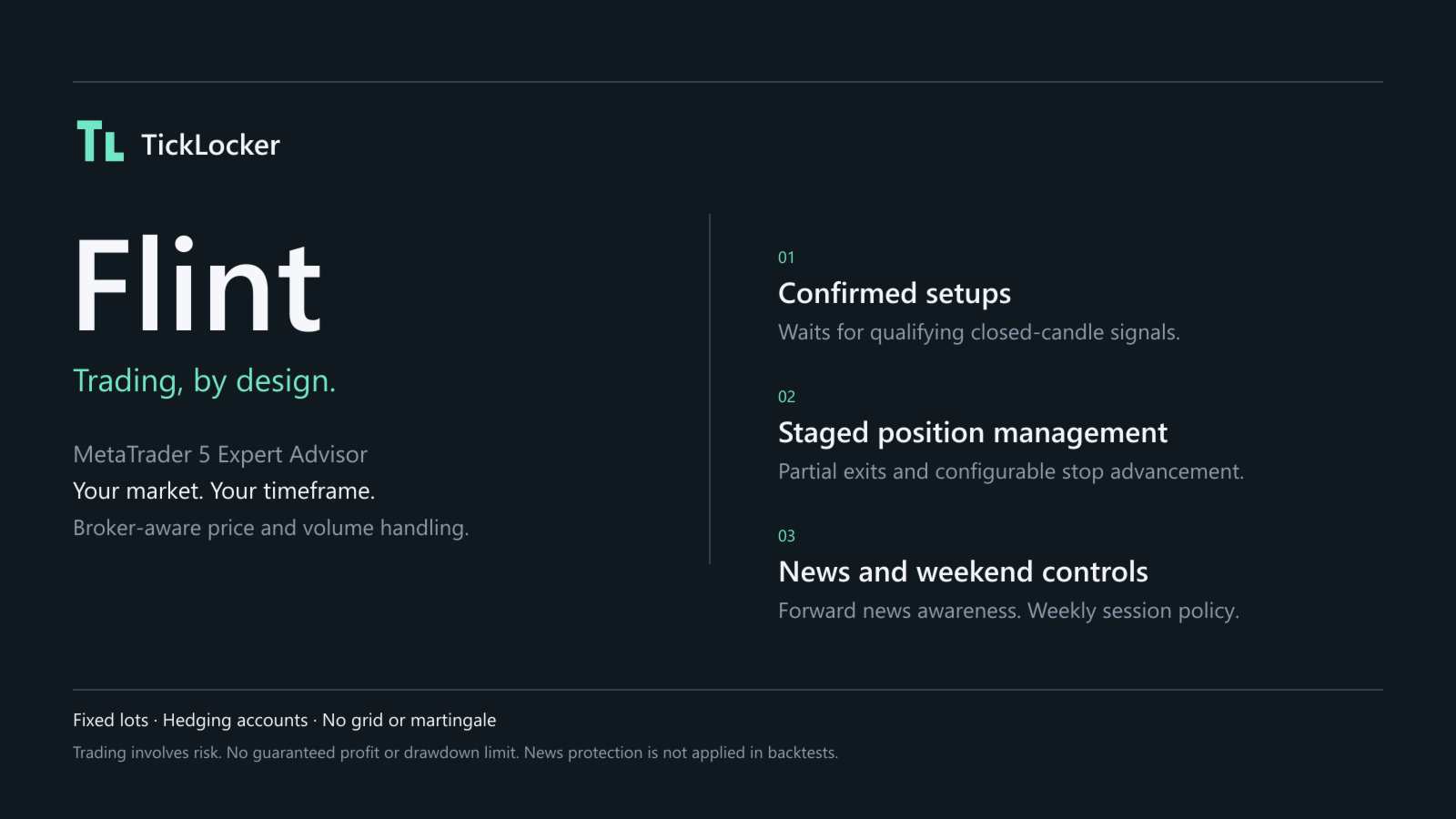
Flint is a configurable Expert Advisor for MetaTrader 5 built around confirmed setups and staged position management. Choose your symbol and signal timeframe, with broker-aware price and volume handling. Flint waits for a qualifying opportunity, opens a position with a stop loss and final target, then manages partial exits and optional stop advancement.
What you control
- Signal timeframe and entry settings.
- Fixed lots per target and a configurable number of target portions.
- Initial stop method and extra stop distance.
- Break-even after the first confirmed partial exit and staged stop advancement.
- High-impact news and weekend protection, enabled by default.
- A compact chart panel, TickLocker chart colours and optional native MT5 setup alerts.
Flint does not use a grid, martingale or averaging into losing trades. The panel shows operating status, Flint-owned performance and upcoming news when calendar data is available.
Your market and timeframe
Flint is not locked to gold, one timeframe or a named broker. Use your chosen chart symbol, including the broker's symbol suffix, and select the signal timeframe independently of the chart. Choosing Current follows the chart timeframe.
Flint reads the broker's price precision, tick size, volume and stop rules, uses the symbol's filling policy and checks available margin before entry. News and weekly-session protection follow broker server time. These features handle broker differences; they do not automatically choose profitable settings or make the same lot size equally suitable for every instrument.
An MT5 hedging account is required; netting accounts are not supported in this version. Test your chosen symbol, timeframe and broker conditions before online use. Missing or unsupported broker data can prevent entry, with a status reason.
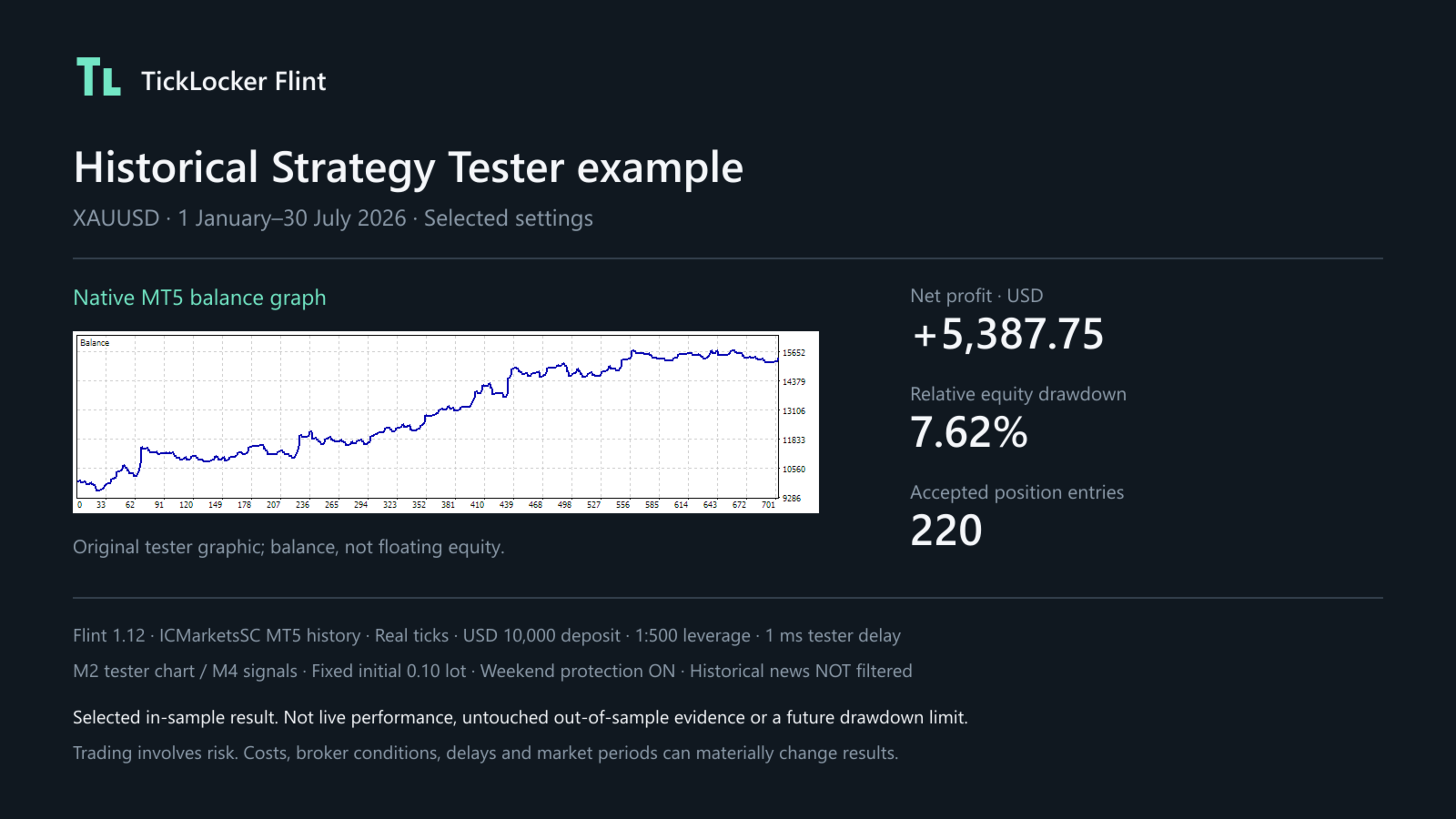
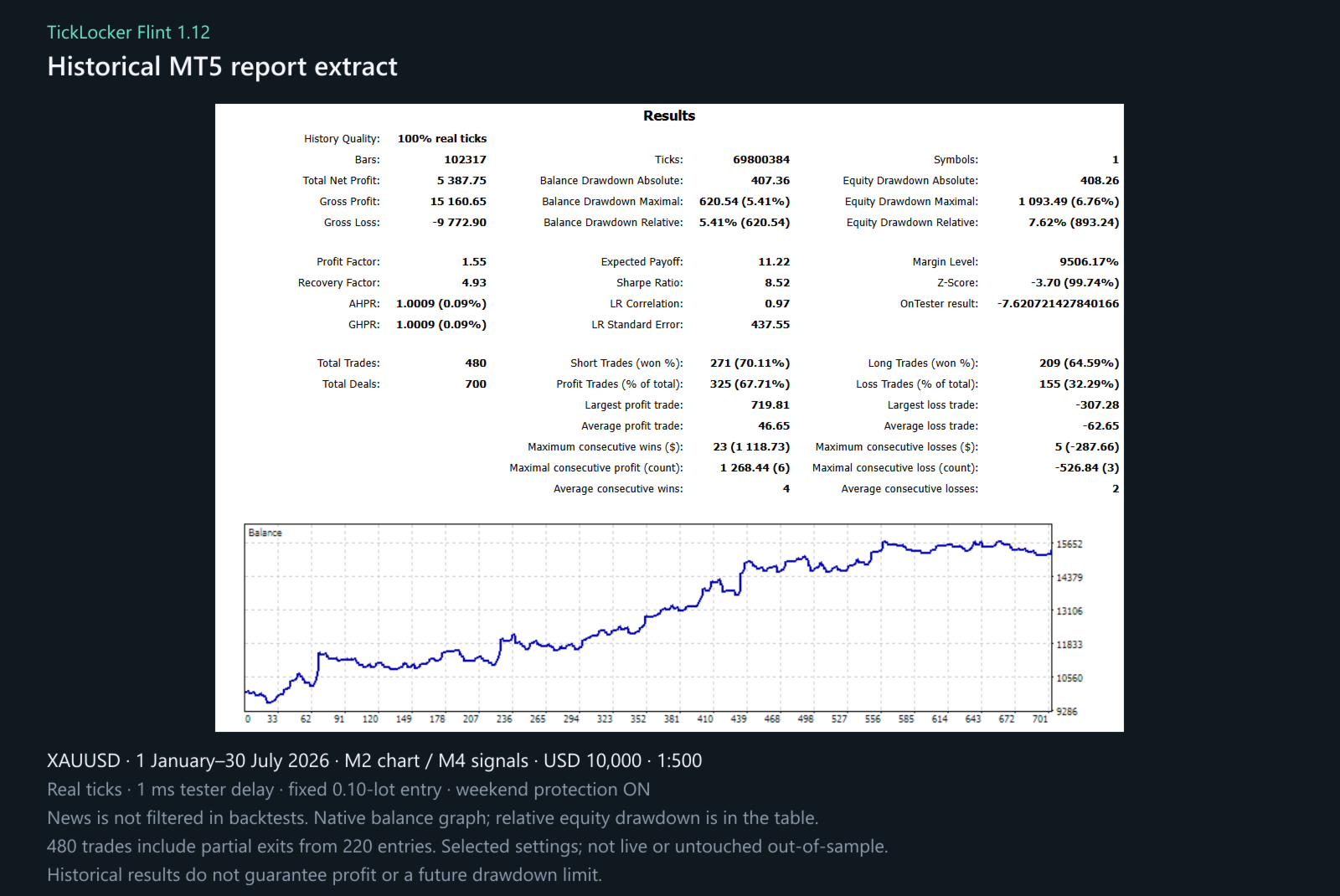
One optional XAUUSD preset is supplied as a starting point, not a required market or timeframe. Historical images identify the settings used for that particular test.
Default initial volume is 0.10 lot, formed from ten 0.01-lot target portions in one position. Sizing is fixed, not balance-based. Stop distance and cash risk vary by setup. There are no daily-loss or total-equity limits in this version. Check your volume, available margin and potential loss before enabling trading.
Protection and testing
The news filter works forward on online demo/live accounts using MT5's economic calendar. It is not applied in historical backtests. It cannot cover unscheduled news. Weekend protection uses the broker's weekly sessions and remains active in Strategy Tester; it is not a holiday calendar. Market gaps, disconnections and execution delays can prevent timely exits.
Use the free Market demo in Strategy Tester before renting. Test with real ticks, your broker's costs, realistic execution delays and different market periods. Published backtests are historical examples, not live results or forecasts. Selected settings can perform worse outside the period used to choose them.
The free demo is for Strategy Tester only. Online-chart operation requires a paid Market rental. Support is available through the MQL5 Comments tab and seller messages.
Monitor the rental expiry date and renew in advance or handle open positions before expiry. MT5 stops the EA when the rental ends.
Common questions
Can I use another symbol or timeframe? Yes, choose the chart symbol and Signal timeframe input. The supplied preset is only one starting point. Check broker compatibility, costs and exposure, then test settings for the market you choose; results do not transfer automatically between markets.
Why does 0.01 lot become a 0.10-lot entry? Lots per target are multiplied by the target count. Ten 0.01-lot portions form one position. Reducing target count changes both total size and the exit plan; size does not scale automatically with balance.
What do R and target trailing mean? R represents the planned entry-to-initial-stop distance. The defaults take equal partial exits at 1R through 9R and leave one portion for the final 20R target. Entry-price break-even follows a confirmed TP1 exit. Target trailing starts after TP2 and advances through earlier target levels; it is not a continuous trailing distance.
Why is Flint waiting? Flint waits for a confirmed setup rather than trading every price move. Entry also needs available margin, legal broker volume/stops, trading permission and clear protection status. It does not open another position while the same instance already owns one.
Do I need to keep MT5 running? Yes, for partial exits, stop advancement and news/weekend closure requests. Broker-held SL and final TP do not replace that active management. The free Market demo runs only in Strategy Tester, and historical tests do not apply news protection.
Trading involves risk. There is no promise of profit, a maximum drawdown or prop-account compliance. An entry-price stop does not guarantee a net break-even result after costs or slippage.
Flint questions and input guideFlint combines selective setups with configurable position size, staged exits and optional stop advancement. This guide helps you choose your settings and understand how your trades are managed.
For Flint 1.12 on MetaTrader 5. The supplied Base preset is one XAUUSD starting point, not a restriction on symbols or timeframes or a promise that the same settings suit every market.
Before you start
Which account and chart do I need?
Use an MT5 hedging account. Netting accounts are not supported in this version. Open your chosen broker symbol's chart and select the Signal timeframe input. It can follow the chart or use a separately selected timeframe. The supplied XAUUSD preset is optional; test the market, timeframe and broker conditions you intend to use.
How does Flint handle different brokers?
Flint uses the exact chart symbol, including any suffix, and reads its price precision, tick size, volume and stop rules. It uses the symbol's filling policy, checks available margin and follows broker server time for calendar and weekly-session protection. Required data must be available and supported; a named broker is not a licence requirement. This does not automatically optimise your inputs or guarantee identical results across brokers.
Does the free demo trade on a demo account?
The Market demo runs in Strategy Tester only. Online charts, including broker demo-account charts, require a paid rental. Check the rental expiry date and renew or arrange management of open positions before expiry; licence expiry does not close positions for you.
Does Flint adjust lots to my balance?
No. Initial lots equal Lots per target multiplied by Number of target portions. The defaults open one 0.10-lot position, not ten entry orders. A small balance does not automatically receive a smaller position. Wider stops mean more cash at risk with the same lots. This version has no daily-loss or total-equity limit.
Entry setup
Input keys in parentheses match saved set files. Candle counts refer to the selected signal timeframe.
| Input | Default | What it means |
|---|---|---|
| Signal timeframe ( SignalTimeframe ) | M4 | Candles used for setup decisions. Choose Current to follow the chart, or select a separate MT5 timeframe. The supplied default is a starting point, not a requirement. |
| Structure left candles ( PivotLeftBars ) | 2 | Sets the depth of earlier price context used by the setup assessment. Higher values use more context and can change which setups qualify. Range: 1 to 100. |
| Structure right candles ( PivotRightBars ) | 8 | Adjusts structure confirmation. Higher values require more confirmation time and can change signal timing. Range: 1 to 100. |
| Structure lookback ( StructureLookbackBars ) | 50 | Sets the historical window for structure assessment. It is not a trade holding-time limit. Range: 20 to 20000 candles. |
| Confirmation buffer ( BreakoutBufferPoints ) | 0 | Adds price distance to the entry confirmation requirement, in broker points. Larger values make this requirement stricter; they do not directly widen the stop. Use zero for no extra buffer. |
| Activity reference ( VolumeAverageBars ) | 60 | Sets the history window for activity assessment. A longer window uses more history; it does not guarantee better signals. Range: 2 to 20000. |
| Activity threshold multiplier ( VolumeBurstMultiplier ) | 2 | Adjusts how selective Flint is about market activity. Higher values make the activity requirement stricter. Must be positive. |
Are points the same as pips or dollars?
No. A broker point is the symbol's quoted point size. If that size is 0.01, then 50 points equal a 0.50 price move, not a USD 50 profit or loss. Check the symbol specification; units can differ between brokers and instruments.
Will every broker produce the same signals?
Not necessarily. Flint uses the broker's price and tick-activity data, not a complete record of worldwide market activity or institutional order flow. Feed differences, trading costs and execution conditions can affect signals and results.
Why does Flint wait while the market is moving?
Price movement alone does not make a setup eligible. Flint waits for its confirmed setup criteria. A confirmed setup can still be skipped if a position is already open, protection is active or the broker cannot accept the order. A signal is not a guaranteed fill.
Position size and targets
| Input | Default | What it means |
|---|---|---|
| Fixed lots per target portion ( LotsPerTarget ) | 0.01 | Size of each equal portion. Total entry size is this value multiplied by target count. Each portion and the total must meet the broker's volume rules and available margin. |
| Number of target portions ( TargetCount ) | 10 | Positive whole number. With ten portions, nine are managed as partial exits and one remains for the final target. Increasing this while keeping lots per portion unchanged increases total exposure. |
| Final target R ( FinalTargetR ) | 20 | Distance to the final target, measured in R. It must be at least the target count. Intermediate targets remain at 1R, 2R and so on; changing final R does not spread them evenly across the final distance. |
What is R and how do the targets work?
R represents the entry-to-initial-stop distance used for the trade plan. For illustration, a buy planned at 3000 with a stop at 2998 has a 2.00 price distance: 1R is 3002, 2R is 3004 and 20R is 3040. These are price levels, not promised cash returns. Actual fills and broker price rounding can affect the levels.
With the defaults, Flint attempts 0.01-lot partial exits at 1R through 9R. The final 0.01 lot has the final broker-held TP at 20R. Portions can close earlier at the stop or through protection. With one target, the full position uses the final TP; there is no intermediate partial-exit or TP1 break-even step.
How can I reduce size without changing the number of exits?
Reduce Lots per target if the broker permits that smaller volume. If 0.01 is already the minimum, fewer targets reduce total lots but also change the exit plan. Flint does not silently round an undersized portion up or scale a rejected order down to fit margin.
Stop management
| Input | Default | What it means |
|---|---|---|
| Initial stop method ( InitialStopMode ) | Signal candle | Chooses whether the initial stop is anchored to the setup candle or confirmed market structure. Either can produce a wide stop; neither fixes cash risk. Check the position's actual SL in MT5. |
| Additional stop distance ( StopBufferPoints ) | 0 | Adds broker points beyond the selected stop level, away from entry. A larger buffer generally increases stop distance and cash risk at fixed lots. Must be nonnegative. |
| Move stop to entry after TP1 ( MoveToBreakEvenAtTP1 ) | On | Requests an entry-price stop after the first partial exit is confirmed. It does not act as soon as floating profit turns positive. |
| Advance stop through targets ( TrailStopThroughTargets ) | On | After TP2 is confirmed, requests the stop at 1R; after TP3, at 2R, and so on. This is a staged stop, not a continuous distance-based trail. |
Can I use break-even and target trailing separately?
Yes. Break-even On and trailing Off requests an entry stop after TP1 without later target-step advances. Break-even Off and trailing On leaves the TP1 stop unchanged, then starts advancing after TP2. With both Off, Flint keeps the initial stop while still managing partial exits.
Is a break-even trade risk free?
No. An entry-price stop can still lose after commission, swap, slippage or gaps. Stop changes also require a valid broker distance and an accepted modification. Until accepted, the previous stop remains in place.
News and weekend protection
| Input | Default | What it means |
|---|---|---|
| High-impact news protection ( HighImpactNewsProtection ) | On | Uses MT5's calendar for relevant scheduled high-impact releases on online demo/live accounts. During a protected window, Flint pauses entries and requests closure of its owned position. |
| Minutes before news ( NewsMinutesBefore ) | 15 | Protection starts this many minutes before a relevant release. Range when enabled: 1 to 240. |
| Minutes after news ( NewsMinutesAfter ) | 15 | Protection continues this many minutes after the release. Range when enabled: 1 to 240. |
| Weekend protection ( WeekendProtection ) | On | Pauses weekend entries and requests Friday closure before the broker's published session ends. Outside published weekly trading sessions, new entries also pause. |
| Friday close lead ( WeekendMinutesBeforeClose ) | 30 | Minutes before the final published Friday session close when weekend protection begins. It follows broker server time, not your PC clock. Range when enabled: 1 to 240. |
Does the backtest include the news filter?
No. News protection is forward-only. Historical results do not remove news-period trades, even if the input is On. Weekend protection does operate in the tester. This distinction matters when comparing a report with online trading.
What happens if calendar information is unavailable?
New entries pause with a visible reason. Existing protective management remains active while the terminal is running and able to trade. Calendar protection cannot cover surprise news. Weekend protection is based on weekly sessions, not a verified holiday calendar. Neither guarantees a timely exit during a disconnection, closed market or gap.
Platform and display
| Input | Default | What it means |
|---|---|---|
| Unique EA magic number ( MagicNumber ) | 78010601 | Identifies this instance's trades and statistics. Use a nonzero number unique to each separate instance. Do not share the same symbol and magic with another EA. |
| Allowed deviation ( MaxDeviationPoints ) | 20 | Requested price tolerance in broker points. How it is applied depends on broker execution rules; it is not a guaranteed slippage or maximum-loss cap. Range: 0 to 10000. |
| Show compact panel ( DisplayPanel ) | On | Shows Flint's status, owned performance, signals and available upcoming news. Turning it Off does not disable trading or protection. |
| Apply TickLocker colours ( UseTickLockerChartTheme ) | On | Applies the chart theme. It changes presentation, not trading decisions. |
| MT5 account trade arrows ( ShowMT5TradeHistory ) | On | Shows MT5's recorded trade history on the chart symbol. These arrows can include manual trades and other EAs; they are not filtered to Flint's magic number. |
Why do arrows and panel totals differ?
The panel's money figures belong to the current symbol and magic number. Native arrows cover account trades on that symbol. A position may also have several partial-exit deals, so deal counts and completed-position counts are different measures. Signal counts describe setups, not necessarily executed trades.
Can I run multiple instances?
Use separate charts and unique magic numbers. Each instance manages at most one owned position at a time. Different instances may trade the same move, multiplying account exposure; unique magic numbers do not diversify that risk. Review positions before changing settings, upgrading or changing a magic number. Do not manually change a managed position's volume.
Does MT5 or a VPS need to stay running?
Yes, for entries, partial exits, target-step stop updates and calendar/session closure requests. The accepted initial SL and final TP are held by the broker, but they do not replace the EA's active management. A VPS panel is not mirrored onto your local chart.
Notifications
| Input | Default | What it means |
|---|---|---|
| Popup alerts ( PopupAlerts ) | Off | MT5 desktop popup for a newly confirmed setup. Popups are not displayed on MetaTrader's virtual hosting. |
| Phone push ( PushNotifications ) | Off | Requests a phone notification through MT5. Configure and test Tools > Options > Notifications first. |
| Email ( EmailAlerts ) | Off | Requests an email through MT5. Configure and test Tools > Options > Email first. |
Why did I receive a setup alert without a trade?
Alerts identify confirmed setups, not fills. Protection, an existing position or a broker rejection can prevent entry. Notifications are not sent for attachment context, historical backfill or tester runs. Delivery depends on MT5 and the configured service; an alert is not a guaranteed execution receipt.
Testing and troubleshooting
Flint is quiet or says it cannot enter
Check the panel and Experts/Journal tabs. Common causes are waiting for a qualifying closed candle, insufficient history, an existing owned position, calendar/session protection, disabled Algo Trading, insufficient margin, unsupported account mode or invalid volume/stop settings. An unresolved execution warning needs review; restarting or changing magic to hide it is not a fix.
Can I rely on the published drawdown or use Flint on a prop account?
A backtest drawdown describes that test only; it is not a future loss ceiling. Test real ticks, costs, execution delays and separate market periods. Check your account's rules yourself: Flint has no built-in daily/total loss limit and does not promise prop-account compliance or profit.
Why is the custom optimisation Result negative when Profit is positive?
Flint's custom tester score is negative relative equity drawdown, not profit. For example, a 7.62% relative equity drawdown gives a score near -7.62. With Custom max selected, scores closer to zero rank higher. Check Profit separately; this score does not require a profitable result.
For support, use the product's MQL5 Comments tab or seller messages. Include the version, symbol, relevant settings and journal message. Remove account numbers, credentials and unrelated personal details before sharing.
Platform guidance: Market demos and rental expiry, deviation in points. These explain MT5 facilities, not Flint performance.