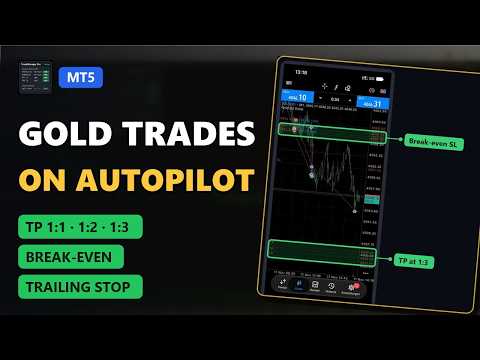
TradeManager Pro RR Partial TP and Trailing

TradeManager Pro는 열려 있는 포지션을 대신 관리합니다. 스스로 거래를 열지 않습니다. 수동, 휴대폰 또는 다른 Expert Advisor로 연 거래를 관리하며, 매 틱마다 위험 관리 규칙을 일관되게 적용합니다.

트레이더들이 사용하는 이유

  • 모든 거래에 손절(SL)이 자동으로 설정됩니다.
  • 위험 대비 수익(R:R)에 기반한 부분 익절로 수익을 단계적으로 확보합니다.
  • 첫 번째 목표 이후 거래는 무위험(본전) 상태가 됩니다.
  • 남은 포지션은 트레일링 스톱으로 따라가며 더 큰 움직임을 노립니다.
  • 모든 것을 차트 위 하나의 패널에서 확인하고 조정할 수 있어 설정 창을 열 필요가 없습니다.

최소 손절

  • SL이 없는 거래에는 자동으로 손절이 설정됩니다(금 기본값 80핍).
  • 너무 가까운 손절은 최소 거리로 넓혀집니다.
  • SL이 손실 쪽에 있을 때만 작동하며, 본전이나 트레일링을 되돌리지 않습니다.

R:R 기반 부분 익절

  • 최대 3개 목표, 예: 1:1 (50%), 1:2 (25%), 1:3 (나머지).
  • R은 각 거래의 초기 위험이며 저장되므로 트레일링이 목표를 바꾸지 않습니다.
  • 고정 핍 목표도 가능합니다.
  • PC나 터미널이 오프라인이 될 경우를 대비한 선택적 브로커 고정 TP.

본전(브레이크이븐)

  • X핍 수익 후 SL을 진입가 + 버퍼로 이동합니다.
  • 선택 사항: TP1 직후 즉시 본전.

트레일링 스톱 – 4가지 방식

  • 고정 핍, ATR 기반, 최근 스윙 고점/저점 뒤, 또는 최근 캔들의 고점/저점 뒤.
  • 여러 방식을 조합하여 가장 촘촘하거나 가장 넓은 손절을 선택할 수 있습니다.
  • 불필요한 수정을 막는 최소 단계.

시간 기능

  • 지정한 시간대에만 관리.
  • 매일 정해진 시간 또는 주말 전(금요일)에 모든 거래 청산.
  • 최대 보유 시간 후 청산.

인터랙티브 대시보드

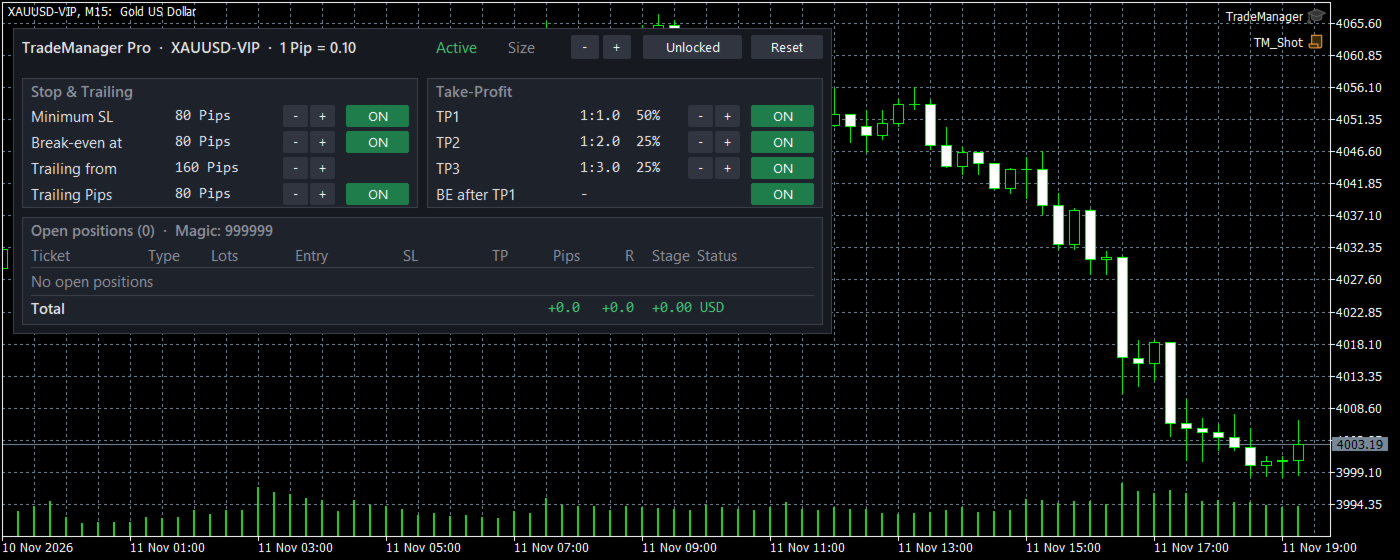
  • 설정 표: 차트에서 바로 기능을 ON/OFF하고 −/+로 값을 변경합니다.
  • 포지션 표: 티켓, 유형, 랏, 진입가, SL, TP, 핍, R 배수, 도달한 TP 단계 및 상태(Initial SL / BE / Trailing).
  • 핍, R, 계좌 통화 손익을 보여주는 합계 행.
  • 크기 조절, 실수 클릭 방지 잠금, 입력값으로 재설정.
  • 어두운/밝은 차트에 자동으로 맞춰집니다. 대시보드 언어: 영어 또는 독일어.
  • 변경 사항은 터미널 재시작 후에도 유지됩니다.

금에 맞춘 핍 계산

  • 금(1핍 = 0.10)과 5/3자리 외환 종목을 자동으로 인식합니다.
  • 지수나 특수 종목은 핍 크기를 수동으로 설정할 수 있습니다.

필터와 안전성

  • 차트 종목만 또는 모든 종목을 관리합니다.
  • 매직 넘버 필터: 모든 거래, 수동 거래만, 또는 특정 EA.
  • 브로커의 스톱/프리즈 레벨을 준수하고, 손절을 뒤로 옮기지 않으며, 시장이 닫혀 있을 때는 요청을 보내지 않습니다.
  • 헤징 및 네팅 계좌에서 작동합니다.

사용 방법

  1. TradeManager Pro를 아무 차트(예: XAUUSD)에 적용합니다.
  2. 알고 트레이딩을 활성화합니다.
  3. 평소처럼 거래를 엽니다: 수동, 휴대폰 또는 다른 EA.
  4. 언제든지 대시보드에서 설정을 조정합니다.

전략 테스터
이 유틸리티는 스스로 거래하지 않습니다. 전략 테스터에서 동작을 보여주기 위해 테스터에서만 무작위 테스트 거래를 여는 데모 모드가 포함되어 있습니다. 실거래에서는 이 모드가 작동하지 않습니다. 무작위 진입은 관리 기능을 보여주기 위한 것일 뿐 거래 전략이 아닙니다.

주요 입력값(EA 내 이름은 영어)

  • Filter: manage only chart symbol, magic number (-1 all, 0 manual only).
  • Pips: manual pip size (0 = automatic).
  • Minimum SL: on/off, distance in pips (80), set SL if missing.
  • Break-even: on/off, trigger (80 pips), buffer (5 pips).
  • Trailing: start (160 pips), step (5 pips), combine mode; fixed pips (80), ATR (period 14, x2.0), swing (strength 3, lookback 50, buffer 10), candle (2 bars, buffer 5).
  • Partial TPs: mode R:R or pips; TP1 1:1 50 %, TP2 1:2 25 %, TP3 1:3 25 %; BE after TP1; broker TP at 1:3.
  • Time: time window, daily close, Friday close, max holding time (all off by default).
  • Dashboard: show, language, remember changes, start locked, position, size, max rows.
  • Strategy Tester only: demo trades on/off, interval, lot size, initial SL/TP, random seed.

중요: 이 제품은 거래 관리 도구이며 신호나 진입 시스템이 아닙니다. 결과는 사용자의 진입에 따라 달라집니다. 과거 결과가 미래 결과를 보장하지 않습니다. 먼저 데모 계좌에서 테스트하세요.
추천 제품
Equity Pulse MT5 Real-time equity, drawdown, and portfolio performance tracking in one clean trading panel. Equity Pulse MT5 is a practical account-monitoring indicator for MetaTrader 5. It helps traders see exactly where they stand across today, yesterday, recent days, the current week, month, and year. Instead of checking account history manually or relying only on the terminal’s floating profit number, Equity Pulse gives you a clear performance snapshot directly on the chart. It is designed
The Simple Manual Trading Panel (v2.11) Is a professional trade management tool designed with a clean, movable UI to streamline manual execution and automated exit strategies. Core Features Dynamic Visual Interface: A movable GUI panel that provides real-time information including a bar countdown timer, live spread, and advanced volume analysis. Flexible Lot Size setting, with 2 decimals (If broker supports it). Multi-Stage Take Profit: Supports three distinct Take Profit (TP) levels in either
Guardian Account Protector — the seatbelt for your trading account Your robots have no brakes. Guardian is the brakes. Guardian does not open trades. It has no grid, no martingale, and no entry logic of any kind. It does one job with complete discipline: it watches your ENTIRE account and enforces the risk limits you set, so that no robot, no strategy, and no bad day can destroy your balance. Think of it like a seatbelt for the driver. A seatbelt does not steer the car and does not make the d
Weekday Stats
Elidio Xavier Guimaraes
Weekday Stats Overview Weekday Stats is a quantitative analysis indicator designed to perform statistical studies of price behavior by classifying candle data according to the day of the week on which each candle occurred. The indicator processes the historical candles of the selected asset and provides statistical information for each day of the week, allowing the user to analyze price direction and price variation separately for each weekday. The sampling period, statistical parameters, and da
Trade Assistant Professional
Itumeleng Mohlouwa Kgotso Tladi
TradeAssistantPro — Visual Panel | 7-Mode Trailing | Local Copier MQL5 Market Description (Ready to Paste) Clean, simple language — optimized for Market validation & rating Trade Smarter, Manage Risk, Scale Locally — All in One EA TradeAssistantPro is a 3-in-1 professional tool for serious traders: a Visual Trade Panel with Smart Risk Calculator , a 7-Mode Trailing & Position Manager , and a Local Multi-Terminal Copier (Master/Client) . No DLL. No WebRequest. No cloud. Pure MQL5, built for MT
DoIt EA Monitor - Multi EA Performance Dashboard for MT5 Your account can be profitable while one EA quietly drags down the portfolio. MetaTrader history shows the combined result, but it does not clearly show which strategy deserves more capital and which one needs attention. DoIt EA Monitor runs on one chart and separates live and historical performance by magic number, EA and symbol. It is completely read-only. It never opens, closes or modifies a trade. KNOW WHICH EA IS EARNING ITS PLACE Aut
FREE
Smart FVG Stats
- Md Rashidul Hasan
5 (1)
The  Smart FVG Statistics Indicator  is a powerful MetaTrader 5 tool designed to automatically identify, track, and analyze Fair Value Gaps (FVGs) on your charts. Love it? Hate it? Let me know in a review! Feature requests and ideas for new tools are highly appreciated. :) Try "The AUDCAD Trader": https://www.mql5.com/en/market/product/151841 Key Features Advanced  Fair Value Gap  Detection Automatic Identification : Automatically scans for both bullish and bearish FVGs across specified histo
FREE
​AlphaPulse Quant (Momentum Pulse Reversal System) ​ Strategy Overview ​AlphaPulse Quant is an intelligent quantitative trading system meticulously engineered to capture institutional market sweeps and extreme overbought/oversold inflection points. Rejecting the lagging nature of traditional trend-following indicators, the strategy utilizes a proprietary multi-dimensional momentum pulse algorithm to execute counter-trend deployments just as trends exhaust and retail market sentiment reaches F
ZeroG CyberClock Pro
Pedro Matias Ambrosio
ZeroG CyberClock Pro   is not just another standard MetaTrader clock—it is a premium, beautifully crafted, cyberpunk-style desktop utility designed for the modern algorithmic and manual trader. Tired of basic, ugly text overlapping your charts? CyberClock Pro introduces a sleek, draggable Neon HUD that seamlessly blends into your trading environment without cluttering your analysis. Stay perfectly synchronized with the world’s major financial hubs thanks to its real-time Smart Session Engine.
FREE
Take control of your trading with OGL PositionSizer PRO , the ultimate trade management tool for MetaTrader 5. Designed for both professional and aspiring traders, this panel helps you manage your risk, positions, and profits efficiently. Key Features: Automatic Lot Calculation: Calculate lots based on risk % or fixed amount. Auto Breakeven all active positions on showing chart. Pending Protection - > If the prices comes stoploss before active position. The order will auto delete. Smart Partial
Online Accounts Manager MT5
Kyra Nickaline Watson-gordon
5 (1)
OneClick Online Account Manager is a powerful utility that helps you to manage all your accounts from a centralized panel. It is suitable for all single account traders and specially for multiple accounts traders. The utility help you to : Monitor status of all accounts on a private web page. Some information such as account connection status, account profit, DD, Balance, Equity, Margin Level, Number of positions and orders, Daily and Weekly profit/loss and also overall summation of all these p
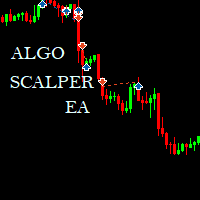
Algo Scalper EA
Tshepo Michael Motaung
Algo Scalper EA is a confluence day trading robot using market orders and it trades during Trading Sessions. The EA exercise consistency and risk management, it has 2 entry signals produced from  Moving Averages(90 & 120) to harvest the most out of the trending market (on automatic mode). It is capable of allowing you to trade any symbol you want and during the time you want. Profits can only be secured by take profit level. Low spread is highly recommended for this EA, and you will see signific
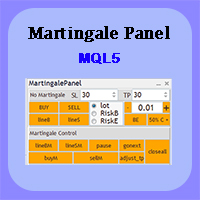
Martingale panel MT5
Mohammadbagher Ramezan Akbari
In this article, we would like to introduce the trade panel product with the Martingale panel. This panel is made in such a way that it can meet the needs of traders to a great extent. This trade panel actually consists of two trade panels at the same time, with the first one you can take positions with certain profit and loss limits, and with the second one, you can have positions with profit limits but without loss limits. When positions lose, a new position will be added based on the settings
Multiple Positions
Emanuel Reynard Phillips
한 번에 여러 포지션/거래를 열어야 합니까? 우리는 귀하의 쉬운 솔루션을 만들었습니다. 이제 한 번에 여러 직위를 입력할 수 있습니다. 로트 크기, 포지션 수, 이익 실현 및 손실 중지를 설정할 수 있습니다. 예: 특정 로트 규모로 3, 5, 10 또는 원하는 수의 포지션을 구매하려고 합니다. 이제 "구매" 버튼을 탭하기만 하면 됩니다. 또는 예: 특정 로트 규모로 3, 5, 10 또는 원하는 수의 포지션을 판매하려고 합니다. 간단히 "판매" 버튼을 클릭하시면 됩니다. han beon-e yeoleo pojisyeon/geolaeleul yeol-eoya habnikka? ulineun gwihaui swiun sollusyeon-eul mandeul-eossseubnida. ije han beon-e yeoleo jig-wileul iblyeoghal su issseubnida. loteu keugi, pojisyeon su, iig silhyeon mich sonsil jung
Are you tired of manually calculating lot sizes for your trades? The Target Lot Calculator is an MQL5 tool that instantly computes and displays the optimal lot size based on your desired profit/loss amount and the price range measured with a crosshair. This tool will make your trading more intuitive and efficient. Key Features Intuitive Operation : Simply move the crosshair to see the optimal lot size for the current price range in real-time. Dynamic Lot Calculation : The tool automatically cal
Trend Strength Visualizer
Alexander Denisovich Jegorov
Trend Strength Visualizer A Simple Tool for Trend Analysis This indicator helps you quickly assess the strength of market trends using fast and slow moving averages. It’s designed to give you a clear visual representation of the trend, so you can make better trading decisions. ~Displays: Green Line : Strong uptrend (potential buying opportunities). Red Line : Strong downtrend (potential selling opportunities). ~Values That Can Be Changed: Fast MA period. Slow MA period. Line color for uptrend an
Custom Alerts: 여러 시장을 동시에 모니터링하고 중요한 기회를 놓치지 마세요 개요 Custom Alerts 는 여러 종목에 걸쳐 잠재적 트레이딩 기회를 한눈에 파악하고자 하는 트레이더를 위한 동적인 솔루션입니다. FX Power, FX Volume, FX Dynamic, FX Levels, IX Power와 같은 Stein Investments의 주요 도구들과 통합되어, 여러 차트를 오가거나 기회를 놓치는 일 없이 중요한 시장 변화를 자동으로 알림으로 제공합니다. 이제 브로커가 제공하는 모든 자산군을 지원하며, 기호를 입력할 필요 없이 자산 유형만 선택하면 설정이 완료됩니다. 1. Custom Alerts가 트레이더에게 매우 유용한 이유 올인원 시장 모니터링 • Custom Alerts 는 외환, 금속, 암호화폐, 지수, 주식(브로커가 지원하는 경우)까지 다양한 자산군의 신호를 수집하고 통합합니다. • 여러 차트를 전환할 필요 없이 하나의 창에서 명확한 알림을 받아보
Max Lot Limiter with Auto Close MetaTrader 5 자동 리스크 관리 도구 Max Lot Limiter with Auto Close는 MetaTrader 5용 자동 리스크 관리 Expert Advisor입니다. 이 EA는 거래 계좌의 모든 거래 종목에서 열린 포지션의 총 랏 수를 지속적으로 모니터링합니다. 설정된 최대 총 랏 수를 초과하면 EA가 자동으로 긴급 청산 절차를 시작하고, 수익 또는 손실 여부와 관계없이 계좌의 모든 열린 포지션을 청산하려고 시도합니다. 이 도구의 목적은 통제되지 않은 포지션 규모 확대를 방지하고 과도한 거래 노출 위험을 줄이는 것입니다. 주요 기능 모든 거래 종목의 열린 포지션 총 랏 수 모니터링. 최대 총 랏 한도 사용자 설정 가능. 기본 최대 랏: 0.70 랏. 한도 초과 시 자동 긴급 청산 절차 시작. 초과된 수량만이 아니라 모든 열린 포지션의 청산 시도. 예약 주문을 총 랏 수 계산에 포함하는 옵션. 한도 초과 시 예약
Advanced Live signal panel
Taha Saber Ashour Kamel
5 (1)
Advanced Signals Pro v10.0 is a professional-grade, all-in-one trading dashboard that combines 11 powerful technical indicators into a single, elegant interface. Monitor multiple symbols simultaneously, receive instant buy/sell signals with calculated targets, and make informed trading decisions with confidence. adjust parameters as you wish and if you want to see detailed analysis for any pair double click on it you will get tp , sl and support and resistance and accurate signal Whether you're
FREE
RazorQuant AI
Steffen Schmidt
RAZORQUANT AI v3.7 (MT5 EA)  Purpose: Automated trading EA that combines classic technical filters with machine-learning signals and optional external AI (LLM) advice to decide BUY/SELL/HOLD and manage trades. Core trading + risk rules: Runs on a chosen timeframe (default M1 ), with MagicNumber , max trades per symbol/day , minimum minutes between trades , max spread , and daily loss limit (% of balance) . Position sizing supports fixed lot or risk-% . Technical filters (rule-based): Trend/MA s
Range Breakout XXX Pro
Saiful Izham Bin Hassan
Range Breakout XXX Pro는 세션 기반 레인지 돌파 로직과 적응형 변동성 타겟팅을 결합한 다중 통화 바스켓 트레이딩 전문가 어드바이저(EA)입니다. 단일 차트에 연결하고 원하는 심볼 바스켓을 정의하면, EA가 각 상품을 독립적으로 추적하고 거래하며 동시에 포트폴리오 수준의 글로벌 위험 통제를 적용합니다. 핵심 전략은 사용자가 정의한 세션 윈도우 동안 형성된 고가 및 저가 가격 수준을 식별합니다. 세션이 종료되면 EA는 해당 수준을 넘어선 확인된 돌파를 기다렸다가 모멘텀 방향으로 진입합니다. 이익 실현 및 손실 중단은 ATR 승수를 사용하여 동적으로 계산되며, 고정 핍 값에 의존하는 대신 현재 시장 변동성에 자동으로 적응합니다. 이 EA는 여러 상품에 걸쳐 체계적이고 규칙 기반의 돌파 거래 방식을 원하는 트레이더를 위해 설계되었으며, 별도의 차트를 관리하거나 수동으로 익스포저를 조정할 필요가 없습니다. 주요 장점 멀티 심볼 바스켓 엔진 단일 차트 연결에서 원하는
Trend Alignment Scanner Pro The Ultimate Volatility Direction Score Dashboard for MetaTrader 5 Are you tired of flipping through dozens of charts just to find a single valid setup? Meet Trend Alignment Scanner Pro , an institutional-grade multi-symbol, multi-timeframe dashboard engineered to detect high-probability market imbalances in real-time. Powered by our proprietary Volatility Direction Score (VDS) Engine , this scanner filters out market noise and ranks the most explosive, trend-aligned
️ 단 하루의 실수로 펀딩 계좌를 잃어서는 안 됩니다. Risk Manager FS Pro 는 계좌에 엄격한 일일 손실 한도를 강제합니다. 자산(Equity)이 한도에 도달하는 순간 모든 포지션을 시장가로 즉시 청산하고, 다음 거래일까지 거래를 잠급니다 — 더 이상 의지력에 기댈 필요가 없습니다 . 프랍펌(Prop Firm) 챌린지와 펀딩 계좌를 위해 특별히 설계되었습니다(1단계, 2단계, 인스턴트 펀딩). 챌린지에 실패하는 진짜 이유 전략 때문인 경우는 거의 없습니다. 단 한 번의 틸트(감정적 폭주) 때문입니다: 손실, 복수 매매, 두 배로 늘린 랏 — 그리고 일일 드로다운 규칙 위반. 이 유틸리티는 그런 시나리오를 기술적으로 불가능하게 만듭니다. 3중 독립 보호 레이어 자동 청산 — 자산이 일일 또는 전체 한도에 도달 → 모든 포지션 즉시 청산. 하드 락 — 서버 시간 자정까지 거래가 차단됩니다. 잠금 중에 열린 새 주문은 약 0.5초 안에 청
The primary function of this script, Tick Data Exporter , is to efficiently extract historical tick data. Tick data represents the most granular level of market data, capturing every single price change. The script downloads this data from a broker and formats it into CSV files for external quantitative analysis. Five things tick data shows that bars permanently hide: Spread microstructure: Bars give you one spread number per period (typically the spread at bar close). Ticks show you the sprea
Account protection tool for MT5: daily and weekly loss limits and a daily profit lock on equity. When a limit is hit it closes the positions and keeps the account flat until the next day. Daily Equity Sentinel is a trading utility for MetaTrader 5 - daily and weekly loss limits for the whole account. Sets a hard floor under your day - and keeps you out once it is hit. It works on any symbol (designed with XAUUSD / gold in mind) and on hedging and netting accounts. What it does Daily loss limit -
Telegram to MT5 Coppy
Sergey Batudayev
5 (10)
Telegram에서 MT5로:   최고의 신호 복사 솔루션 DLL 없이도 Telegram 채널과 채팅에서 MetaTrader 5 플랫폼으로 거래 신호를 직접 복사하는 최신 도구인 Telegram to MT5를 사용하여 거래를 간소화하세요. 이 강력한 솔루션은 정밀한 신호 실행, 광범위한 사용자 정의 옵션을 제공하고 시간을 절약하며 효율성을 높여줍니다. [ Instructions and DEMO ] 주요 특징 직접 Telegram API 통합 전화번호와 보안 코드를 통해 인증하세요. 사용자 친화적인 EXE 브리지를 통해 채팅 ID를 쉽게 관리하세요. 여러 채널/채팅을 추가, 삭제, 새로 고침하여 동시에 신호를 복사합니다. 고급 필터를 사용한 신호 파싱 예외 단어(예: "보고서", "결과")가 포함된 원치 않는 신호를 건너뜁니다. 유연한 SL 및 TP 형식을 지원합니다: 가격, 핍 또는 포인트. 가격 대신 포인트를 지정하는 신호에 대한 진입 포인트를 자동으로 계산합니다. 주문 맞춤화 및

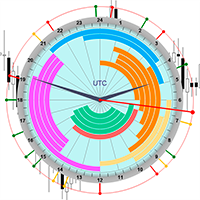
The professional browser of News and Trading Sessions is now available in MetaTrader 5. Now all the most important market information is collected on one dial! News located on the Time scale. Planning your working time has never been so easy and convenient ... The news scale can be switched a day, two, a week, a month forward or backward (see the details in the short video). All news updates in real time. Thanks to the built-in filters, you can configure the display of news by importance, cou
The strategy which is applied in finance market all around the world is known as CTA strategy. A successful CTA always includes multi-strategies, multi-instruments and multi-timeframe. The series of Multi Instruments TrendSystem (MITS) provide a profitable strategy which can be used in different instruments with different timeframe. Multi Instruments TrendSystem 6 CP  (Central Power ) MT5  is a fully automated multi-instrument Expert Advisor. This EA is one of our trend strategies EA, it can be
Advisor for hedging trading or pair trading. A convenient panel allows you to open positions on the necessary trading instruments and lots. Automatically determines the type of trading account - netting or hedging. Advisor can close all its positions upon reaching profit or loss (determined in the settings). A negative value is required to control losses (for example, -100, -500, etc.). If the corresponding fields are 0, the EA will not use this function.   Settings: Close profit (if 0 here
손절 위치는 직접 정하고, 수량은 패널이 계산합니다. Risk Lock Trade Panel은 설정한 리스크로 매번 주문 수량을 계산해, 손절이 이미 붙은 상태로 주문을 보내고, 같은 창에서 포지션까지 관리하는 MetaTrader 5용 수동 트레이딩 패널입니다. 스스로 주문을 내지 않고, 조언을 하지 않으며, 신호를 보내지 않습니다. 리스크는 잔고나 유효증거금 대비 비율, 또는 고정 금액으로 입력하고, 손절 거리는 포인트로 지정하거나 Show line을 눌러 차트의 손절선을 드래그하면 됩니다. 손절선을 움직일 때마다 거리·로트·리스크 금액이 다시 계산되어, 손절을 가깝게 두면 로트가 커지고 멀리 두면 작아지지만 리스크 금액 자체는 설정한 값 그대로 유지됩니다. 손익비 프리셋을 쓰면 손절 거리의 배수(1:1, 1:1.5, 1:2, 또는 미지정)로 익절을 손절과 함께 주문에 붙일 수 있습니다. 로트 수량은 종목에 맞춰 정규화됩니다. 최소 단위와 최소·최대 거래량은 브로커에서 읽어오고
이 제품의 구매자들이 또한 구매함
Trade Assistant MT5
Evgeniy Kravchenko
4.43 (216)
거래당 위험 계산, 라인을 사용한 손쉬운 신규 주문, 부분 청산 기능을 통한 주문 관리, 7가지 유형의 트레일링 스탑 및 기타 유용한 기능을 제공합니다. 추가 자료 및 지침 설치 지침   -   애플리케이션 지침   라인 기능       - 차트에 개시선, 손절매, 차익실현을 표시합니다. 이 기능을 사용하면 새로운 주문을 쉽게 하고 개봉 전에 추가 특성을 볼 수 있습니다. 위기 관리       -       위험 계산 기능은 설정된 위험과 손절매 주문의 크기를 고려하여 새 주문의 볼륨을 계산합니다. 이를 통해 손절매 크기를 설정하고 동시에 설정된 위험을 존중할 수 있습니다. 로트 계산 버튼 - 위험 계산을 활성화/비활성화합니다. 필요한 위험 값은 위험 필드에 0에서 100 사이의 백분율 또는 예금 통화로 설정됩니다. 설정 탭에서 위험 계산 옵션을 선택합니다. $ 통화, % 잔액, % 지분, % 자유 마진, % 사용자 정의, % AB 이전 일, % AB 이전 주, % AB 이전
Farmed Hedge Yield Farming | All Markets (Manual - Hybrid - Semi/Automated EA) VERIFIED TRADING RESULTS - Farmed Hedge Yield Axi Copy:  https://www.mql5.com/en/signals/2356376 - Farmed Hedge Yield Exn Copy:   https://www.mql5.com/en/signals/2356404 - Farmed Hedge Yield V Copy:  https://www.mql5.com/en/signals/2357156 IMPORTANT NOTICE: FarmedHedge is a MANUAL-FOCUSED TRADING UTILITY ,not a fully automated EA. Results shown on this Signal include manual trades and overall strategic management.
Trade Manager EA에 오신 것을 환영합니다. 이 도구는 거래를 보다 직관적이고 정확하며 효율적으로 만들기 위해 설계된 궁극적인 리스크 관리 도구 입니다. 단순한 주문 실행 도구가 아닌, 원활한 거래 계획, 포지션 관리 및 리스크 제어를 위한 종합 솔루션입니다. 초보자부터 고급 트레이더, 빠른 실행이 필요한 스캘퍼에 이르기까지 Trade Manager EA는 외환, 지수, 상품, 암호화폐 등 다양한 시장에서 유연성을 제공합니다. Trade Manager EA를 사용하면 복잡한 계산은 이제 과거의 일이 됩니다. 시장을 분석하고 진입, 손절 및 익절 수준을 차트의 수평선으로 표시한 후 리스크를 설정하면, Trade Manager가 이상적인 포지션 크기를 즉시 계산하고 SL 및 TP 값을 실시간으로 표시합니다. 모든 거래가 간편하게 관리됩니다. 주요 기능: 포지션 크기 계산기 : 정의된 리스크에 따라 거래 크기를 즉시 결정합니다. 간단한 거래 계획 : 진입, 손절, 익절을 위한
Telegram to MT5 Multi-Channel Copier   는 Telegram 및 Discord 채널의 트레이딩 시그널을 MetaTrader 5로 자동 복사합니다. 봇도, 브라우저 확장도, 수동 복사도 필요 없습니다. Telegram이나 Discord에 시그널이 도착하면 EA가 몇 초 안에 터미널에서 주문을 실행합니다. 그리고 채널을 복사하기 전에, 내장 백테스터가 그 채널이 내 계좌에서 어떤 결과를 냈을지 보여줍니다. 제품은 두 가지 구성 요소로 이루어집니다: Telegram 채널을 수신하는 Windows 애플리케이션과, MT5 터미널에서 시그널을 실행하는 본 EA입니다. MT4 버전도 제공됩니다   여기 . 구매 전에 사용해 보세요:   애플리케이션은 무료로 다운로드할 수 있습니다. 본인의 채널을 연결하고 각 시그널이 어떻게 읽히는지 확인하세요. Backtest 탭과 실제 거래에는 구매하거나 임대한 EA가 필요합니다. 이 페이지의 무료 데모는 전략 테스터에서만 실행되며
Local Trade Copier EA MT5
Juvenille Emperor Limited
4.94 (150)
Local Trade Copier EA MT5는 동일한 Windows 컴퓨터 또는 Windows VPS에서 여러 MetaTrader 5 계정 간에 거래를 복사하고 관리할 수 있는 빠르고 유연한 거래 복사기입니다. 로컬 거래 동기화 기능과 함께 Receiver 측에서 로트 크기, 리스크 관리, 거래 필터링, 심볼 매핑, 거래 관리 및 계정 보호를 독립적으로 설정할 수 있습니다. Transmitter와 Receiver 터미널을 약 1분 안에 설정하고, 동일한 브로커 또는 서로 다른 브로커의 계정 간에 수동 거래 또는 EA 거래를 복사할 수 있습니다. 적절한 조건에서는 로컬 MetaTrader 터미널 간의 거래 정보가 0.5초 이내 에 동기화될 수 있습니다. 실제 체결 속도는 브로커 지연 시간, 네트워크 상태, 컴퓨터/VPS 성능 및 터미널 부하에 따라 달라집니다. 구매 전에 무료 데모를 사용해 보세요 MT5 데모 계정에서 Local Trade Copier EA MT5의 모든 기능을
TradePanel MT5
Alfiya Fazylova
4.88 (173)
Trade Panel은 다기능 거래 도우미입니다. 이 애플리케이션에는 50개 이상의 수동 거래 기능이 포함되어 있으며 대부분의 거래 작업을 자동화할 수 있습니다. 앱 사용 설명서: https://www.mql5.com/en/blogs/post/756482 데모 계정용 앱 체험판: https://www.mql5.com/en/blogs/post/750865 앱 설치 방법: https://www.mql5.com/en/blogs/post/756239 시각 모드에서 앱 테스트 방법: https://www.mql5.com/en/blogs/post/770277 VPS MetaTrader에 앱 설치 방법: https://www.mql5.com/en/blogs/post/770190 거래. 한 번의 클릭으로 거래를 수행할 수 있습니다: 리스크 자동 계산과 함께 예약 주문 및 포지션 열기. 한 번의 클릭으로 여러 주문 및 포지션 열기. 주문 그리드 열기. 예약 주문 및 포지션을 그룹별로 닫기. 포지션
News Trade EA MT5
Konstantin Kulikov
4.55 (11)
제가 몇 년 동안 사용하고 있는 유용한 로봇을 소개드립니다. 반자동뿐만 아니라 자동 모드로도 사용할 수 있습니다. >>> Chat <<< 본 프로그램에는 경제 캘린더의 뉴스별로 유연한 거래 설정이 포함되어 있습니다. 전략 테스터에서 확인할 수 없습니다. 진짜 작업뿐입니다. 최신 설정 아카이브 다운로드: https://www.mql5.com/en/blogs/post/747929 신호 모니터링: https://www.mql5.com/en/signals/author/test-standart 이 전문가를 위해 고유 설정 세트를 만들 때 블로그의 모든 매개변수에 대한 설명을 참조하십시오: https://www.mql5.com/en/blogs/post/748545 . 기본 설정 설명 작업은 한 차트에서 GBP(GBPUSD, EURGBP, GBPJPY, GBPCAD, GBPAUD, GBPCHF)와 쌍으로 이루어집니다. GBP는 가장 변동성이 큰 통화로서 거래 수행 시 거래를 성공적으로
내 거래 규칙에 맞춰 Telegram 신호 복사 Telegram to MT5 Signal Trader 는 공개 및 비공개 Telegram 채널과 그룹의 텍스트 기반 거래 신호를 MetaTrader 5로 자동 복사합니다. 하나의 데스크톱 앱에서 여러 신호 제공자와 MT5 계좌를 관리하고, 제공자마다 위험 관리 및 거래 설정을 개별적으로 지정 할 수 있습니다. 신호 복사에는 Telegram 봇이나 API 설정이 필요하지 않습니다. 전화번호 또는 QR 코드로 본인의 Telegram 계정에 로그인한 후, 이미 가입한 채널이나 그룹을 선택하면 됩니다. 봇을 만들거나 Telegram API 토큰, API ID 또는 API 해시를 입력할 필요가 없습니다. 포지션 크기를 선택하고, 여러 익절 목표에 청산 물량을 배분하며, 손익분기점 이동과 트레일링 스톱을 자동화하세요. 제공자의 신호를 따르면서도 실제 거래 방식은 직접 설정할 수 있습니다. 이 제품은 MT5 Expert Advisor와 필수 Win
Exp COPYLOT CLIENT for MT5
Vladislav Andruschenko
3.97 (35)
MetaTrader 5용 전문 트레이드 복사기 MetaTrader 용 빠르고 전문적이며 신뢰할 수 있는 트레이드 복사기 입니다. COPYLOT 은 MT4와 MT5 터미널 간의 Forex 거래 복사를 지원하며, Hedge 및 Netting 계좌를 모두 지원합니다. COPYLOT MT5 버전 지원 구성: - MT5 Hedge → MT5 Hedge - MT5 Hedge → MT5 Netting - MT5 Netting → MT5 Hedge - MT5 Netting → MT5 Netting - MT4 → MT5 Hedge - MT4 → MT5 Netting MT4 버전 전체 설명 + DEMO + PDF 구매 방법 설치 방법 로그 파일 확인 방법 테스트 및 최적화 방법 Expforex의 모든 제품 MT4 터미널로도 거래를 복사할 수 있습니다(MT4 → MT4, MT5 → MT4): COPYLOT CLIENT for MT4 COPYLOT은 2개, 3개, 심지어 10개의 터미널과 동시에 작동할
EA Overfitter
Stephen J Martret
5 (3)
That backtest looks great. But will it still be making money tomorrow, next week, next month? EA Overfitter re-runs your EA on 100 price histories it has never seen. One score tells you if the edge is real. A backtest tells you what an EA did on one price history — the one that happened to occur. What you cannot tell from it is how much of that result was the strategy and how much was the particular path. EA Overfitter answers that. It builds up to 100 synthetic price histories your EA has n
================================================================================ POC BREAKOUT - V20.72. Full Professional Grade Toolkit ================================================================================ POC Breakout is a full MetaTrader 5 trading dashboard for discretionary traders who want breakout signals, Point of Control (POC) context, volume profiles, order flow, market structure, news, alerts, and advanced trade planning in one professional workspace. Attached directly to you
The product will copy all telegram signal to MT5 ( which you are member) , also it can work as remote copier.  Easy to set up, copy order instant, can work with almost signal formats, image signal,  s upport to translate other language to English Work with all type of channel or group, even channel have "Restrict Saving Content", work with  multi channel, multi MT5 Work as remote copier: with signal have ticket number, it will copy exactly via ticket number. Support to backtest signal. How to s
Power Candles Strategy Scanner: 스스로 최적화하는 멀티 심볼 셋업 파인더 작은 움직임마다 울리는 스캐너는 결국 무시하게 됩니다. 분주한 캔들 마감 한 번에 알림이 연달아 쏟아지고, 정작 실제로 거래하는 단 하나의 셋업은 소음에 묻혀 버립니다. Power Candles Strategy Scanner 는 스스로 최적화하는 Power Candles 엔진을 Market Watch의 모든 심볼에서 실행하고, 당신이 직접 정한 필터를 통과한 것만 알려줍니다. 기준은 마지막 확정 캔들의 강도, 셋업의 손익비, 실시간 스프레드, 그리고 당신이 거래하는 자산군입니다. 심볼이 리스트에 들어오면 스캐너가 당신을 부릅니다. 필터로 걸러낸 것은 모두 조용히 남아 있고, 같은 캔들 마감에서 나온 모든 신호는 하나의 메시지로 도착합니다. 구매 전에 패널과 모든 필터를 확인하세요. 스크린샷, 전체 기능 투어, Power Candles와 함께 쓰는 워크플로: stein.investment
Timeless Charts
Samuel Manoel De Souza
5 (9)
Timeless Charts is an all-in-one trading utility for professional traders. It combines custom chart types such as Seconds Charts and Renko with advanced order flow analysis using Footprints , Clusters , Volume Profiles , VWAP studies, and anchored analysis tools for deeper market insight. Trading and position management are handled directly from the chart through an integrated trade management panel , while Market Replay and Virtual Accounts provide environments for practicing trading skills and
다음 업데이트 — 버전 2.52 곧 출시! [신규] 시장 분석 및 트레이딩 워크플로를 향상시키기 위해 설계된 4가지 주요 신규 기능을 기대해 주세요. 트레이딩 요구 사항을 충족하도록 설계된 4가지 새로운 기능으로 시장 분석을 한 단계 더 발전시킵니다. 다음 기능을 소개합니다: 1. TRADE OVERVIEW DASHBOARD 2. CONFLUENCE AT ZONE 3. STRONG & WEAK HIGH/LOW 4. OTE 1. TRADE OVERVIEW DASHBOARD 시장 전체 상황을 더 쉽게 파악할 수 있도록 도와주는 대시보드입니다. 트레이딩 의사결정을 지원하는 가이드를 제공하며, 하나의 화면에서 시장을 분석하고 체계적으로 트레이딩을 계획할 수 있도록 도와줍니다. 멀티 타임프레임 시장 개요 (Multi-Timeframe Market Overview) 시장 방향과 가격 구조를 더욱 명확하게 파악 시장 상황을 빠르게 확인 체계적인 시장 분석 및 진입 계획을 위한 가이드 2. CO
Anchor Trade Manager
Kalinskie Gilliam
5 (8)
Your EAs cannot see each other, but Anchor can. Anchor gives you one place to coordinate your EAs, manage risk, and decide when trading is allowed. It works alongside the trading bots you already use without any changes to them. The Problem One EA opens a trade. Then another starts trading. The next thing you know, you wake up to multiple grids built across your account. Each EA may be doing exactly what it was designed to do, but together they can place far more risk on your account than you in
EA Auditor
Stephen J Martret
5 (7)
EA Auditor is an independent analysis tool for traders evaluating Expert Advisors and trading signals on MetaTrader 5. It audits backtest reports, reviews posted developer signals, and cross-verifies the two against each other to help traders assess strategies before committing capital. The MQL5 market offers a wide range of Expert Advisors from many developers, with varying approaches, quality, and transparency. EA Auditor provides a consistent, data-driven framework for reviewing them, answer
Trade Dashboard MT5
Fatemeh Ameri
4.94 (135)
Trade Dashboard simplifies how you open, manage, and control your trades, with built-in lot size calculation. It allows you to execute trades, manage risk, and control positions directly on the chart, with tools such as partial close, breakeven, and trailing stop. Designed to reduce manual work and help you stay focused on your trading decisions. A demo version is available for testing. Detailed explanations of features are provided within the MQL5 platform. Installation instructions are include
MT5 to Telegram Signal Provider 는 사용하기 쉽고 완전히 커스터마이즈 가능한 유틸리티로, 특정 신호를 Telegram의 채팅, 채널 또는 그룹으로 전송하고, 귀하의 계정을 신호 제공자 로 만듭니다. 경쟁 제품과 달리 DLL 임포트를 사용하지 않습니다. [ 데모 ] [ 매뉴얼 ] [ MT4 버전 ] [ 디스코드 버전 ] [ 텔레그램 채널 ]  New: [ Telegram To MT5 ] 설정 단계별 사용자 가이드 가 제공됩니다. 텔레그램 API에 대한 지식은 필요하지 않습니다; 개발자가 제공하는 모든 것이 필요합니다. 주요 특징 구독자에게 보낸 주문 상세 정보를 커스터마이즈할 수 있습니다. 예를 들어, 브론즈, 실버, 골드와 같은 계층 구독 모델을 만들 수 있습니다. 골드 구독에서는 모든 신호를 받습니다. id, 심볼, 또는 코멘트로 주문을 필터링할 수 있습니다. 주문이 실행된 차트의 스크린샷이 포함됩니다 보낸 스크린샷에 닫힌 주문을 그려 추가 검증을 합니다
RETAILBERG FOOTPRINT CHART PRO — Order-Flow Workspace for MetaTrader 5 Version 7.00  |  Professional System  |  31 tools  |  One chart A full 150-page illustrated User Manual is included. Please read the full manual to understand this feature packed footprint chart elements and ui. https://www.mql5.com/en/blogs/post/777982 DEMO / STRATEGY TESTER — PLEASE READ FIRST
VirtualTradePad PRO SE MT5 — MetaTrader 5용 전문 트레이딩 컨트롤 센터 VirtualTradePad PRO SE 는 MetaTrader 5 용 프리미엄 차트 기반 트레이딩 패널이자 거래 관리 워크스페이스입니다. 더 빠른 주문 실행, 더 명확한 포지션 관리, 구조화된 거래 관리, 시각적인 레벨 계획, 그리고 차트에서 직접 작업하는 전문적인 워크플로를 원하는 트레이더를 위해 설계되었습니다. 이 제품은 단순한 BUY / SELL 패널이 아닙니다. PRO SE는 수동 트레이딩, 예약 주문, 포지션 관리, 부분 청산, 바스켓 손익 관리, 평균가 레벨, ATM 규칙, 신호 모니터링, 실시간 시장 정보, 전략 테스터 (Strategy Tester) 워크플로, VPS 중심 운용을 하나의 연결된 인터페이스로 통합합니다. MT4 버전 | 전체 설명 및 스크린샷 | 구입 방법 | 설치 방법 | 로그 파일을 얻는 방법 | 테스트 및 최적화 방법 | Expforex의 모든
Trader Evolution
Siarhei Vashchylka
5 (7)
" Trader Evolution " - A utility designed for traders who use wave and technical analysis in their work. One tab of the utility is capable of money management and opening orders, and the other can help in making Elliott wave and technical analysis. Manual (Be sure to read before purchasing) | Version for MT4 Advantages 1. Trading in a few clicks. Immediate and pending orders are available in the panel 2. Money management. The program automatically selects the appropriate lot size 3. Simplifies
AW Trade Manager
AW Trading Software Limited
AW Trade Manager는 차트에 손익비(리스크/리워드) 도구를 갖춘 MetaTrader 5용 거래 패널입니다. 거래는 마우스로 끌어 놓는 Entry, Stop Loss, Take Profit 선으로 계획합니다: 라벨에는 가격, 거리, 금액이 표시되고, 구역은 수익과 손실을 보여 주며, 거래량은 리스크를 기준으로 계산됩니다. 주문을 보내기 전에 확인 창에서 리스크, 증거금, 포지션 규칙을 포함한 거래 전체를 보여 줍니다. 매뉴얼과 사용 설명 -> 여기 / 무료 LIVE 데모 -> 여기 진입 후 포지션 관리를 위해 패널에는 손익분기 이동, 트레일링, 부분 청산, 시간 기준 청산, 숨김 레벨 기능이 있습니다. 이 기능들은 Rules 탭에서 모든 신규 거래에 켜거나, 포지션 창에서 개별 포지션에만 켤 수 있습니다. 개별 거래보다 상위 수준에서는 계좌 리스크 한도, 바스켓, 예약 작업, 알림, MT5 경제 캘린더가 작동합니다. 장점: 차트 위의 거래 계획: 라벨, 구역, R:R이 표시
MetaTrader 5용 트레이딩 패널 — 차트와 키보드에서 실행하는 프로페셔널 원클릭 트레이딩 활동적인 트레이더를 위해 설계된 고급 Trading Panel로, MetaTrader 기본 인터페이스보다 훨씬 빠르고 직관적으로 포지션과 주문을 열고, 관리하고, 종료할 수 있습니다. 이 패널은 포지션 관리, 대기 주문 제어, 총수익 관리, 체결 속도를 하나의 전문적인 작업 공간에 통합하고 싶은 트레이더를 위한 솔루션입니다. 이것은 단순한 보조 유틸리티가 아닙니다. MetaTrader 5를 위한 진정한 trading cockpit입니다. 차트에서 직접 거래하고, 키보드로 빠르게 명령을 실행하며, 자동 계산과 시각적 가이드를 통해 수동 트레이딩을 더 빠르고, 더 명확하고, 더 편리하게 만들어 줍니다.  이 패널을 사용하면 차트에서 단 한 번의 클릭으로 거래를 실행할 수 있으며, 표준 MetaTrader 컨트롤보다 최대 30배 빠르게 거래 작업을 수행할 수 있습니다. 새로운 프리미엄 버전
COPYLATOR – MT5 Trade Copier Key Highlights Multi-Sender / Multi-Receiver Trade Replication – supports one-to-many, many-to-one, and many-to-many configurations, with complete real-time copying of market orders, pending orders, SL, and TP. Advanced drawdown protection – closing, blocking, pending-order deletion, manual and automatic reset mechanisms. Automatic symbol mapping – finds correct symbols, alerts if missing, allows manual override. Hedging & Netting support – auto-detected, no manual s
차트 기반 거래 어시스턴트 및 리스크 관리 패널 다양한 모드의 SL 및 TP(ATR, 손익비 R:R, 포인트, 계좌 통화), 실시간 분석 및 경제 캘린더를 탑재한 차트 기반 거래 종합 도구 Ergotick Trade Manager 는 주관 거래자, 프랍 챌린지 트레이더 및 스캘퍼를 위해 설계된 올인원 전문 거래 패널입니다. 이 도구는 즉각적인 자동 랏 크기 계산, 다중 모드 손절매(SL) 및 익절매(TP) 설정, 고급 바스켓(Basket) 주문 관리, 실시간 계좌 통계, 그리고 내장된 경제 뉴스 캘린더를 MetaTrader 5의 단일하고 깔끔한 인터페이스 하나로 결합했습니다. 수동으로 포지션 크기를 계산하던 번거로움에서 벗어나세요! 밀리초 단위로 랏 크기를 자동 계산하고, 리스크가 관리된 주문을 즉시 실행하며, 내장된 일일 손실 한도 보호 기능으로 소중한 자본을 지킬 수 있습니다. 주요 특징 1. 대화형 시각적 도구 및 자동 랏 크기 계산기 차트 상 드래그 앤 드롭(Drag & Dr
Master Your Trading Discipline   Stop losing your hard-earned gains to overtrading and emotional decisions. The Discipline Tool is your ultimate trading assistant, ensuring strict risk management in real-time. Key Protection Features: Advanced Drawdown Defense : Automatically halts trading if your daily drawdown exceeds a preset threshold (percentage or dollar amount). Real-Time Equity Lock : Safeguard profits by referencing peak equity, ensuring drawdown stays within control. Hard Profit Target
Dealer's Panel No signal decides anything here — a hand does. One click, and the panel calculates what's underneath: lot size from risk, target from a 30-step balance ladder that remembers exactly how far an account has climbed. Toggle between market and pending without touching an input field. Set a stop, and the take-profit can write itself — a fixed share of the balance, translated into price with no arithmetic left for the trader to get wrong. One trade live at a time; it won't let a seco
Astro Trade MT5
Indra Maulana
5 (8)
25% discount on the release of the tool: only for the next 3 buyers Send a message to receive a demo version. AstroTrade Trading Assistant AstroTrade is a comprehensive multi-functional trading utility developed for the MetaTrader 5 platform. It integrates essential tools for trade execution, risk management, and technical monitoring into a single unified interface. The application is designed to assist traders in managing their daily operations through a visual and structured environment. Vi
Bneu Prop Firm Pass System
Marvinson Salavia Caballero
5 (1)
BNEU PROP FIRM PASS SYSTEM v2.37 PRODUCT OVERVIEW Bneu Prop Firm Pass System is a professional risk management and account protection utility for MetaTrader 5. Attach to any chart and configure your account rules. The system monitors daily loss, maximum drawdown, profit target, trading days, open risk, margin usage, news events, pending orders, weekend restrictions, and rollover restrictions from one dashboard. It includes a 5-tab premium dashboard, prop firm presets, custom rules, Risk Sentine
제작자의 제품 더 보기
NeuroTrend Cloud
Istvan Gyarfas
NeuroTrend Cloud는 추세 방향과 신호를 보여줄 뿐만 아니라 거래하지 않는 것이 좋은 횡보 구간도 표시하는 추세 지표입니다. 녹색은 상승 추세, 빨간색은 하락 추세, 회색은 신호가 없는 횡보 구간을 나타냅니다. 이 지표는 외환, 금, 지수, 암호화폐에 자동으로 적응하며 신호를 다시 그리지 않습니다. 지표 작동 방식 중심선은 KAMA(카우프만 적응형 이동평균)입니다. 추세에서는 빠르게, 노이즈가 많은 횡보장에서는 느리게 반응합니다. 중심선 주위의 클라우드는 ATR을 기반으로 하며, 변동성이 높으면 넓어지고 낮으면 좁아져 적절한 손절 거리를 정하는 데 도움이 됩니다. 가격이 중심선 가까이에 머무르면 선이 회색으로 바뀝니다. 이 중립 구간에서는 신호가 생성되지 않습니다. 신호 가격이 중심선 위에서 마감하면 매수 신호(BUY 화살표), 아래에서 마감하면 매도 신호(SELL 화살표)가 나타납니다. 화살표는 캔들이 마감된 후에만 표시되며 이후 변경되지 않습니다. 클라우드와 중심선의
FREE
필터:
리뷰 없음
리뷰 답변