Zodiac
- Experts
-
Volodymyr Hrybachov
 안녕하세요, 트레이더 여러분! 🚀
제 이름은 볼로디미르이며, 39세, 우크라이나 출신입니다 🇺🇦.
저는 11년 이상 MetaTrader 플랫폼에서 거래 시스템, 지표, 전문가 조언자(EA)를 개발해왔습니다. 제 접근 방식은 인공지능, 알고리즘 전략, 그리고 실제 시장 경험을 결합한 것입니다.
💡 저의 목표는 트레이더가 안정적인 수익을 달성하고 위험을 줄이며 자신 있게 거래할 수 있도록 돕는 도구를 만드는 것입니다.
📊 트레이더가 저를 신뢰하는 이유: - 버전: 1.1
- 업데이트됨: 4 3월 2022
- 활성화: 5
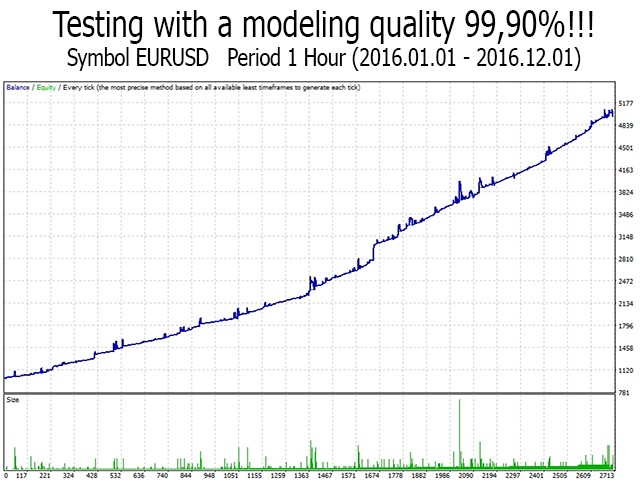
The Expert Advisor uses the strategy of breakdown or rollback from the price channel drawn based on the High and Low over a selected period. The EA Only works with market orders using the modification of order opening levels at new prices, which are closer to the market, which allows opening positions at a better price. All trades are closed using baskets of orders in the trade direction using multicurrency approach (if enabled in the Inp_Multicurrency parameter). The EA is adjusted for 4-, 5-digit quotes. VPS server is recommended. Before launching the EA on a real trading account, I recommend checking its parameters in the strategy tester using 99.90% quality quotes at least over the last year. Should you need my help, please PM me.
Launching the EA
It is recommended to launch the EA on several adjacent currency pairs with the same magical numbers. For example:
- GBPUSD, EURUSD, AUDUSD, NZDUSD;
- or USDCAD, USDCHF;
- or GBPJPY, EURJPY, AUDJPY, NZDJPY;
- or other similar linked pairs.
Inp_Multicurrency – if allowed, the EA works with the same magic number on all symbols it is launched on. When a specified profit, drawdown, breakeven or trailing is reached, all orders in the same direction with the same magic number are closed and the trading is started anew.
Parameters
- Inp_PeriodChannel – period for calculating the price channel;
- Inp_ReverseSignal – use a reverse signal, if false trades breakouts, otherwise - rollbacks;
- Inp_BalanceLots – calculation of lot based on the balance value. Formula – max lot/100*Inp_BalanceLots;
- Inp_StartLots – initial lot if Inp_BalanceLots = 0;
- Inp_PercenValues – if true, the values of stop loss, take profit, breakeven and trailing stop are set in %, otherwise in points;
- Inp_Slippage – maximum allowable slippage;
- Inp_CloseAllOrders – close a portfolio of bi-directional orders;
- Inp_StopLoss – stop loss, not used if 0;
- Inp_TakeProfit – take profit, not used if 0;
- Inp_BreakevenStop – the distance that the price should move for the breakeven level, not used if 0;
- Inp_BreakevenStep – profit in points to protect by breakeven;
- Inp_TrailingStop – the distance that the price should move for the position trailing, not used if 0;
- Inp_TrailingStep – profit in points to protect by trailing stop;
- Inp_MagicNum – magic number. If = -1, the EA will work with all orders, including those opened manually or by other Expert Advisors;
- Inp_EaComment – comment to trades;
- Inp_Multicurrency – take into account all open orders of all symbols;
- Inp_MaxOrdersSeries – maximum number of orders in a series;
- Inp_MaxLotsSeries – maximum total lot of a series of orders;
- Inp_MaxOpenLots – the maximum allowable lot of one trade;
- Inp_SendOrderLevel – distance from the last opened position to allow placement of a pending order;
- Inp_PlusLot – component of the previous lot for averaging, not used if 0;
- Inp_PlusRatio – lot multiplier for averaging, a value greater than 1, not used if 0;
- Inp_LevelAveraging – averaging level setting step, not used if 0;
- Inp_MinusLot – subtract from the previous lot for additional lot, not used if 0;
- Inp_MinusRatio – lot decrease ratio for additional lot, a value below 1, not used if 0;
- Inp_LevelRebuy – step for setting the rebuy level, not used if 0;
- Inp_PauseMinutes – a pause in minutes between modifications of order opening levels, not used if 0;
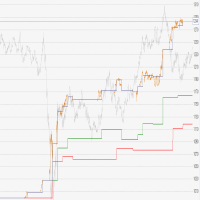
- Inp_Visualization – show the history of trades and the current position of levels on the chart;
- Inp_ModeWithdrawal – withdrawal mode. The Expert Advisor does not open a new one-direction series of orders, it closes positions.