WAIT Entry Timing
- 지표
-
Paolo Ruffini
 저는 외환(Forex) 및 원자재 시장에서 15년 이상의 실전 경험을 보유한 트레이더로, 특히 유동성의 동적 구조, 거래량 기반 시장 압력, 그리고 가격의 방향성 구조 분석에 중점을 두고 있습니다.
수년간 저는 재량적 분석을 자체 개발한 정량적 도구와 점진적으로 통합해 왔으며, 실제 시장 참여도를 측정하는 데 초점을 맞춘 지표를 개발해 왔습니다. - 버전: 1.0
WAIT Entry Timing
WAIT stands for Weighted Analysis of Ideal Timing.
WAIT Entry Timing is a decision-support indicator designed to help traders evaluate whether a detected setup may be ready for entry or whether waiting for a pullback, confirmation, or a potentially better price could be more appropriate.
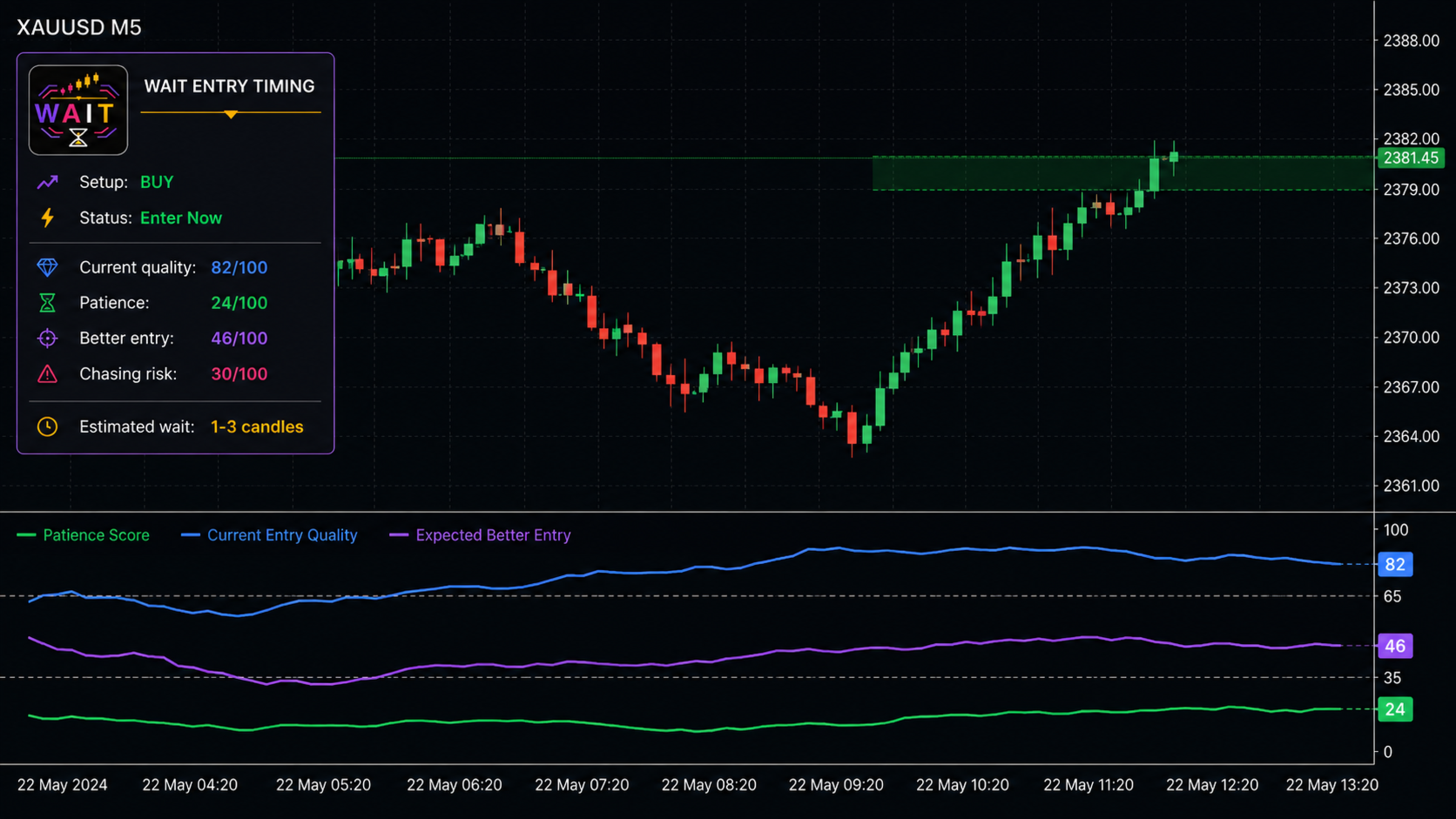
The indicator does not execute trades. It analyzes market conditions and presents the result through three normalized values from 0 to 100:
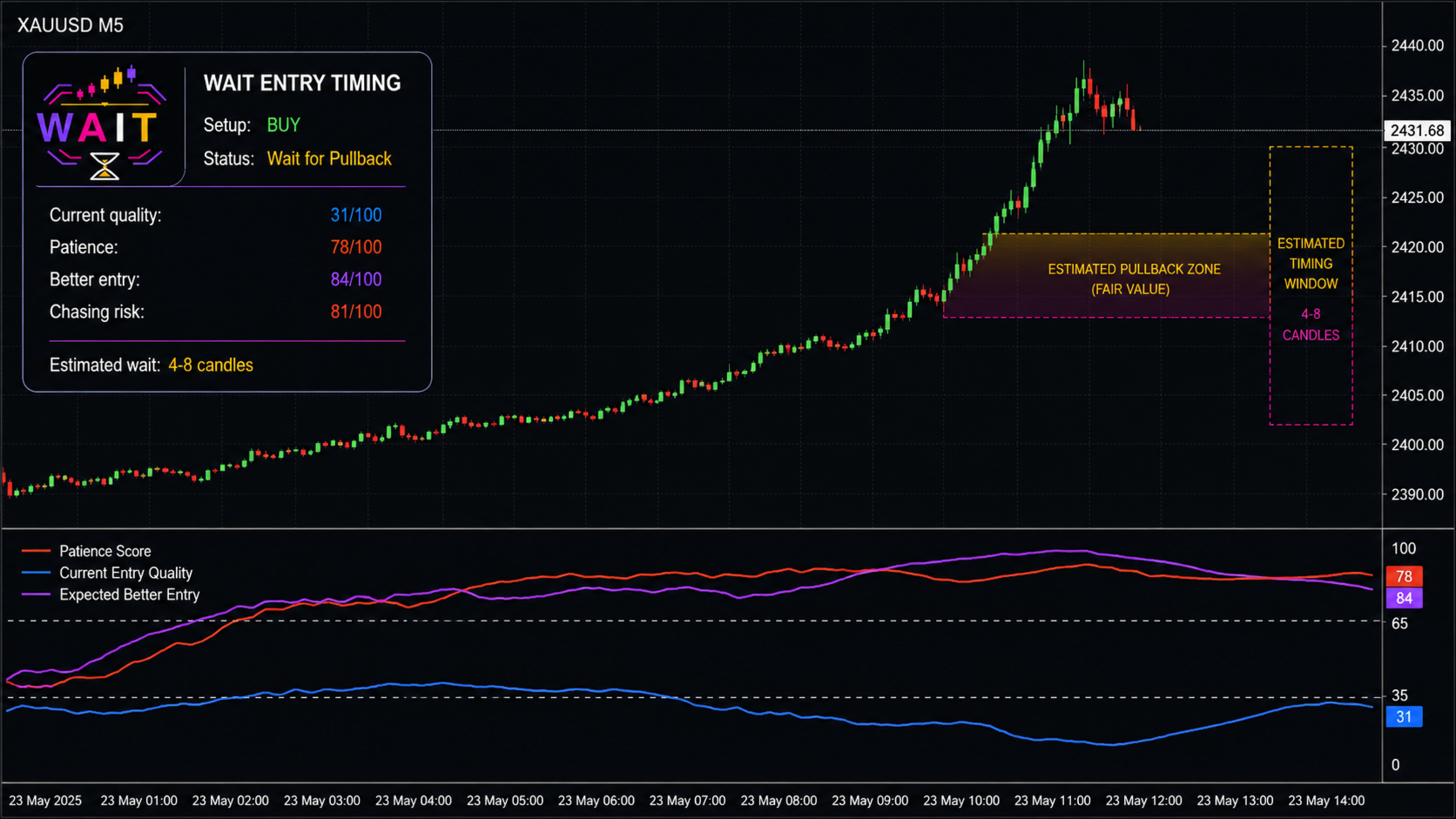
Patience Score measures the potential benefit of waiting. A low value suggests that the current conditions may already be suitable, while a high value indicates an increased risk of chasing price or entering before a better window develops.
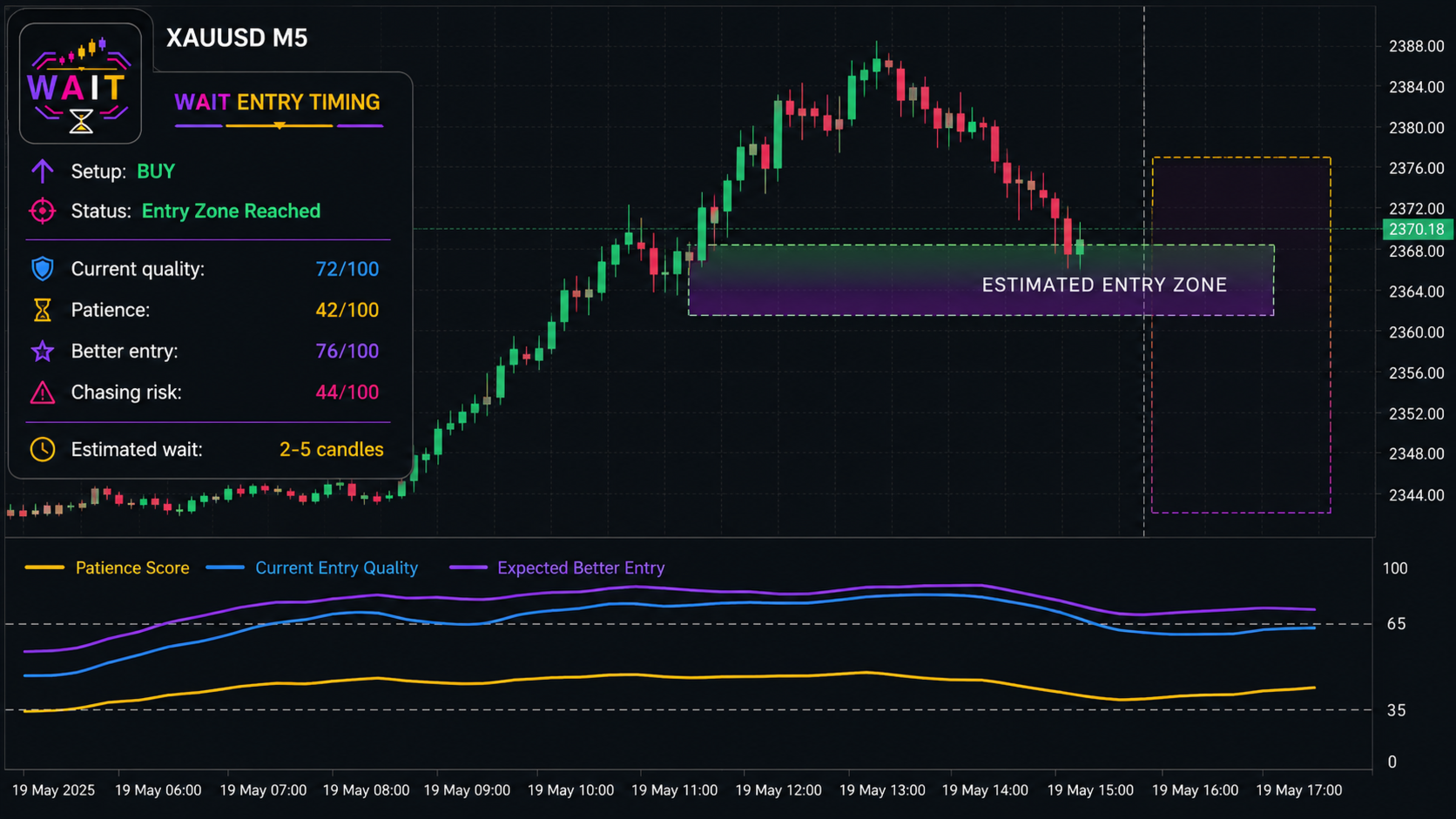
Current Entry Quality estimates the quality of the current market position in relation to direction, volatility, spread, candle structure and multi-timeframe context.
Expected Better Entry estimates whether a more favorable entry window may develop after a pullback or market stabilization.
How it works
WAIT combines price distance from fair value, directional impulse, movement speed, candle body and wick structure, relative tick volume, spread, nearby support and resistance, market structure, volatility regime and optional higher-timeframe alignment.
The components are normalized and combined through configurable weights. The result is presented as a clear operational state:
-
No Entry
-
Enter Now
-
Wait for Confirmation
-
Wait for Pullback
-
Optimal Window Approaching
-
Entry Zone Reached
-
Opportunity Deteriorated
These states are analytical indications and should not be interpreted as guaranteed trading signals.
Main features
-
Works with any symbol and timeframe
-
Automatic, BUY-only or SELL-only analysis
-
Internal, always-active or external setup trigger
-
Normalized scores from 0 to 100
-
Estimated pullback entry zone
-
Estimated waiting window in candles and minutes
-
Optional higher-timeframe filter
-
Configurable sensitivity and analysis weights
-
Popup, mobile push and email alerts
-
Alerts generated only when the operational state changes
-
Closed-candle calculation by default to reduce unstable intrabar changes
Indicator display
The main Patience Score changes color according to the configured thresholds:
Green indicates a low waiting requirement.
Gold represents an intermediate condition where additional confirmation may be useful.
Red indicates a high Patience Score and a greater potential benefit from waiting.
The blue line represents Current Entry Quality, while the purple line represents Expected Better Entry.
Input parameters
General
InpTimeframe selects the analysis timeframe. PERIOD_CURRENT uses the timeframe of the active chart.
InpSetupMode selects automatic analysis, BUY-only analysis or SELL-only analysis.
InpUpdateCurrentBar enables intrabar recalculation. When disabled, the indicator uses completed candles.
InpHistoryBars defines the number of historical bars calculated.
InpSensitivity controls indicator responsiveness. Lower values are more conservative, while higher values are more reactive.
Setup Trigger
InpTrigger selects the trigger source: internal logic, always-active analysis or an external custom indicator.
InpExternalIndicator specifies the name of the external indicator used through iCustom.
InpBufferBuy and InpBufferSell select the external indicator buffers used for BUY and SELL conditions.
InpTriggerThreshold defines the minimum external buffer value required to activate a setup.
InpFastPeriod and InpSlowPeriod configure the internal moving-average trigger.
Analysis
InpATRPeriod configures the volatility measurement period.
InpFairValuePeriod defines the moving-average period used as an estimated fair-value reference.
InpVolumePeriod defines the lookback used to calculate relative tick volume.
InpStructurePeriod controls the support, resistance and market-structure lookback.
InpRegimePeriod defines the period used to evaluate the broader market regime.
InpPullbackATR controls the estimated entry-zone distance as a fraction of ATR.
InpMaxSpreadPoints defines the spread value considered high for the selected symbol.
InpMTFFilter enables higher-timeframe alignment analysis.
InpMTFTimeframe selects the higher timeframe used by the MTF filter.
Weights
The Weight parameters control the relative importance of distance from fair value, impulse, speed, candle wick, volume, spread, support and resistance, structure and market regime.
All weights are normalized automatically. They do not need to add up to any specific value.
Display
InpShowPanel displays the information panel.
InpShowEntryZone displays the estimated pullback entry area.
InpShowTimeWindow displays the estimated future timing window.
InpEnterNowThreshold defines the upper Patience Score limit associated with immediate-entry conditions.
InpWaitThreshold defines the Patience Score level associated with waiting conditions.
InpEntryZoneColor selects the color of the estimated entry zone.
Alerts
InpPopupAlert enables terminal popup alerts.
InpPushAlert enables mobile notifications through the MetaTrader 5 application. The MetaQuotes ID must be configured in the terminal notification settings.
InpEmailAlert enables email notifications. Email settings must be configured in MetaTrader 5.
The remaining alert parameters allow the user to independently enable notifications for Enter Now, Wait for Pullback, Optimal Window Approaching, Entry Zone Reached and Opportunity Deteriorated.
Important information
WAIT Entry Timing is an analytical tool and does not provide financial advice, execute orders or guarantee future market outcomes. Results can vary according to symbol, timeframe, broker data, spread and market conditions. Always combine the indicator with appropriate risk management and independent analysis.