Visual Risk Panel
- 유틸리티
- 버전: 1.0

Visual Risk Panel Pro is a premium, lightweight utility designed specifically for manual traders who value speed, precision, and strict risk management.
Instead of typing numbers into a clunky panel or calculating position sizes on a separate app mid-trade, this utility brings interactive math directly onto your charts. Simply draw your structural zone, drag your entry or exit lines, and let the panel manage the rest flawlessly.
✨ Key Advantages
-
Zero Math Anxiety: The panel automatically calculates your exact lot size down to the decimal based on your custom risk profile.
-
Prop Firm Safety Net: Protect your equity and never breach maximum daily drawdowns by locking in exact cash risk variables before you execute.
-
Clean Trading Environment: On launch, the utility automatically sweeps away lagging visual indicator clutter so you can focus 100% on raw price action.
-
Instant & Delayed Flexibility: Seamlessly execute lightning-fast instant market orders or place structural pending orders (Stops and Limits) right from the visual lines.
🛠️ Core Features Matrix
-
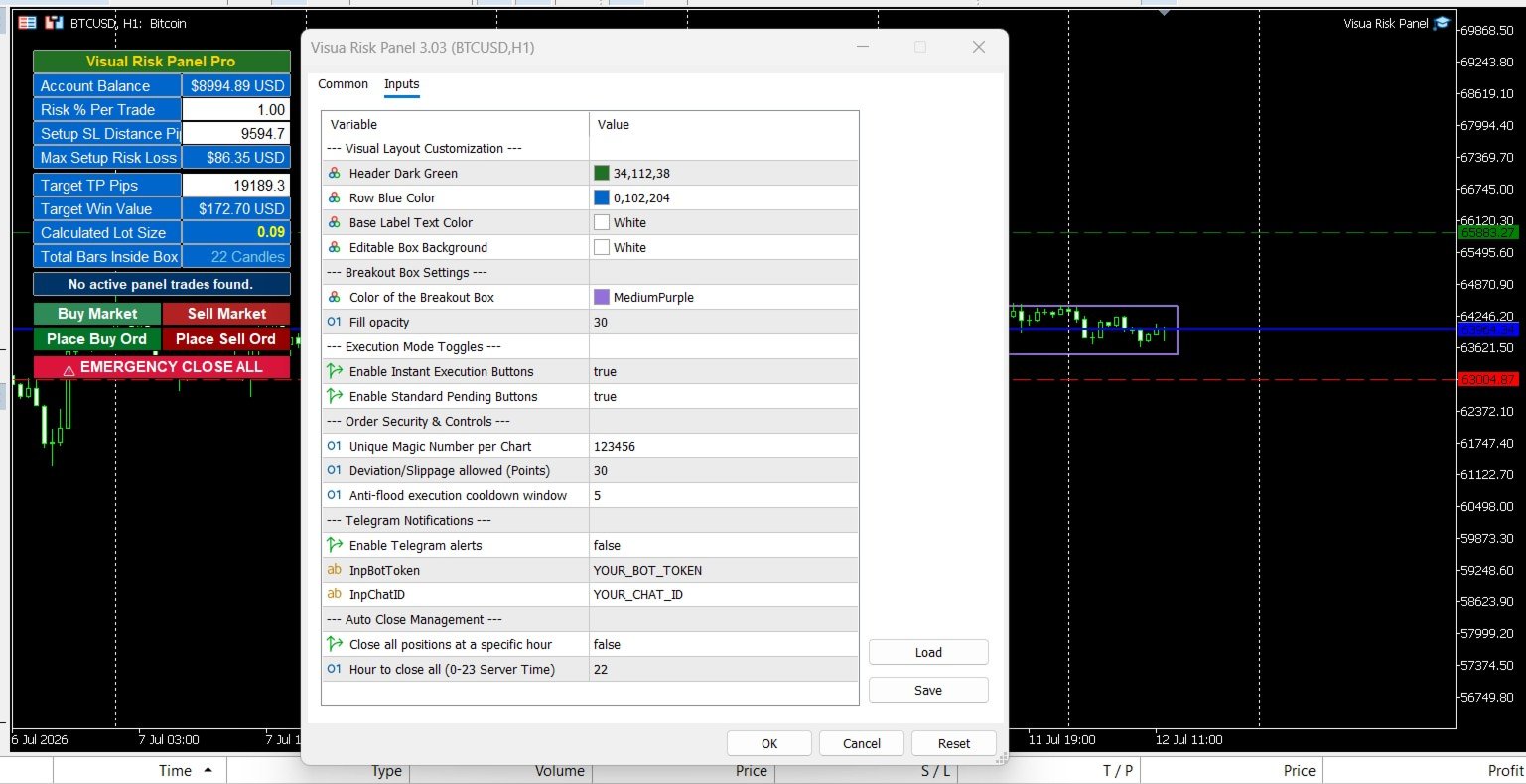
Dynamic Range Box ( RangeBox ): A custom, stretchable timeline rectangle designed for accumulation, breakout, and session high/low tracking. Fully unlocked—drag and resize with absolute freedom.
-
Live Order Metrics: Real-time on-chart monitoring that updates your live risk/reward cash values, candle counters inside your zones, and pip distances instantly on every tick.
-
Anti-Flood Protection: A built-in security cooldown window that blocks accidental double-clicks or erratic trade entry spam during high-volatility news events.
-
Telegram Alert Integration: Automatically pushes comprehensive transaction logs, hit targets, and emergency exit metrics straight to your mobile device.
🎛️ Input Parameters & Configuration Guide
🎨 Visual Layout Customization
-
InpLogoFile [Default: "vrp_logo.bmp" ] — The filename of your custom 260x50 brand banner image (Must be placed in the /MQL5/Images/ folder).
-
InpHeaderBg [Default: Dark Green ] — The color theme for the panel's main title header block.
-
InpRowBg [Default: Blue ] — The background color theme applied to the text data matrix lines.
-
InpTextCol [Default: White ] — The font color used for static data titles.
📦 Breakout Box Settings
-
InpBoxColor [Default: Medium Purple ] — The visual border color of your interactive on-chart RangeBox .
-
InpBoxOpacity [Default: 30 ] — The transparency level for the highlighted price accumulation zone fill.
🚀 Execution Mode Toggles
-
InpAllowInstant [Default: true ] — Enables or disables the quick-action Market Buy and Market Sell buttons.
-
InpAllowPending [Default: true ] — Enables or disables the automated pending structure buttons (Buy/Sell Stops & Limits).
🔒 Order Security & Controls
-
InpMagicNumber [Default: 123456 ] — Unique identifier assigned to this utility's trades, preventing overlapping order conflicts with other EAs on your account.
-
InpMaxSlippage [Default: 30 Points ] — The maximum allowed price deviation for order fills before the trade is safely rejected.
-
InpCooldownSeconds [Default: 5 ] — The protective anti-flood security time window required between execution clicks.
📱 Telegram Notifications
-
InpUseTelegram [Default: false ] — Set to true to route transaction reports directly to your personal phone channel.
-
InpBotToken [Default: "YOUR_BOT_TOKEN" ] — The secure API token generated by Telegram's BotFather.
-
InpChatID [Default: "YOUR_CHAT_ID" ] — Your unique Telegram user or channel destination address.
⏰ Auto Close Management
-
InpUseHourlyClose [Default: false ] — Set to true to activate automated structural day-end position flattening.
-
InpHourToClose [Default: 22 ] — The designated hour (0-23 Server Time) to close out all open panel positions and cancel remaining pending orders.