SWDM Position Manager EA
- 유틸리티
- 버전: 1.4
- 업데이트됨: 12 7월 2026

SWDM Position Manager EA
The SWDM Position Manager EA is a MetaTrader 5 Expert Advisor for automatically managing matching positions on the current chart symbol. It can manage already open positions as well as newly opened positions, as long as they match the configured position filters. It is not a classic entry-signal robot and does not open trades by itself in the default workflow. The EA is designed to protect and manage manual trades or positions opened by other tools using internal risk management logic.
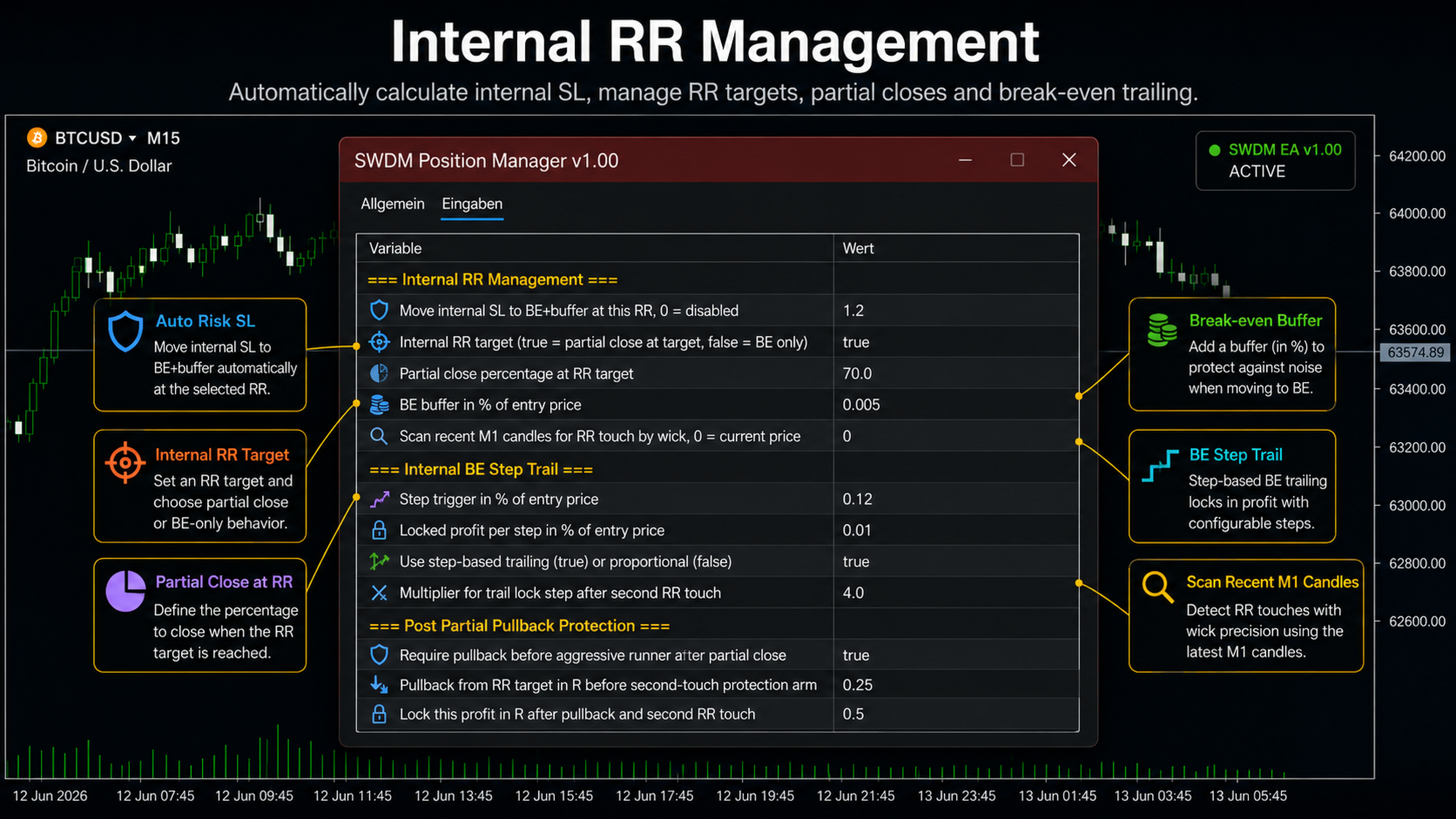
The main purpose of the EA starts after the trade entry. It monitors matching open positions, calculates internal stop levels, tracks risk/reward targets, can perform partial closes, move remaining positions into break-even protection, trail the internal stop and automatically close positions when internal protection rules are triggered.
Important: The EA uses internal management. By default, it does not place visible broker-side Stop Loss or Take Profit levels. Internal stops and targets are managed by the EA. Therefore, the EA must remain active for this protection logic to work.
Main Features
- Management of already open MetaTrader 5 positions
- No automatic market entries in the default workflow
- Internal Stop Loss and Take Profit logic
- Risk/reward based position management
- Automatic internal stop calculation based on account risk
- Calculation based on either balance or equity
- Optional manual internal SL distance as a percentage of the entry price
- Optional shared risk across multiple managed positions
- Partial close at the configured RR target
- Break-even protection with configurable buffer
- Early break-even protection before the full RR target is reached
- Internal step-based trailing after break-even
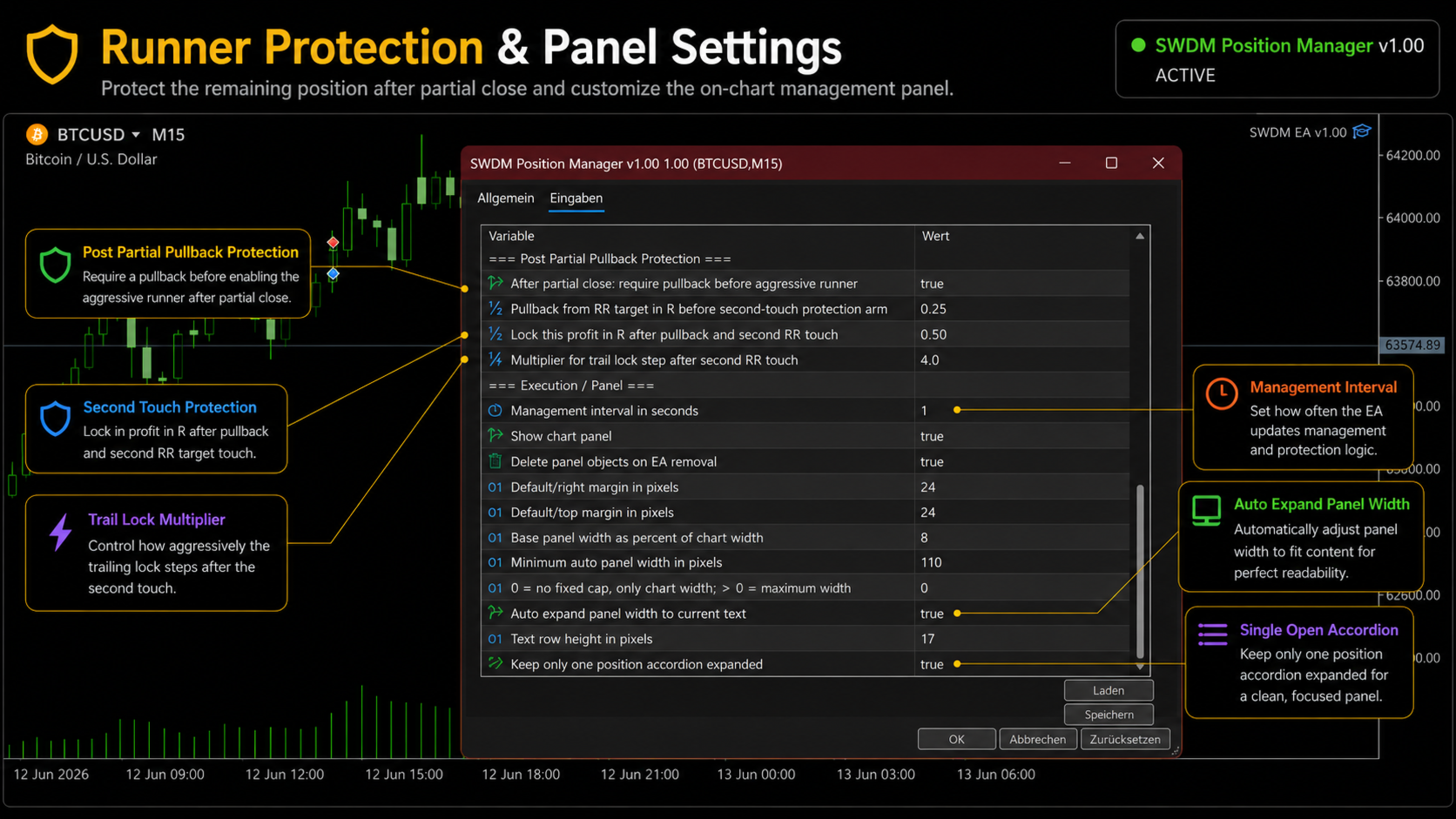
- Optional pullback protection after partial close for runner positions
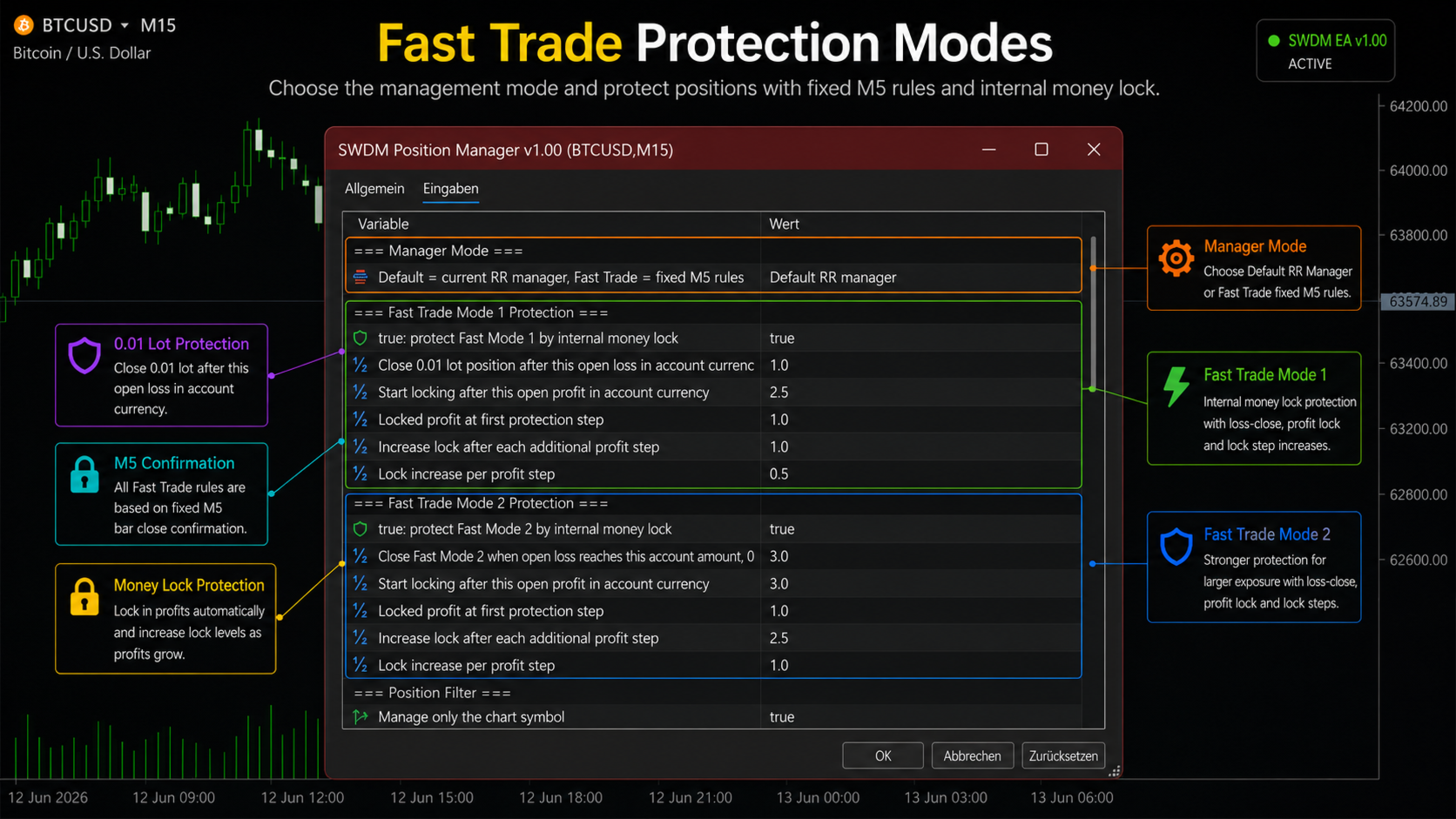
- Fast Trade Mode for short-term trade management
- M5 entry candle confirmation in Fast Trade Mode 2
- Internal money-lock protection for Fast Trade Mode 1 and Fast Trade Mode 2
- Loss limitation in Fast Trade modes
- Overtrading protection with automatic closing of additional matching positions
- Position filters for symbol, magic number, manual positions, empty comments and empty server-side SL/TP
- Optional protection against duplicate managers on the same account and symbol
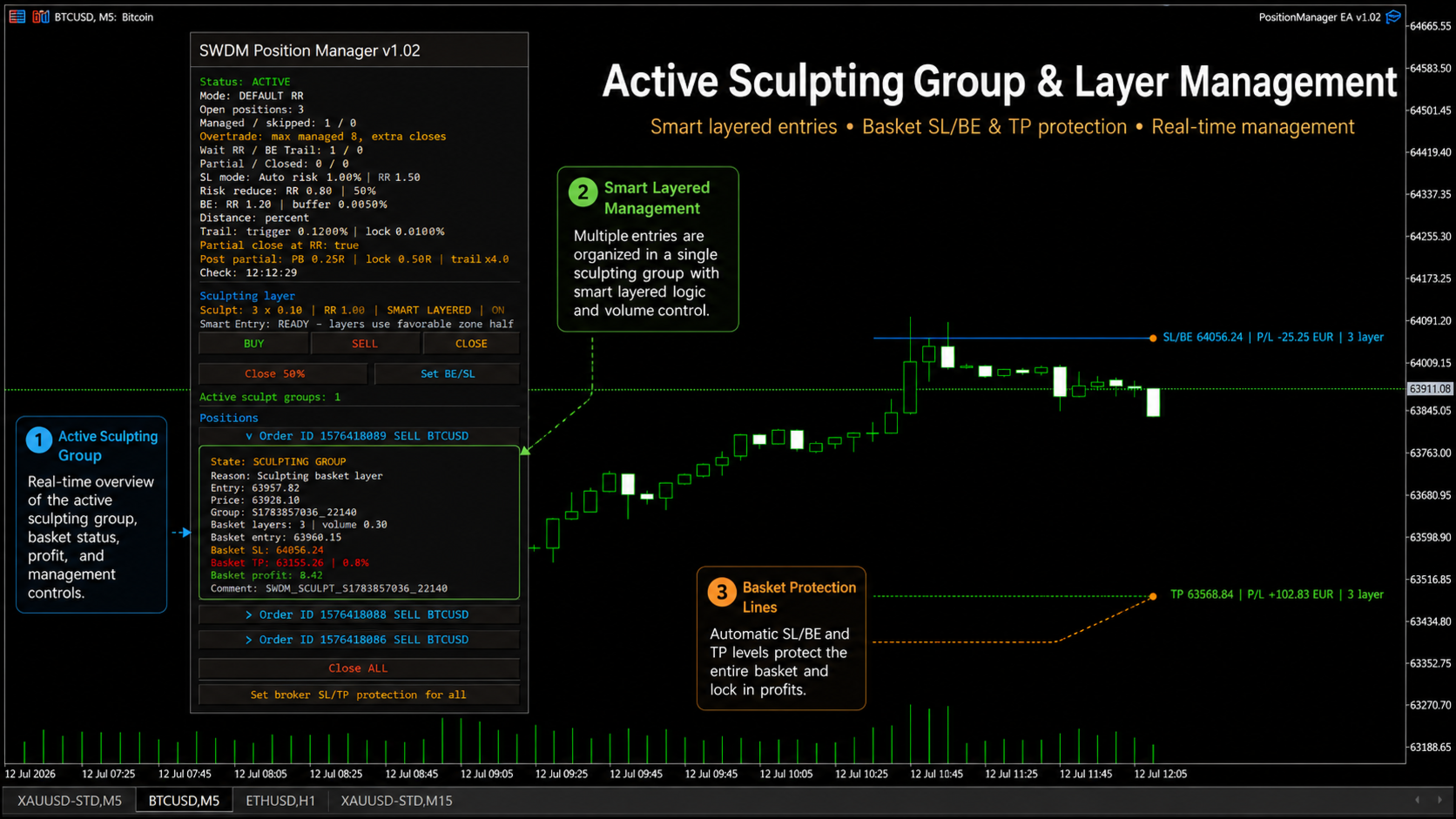
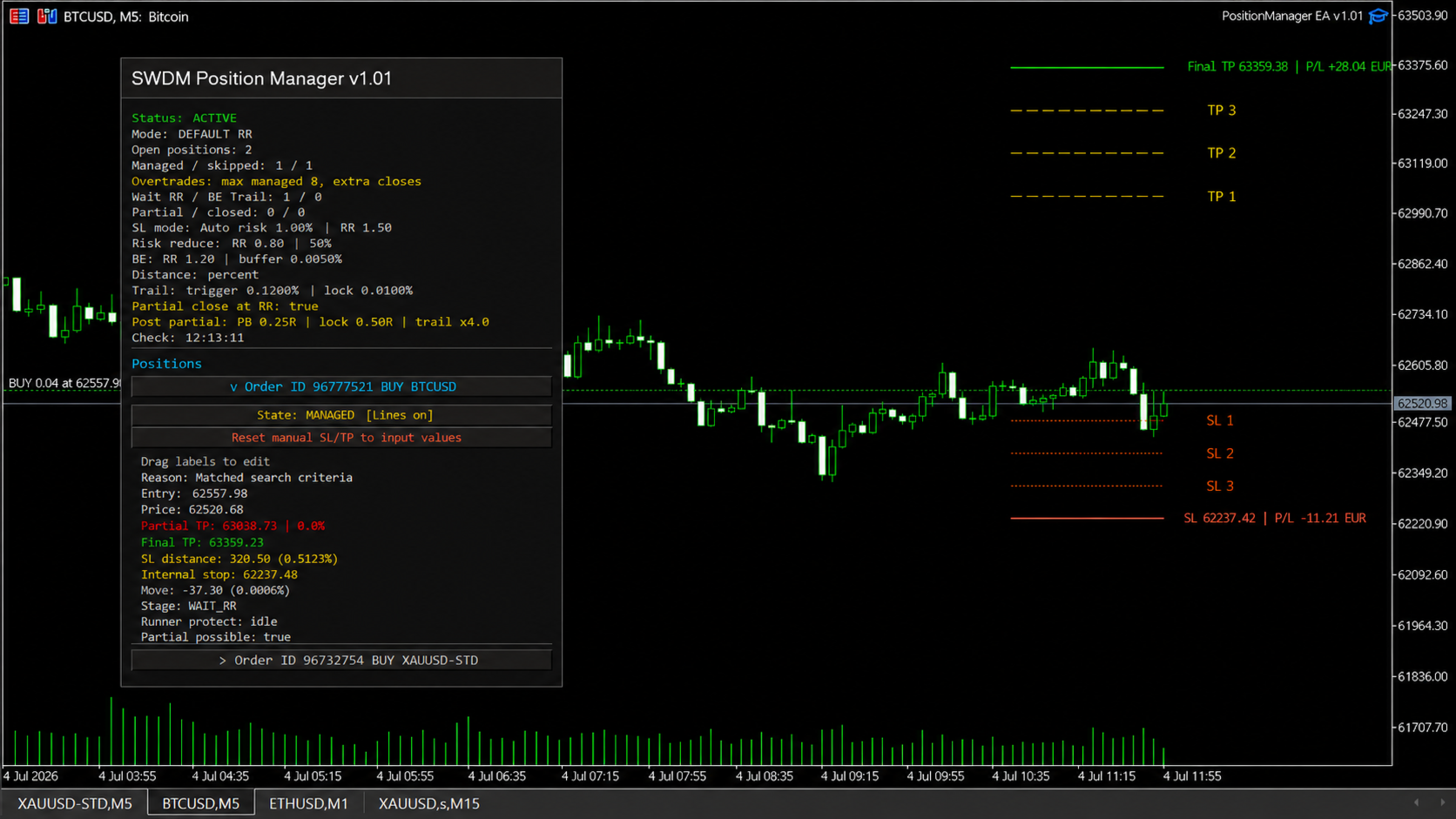
- Interactive chart panel with position status, internal stop, target, mode and management state
Management Modes
1. Default RR Manager
The Default RR Manager is intended for normal position management after a trade has been opened. Once a matching position is detected, the EA calculates an internal stop. If the manual internal SL distance is set to 0, the stop distance is calculated based on the configured account risk.
If multiple positions are managed at the same time, the automatic risk can optionally be shared across all managed positions. This helps prevent the full configured risk from being applied separately to every single position.
After the stop calculation, the EA calculates the internal RR target. When this target is reached, the EA can close part of the position and move the remaining volume into break-even protection. If a partial close is not possible because of broker minimum volume or volume step restrictions, break-even management is still activated.
The EA can also reduce risk before the full RR target is reached. Once an internal intermediate RR level is reached, the stop can be tightened. After break-even, the EA uses an internal trailing system. The internal stop only moves in the trade direction and is never loosened.
2. Fast Trade Mode
The Fast Trade Mode is intended for fast manual trading workflows where open positions should be protected quickly. This mode separates positions by volume.
Fast Trade Mode 1
Fast Trade Mode 1 is designed for 0.01 lot positions. The EA can close a position when the open loss reaches the configured loss limit in account currency. In addition, an internal money lock can be activated once the position reaches the configured open profit.
- 0.01 lot positions are handled as Fast Trade Mode 1
- Configurable loss limit in account currency
- Internal profit protection after a defined open profit is reached
- Step-by-step increase of the locked profit if open profit continues to grow
Fast Trade Mode 2
Fast Trade Mode 2 is designed for positions from 0.02 lot and above. This mode uses M5 candle logic and internal capital protection rules.
The EA checks the M5 candle that was already running when the position was opened. It does not wait for the next M5 candle after entry. If the entry M5 candle does not confirm the position direction, the position is closed. For a buy position, the entry M5 candle must close bullish. For a sell position, the entry M5 candle must close bearish.
Fast Trade Mode 2 also checks the configured loss limit first. If the open loss reaches the configured amount, the position is closed before any other rule is applied. This priority is intended to protect capital.
After the entry candle is confirmed, the EA can apply an internal money lock. In addition, the position can be closed if an opposite M5 candle closes after the confirmed entry candle.
Overtrading Protection
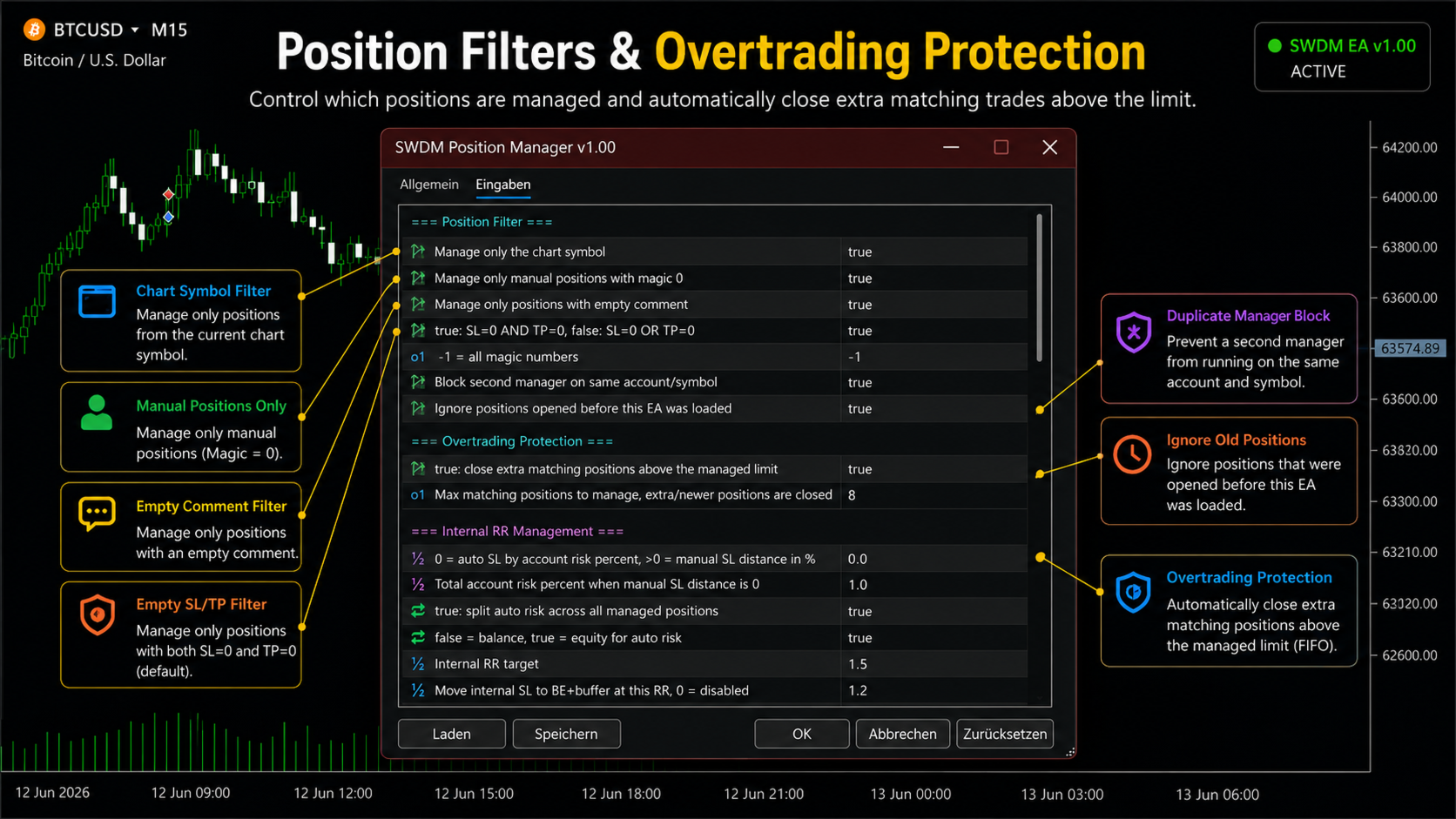
The EA includes built-in overtrading protection. When this function is enabled, the EA limits how many matching positions may be managed at the same time.
If more matching positions exist than allowed, additional newer positions are closed automatically. Older matching positions are kept first. This function is useful when multiple manual clicks, other tools or broker-side behavior create more positions than intended.
Position Filters
The EA does not manage every position automatically. It only manages positions that match the active filters. The filters are intentionally conservative to prevent the EA from interfering with unrelated trades or other Expert Advisors.
- Manage current chart symbol only
- Manage manual positions only
- Manage positions with empty comments only
- Manage positions without server-side SL and TP only
- Optional magic number filter
- Ignore positions that existed before the EA was attached
- Prevent duplicate manager instances on the same account and symbol
Internal Management
The SWDM Position Manager EA is based on internal protection logic. The internal stop, the internal target and the internal position state are stored and managed by the EA. Visible broker-side Stop Loss or Take Profit levels are not required.
Because the protection logic is internal, the EA must remain active on the chart. MetaTrader 5 must be connected and Algo Trading must stay enabled. If MetaTrader 5 is closed, the EA is removed from the chart or Algo Trading is disabled, the internal stop and target management cannot be executed.
Chart Panel
The EA includes an interactive chart panel with important information about the current management state.
- EA status
- Current management mode
- Number of open positions
- Number of managed and skipped positions
- Overtrading protection status
- RR and SL mode
- Counters for partial closes and closed positions
- Internal stop
- Target price
- Position direction, volume and entry price
- Position management state
- Fast Trade protection status when Fast Trade Mode is active
The position list uses accordion rows. Position details can be opened and closed directly on the chart. The panel can also be moved on the chart.
Typical Workflow
- Attach the EA to the chart of the symbol you want to manage.
- Enable Algo Trading in MetaTrader 5.
- Select the management mode.
- Open a position manually or with another tool.
- The EA manages matching positions according to its internal rules.
- Monitor the internal stop, target, status and management stage in the chart panel.
Recommended Use
This EA is suitable as a risk and trade management assistant. It is useful for traders who use their own entry rules and need a separate tool for managing open positions.
- For manual traders who want automatic internal protection logic
- For traders who want to manage positions without broker-side SL/TP
- For traders who want partial close and break-even logic
- For traders who want internal trailing after break-even
- For traders who need fast protection for short-term manual trades
- For traders who want a limit against overtrading behavior
Important Notes
This EA does not guarantee profits. It is a management tool, not a prediction system. Trading results depend on market conditions, spread, execution quality, symbol behavior, broker rules, account type, position size and the selected settings.
Internal protection only works while the EA is running, the terminal is connected and Algo Trading is enabled. Always test the settings in the Strategy Tester or on a demo account before using them on a live account.
The EA can close positions automatically when internal rules are triggered. Make sure you understand the selected mode and all position filters before using the EA.