
ATR Robot PRO
- Experts
-
Volodymyr Hrybachov
 안녕하세요, 트레이더 여러분! 🚀
제 이름은 볼로디미르이며, 39세, 우크라이나 출신입니다 🇺🇦.
저는 11년 이상 MetaTrader 플랫폼에서 거래 시스템, 지표, 전문가 조언자(EA)를 개발해왔습니다. 제 접근 방식은 인공지능, 알고리즘 전략, 그리고 실제 시장 경험을 결합한 것입니다.
💡 저의 목표는 트레이더가 안정적인 수익을 달성하고 위험을 줄이며 자신 있게 거래할 수 있도록 돕는 도구를 만드는 것입니다.
📊 트레이더가 저를 신뢰하는 이유: - 버전: 1.1
- 업데이트됨: 4 3월 2022
- 활성화: 10
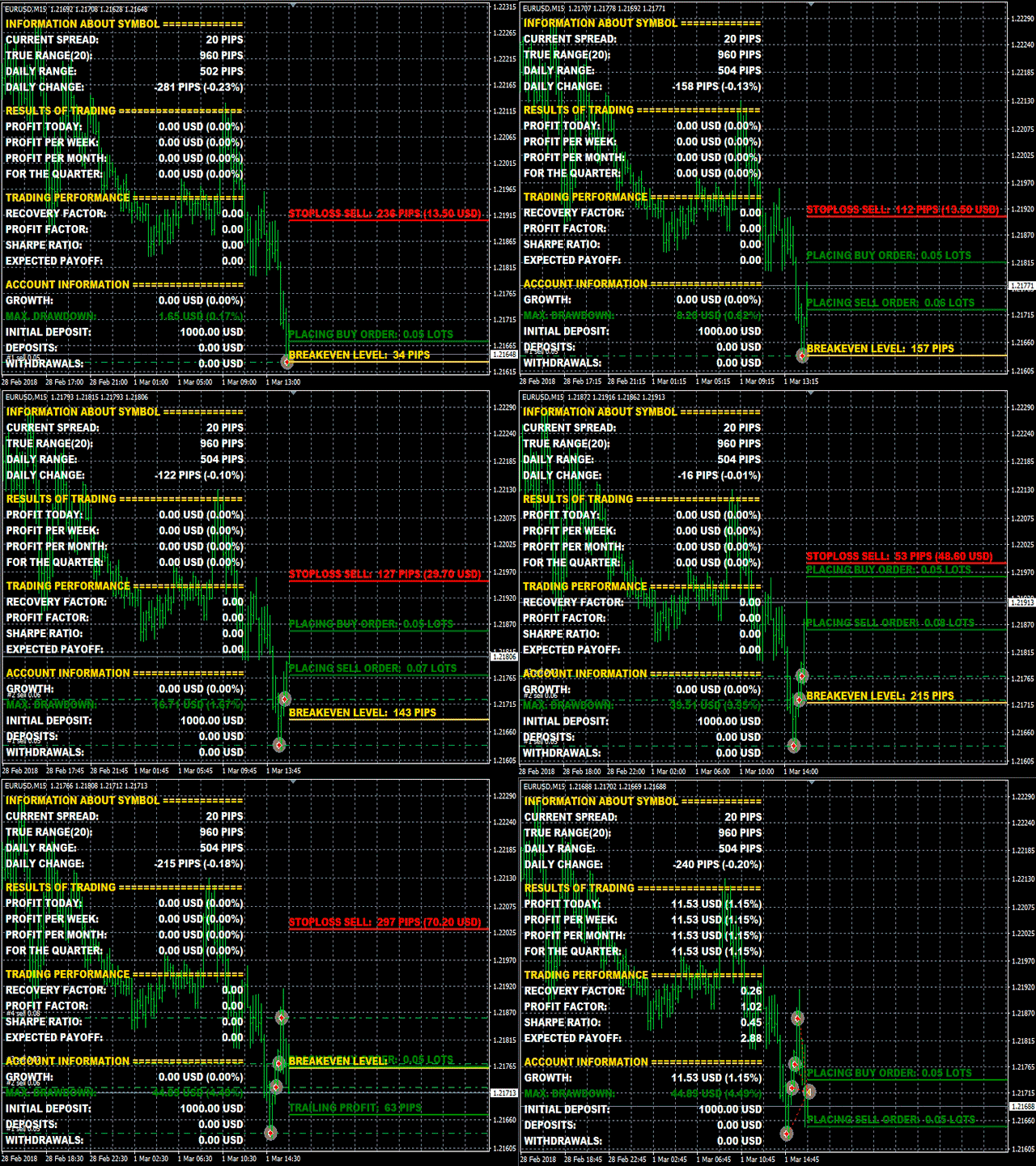
This is an expanded version of ATR Robot. The EA is based on a multifunctional template and is designed for intraday trading with all major currency pairs on any timeframe. The strategy is based on analysis of price action within the daily volatility range for a given period. The EA has a vast set of features - it can be configured for any trading style, which makes it not just a trading robot, but a multifunctional flexible designer. The EA applies order placement levels, stop loss, take profit and trailing stop levels invisible for brokers. The entire trading process and detailed statistics are displayed on the chart as lines and on the information panel. Use the EA on highly liquid currency pairs, such as EURUSD, GBPUSD, AUDUSD, USDJPY, USDCHF, USDCAD, NZDUSD, XAUUSD;
MT5 version https://www.mql5.com/en/market/product/36861
Features
- scalping (virtual stops from 1 point)
- position averaging (adaptive or fixed distance from the last opened position)
- martingale/antimartingale (increase/decrease in the lot)
- hedging (work with short and long positions simultaneously)
- calculate the stop loss, take profit and trailing stop levels in pips, in money, in percent of the balance
- simultaneously manage and close positions in different directions (both single orders and order baskets)
- manage positions opened manually or by another expert (distinguished by magic number)
Parameters
- MaximumSpread - maximum allowed spread to start working, not used if -1.
- ATRPeriod - period for calculating the average daily volatility, in days.
- ATRDistance - the distance in % of the ATR value that the price should pass within a certain time interval.
- UpdateDistance - time in seconds, after which the data for opening positions are refreshed.
- LotsFor1000 - initial lot size per 1000 units of base currency.
- TradingMethod - trading method:
- Unidirectional - trading is performed in only one direction.
- Multidirectional - trading can be performed in two directions simultaneously.
- OrderOpenMode - calculation mode of the step for opening new orders:
- Pips - in pips.
- Money - in the deposit currency.
- Percent - in balance %.
- ATR - percentage of the ATR value.
- OrderOpenStop - distance from the opening price of the last order.
- OrderOpenStep - distance from the current price to set the level for opening a new order.
- OrderOpenRatio - position increment ratio, not used if -1.
- MaximumOrders - the maximum number of orders opened at a time, not used if -1.
- LotCalcMethod - method for calculating the trading lot:
- Unidirectional - separately for short and long positions.
- Multidirectional - all basket of oppositely directed orders is taken into account.
- LotMultiplier - lot multiplier for subsequent orders; if 1, does not change.
- PlusLot - lot added to subsequent orders, not changed if -1.
- MaximumLot - the maximum lot for opening positions.
- LevelsMethod - take profit/stop loss placement method:
- Unidirectional - separate, for the basket of unidirectional orders.
- Multidirectional - common, for the basket of oppositely directed orders.
- LevelsMode - select take profit/stop loss method:
- Pips - in pips.
- Money - in the deposit currency.
- Percent - in balance %.
- ATR - percentage of the ATR value.
- StopLoss - stop loss; not used if -1.
- TakeProfit - take profit; not used if -1.
- TrailingMethod - trailing stop operation method:
- Unidirectional - close the basket of unidirectional orders.
- Multidirectional - close the basket of oppositely directed orders.
- TrailingMode - select the trailing stop mode:
- Pips - in pips.
- Money - in the deposit currency.
- Percent - in balance %.
- ATR - percentage of the ATR value.
- TrailingStop - trailing stop distance.
- TrailingStep - trailing step.
- MagicNumber - EA ID, if -1 the EA will work with all orders.
- TradeComment - trade comment.
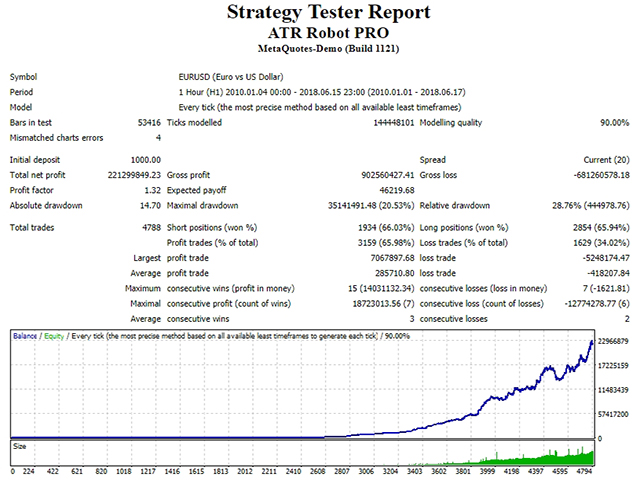

















































































Tests look very promising. Need to see the outcome from live trades after one month
Anyone thinking of buying. First, analyze the test results very closely as this EA does not trade every day.
Update: I'm very happy. The first week, really good results. 6 - S&P orders (M15 TF). FX pairs zero so far.