CurrencyMeter Pro
- 지표
- 버전: 2.10
- 활성화: 5

# CurrencyMeter Pro - Professional Multi-Market Strength Analyzer
## Overview
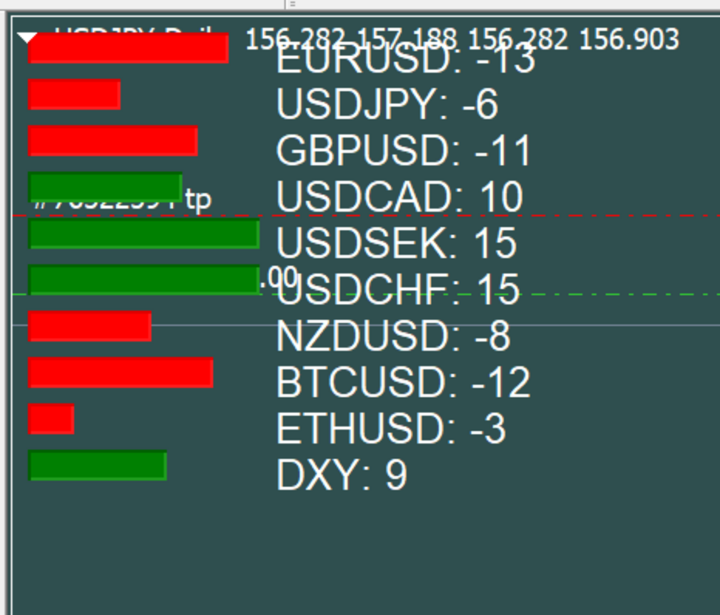
CurrencyMeter Pro is a powerful real-time momentum analyzer that tracks the strength of currencies, cryptocurrencies, indices, metals, and energy markets at a glance. Make smarter trading decisions by instantly identifying the strongest and weakest instruments across multiple asset classes.
Whether you're a forex trader looking to pair strong currencies against weak ones, or a multi-asset trader seeking momentum confirmation, CurrencyMeter Pro gives you the edge you need.
---
## Key Features
### Real-Time Momentum Analysis
- Calculates momentum on every tick using adaptive rolling min/max normalization
- Built-in EMA smoothing eliminates noise and false signals
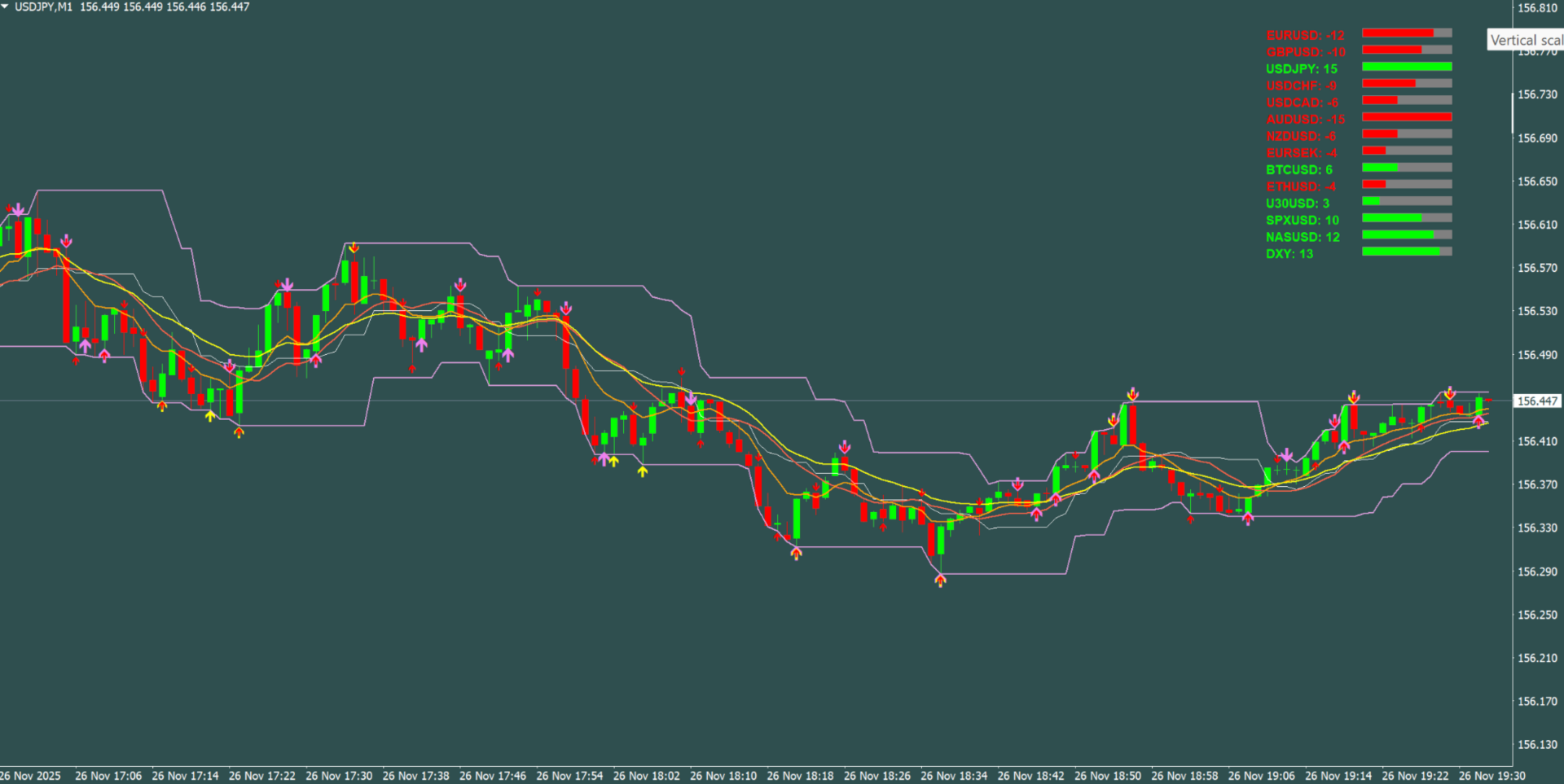
- Scaled -15 to +15 range for easy interpretation
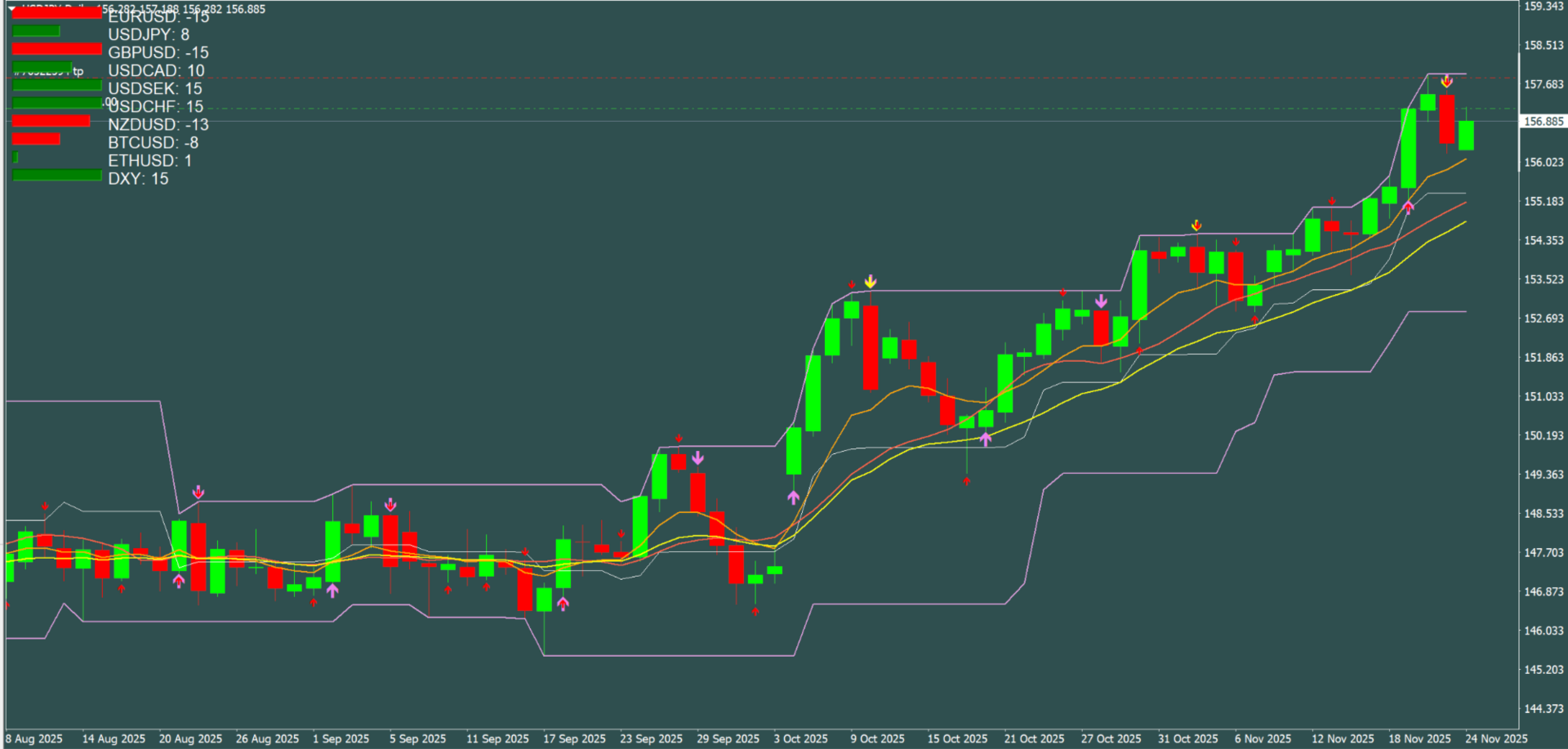
- Color-coded bars: Green = bullish momentum, Red = bearish momentum
### Accurate US Dollar Index (DXY)
- Calculates DXY using the official ICE formula with proper currency weightings
- Track true dollar strength alongside individual pairs
- Option to display DXY at top or bottom of the list
### Two Display Modes (Included)
This product includes TWO indicator files to suit your trading style:
**1. CurrencyMeter_Pro.mq4 (On-Chart Version)**
- Displays directly on your price chart as an overlay
- Position anywhere: Top-Left, Top-Right, Bottom-Left, or Bottom-Right
- Perfect for traders who want everything visible on one screen
**2. CurrencyMeter_Pro_Subwindow.mq4 (Subwindow Version)**
- Displays in a separate panel below your chart
- Horizontal layout option for compact viewing
- Ideal for traders who prefer a clean chart with indicators in separate panels
### Fully Customizable Display
- Adjustable position (X/Y offset in pixels)
- Customizable bar width, height, and spacing
- Choose your colors for positive, negative, and neutral momentum
- Fixed or dynamic text color (matches bar color or stays fixed)
- Adjustable font size and style
### Universal Broker Compatibility
- Symbol prefix/suffix options work with ANY broker naming convention
- Supports formats like: EURUSD, EURUSDm, EUR/USD, EURUSD.pro, m.EURUSD
- Auto-detection: Only displays instruments your broker offers
### EA Integration Ready
- Exports all momentum values via GlobalVariables
- Access real-time strength data in your Expert Advisors
- Variable format: Momentum_EURUSD, Momentum_DXY, etc.
---
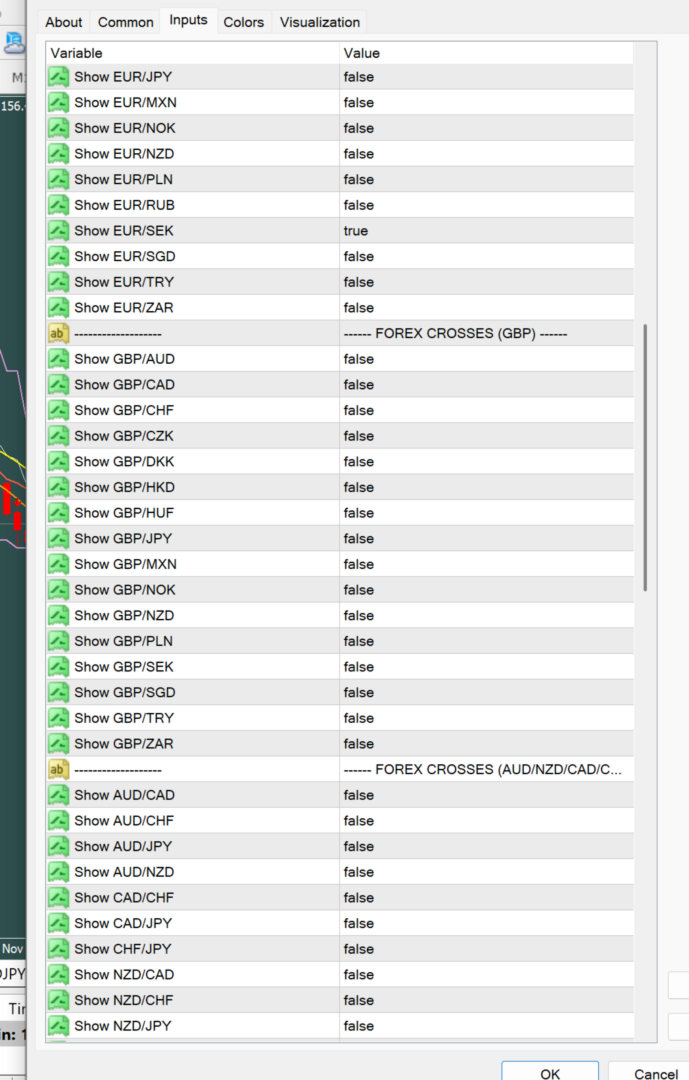
## Supported Instruments (100+)
### Forex Majors (7)
EURUSD, GBPUSD, USDJPY, USDCHF, USDCAD, AUDUSD, NZDUSD
### Forex Crosses - EUR (18)
EURAUD, EURCAD, EURCHF, EURCZK, EURDKK, EURGBP, EURHKD, EURHUF, EURJPY, EURMXN, EURNOK, EURNZD, EURPLN, EURRUB, EURSEK, EURSGD, EURTRY, EURZAR
### Forex Crosses - GBP (16)
GBPAUD, GBPCAD, GBPCHF, GBPCZK, GBPDKK, GBPHKD, GBPHUF, GBPJPY, GBPMXN, GBPNOK, GBPNZD, GBPPLN, GBPSEK, GBPSGD, GBPTRY, GBPZAR
### Forex Crosses - AUD/NZD/CAD/CHF (11)
AUDCAD, AUDCHF, AUDJPY, AUDNZD, CADCHF, CADJPY, CHFJPY, NZDCAD, NZDCHF, NZDJPY, NZDSGD
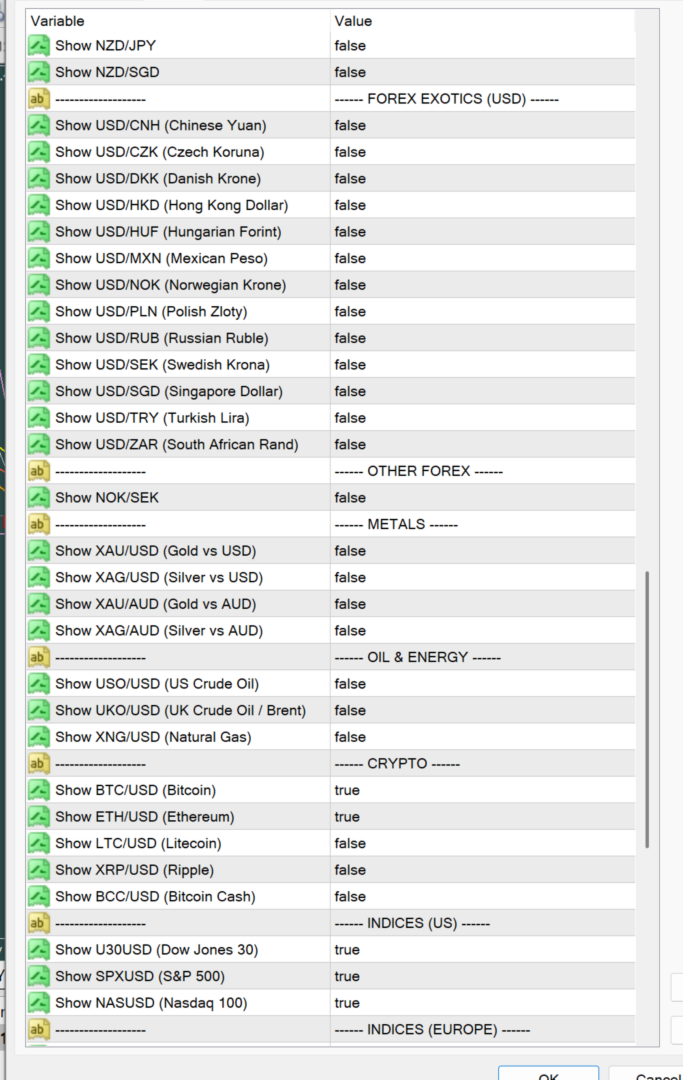
### Forex Exotics - USD (13)
USDCNH, USDCZK, USDDKK, USDHKD, USDHUF, USDMXN, USDNOK, USDPLN, USDRUB, USDSEK, USDSGD, USDTRY, USDZAR
### Other Forex (1)
NOKSEK
### Precious Metals (4)
XAUUSD (Gold/USD), XAGUSD (Silver/USD), XAUAUD (Gold/AUD), XAGAUD (Silver/AUD)
### Oil & Energy (3)
USOUSD (US Crude Oil), UKOUSD (Brent Crude), XNGUSD (Natural Gas)
### Cryptocurrencies (5)
BTCUSD (Bitcoin), ETHUSD (Ethereum), LTCUSD (Litecoin), XRPUSD (Ripple), BCCUSD (Bitcoin Cash)
### Indices - US (3)
U30USD (Dow Jones 30), SPXUSD (S&P 500), NASUSD (Nasdaq 100)
### Indices - Europe (5)
100GBP (UK FTSE 100), D30EUR (Germany DAX 30), F40EUR (France CAC 40), E50EUR (Euro Stoxx 50), E35EUR (Spain IBEX 35)
### Indices - Asia Pacific (4)
225JPY (Japan Nikkei 225), 200AUD (Australia S&P 200), H33HKD (Hong Kong Hang Seng), H50HKD (Hong Kong 50)
### Custom Symbols (10 Slots)
Add ANY symbol your broker offers using the 10 custom symbol input fields
---
## Input Parameters
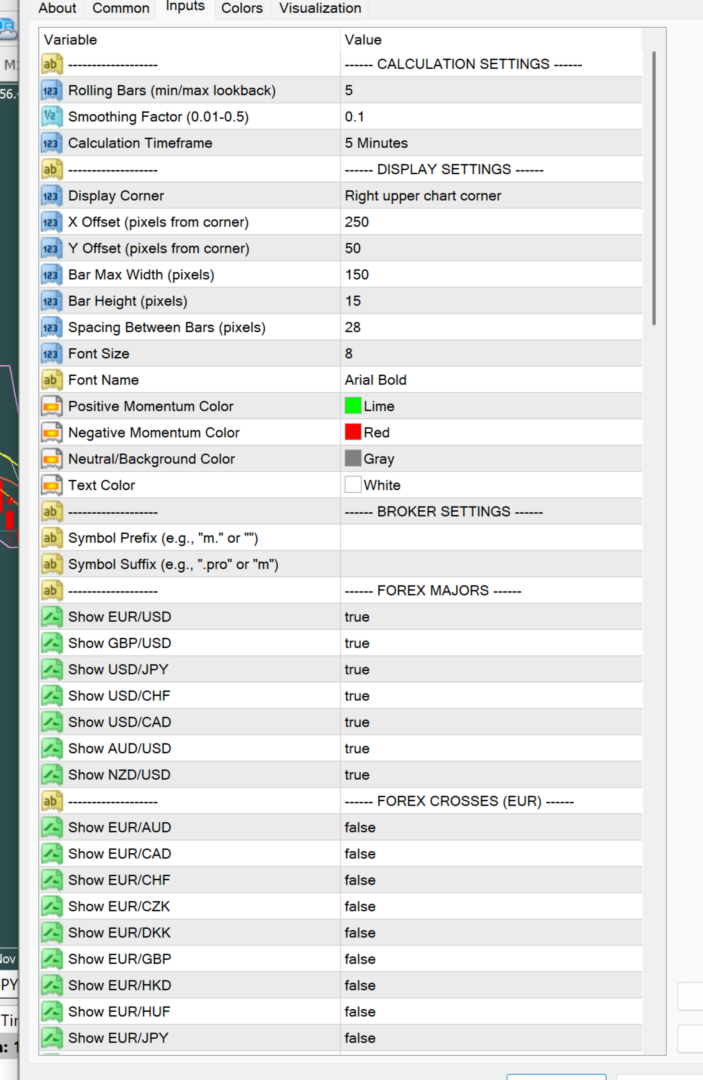
### Calculation Settings
| Parameter | Description | Default |
|-----------|-------------|---------|
| Rolling Bars | Lookback period for min/max calculation | 10 |
| Smoothing Factor | EMA smoothing intensity (0.01-0.5) | 0.1 |
| Calculation Timeframe | Timeframe for price data | M1 |
### Display Settings
| Parameter | Description | Default |
|-----------|-------------|---------|
| Display Corner | Chart corner for positioning (On-Chart version) | Left Upper |
| X Offset | Horizontal distance from corner (pixels) | 10 |
| Y Offset | Vertical distance from corner (pixels) | 50 |
| Bar Max Width | Maximum width of momentum bars (pixels) | 150 |
| Bar Height | Height of each bar (pixels) | 18 |
| Spacing Between Bars | Vertical space between meters (pixels) | 28 |
| Font Size | Text size | 10 |
| Font Name | Text font | Arial Bold |
| Positive Momentum Color | Color for bullish momentum | Lime |
| Negative Momentum Color | Color for bearish momentum | Red |
| Neutral/Background Color | Background bar color | Gray |
| Text Color | Label color (when fixed) | White |
| Use Fixed Text Color | True=fixed color, False=dynamic (matches bar) | False |
| Horizontal Layout | Side-by-side display (Subwindow version only) | True |
### Broker Settings
| Parameter | Description | Default |
|-----------|-------------|---------|
| Symbol Prefix | Added before symbol name (e.g., "m.") | Empty |
| Symbol Suffix | Added after symbol name (e.g., ".pro" or "m") | Empty |
### DXY Settings
| Parameter | Description | Default |
|-----------|-------------|---------|
| Show DXY | Display calculated Dollar Index | True |
| DXY At Bottom | Show DXY at bottom of list (vs top) | True |
---
## How To Use
### Installation
1. Copy both .ex4 files to your MT4 Indicators folder
2. Restart MT4 or refresh the Navigator panel
3. Drag your preferred version onto a chart
### Quick Start
1. Enable the instruments you want to track in the Inputs tab
2. Adjust display settings to your preference
3. If symbols don't appear, check your broker's naming convention and set the appropriate prefix/suffix
### Trading Applications
- **Pair Strong vs Weak**: When EUR shows +12 and JPY shows -10, consider long EURJPY
- **Confirm Trends**: Use momentum direction to confirm your technical analysis
- **Multi-Asset Scanning**: Quickly identify which markets are moving
- **Dollar Correlation**: Compare DXY with USD pairs for correlation trades
---
## Important Notes
### Initial Calibration Period
The indicator requires approximately 20-30 seconds to calibrate the rolling min/max calculations when first loaded onto a chart. Momentum values will stabilize and display accurately after this brief initialization period. This is normal behavior required for accurate adaptive scaling.
### Chart Window Size
For optimal performance when enabling new instruments, ensure your chart window is at a reasonable size. If some meters don't appear on smaller chart windows, simply enlarge the chart window and reload the indicator. Once loaded, you can resize the chart as desired and all meters will remain visible.
### Symbol Availability
The indicator automatically detects which symbols your broker offers. If you enable an instrument that your broker doesn't provide, it simply won't appear in the display. Use the Custom Symbol slots to add any broker-specific symbols not in the preset list.
---
## Why CurrencyMeter Pro?
✓ **Multi-Asset Coverage** - Forex, Crypto, Indices, Metals, Energy all in one indicator
✓ **Professional Accuracy** - Official DXY formula, EMA smoothing, adaptive normalization
✓ **Two Display Modes** - On-chart overlay OR separate subwindow panel
✓ **Universal Compatibility** - Works with any broker's symbol naming convention
✓ **Fully Customizable** - Colors, sizes, positions, and 100+ instruments to choose from
✓ **EA Ready** - GlobalVariable output for automated trading integration
✓ **10 Custom Slots** - Add any symbol your broker offers
---
## What's Included
- CurrencyMeter_Pro.ex4 (On-Chart Version)
- CurrencyMeter_Pro_Subwindow.ex4 (Subwindow Version)
- User Guide (this document)
---
## Support
If you have questions or need assistance, please leave a comment or send a message. I'm committed to ensuring you get the most out of CurrencyMeter Pro.
---
*Trade smarter by knowing which markets are strongest. Download CurrencyMeter Pro today.*
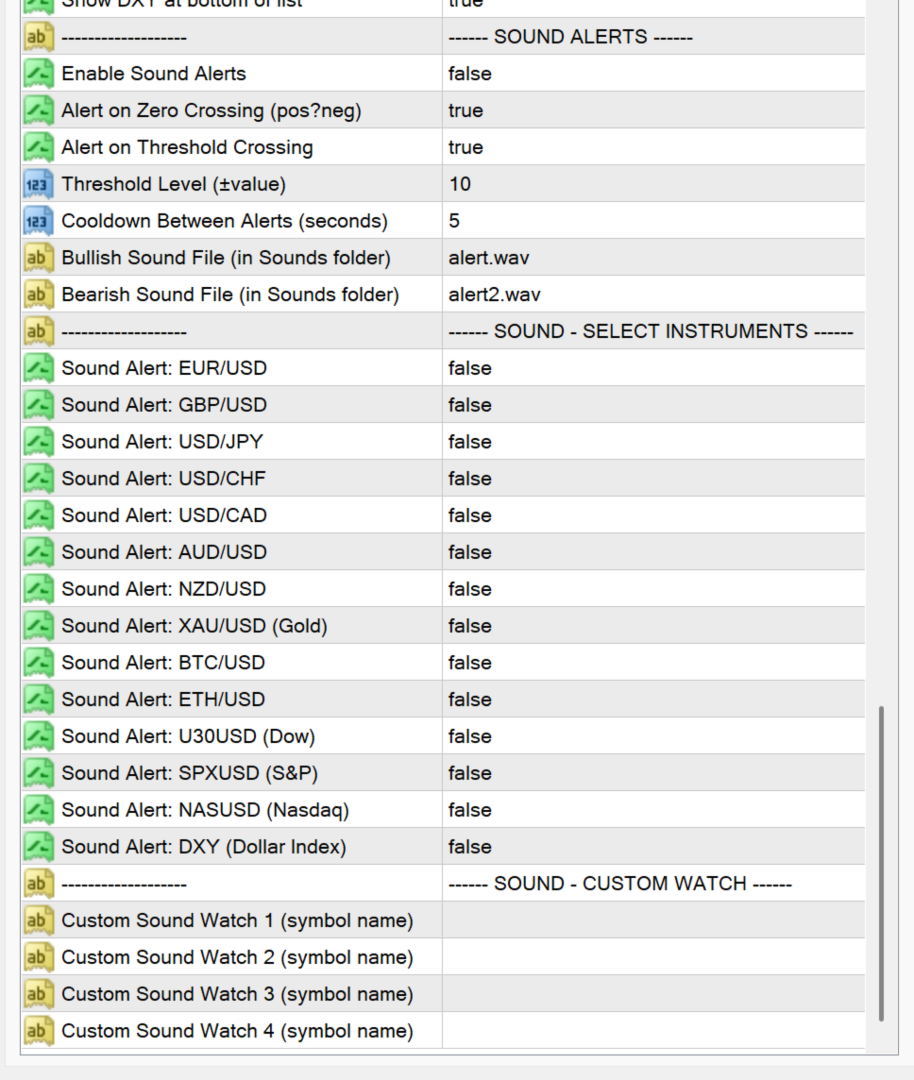
Enable Sound Alerts: Master on/off toggle (Default: false) Alert on Zero Crossing: Sound when momentum flips positive↔negative (Default: true) Alert on Threshold: Sound when momentum crosses ±threshold (Default: true) Threshold Level: The level to trigger threshold alerts (Default: 10) Cooldown Between Alerts: Seconds before same instrument can alert again (Default: 5) Bullish Sound File: .wav file for positive crossings (Default: alert.wav) Bearish Sound File: .wav file for negative crossings (Default: alert2.wav)
Sound Alert Features Added
New Settings Section
Instrument Sound Toggles
Pre-configured toggles for common instruments:
* EURUSD, GBPUSD, USDJPY, USDCHF, USDCAD, AUDUSD, NZDUSD
* XAUUSD (Gold), BTCUSD, ETHUSD
* U30USD (Dow), SPXUSD (S&P), NASUSD (Nasdaq)
* DXY (Dollar Index)
Custom Watch List
4 slots where you can enter ANY symbol name to monitor with sound alerts.
How It Works
Zero Crossing Alerts:
* Plays bullish sound when momentum goes from negative → positive
* Plays bearish sound when momentum goes from positive → negative
Threshold Crossing Alerts:
* Plays bullish sound when momentum crosses above +10 (or your threshold)
* Plays bearish sound when momentum crosses below -10 (or your threshold)
Smart Features:
* Automatic 30-second calibration period (no alerts during startup)
* Cooldown prevents sound spam
* Logs all alerts to Experts tab with details
Example Setup
To monitor EURUSD and DXY for trading:
1. Enable Sound Alerts = true
2. Sound_EURUSD = true
3. Sound_DXY = true
4. Threshold Level = 10
5. Cooldown = 5 seconds
You'll hear:
* Alert when EURUSD momentum crosses ±10
* Alert when EURUSD flips bullish/bearish
* Alert when DXY crosses ±10 (inverse confirmation)
* Different sounds so you know which fired
Available MT4 Sounds
These are in your MT4 `Sounds` folder:
* alert.wav, alert2.wav
* tick.wav
* news.wav
* ok.wav
* expert.wav
* connect.wav
Or add your own .wav files to customize!