SwapSort

Swap Sort is an MQL5 script designed for traders and investors to streamline their decision-making process by efficiently analyzing and organizing swap fees for financial instruments. This tool is ideal for professionals who want to optimize their trading strategies by minimizing costs and maximizing profits.


Swap fees can significantly impact the success or failure of a trade, as high fees can erode profits over time, while favorable swaps can enhance returns for positions held overnigh.


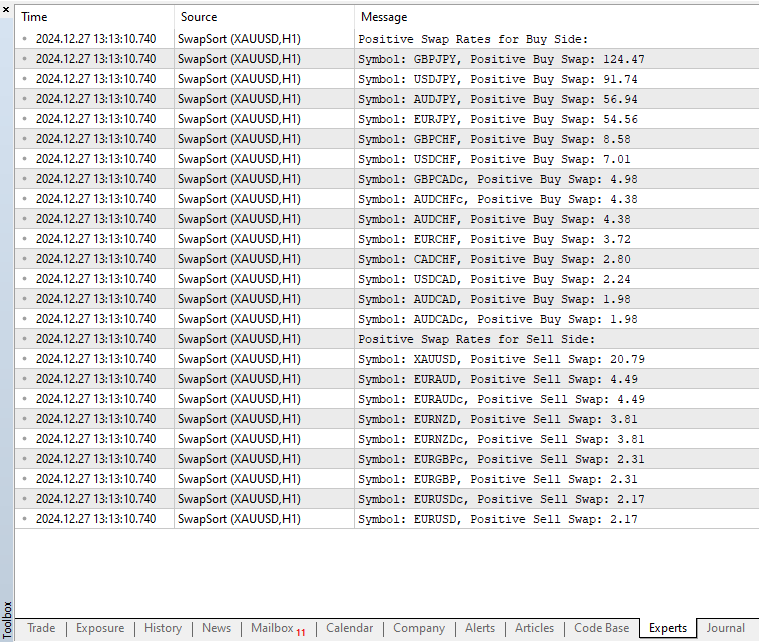
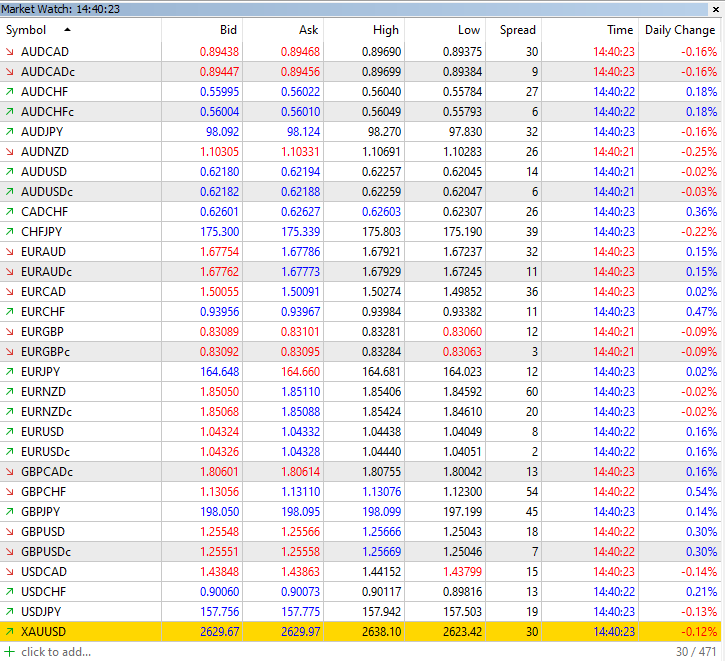
With the Swap Fee Sorter script, simply apply it to any chart to instantly retrieve and sort all swap fees for all financial instruments in the Market Watch by positive values for both the buy and sell sides separately
추천 제품
Atlas Trade Desk
Bernhard Wurzlbauer
Atlas Trade Desk MT5 Atlas Trade Desk MT5 is a visual trade panel, risk manager and lot calculator for manual MetaTrader 5 traders. Plan market and pending orders directly on the chart, calculate position size from your selected risk, adjust Entry, Stop Loss and Take Profit visually, and manage open positions from one clean dashboard. The tool is built for discretionary traders who want faster order preparation, clearer risk control and safer position management without switching between multipl
Advanced Indicators Manager Tired of manually removing and re-adding indicators every time you want to switch between setups or get a clean chart? With this tool you turn them on and off with a single click, no digging through menus, no lost time. Advanced Indicators Manager automatically scans your chart and detects every indicator currently applied (main window and sub-windows), creating a small button panel with one button per indicator. You can add as many indicators as you want to your cha
Chart Time Plus MT5
Isaac Montesinos Valdes
Description:   -   Chart Time + Indicator is very simple and easy, but it can be very important to control the time before opening any manual trade. This indicator shows the time in a panel between 3 different options. Can be possible to move the panel with mouse or with fixed coordinates on the chart. Input Parameters:   -   Local Time : Enable Local Time if you want to show it (Personal Computer Time).   -   Server Time : Enable Server Time if you want to show it (Broker Time).   -   GMT Time
Gold Scalping Matrix MT5
Mohamed Abdulmohsen Mohamed Saeed Ali
The Gold Scalping Matrix is an advanced trading algorithm designed to capitalize on market action and price reversals in the gold market. This innovative bot employs real time market behavior trading strategy, intelligently placing buy and sell orders at predetermined intervals around the current market price.  All Configuration Set Files for back-test and live accounts   All Experts for back-Test find the new free versions before change to paid Recommended Broker Support group   or DM for any
혁신적인 Trades Time Manager로 손쉽게 거래 루틴을 관리하세요. 이 강력한 도구는 지정된 시간에 주문 실행을 자동화하여 거래 방식을 변화시킵니다. 수동 개입 없이 구매에서 주문 설정에 이르기까지 다양한 거래 작업을 위한 개인화된 작업 목록을 만드십시오. 거래 시간 관리자 설치 및 입력 가이드 EA에 대한 알림을 받으려면 MT4/MT5 터미널에 URL을 추가하십시오(스크린샷 참조). MT4 버전       https://www.mql5.com/en/market/product/103716 MT5 버전       https://www.mql5.com/en/market/product/103715 수동 모니터링에 작별을 고하고 간소화된 효율성을 수용하십시오. 직관적인 인터페이스를 통해 기호, 실행 시간, 가격, 손절매(SL), 이익실현(TP) 포인트 및 로트 크기를 포함한 정확한 매개변수를 설정할 수 있습니다. 도구의 유연성은 시장 행동과 일치하는 적응형 반복 옵션으로 강조됩니
Trade Sentinel MT5 is a manual trading panel for MetaTrader 5. It combines the usual trade manager functions (one-click orders, lot size from risk, draggable Entry, SL and TP lines, breakeven, trailing, partial closes) with a basket manager that handles several positions as one trade, and an equity monitor with daily and total loss limits. The user guide is published on the MQL5 blog: https://www.mql5.com/en/blogs/post/773646 . Support is available through the product comments or the mql5.com me
Smart Risk Manager
Abderrahmane Benali
5 (1)
Smart Risk Manager – Master Your Trades with Precision and Confidence Take complete control of your manual trading with Smart Risk Manager , a professional all-in-one trade and risk management Expert Advisor for MetaTrader 5 . Designed for traders who value speed, precision, and capital protection, it simplifies every step of trade execution while ensuring your risk remains under control. Whether you trade Forex, Gold, Indices, or Cryptocurrencies , Smart Risk Manager helps you execute trades w
Telegram Notify MT5 Telegram Notify MT5 is an utility tool to bridge your MetaTrader 5 activities to your Telegram chat/channel. It is useful for monitoring your MetaTrader 5 account by sending a notification to your particular Telegram chat/channel when someone/EA is placing trades, modifying order's TP/SL, closing trades and etc. This EA does not place any trade for your account. This EA also could be a convenient tool for monitoring other's EA trading activities or a tool for publishing your
️ UMNi-CMND MT5 Remote Command & Trade Control System UMNi-CMND turns Telegram into a full remote control panel for your MetaTrader terminal. Send commands from your phone to open trades, manage positions, query account status, and receive complete trade telemetry — all without touching the platform. KEY FEATURES Full remote trade execution via Telegram Open, close, and manage positions by command Move SL/TP, set breakeven, partial close Live status, account, and position
Why execution quality matters more than you think You can have the best trading strategy, perfect entry points, and proper risk management. But if your broker consistently executes orders at worse prices, you lose money before the market even moves. A slippage of 0.01% seems insignificant. But over 100 trades per month, it becomes a noticeable amount. Over 1000 trades, it becomes a serious problem. Scalpers and algorithmic traders understand this well: execution quality directly affects your bot
Trade Control Center 많은 계좌 관리 도구는 자신이 낸 주문이나 차트의 종목만 보여줍니다. Trade Control Center는 다릅니다. 수동이든 스마트폰이든 다른 기기든 어떤 EA든, 계좌에 있는 모든 포지션과 대기 주문을 종목 구분 없이 하나의 표로 모읍니다. 버튼을 직접 누르거나 한도와 동작을 미리 정해 두어야만 청산되거나 멈추며, 그 전에는 아무 일도 일어나지 않습니다. 다음에 무엇을 사고팔아야 하는지는 말하지 않습니다. 화면과 숫자 확인 Trades 화면에는 아래와 같이 표가 그대로 나옵니다. = Trade Control Center Trades Guards Guards Account OK [###---] EA 69 Window OFF Today (comm/swap incl.) -15162.00 Open 11 / 0.40 lots Pending 1 Group: None All Buys Sells Losing Winning Symbol EA
This EA helps to Close all Positions opened. It saves you the time of closing multiple positions manually. Parameters: Buy:  Close Buy Positions Only Sell:  Close Sell Positions Only Buy & Sell: Close Buy & Sell Positions Pending: Close Pending Orders More Advanced MT5 version available at:  https://www.mql5.com/en/market/product/93301?source=Unknown%3Ahttps%3A%2F%2Fwww.mql5.com%2Fen%2Fmarket%2Fmy More Advanced MT4 version available at:   https://www.mql5.com/en/market/product/93468?source=Unk
This Expert Advisor monitors all open positions across all symbols in MetaTrader 5. Whenever a Stop Loss (SL) or Take Profit (TP) is manually set or adjusted on any position, the EA automatically applies that value to all other open positions , regardless of symbol or order type (Buy/Sell). This ensures consistent and synchronized SL and TP levels across your account. Perfect for mobile trading via tablet or smartphone!
The utility is designed to display on the chart the margin zones built on the basis of margin requirements for futures of the Chicago Mercantile exchange (CME). These margin zones are good levels of resistance and support, as seen in the screenshots. How to use To trade on margin zones, use the following rules: buy after the day has closed above one of the zones to the next zone; sell after the day has closed below one of the zones to the next zone; after opening a sell trade, place limit sell
MQL5 블로그: https://www.mql5.com/en/blogs/post/761446 MT4 버전: https://www.mql5.com/en/market/product/136790 MT5 버전: https://www.mql5.com/en/market/product/136791 Time Wizard는 속도, 타이밍, 실행 제어 기능을 하나의 깔끔한 대시보드에서 필요로 하는 트레이더를 위해 설계된 전문 트레이딩 어시스턴트입니다. 이 Expert Advisor는 이벤트 기반 트레이딩, 예약 실행, 빠른 반자동 주문 관리 기능을 제공합니다. 주문을 미리 준비하고, 정확한 실행 시간을 지정하고, 계층형 대기 주문을 설정하고, 손절매 및 이익 실현으로 위험을 관리하고, 차트의 간편한 인터페이스에서 모든 것을 모니터링할 수 있습니다. 경제 이벤트, 개장 시간, 돌파 시점 또는 사용자 지정 일정 등 어떤 시점을 기준으로 거래하든 Time Wizard는 체계적이고 규율 있는 실행을
Reality Engine Standard | Live Spread · Slippage · Latency Monitor What is Reality Engine? Reality Engine is a non-invasive monitoring utility that simulates and logs the real-world execution conditions your algorithmic strategies actually face — spread widening, slippage, and network latency — in real time, on any symbol, for any EA running on your terminal. It does not place trades. It does not interfere with your existing strategies. It attaches silently to a separate chart and watches everyt
Summary A simple yet powerful trade manager for MetaTrader 5 that combines lightning fast execution with bulletproof risk management  Features • Account summary showing balance, daily PnL, symbol and spread • Auto lot size calculation based on % of account risk per trade • Pre-defined stoploss and risk/reward targets • Breakeven toggle which moves stoploss to entry • Trailing stoploss toggle for active positions • Keyboard hotkeys for quick entries and exits • Lightweight and optimised for low
Signals Executor for Telegram is a Utility that allows you to execute and manage positions from messages sent in Telegram Chats. Chat messages are processed to check for the existence of commands, and the command will be executed if its parameters are valid. You need the Telegram Bot Token and Chat Id to configure the input parameters. It is possible to restrict the sending of commands through the User Id, which must be configured in the input parameters. Valid Commands: Buy and Sell: Market or
Advanced Trailing Stop & Break-Even Expert Advisor with Partial Profit Taking Overview Unlock the full potential of your trading strategy with this Expert Advisor that automates trade management to maximize profits and minimize losses. Designed for both novice and experienced traders, this EA offers precise control over your trades with customizable trailing stops, break-even protection, and partial profit taking — all working seamlessly to protect your capital and lock in gains. Key Features Dy
THIS RISK MANAGER WILL HELP YOU IN YOUR DAILLY TRADING, BY CALCULATING THE RISK AND THE LOTS, AND SET STOPLOSS, AND TAKE PROFIT, AND CAN CLOSE TRADES FOR YOU. RISK PERCENTAGE CASHRISK LOTS STOPLOSS TAKE PROFIT SELL AND BUY BUTTONS LOSE IN PROFIT BUTTON WICH WILL CLOSE ALL TRADES IN PROFIT SET BY THE USER CLOSE ON PROFIT BUTTON WICH WILL CLOSE ALL TRADES WHEN THE EQUALITY IS IN PROFIT SET BY THE USER AS WELL CLOSE TRADES BUTTON
Chart Date Jump Chart Date Jump is a lightweight MetaTrader 5 utility that helps you open historical chart context in seconds. Enter a target Day / Month / Year / Hour / Minute , press Go to datetime , and the chart scrolls to the matching bar and centers it in the window. A vertical marker is drawn on the located candle so you can instantly see the exact time you jumped to. Key features Jump to an exact date and time on the current symbol/period Center the found bar in the visible chart area Ma
Limiter Drawdown EA – Automatic Account Protection for MetaTrader 5 Description Limiter Drawdown EA is a lightweight risk management tool for MetaTrader 5. It monitors your account drawdown in real time and will automatically close all open trades once the threshold you define is reached. This provides a reliable safeguard for any trading strategy. Main Functions Monitors equity versus balance continuously Closes all positions when your chosen drawdown percentage is reached Optionally removes
FREE
ProTrading Panel — 수동 트레이딩을 위한 최고의 어시스턴트 ProTrading Panel 과 함께 수동 트레이딩의 경험을 한 단계 더 높여보세요. 이 EA(Expert Advisor)는 신속한 주문 체결을 위해 설계되었으며, 차트 공간을 방해하지 않고 완벽하게 어우러지는 세련되고 눈이 편안한 세로형 인터페이스를 제공합니다. 화면을 마우스로 클릭하는 것을 선호하시든, 키보드 단축키를 사용하여 번개처럼 빠른 속도로 거래를 실행하시든 이 도구는 귀하에게 가장 완벽한 선택이 될 것입니다. 주요 기능: 정밀한 리스크 관리: 스톱로스(SL)를 포인트 단위로 설정하면, 설정하신 원하는 손익비(Risk:Reward / R:R)에 따라 테이크프로핏(TP)이 자동으로 계산됩니다. 고급 트레이링 스톱: 수익을 자동으로 확보할 수 있습니다. 트레이링 스톱 기능의 활성화/비활성화를 토글할 수 있으며 시작, 단계, 거리를 포인트 단위로 자유롭게 설정할 수 있습니다. 실시간 손익 추적: 당일 손
The professional browser of News and Trading Sessions is now available in MetaTrader 5. Now all the most important market information is collected on one dial! News located on the Time scale. Planning your working time has never been so easy and convenient ... The news scale can be switched a day, two, a week, a month forward or backward (see the details in the short video). All news updates in real time. Thanks to the built-in filters, you can configure the display of news by importance, cou
Telegram to mt5 pro
Janet Abu Khalil
4 (4)
Telegram to MT5 Pro — Advanced Telegram Signal Copier with Auto-Fix, Multi-TP, Risk Control and Full Trade Management Telegram to MT5 Pro — 전문 텔레그램 신호 복사기 Telegram to MT5 Pro는 텔레그램 신호를 MetaTrader 5 계정으로 자동으로 직접 실행하는 고성능 트레이드 복사기로, 리스크, 실행, 트레이드 관리에 대한 완전한 제어를 제공합니다. 이 시스템은 두 가지 구성 요소로 이루어져 있습니다: • MetaTrader 5 내부에서 실행되는 Expert Advisor (EA) • 텔레그램에 연결되어 신호를 로컬로 EA에 전송하는 데스크톱 브리지 애플리케이션 두 구성 요소는 동일한 컴퓨터에서 실행되어야 합니다. MQL5 플랫폼 제한으로 인해 EA는 텔레그램에 직접 연결할 수 없습니다. 브리지는 텔레그램을 처리하고 EA는 거래를 실행합니다. 지원 및 설치
ProBridger
Marius Ovidiu Sunzuiana
How Traders and Analysts Can Use the Data Export Bridge to Improve Their Analytics The MQL Data Export Bridge unlocks a new level of analytical power by transforming MetaTrader into a real‑time data provider for any external research environment. Here are the most impactful ways different users can apply the bridge to enhance their trading performance. Build Predictive Models with Machine Learning Who benefits: Quantitative traders, data scientists, algorithm developers How it helps: Export t
### Take Control of Your Trading Edge with Manual Strategy Backtester Pro Do you want to achieve years of trading experience in just a few hours? Spending months testing strategies on live or demo accounts is slow, tedious, and expensive. **Strategy Backtester Pro** is a lightweight, ultra-fast manual charting simulator designed to let you backtest any mechanical or discretionary strategy with total control and speed. Whether it is the weekend or after hours, you can instantly spin up a simul
Market View MT5
Kyra Nickaline Watson-gordon
Definition : Market View is a dashboard (scanner) to view price graphs of all symbols and all timeframes at a glance. The utility is designed user friendly and added a wide range of customization options. Main features of Market View : Visual settings window on the chart Customizable list of symbols and timeframes Different shapes : Real Candles, Schematic Candles, Arrows Customizable number of candles Changeable size of dashboard (scanner) Highlight timeframes with gaps on candles Open approp
Position Prime
Mariana Cordeiro Neves Fernandes
지금 무료 데모 버전을 다운로드하여 구매 전에 전략 테스터에서 모든 위험 관리 기능을 테스트해 보세요! Position Prime 은 MetaTrader 5 (MT5)를 위한 기관급 시각적 주문 실행 어시스턴트이자 위험 관리 도구입니다. 속도와 정밀도를 요구하는 트레이더를 위해 개발되었으며, 수동 랏(Lot) 계산의 번거로움을 없애고 차트를 진정한 트레이딩 데스크로 바꿔줍니다. 단 몇 분의 1초 만에 거래를 계획, 실행 및 보호하세요. ️ 위험 관리 및 자동 랏(Lot) 계산 동적 계산: 위험 감수 금액($) 또는 계좌 잔고 비율(%)을 설정하세요. 차트에서 손절매(SL) 선을 드래그하면 패널이 정확한 랏 크기를 자동으로 계산합니다. 실시간 예측: 주문을 열기 전에 화면에서 직접 손익비(RR), 예상 수익 및 잠재적 손실을 시각화합니다. 일일 손실 제한 (Daily Loss Lock): 하루 최대 금전적 손실 한도를 설정하세요. 이 한도에 도달하면 패널이 새로운 거래를 차단
# Telegram Signal Forwarder EA for MetaTrader 5 ## Overview This Expert Advisor automatically forwards all trading activity to a Telegram channel or group. It tracks **positions AND pending orders** in real-time and sends formatted signals. **Key Feature:** All follow-up messages (close, partial close, modify, delete) are sent as **replies to the original signal** in Telegram, creating a clean threaded conversation for each trade. ## Signal Types ### For Positions (Market Orders) - **OPEN
이 제품의 구매자들이 또한 구매함
Trade Assistant MT5
Evgeniy Kravchenko
4.43 (215)
거래당 위험 계산, 라인을 사용한 손쉬운 신규 주문, 부분 청산 기능을 통한 주문 관리, 7가지 유형의 트레일링 스탑 및 기타 유용한 기능을 제공합니다. 추가 자료 및 지침 설치 지침   -   애플리케이션 지침   -   데모 계정용 애플리케이션 평가판 라인 기능       - 차트에 개시선, 손절매, 차익실현을 표시합니다. 이 기능을 사용하면 새로운 주문을 쉽게 하고 개봉 전에 추가 특성을 볼 수 있습니다. 위기 관리       -       위험 계산 기능은 설정된 위험과 손절매 주문의 크기를 고려하여 새 주문의 볼륨을 계산합니다. 이를 통해 손절매 크기를 설정하고 동시에 설정된 위험을 존중할 수 있습니다. 로트 계산 버튼 - 위험 계산을 활성화/비활성화합니다. 필요한 위험 값은 위험 필드에 0에서 100 사이의 백분율 또는 예금 통화로 설정됩니다. 설정 탭에서 위험 계산 옵션을 선택합니다. $ 통화, % 잔액, % 지분, % 자유 마진, % 사용자 정의, % AB 이전
Trade Manager EA에 오신 것을 환영합니다. 이 도구는 거래를 보다 직관적이고 정확하며 효율적으로 만들기 위해 설계된 궁극적인 리스크 관리 도구 입니다. 단순한 주문 실행 도구가 아닌, 원활한 거래 계획, 포지션 관리 및 리스크 제어를 위한 종합 솔루션입니다. 초보자부터 고급 트레이더, 빠른 실행이 필요한 스캘퍼에 이르기까지 Trade Manager EA는 외환, 지수, 상품, 암호화폐 등 다양한 시장에서 유연성을 제공합니다. Trade Manager EA를 사용하면 복잡한 계산은 이제 과거의 일이 됩니다. 시장을 분석하고 진입, 손절 및 익절 수준을 차트의 수평선으로 표시한 후 리스크를 설정하면, Trade Manager가 이상적인 포지션 크기를 즉시 계산하고 SL 및 TP 값을 실시간으로 표시합니다. 모든 거래가 간편하게 관리됩니다. 주요 기능: 포지션 크기 계산기 : 정의된 리스크에 따라 거래 크기를 즉시 결정합니다. 간단한 거래 계획 : 진입, 손절, 익절을 위한
Farmed Hedge Yield Farming | All Markets (Manual - Hybrid - Semi/Automated EA) VERIFIED TRADING RESULTS - Farmed Hedge Yield Axi Copy:  https://www.mql5.com/en/signals/2356376 - Farmed Hedge Yield Exn Copy:   https://www.mql5.com/en/signals/2356404 - Farmed Hedge Yield V Copy:  https://www.mql5.com/en/signals/2357156 IMPORTANT NOTICE: FarmedHedge is a MANUAL-FOCUSED TRADING UTILITY ,not a fully automated EA. Results shown on this Signal include manual trades and overall strategic management.
Local Trade Copier EA MT5
Juvenille Emperor Limited
4.94 (148)
Local Trade Copier EA MT5는 동일한 Windows 컴퓨터 또는 Windows VPS에서 여러 MetaTrader 5 계정 간에 거래를 복사하고 관리할 수 있는 빠르고 유연한 거래 복사기입니다. 로컬 거래 동기화 기능과 함께 Receiver 측에서 로트 크기, 리스크 관리, 거래 필터링, 심볼 매핑, 거래 관리 및 계정 보호를 독립적으로 설정할 수 있습니다. Transmitter와 Receiver 터미널을 약 1분 안에 설정하고, 동일한 브로커 또는 서로 다른 브로커의 계정 간에 수동 거래 또는 EA 거래를 복사할 수 있습니다. 적절한 조건에서는 로컬 MetaTrader 터미널 간의 거래 정보가 0.5초 이내 에 동기화될 수 있습니다. 실제 체결 속도는 브로커 지연 시간, 네트워크 상태, 컴퓨터/VPS 성능 및 터미널 부하에 따라 달라집니다. 구매 전에 무료 데모를 사용해 보세요 MT5 데모 계정에서 Local Trade Copier EA MT5의 모든 기능을
베타 출시 Telegram to MT5 Signal Trader 는 곧 공식 알파 버전을 출시할 예정입니다. 일부 기능은 아직 개발 중이며, 작은 버그가 발생할 수 있습니다. 문제가 있으면 꼭 보고해 주세요. 여러분의 피드백은 소프트웨어 개선에 도움이 됩니다. Telegram to MT5 Signal Trader 는 Telegram 채널 또는 그룹의 거래 신호를 자동으로 MetaTrader 5 계정으로 복사하는 강력한 도구입니다. 공개 및 비공개 채널을 모두 지원하며, 여러 신호 제공자를 여러 MT5 계정에 연결할 수 있습니다. 소프트웨어는 빠르고 안정적으로 동작하며, 복사된 거래를 완벽히 제어할 수 있습니다. 인터페이스는 깔끔하며 대시보드와 차트가 시각적으로 구성되어 있고, 직관적인 네비게이션이 가능합니다. 여러 Signal Account를 관리하고, 공급자별 설정을 세밀하게 조정하며, 모든 동작을 실시간으로 모니터링할 수 있습니다. 필수 조건 MQL의 제한으로 인해 EA는 Te
Telegram to MT5 Multi-Channel Copier   는 Telegram 채널의 트레이딩 시그널을 MetaTrader 5로 자동 복사합니다. 봇도, 브라우저 확장도, 수동 복사도 필요 없습니다. Telegram에 시그널이 도착하면 EA가 몇 초 안에 터미널에서 주문을 실행합니다. 그리고 채널을 복사하기 전에, 내장 백테스터가 그 채널이 내 계좌에서 어떤 결과를 냈을지 보여줍니다. 제품은 두 가지 구성 요소로 이루어집니다: Telegram 채널을 수신하는 Windows 애플리케이션과, MT5 터미널에서 시그널을 실행하는 본 EA입니다. MT4 버전도 제공됩니다   여기 . 설정 가이드와 앱 다운로드:   https://www.mql5.com/en/blogs/post/768988 현재 가격은 향후 인상될 예정입니다. 작동 방식 Windows 앱은 봇이 아닌 본인의 API 자격 증명으로 Telegram에 연결됩니다. 따라서 비공개·VIP 채널을 포함해 구독 중인 모든 채널
================================================================================ POC BREAKOUT - V20.72. Full Professional Grade Toolkit ================================================================================ POC Breakout is a full MetaTrader 5 trading dashboard for discretionary traders who want breakout signals, Point of Control (POC) context, volume profiles, order flow, market structure, news, alerts, and advanced trade planning in one professional workspace. Attached directly to you
TradePanel MT5
Alfiya Fazylova
4.88 (167)
Trade Panel은 다기능 거래 도우미입니다. 이 애플리케이션에는 50개 이상의 수동 거래 기능이 포함되어 있으며 대부분의 거래 작업을 자동화할 수 있습니다. 앱 사용 설명서 + 동영상 설명: https://www.mql5.com/en/blogs/post/772292 데모 계정용 앱 체험판: https://www.mql5.com/en/blogs/post/750865 앱 설치 방법: https://www.mql5.com/en/blogs/post/756239 시각 모드에서 앱 테스트 방법: https://www.mql5.com/en/blogs/post/770277 VPS MetaTrader에 앱 설치 방법: https://www.mql5.com/en/blogs/post/770190 거래. 한 번의 클릭으로 거래를 수행할 수 있습니다: 리스크 자동 계산과 함께 예약 주문 및 포지션 열기. 한 번의 클릭으로 여러 주문 및 포지션 열기. 주문 그리드 열기. 예약 주문 및 포지션을 그룹별로
Premium Trade Manager - 코치가 내장된 트레이딩 패널 Premium Trade Manager 는 차트 안에 트레이딩 코치를 심어놓은 도구입니다. 주문을 확정하기 전에, AI 트레이딩 코치 Max가 설정된 거래를 직접 읽고 명확한 판단을 내려줍니다. 스톱이 규율 있는 접근 방식에 맞는지, 리스크 크기가 합리적인지, 고영향 뉴스 이벤트가 몇 분 후에 있는지, 프롭 펌 한도에 근접했는지. 그 아래에는 완전한 실행 엔진이 있습니다. 원클릭 리스크 기반 진입, 차트에서 드래그로 세우고 거래가 진행되는 동안에도 계속 움직일 수 있는 플랜, 최대 4단계 분할 익절, 7가지 트레일링 방식, 실시간 프롭 펌 컴플라이언스, 뉴스 가드, 그리고 자체 비용을 평가하는 스프레드까지. 결정은 당신이 내립니다. Max가 두 번째 시선으로 확인합니다. 패널이 그 이후의 모든 것을 처리합니다. 구매 전에 직접 체험해 보세요. 브라우저에서 라이브 패널을 직접 클릭해볼 수 있습니다. 구매 전에 실제
Astro Trade MT5
Indra Maulana
5 (7)
25% discount on the release of the tool: only for the next 3 buyers Send a message to receive a demo version. AstroTrade Trading Assistant AstroTrade is a comprehensive multi-functional trading utility developed for the MetaTrader 5 platform. It integrates essential tools for trade execution, risk management, and technical monitoring into a single unified interface. The application is designed to assist traders in managing their daily operations through a visual and structured environment. Vi
Strategy Ledger Pro
Abdullah Uygar Tuna
5 (2)
Strategy Ledger Pro 는 MetaTrader 5용 읽기 전용 계좌 분석 패널입니다. 계좌 결과를 Expert Advisor, 전략, 종목, 매직 넘버별로 분리해 보여줍니다. 모든 기능을 설명하는 상세 매뉴얼 . MetaTrader는 계좌 전체에 대해 하나의 잔고만 보여줍니다. 여러 EA가 함께 거래하면 그 잔고로는 각각의 기여를 알 수 없습니다. Strategy Ledger Pro는 계좌 내역을 읽고, 청산된 포지션을 재구성하고, 전략에 배정한 뒤 결과를 하나의 패널로 보여줍니다. 이 제품은 주문을 넣거나 수정하거나 청산하지 않습니다. 거래 전략을 포함하지 않고, 지표를 만들지 않으며, 차트 가격을 읽지 않습니다. 주요 기능 EA, 개별 전략, 종목 또는 매직 넘버별 결과. 사전 설정 기간과 사용자 지정 날짜 범위. 실현 및 미실현 결과, 오픈 노출, 거래 통계, 핍, 드로다운, 자산 곡선. 수수료, 스왑, 비용 부담률, 진입·청산 슬리피지 추정치와 합계. 고정 규
Exp COPYLOT CLIENT for MT5
Vladislav Andruschenko
3.97 (35)
MetaTrader 5용 전문 트레이드 복사기 MetaTrader 용 빠르고 전문적이며 신뢰할 수 있는 트레이드 복사기 입니다. COPYLOT 은 MT4와 MT5 터미널 간의 Forex 거래 복사를 지원하며, Hedge 및 Netting 계좌를 모두 지원합니다. COPYLOT MT5 버전 지원 구성: - MT5 Hedge → MT5 Hedge - MT5 Hedge → MT5 Netting - MT5 Netting → MT5 Hedge - MT5 Netting → MT5 Netting - MT4 → MT5 Hedge - MT4 → MT5 Netting MT4 버전 전체 설명 + DEMO + PDF 구매 방법 설치 방법 로그 파일 확인 방법 테스트 및 최적화 방법 Expforex의 모든 제품 MT4 터미널로도 거래를 복사할 수 있습니다(MT4 → MT4, MT5 → MT4): COPYLOT CLIENT for MT4 COPYLOT은 2개, 3개, 심지어 10개의 터미널과 동시에 작동할
Telegram To MT5 Ultra
Mirel Daniel Gheonu
5 (5)
Telegram To MT5 — 시그널 카피어 텔레그램 채널의 트레이딩 콜을 실제 MT5 주문으로 바꿔 드립니다 — 자동으로, 원하는 만큼의 계좌에서, 리스크와 규칙을 완전히 당신의 통제 아래 둡니다. Telegram To MT5는 이미 텔레그램에서 팔로우하고 있는 VIP / 시그널 채널을 당신의 MetaTrader 5 터미널에 연결합니다. 무료 동반 데스크톱 앱이 메시지를 읽고(봇을 차단하는 채널에서도 가능), 이 EA가 당신의 계좌에서 이를 실행합니다 — 당신만의 리스크 설정, 심볼 매핑, 익절(TP) 처리, 세션 및 뉴스 필터를 적용합니다. 이것은 블랙박스 전략이 아니라 시그널 카피어입니다. 어떤 채널을 신뢰할지, 각 거래의 수량과 관리 방식을 당신이 결정합니다. 단계별 설정 및 동반 앱 설치 가이드 작동 방식 [당신의 텔레그램 채널] -> [동반 데스크톱 앱] -> [MT5 + 이 EA] -> 주문 동반 데스크톱 앱(무료, 포함)은 당신의 텔레그램 계정으로 로그인하여 선택한
Welcome to ENTRY IN THE ZONE WITH SMC MULTI TIMEFRAME Entry In The Zone and SMC Multi Timeframe is a real-time market analysis tool based on Smart Money Concepts (SMC), designed to analyze market structure, price direction, and key trading zones. It supports both Single-Timeframe Analysis and Multi-Timeframe Analysis, providing a clearer view of the overall market structure across multiple timeframes, with real-time BUY / SELL signals that do not repaint. It is designed to help filter trading op
HINN MagicEntry Extra
ALGOFLOW OÜ
4.74 (19)
HINN MAGIC ENTRY – the ultimate tool for entry and position management! SIMPLE. FASTEST. INTUITIVE. MAX AUTOMATED. Place orders by selecting a level directly on the chart! full description   ::  demo-version  :: 60-sec-video-description Key features: - Market, limit, and pending orders - Automatic lot size calculation - Automatic spread and commission accounting - Unlimited partitial take-profits  - Breakeven and trailing stop-loss and take-profit  functions - Invalidation leves - Intuitive, a
EA Overfitter
Stephen J Martret
5 (1)
That backtest looks great. But will it still be making money tomorrow, next week, next month? EA Overfitter re-runs your EA on 100 price histories it has never seen. One score tells you if the edge is real. A backtest tells you what an EA did on one price history — the one that happened to occur. What you cannot tell from it is how much of that result was the strategy and how much was the particular path. EA Overfitter answers that. It builds up to 100 synthetic price histories your EA has n
Signal TradingView to MT5 Pro Automator TradingView와 MetaTrader 5 간의 즉각적인 전문 실행 TradingView 알림과 MT5의 실제 실행을 연결하는 가장 강력한 커뮤니케이션 브리지로 거래 전략을 자동화하세요. 속도, 유연성 및 완벽한 위험 관리를 요구하는 트레이더를 위해 설계된 이 Expert Advisor는 모든 알림 메시지를 정확한 시장가 또는 지정가 주문으로 변환합니다. 강점 및 이점 범용 파싱 엔진(독점 기술): 모든 알림 형식에서 데이터를 자동으로 인식하고 추출할 수 있는 고급 기술입니다. 단일하고 엄격한 형식에 얽매일 필요가 없습니다. 시스템은 심볼, 액션, 가격, SL 및 TP를 자동으로 이해합니다. 실시간 실행: 지연 시간을 최소화하도록 최적화된 1초 미만의 초고속 폴링 기술. 신호 수신 후 몇 밀리초 내에 주문 실행이 이루어집니다. 기관 수준의 위험 관리: 다음 기준에 따른 자동적이고 정확한 로트(Lot) 크기 계
Anchor Trade Manager
Kalinskie Gilliam
5 (9)
Your EAs cannot see each other, but Anchor can. Anchor gives you one place to coordinate your EAs, manage risk, and decide when trading is allowed. It works alongside the trading bots you already use without any changes to them. The Problem One EA opens a trade. Then another starts trading. The next thing you know, you wake up to multiple grids built across your account. Each EA may be doing exactly what it was designed to do, but together they can place far more risk on your account than you in
MT5 to Telegram Signal Provider 는 사용하기 쉽고 완전히 커스터마이즈 가능한 유틸리티로, 특정 신호를 Telegram의 채팅, 채널 또는 그룹으로 전송하고, 귀하의 계정을 신호 제공자 로 만듭니다. 경쟁 제품과 달리 DLL 임포트를 사용하지 않습니다. [ 데모 ] [ 매뉴얼 ] [ MT4 버전 ] [ 디스코드 버전 ] [ 텔레그램 채널 ]  New: [ Telegram To MT5 ] 설정 단계별 사용자 가이드 가 제공됩니다. 텔레그램 API에 대한 지식은 필요하지 않습니다; 개발자가 제공하는 모든 것이 필요합니다. 주요 특징 구독자에게 보낸 주문 상세 정보를 커스터마이즈할 수 있습니다. 예를 들어, 브론즈, 실버, 골드와 같은 계층 구독 모델을 만들 수 있습니다. 골드 구독에서는 모든 신호를 받습니다. id, 심볼, 또는 코멘트로 주문을 필터링할 수 있습니다. 주문이 실행된 차트의 스크린샷이 포함됩니다 보낸 스크린샷에 닫힌 주문을 그려 추가 검증을 합니다
파워 캔들 전략 스캐너 - 자체 최적화 다중 종목 설정 찾기 도구 파워 캔들 전략 스캐너는 마켓 워치에 등록된 모든 종목에 대해 파워 캔들 지표와 동일한 자체 최적화 엔진을 동시에 실행합니다. 하나의 패널에서 현재 통계적으로 거래 가능한 종목, 각 종목별 최적의 전략, 최적의 손절매/익절 조합을 알려주며, 새로운 신호가 발생하면 즉시 알림을 전송합니다. 이 도구는 Stein Investments 에코시스템의 일부입니다. 18개 이상의 도구와 함께 당신의 1대1 AI 트레이딩 멘토 Max.  항상 대기 중, 모든 인디케이터를 깊이 있게 이해, 무언가를 차근차근 생각해보고 싶은 순간에 도움을 줍니다.  https://stein.investments 에서 만나보세요 완벽한 시장 모니터링. 종목당 3,000건 이상의 자동 최적화. 2가지 알림 유형. 한 번의 클릭으로 차트를 전환하고 바로 거래하세요. 이 도구가 필요한 이유 대부분의 다중 종목 스캐너는 가격 변동만 보여줍니다. 티커별
The product will copy all telegram signal to MT5 ( which you are member) , also it can work as remote copier.  Easy to set up, copy order instant, can work with almost signal formats, image signal,  s upport to translate other language to English Work with all type of channel or group, even channel have "Restrict Saving Content", work with  multi channel, multi MT5 Work as remote copier: with signal have ticket number, it will copy exactly via ticket number. Support to backtest signal. How to s
Seconds Chart MT5
Boris Sedov
4.61 (18)
Seconds Chart - MetaTrader 5에서 초 단위 차트를 생성하는 독특한 도구입니다. Seconds Chart 를 사용하면 초 단위로 설정된 타임프레임으로 차트를 작성할 수 있어, 표준 분 또는 시간 단위 차트에서는 불가능한 유연성과 정밀한 분석이 가능합니다. 예를 들어, S15 타임프레임은 15초 동안의 캔들로 구성된 차트를 의미합니다. 사용자 정의 심볼을 지원하는 모든 인디케이터와 전문가 어드바이저를 사용할 수 있습니다. 이를 사용하는 것은 표준 차트에서 거래하는 것만큼 편리합니다. 표준 도구와 달리, Seconds Chart 는 초고속 타임프레임에서도 높은 정확도와 지연 없이 작업할 수 있도록 지원합니다. 무료 데모: Seconds Chart v2.29 Demo.ex5 무료 데모를 다운로드하고 직접 확인하십시오: 완전한 기능 - 모든 기능 사용 가능 24시간 테스트 - 정확성과 편리성을 평가하기에 충분한 시간 데모 계정만 - 대부분의 브로커에서 쉽게 개설 가능
Footprint Chart Pro — Professional OrderFlow EA for MetaTrader 5 Version 6.34 | Professional tool for real traders | Institutional-Grade Visualization DEMO USERS - PLEASE SELECT EVERY TICK / REAL TICK WHEN TESTING AND YOU HAVE DOWNLOADED HISTORICAL DATA. IF YOU SEE A WAITING SCREEN AND IT IS NOT DOWNLOADING, IT MEANS YOU HAVE LOW HISTORICAL DATA. TRY 1 MIN AND 5 MIN FIRST ON 1 DAY DATA. ONE DAY DATA SHOULD BE THE NEWEST AND MOST CURRENT DATE. PLEASE WAIT UNTIL THE MARKET HAS ROLLED OVER PERIOD.
Trade copier MT5
Alfiya Fazylova
4.6 (55)
Trade Copier는 거래 계정 간의 거래를 복사하고 동기화하도록 설계된 전문 유틸리티입니다. 복사는 공급자의 계정/단말기에서 동일한 컴퓨터 또는 vps에 설치된 수신자의 계정/단말기로 발생합니다. 프로모션 - 이미 "Trade copier MT5"를 구매하셨다면, "Trade copier MT4"를 무료로 받으실 수 있습니다 (MT4 → MT5 및 MT4 ← MT5 복사용). 조건에 대한 자세한 정보를 원하시면, 개인 메시지를 통해 저희에게 문의해 주시기 바랍니다! 구매하기 전에 데모 계정에서 데모 버전을 테스트할 수 있습니다. 데모 버전 여기 . 전체 지침 여기 . 주요 기능 및 이점: 복사기는 "МТ5> МТ5", "МТ4> МТ5", "МТ5> МТ4" 복사를 지원합니다. 복사기는 데모 계정 > 실 계정, 실 계정 > 데모 계정, 데모 계정 > 데모 계정 및 실제 계정 > 실 계정 복사를 지원합니다. 복사기는 읽기 전용 암호가 적용된 투자자 계정에서 복사를 지원합니다. 하
Timeless Charts
Samuel Manoel De Souza
5 (8)
Timeless Charts is an all-in-one trading utility for professional traders. It combines custom chart types such as Seconds Charts and Renko with advanced order flow analysis using Footprints , Clusters , Volume Profiles , VWAP studies, and anchored analysis tools for deeper market insight. Trading and position management are handled directly from the chart through an integrated trade management panel , while Market Replay and Virtual Accounts provide environments for practicing trading skills and
Trade Copier Ultimate
Janitha Sandaruwan Amaradasa Wickramasingha Arachchilage
5 (5)
Trade Copier Ultimate - Telegram to MT5 Signal Copier Trade Copier Ultimate automatically copies Telegram trading signals into MetaTrader 5. The EA can read signal messages, detect the symbol, order type, entry price, Stop Loss, Take Profit levels and selected update commands, then execute or manage the trade in MT5 using your lot and risk settings. It is more than a basic Telegram to MT5 copier. TCU also supports Bot API and user-account Bridge workflows, Discord signal routing, local MT5 to MT
Trade Dashboard MT5
Fatemeh Ameri
4.95 (132)
Trade Dashboard simplifies how you open, manage, and control your trades, with built-in lot size calculation. It allows you to execute trades, manage risk, and control positions directly on the chart, with tools such as partial close, breakeven, and trailing stop. Designed to reduce manual work and help you stay focused on your trading decisions. A demo version is available for testing. Detailed explanations of features are provided within the MQL5 platform. Installation instructions are include
Risk Manager Pro MT5 is an account protection Expert Advisor for traders who want strict risk control inside MetaTrader 5. The utility monitors your account equity, daily and weekly results, drawdown, open positions, trade count, consecutive losses, and trading hours. When a configured limit is reached, it can automatically close positions, cancel pending orders, stop other EAs, send notifications, or close the terminal. Instead of relying on discipline during a stressful trading session, you de
Trade Indicator Assistant   is a powerful MT5 utility designed to turn indicators into automated trading systems. Its main feature is the ability to automatically detect an indicator’s   BUY and SELL signal buffers , without requiring you to know the buffer numbers, search through indicator settings, or modify the indicator source code. Bonus Indicator:   After purchasing Trade Indicator Assistant, contact me to receive   Trade Signal Pro   completely free as a bonus indicator. [Download Demo V
MetaTrader 5용 트레이딩 패널 — 차트와 키보드에서 실행하는 프로페셔널 원클릭 트레이딩 활동적인 트레이더를 위해 설계된 고급 Trading Panel로, MetaTrader 기본 인터페이스보다 훨씬 빠르고 직관적으로 포지션과 주문을 열고, 관리하고, 종료할 수 있습니다. 이 패널은 포지션 관리, 대기 주문 제어, 총수익 관리, 체결 속도를 하나의 전문적인 작업 공간에 통합하고 싶은 트레이더를 위한 솔루션입니다. 이것은 단순한 보조 유틸리티가 아닙니다. MetaTrader 5를 위한 진정한 trading cockpit입니다. 차트에서 직접 거래하고, 키보드로 빠르게 명령을 실행하며, 자동 계산과 시각적 가이드를 통해 수동 트레이딩을 더 빠르고, 더 명확하고, 더 편리하게 만들어 줍니다.  이 패널을 사용하면 차트에서 단 한 번의 클릭으로 거래를 실행할 수 있으며, 표준 MetaTrader 컨트롤보다 최대 30배 빠르게 거래 작업을 수행할 수 있습니다. 새로운 프리미엄 버전
제작자의 제품 더 보기
TradeInfos
Dustin Ricardo Pierenz
Track your spread and all position PnLs (Buy & Sell) in real-time – stay in control of your trades at a glance! Features: Real-time spread display (in pips) Total Buy position PnL Total Sell position PnL Clean, non-intrusive display layout Works with all symbols and timeframes Perfect for: Scalpers needing quick spread awareness Day traders monitoring long/short performance Risk managers optimizing exposure No need to switch tabs or rely on external tools — everything you need is visible at
FREE
ChartChaos
Dustin Ricardo Pierenz
A MetaTrader 5 script that automatically closes all charts except for a specified number to keep open. Simply enter numbers like   1,2,5,10   to keep those corresponding charts open, or a single number (e.g.,   3 ) to keep the first 3 charts open. All other charts are closed in one action, helping you manage multiple open positions with ease. Perfect for decluttering your workspace and focusing on the charts that matter most. Source Code here:  https://github.com/pwn-forex/ChartChaos Youtube T
FREE
Swap Detector
Dustin Ricardo Pierenz
The Swap Detector is an essential MQL4 utility that displays the swap costs of any instrument when applied to a chart. It helps traders make informed decisions by visually indicating the swap value in customizable colors— green for positive (good) and red for negative (bad) by default. This tool ensures transparency in overnight holding costs, enabling better trade planning and risk management
FREE
ADR Levels Plus
Dustin Ricardo Pierenz
Uncover the market’s secret zones with the ADR Levels+ Indicator. This dynamic tool plots ADR extension levels at 100%, 125%, 150%, and 200% right on your chart. In most cases, price dances between these boundaries—but when it breaks out, it often signals a prime opportunity for a mean reversion trade or the start of an evolving trend. Plus, an integrated alarm system triggers as soon as these key levels are reached, ensuring you never miss a lucrative trading opportunity. Elevate your strategy
EaInfoMaster
Dustin Ricardo Pierenz
EA Info Display Master Stop clicking through charts to find your EA configurations! Get a complete overview of all running Expert Advisors with their symbols and magic numbers in seconds. Managing multiple EAs across different symbols? Monitoring performance on FX Blue or other platforms? This tool instantly displays: All running EA names Their symbols and magic numbers Account details (number, broker, currency) Direct FX Blue statistics links (other provider will follow! Tell me what you need)
필터:
리뷰 없음
리뷰 답변