Tick Data HTTP Exporter

Tick Data HTTP Exporter

Description

The EA turns your terminal into a historical/realtime tick data provider for your application.
There are many market data providers on the internet, but in practice, the data provided is not always of good quality. Moreover, these services are often more expensive and typically require monthly subscription fees per each symbol.
With this EA, you can feed your application with exactly the same tick data that you see in the terminal, the same data on which you base your trades and market analysis.
Together with the Candle Data HTTP Exporter, which provides rates data (OHLC, candles), a complete data set necessary for market analysis is offered.

Capabilities

  • Enables the transmission of tick data to a pre-configured external HTTP URL.
  • Guarantees the delivery of every tick, with the capability to resume from the last sent tick in case of disruptions.
  • Offers two storage options for tick timestamp offsets:
    • Local files (default, managed automatically)
    • HTTP endpoint (for integration with applications)
  • Ensures reliable delivery of ticks, with retry mechanisms for HTTP request failures.
  • Allows for data transfer with configurable batching.

Configuration

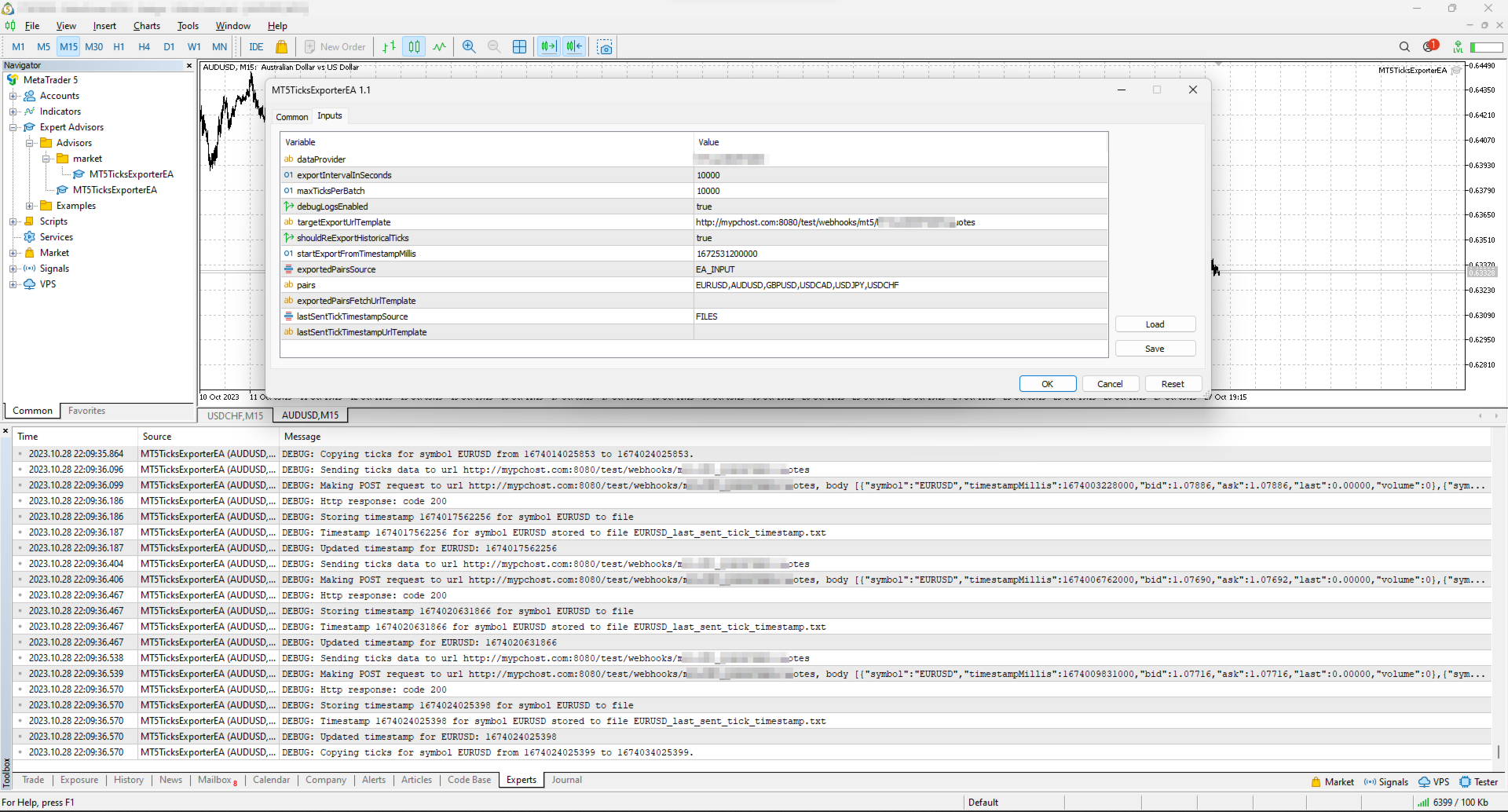
Input Description Default
dataProvider Specifies the name of the data provider.
This name can then be used in URL templates as {dataProvider}.
-
tickQueryingIntervalDurationSeconds Interval for querying ticks from the broker, in seconds. 10000 seconds
maxTicksPerBatch Maximum number of ticks that can be sent in a single batch. 10000 ticks
debugLogsEnabled Whether to enable debug logs. false
dataSendingIntervalMilliseconds Period for querying ticks and sending them to an external URL. 10000 milliseconds
targetExportUrlTemplate URL template for the endpoint where the tick data will be sent.
Supported placeholders: dataProvider.
-
shouldReExportHistoricalTicks Option to re-export ticks starting from a specific value, as specified in the startExportFromTimestampMillis input. false
startExportFromTimestampMillis If shouldReExportHistoricalTicks is set to true, ticks will be sent starting from the timestamp specified in milliseconds (on the server clock, the time the terminal shows). 1672531200000 (2023-01-01 00:00:00)
exportedSymbolsSource Source for the symbols for which ticks will be exported. Options are: 'HTTP_ENDPOINT' or 'EA_INPUT'. EA_INPUT
symbols In cases where exportedSymbolsSource is set to 'EA_INPUT', this setting specifies for which symbols ticks will be exported. EURUSD,AUDUSD,GBPUSD,USDCAD,USDJPY,USDCHF
exportedSymbolsFetchUrlTemplate URL template to fetch the symbols. Used in case exportedSymbolsSource='HTTP_ENDPOINT'.
Supported placeholders: dataProvider.
-
lastSentTickTimestampSource Source for the timestamp of the last sent tick. Options are: 'HTTP_ENDPOINT' or 'FILES'. FILES
lastSentTickTimestampUrlTemplate URL template to fetch/store the timestamp of the last sent tick. Used in case lastSentTickTimestampSource='HTTP_ENDPOINT'.
Supported placeholders: dataProvider, symbol.
-
serverTimeZoneMode The server clock, used to convert tick times to UTC. AUTO (default) detects the server clock; or choose it explicitly: US_DST (New York close), EU_DST (Eastern European), NO_DST, MANUAL (manualServerGmtOffsetMinutes) — an explicit choice gives exact timestamps for the whole history. AUTO
manualServerGmtOffsetMinutes Server offset from GMT in minutes, used with MANUAL. 120

EA Workflow Description

Upon initialization, the Expert Advisor (EA) performs the following operations:

  1. Reset Offset Check: The EA checks the shouldReExportHistoricalTicks variable to determine if there's a need to export historical tick data from a specific timestamp. If a re-export is required, it:

    • Establishes the startExportFromTimestampMillis value as the new timestamp offset.
    • Saves this offset securely, either locally in a file or by sending it to a designated HTTP endpoint, based on the configuration set by lastSentTickTimestampSource.
  2. Periodic Tick Data Harvesting and Sending: The EA is programmed with a timer set to activate at intervals defined by dataSendingIntervalMilliseconds. Upon each activation, the EA:

    • Requests tick data from the broker, starting from the last stored offset (the most recent tick timestamp) to the present moment.
    • Converts the acquired tick data into JSON and sends it to the predefined URL derived from the targetExportUrlTemplate input.

By executing these steps, the EA ensures a continuous and automated stream of the most recent tick data for external use, keeping your application or analysis tools supplied with up-to-the-minute market information.

Usage

Below are the minimum actions required for the EA to start exporting ticks to your configured URL:

  • Implement an HTTP endpoint that handles a POST request on a URL derived from the targetExportUrlTemplate. This endpoint should:

    • Accept tick data with the JSON structure described below.
    • Respond with a 200 status code if the reception is successful.
  • Allow the terminal to send data to your server: open Tools > Options > Expert Advisors, tick the box "Allow WebRequest for listed URL" and add your server address, e.g. https://data.example.com.

    • If you are testing locally on localhost, create a hostname in 'C:\Windows\System32\drivers\etc\hosts' on Windows or '/etc/hosts' on Linux-based systems. Use this hostname in the targetExportUrlTemplate.
  • Attach the EA to any chart in the terminal and configure the following inputs:

    • dataProvider and targetExportUrlTemplate: required; the EA does not start without them.
    • startExportFromTimestampMillis: set the timestamp from which you need to get ticks.
    • symbols: configure the symbols that you need ticks for.
    • shouldReExportHistoricalTicks: this must be set to true on the first run so that the EA creates all necessary files for tracking the last sent tick timestamp. After the first run set it back to false, otherwise every restart sends everything again from startExportFromTimestampMillis.

Note: the EA does not work in the Strategy Tester, because the tester blocks sending data over the internet.

Offset Management

The EA maintains the timestamp (offset) of the last successfully sent tick in order to continue the export process in the event of disruptions or a terminal restart.
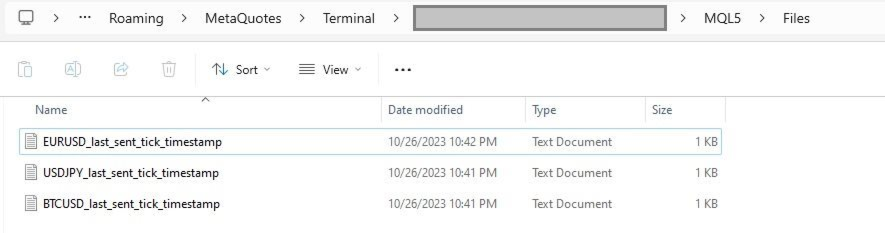
By default, timestamps are stored in files that are automatically created in the terminal's MQL5\Files folder. There is a separate file for each symbol.

Additionally, there is an option to use separate HTTP endpoints for reading/storing the offset instead of files.
To use this feature, set lastSentTickTimestampSource to 'HTTP_ENDPOINT' and implement HTTP endpoints based on the URL defined in lastSentTickTimestampUrlTemplate.
As a backend solution, you can choose to store offsets in a database (such as PostgreSQL). If you need to re-export ticks for a specific symbol, you would only need to update the timestamp values in the database table.

What the offset is. The offset is the time of the last delivered tick, in milliseconds since 1970-01-01 on the broker's server clock (the time the terminal shows), not UTC. If you keep offsets on your server, return exactly the number the EA posted.

Exported Symbols Management

By default, the EA uses the input symbols to determine for which symbols ticks need to be exported.
However, there is also an option to retrieve the list of symbols from a separate HTTP endpoint.
To utilize this feature, set exportedSymbolsSource to 'HTTP_ENDPOINT' and implement an endpoint using the URL defined in exportedSymbolsFetchUrlTemplate.

EA External Management

If you set both lastSentTickTimestampSource and exportedSymbolsSource to 'HTTP_ENDPOINT', then the EA can be fully controlled externally:

  • You can initiate re-export for specific symbols without needing to perform any actions in the terminal.
  • You can specify which symbols to export without having to change the inputs in the terminal.

REST API Specification for Application Integration

HTTP Endpoint Description Method Request Response
targetExportUrlTemplate URL for sending tick data.
timestampMillis is the tick time in UTC.
POST Headers:
Content-Type: application/json
Body
[
    {
        "symbol": "EURUSD",
        "bid": 1.18000,
        "ask": 1.18020,
        "last": 1.18010,
        "volume": 1234.56,
        "timestampMillis": 1625135912000
    },
    ...
]
Response Code 200 in case ticks are obtained successfully
exportedSymbolsFetchUrlTemplate The URL is used to retrieve the list of symbols that the EA will export to the URL derived from 'targetExportUrlTemplate'. GET   Headers:
Content-Type: text/plain
Body (comma separated list of symbols)
EURUSD,GBPUSD,AUDUSD,BTCUSD
lastSentTickTimestampUrlTemplate The URL is utilized to fetch the specific timestamp from which the export process should begin.
The body is the offset exactly as the EA posted it.
GET   Headers:
Content-Type: text/plain
Body
1625135912000
lastSentTickTimestampUrlTemplate The URL is used to store the timestamp of the last successful POST request made to the URL derived from 'targetExportUrlTemplate'.
The body is the offset.
POST Headers:
Content-Type: text/plain
Body
1625135912000
 

IMPORTANT: Before purchasing this EA, please verify that your broker supports exporting historical tick data. Availability and depth of tick data vary across brokers.

Free version (NZDUSD only)

Tags: ticks, tick, quotes, quote, stream, streaming, export, exporting, webhook, webhooks, integration, http, rest, forex, crypto, data, historical, realtime, rest api, provider, data feed
Önerilen ürünler
The "MR Volume Profile 5" indicator is a charting tool that displays trading volume at different price levels rather than time intervals. A key concept in volume profile is the point of control (POC)—the price level with the highest volume traded during the session or time range. While tools like VWAP or OBV provide volume trends, the "MR Volume Profile 5" indicator offers granular detail about where the most market activity occurs at specific price levels. This makes it a more precise tool for
This indicator allows you to enjoy the two most popular products for analyzing request volumes and market deals at a favorable price: Actual Depth of Market Chart Actual Tick Footprint Volume Chart This product combines the power of both indicators and is provided as a single file. The functionality of Actual COMBO Depth of Market AND Tick Volume Chart is fully identical to the original indicators. You will enjoy the power of these two products combined into the single super-indicator! Below is
Let us introduce you to a new era of neural indicators for financial markets! Intelligent Moving is a unique indicator that trains its neural network in real time! You no longer need to look for the optimal indicator parameters for each specific situation. No more late signals. The artificial intelligence is able to adapt itself and predict any market movements. Visually, the indicator is drawn as a main solid moving average line, two dotted lines of standard deviations and signal arrows. For
"Trade Manager Pro Institutional Terminal (TMPRO)" is a commercial-grade, on-chart trading terminal designed specifically for manual traders, scalpers, and Prop-Firm funded traders. Built natively for MetaTrader 5, it completely replaces the clunky default order window with a high-resolution, TradingView-style interface. Whether you need pixel-perfect Auto-Lot sizing, 4-Tier Virtual Partial Take Profits, or advanced Prop-Firm anti-scalp protections,TMPRO executes your strategy with institutiona
Bar Size Pro
Makarii Gubaydullin
Her zaman diliminde fiyat değişimini hesaplar: yüzen veya son kapanan barlar. Çok işlevli araç : 66+ özellik, bu araç dahil  |   Sorularınız varsa bana ulaşın   |    MT4 sürümü Hesaplanan barın   kaydırma   değerini seçebilirsiniz: Yüzen (mevcut) barlar; Son kapanan (önceki) barlar; Fiyat değerinin türü   üst sıradaki mavi anahtar ile seçilebilir: Pip; Piyasa puanları; Yüzde değeri (%); Fiyat değeri; Bar boyutunun hesaplama yöntemi   mavi düğme ile seçilebilir: Gövde : (Açılış - Kapanış) fiyatla
Local Copy Trader Utility - Professional Copy Trading System Overview Local Copy Trader Utility is the complete solution for mirroring trades between MetaTrader 5 accounts. With both Master and Slave functionality in one powerful Expert Advisor, it delivers reliable, lightning-fast trade copying with zero external dependencies. Perfect for managing multiple accounts, following trading signals, or transferring trades between brokers, this system ensures your positions stay perfectly synchronized
Gösterge, tarihsel olanlarla karşılaştırılabilecek güncel teklifler oluşturur ve bu temelde bir fiyat hareketi tahmini yapar. Gösterge, istenen tarihe hızlı navigasyon için bir metin alanına sahiptir. Seçenekler: Sembol - göstergenin göstereceği sembolün seçimi; SymbolPeriod - göstergenin veri alacağı dönemin seçimi; GöstergeRenk - gösterge rengi; Ters - doğru tırnakları tersine çevirir, yanlış - orijinal görünüm; Sonraki, tarihi girebileceğiniz ve 'enter' tuşuna basarak hemen atlayab
This Volume Delta Profile is an advanced MetaTrader 5 indicator that visualizes   volume delta (order flow imbalance)   using a volume profile-style histogram. It shows the difference between buying and selling pressure at specific price levels, helping traders identify supply and demand zones. This indicator provides a unique perspective on market dynamics by visualizing the imbalance between buying and selling pressure, offering insights beyond traditional volume analysis. Core Concept Positiv
VP hidden
Emr Aljnaby
4.33 (12)
The indicator works to convert normal volume into levels and determine financial liquidity control points. It is very similar in function to Fixed Volume Profile. But it is considered more accurate and easier to use than the one found on Trading View because it calculates the full trading volumes in each candle and in all the brokers present in MetaTrade, unlike what is found in Trading View, as it only measures the broker’s displayed prices. To follow us on social media platforms: telegram
FREE
TRINITY TREND — Tek EA, Üç Trend Piyasası (Bitcoin, Ethereum, USDJPY) BİR BAKIŞTA (MT5 geriye dönük testi — geçmiş veriler, canlı kayıt değildir) - Tek EA, tek bir BTCUSD H4 grafiğinden düşük korelasyonlu üç trend piyasası: SMA200 yönünde BTCUSD, ETHUSD ve USDJPY Donchian kırılımları - Uzun dönem (2019.01-2026.06, test cihazının modellediği tikler): Standard (varsayılan) +%1.021 / Kâr Faktörü 1,91 / varlık düşüşü %14,1 - %100 gerçek tik kontrolü (2026.01-2026.08, 38 işlem): Standard Kâr Faktörü
ÖNEMLİ BİLDİRİM – LİSANS VE AKTİVASYON GEREKLİDİR ================================================== Aktivasyon Talimatları: Satın alma işleminizi tamamladıktan sonra, lisans anahtarınızı, şifrenizi veya aktivasyon bilgilerinizi almak için lütfen derhal bizimle iletişime geçin. Bunlar olmadan yazılım çalışmayacaktır. Sorunsuz bir aktivasyon süreci sağlamak ve tüm sorularınızda size yardımcı olmak için buradayız. --- Volume Delta Profile V2 Enhanced ================================ Prof
# Smart Market Structure Suite The **Smart Market Structure Suite** is a technical analysis utility for MetaTrader 5 that integrates four distinct structural engines into a unified charting workspace. By combining structural high-low pivots, institutional order blocks with support-resistance flips, momentum-driven supply/demand zones, and divergence-proof oscillator levels, this utility helps traders identify key horizontal boundaries, order flow footprints, and structural transitions. The eng
Volume Profile, profesyonel ve kurumsal yatırımcılar tarafından kullanılan en güçlü analitik araçlardan biridir. Sadece ekranınızın alt kısmında işlemlerin ne zaman gerçekleştiğini gösteren geleneksel hacim göstergelerinin aksine Volume Profile, bu işlemlerin tam olarak hangi fiyat seviyelerinde gerçekleştiğini gösterir. Bu size piyasa yapısının net bir X-ışını vizyonunu vererek, akıllı paranın (smart money) ve kurumların pozisyonlarını tam olarak nerede biriktirdiğini veya dağıttığını görmenizi
Market Profile TPO Indicator
Thiago Pereira Pinho
5 (1)
The MarketProfileTPO indicator for MetaTrader 5 is a powerful tool designed to bring the Market Profile concept, based on Time Price Opportunity (TPO) analysis , directly onto your main chart window. This indicator calculates and displays the price distribution over a specified period, highlighting key areas of market activity and concentration. It is particularly optimized for high-volatility instruments like NAS100, US30, and XAUUSD when used on the M1 (1-minute) timeframe, offering a detailed
FREE
ZoneCore MT5
Frederic Jacques Collomb
ZONECORE — Volume Profile & Pivot Levels En çok işlem gören fiyat bölgelerini cerrahi hassasiyetle tespit edin. MT4 version ZONECORE nedir? ZONECORE, Hacim Profili (Volume Profile) ile yüksek hacimli Pivot Seviyeleri (Pivot Levels) birleştiren profesyonel düzeyde bir göstergedir. Piyasanın en uzun süre kaldığı ve en fazla hacmin gerçekleştiği fiyat bölgelerini açıkça ortaya koyar. Bu bölgeler fiyat için bir mıknatıs gibi davranır — bunları bilmek, destek, direnç ve yüksek olasılıklı dönüş bölge
Symbol: EURUSD Timeframe: 30 minutes (M30) For other symbols or timeframes, adjust the settings to match the market. Volume Profile POC Breakout builds a volume profile from recent candles, finds the Point of Control (POC) and marks clean breakouts of that level. Each breakout is shown as a complete trade plan with entry, stop loss and three take profit levels, filtered by the higher timeframe trend and rated by a quality score. The indicator does not open trades. It is a visual and analysis to
CVD SmoothFlow Pro
Thalles Nascimento De Carvalho
CVD SmoothFlow Pro - Her Varlık İçin Sınırsız Hacim Analizi! CVD SmoothFlow Pro , hassas ve sınırsız bir hacim analizi arayan trader'lar için nihai çözümüdür. Cumulative Volume Delta (CVD) hesaplamasını ve gelişmiş gürültü filtrelemesini kullanarak, Pro sürümü herhangi bir finansal varlık için gereken esneklik ve doğruluğu sağlar. CVD SmoothFlow Pro Neler Sunar? Açık Analiz : Pazar gürültüsünü filtreler ve her finansal varlıkta önemli hacim hareketlerini vurgular. ️ Kesin Hesaplama : Alım
Crazy Buffalo Mt5
Georgios Baizanis
Crazy Buffalo is an EA that trades exclusively Gold. A very high accuracy EA, producing maximum 1 single trade per day protected with stop loss and managed smart dynamic trailing profit. In the backtests you see since Last year (2025) with 1K capital, achieved 1.965M USD net profits with only 11.24% DD at a high risk configuration. The EA does not use any martingale or Grid risky systems.  Attach the EA on the M1 Gold/XAUUSD chart. The EA is a simple plug and play. you only need to specify the
VolumeProfile MT5
Robert Hess
4.14 (7)
Description: The Volume Profile displays detailed informations of historical trading activities at certain price levels (Market Profile). Locate the areas with the best prices in the market and get an advantage over other market participants. Features: Customizable Market Profile Shows the "fair" Value Area with 70% of all Volume Shows critical low volume zones Shows VPOC, VAL and VAH Points integrated resource management to reduce the load while working with multiple charts Works on all timefr
Blahtech Supply Demand MT5
Blahtech Limited
4.57 (14)
Was: $299  Now: $99  Supply Demand uses previous price action to identify potential imbalances between buyers and sellers. The key is to identify the better odds zones, not just the untouched ones. Blahtech Supply Demand indicator delivers functionality previously unavailable on any trading platform. This 4-in-1 indicator not only highlights the higher probability zones using a multi-criteria strength engine, but also combines it with multi-timeframe trend analysis, previously confirmed swings a
ClusterSecondForex
Rafil Nurmukhametov
4.67 (3)
The utility allows you to build different types of graphs: Seconds chart from 1 second to 86400 seconds Tick chart from 1 tick and above The volume chart Delta chart Renko chart Range chart Product demo https://www.mql5.com/ru/channels/clustersecondforex Built-in indicators for volumetric analysis: daily market profile and market profile of the selected timeframe, Cluster Search Imbalance VWAP Dynamic POC, VAH, VAL the profile depth of the market vertical volume with various display options, del
VOLUME PROFILE SAF-XII MT5 için Profesyonel Market Profile Analizi (Grid tarzı yatırımcılar için rüya indikatör) VOLUME PROFILE (HACİM PROFİLİ) NEDİR? Volume Profile, hacmi zamana göre gösteren geleneksel hacim indikatörlerinin aksine, belirli fiyat seviyelerindeki işlem faaliyetlerini görüntüleyen profesyonel bir kurumsal araçtır. Seçtiğiniz pencere içinde işlemlerin NEREDE gerçekleştiğini ortaya çıkararak şunları belirlemenize yardımcı olur: ADİL DEĞER ALANLARI (VAH/VAL) – İşlemlerin çoğunun
Heiken Ashi Stacked Pro is a chart overlay indicator that combines smooth Heiken Ashi visual trend candles, a real-time bar completion timer, and an on-hover crosshair HUD for instant price and wick-to-body ratio diagnostics. Marketplace Description Overview Heiken Ashi Stacked Pro upgrades standard Heiken Ashi candle visuals with an interactive HUD. Designed for trend followers and price action traders, it filters out market noise using colored candles while supplying precise candle metric read
DDKiller Pro
Njaratahiry Michael Randrianiaina
Stop Blowing Your Account. Once and For All. DDKiller Pro is the MT5 risk guardian that runs silently on your chart and shuts down trading the moment you hit a limit — whether you're grinding a prop firm challenge or managing your own CFD account. The problem every trader knows: You set your rules. You break them anyway. One revenge trade. One overleveraged position. One session that erases a month of gains. DDKiller Pro removes that decision from your hands entirely. What it does: The second yo
Haven Volume Profile
Maksim Tarutin
4.64 (14)
Haven Volume Profile, ticaret hacminin dağılımına dayalı olarak önemli fiyat seviyelerini belirlemeye yardımcı olan çok fonksiyonlu bir hacim profili analiz göstergesidir. Piyasayı daha iyi anlamak ve önemli giriş ve çıkış noktalarını belirlemek isteyen profesyonel yatırımcılar için tasarlanmıştır. Diğer Ürünler ->  BURADAN Temel Özellikler: Point of Control (POC) Hesaplama - en yüksek ticaret aktivitesinin gerçekleştiği seviye, en likit seviyeleri belirlemeye yardımcı olur Value Area (yüksek ak
FREE
Win Streak Size Creep Mirror, yalnızca kendi hesabınızın kapanmış işlem geçmişini okur ve tek bir örüntüyü sayar: bir kazanç serisi sürerken, kendi olağan hacminizden daha büyük bir lotla yeni bir pozisyon açmak. Araç hiçbir şey tahmin etmez ve hiçbir öneride bulunmaz. Panelde görünen her rakam, bu hesapta zaten gerçekleşmiş bir şeydir. Rakamlar nasıl hesaplanır: Tüm sembollerde ve tüm sihirli numaralarda, en fazla 31 günlük kapanmış işlemi okur - bu, grafikteki sembole değil, hesabın tamamına
FREE
ClusterSecond
Rafil Nurmukhametov
4.78 (32)
The utility allows you to build different types of graphs: Seconds chart from 1 second to 86400 seconds Tick chart from 1 tick and above The volume chart Delta chart Renko chart Range chart Demo version of the utility https://www.mql5.com/ru/channels/clustersecond Built-in indicators for volumetric analysis: daily market profile and market profile of the selected timeframe, Cluster Search Imbalance VWAP Dynamic POC, VAH, VAL the profile depth of the market vertical volume with various display op
PROP VOLUME PROFILE ==================== Cumulative Volume Profile for MetaTrader 5 -------------------------------------------- Prop Volume Profile shows you where price has spent the most time and volume over the selected period - directly on your chart, in a clean vertical profile on the right edge. One glance tells you the "fair value" zone, the strongest price level, and whether the current price is stretched far above or below where the market actually trades. HIGHLIGHTS ---------- -
FREE
TradeControl Pro – MetaTrader için Gelişmiş Trade Yönetim Aracı TradeControl Pro , MetaTrader platformu için geliştirilmiş bir trade yönetim aracıdır ve işlemlerin doğrudan grafik üzerinden düzenli ve verimli bir şekilde yönetilmesini sağlar. Uygulama, açık ve anlaşılır bir kullanıcı arayüzünü otomatik hesaplamalar ve farklı işlem yaklaşımlarına uygun esnek kontrol seçenekleri ile birleştirir. Grafik üzerine entegre edilen panel, tablo yapısında tasarlanmış olup üç ana sekmeden oluşur: Execution
Volume Profile For MT5
Abdelkhabir Yassine Alaoui
Volume Profile VPVR For MT5 Volume Profile VPVR is a powerful, high-performance MetaTrader 5 indicator designed to replicate the advanced  Volume Profile (Visible Range) directly on your chart. It provides deep insight into market structure by visualizing where trading activity is concentrated, helping traders identify key price levels with precision. This indicator dynamically analyzes volume distribution across price levels and renders a detailed histogram directly on the chart, allowing you
Bu ürünün alıcıları ayrıca şunları da satın alıyor
Telegram to MT5 Multi-Channel Copier   , Telegram ve Discord kanallarınızdaki alım-satım sinyallerini doğrudan MetaTrader 5'e otomatik kopyalar. Bot yok, tarayıcı uzantısı yok, elle kopyalama yok. Sinyal Telegram'a veya Discord'a düşer ve EA birkaç saniye içinde terminalinizde işlemi açar. Ve bir kanalı kopyalamadan önce, yerleşik backtester o kanalın hesabınızda ne yapmış olacağını gösterir. Ürün iki bileşenden oluşur: Telegram kanallarınızı dinleyen bir Windows uygulaması ve sinyalleri MT5 ter
================================================================================ POC BREAKOUT - V20.72. Full Professional Grade Toolkit ================================================================================ POC Breakout is a full MetaTrader 5 trading dashboard for discretionary traders who want breakout signals, Point of Control (POC) context, volume profiles, order flow, market structure, news, alerts, and advanced trade planning in one professional workspace. Attached directly to you
The Patch It never opens a trade. It walks behind the ones that did. Every open position, every pending order — checked twice a second for the one thing that's easy to forget: a stop, a target. Found bare, it doesn't ask. It writes the missing number in, measured in points from wherever the position began, and moves on to the next. No strategy, no opinion on direction. Just the quiet assumption that nothing should ever sit on the market unprotected — not because someone decided it shouldn't,
Floor Watch
Syed Tauqeer Hussain Shah
Floor Watch One number, watched every thirty seconds: how far equity has fallen since the day began — or since its highest point, if it's told to trail the peak instead of the open. Cross the line and it doesn't argue. Every open position closes, every pending order vanishes, and anything that slips through afterward gets shut the moment it appears. Not asked. Removed. The floor holds until the clock turns 5 AM Pakistan time — then, and only then, does the day start over. One rule. No except
Power Candles Strateji Tarayıcısı - Kendi Kendini Optimize Eden Çoklu Sembol Kurulum Bulucu Power Candles Strateji Tarayıcısı , Power Candles göstergesini çalıştıran aynı kendinden optimize edici motoru, Piyasa İzleyicinizdeki her sembol üzerinde yan yana çalıştırır. Tek bir panel, şu anda istatistiksel olarak hangi sembollerin işlem yapılabilir olduğunu, her birinde hangi stratejinin kazandığını, en uygun Stop Loss / Take Profit çiftini gösterir ve yeni bir sinyal geldiği anda size bildirim gön
The product will copy all telegram signal to MT5 ( which you are member) , also it can work as remote copier.  Easy to set up, copy order instant, can work with almost signal formats, image signal,  s upport to translate other language to English Work with all type of channel or group, even channel have "Restrict Saving Content", work with  multi channel, multi MT5 Work as remote copier: with signal have ticket number, it will copy exactly via ticket number. Support to backtest signal. How to s
Bir kez satın alın. Şu anda sunulan ve gelecekte yayımlayacağım tüm MT4 ve MT5 göstergelerimi ek ücret ödemeden edinin. Satın aldıktan sonra edinme talimatları için benimle iletişime geçin. Her 10 satın alımdan sonra fiyatın 50$ artırılarak en fazla 999$ olması planlanmaktadır. Ödeme sırasında Market’te görünen fiyat geçerlidir. Güvendiğiniz göstergeyi kullanmaya devam edin. Çevresindeki işleri otomatikleştirin. Sizin sinyaliniz. Sizin kurallarınız. Sizin işlem yürütmeniz. Güvendiğiniz bir MT5
Quant AI Agents are independent trading Expert Advisors. Instead of trading using a fixed strategy like other conventional EAs, Quant AI Agents   is a   multi-agent AI trading framework   that turns natural-language strategy prompts into live.  WANT THE SAME RESULTS AS MY LIVE SIGNAL?   Use the exact same brokers I do:   IC MARKETS , IC TRADING   .  Unlike the centralized stock market, Forex has no single, unified price feed.  Every broker sources liquidity from different providers, creating un
Daily Trading Limiter
AL MOOSAWI ABDULLAH JAFFER BAQER
5 (8)
• Please test the product in the Strategy Tester before purchasing to understand how it works. • If you face any issues, contact me via private message—I’m always available to help. • After purchase, send me a screenshot of your order to receive a FREE EA as a gift. Daily Trading Limiter — the rule you cannot break Every trader knows the number. Three trades. Two percent. One bad day and stop. And every trader has watched themselves take the fourth trade anyway. The problem was never knowing th
VirtualTradePad PRO SE MT5 — MetaTrader 5 için profesyonel işlem kontrol merkezi VirtualTradePad PRO SE , MetaTrader 5 için grafik tabanlı premium bir işlem paneli ve trade yönetim çalışma alanıdır. Daha hızlı emir yürütme, daha net pozisyon kontrolü, yapılandırılmış trade yönetimi, görsel seviye planlama ve doğrudan grafik üzerinden profesyonel bir çalışma akışı isteyen traderlar için tasarlanmıştır. Bu yalnızca basit bir BUY / SELL paneli değildir. PRO SE; manuel işlem, bekleyen emirler, pozis
FUTURES ORDERFLOW FOOTPRINT CHART Professional OrderFlow EA for MetaTrader 5 Version 1.01| Professional tool for real traders | Institutional-Grade Visualization STRATEGY TESTER USERS - PLEASE SELECT EVERY REAL TICK WHEN TESTING AND YOU HAVE DOWNLOADED HISTORICAL DATA. IF YOU SEE A WAITING SCREEN AND IT IS NOT DOWNLOADING, IT MEANS YOU HAVE LOW HISTORICAL DATA. TRY 1 MIN AND 5 MIN FIRST ON 1 DAY DATA. ONE DAY DATA SHOULD BE THE NEWEST AND MOST CURRENT DATE. PLEASE WAIT UNTIL THE MARKET HAS ROL
Footprint Chart Pro — Professional OrderFlow EA for MetaTrader 5 Version 6.34 | Professional tool for real traders | Institutional-Grade Visualization DEMO USERS - PLEASE SELECT EVERY TICK / REAL TICK WHEN TESTING AND YOU HAVE DOWNLOADED HISTORICAL DATA. IF YOU SEE A WAITING SCREEN AND IT IS NOT DOWNLOADING, IT MEANS YOU HAVE LOW HISTORICAL DATA. TRY 1 MIN AND 5 MIN FIRST ON 1 DAY DATA. ONE DAY DATA SHOULD BE THE NEWEST AND MOST CURRENT DATE. PLEASE WAIT UNTIL THE MARKET HAS ROLLED OVER PERIOD.
YuClusters
Yury Kulikov
4.93 (43)
Attention: You can view the program operation in the free version  YuClusters DEMO .  YuClusters is a professional market analysis system. The trader has unique opportunities to analyze the flow of orders, trade volumes, price movements using various charts, profiles, indicators, and graphical objects. YuClusters operates on data based on Time&Sales or ticks information, depending on what is available in the quotes of a financial instrument. YuClusters allows you to build graphs by combining da
Ultimate Extractor - Professional Trading Analytics for MT5 *****this is the local HTML version of Ultimate Extractor. !!!!!it is not compatible with Cloud!!!! For the online version please reach out to me directly****** Ultimate EA manager also now available when you use cloud pro and above for free!! Ultimate Extractor transforms your MetaTrader 5 trading history into actionable insights with comprehensive analytics, interactive charts, and real-time performance tracking. What It Does Automa
Advanced Daily Trading Limiter PRO Professional Risk Management. Uncompromising Trading Discipline. One undisciplined trading session can erase weeks of consistent profits. Whether it's overtrading, revenge trading, or exceeding a prop firm's daily risk limits, emotional decisions often become a trader's biggest obstacle—not the market itself. Advanced Daily Trading Limiter PRO is a comprehensive risk management and discipline enforcement utility for MetaTrader 5, designed to help traders stay
Farmed Hedge Yield Farming | All Markets (Manual - Hybrid - Semi/Automated EA) VERIFIED TRADING RESULTS - Farmed Hedge Yield Axi Copy:  https://www.mql5.com/en/signals/2356376 - Farmed Hedge Yield Exn Copy:   https://www.mql5.com/en/signals/2356404 - Farmed Hedge Yield V Copy:  https://www.mql5.com/en/signals/2357156 IMPORTANT NOTICE: FarmedHedge is a MANUAL-FOCUSED TRADING UTILITY ,not a fully automated EA. Results shown on this Signal include manual trades and overall strategic management.
AI Arbitron — an MT5 Spot vs Future Gold Arbitrage Bot designed to capture price discrepancies between correlated Spot and Future instruments through hedged, non-directional trading. Platform: MT5 Asset: Mainly Gold (XAUUSD) using Spot + Future/CFD price feeds. Core strategy: It monitors the price gap between Spot and Future. When the gap reaches your defined threshold, it opens hedged positions—typically Buy Spot + Sell Future (or the reverse depending on the gap). Exit: Positions are closed
EASY Insight AIO – Akıllı ve zahmetsiz yatırım için hepsi bir arada çözüm Genel Bakış Tüm piyasayı — Forex, Altın, Kripto, Endeksler ve hatta Hisseler — saniyeler içinde, manuel grafik incelemesi, gösterge kurulumu ya da karmaşık ayarlar olmadan analiz edebildiğinizi hayal edin. EASY Insight AIO , yapay zekâ destekli yatırım için nihai, kullanıma hazır dışa aktarma aracınızdır. Tüm piyasanın kapsamlı bir anlık görüntüsünü tek bir temiz CSV dosyasında sunar; bu dosya ChatGPT, Claude, Gemini, Pe
Timeless Charts
Samuel Manoel De Souza
5 (8)
Timeless Charts, profesyonel yatırımcılar için hepsi bir arada bir trading aracıdır. Saniye Grafikleri ve Renko gibi özel grafik türlerini, Footprints , Clusters , Hacim Profilleri , VWAP çalışmaları ve gelişmiş piyasa analizi sağlayan sabitlenmiş analiz araçlarıyla gelişmiş emir akışı analiziyle birleştirir. İşlem ve pozisyon yönetimi, entegre işlem yönetim paneli aracılığıyla doğrudan grafik üzerinden gerçekleştirilirken, Market Replay ve Sanal Hesaplar trading becerileri ve stratejileri üzeri
One button. One trade. MT5 Trading Deck is a hotkey trading panel for MetaTrader 5 that turns the platform into a keyboard-driven execution cockpit. Stop loss, take profit and lot size are pre-calculated for every key; the moment you press, a market order is live on the broker. A complete technical user manual is attached in the product Comments section. It documents every input parameter, the full hotkey map, the recommended Stream Deck XL layout, and the advanced workflows for Pre-Limit orders
EA Slipstream
Stephen J Martret
5 (1)
Your backtest filled every order at the price it asked for. Your account does not. EA Slipstream measures what execution costs your EA, using your own fills, slippages and spreads to show you the true performance of your EA. A backtest prices every trade at the level the EA named. In live trading a pending order fills at whatever price is available when it triggers, a stop closes wherever the market is when it is hit, and the spread at that moment is whatever the account was quoting. The differ
EA Overfitter
Stephen J Martret
5 (1)
That backtest looks great. But will it still be making money tomorrow, next week, next month? EA Overfitter re-runs your EA on 100 price histories it has never seen. One score tells you if the edge is real. A backtest tells you what an EA did on one price history — the one that happened to occur. What you cannot tell from it is how much of that result was the strategy and how much was the particular path. EA Overfitter answers that. It builds up to 100 synthetic price histories your EA has n
Trading Chaos Expert
Hennadii Stanilevych
5 (11)
This software has no equals in the world and represents a universal trade "console" covering trading signals, automated market entry, setting of Stop Loss and Take Profit, as well as Trailing Profit for multiple trades at the same time in a single open window. Intuitive control of the Expert Advisor in "three clicks" ensures a comprehensive use of all its functions on different computers, including tablets PCs. Interacting with additional signal indicators that mark the chart to give a real mark
Copy your MT5 trades to Interactive Brokers You keep using MT5. Every order you open or close is sent to your IB account. In real time. No coding. No changes to your strategy or EA. Try it first Rent 1 month: $30. Test on a live or paper account. What it does Real-time copying: same direction, reverse, or one side only. Map any MT5 symbol to any IB symbol. Set a lot ratio for each. Forex, Futures, Stocks, CFDs, Metals and Crypto. Position sync: both accounts checked, any difference fixed. Optio
Quant Panel
Kevin Craig E Gittins
Quant Panel is a strategy analysis utility for MetaTrader 5. It helps traders review several Expert Advisors or trading strategies running on the same account. The panel groups closed positions by Expert Advisor comment or magic number and calculates each strategy's results separately. You can compare strategy performance, review individual drawdowns and export detailed reports from one dashboard. Independent strategy analysis Each strategy has its own virtual starting balance and closed-trade b
MT5 için Dynamic Fibonacci Grid Dashboard’un en son sürümünü tanıtıyoruz. Artık birçok yeni özellikle donatılmış olan bu yeni gösterge paneli, ticaret deneyiminizi tamamen değiştirir ve piyasayı ile fiyat hareketlerini tamamen farklı bir bakış açısıyla görmenizi sağlar. Birden fazla zaman dilimi ve sembolün eşzamanlı analizleriyle yeni fırsatları keşfedin. Manuel işlem ve pozisyon yönetimi için kullanıcı dostu arayüz ve önceden tanımlanmış otomatik stratejileri uygulama yeteneğinin genişletilmi
Mentfx Mmanage mt5
Anton Jere Calmes
4.25 (8)
The added video will showcase all functionality, effectiveness, and uses of the trade manager. Drag and Drop Trade Manager. Draw your entry and have the tool calculate the rest. Advanced targeting and close portions of a trade directly available in tool (manage trades while you sleep). Market order or limit order on either side with factored spread. Just draw the entry, the tool does the rest. Hotkey setup to make it simple. Draw where you want to enter, and the stop loss, the tool calculates al
VERON LINK MASTER MT5 — Real-time Multi-Account Dashboard & Sync Controller Veron Link Master is a high-performance, centralized monitoring and synchronization control center designed for MetaTrader 5. Built specifically for traders managing multiple accounts, prop firm portfolios, grid/martingale EAs, or client networks, Veron Link Master provides a seamless, ultra-modern dark-themed GUI dashboard directly on your MT5 terminal. Pricing Structure: Take advantage of our early-bird pricing before
EA Auditor
Stephen J Martret
5 (5)
EA Auditor is an independent analysis tool for traders evaluating Expert Advisors and trading signals on MetaTrader 5. It audits backtest reports, reviews posted developer signals, and cross-verifies the two against each other to help traders assess strategies before committing capital. The MQL5 market offers a wide range of Expert Advisors from many developers, with varying approaches, quality, and transparency. EA Auditor provides a consistent, data-driven framework for reviewing them, answer
Veron Link Slave – Synchronized Grid, Martingale & Breakout Management Short Description Advanced synchronization tool designed to manage Grid, Martingale, and Breakout EAs. Automatically sends close-basket signals to the Master account upon profit target completion, minimizing slippage across different brokers. Full Description Veron Link Slave is a specialized utility developed to enhance the execution efficiency and risk management of multi-account or multi-broker trading setups. It is desig
Yazarın diğer ürünleri
Tick Data HTTP Exporter NZDUSD This free version exports NZDUSD only; the full version, Tick Data HTTP Exporter , exports any symbol. Description The EA turns your terminal into a historical/realtime tick data provider for your application. There are many market data providers on the internet, but in practice, the data provided is not always of good quality. Moreover, these services are often more expensive and typically require monthly subscription fees per each symbol. With this EA, you can fe
FREE
Candle Data HTTP Exporter NZDUSD This free version exports NZDUSD only; the full version, Candle Data HTTP Exporter , exports any symbol. Description The EA turns your terminal into a historical/realtime rates (OHLC, candles) data provider for your application. There are many market data providers on the internet, but in practice, the data provided is not always of good quality. Moreover, these services are often more expensive and typically require monthly subscription fees per each symbol. Wit
FREE
Candle Data HTTP Exporter Description The EA turns your terminal into a historical/realtime rates (OHLC, candles) data provider for your application. There are many market data providers on the internet, but in practice, the data provided is not always of good quality. Moreover, these services are often more expensive and typically require monthly subscription fees per each symbol. With this EA, you can feed your application with exactly the same rates data that you see in the terminal, the same
Filtrele:
Değerlendirme yok
Değerlendirmeye yanıt