Broker Preflight

Broker Preflight は、Expert Advisor を実行する前に現在の取引環境をすばやく確認するための無料 MetaTrader 5 ユーティリティです。

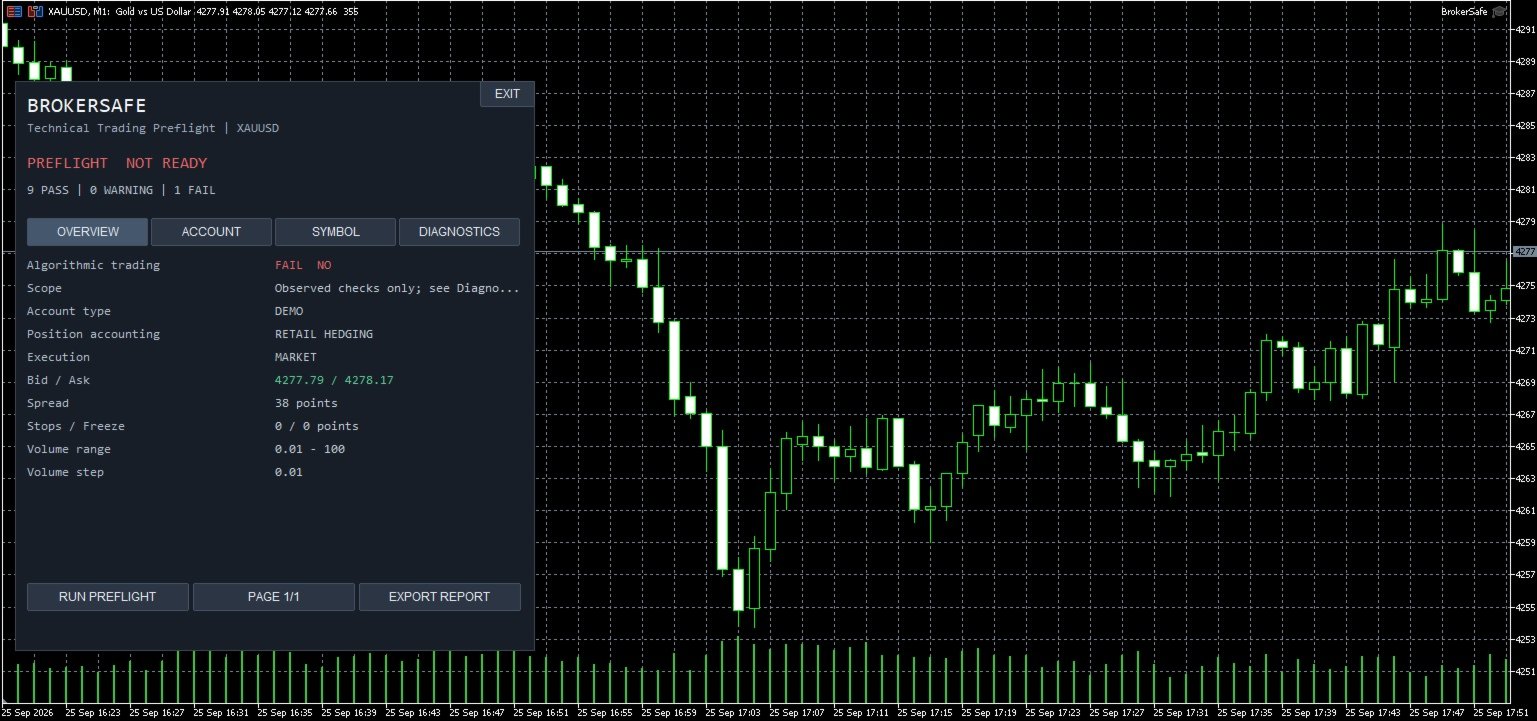
自動売買に影響する可能性のある口座、ターミナル、シンボルの主要な条件を分析し、PASS / WARNING / FAIL の分かりやすい形式で結果を表示します。

Broker Preflight は注文の発注、変更、決済を行いません。純粋な診断ツールとして動作します。

主な機能

  • 口座モードを検出:Hedging、Netting、Exchange
  • 取引および Expert Advisor の権限を確認
  • ターミナル接続と価格データの利用可否を確認
  • シンボルの執行方式と取引制限を表示
  • 最小取引量、最大取引量、取引量ステップ、制限を表示
  • Stops Level と Freeze Level を確認
  • 現在のスプレッドとシンボル仕様を表示
  • テストロットがブローカーの取引量ルールに適合するか確認
  • テストストップ距離がブローカーの制限を満たしているか確認
  • 注文を出さずに利用可能証拠金を確認
  • 欠落または利用不可のシンボルデータを検出
  • EA Readiness の概要を表示
  • 詳細な技術レポートをローカル TXT ファイルに出力

EA Readiness

Broker Preflight は現在の環境を以下のステータスで表示します。

PASS — 問題は検出されていません
WARNING — 確認が必要な条件があります
FAIL — 技術的な制限により EA が正常に動作できない可能性があります
INFO — EA によっては重要となる情報です

このユーティリティはブローカーの評価や格付けを行いません。目的はあくまで技術的なもので、Expert Advisor に影響する可能性のある設定差異や取引制限を特定することです。

使用例

  • 新しいブローカーで EA をテストする
  • ブローカー間の取引条件を比較する
  • Netting と Hedging の違いを確認する
  • 無効な取引量やストップ距離の問題を診断する
  • 自動売買を開始する前にシンボル仕様を確認する
  • EA 開発者やサポート向けの技術レポートを作成する

安全な診断動作

Broker Preflight:

  • 注文を発注しません
  • ポジションや注文を変更しません
  • DLL を使用しません
  • WebRequest を使用しません
  • 外部サービスへデータを送信しません
  • 外部ソフトウェアを必要としません

すべてのチェックは MetaTrader 5 のネイティブデータを使用してローカルで実行されます。

Broker Preflight は、EA が実際に制限に直面する前に取引環境を理解するためのツールです。

おすすめのプロダクト
AccountVista — profit and deposit information panel for MetaTrader 5 Version 1.6 INDICATOR DESCRIPTION ===================== The AccountVista indicator displays a compact information panel on the chart with the key statistics of your trading account: current floating profit, results for today, for each of the four previous trading days, for the current week, month, quarter and year, as well as the volumes of closed deals, deposits and withdrawals. The panel uses no indicator buffers and does
Funded Account Guard monitors the whole trading account and enforces the risk limits you set. When a limit is reached, it closes all positions, deletes pending orders and blocks new entries until the limit period ends. It is intended for funded and evaluation accounts with a daily loss limit and a maximum drawdown limit, and for any trader who wants a fixed daily stop. The utility does not open trades, does not give signals and does not move stop loss or take profit levels. Rules - Daily loss
FREE
VPOB Smart Order Block Alert MT5 VPOB Smart Order Block Alert MT5 is an Order Block detection and alert system designed for MetaTrader 5. The system automatically analyzes price structure, detects Bullish and Bearish Order Blocks, evaluates Volume Profile information and POC, and provides a Quality Score to help traders identify important price zones. MAIN FEATURES • Automatic Bullish Order Block detection • Automatic Bearish Order Block detection • Volume Profile analysis • Point of Contro
FREE
Position Manager Pro v1.0 (MT5) Dual Magic Number Independent Group Manager with Live P&L Dashboard Overview Position Manager Pro   is a powerful trade management Expert Advisor for MetaTrader 5 that operates as an   overlay manager   — it does not open positions itself, but instead manages and monitors positions opened by other EAs or manually by the trader. The core concept is   two fully independent groups , each identified by a unique   Magic Number . Each group has its own Take Profit, Stop
FREE
SAB Advance Assistant は、MetaTrader 5 向けの手動トレード管理パネルです。すべてのトレードを チャート上で視覚的に組み立て、リスクを正確にコントロールし、内蔵エンジンに部分利確・建値 (ブレークイーブン)・トレーリングを任せられます。すべては、すっきりとしたサイズ変更可能な 1つのパネルから。 表計算に頼らず精度を求める裁量トレーダーおよび ICT/SMC トレーダー向けに設計。 主な機能 - ドラッグ可能な Entry・Stop Loss・TP1〜TP5・Final TP ライン、ライブ表示付き(pips、金額、   R:R、%、価格) - 残高のリスク%または固定金額からロットを自動計算 - 最大5つの部分利確(TP ごとに%または正確なロットで配分)+残りを決済する Final TP - 移動可能な建値ライン(TP1 または SL 基準でトリガー)、マウスで調整 - %または pips のトレーリングストップ、TP1 到達後に作動 - Link モード:完全なセットアップを用意し、R:R を保ったままブロック全体(Entry+SL+TP)を
MT4 MT5 Trade Bridge for MetaTrader 5  is the MetaTrader 5 component of the MT4 MT5 Trade Bridge system. It allows a MetaTrader 5 terminal to work either as a  Master  or as a  Slave  in a local bridge connection with MetaTrader 4. When configured as  Master , the MT5 component reads trading activity from the MetaTrader 5 terminal and writes structured trade data into a local bridge file. The connected MT4 component can then read this data and mirror the trading activity according to its selecte
FREE
Super simple, convenient, useful tool. Allows displaying the end time of a candle (standard) and expanding the symbol's spread in real time. The countdown tool is smooth, not jerky or slow like some other tools Useful tool for professional traders specializing in short-term and long-term trading. Contact author or user guide: https://www.mql5.com/en/channels/metool_trading
FREE
[概要] Dynamic Price Countdown は、現在のローソク足が閉じるまでの残り時間を現在の価格のすぐ横に表示する、MT5に不可欠なインジケーターです。チャートの隅に固定された静的なタイマーとは異なり、このインジケーターはリアルタイムの価格の動きに動的に追従します。これにより、トレーダーは完璧なエントリータイミングを逃すことなく、チャートの最も重要な部分に完全に集中することができます。  [主な機能]  動的な価格追従: カウントダウンタイマーは現在のBid価格に自動的に追従し、設定した正確な距離を維持します。  スムーズなティックフリータイマー: 内部の1秒タイマーを使用することで、ティックの流入が非常に少ない低ボラティリティの期間でも、カウントダウンがスムーズかつ正確に実行されます。  完全なカスタマイズ性: テキストのサイズ、色、および正確なX/Y座標のオフセットを調整して、個人のチャート設定と解像度に完全に一致させることができます。  [パラメーター設定]  Font Size (フォントサイズ): カウントダウンテキストのサイズを調整します。  Font Co
FREE
The “Summary Risk Target” indicator is designed to show the total number of transactions made on a single pair. The transactions counted include active positions as well as pending orders . By setting a stop loss for each trade, this indicator displays the total potential risk (loss) that may be incurred. This helps traders easily understand their overall risk exposure without the need for manual calculations. Likewise, for take profit , if the TP level is defined—either in terms of pips or at a
FREE
[ マイプロダクト ] , [ マイチャンネル ] OMG Trading Panel スマートフォンからトレードパネルを直接操作できるようになりました。MQL VPSにOMG Trading Toolをインストールすれば、パネルを24時間稼働させながら、モバイル版MetaTrader 5アプリで快適にトレードできます。 また、2つの便利な戦略「スマート・マージン・プロテクション(証拠金保護)」と「グリッド戦略」も追加しました。価格下落時に作動するアラートを設定することも可能です。 主な機能 モバイル版MT5によるリモートコントロール スマートフォンを使って、どこからでもトレードツールの操作が可能です!注文のコメント欄に特別なコマンドを入力して待機注文(予約注文)を出すだけで、ツールが自動的に指示を実行します。柔軟性と機動力を求めるトレーダーに最適です。 コマンド例: omg auto- オートモードのON/OFF切り替え omg auto on - オートモードを有効化 omg auto off - オートモードを無効化 omg profit X - 利確(TP)金額をXドルに設定
FREE
SL TP Manager MMS
Muhammad Masood Sarkar
5 (2)
SL TP Manager is a compact on-chart panel that sets the stop loss or take profit of all open trades on a symbol in one click, or moves every stop loss to break-even. It is designed for traders who scale in with several positions and do not want to edit each trade one by one. HOW IT WORKS - Type a price in the SL box and click Set SL: the stop loss is applied to every open trade on the chart's symbol. - Type a price in the TP box and click Set TP: the take profit is applied the same way. - Clic
FREE
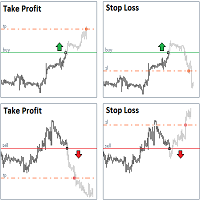
StopLoss and TakeProfit Utility MT5 for automatic setting of stop loss and take profit levels. Created by a professional trader for traders.   The utility   works with any market orders opened by a trader manually or using advisors. Can filter trades by magic number. The utility can work with any number of orders simultaneously. WHAT THE UTILITY CAN DO: Set virtual stop loss and take profit from 1 pip Real   stop loss and take profit W ork with each order separately (   stop loss and take prof
Trade Performance Journal — Your Visual Trading Summary Tool Trade smarter by understanding your performance. This Expert Advisor (EA) provides an instant visual summary of your trading results directly on the chart. Whether you’re a scalper, swing trader, or long-term investor, this tool helps you stay on top of your performance metrics with ease. Key Features Flexible Time Analysis View your performance by Quarter, Month, or Half-Year. Easily switch between display modes to analyze your res
FREE
EW Close All – ワンクリックですべて終了。 EW Close All は軽量で多言語対応のEA(エキスパートアドバイザー)です。ボタンを1回クリックするだけで、すべてのオープン中のポジションを即座に決済し、すべての保留中注文をキャンセルできます。 すべての保有ポジションを決済   すべての保留注文を取消   どんな通貨ペア・時間足でも動作   多言語インターフェース対応   シンプル・高速・確実 素早い撤退、リスク管理、取引終了時のクリーンアップに最適。 完全にコントロールを維持 — EW Close All で数秒ですべてをクローズ! EW Close All – ワンクリックですべて終了。 EW Close All は軽量で多言語対応のEA(エキスパートアドバイザー)です。ボタンを1回クリックするだけで、すべてのオープン中のポジションを即座に決済し、すべての保留中注文をキャンセルできます。 すべての保有ポジションを決済   すべての保留注文を取消   どんな通貨ペア・時間足でも動作   多言語インターフェース対応  
FREE
TradeBot – Trade Manager & Copier for MT5 TradeBot is an Expert Advisor designed to simplify trade management and trade copying in MetaTrader 5. It helps traders manage open positions efficiently and automate trade-copying workflows with configurable settings. Key Features Automated Trade Management: Manage trades according to your configured rules. Trade Copying: Copy trades between supported trading accounts or terminals, depending on the EA's configuration. Risk Management: Configure trade-ma
Every panel tells you how much you're risking. This one tells you how much you have left. You didn't lose the challenge because your strategy failed. You lost it because one more trade pushed you past the daily limit while you were chasing the target. PropDesk is the desk that helps stop that from happening. 1. Size against your ROOM, not your equity. Every order shows "risk $X = Y% of your daily room left". You always know if the next trade fits inside what the firm allows today - before you
Close All Trades Button
PHOENIX GLOBAL INVESTMENTS LTD
5 (2)
相場が激しく変動している時やプラットフォームに問題が発生している際に、複数の未決済ポジションを1つずつ手動で決済するのは時間の無駄であり、余分な1秒ごとにスリッページリスクが高まります。 「全取引を決済」ボタンを使用すると、ワンクリックでポートフォリオ全体のポジションを即座に決済できます。ボタンを押すと、すべての未決済ポジションが順次決済されます。また、注文の拒否やリクオートが発生した場合は自動的に再試行されるため、1つの注文が滞ったとしても、残りの決済が妨げられることはありません。 決済を高速化する仕組み - ワンクリックで、EAが設定されている口座のすべてのオープンポジションを決済 - 注文拒否やリクオートに対する自動再試行処理(100ポイントのスリッページ許容範囲付き) - 実行後のまとめ画面で、決済されたポジションと失敗したポジションを表示 - デフォルトでは未約定注文には影響しないため、有効なリミット注文やストップ注文はそのまま維持される カスタマイズ ボタンの位置(自動中央揃えまたは手動でのX/Y指定)、サイズ、背景色、文字色、およびボ
FREE
Overview Equity Watching Telegram Pro is an advanced, intelligent portfolio guardian designed for professional traders and investors who demand real-time control over their MetaTrader accounts. This Expert Advisor continuously monitors your account's Balance, Equity, and Floating P/L, instantly dispatching structured, mobile-optimized status cards directly to your Telegram account or group chats. Whether you are running multiple automated trading strategies simultaneously, managing high-volatil
EA AccountTrailingStop MT5を紹介します。これは、MetaTrader 5での利益を自動的に管理・保護することで、あなたのトレーディング戦略を強化するために設計された高度なExpert Advisorです。このツールは、初心者とプロのトレーダーの両方に最適で、さまざまなトレーディング環境でのダイナミックな利益ロックのための堅牢なソリューションを提供します。 EA AccountTrailingStop MT5を使用することで、ユーザーは有利な市場条件下での利益保持の改善や手動監視時間の短縮など、重要な利点を体験します。forex、インデックス、暗号通貨のトレーダーは、全体的な収益性の顕著な向上を報告しており、このEAは、トレーディングパフォーマンスを最適化したいすべての人にとって重要な資産となっています。 MQL製品のインストールガイド | MT4/MT5で購入したMQL製品の更新 | 一般的なトラブルシューティングガイド | 一般設定 / 入力ガイド | バックテストとセットファイル 主な機能 ダイナミック利益トレーリング:総口座利益を自動的に追跡し、現在の利
FREE
Global Stop Loss and Take Profit Manager Drag Lines Auto Apply Already using my free Global Stop Loss and Take Profit Setter? This is the always on version. Instead of setting levels once, you drag two lines on the chart and every manual position on that symbol — plus every new one you open — instantly inherits the Stop Loss and Take Profit. No clicking into each order. No forgetting a stop. Global Stop Loss and Target Manager is a drag-and-drop risk tool for manual traders on MetaTrader 5. Pu
OB FVG Trade Copier: Unified Master & Slave EA Version: 2.00 Type: Trade Copier / Risk Management Utility Compatibility: MetaTrader 4 & MetaTrader 5 (Cross-compatible codebase) Overview The OB FVG Trade Copier is a professional-grade, unified trade copying system designed to mirror trades between Master and Slave accounts seamlessly. Built with a unified architecture, a single EA file serves as both the sender (Master) and receiver (Slave) simply by toggling the EA Mode in the settings. It uti
FREE
AILibrary
Marius Ovidiu Sunzuiana
AI Utility Library for MQL5 The AI Utility Library for MQL5 is a next‑generation development framework that brings artificial intelligence, adaptive logic, and intelligent data processing directly into the MetaTrader ecosystem. Designed for traders, quants, and algorithm developers who demand more than traditional indicator logic, this library transforms MQL5 into a smarter, more predictive, and more efficient environment for building advanced trading systems. Built with a modular architectur
Instructions for Using Reverse Copier EA Attach EA to Charts Open MetaTrader and attach the EA to any chart on both accounts (master & slave). Make sure AutoTrading is enabled. Master Account (Signal Sender) Set Mode = Master in EA settings. This account will send trade signals. Slave Account (Signal Receiver) Set Mode = Slave in EA settings. This account will receive trades in reverse (opposite direction). Lot Multiplier In Slave EA settings, set Multiplier to control lot size. Example: 1.0
Free MetaTrader 5 indicator that displays "CALL IT A DAY" when London & New York sessions close. Customizable alerts, session tracking, and a guilt-free reminder to log off. Perfect for workaholic traders! Tired of staring at charts when the market’s already clocked out? Session Guardian   is your sassy trading assistant that slaps a giant   "CALL IT A DAY"   on your screen when both London   and   New York sessions are closed—because even traders deserve happy hour. Key Features:   Big, Bo
FREE
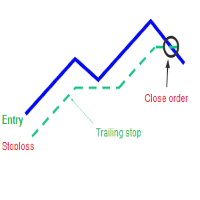
A trailing stop loss is   a type of day-trading order that lets you set a maximum value or percentage of loss you can incur on a trade . If the security price rises or falls in your favor, the stop price moves with it. If the security price rises or falls against you, the stop stays in place. With this version, you can run trailing stoploss with currencies (ex start when profit more 1$, trailing stop with 2$...)
FREE
ProBridger
Marius Ovidiu Sunzuiana
How Traders and Analysts Can Use the Data Export Bridge to Improve Their Analytics The MQL Data Export Bridge unlocks a new level of analytical power by transforming MetaTrader into a real‑time data provider for any external research environment. Here are the most impactful ways different users can apply the bridge to enhance their trading performance. Build Predictive Models with Machine Learning Who benefits: Quantitative traders, data scientists, algorithm developers How it helps: Export t
NEXA Trend Ride PRO — ユーザーガイド 1. 概要 NEXA Trend Ride PRO は、MetaTrader 5 プラットフォーム向けに設計された自動売買プログラム(Expert Advisor)です。 このプログラムは、価格の動きやテクニカル指標を分析し、市場の条件を評価してトレンドの可能性を判断します。設定された条件が満たされると、プログラムは自動的に取引を実行および管理します。 Expert Advisor はユーザーが設定可能なパラメータとリスク管理設定に基づいて動作します。 本製品は MetaTrader 5 プラットフォームで使用するための EX5 形式のコンパイル済みファイルとして提供されます。 2. 主な機能 NEXA Trend Ride PRO は次の機能を提供します。 自動売買注文の実行 市場トレンド条件の分析 ボラティリティに基づくエントリー条件 取引時間フィルター スプレッドチェック機能 ポジション管理 Stop Loss と Take Profit の設定 ポジションの部分決済 リスク管理パラメータ これらの機能は、取引条件が満た
AlgoWay Telegram Reporter is a free MetaTrader 5 utility that sends clear and detailed trading notifications directly to Telegram. The utility does not open, modify, or close trades. It only monitors trading activity on the account. It works with: • Manual trades • Trades opened from mobile or web terminals • Trades opened by Expert Advisors • Trades opened through AlgoWay • Netting and hedging accounts Main features • Position opening notifications • Entry price, volume, Stop Loss and Take Prof
FREE
Elite Telegram Trade Copier & Community Manager (v3.94) Welcome to the ultimate solution for professional Telegram signal copying and community management. This Expert Advisor is not just a standard copier – it is a fully automated Trade Management Engine , a Signal Analytics Tool , and a Marketing Funnel for your own Telegram channels. Whether you want to automate trades from your favorite signal providers or manage your own VIP and Follower channels simultaneously, this EA handles everything:
FREE
Daily P/L Risk Management is a MetaTrader 5 utility that watches your account's daily profit and loss and acts automatically when a limit is hit. It tracks both realized and unrealized P/L and can close positions, disable trading or alert you. It is a practical safety net for prop-firm challenges and disciplined day trading. Features Daily loss and profit limits, set by money amount or percent of balance/equity. Combined P/L tracking: counts both closed-trade (realized) and open-position (unreal
FREE
このプロダクトを購入した人は以下も購入しています
Trade Assistant MT5
Evgeniy Kravchenko
4.43 (216)
取引 ごとのリスクの 計算、新規注文 の 簡単 な 設置、部分的 な 決済機能 を 持 つ 注文管理、 7 種類 のトレーリングストップなど 、便利 な 機能 を 備 えています 。 追加の資料と説明書 インストール手順   -   アプリケーションの手順   ライン機能 チャート上にオープニングライン、ストップロス、テイクプロフィットを表示します。この機能により、新規注文を簡単に設定することができ、注文を出す前にその特徴を確認することができます。   リスク計算 リスク計算機能は、設定されたリスクとストップロス注文のサイズを考慮して、新規注文のボリュームを計算します。ストップロスの大きさを自由に設定できると同時に、設定したリスクを守ることができます。 Lot calc ボタン - リスク 計算 を 有効 / 無効 にします 。 Risk フィールドでは 、必要 なリスクの 値 を 0 から 100 までのパーセンテージまたは 預金通貨 で 設定 します 。 設定」 タブで 、 リスク 計算 の 種類 を 選択 します :「 $ 通貨」、「 % 残高」、「 % エクイティ 」、「
Farmed Hedge Yield Farming | All Markets (Manual - Hybrid - Semi/Automated EA) VERIFIED TRADING RESULTS - Farmed Hedge Yield Axi Copy:  https://www.mql5.com/en/signals/2356376 - Farmed Hedge Yield Exn Copy:   https://www.mql5.com/en/signals/2356404 - Farmed Hedge Yield V Copy:  https://www.mql5.com/en/signals/2357156 IMPORTANT NOTICE: FarmedHedge is a MANUAL-FOCUSED TRADING UTILITY ,not a fully automated EA. Results shown on this Signal include manual trades and overall strategic management.
Trade Manager EAへようこそ。これは、取引をより直感的、正確、そして効率的にするために設計された究極の リスク管理ツール です。これは単なるオーダー実行ツールではなく、包括的な取引計画、ポジション管理、リスク管理のためのソリューションです。初心者から上級者、迅速な実行を必要とするスキャルパーまで、Trade Manager EAはあらゆるニーズに対応し、為替、指数、商品、暗号通貨などさまざまな市場で柔軟に対応します。 Trade Manager EAを使用すると、複雑な計算が過去のものになります。市場を分析し、エントリーポイント、ストップロス、テイクプロフィットのレベルをチャート上のラインでマークし、リスクを設定するだけで、Trade Managerが最適なポジションサイズを即座に計算し、SLとTPをピップ、ポイント、口座通貨でリアルタイムに表示します。すべての取引が簡単かつ効果的に管理されます。 主な機能: ポジションサイズ計算機 :定義されたリスクに基づいて取引サイズを瞬時に決定します。 簡単な取引計画 :エントリー、ストップロス、テイクプロフィットを設定するためのド
Telegram to MT5 Multi-Channel Copier   は、 Telegram と Discord チャンネルのトレードシグナルを MetaTrader 5 へ自動コピーします。ボット不要、ブラウザ拡張不要、手動コピー不要。Telegram や Discord にシグナルが届くと、EA が数秒であなたのターミナルに注文を出します。 さらに、チャンネルをコピーする前に、内蔵バックテスターでそのチャンネルがあなたの口座でどう動いたかを確認できます。 製品は 2 つのコンポーネントで構成されます:Telegram チャンネルを監視する Windows アプリと、MT5 ターミナルでシグナルを執行する本 EA です。MT4 版もあります   こちら . 購入前にお試しください:   アプリは無料でダウンロードできます。ご自身のチャンネルを接続し、各シグナルがどのように読み取られるかをご確認ください。Backtest タブと実際の取引には、購入またはレンタルした EA が必要です。このページの無料デモはストラテジーテスターでのみ動作し、テスターでは Telegram と D
TradePanel MT5
Alfiya Fazylova
4.88 (172)
Trade Panelは多機能なトレーディングアシスタントです。アプリには手動取引用の50以上のトレーディング機能が搭載されており、ほとんどの取引作業を自動化することができます。 アプリの説明書: https://www.mql5.com/en/blogs/post/756482 デモ口座用アプリの試用版: https://www.mql5.com/en/blogs/post/750865 アプリのインストール方法: https://www.mql5.com/en/blogs/post/756239 アプリをビジュアルモードでテストする方法: https://www.mql5.com/en/blogs/post/770277 VPSのMetaTraderにアプリをインストールする方法: https://www.mql5.com/en/blogs/post/770190 取引。 ワンクリックで取引操作を行うことができます: リスクを自動計算して指値注文やポジションを開く。 複数の注文やポジションをワンクリックで開く。 注文のグリッドを開く。 保留中の注文やポジションをグループごとに閉じる
Local Trade Copier EA MT5
Juvenille Emperor Limited
4.94 (150)
Local Trade Copier EA MT5 は、同一の Windows PC または Windows VPS 上で稼働する複数の MetaTrader 5 口座間で、取引をコピーおよび管理するための高速で柔軟なトレードコピーツールです。 ローカルでの取引同期に加え、Receiver 側でロットサイズ、リスク管理、取引フィルター、シンボルマッピング、取引管理、口座保護を個別に設定できます。 Transmitter と Receiver のターミナルは約 1分 で設定でき、同一ブローカーまたは異なるブローカーの口座間で、手動取引や EA による取引をコピーできます。適切な条件下では、ローカルの MetaTrader ターミナル間で取引情報を 0.5秒未満 で同期できます。実際の約定速度は、ブローカーのレイテンシー、ネットワーク状況、PC/VPS の性能、ターミナルの負荷によって異なります。 ご購入前に無料デモをお試しください Local Trade Copier EA MT5 の完全機能版無料デモ を、MT5 デモ口座で 1回につき4時間 テストできます。 Local Trad
News Trade EA MT5
Konstantin Kulikov
4.55 (11)
僕自身が数年間使っている便利なロボットをご紹介します。半自動モードでも完全自動モードでもお使いいただけます。 >>> Chat <<< 当プログラムは経済指標カレンダーで発表されるニュースをもとにした取引の柔軟な設定が可能です。戦略テスターでは確認不可です。実際の取引のみです。 最新の設定アーカイブをダウンロードしてください: https://www.mql5.com/en/blogs/post/747929 シグナルモニタリング: https://www.mql5.com/en/signals/author/test-standart 当該エキスパート・アドバイザーのためのカスタマイズ設定セットを作る場合は、ブログの全パラメータの説明を参照してください :   https://www.mql5.com/en/blogs/post/748545 。 基本的なデフォルト設定について 一つのチャートからGBPとの通貨ペア(GBPUSD、EURGBP、GBPJPY、GBPCAD、GBPAUD、GBPCHF)で取引をします。GBPは最もボラティリティの高い通貨のため、取引が成功するチ
Exp COPYLOT CLIENT for MT5
Vladislav Andruschenko
3.97 (35)
MetaTrader 5 用のプロフェッショナル取引コピー機 MetaTrader 向けの高速・高性能・信頼性の高い 取引コピー機 です。 COPYLOT は、MT4 と MT5 のターミナル間で Forex 取引をコピーでき、 Hedge 口座と Netting 口座の両方に対応しています。 COPYLOT MT5 版の対応構成: - MT5 Hedge → MT5 Hedge - MT5 Hedge → MT5 Netting - MT5 Netting → MT5 Hedge - MT5 Netting → MT5 Netting - MT4 → MT5 Hedge - MT4 → MT5 Netting MT4 版 完全な説明 + DEMO + PDF 購入方法 インストール方法 ログファイルの取得方法 テストと最適化の方法 Expforex のすべての製品 MT4 ターミナルへのコピーも可能です(MT4 → MT4、MT5 → MT4): COPYLOT CLIENT for MT4 COPYLOT は、2台、3台、さらには10台のターミナル間で同時に動作できる、プロフェッ


自分の取引ルールで Telegram のシグナルをコピー Telegram to MT5 Signal Trader は、Telegram の公開・非公開チャンネルやグループから、テキスト形式の取引シグナルを MetaTrader 5 へ自動でコピーします。1つのデスクトップアプリで複数の配信者と MT5 口座を管理し、 配信者ごとにリスクと取引設定を個別に指定 できます。 シグナルのコピーに Telegram ボットや API 設定は必要ありません。 電話番号または QR コードでご自身の Telegram アカウントにログインし、すでに参加しているチャンネルやグループを選ぶだけです。ボットの作成や、Telegram API トークン、API ID、API hash の入力は不要です。 ポジションサイズを選び、複数の利確水準に分けて決済し、建値へのストップ移動やトレーリングストップを自動化できます。配信者のシグナルを受け取りながら、実際の取引方法は自分で管理できます。 本製品は、この MT5 エキスパートアドバイザ(EA)と、必須の Windows 連携アプリで構成されます。 インス
The product will copy all telegram signal to MT5 ( which you are member) , also it can work as remote copier.  Easy to set up, copy order instant, can work with almost signal formats, image signal,  s upport to translate other language to English Work with all type of channel or group, even channel have "Restrict Saving Content", work with  multi channel, multi MT5 Work as remote copier: with signal have ticket number, it will copy exactly via ticket number. Support to backtest signal. How to s
Strategy Ledger Pro
Abdullah Uygar Tuna
5 (14)
日本語に対応しました。 Strategy Ledger Pro は、MetaTrader 5 用の読み取り専用の口座分析パネルです。口座の成績をエキスパートアドバイザー(EA)、戦略、銘柄、マジックナンバーごとに分け、それぞれが実際にどれだけ貢献しているかを明らかにします。 パネルは 11 言語に対応しています:English、Français、Deutsch、Español、Italiano、Português、Русский、Türkçe、中文、日本語、한국어。 デモをダウンロードする前に。 Market では、有料製品のデモはストラテジーテスター内でのみ実行されます。このパネルはご自身の口座の取引を分析しますが、ストラテジーテスターには読み取る口座履歴がないため、デモは空のパネルで起動し、その旨を表示します。これはデモの仕組みによるもので、製品の制限ではありません。 この説明内の動画では、実口座でのパネルの動作をご覧いただけます。 すべての機能を解説した詳しい マニュアル (英語)と、情報交換やお知らせのための AureusAI Trading Suite グループをご用意し
================================================================================ POC BREAKOUT - V20.72. Full Professional Grade Toolkit ================================================================================ POC Breakout is a full MetaTrader 5 trading dashboard for discretionary traders who want breakout signals, Point of Control (POC) context, volume profiles, order flow, market structure, news, alerts, and advanced trade planning in one professional workspace. Attached directly to you
EA Overfitter
Stephen J Martret
5 (3)
That backtest looks great. But will it still be making money tomorrow, next week, next month? EA Overfitter re-runs your EA on 100 price histories it has never seen. One score tells you if the edge is real. A backtest tells you what an EA did on one price history — the one that happened to occur. What you cannot tell from it is how much of that result was the strategy and how much was the particular path. EA Overfitter answers that. It builds up to 100 synthetic price histories your EA has n
Power Candles Strategy Scanner - 自動最適化型マルチシンボル設定ファインダー パワーキャンドル・ストラテジー・スキャナーは 、パワーキャンドル・インジケーターを駆動するのと全く同じ自己最適化エンジンを、マーケットウォッチに登録されているすべての銘柄に対して並行して実行します。1つのパネルで、現在統計的に取引可能な銘柄、各銘柄で勝率の高い戦略、最適なストップロス/テイクプロフィットの組み合わせが表示され、新たなシグナルが発生した瞬間に通知が届きます。 このツールは、Stein Investmentsのエコシステムの一部です。  18種類以上のツールをすべて閲覧し、AIを活用したセットアップの推奨を受け取り、  https://stein.investments でコミュニティに参加しましょう 市場動向を網羅。銘柄ごとに3,000件以上の自動最適化。2種類のアラート。ワンクリックでチャートを切り替えて即座にアクション。 なぜこれが必要なのか 多くのマルチ銘柄スキャナーは、 価格の動き (ボラティリティ、変動率、銘柄ごとのRSI)を表示するだけです。それ
HINN MAGIC ENTRY – the ultimate tool for entry and position management! SIMPLE. FASTEST. INTUITIVE. MAX AUTOMATED. Place orders by selecting a level directly on the chart! full description   ::  demo-version  :: 60-sec-video-description Key features: - Market, limit, and pending orders - Automatic lot size calculation - Automatic spread and commission accounting - Unlimited partitial take-profits  - Breakeven and trailing stop-loss and take-profit  functions - Invalidation leves - Intuitive, a
Timeless Charts
Samuel Manoel De Souza
5 (9)
Timeless Charts is an all-in-one trading utility for professional traders. It combines custom chart types such as Seconds Charts and Renko with advanced order flow analysis using Footprints , Clusters , Volume Profiles , VWAP studies, and anchored analysis tools for deeper market insight. Trading and position management are handled directly from the chart through an integrated trade management panel , while Market Replay and Virtual Accounts provide environments for practicing trading skills and
TelegramからMT5へ: 究極のシグナルコピーソリューション Telegram to MT5 を使えば、取引がシンプルになります。DLL を必要とせず、Telegram のチャンネルやチャットから MetaTrader 5 プラットフォームに取引シグナルを直接コピーできる最新ツールです。この強力なソリューションは、正確なシグナル実行、豊富なカスタマイズオプション、時間の節約、そして効率性の向上を実現します。 [ Instructions and DEMO ] 主な特徴 直接的なTelegram API統合 電話番号とセキュアコードで認証します。 ユーザーフレンドリーな EXE ブリッジを通じてチャット ID を簡単に管理できます。 複数のチャネル/チャットを追加、削除、更新して、同時に信号をコピーします。 高度なフィルターによる信号解析 例外的な単語 (例: 「レポート」、「結果」) を含む不要な信号をスキップします。 柔軟な SL および TP 形式 (価格、ピップ、ポイント) をサポートします。 価格ではなくポイントを指定するシグナルのエントリ ポイントを自動的に計算します。
MetaTrader 5 用トレーディングパネル — チャートとキーボードから行うプロフェッショナルなワンクリック取引 アクティブトレーダーのために設計された高機能 Trading Panel。標準の MetaTrader 操作よりも、はるかに速く、直感的に、そして効率的に取引を実行できます。 本パネルは、ポジション管理、未決注文管理、利益コントロール、執行スピードをひとつのプロフェッショナルなワークスペースに集約した実践的なソリューションです。 これは単なる補助ツールではありません。MetaTrader 5 のための本格的な trading cockpit です。チャートから直接操作し、キーボードで素早くコマンドを実行し、自動計算や視覚的なガイドを活用することで、手動トレードをより速く、より明確に、より快適にします。 このパネルを使えば、チャート上からワンクリックで注文を実行でき、標準の MetaTrader コントロールと比べて最大 30 倍速く取引操作を行うことができます。 新しいプレミアム版が利用可能です: VirtualTradePad PRO SE で取引ワークフローを強
次回アップデート — バージョン 2.52 近日公開!【新機能】 市場分析とトレードワークフローを強化する、4つの主要な新機能にご期待ください 皆様のトレードニーズに応える4つの新機能により、市場分析を次のレベルへと引き上げます。新機能をご紹介します: 1. TRADE OVERVIEW DASHBOARD 2. CONFLUENCE AT ZONE 3. STRONG & WEAK HIGH/LOW 4. OTE 1. TRADE OVERVIEW DASHBOARD 市場全体の状況をより簡単に把握できるダッシュボードです。トレード判断をサポートするガイダンスを提供し、市場分析とトレード計画を体系的に行えるよう支援します。すべてを1つの画面で確認できます。 マルチタイムフレーム市場概要(Multi-Timeframe Market Overview) 市場の方向性と価格構造をより明確に把握 市場状況をすばやく確認 体系的な市場分析とエントリー計画のためのガイダンス 2. CONFLUENCE AT ZONE 価格が重要なゾーンに入るとき…いくつのサポート要因が一致しているかを確認で
Telegram To MT5 — シグナルコピア Telegram チャンネルのトレードコールを、実際の MT5 注文に変換します — 自動で、好きなだけの口座に対応し、リスクとルールは完全にあなたの管理下に置けます。 Telegram To MT5 は、あなたが Telegram で既にフォローしている VIP / シグナルチャンネルを MetaTrader 5 端末に接続します。無料の付属デスクトップアプリがメッセージを読み取り(ボットを禁止しているチャンネルでも可能)、この EA があなたの口座でそれらを執行します — あなた自身のリスク設定、シンボルマッピング、テイクプロフィット処理、セッションおよびニュースフィルターを適用します。 これはシグナルコピアであり、ブラックボックス戦略ではありません。どのチャンネルを信頼するか、各トレードのロットと管理方法をあなたが決めます。 ステップバイステップの設定と付属アプリのインストールガイド 仕組み [あなたの Telegram チャンネル] -> [付属デスクトップアプリ] -> [MT5 + この EA] -> 注文 付属デスクトッ
Your EAs cannot see each other, but Anchor can. Anchor gives you one place to coordinate your EAs, manage risk, and decide when trading is allowed. It works alongside the trading bots you already use without any changes to them. The Problem One EA opens a trade. Then another starts trading. The next thing you know, you wake up to multiple grids built across your account. Each EA may be doing exactly what it was designed to do, but together they can place far more risk on your account than you in
Trade Indicator Assistant   is a powerful MT5 utility designed to turn indicators into automated trading systems. Its main feature is the ability to automatically detect an indicator’s   BUY and SELL signal buffers , without requiring you to know the buffer numbers, search through indicator settings, or modify the indicator source code. Bonus Indicator:   After purchasing Trade Indicator Assistant, contact me to receive   Trade Signal Pro   completely free as a bonus indicator. [Download Demo V
EA Auditor
Stephen J Martret
5 (7)
EA Auditor is an independent analysis tool for traders evaluating Expert Advisors and trading signals on MetaTrader 5. It audits backtest reports, reviews posted developer signals, and cross-verifies the two against each other to help traders assess strategies before committing capital. The MQL5 market offers a wide range of Expert Advisors from many developers, with varying approaches, quality, and transparency. EA Auditor provides a consistent, data-driven framework for reviewing them, answer
Trade Manager は、リスクを自動的に計算しながら、取引を迅速に開始および終了するのに役立ちます。 過剰取引、復讐取引、感情的な取引を防止する機能が含まれています。 取引は自動的に管理され、アカウントのパフォーマンス指標はグラフで視覚化できます。 これらの機能により、このパネルはすべてのマニュアル トレーダーにとって理想的なものとなり、MetaTrader 5 プラットフォームの強化に役立ちます。多言語サポート。 MT4バージョン  |  ユーザーガイド + デモ Trade Manager はストラテジー テスターでは機能しません。 デモについてはユーザーガイドをご覧ください。 危機管理 % または $ に基づくリスクの自動調整 固定ロットサイズを使用するか、ボリュームとピップに基づいた自動ロットサイズ計算を使用するオプション RR、Pips、または価格を使用した損益分岐点ストップロス設定トレーリングストップロス設定 目標に達したときにすべての取引を自動的に終了するための 1 日あたりの最大損失 (%)。 過度のドローダウンからアカウントを保護し、オーバートレードを防ぎます
MT5 to Telegram Signal Provider は、Telegramのチャット、チャンネル、またはグループに 指定された シグナルを送信することができる、完全にカスタマイズ可能な簡単なユーティリティです。これにより、あなたのアカウントは シグナルプロバイダー になります。 競合する製品とは異なり、DLLのインポートは使用していません。 [ デモ ] [ マニュアル ] [ MT4版 ] [ Discord版 ] [ Telegramチャンネル ]  New: [ Telegram To MT5 ] セットアップ ステップバイステップの ユーザーガイド が利用可能です。 Telegram APIの知識は必要ありません。必要な全ては開発者から提供されます。 主な特長 購読者に送信する注文の詳細をカスタマイズする機能 例えば、Bronze、Silver、Goldといった階層型のサブスクリプションモデルを作成できます。Goldサブスクリプションでは、すべてのシグナルが提供されます。 id、シンボル、またはコメントによって注文をフィルターできます 注文が実行されたチャート
RETAILBERG FOOTPRINT CHART PRO — Order-Flow Workspace for MetaTrader 5 Version 7.00  |  Professional System  |  31 tools  |  One chart A full 150-page illustrated User Manual is included. Please read the full manual to understand this feature packed footprint chart elements and ui. https://www.mql5.com/en/blogs/post/777982 DEMO / STRATEGY TESTER — PLEASE READ FIRST
DrawDown Limiter
Haidar Lionel Haj Ali
5 (23)
DrawDown Limiter v5.0 — 高度な口座保護コントローラー DrawDown Limiter v5.0 は、取引口座を監視し、設定されたリスク、利益、ニュース、スケジュール、ロールオーバー、またはポジション数の制限に達した際に自動的に対応する、クライアント側で動作する口座保護コントローラーです。 1つの専用チャートから、 手動取引、自動売買戦略、複数のExpert Advisor、指値・逆指値注文、保有ポジション を監視できます。口座全体を保護することも、Magic Numberを使用して特定のEAまたは複数のEAのみを監視することもできます。 DrawDown Limiter の目的は、単にドローダウンを表示することではありません。 設定した取引ルールを積極的に適用し 、保護条件が有効である限り、そのルールを継続的に実行することを目的としています。 DrawDown Limiter v5.0 は、損失額だけを監視するのではなく、戦略がいつ取引を継続できるのか、どのエクスポージャーを維持できるのか、いつ取引を停止すべきか、そして自動売買環境をいつ安全に再開できるのかま
VirtualTradePad PRO SE MT5 — MetaTrader 5向けプロフェッショナル取引コントロールセンター VirtualTradePad PRO SE は、 MetaTrader 5 向けのプレミアムなチャートベースの取引パネルであり、トレード管理ワークスペースです。より速い執行、明確なポジション管理、構造化されたトレード管理、視覚的なレベル計画、そしてチャート上で完結するプロフェッショナルなワークフローを求めるトレーダー向けに設計されています。 これは単なる BUY / SELL パネルではありません。PRO SE は、手動取引、予約注文、ポジション管理、部分決済、バスケット損益管理、平均化レベル、ATMルール、シグナル監視、リアルタイム市場情報、ストラテジーテスター (Strategy Tester) ワークフロー、VPS向け運用を、1つの連携されたインターフェースに統合します。 MT4版 | 完全な説明とスクリーンショット | 購入方法 | インストール方法 | ログファイルの取得方法 | テストと最適化の方法 | Expforex のすべての製品 PRO
Trader Evolution
Siarhei Vashchylka
5 (7)
" Trader Evolution " - A utility designed for traders who use wave and technical analysis in their work. One tab of the utility is capable of money management and opening orders, and the other can help in making Elliott wave and technical analysis. Manual (Be sure to read before purchasing) | Version for MT4 Advantages 1. Trading in a few clicks. Immediate and pending orders are available in the panel 2. Money management. The program automatically selects the appropriate lot size 3. Simplifies
Trade copier MT5
Alfiya Fazylova
4.61 (57)
Trade Copierは、取引口座間の取引をコピーして同期するように設計された専門的なユーティリティです。 コピーは、同じコンピューターまたはvps にインストールされている、サプライヤーのアカウント/端末から受信者のアカウント/端末に行われます。 購入する前に、デモ アカウントでデモ バージョンをテストできます。 デモ版 こちら 。 詳細な説明は こちら 。 主な機能と利点: MT5ネッティングアカウントを含む、MT5> MT5、MT4> MT5、MT5> MT4のコピーをサポートします。 高いコピー速度(0.5秒未満)。 ベンダーモードと受信者モードは同じ製品内に実装されています。 チャートから直接リアルタイムでコピーを制御できる、簡単で直感的なインターフェイス。 接続が切断されたり、端末が再起動されたりしても、設定と位置が失われることはありません。 コピーするシンボルを選択できます。また、受信者のシンボルを置き換えることもできます(例:EURUSD> USDJPY)。 各シンボルごとにコピーの個別設定を行うことができます。 バックコピーをサポートします。 特定の注文のみのコピー
作者のその他のプロダクト
Propfirm Metrics は、プロップファームのトレーダー向けに設計されたシンプルな読み取り専用ダッシュボードです。MetaTrader 5 上で重要な口座指標を簡単に確認できます。 残高、エクイティ、含み損益、当日の損益、残りの日次および総ドローダウン、コンシステンシールール、取引日数、利益目標までの進捗など、現在の口座状況をわかりやすく表示します。 使用しているプロップファームのルールを入力するだけで、Propfirm Metrics が必要な数値を自動的に計算し、見やすいパネルに表示します。 主な機能: • 日次および総ドローダウンの監視 • 残りのドローダウンをリアルタイム表示 • 当日の利益と含み損益 • コンシステンシールールの監視 • 最高利益日とコンシステンシー達成に必要な利益 • 取引日、利益日、条件達成日のカウント • 利益目標への進捗表示 • 日次リセット時刻の設定 • プロップファームの制限を自由に設定可能 • すべてのシンボルとEAを含むMT5口座全体を監視 Propfirm Metrics は読み取り専用です。取引の開始、決済、変更は一切
FREE
Goldryx
Razvan-adrian Pavel
# GOLDRYX — Lenvyr Metricsによるゴールド・アルゴリズム取引 **GOLDRYX** は、**Lenvyr Metrics** が **MetaTrader 5** 向けに開発した自動売買システムであり、**XAUUSD(Gold)** の取引に特化して設計されています。 このExpert Advisorは、体系的かつルールベースの市場執行を中心に構築されています。裁量的な判断、感情、手動での継続的なチャート監視に頼るのではなく、GOLDRYXは事前に定義されたアルゴリズムの枠組みに従って取引機会を特定し、ポジションを管理し、戦略を自動的に実行します。 GOLDRYXの目的はシンプルです。世界で最も活発に取引されている市場の一つに対し、構造化され再現可能なアプローチを提供することです。 **手動エントリー不要。感情的な判断不要。常時チャート監視不要。** 適切に設定し、対応するチャートにExpert Advisorを適用すると、その取引ロジックは自動的に実行されます。 --- ## ゴールド専用設計 ゴールドは、多くの一般的な通貨ペアとは異なる
フィルタ:
レビューなし
レビューに返信