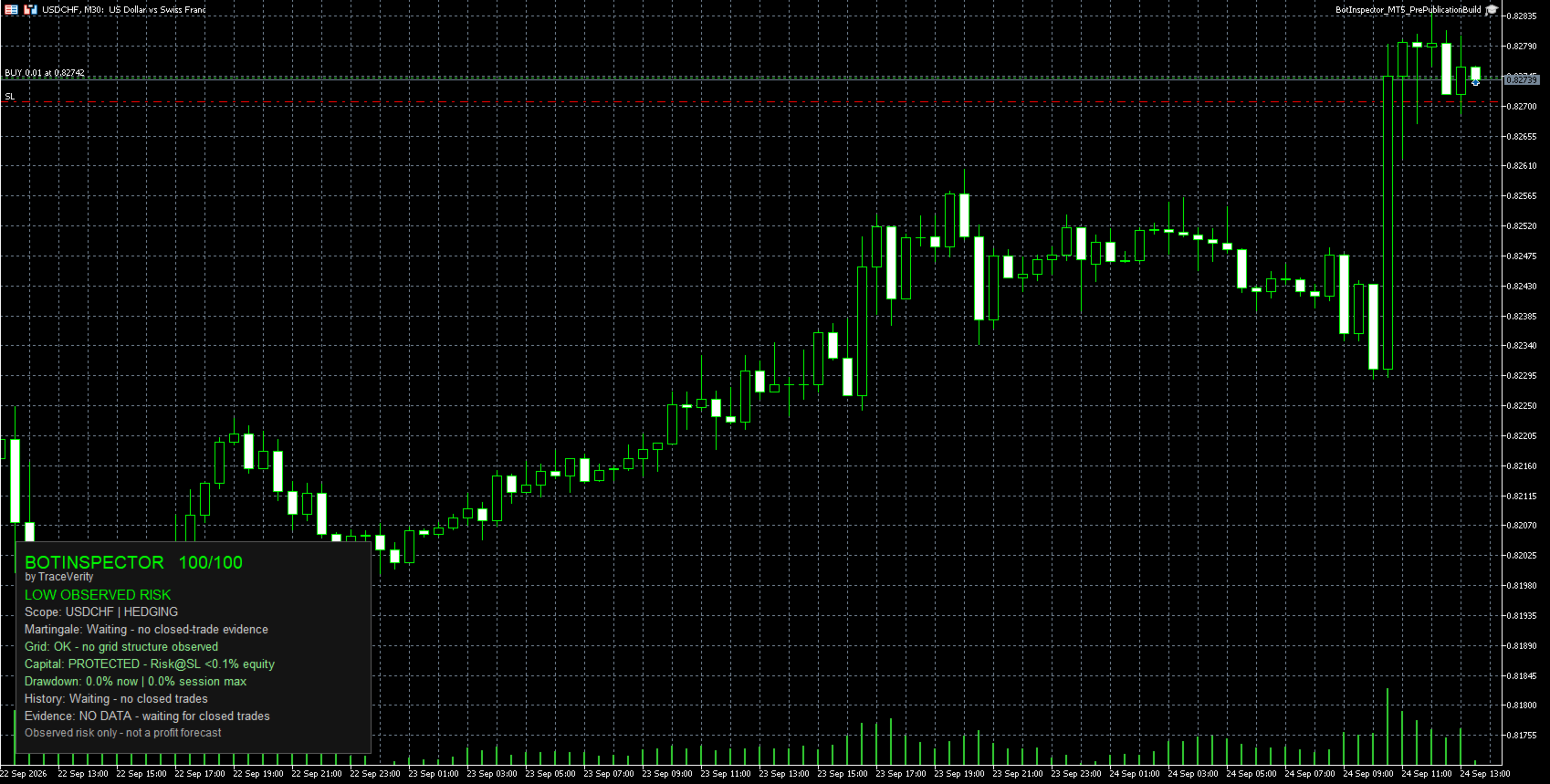
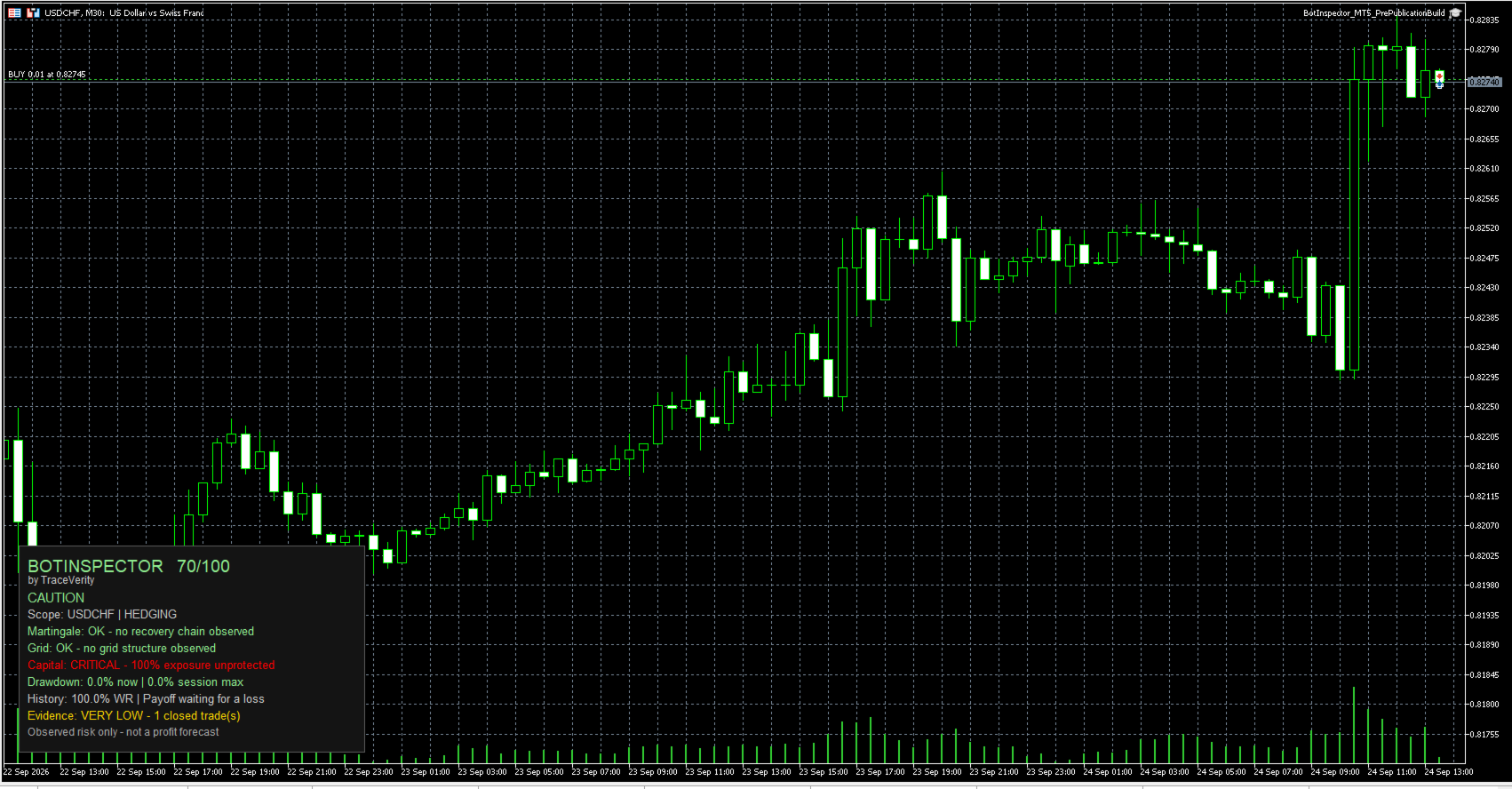
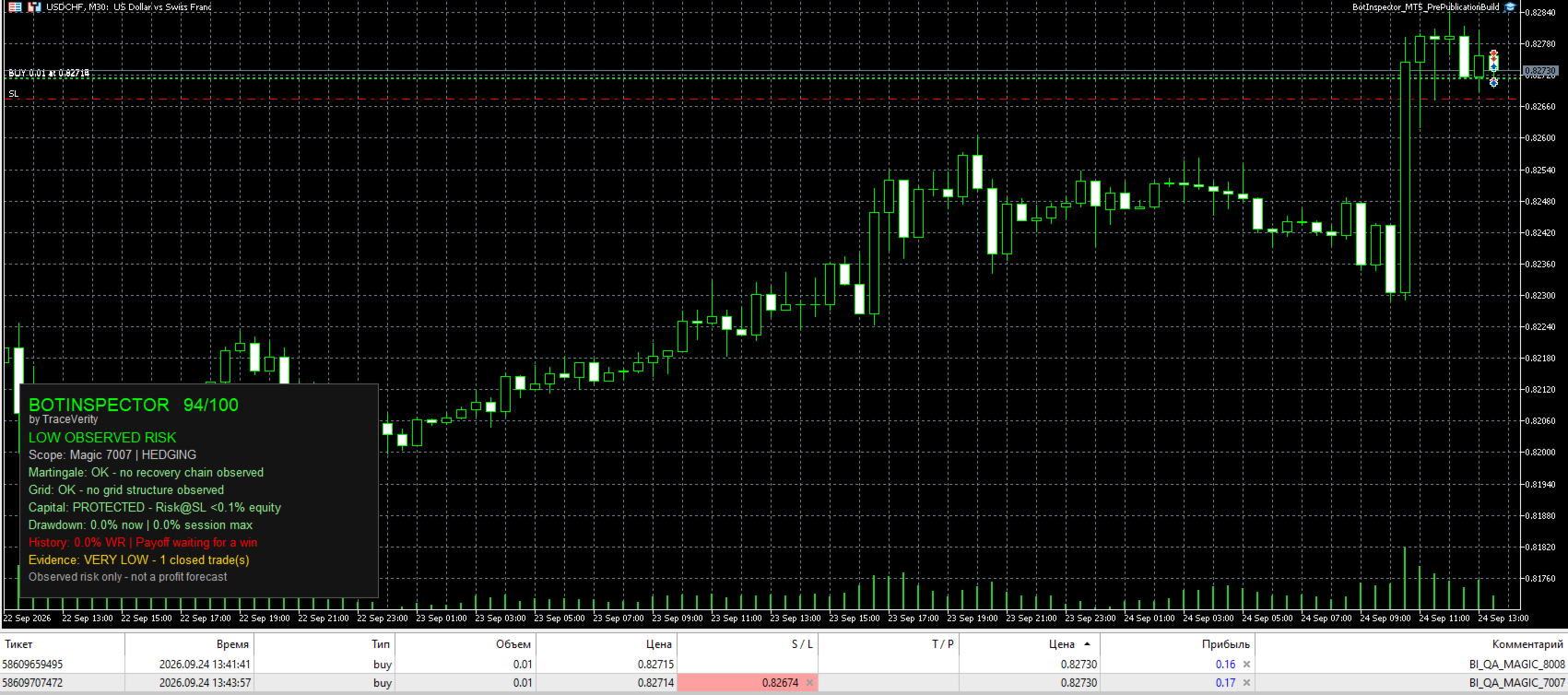
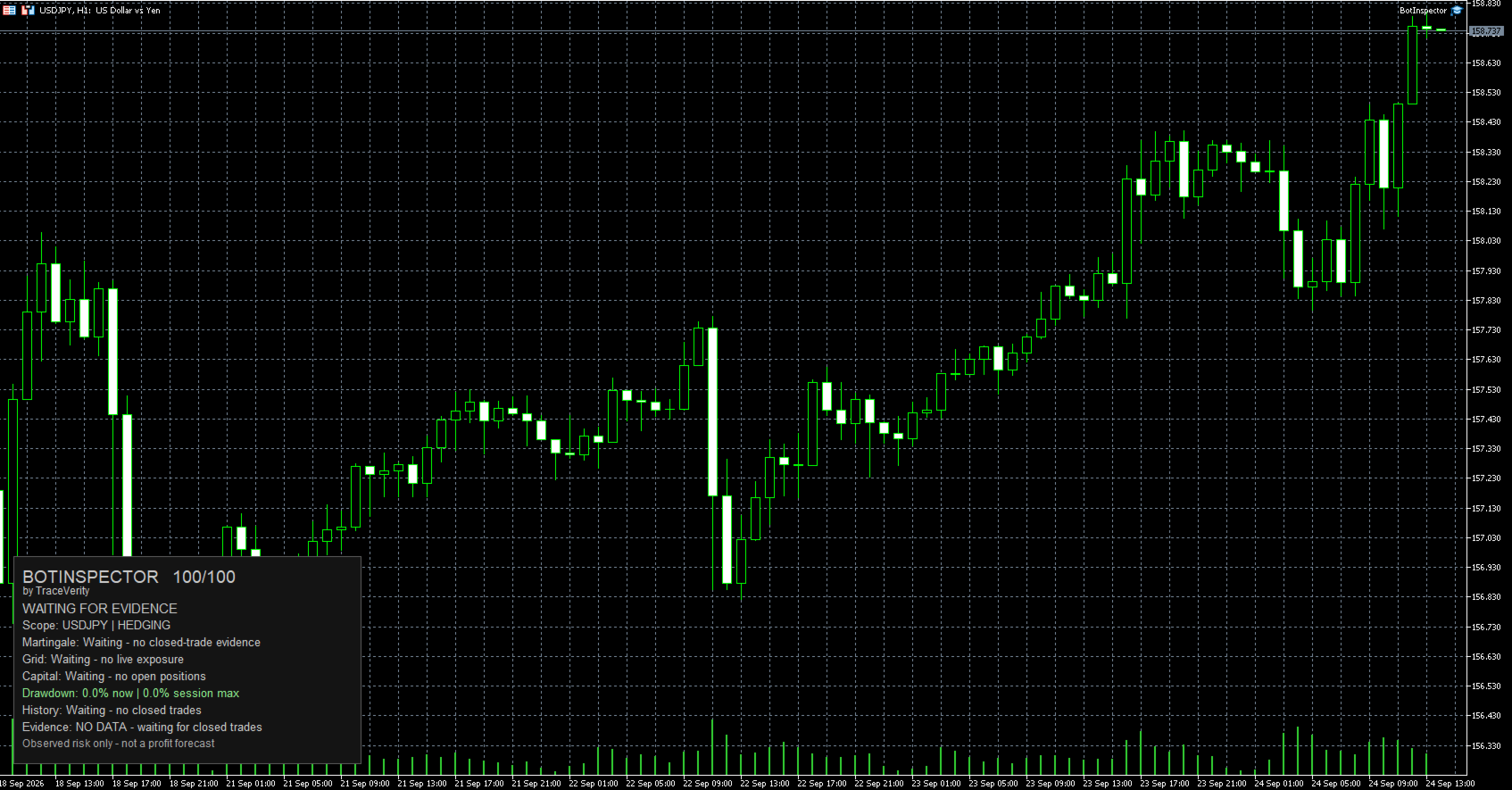
BotInspector

Inspect one bot. One symbol. Or the entire account.

BotInspector by TraceVerity is a non-trading risk analysis utility for MetaTrader 5.

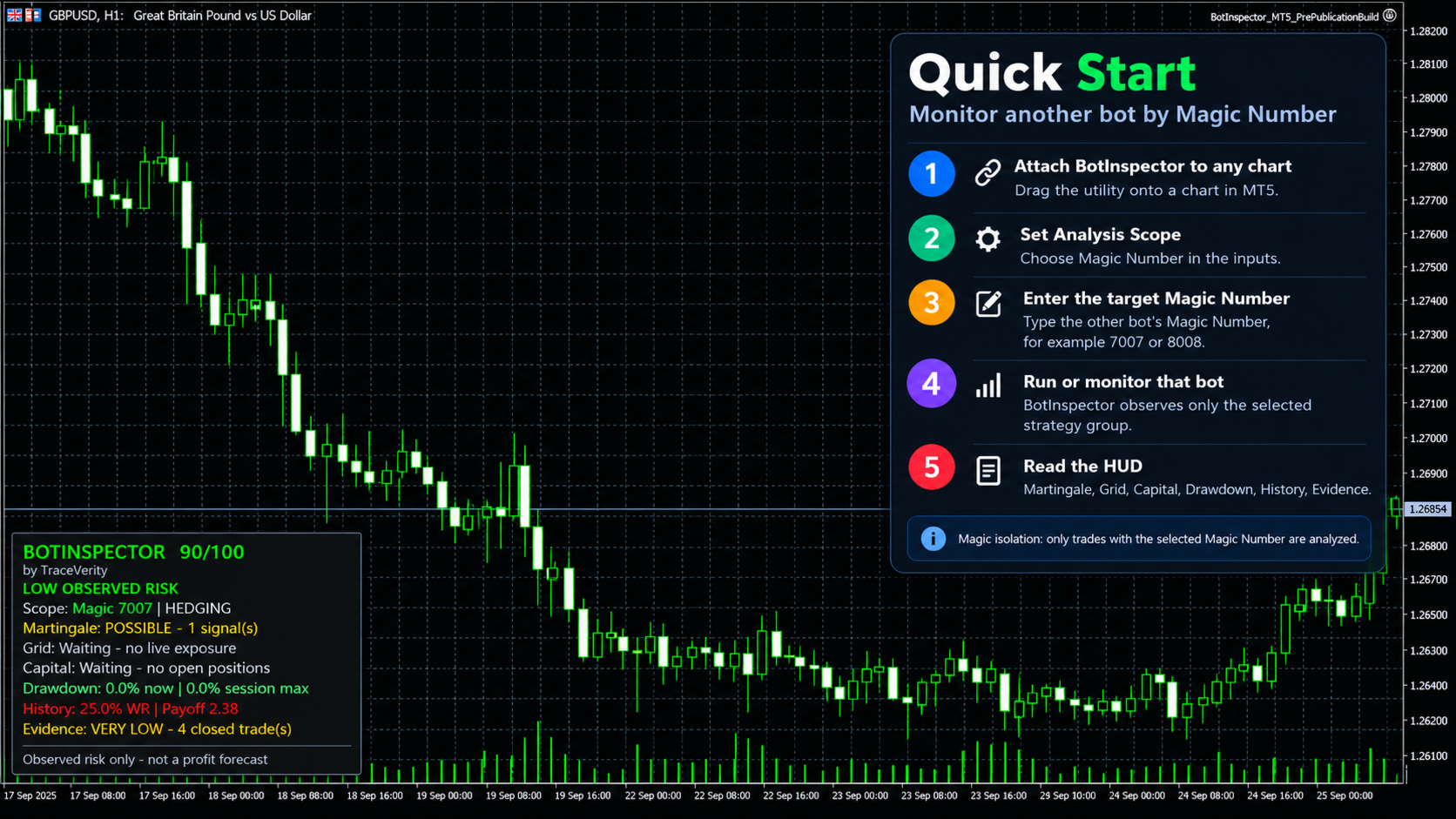
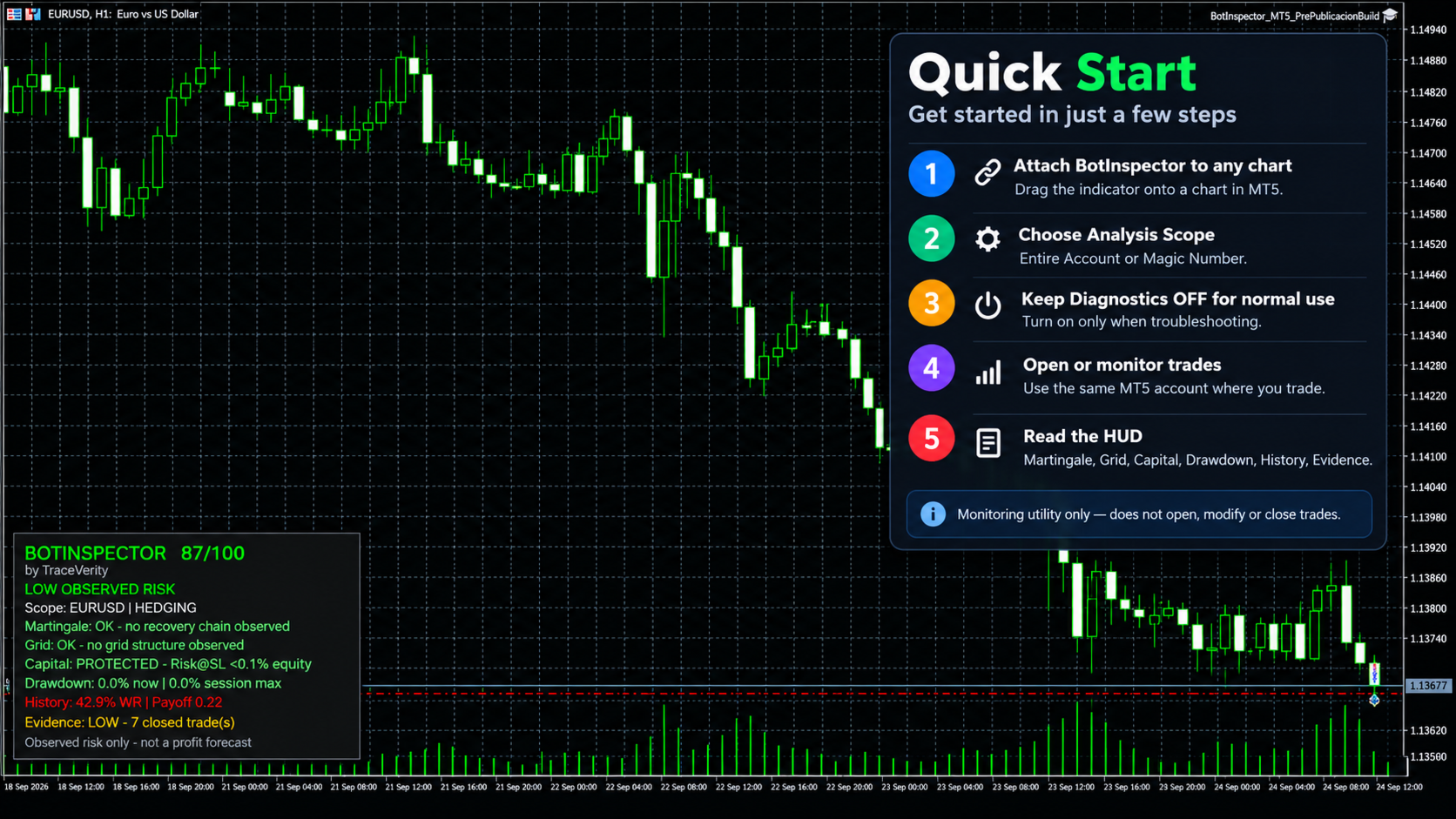
It can inspect the observed trading behavior of the entire account, one symbol, or a specific Expert Advisor identified by Magic Number.

BotInspector does not read another EA's source code and does not need to run on the same chart as that EA. It analyzes the trading evidence available in MetaTrader 5: live positions, pending orders, deal history, volume changes, Stop Loss protection and drawdown.

This makes it possible to observe how a third-party EA actually behaves on a demo or live account instead of relying only on its description.

Inspect one strategy or the whole account

BotInspector provides three analysis scopes:

Entire Account
Reviews account activity as a whole. Balance, Equity and Drawdown remain account-level metrics. Where strategy ownership can be identified, behavioral structures are kept separated by Magic Number.

Current Symbol
Focuses the analysis on the symbol of the chart where BotInspector is running.

Exact Magic Number
Isolates the trading activity of a specific EA or strategy using its Magic Number. Trades belonging to other identifiable Magic Numbers are excluded from that strategy-specific analysis.

BotInspector does not require the inspected EA to be attached to the same chart. If its trading activity is present in the same MetaTrader 5 account and can be identified from the available trading data, BotInspector can analyze it.

Manual or unidentified activity using Magic Number 0 is treated as its own observable group and cannot always be separated into individual strategies.

Evidence-based analysis

BotInspector distinguishes between a verified observation and insufficient evidence.

When the necessary data is not available, the panel reports explicit states such as:

Waiting - no closed-trade evidence
Waiting - no live exposure
Waiting - no open positions
Waiting - no closed trades

A lack of evidence is not presented as a positive result.

Martingale and recovery behavior

BotInspector analyzes realized losses and subsequent trades inside the same identifiable strategy group.

The analysis uses Symbol, Magic Number and trade direction to prevent unrelated strategies from being merged into one recovery sequence.

A qualifying increase in trade volume after a realized loss can be reported as Possible.

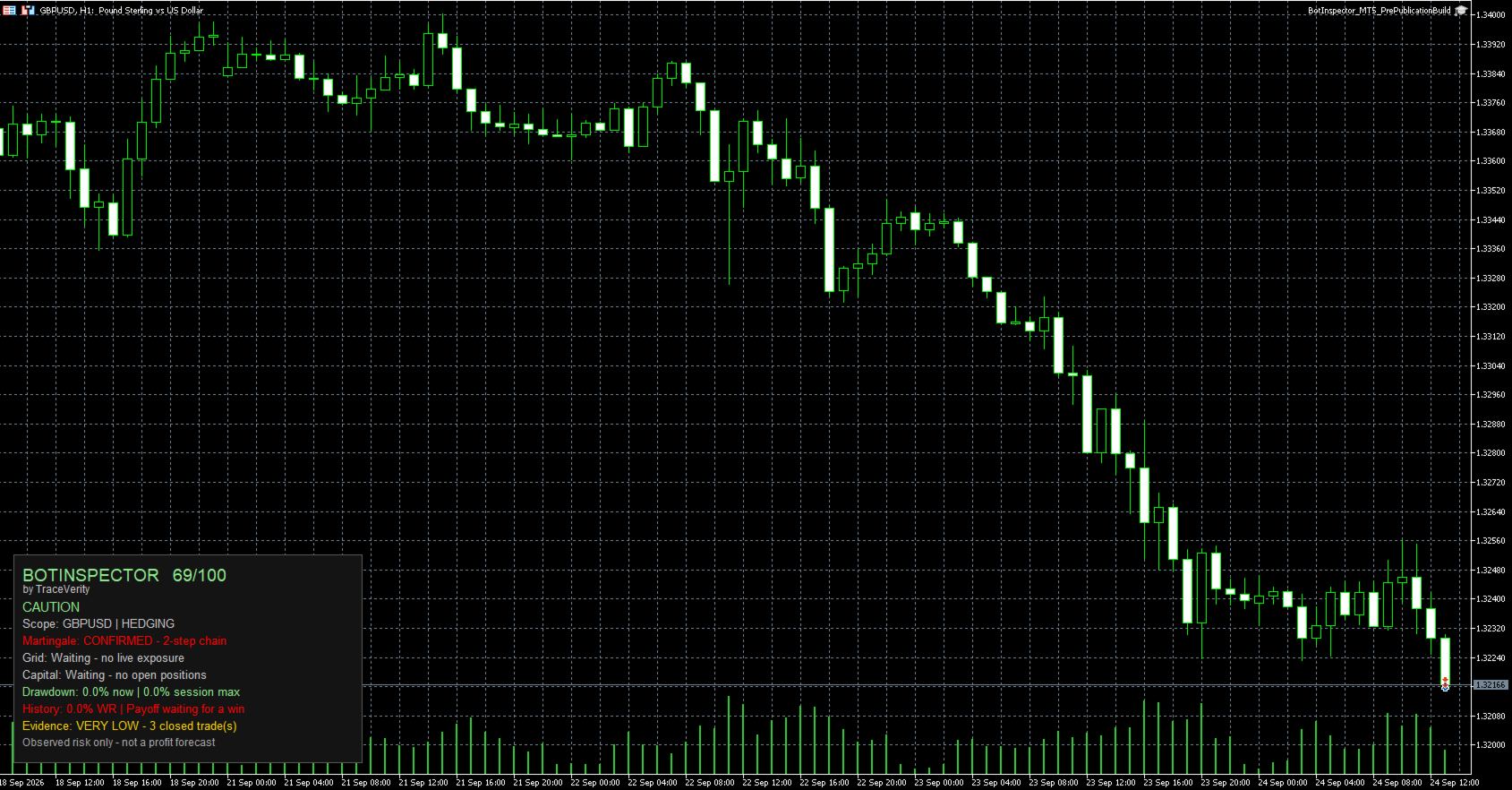
A linked multi-step recovery sequence can be reported as Confirmed.

Different identifiable Magic Numbers are never merged into the same Martingale or recovery chain.

Grid structure

BotInspector analyzes current positions and pending orders for concentrated exposure and regularly spaced price levels.

Exposure density can be reported as Possible.

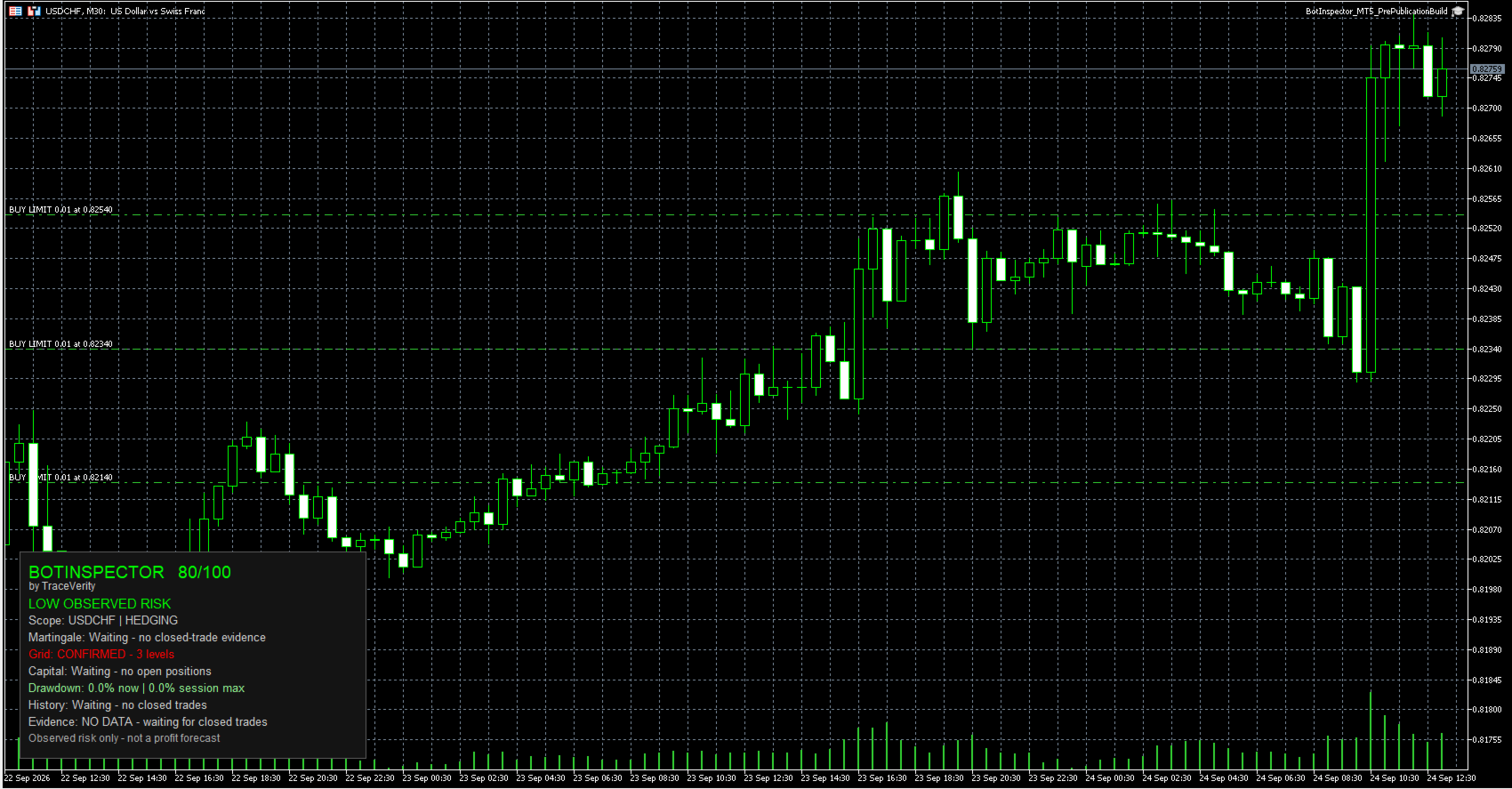
A sufficiently regular same-source price ladder can be reported as Confirmed.

Grid analysis also respects identifiable strategy ownership by Magic Number.

Capital protection

Open positions are checked for Stop Loss protection.

For a Stop Loss located on the loss side of the trade, BotInspector estimates Risk at SL using MetaTrader 5 calculation functions.

A Stop Loss at breakeven or on the profitable side represents zero loss-side risk.

If Risk at SL cannot be calculated reliably, the value remains unknown rather than being treated as zero.

Risk at SL does not include future commission or swap.

Drawdown monitoring

BotInspector displays:

Current floating drawdown
Session Max Drawdown

Session Max Drawdown represents the maximum observed since the current BotInspector session started. It is not presented as lifetime historical drawdown.

Historical evidence

When closed-trade evidence is available, BotInspector reports:

Win Rate
Payoff Ratio
Historical Expectancy
Evidence confidence

Historical metrics describe the available trading sample only. They are not a forecast of future performance.

Hedging and Netting accounts

BotInspector supports both MetaTrader 5 Hedging and Netting account modes.

On Hedging accounts, trade episodes are reconstructed using position identifiers and exposure changes, including scale-in and partial-close behavior.

On Netting accounts, directional exposure episodes are reconstructed from deal history.

When several Magic Numbers contribute to the same Netting exposure and ownership cannot be attributed safely to one strategy, BotInspector reports Limited evidence rather than assigning the position arbitrarily.

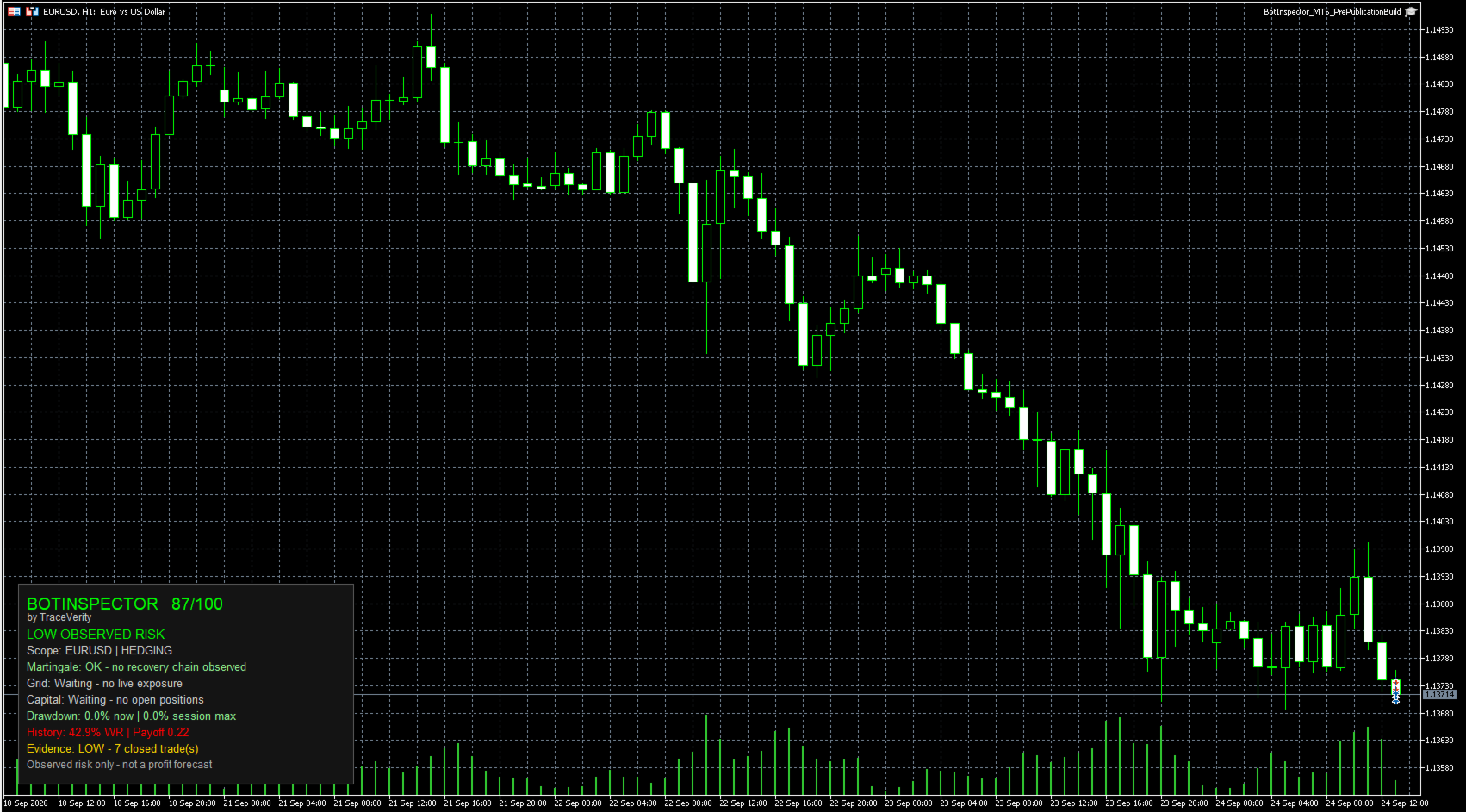
On-chart panel

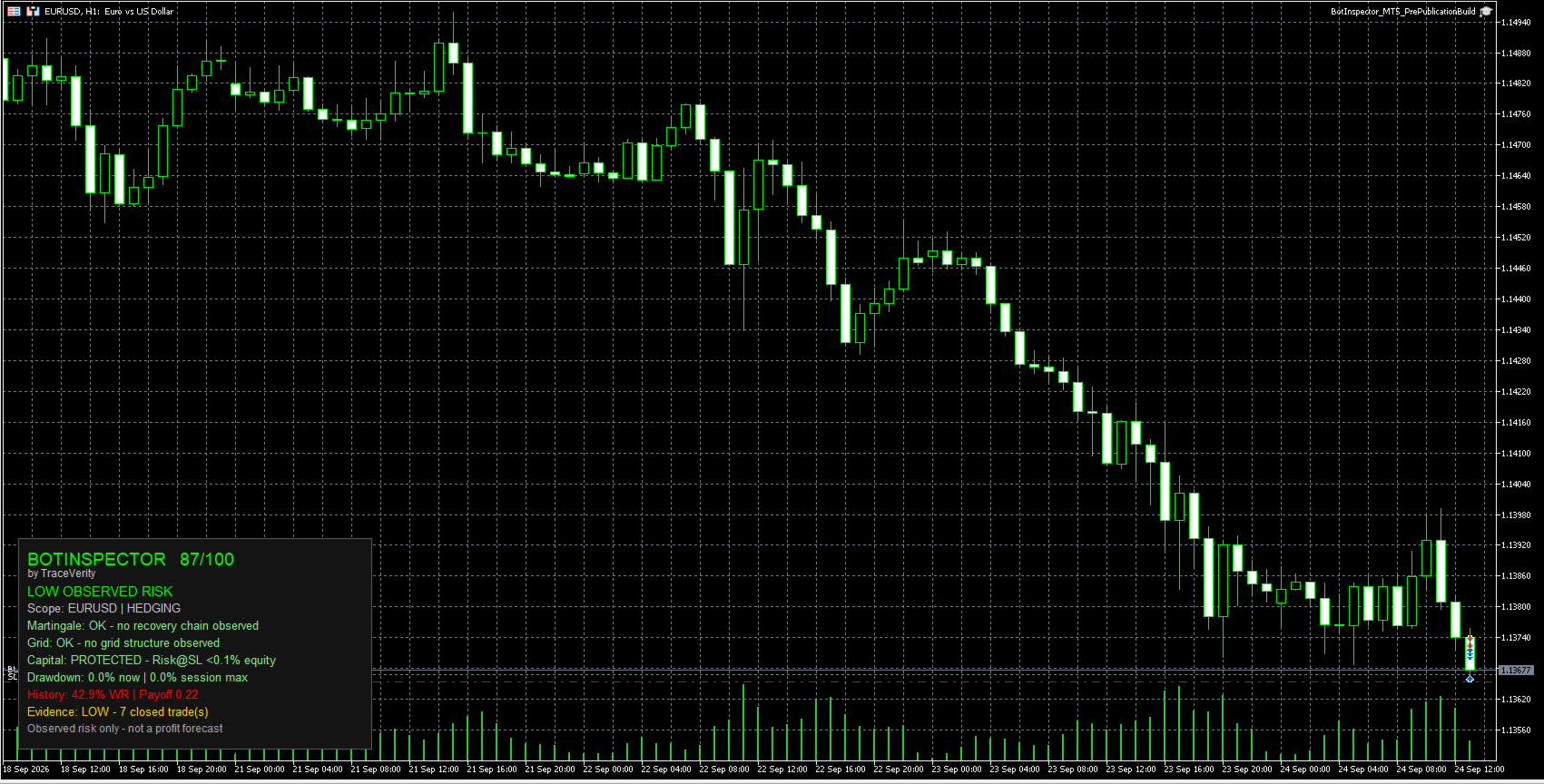
The panel displays:

BotInspector Health Score
Observed Risk state
Analysis Scope
Martingale status
Grid status
Capital protection status
Current and Session Max Drawdown
Historical metrics
Evidence level

The panel can be positioned in any chart corner. Bottom Left is the default position.

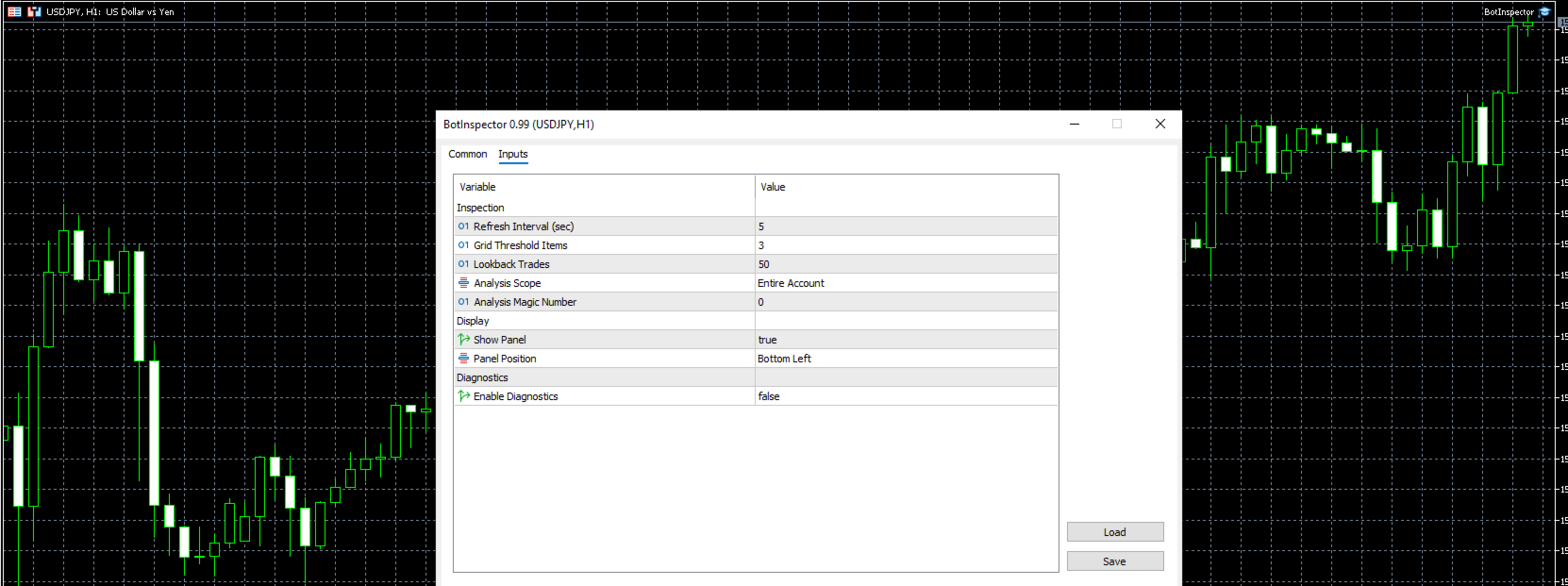
Main parameters

Refresh Interval
Grid Threshold Items
Lookback Trades
Analysis Scope
Analysis Magic Number
Show Panel
Panel Position
Enable Diagnostics

Diagnostics are disabled by default and can be enabled for additional technical information and troubleshooting.

Requirements

MetaTrader 5 only.

Supports Hedging and Netting accounts.

No DLL is required.

No WebRequest is required.

No external API key or external service is required.

BotInspector does not open, modify or close trades.

Important

BotInspector is an observational risk-analysis utility.

It evaluates the trading evidence available in MetaTrader 5. It does not inspect the source code of another Expert Advisor.

A high score or low observed-risk state does not mean that a strategy is safe, profitable or suitable for future trading.

Observed risk only - not a profit forecast.
おすすめのプロダクト
QuickTrade Panel – Fast Order Execution & Risk Management The QuickTrade Panel is a powerful MetaTrader 5 trading tool that helps traders place orders faster, manage risk automatically, and control trades directly from the chart. It reduces manual work, improves trading accuracy, and makes trade management simple and efficient. Key Features On-Chart Trading: Change Lot Size, Risk %, Stop Loss (SL), Take Profit (TP), and Pending Distance without opening EA settings. Smart Position Sizing: Choose
Panic Panel is a professional manual trade management tool for MetaTrader 5. It allows traders to control open positions quickly and safely directly from the chart. Main Features: - Symbol-specific position control - One-click Break Even - Manual Stop Loss step adjustment - Partial close: 25% / 50% / 75% - Net profit, position count and volume display - Independent per chart operation The panel works only on the active symbol and does not affect other instruments. This tool does NOT open tr
PS4 Trading Controller lets you trade MetaTrader 5 using a DualShock 4 controller (USB or Bluetooth). Designed for traders who want speed and convenience, this tool maps controller buttons to essential trading actions so you can execute and manage positions without touching the keyboard or mouse. Key Features: • Market Buy / Sell with R2 and L2 • Close one position at a time (R1 / L1) • Close all profitable trades (Triangle) • Close all losing trades (Circle) • Adjust lot size with D-Pad • Mov
FREE
インディケータは現在のクオートを作成し、これを過去のものと比較して、これに基づいて価格変動予測を行います。インジケータには、目的の日付にすばやく移動するためのテキスト フィールドがあります。 オプション: シンボル - インジケーターが表示するシンボルの選択; SymbolPeriod - 指標がデータを取る期間の選択; IndicatorColor - インジケータの色; HorisontalShift - 指定されたバー数だけインディケータによって描画されたクオートのシフト; Inverse - true は引用符を逆にします。false - 元のビュー。 ChartVerticalShiftStep - チャートを垂直方向にシフトします (キーボードの上下矢印)。 次は日付を入力できるテキストフィールドの設定で、「Enter」を押すとすぐにジャンプできます。
Apex Zone Reversal 製品概要 Apex Zone Reversal は、MetaTrader 5 (MT5) 向けに開発されたテクニカル分析インジケーターです。ZORRO フレームワークおよび市場構造の反転に基づいて、市場のサポート、レジスタンス、および反転ゾーンをトレーダーが特定するのを支援するように設計されています。 主な機能 ゾーンマッピング : ZORRO フレームワークから派生したシステムロジックを使用して、サポート、レジスタンス、および反転ゾーンを自動的に特定します。 時間枠フィルタリング : M1、M2、M3 などの下位の時間枠での描画を制限するパラメーターが組み込まれており、チャートをクリーンに保ちます。 リトレースメントスケーリング : 内部の分析オーバーレイを起点から終点まで正しくプロットします。 マルチアセット互換性 : 金 (XAUUSD) や通貨ペアなどの主要な資産を含む、さまざまな金融商品で機能するように設計されています。 仕様 プラットフォーム : MetaTrader 5 (MT5) 製品タイプ : カスタムテクニカルインジケーター (
Risk Manager Custom Version for MetaTrader 5 Risk Manager is a professional risk-control utility for MT5. It does not open trades by itself and does not generate trading signals. The tool is designed to monitor already opened positions and help the trader control risk, position size, stop loss, take profit, and trading restrictions. Main features: Individual Max Lot for selected symbols — set a separate maximum lot for up to 5 instruments. For example: EURUSD = 1.2 lot, XAGUSD = 0.1 lot. All
ティッカーのリスト全体を、ワンクリックで「気配値表示」に追加します。 スクリーナーで80銘柄を絞り込みました。しかし、それをMetaTrader 5に追加するには1件ずつ作業が必要です。銘柄ツリーを開き、ティッカーを入力し、自分のブローカーでの表記を推測し、それを80回繰り返す。純粋なクリック作業だけで30〜50分。しかもウォッチリストを変えるたびに、毎回この作業をやり直すことになります。 Market Watch Bulk Loaderは、これをクリップボードから数秒で終わらせます。 どこからでもティッカーをコピーし、入力欄に貼り付けて、ボタンを1回押すだけ。ユーティリティが各ティッカーをブローカーが実際に提供している銘柄と照合し、一致したものを「気配値表示」に追加します。 使い方 1. ティッカーのリストをクリップボードにコピーします(スクリーナー、表計算ソフト、チャットのメッセージなど、どこからでも構いません)。 2. MetaTrader 5でパネルのリストボタンを押します。入力欄が表示されます。 3. リストを貼り付けます(Ctrl+V または右クリック)。 4.
Short Description Swing Timing Breakout EA is a smart Expert Advisor for MetaTrader 5 that combines trend filtering, momentum timing, and dynamic risk management to capture high-probability swing and breakout opportunities. Full Description Swing Timing Breakout EA is a professional trading robot designed for MetaTrader 5, suitable for traders who want a balance between automation, control, and disciplined risk management. This EA uses a trend-following and momentum confirmation approach ,
SEN Guardは、MetaTrader 5(MT5)向けのリスク監視・口座保護ユーティリティです。 現在の安全状態、その理由、保護処理の状態をチャート上で確認でき、対応条件下では安全側への停止、保護を目的としたポジションのクローズ、保留注文のキャンセルを支援します。 SEN Guardの重要な特徴は、「何が起きているか」だけでなく「なぜその状態なのか」を確認できることです。 Operation、Safety、Reason、Enforcementを1つのパネルに表示し、現在の保護状態とその理由を分かりやすく可視化します。 主な機能 - Operation、Safety、Reason、Enforcementを表示するランタイム安全状態パネル - 現在の保護状態と、その状態になっている理由の可視化 - 対応条件下での安全側への停止動作 - 対応条件下での保護を目的としたポジションクローズ - 対応条件下での保留注文キャンセル - 対応するMetaTrader 5口座の現在状態を分かりやすく表示 - 対応していない口座モードを検出した場合の安全側への停止 - 自
CosmiCLab SMC FIBO CosmiCLab SMC FIBO is a professional trading indicator designed for traders who use Smart Money Concepts (SMC), market structure analysis and Fibonacci retracement levels. The indicator automatically detects market swings and builds Fibonacci levels based on the latest impulse movement. It also identifies market structure changes such as BOS (Break of Structure) and CHOCH (Change of Character), helping traders understand the current market direction. CosmiCLab SMC FIBO also pr
This tool is used to generate a K - line reflection chart of a currency pair for foreign exchange transactions. For example, if the currency pair is EURUSD, a custom currency pair named EURUSD_ref is generated and a chart for that currency pair is opened. The price of a custom pair of currency is the inverse of the price of the original pair, which is the equivalent of a new pair of currency, the USDEUR. The usage is simple, put it on any chart, the new chart will open, and then draw the corr
Reflex Panel - 半自動売買の革命! MT5の使いにくい標準インターフェースにうんざりしていませんか?ウィンドウの切り替えや複雑な計算はもう忘れましょう! Chart Revolution EA は、あなたのチャートをトレーダーの本格的なコマンドセンターに変える、次世代のプロフェッショナル取引パネルです! CHART REVOLUTIONが選ばれる理由 すべてを1画面で - 余分なウィンドウはもう不要 即時実行 - ワンクリックで取引を開始 スマートなリスク計算 - 証拠金に対する割合(%)でロットを自動計算 視覚的な管理 - すべてのポジションレベルをチャート上に直接表示 4つのスタイリッシュなテーマ - サイバーパンクからマトリックスまで 主な機能 取引パネル: ワンクリックでBUY/SELLポジションを発注 ロット、SL、TPの迅速な設定 クイック選択ボタン (0.01 - 1.00 ロット) プリセットSL/TPレベル (25, 50, 100, 200 ポイント) 全ポジション決済 / 利益のあるポジションのみ決済 省スペ
FREE
Trading Rules Enforcer is a deterministic account-discipline monitor for trade-count, loss, time and exposure rules. Key functions: - Clear rule status dashboard - Trading-session restrictions - Overtrading controls - Symbol and Magic Number scope - Daily loss and exposure monitoring - Clear blocking reasons - Operational event history The utility enforces rules configured by the user. It does not generate entry signals, predict market direction or guarantee trading results. Test all rule comb
GDS Renko Pip ST Chart - Pip-Based Renko Chart Indicator for MetaTrader 5 GDS Renko Pip ST Chart is a pip-based Renko chart indicator for MetaTrader 5. It helps traders build and study cleaner Renko price movement using a practical fixed pip or point-based brick structure. This tool is designed as a Renko chart foundation for manual analysis. It does not predict the market, does not generate buy or sell signals and does not decide whether a trade should be opened. Renko EDGE EA Golden Delta | A
Order Book, known also as Market Book, market depth, Level 2, - is a dynamically updated table with current volumes of orders to buy and to sell specific financial instument at price levels near Bid and Ask. MetaTrader 5 provides the means for receiving market book from your broker, but in real time only, without access to its history. The indicator OrderBook Cumulative Indicator accumulates market book data online and visualizes them on the chart. In addition, the indicator can show the market
Trade Plan Desk MT5 は、注文を実行する前にトレード計画を整理し、確認するためのトレード管理ダッシュボードです。 方向、エントリー、Stop Loss、Take Profit、リスクを設定すると、ブローカー条件に基づいて適切なロット数、予定リスクリワード比を計算し、取引前チェックを実行します。 主な機能: • Entry / Stop Loss / Take Profit の計画 • パーセントまたは金額によるリスク設定 • ブローカー条件に基づく自動ロット計算 • PASS / WARNING / FAIL の事前チェック • スプレッド、証拠金、最小距離、ブローカールールの確認 • Market / Stop / Limit 注文 • Netting / Hedging 対応 • SL/TP変更、部分決済、ポジション量変更の監視 • Planned vs Actual 比較 • R、P&L、MFE、MAE、giveback、capture efficiency • 履歴保存と再起動後の状態復元 • Compact / Details を備えたサイズ変更可能な
概要 Candle Timer Countdown Pro は、現在のローソク足が終了するまでの残り時間を、滑らかで正確なカウントダウンとして表示します。さらに、円形のプログレスアーク(進行表示)を組み合わせることで、残り時間を瞬時に視覚的に把握できます。 ティック間で停止したり、時間がずれてしまう他のタイマーとは異なり、本インジケーターはサーバー時間の補間(Server Time Interpolation)を使用し、M1 から MN まであらゆる時間足で途切れのないスムーズなカウントダウンを実現します。 1分足でのスキャルピングでも、H4でのスイングトレードでも、現在のローソク足が正確にいつ確定するのかを把握することで、エントリータイミングの最適化、ローソク足パターンの確認、そして早すぎる判断の回避に役立ちます。 このタイマーが他と違う理由 多くの MT5 用キャンドルタイマーは TimeCurrent() のみに依存しており、新しいティックが到着したときにしか更新されません。低ボラティリティ時や上位時間足では、ティックの間隔が数秒空くことがあり、その間タイマーが停止し、その後突
MT5 Telegram Notifier — Real-Time Account Monitoring Stay informed and in control of your trading account from anywhere. This utility Expert Advisor sends instant notifications and detailed reports directly to your Telegram chat. Key Benefits Real-Time Alerts : Receive notifications when positions open, close, or pending orders change. Risk Management : Margin level alerts help you act before critical thresholds. Hedging Support : Displays every position individually using ticket-based logic. O
SolarTrade Suite 金融ロボット: LaunchPad Market Expert - 取引を開始するために設計されています! これは、革新的で高度なアルゴリズムを使用して値を計算する取引ロボットであり、金融​​市場の世界でのアシスタントです。 SolarTrade Suite シリーズのインジケーター セットを使用して、このロボットを起動するタイミングをより適切に選択してください。 説明の下部にある SolarTrade Suite シリーズの他の製品をご覧ください。 投資と金融市場の世界を自信を持ってナビゲートしたいですか? SolarTrade Suite 金融ロボット: LaunchPad Market Expert は、情報に基づいた投資決定を行い、利益を増やすのに役立つ革新的なソフトウェアです。 SolarTrade Suite 金融ロボット: LaunchPad Market Expert の利点: - 正確な計算: 当社のロボットは、高度なアルゴリズムと分析方法を使用して、市場の動きを正確に予測します。 資産を売買するのに最適なタイミングを
Hisoka Trade Panel — v6.91 Description: Hisoka Trade Panel is a comprehensive on-chart trade management Expert Advisor for MetaTrader 5. It places a draggable, collapsible panel directly on your chart and lets you manage open positions — break-even locks, trailing stops, partial closes, and SL/TP modification — with one click. All risk math is dollar-based, so the same "BE 5$" button locks $5 of profit consistently across XAUUSD, BTCUSD, EURUSD or any other instrument, regardless of contract siz
The purpose   of this utility is to manage one or more subwindow in the same chart by opening and closing them through a button or the keyboard keys How it works: If you want to handle more than one subwindow you need to reinstall the indicator . In this case some setups has to be customized onlu in the last subwindow installed and others setups in the installed subwindow during the first time installation. They are denoted in the input rispectively as ' LW ' and ' IW '. First of all install
HMA Scalper Pro EA
Vladimir Shumikhin
5 (2)
HMA Scalper Pro EA — Hull Moving Average (HMA) インジケーターに基づく MetaTrader 5 用自動売買アドバイザー 概要 HMA Scalper Pro EA は、Hull Moving Average (HMA) の方向にトレードする MetaTrader 5 用のプロフェッショナルなトレーディングロボット(Expert Advisor)です。HMA インジケーターは現在のトレンド方向を判定し、アドバイザーはその方向にトレードを執行し、Smart Risk キャピタルマネジメント、アダプティブグリッドトレーディング、トレイリングストップ、ブレイクイーブン、タイムフィルターでエントリーを補完します。 このアドバイザーは Netting アカウントと Hedging アカウントの両方をサポートし、金(XAU/USD)、外国為替通貨ペア、原油、指数、暗号資産の取引に適しています。 HMA SCALPER PRO EA を選ぶ理由 - Hull Moving Average シグナル — HMA の方向に基づくエントリー。HMA
How the Chart Cleaner Script Works The Chart Cleaner is a one-click tool designed to instantly wipe your chart clean. When you drag and drop the script onto a chart, it scans for and removes all visual objects—including trend lines, horizontal lines, text labels, shapes, and any other drawings you have placed. The result is a completely clean, uncluttered chart, giving you a fresh workspace for your analysis. It's the fastest way to reset your chart to its default state.
Non-Repainting. Non-Redrawing. Non-Lagging. Signals appear only on confirmed bars. What you see on history is exactly what appeared in real time. Built specifically for Gold (XAUUSD) traders. Gold ML Supertrend MT5 is the only Supertrend indicator on MQL5 that learns. Instead of using a fixed multiplier, it runs a K-means clustering algorithm on recent price data to find the optimal band width. Then it adapts that width per trading session (Asia/London/NY) based on what actually worked. The resu
️ MQL5 3D Animated AutoChess Sandbox - Game Guide This AutoChess sandbox game is a standalone 3D animated strategy game developed entirely in MQL5. Below is the comprehensive guide to game rules, input parameters, core mechanics, and operations. ️ System Input Parameters When loading the script in MT5, you can configure the following options in the "Inputs" panel: | Parameter Name | Default | Description & Details | | :--- | :---: | :--- | |   Language   |   LANG_ENG   |   Language Option . Ch
Trading Co-Pilot for MetaTrader 5 Advanced Position Management for Manual Traders Trading Co-Pilot is a professional trade management assistant designed for traders who open positions manually and want precise, automated control over risk and profit handling. It does not open trades. It manages them intelligently. You focus on entries. The Co-Pilot protects and optimizes the exit. How It Works Once you open a manual position, Trading Co-Pilot automatically: • Applies Stop Loss • Sets Take Profit
FREE
Trading Panel — 説明 JA Trading Panel — MetaTrader 5 向け執行・リスク管理パネル Trading Panel は、実際のトレード経験をもとに開発された手動取引ユーティリティです。単なる注文送信ツールではなく、取引執行・ポジション管理・リスク管理を統合した完全なソリューションです。自動部分決済、ブレークイーブン、トレーリングストップを内蔵。FX、先物、CFD、株式、暗号資産に対応。ヘッジ口座・ネッティング口座を完全サポート。DLL不要。 DLL不要 MQL5 Market準拠 ヘッジ & ネッティング FX • 先物 • CFD • 株式 • 暗号資産 4テーマ 重要: パネルはMagic Numberを使用します。インスタンス間の競合を避けるため、チャートごとに必ず固有のMagic Numberを使用してください。 主な機能 ワンクリックBUY・SELL: SLとTPを自動計算してダイアログなしで即座に成行注文を執行。 チャートクリックによる指値注文: 指値モードを有効にしてチャート上の任意の価格をクリックし、Buy Stop・Buy L
ClusterSecondForex
Rafil Nurmukhametov
4.67 (3)
The utility allows you to build different types of graphs: Seconds chart from 1 second to 86400 seconds Tick chart from 1 tick and above The volume chart Delta chart Renko chart Range chart Product demo https://www.mql5.com/ru/channels/clustersecondforex Built-in indicators for volumetric analysis: daily market profile and market profile of the selected timeframe, Cluster Search Imbalance VWAP Dynamic POC, VAH, VAL the profile depth of the market vertical volume with various display options, del
Bank Your Profits & Secure Your Trade in One Click The Ultimate "Scale Out" Tool for Professional Traders. Close Partial  (MT5 Utility) is designed for traders who want to lock in profits without killing the trend. With a single click, you can bank a percentage of your profit instantly. New Feature (Auto-Secure): Stop wasting time dragging your Stop Loss after taking profit. This manager can now automatically move your Stop Loss to Break-Even the moment you click the "Close Partial" button. Bank
FLUG — Professional Price Action EA for XAUUSD A precision-engineered Expert Advisor built exclusively for Gold (XAUUSD). FLUG identifies high-probability price-action setups using proprietary candle structure analysis, then manages every position with multiple configurable safeguards designed for serious traders and prop-firm accounts. Key Features - Built specifically for XAUUSD — all calculations tuned for 2-digit Gold pricing - Two switchable entry modes: Classic and Sniper Pullback - Struc
このプロダクトを購入した人は以下も購入しています
Trade Assistant MT5
Evgeniy Kravchenko
4.43 (216)
取引 ごとのリスクの 計算、新規注文 の 簡単 な 設置、部分的 な 決済機能 を 持 つ 注文管理、 7 種類 のトレーリングストップなど 、便利 な 機能 を 備 えています 。 追加の資料と説明書 インストール手順   -   アプリケーションの手順   -   デモアカウント用アプリケーションの試用版 ライン機能 チャート上にオープニングライン、ストップロス、テイクプロフィットを表示します。この機能により、新規注文を簡単に設定することができ、注文を出す前にその特徴を確認することができます。   リスク計算 リスク計算機能は、設定されたリスクとストップロス注文のサイズを考慮して、新規注文のボリュームを計算します。ストップロスの大きさを自由に設定できると同時に、設定したリスクを守ることができます。 Lot calc ボタン - リスク 計算 を 有効 / 無効 にします 。 Risk フィールドでは 、必要 なリスクの 値 を 0 から 100 までのパーセンテージまたは 預金通貨 で 設定 します 。 設定」 タブで 、 リスク 計算 の 種類 を 選択 します :「 $ 通
Trade Manager EAへようこそ。これは、取引をより直感的、正確、そして効率的にするために設計された究極の リスク管理ツール です。これは単なるオーダー実行ツールではなく、包括的な取引計画、ポジション管理、リスク管理のためのソリューションです。初心者から上級者、迅速な実行を必要とするスキャルパーまで、Trade Manager EAはあらゆるニーズに対応し、為替、指数、商品、暗号通貨などさまざまな市場で柔軟に対応します。 Trade Manager EAを使用すると、複雑な計算が過去のものになります。市場を分析し、エントリーポイント、ストップロス、テイクプロフィットのレベルをチャート上のラインでマークし、リスクを設定するだけで、Trade Managerが最適なポジションサイズを即座に計算し、SLとTPをピップ、ポイント、口座通貨でリアルタイムに表示します。すべての取引が簡単かつ効果的に管理されます。 主な機能: ポジションサイズ計算機 :定義されたリスクに基づいて取引サイズを瞬時に決定します。 簡単な取引計画 :エントリー、ストップロス、テイクプロフィットを設定するためのド
Local Trade Copier EA MT5
Juvenille Emperor Limited
4.94 (149)
Local Trade Copier EA MT5 は、同一の Windows PC または Windows VPS 上で稼働する複数の MetaTrader 5 口座間で、取引をコピーおよび管理するための高速で柔軟なトレードコピーツールです。 ローカルでの取引同期に加え、Receiver 側でロットサイズ、リスク管理、取引フィルター、シンボルマッピング、取引管理、口座保護を個別に設定できます。 Transmitter と Receiver のターミナルは約 1分 で設定でき、同一ブローカーまたは異なるブローカーの口座間で、手動取引や EA による取引をコピーできます。適切な条件下では、ローカルの MetaTrader ターミナル間で取引情報を 0.5秒未満 で同期できます。実際の約定速度は、ブローカーのレイテンシー、ネットワーク状況、PC/VPS の性能、ターミナルの負荷によって異なります。 ご購入前に無料デモをお試しください Local Trade Copier EA MT5 の完全機能版無料デモ を、MT5 デモ口座で 1回につき4時間 テストできます。 Local Trad
Telegram to MT5 Multi-Channel Copier   は、Telegram チャンネルのトレードシグナルを MetaTrader 5 へ自動コピーします。ボット不要、ブラウザ拡張不要、手動コピー不要。Telegram にシグナルが届くと、EA が数秒であなたのターミナルに注文を出します。 さらに、チャンネルをコピーする前に、内蔵バックテスターでそのチャンネルがあなたの口座でどう動いたかを確認できます。 製品は 2 つのコンポーネントで構成されます:Telegram チャンネルを監視する Windows アプリと、MT5 ターミナルでシグナルを執行する本 EA です。MT4 版もあります   こちら . セットアップガイドとアプリのダウンロード:   https://www.mql5.com/en/blogs/post/768988 現在の価格は今後値上げされます。 仕組み アプリはあなた自身の Telegram アカウントで接続するため、フォローしているすべてのチャンネル、グループ、トピック、ボット(プライベートや VIP を含む)を見ることができます。シグナル
TradePanel MT5
Alfiya Fazylova
4.88 (169)
Trade Panelは多機能なトレーディングアシスタントです。アプリには手動取引用の50以上のトレーディング機能が搭載されており、ほとんどの取引作業を自動化することができます。 アプリの説明書+ビデオガイド: https://www.mql5.com/en/blogs/post/772292 デモ口座用アプリの試用版: https://www.mql5.com/en/blogs/post/750865 アプリのインストール方法: https://www.mql5.com/en/blogs/post/756239 アプリをビジュアルモードでテストする方法: https://www.mql5.com/en/blogs/post/770277 VPSのMetaTraderにアプリをインストールする方法: https://www.mql5.com/en/blogs/post/770190 取引。 ワンクリックで取引操作を行うことができます: リスクを自動計算して指値注文やポジションを開く。 複数の注文やポジションをワンクリックで開く。 注文のグリッドを開く。 保留中の注文やポジションをグルー
================================================================================ POC BREAKOUT - V20.72. Full Professional Grade Toolkit ================================================================================ POC Breakout is a full MetaTrader 5 trading dashboard for discretionary traders who want breakout signals, Point of Control (POC) context, volume profiles, order flow, market structure, news, alerts, and advanced trade planning in one professional workspace. Attached directly to you
自分の取引ルールで Telegram のシグナルをコピー Telegram to MT5 Signal Trader は、Telegram の公開・非公開チャンネルやグループから、テキスト形式の取引シグナルを MetaTrader 5 へ自動でコピーします。1つのデスクトップアプリで複数の配信者と MT5 口座を管理し、 配信者ごとにリスクと取引設定を個別に指定 できます。 シグナルのコピーに Telegram ボットや API 設定は必要ありません。 電話番号または QR コードでご自身の Telegram アカウントにログインし、すでに参加しているチャンネルやグループを選ぶだけです。ボットの作成や、Telegram API トークン、API ID、API hash の入力は不要です。 ポジションサイズを選び、複数の利確水準に分けて決済し、建値へのストップ移動やトレーリングストップを自動化できます。配信者のシグナルを受け取りながら、実際の取引方法は自分で管理できます。 本製品は、この MT5 エキスパートアドバイザ(EA)と、必須の Windows 連携アプリで構成されます。 インス
Farmed Hedge Yield Farming | All Markets (Manual - Hybrid - Semi/Automated EA) VERIFIED TRADING RESULTS - Farmed Hedge Yield Axi Copy:  https://www.mql5.com/en/signals/2356376 - Farmed Hedge Yield Exn Copy:   https://www.mql5.com/en/signals/2356404 - Farmed Hedge Yield V Copy:  https://www.mql5.com/en/signals/2357156 IMPORTANT NOTICE: FarmedHedge is a MANUAL-FOCUSED TRADING UTILITY ,not a fully automated EA. Results shown on this Signal include manual trades and overall strategic management.
Power Candles Strategy Scanner - 自動最適化型マルチシンボル設定ファインダー パワーキャンドル・ストラテジー・スキャナーは 、パワーキャンドル・インジケーターを駆動するのと全く同じ自己最適化エンジンを、マーケットウォッチに登録されているすべての銘柄に対して並行して実行します。1つのパネルで、現在統計的に取引可能な銘柄、各銘柄で勝率の高い戦略、最適なストップロス/テイクプロフィットの組み合わせが表示され、新たなシグナルが発生した瞬間に通知が届きます。 このツールは、Stein Investmentsのエコシステムの一部です。  18種類以上のツールをすべて閲覧し、AIを活用したセットアップの推奨を受け取り、  https://stein.investments でコミュニティに参加しましょう 市場動向を網羅。銘柄ごとに3,000件以上の自動最適化。2種類のアラート。ワンクリックでチャートを切り替えて即座にアクション。 なぜこれが必要なのか 多くのマルチ銘柄スキャナーは、 価格の動き (ボラティリティ、変動率、銘柄ごとのRSI)を表示するだけです。それ
Exp COPYLOT CLIENT for MT5
Vladislav Andruschenko
3.97 (35)
MetaTrader 5 用のプロフェッショナル取引コピー機 MetaTrader 向けの高速・高性能・信頼性の高い 取引コピー機 です。 COPYLOT は、MT4 と MT5 のターミナル間で Forex 取引をコピーでき、 Hedge 口座と Netting 口座の両方に対応しています。 COPYLOT MT5 版の対応構成: - MT5 Hedge → MT5 Hedge - MT5 Hedge → MT5 Netting - MT5 Netting → MT5 Hedge - MT5 Netting → MT5 Netting - MT4 → MT5 Hedge - MT4 → MT5 Netting MT4 版 完全な説明 + DEMO + PDF 購入方法 インストール方法 ログファイルの取得方法 テストと最適化の方法 Expforex のすべての製品 MT4 ターミナルへのコピーも可能です(MT4 → MT4、MT5 → MT4): COPYLOT CLIENT for MT4 COPYLOT は、2台、3台、さらには10台のターミナル間で同時に動作できる、プロフェッ
Signal TradingView to MT5 Pro Automator TradingViewとMetaTrader 5間の即時プロフェッショナル実行 TradingViewのシグナル(アラート)とMT5での実際の約定を繋ぐ、最も強固なコミュニケーションブリッジで、取引戦略を自動化します。スピード、柔軟性、そして完璧なリスク管理を求めるトレーダー向けに設計されたこのExpert Advisorは、あらゆるアラートメッセージを正確な成行または指値注文に変換します。 強みと利点 ユニバーサルパーシングエンジン(独自技術): あらゆるアラート形式からデータを自動的に認識し、抽出できる高度なテクノロジー。単一の固定フォーマットに制限されることはありません。システムはシンボル(銘柄)、アクション、価格、SL(ストップロス)、TP(テイクプロフィット)を自動的に理解します。 リアルタイム実行: レイテンシ(遅延)を最小限に抑えるよう最適化された、1秒未満の超高速ポーリング技術。シグナルを受信してから数ミリ秒以内に注文が実行されます。 機関投資家レベルのリスク管理: 以下に基づく自動かつ正確
Premium Trade Manager - コーチ内蔵型トレードパネル Premium Trade Manager は、AIトレーディングコーチをあなたのチャートの中に置き、その下に完全な執行エンジンを備えたツールです。いつも通りにトレードをセットアップし、あなた専任のAIトレーディングコーチ Max にそのセットアップをそのまま読み取らせて、発注前に率直な見解を伝えてもらいましょう。ストップの幅が規律あるアプローチに合っているか、リスクサイズは適切か、高影響のニュースイベントが数分後に迫っていないか、プロップファームの制限に近づいていないか。その下には、クリックの後をすべて処理するエンジンが備わっています。ワンクリックのリスクサイズ計算による発注、チャート上でドラッグして組み立て、発注後も動かせるプラン、最大4段階の分割利確、7種類のトレール方式、リアルタイムのプロップファームコンプライアンス、ニュースガード、そしてコストを自ら採点するスプレッド機能。判断はあなたが下す。Max がもう一度確認する。後のことはすべてパネルが担う。 購入前に実際に触れて試せます。 ブラウザ上でライブ
MT5 to Telegram Signal Provider は、Telegramのチャット、チャンネル、またはグループに 指定された シグナルを送信することができる、完全にカスタマイズ可能な簡単なユーティリティです。これにより、あなたのアカウントは シグナルプロバイダー になります。 競合する製品とは異なり、DLLのインポートは使用していません。 [ デモ ] [ マニュアル ] [ MT4版 ] [ Discord版 ] [ Telegramチャンネル ]  New: [ Telegram To MT5 ] セットアップ ステップバイステップの ユーザーガイド が利用可能です。 Telegram APIの知識は必要ありません。必要な全ては開発者から提供されます。 主な特長 購読者に送信する注文の詳細をカスタマイズする機能 例えば、Bronze、Silver、Goldといった階層型のサブスクリプションモデルを作成できます。Goldサブスクリプションでは、すべてのシグナルが提供されます。 id、シンボル、またはコメントによって注文をフィルターできます 注文が実行されたチャート
HINN MAGIC ENTRY – the ultimate tool for entry and position management! SIMPLE. FASTEST. INTUITIVE. MAX AUTOMATED. Place orders by selecting a level directly on the chart! full description   ::  demo-version  :: 60-sec-video-description Key features: - Market, limit, and pending orders - Automatic lot size calculation - Automatic spread and commission accounting - Unlimited partitial take-profits  - Breakeven and trailing stop-loss and take-profit  functions - Invalidation leves - Intuitive, a
One button. One trade. MT5 Trading Deck is a hotkey trading panel for MetaTrader 5 that turns the platform into a keyboard-driven execution cockpit. Stop loss, take profit and lot size are pre-calculated for every key; the moment you press, a market order is live on the broker. A complete technical user manual is attached in the product Comments section. It documents every input parameter, the full hotkey map, the recommended Stream Deck XL layout, and the advanced workflows for Pre-Limit orders
EA Slipstream
Stephen J Martret
5 (1)
Your backtest filled every order at the price it asked for. Your account does not. EA Slipstream measures what execution costs your EA, using your own fills, slippages and spreads to show you the true performance of your EA. A backtest prices every trade at the level the EA named. In live trading a pending order fills at whatever price is available when it triggers, a stop closes wherever the market is when it is hit, and the spread at that moment is whatever the account was quoting. The differ
Grid Manual MT5
Alfiya Fazylova
4.73 (22)
「Grid Manual」は、注文のグリッドを操作するための取引パネルです。 ユーティリティはユニバーサルで、柔軟な設定と直感的なインターフェイスを備えています。 それは、損失を平均化する方向だけでなく、利益を増やす方向でも注文のグリッドで機能します。 トレーダーは注文のグリッドを作成して維持する必要はありません。 すべてが「Grid Manual」によって行われます。 注文を開くだけで十分であり、「Grid Manual」は注文のグリッドを自動的に作成し、非常に閉じるまでそれに付随します。 完全な説明とデモバージョン ここ。 ユーティリティの主な機能と機能 ユーティリティは、モバイル端末から開かれた注文を含め、あらゆる方法で開かれた注文を処理します。 「制限」と「停止」の2種類のグリッドで機能します。 グリッド間隔の計算には、固定と動的(ATRインジケーターに基づく)の2つの方法で機能します。 オープンオーダーグリッドの設定を変更できます。 チャート上の各注文グリッドの損益分岐点を表示します。 各注文グリッドの利益率を表示します。 ワンクリックでグリッドから収益性の高い注文を閉じるこ
EA Overfitter
Stephen J Martret
5 (1)
That backtest looks great. But will it still be making money tomorrow, next week, next month? EA Overfitter re-runs your EA on 100 price histories it has never seen. One score tells you if the edge is real. A backtest tells you what an EA did on one price history — the one that happened to occur. What you cannot tell from it is how much of that result was the strategy and how much was the particular path. EA Overfitter answers that. It builds up to 100 synthetic price histories your EA has n
Trade Manager は、リスクを自動的に計算しながら、取引を迅速に開始および終了するのに役立ちます。 過剰取引、復讐取引、感情的な取引を防止する機能が含まれています。 取引は自動的に管理され、アカウントのパフォーマンス指標はグラフで視覚化できます。 これらの機能により、このパネルはすべてのマニュアル トレーダーにとって理想的なものとなり、MetaTrader 5 プラットフォームの強化に役立ちます。多言語サポート。 MT4バージョン  |  ユーザーガイド + デモ Trade Manager はストラテジー テスターでは機能しません。 デモについてはユーザーガイドをご覧ください。 危機管理 % または $ に基づくリスクの自動調整 固定ロットサイズを使用するか、ボリュームとピップに基づいた自動ロットサイズ計算を使用するオプション RR、Pips、または価格を使用した損益分岐点ストップロス設定トレーリングストップロス設定 目標に達したときにすべての取引を自動的に終了するための 1 日あたりの最大損失 (%)。 過度のドローダウンからアカウントを保護し、オーバートレードを防ぎます
Trade Dashboard simplifies how you open, manage, and control your trades, with built-in lot size calculation. It allows you to execute trades, manage risk, and control positions directly on the chart, with tools such as partial close, breakeven, and trailing stop. Designed to reduce manual work and help you stay focused on your trading decisions. A demo version is available for testing. Detailed explanations of features are provided within the MQL5 platform. Installation instructions are include
MT5 用 Dynamic Fibonacci Grid Dashboard の最新バージョンを紹介します。 数多くの新機能を搭載したこの新しいダッシュボードは、トレード体験を一新し、市場や価格アクションをまったく新しい視点から見ることができます。複数のタイムフレームと複数のシンボルを同時に分析することで、新たな可能性を発見できます。手動トレードやポジション管理のための使いやすいインターフェース、そしてあらかじめ設定された自動売買戦略を適用するための拡張機能を備えています。さらに、DFGはストラテジーテスター内でトレーディングシミュレーターとして完全に機能し、過去データを使用してさまざまな市場環境を再現できます。ビジュアルモードで手動トレードを練習したり、高速モードで自動売買戦略をテストしたりすることが可能です。 主な特徴 • Dynamic Fibonacci Bands の概念に基づく、複数タイムフレームおよび複数シンボルの高度なテクニカル分析。 リアルタイム市場監視ダッシュボードにより、これまでにない効率性を体験できます。M1、M5、M15、H1 のチャートから得られる複雑な
Seconds Chart - MetaTrader 5で秒足チャートを作成するユニークなツールです。 Seconds Chart を使用すると、秒単位のタイムフレームでチャートを構築でき、標準的な分足や時間足チャートでは得られない柔軟性と分析精度を実現します。例えば、 S15 は15秒足を表します。カスタムシンボルをサポートしているインジケーターやEAをすべて使用できます。標準的なチャートと同様に便利に操作できます。 標準的なツールとは異なり、 Seconds Chart は超短期のタイムフレームでも高い精度と遅延なく作業できるように設計されています。 Free Demo: Seconds Chart v2.29 Demo.ex5 無料デモをダウンロードしてご自身でお確かめください: 完全機能版 - すべての機能が利用可能 24時間テスト - 精度と利便性を評価するのに十分な時間 デモ口座のみ - ほとんどのブローカーで簡単に開設可能 GBPCADチャートのみ - ほとんどの端末で利用可能 これらの制限はデモ版のみに適用されます。製品版は、あらゆる口座タイプ(リアル、デモ、コンテス
The product will copy all telegram signal to MT5 ( which you are member) , also it can work as remote copier.  Easy to set up, copy order instant, can work with almost signal formats, image signal,  s upport to translate other language to English Work with all type of channel or group, even channel have "Restrict Saving Content", work with  multi channel, multi MT5 Work as remote copier: with signal have ticket number, it will copy exactly via ticket number. Support to backtest signal. How to s
Your EAs cannot see each other, but Anchor can. Anchor gives you one place to coordinate your EAs, manage risk, and decide when trading is allowed. It works alongside the trading bots you already use without any changes to them. The Problem One EA opens a trade. Then another starts trading. The next thing you know, you wake up to multiple grids built across your account. Each EA may be doing exactly what it was designed to do, but together they can place far more risk on your account than you in
Exp5 Duplicator
Vladislav Andruschenko
4.78 (9)
Duplicator for MetaTrader 5 — 1つの端末内で動作するプロフェッショナルなポジション複製システム MetaTrader 5 ですでに開かれているポジションを自動で複製し、総ボリュームを拡張し、独自のロット設定を適用しながら、複製ポジションを明確なルールで管理したいトレーダーのための信頼性の高い Expert Advisor です。 手動売買、アルゴリズム売買、そして既存ポジションをより柔軟に管理したい場面に適した実用的なツールです。 Duplicator for MT5 は独自の売買戦略で新規ポジションを開くものではありません。役割は、MetaTrader 5 口座内にすでに存在しているポジションを監視し、指定した条件に従ってその複製を作成することです。複製回数、ロットサイズ、Stop Loss、Take Profit、コメント、追加の管理条件まで細かく設定できます。 異なるプラットフォーム間のコピーではなく、 同じ MetaTrader 5 端末内で ポジションを正確に複製したい場合、この MT5 版 Duplicator はその目的のために作られていま
Footprint Chart Pro — Professional OrderFlow EA for MetaTrader 5 Version 6.34 | Professional tool for real traders | Institutional-Grade Visualization DEMO USERS - PLEASE SELECT EVERY TICK / REAL TICK WHEN TESTING AND YOU HAVE DOWNLOADED HISTORICAL DATA. IF YOU SEE A WAITING SCREEN AND IT IS NOT DOWNLOADING, IT MEANS YOU HAVE LOW HISTORICAL DATA. TRY 1 MIN AND 5 MIN FIRST ON 1 DAY DATA. ONE DAY DATA SHOULD BE THE NEWEST AND MOST CURRENT DATE. PLEASE WAIT UNTIL THE MARKET HAS ROLLED OVER PERIOD.
YuClusters
Yury Kulikov
4.93 (43)
Attention: You can view the program operation in the free version  YuClusters DEMO .  YuClusters is a professional market analysis system. The trader has unique opportunities to analyze the flow of orders, trade volumes, price movements using various charts, profiles, indicators, and graphical objects. YuClusters operates on data based on Time&Sales or ticks information, depending on what is available in the quotes of a financial instrument. YuClusters allows you to build graphs by combining da
Averager FULL
Vladislav Andruschenko
4.64 (14)
MetaTrader 5 用 Averager — プロフェッショナルな平均化とポジションシリーズ管理システム ドローダウンに入ったポジションを平均化し、さらにトレンド方向・逆トレンド方向の両方に追加エントリーできる強力な Expert Advisor です。 これは単なる平均化ツールではありません。取引シリーズ全体の平均価格、共通の利益目標、そしてポジション管理を柔軟にコントロールするための実践的な管理システムです。 Averager は、独立した自動売買戦略ではありません。すでに開かれている取引を監視し、平均化、追加エントリー、共通のトレーリングストップによってポジションシリーズ全体を管理するための専用ツールです。 手動取引を行うトレーダー、自分自身のシグナルを使うトレーダー、または他の売買システムと組み合わせて使いたいトレーダーに向けて設計されています。損失側に動いたポジションや発展中のポジションを、ひとつの明確な仕組みで管理したい方に最適です。 MT4 バージョン | 完全説明 + DEMO + PDF | 購入方法 | インストール方法 | ログファイルの取得方法 | テス
MetaTrader 5 用トレーディングパネル — チャートとキーボードから行うプロフェッショナルなワンクリック取引 アクティブトレーダーのために設計された高機能 Trading Panel。標準の MetaTrader 操作よりも、はるかに速く、直感的に、そして効率的に取引を実行できます。 本パネルは、ポジション管理、未決注文管理、利益コントロール、執行スピードをひとつのプロフェッショナルなワークスペースに集約した実践的なソリューションです。 これは単なる補助ツールではありません。MetaTrader 5 のための本格的な trading cockpit です。チャートから直接操作し、キーボードで素早くコマンドを実行し、自動計算や視覚的なガイドを活用することで、手動トレードをより速く、より明確に、より快適にします。 このパネルを使えば、チャート上からワンクリックで注文を実行でき、標準の MetaTrader コントロールと比べて最大 30 倍速く取引操作を行うことができます。 新しいプレミアム版が利用可能です: VirtualTradePad PRO SE で取引ワークフローを強
フィルタ:
レビューなし
レビューに返信