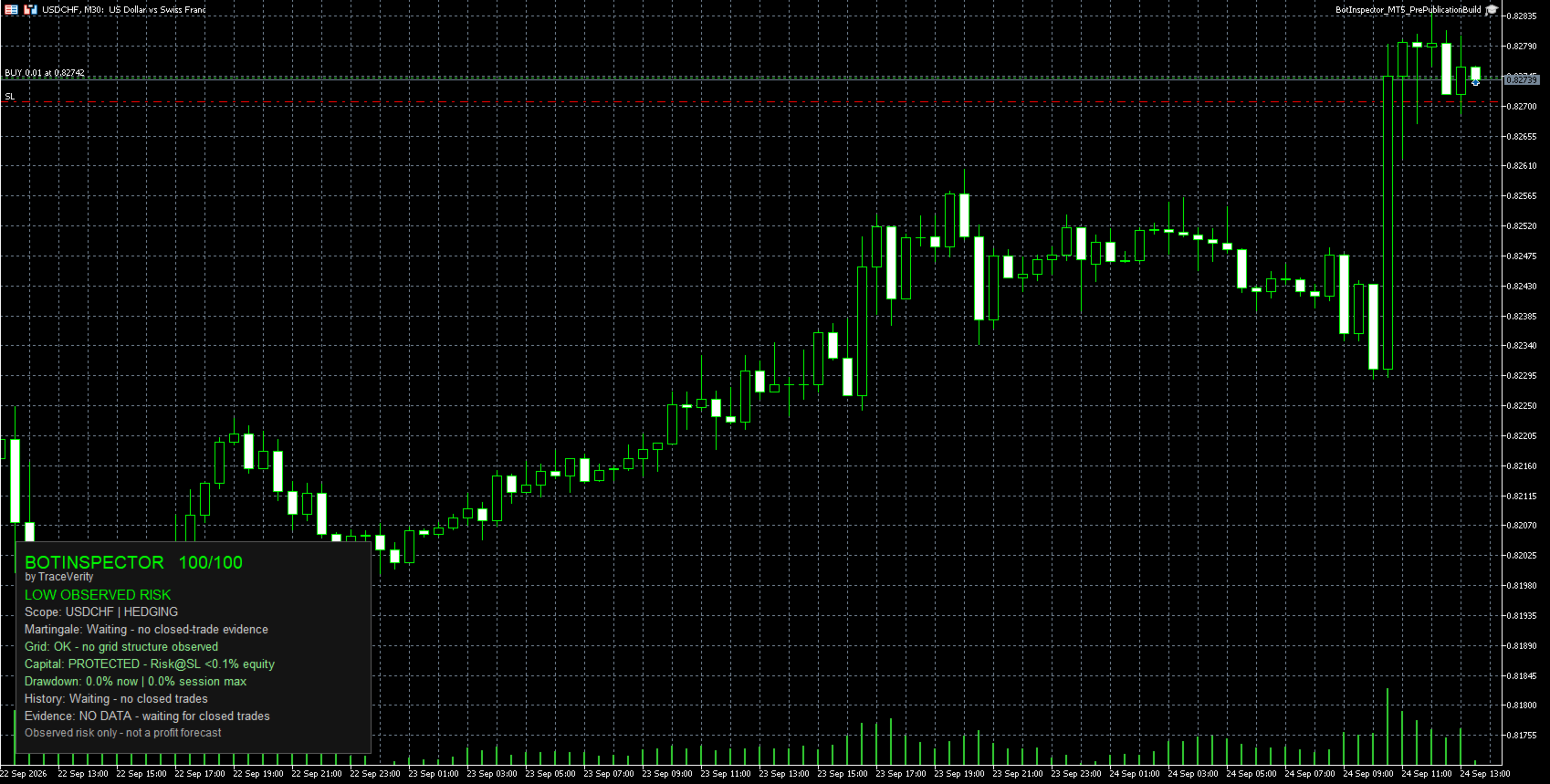
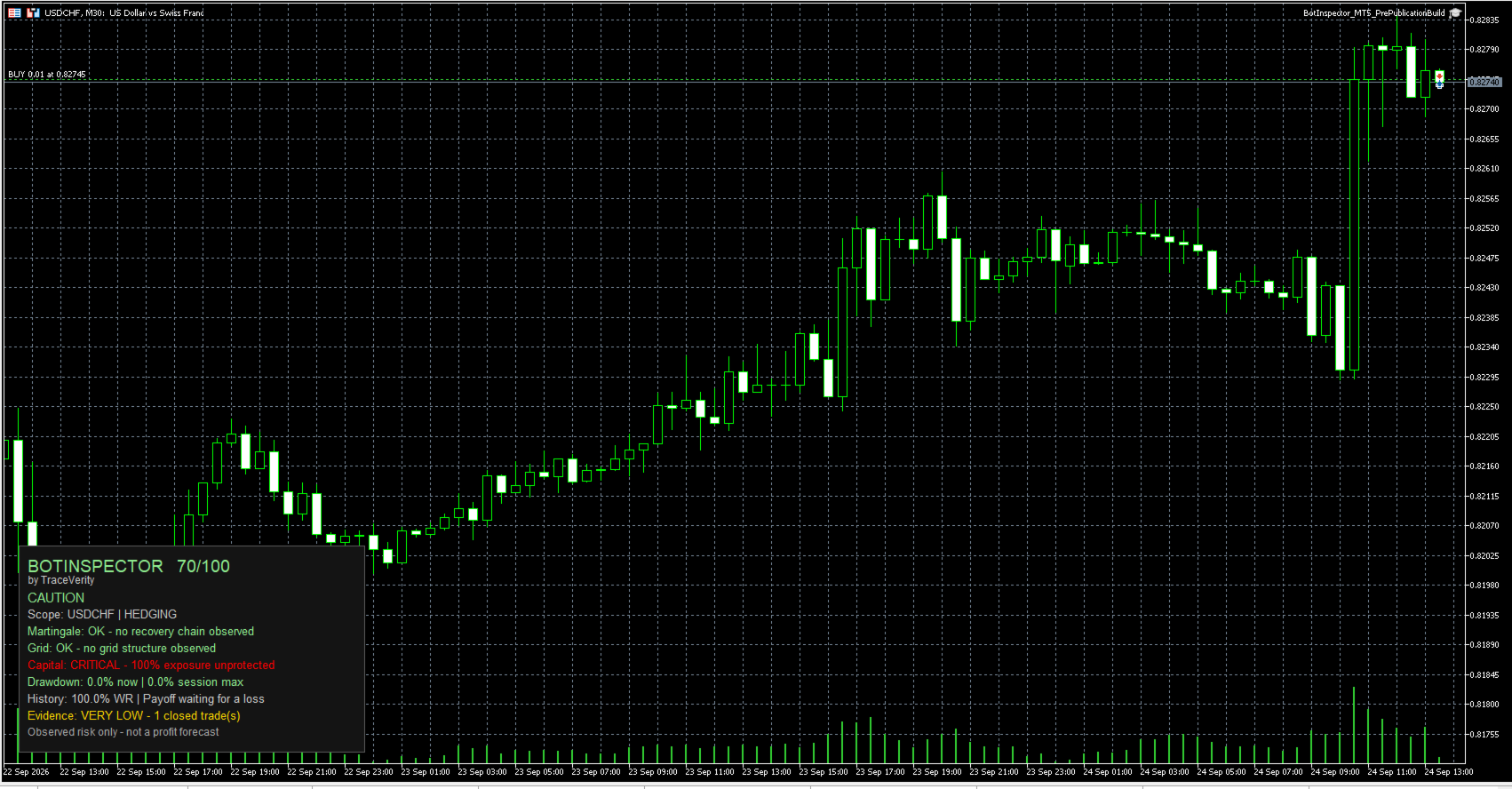
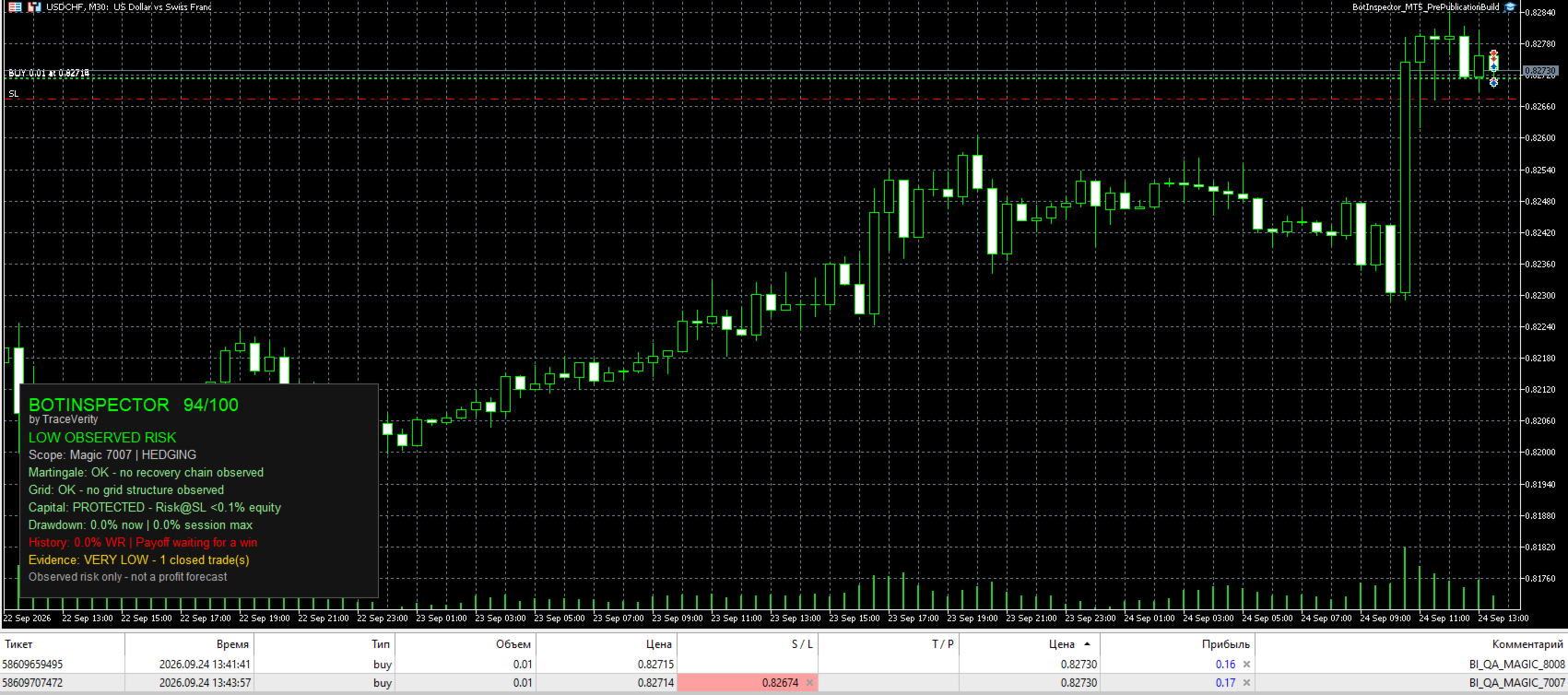
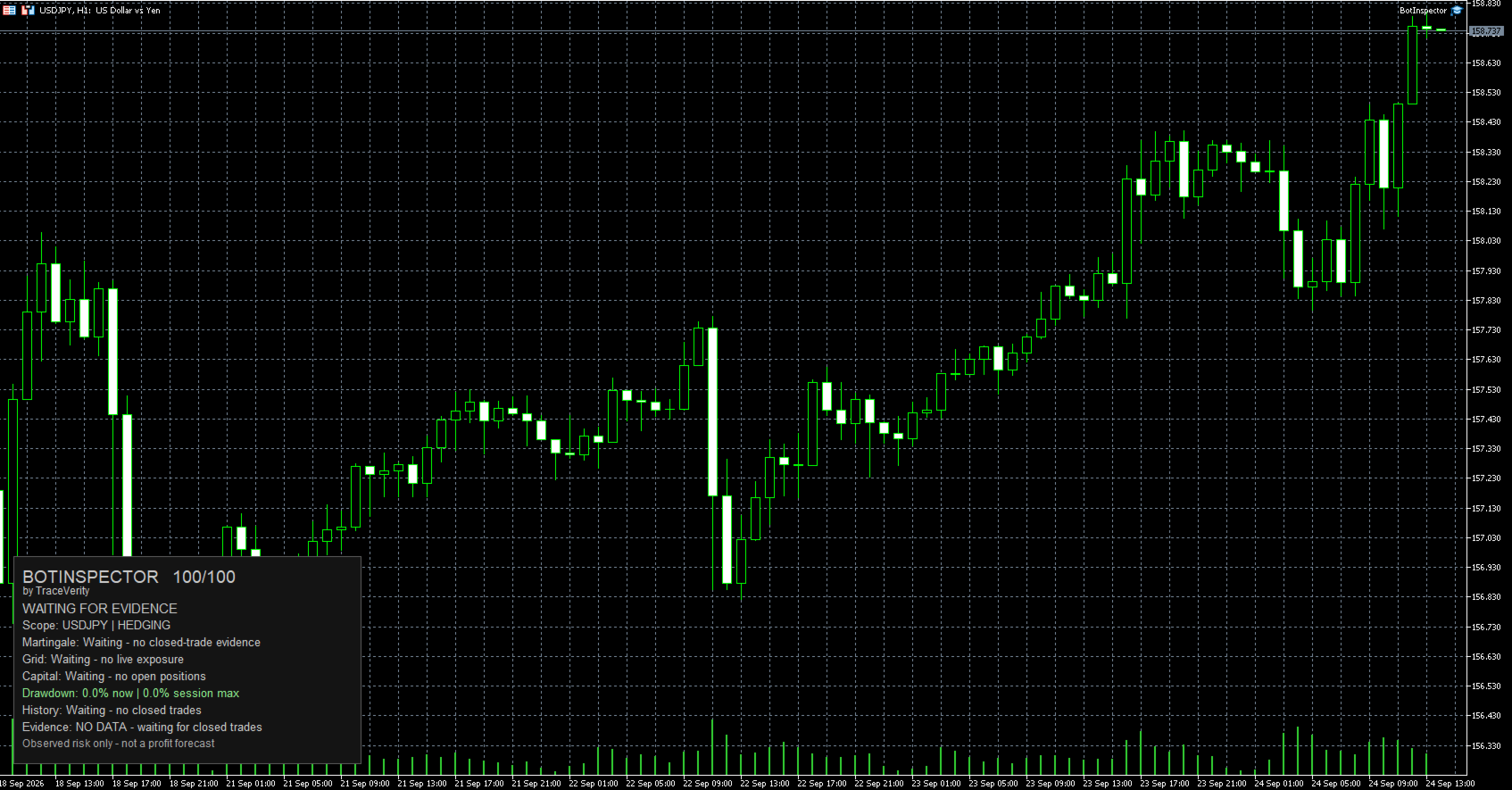
BotInspector

Inspect one bot. One symbol. Or the entire account.

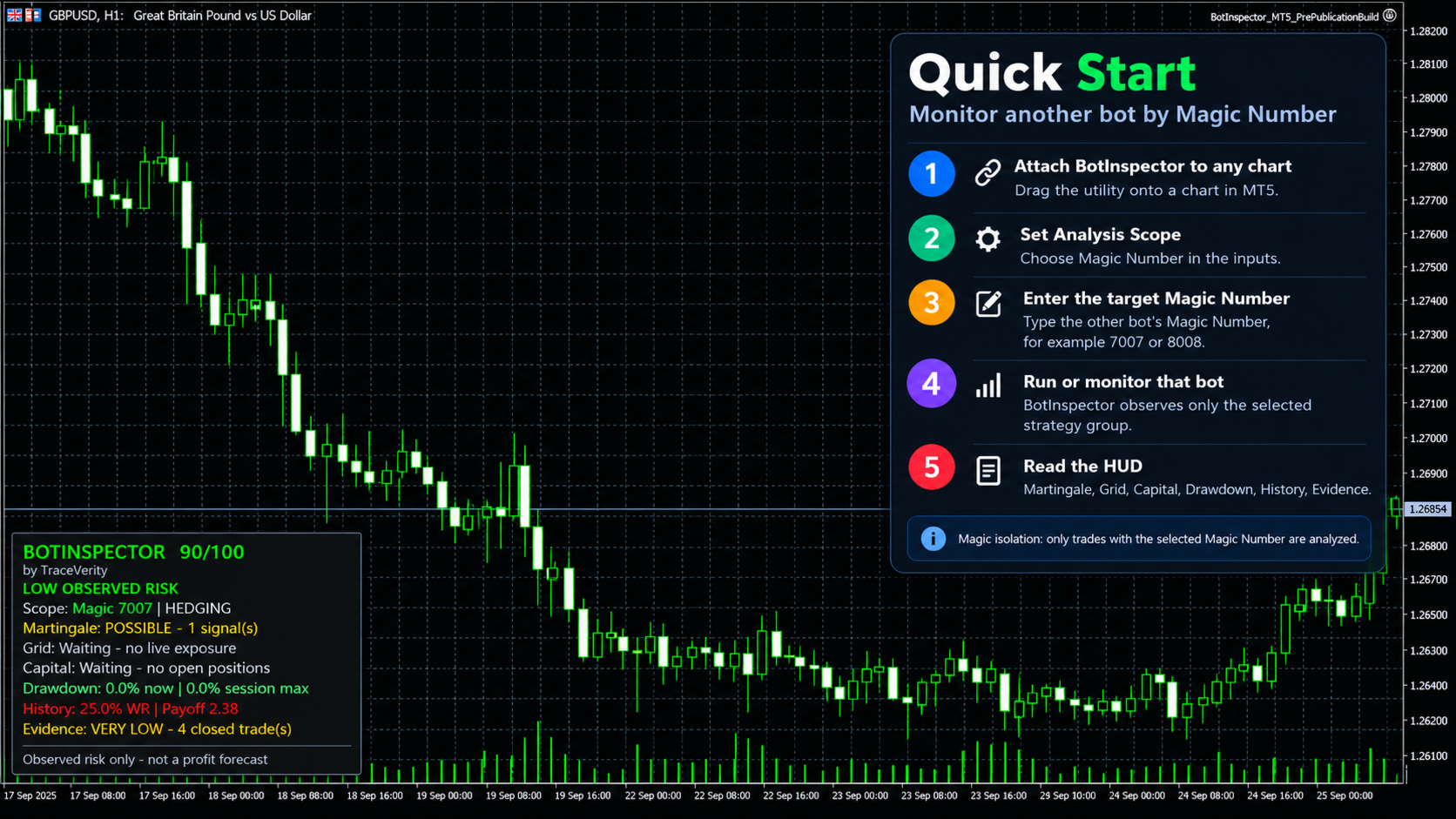
BotInspector by TraceVerity is a non-trading risk analysis utility for MetaTrader 5.

It can inspect the observed trading behavior of the entire account, one symbol, or a specific Expert Advisor identified by Magic Number.

BotInspector does not read another EA's source code and does not need to run on the same chart as that EA. It analyzes the trading evidence available in MetaTrader 5: live positions, pending orders, deal history, volume changes, Stop Loss protection and drawdown.

This makes it possible to observe how a third-party EA actually behaves on a demo or live account instead of relying only on its description.

Inspect one strategy or the whole account

BotInspector provides three analysis scopes:

Entire Account
Reviews account activity as a whole. Balance, Equity and Drawdown remain account-level metrics. Where strategy ownership can be identified, behavioral structures are kept separated by Magic Number.

Current Symbol
Focuses the analysis on the symbol of the chart where BotInspector is running.

Exact Magic Number
Isolates the trading activity of a specific EA or strategy using its Magic Number. Trades belonging to other identifiable Magic Numbers are excluded from that strategy-specific analysis.

BotInspector does not require the inspected EA to be attached to the same chart. If its trading activity is present in the same MetaTrader 5 account and can be identified from the available trading data, BotInspector can analyze it.

Manual or unidentified activity using Magic Number 0 is treated as its own observable group and cannot always be separated into individual strategies.

Evidence-based analysis

BotInspector distinguishes between a verified observation and insufficient evidence.

When the necessary data is not available, the panel reports explicit states such as:

Waiting - no closed-trade evidence
Waiting - no live exposure
Waiting - no open positions
Waiting - no closed trades

A lack of evidence is not presented as a positive result.

Martingale and recovery behavior

BotInspector analyzes realized losses and subsequent trades inside the same identifiable strategy group.

The analysis uses Symbol, Magic Number and trade direction to prevent unrelated strategies from being merged into one recovery sequence.

A qualifying increase in trade volume after a realized loss can be reported as Possible.

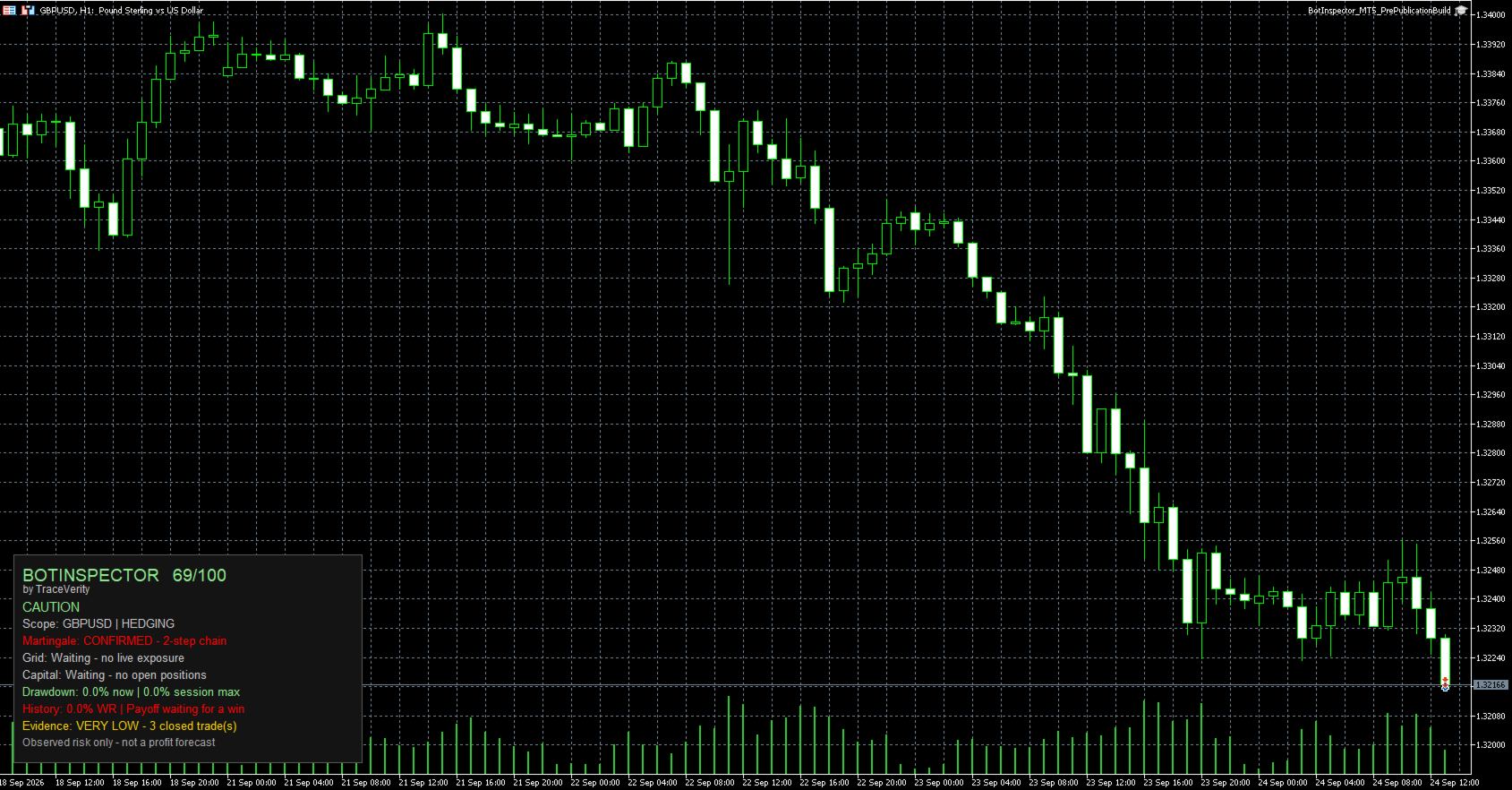
A linked multi-step recovery sequence can be reported as Confirmed.

Different identifiable Magic Numbers are never merged into the same Martingale or recovery chain.

Grid structure

BotInspector analyzes current positions and pending orders for concentrated exposure and regularly spaced price levels.

Exposure density can be reported as Possible.

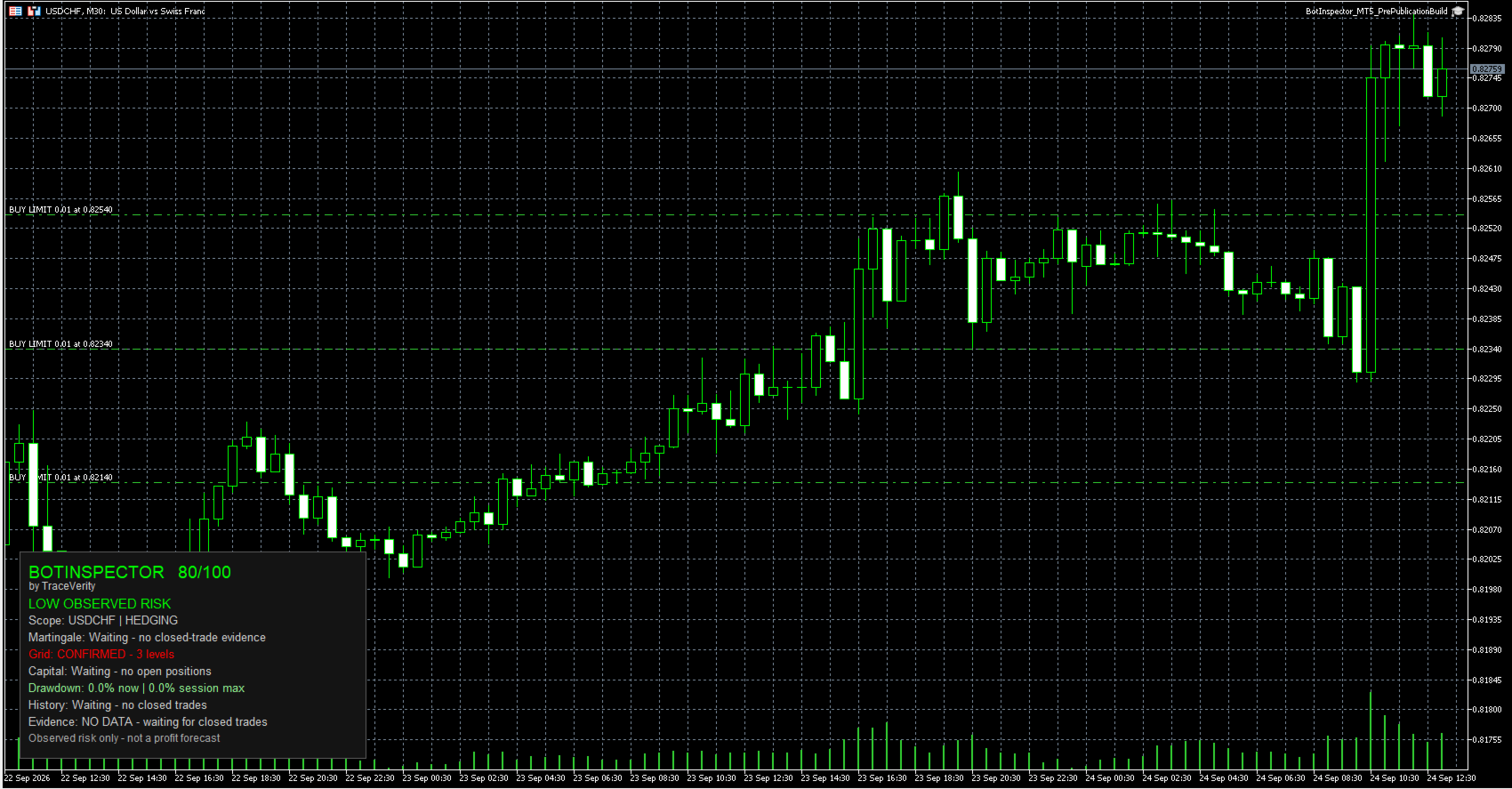
A sufficiently regular same-source price ladder can be reported as Confirmed.

Grid analysis also respects identifiable strategy ownership by Magic Number.

Capital protection

Open positions are checked for Stop Loss protection.

For a Stop Loss located on the loss side of the trade, BotInspector estimates Risk at SL using MetaTrader 5 calculation functions.

A Stop Loss at breakeven or on the profitable side represents zero loss-side risk.

If Risk at SL cannot be calculated reliably, the value remains unknown rather than being treated as zero.

Risk at SL does not include future commission or swap.

Drawdown monitoring

BotInspector displays:

Current floating drawdown
Session Max Drawdown

Session Max Drawdown represents the maximum observed since the current BotInspector session started. It is not presented as lifetime historical drawdown.

Historical evidence

When closed-trade evidence is available, BotInspector reports:

Win Rate
Payoff Ratio
Historical Expectancy
Evidence confidence

Historical metrics describe the available trading sample only. They are not a forecast of future performance.

Hedging and Netting accounts

BotInspector supports both MetaTrader 5 Hedging and Netting account modes.

On Hedging accounts, trade episodes are reconstructed using position identifiers and exposure changes, including scale-in and partial-close behavior.

On Netting accounts, directional exposure episodes are reconstructed from deal history.

When several Magic Numbers contribute to the same Netting exposure and ownership cannot be attributed safely to one strategy, BotInspector reports Limited evidence rather than assigning the position arbitrarily.

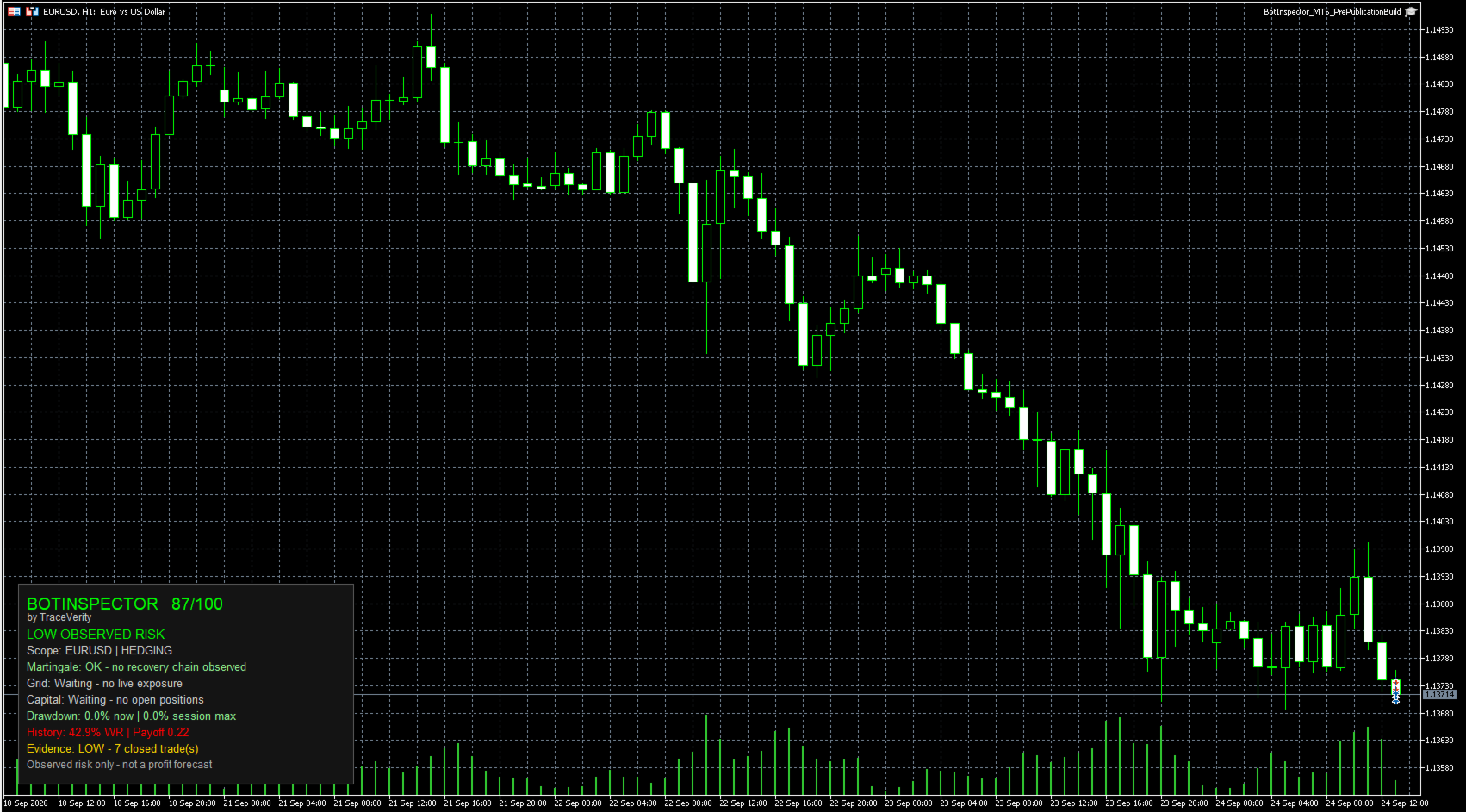
On-chart panel

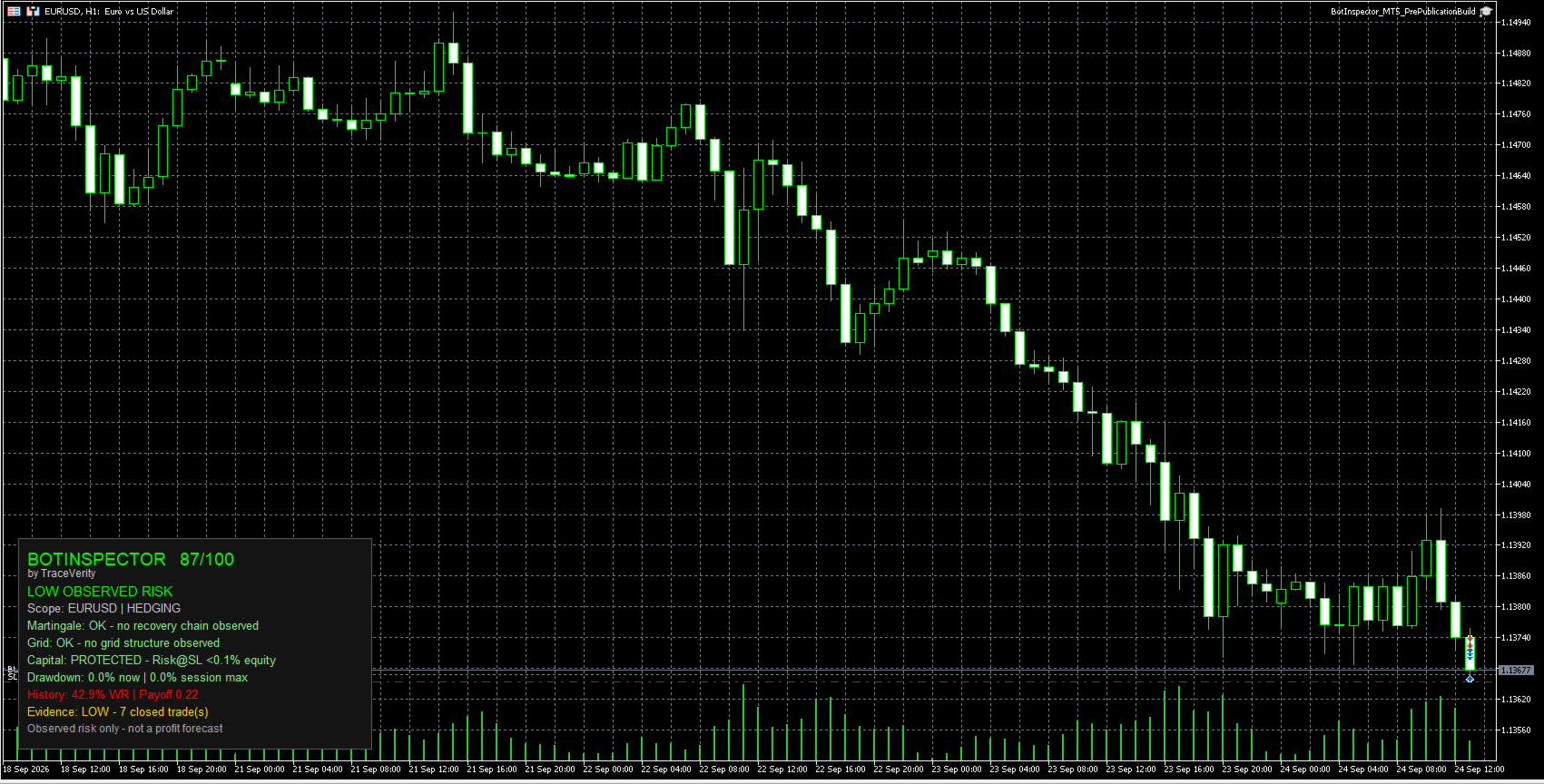
The panel displays:

BotInspector Health Score
Observed Risk state
Analysis Scope
Martingale status
Grid status
Capital protection status
Current and Session Max Drawdown
Historical metrics
Evidence level

The panel can be positioned in any chart corner. Bottom Left is the default position.

Main parameters

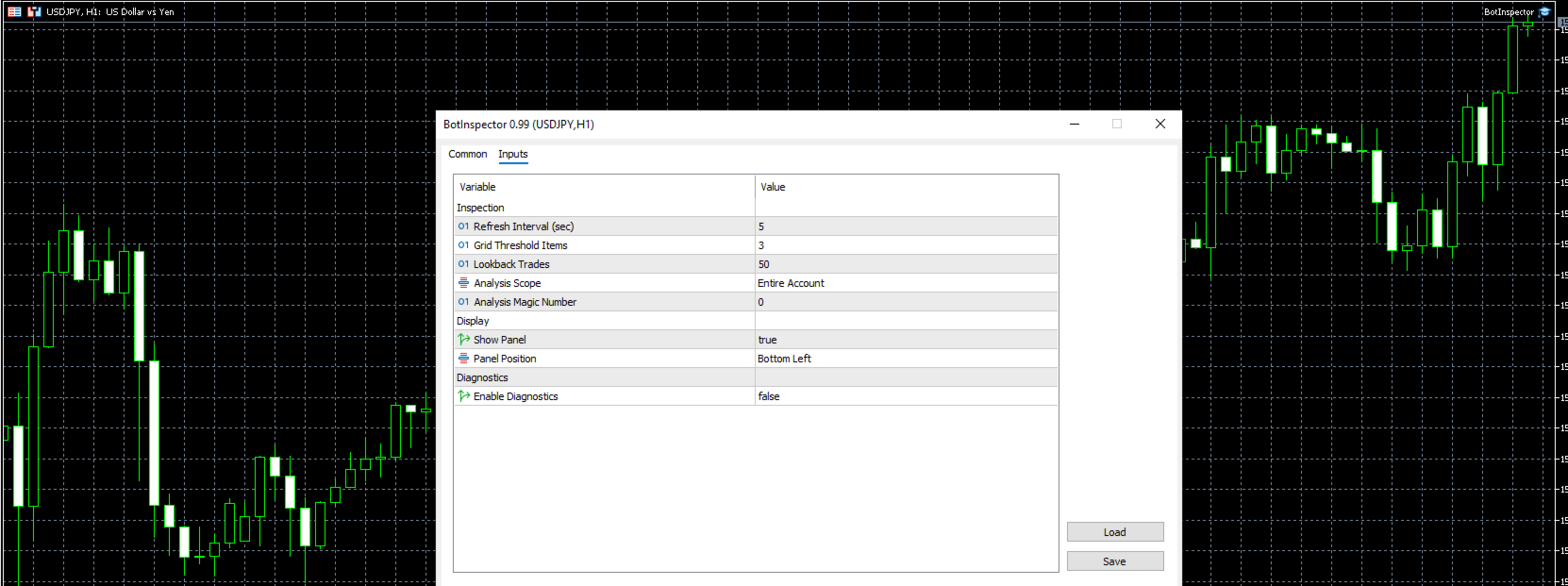
Refresh Interval
Grid Threshold Items
Lookback Trades
Analysis Scope
Analysis Magic Number
Show Panel
Panel Position
Enable Diagnostics

Diagnostics are disabled by default and can be enabled for additional technical information and troubleshooting.

Requirements

MetaTrader 5 only.

Supports Hedging and Netting accounts.

No DLL is required.

No WebRequest is required.

No external API key or external service is required.

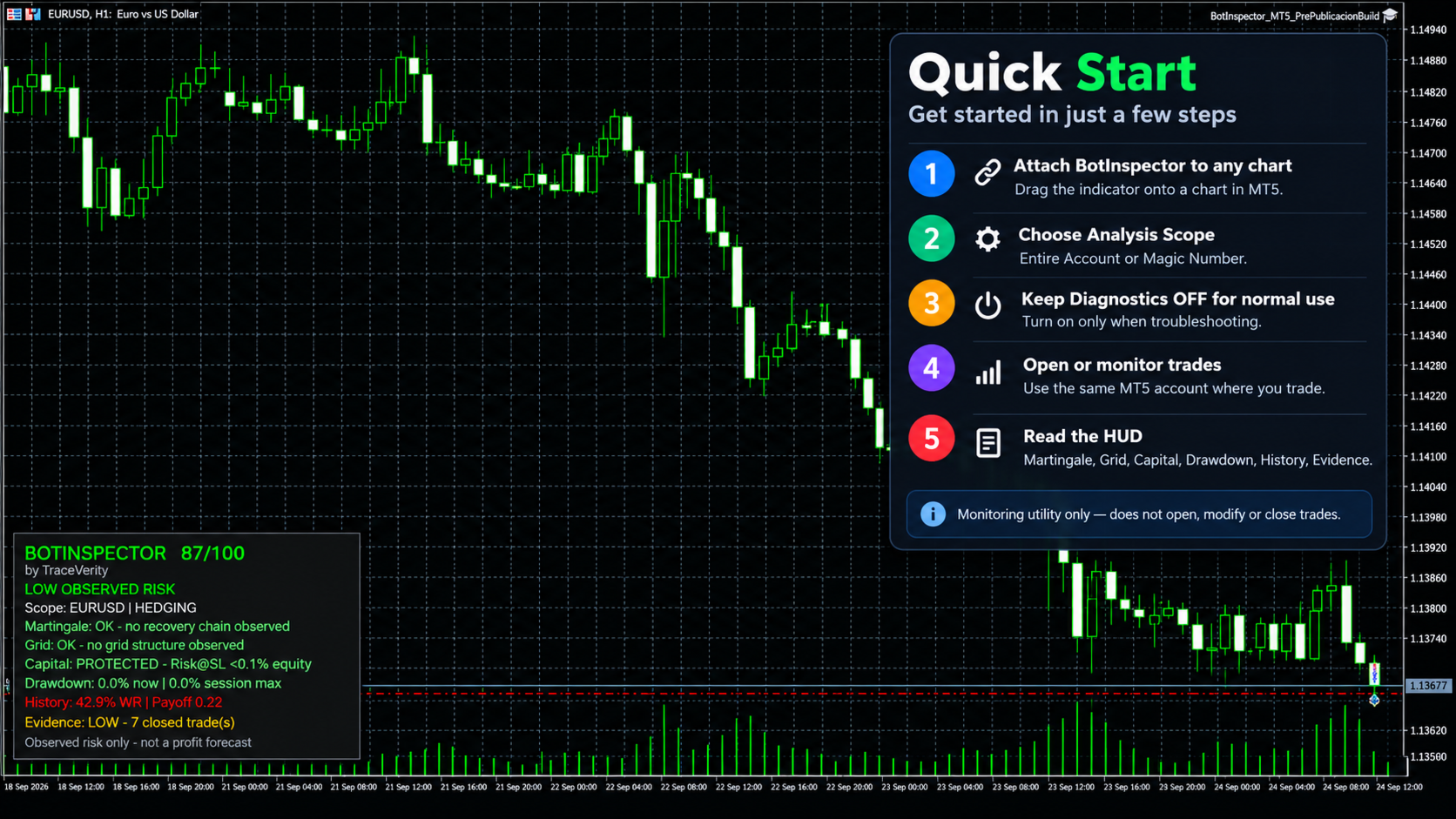
BotInspector does not open, modify or close trades.

Important

BotInspector is an observational risk-analysis utility.

It evaluates the trading evidence available in MetaTrader 5. It does not inspect the source code of another Expert Advisor.

A high score or low observed-risk state does not mean that a strategy is safe, profitable or suitable for future trading.

Observed risk only - not a profit forecast.
Produits recommandés
QuickTrade Panel – Fast Order Execution & Risk Management The QuickTrade Panel is a powerful MetaTrader 5 trading tool that helps traders place orders faster, manage risk automatically, and control trades directly from the chart. It reduces manual work, improves trading accuracy, and makes trade management simple and efficient. Key Features On-Chart Trading: Change Lot Size, Risk %, Stop Loss (SL), Take Profit (TP), and Pending Distance without opening EA settings. Smart Position Sizing: Choose
Panic Panel MT5
Nikola Miladinovic
Panic Panel is a professional manual trade management tool for MetaTrader 5. It allows traders to control open positions quickly and safely directly from the chart. Main Features: - Symbol-specific position control - One-click Break Even - Manual Stop Loss step adjustment - Partial close: 25% / 50% / 75% - Net profit, position count and volume display - Independent per chart operation The panel works only on the active symbol and does not affect other instruments. This tool does NOT open tr
PS4 Trading Controller lets you trade MetaTrader 5 using a DualShock 4 controller (USB or Bluetooth). Designed for traders who want speed and convenience, this tool maps controller buttons to essential trading actions so you can execute and manage positions without touching the keyboard or mouse. Key Features: • Market Buy / Sell with R2 and L2 • Close one position at a time (R1 / L1) • Close all profitable trades (Triangle) • Close all losing trades (Circle) • Adjust lot size with D-Pad • Mov
FREE
L'indicateur construit les cotations actuelles, qui peuvent être comparées aux cotations historiques et, sur cette base, faire une prévision de l'évolution des prix. L'indicateur dispose d'un champ de texte pour une navigation rapide jusqu'à la date souhaitée. Option : Symbole - sélection du symbole que l'indicateur affichera ; SymbolPeriod - sélection de la période à partir de laquelle l'indicateur prendra des données ; IndicatorColor - couleur de l'indicateur ; HorisontalShift - décalage
Apex Zone Reversal
Joseph Muguai Nguru
Here is the MQL5-compliant product description translated into French, Italian, and Turkish: French (Français) Apex Zone Reversal Aperçu du produit Apex Zone Reversal est un indicateur d'analyse technique développé pour MetaTrader 5 (MT5). Il est conçu pour aider les traders à identifier les zones de support, de résistance et de retournement du marché sur la base du cadre ZORRO et des retours de la structure du marché. Caractéristiques principales Cartographie des zones : Identifie automatiqueme
Risk Manager Custom
Sergey Batudayev
5 (1)
Risk Manager Custom Version for MetaTrader 5 Risk Manager is a professional risk-control utility for MT5. It does not open trades by itself and does not generate trading signals. The tool is designed to monitor already opened positions and help the trader control risk, position size, stop loss, take profit, and trading restrictions. Main features: Individual Max Lot for selected symbols — set a separate maximum lot for up to 5 instruments. For example: EURUSD = 1.2 lot, XAGUSD = 0.1 lot. All
Ajoutez toute une liste de tickers dans l'Observation du marché en un seul clic. Vous avez filtré 80 actions dans un screener. Mais pour les faire entrer dans MetaTrader 5, il faut les ajouter une par une : ouvrir l'arborescence des symboles, saisir le ticker, devenir devin pour trouver son nom chez votre courtier, puis répéter l'opération 80 fois. Entre 30 et 50 minutes de clics purs. Et à chaque modification de votre liste de suivi, tout est à refaire. Market Watch Bulk Loader fait le trava
Short Description Swing Timing Breakout EA is a smart Expert Advisor for MetaTrader 5 that combines trend filtering, momentum timing, and dynamic risk management to capture high-probability swing and breakout opportunities. Full Description Swing Timing Breakout EA is a professional trading robot designed for MetaTrader 5, suitable for traders who want a balance between automation, control, and disciplined risk management. This EA uses a trend-following and momentum confirmation approach ,
Sen Guard
Tomonari Chishiro
SEN Guard est un utilitaire MetaTrader 5 (MT5) conçu pour la surveillance des risques et la protection du compte. Il affiche directement sur le graphique l'état de sécurité actuel, la raison de cet état et le statut de l'exécution des mesures de protection. Dans les conditions prises en charge, SEN Guard permet également un arrêt du côté sûr, la fermeture protectrice des positions et l'annulation des ordres en attente. L'une des caractéristiques principales de SEN Guard est qu'il montre non s
CosmiCLab SMC FIBO CosmiCLab SMC FIBO is a professional trading indicator designed for traders who use Smart Money Concepts (SMC), market structure analysis and Fibonacci retracement levels. The indicator automatically detects market swings and builds Fibonacci levels based on the latest impulse movement. It also identifies market structure changes such as BOS (Break of Structure) and CHOCH (Change of Character), helping traders understand the current market direction. CosmiCLab SMC FIBO also pr
This tool is used to generate a K - line reflection chart of a currency pair for foreign exchange transactions. For example, if the currency pair is EURUSD, a custom currency pair named EURUSD_ref is generated and a chart for that currency pair is opened. The price of a custom pair of currency is the inverse of the price of the original pair, which is the equivalent of a new pair of currency, the USDEUR. The usage is simple, put it on any chart, the new chart will open, and then draw the corr
CHART REVOLUTION EA - Une Révolution dans le Trading Semi-Automatique ! Fatigué de l'interface standard et peu pratique de MT5 ? Oubliez le passage constant d'une fenêtre à l'autre et les calculs complexes ! Chart Revolution EA est un panneau de trading professionnel de nouvelle génération qui transformera votre graphique en un centre de commande complet pour le trader ! POURQUOI CHOISIR CHART REVOLUTION ? Tout sur un seul écran - plus de fenêtres superflues Exécution instantanée - ouvr
FREE
Trading Rules Enforcer is a deterministic account-discipline monitor for trade-count, loss, time and exposure rules. Key functions: - Clear rule status dashboard - Trading-session restrictions - Overtrading controls - Symbol and Magic Number scope - Daily loss and exposure monitoring - Clear blocking reasons - Operational event history The utility enforces rules configured by the user. It does not generate entry signals, predict market direction or guarantee trading results. Test all rule comb
GDS Renko Pip ST Chart - Pip-Based Renko Chart Indicator for MetaTrader 5 GDS Renko Pip ST Chart is a pip-based Renko chart indicator for MetaTrader 5. It helps traders build and study cleaner Renko price movement using a practical fixed pip or point-based brick structure. This tool is designed as a Renko chart foundation for manual analysis. It does not predict the market, does not generate buy or sell signals and does not decide whether a trade should be opened. Renko EDGE EA Golden Delta | A
Order Book, known also as Market Book, market depth, Level 2, - is a dynamically updated table with current volumes of orders to buy and to sell specific financial instument at price levels near Bid and Ask. MetaTrader 5 provides the means for receiving market book from your broker, but in real time only, without access to its history. The indicator OrderBook Cumulative Indicator accumulates market book data online and visualizes them on the chart. In addition, the indicator can show the market
Trade Plan Desk MT5 est un tableau de bord de préparation et de contrôle des trades conçu pour structurer chaque décision avant l’exécution. Définissez votre direction, votre entrée, votre Stop Loss, votre Take Profit et votre risque. L’outil calcule le volume adapté, le ratio rendement/risque et effectue un pré-contrôle complet des conditions du broker avant toute exécution. Fonctions principales : • Plan Entry / Stop Loss / Take Profit • Risque en % ou en montant • Calcul automatique du vol
Présentation Candle Timer Countdown Pro affiche un compte à rebours fluide et précis jusqu’à la clôture de la bougie en cours, avec un arc circulaire de progression en temps réel. Fonctionnalités Compte à rebours précis Arc circulaire (anneau ou secteur rempli) 6 positions d’affichage 3 modes de couleur Mise en évidence finale Détection de connexion Alertes nouvelle bougie Faible utilisation CPU Installation Télécharger depuis MQL5 Market Ajouter au graphique Configurer les paramètres Compatibil
MT5 Telegram Notifier — Real-Time Account Monitoring Stay informed and in control of your trading account from anywhere. This utility Expert Advisor sends instant notifications and detailed reports directly to your Telegram chat. Key Benefits Real-Time Alerts : Receive notifications when positions open, close, or pending orders change. Risk Management : Margin level alerts help you act before critical thresholds. Hedging Support : Displays every position individually using ticket-based logic. O
SolarTrade Suite Financial Robot: LaunchPad Market Expert - conçu pour ouvrir des transactions ! Il s'agit d'un robot de trading qui utilise des algorithmes spéciaux innovants et avancés pour calculer ses valeurs, votre assistant dans le monde des marchés financiers. Utilisez notre ensemble d'indicateurs de la série SolarTrade Suite pour mieux choisir le moment de lancer ce robot. Découvrez nos autres produits de la série SolarTrade Suite en bas de la description. Vous souhaitez naviguer en
Hisoka Trade Panel — v6.91 Description: Hisoka Trade Panel is a comprehensive on-chart trade management Expert Advisor for MetaTrader 5. It places a draggable, collapsible panel directly on your chart and lets you manage open positions — break-even locks, trailing stops, partial closes, and SL/TP modification — with one click. All risk math is dollar-based, so the same "BE 5$" button locks $5 of profit consistently across XAUUSD, BTCUSD, EURUSD or any other instrument, regardless of contract siz
The purpose   of this utility is to manage one or more subwindow in the same chart by opening and closing them through a button or the keyboard keys How it works: If you want to handle more than one subwindow you need to reinstall the indicator . In this case some setups has to be customized onlu in the last subwindow installed and others setups in the installed subwindow during the first time installation. They are denoted in the input rispectively as ' LW ' and ' IW '. First of all install
HMA Scalper Pro EA
Vladimir Shumikhin
5 (2)
HMA Scalper Pro EA — Conseiller Expert Automatique pour MetaTrader 5 basé sur l'indicateur Hull Moving Average (HMA) APERÇU HMA Scalper Pro EA est un robot de trading professionnel (Expert Advisor) pour MetaTrader 5 qui négocie dans la direction du Hull Moving Average (HMA). L'indicateur HMA détermine la direction actuelle de la tendance, et le EA ouvre des transactions dans cette direction, complétées par la gestion du capital Smart Risk, le trading en grid adaptatif, le trailing stop, le bre
How the Chart Cleaner Script Works The Chart Cleaner is a one-click tool designed to instantly wipe your chart clean. When you drag and drop the script onto a chart, it scans for and removes all visual objects—including trend lines, horizontal lines, text labels, shapes, and any other drawings you have placed. The result is a completely clean, uncluttered chart, giving you a fresh workspace for your analysis. It's the fastest way to reset your chart to its default state.
Non-Repainting. Non-Redrawing. Non-Lagging. Signals appear only on confirmed bars. What you see on history is exactly what appeared in real time. Built specifically for Gold (XAUUSD) traders. Gold ML Supertrend MT5 is the only Supertrend indicator on MQL5 that learns. Instead of using a fixed multiplier, it runs a K-means clustering algorithm on recent price data to find the optimal band width. Then it adapts that width per trading session (Asia/London/NY) based on what actually worked. The resu
️ MQL5 3D Animated AutoChess Sandbox - Game Guide This AutoChess sandbox game is a standalone 3D animated strategy game developed entirely in MQL5. Below is the comprehensive guide to game rules, input parameters, core mechanics, and operations. ️ System Input Parameters When loading the script in MT5, you can configure the following options in the "Inputs" panel: | Parameter Name | Default | Description & Details | | :--- | :---: | :--- | |   Language   |   LANG_ENG   |   Language Option . Ch
TradingCoPilot
Viktor Mitrofanov
Trading Co-Pilot for MetaTrader 5 Advanced Position Management for Manual Traders Trading Co-Pilot is a professional trade management assistant designed for traders who open positions manually and want precise, automated control over risk and profit handling. It does not open trades. It manages them intelligently. You focus on entries. The Co-Pilot protects and optimizes the exit. How It Works Once you open a manual position, Trading Co-Pilot automatically: • Applies Stop Loss • Sets Take Profit
FREE
PanelPro MT5
Murilo Pereira Vieira
Trading Panel — Description FR Trading Panel — Panneau d'exécution et de gestion des risques pour MetaTrader 5 Trading Panel est un outil de trading manuel développé à partir d'une expérience réelle des marchés. Ce n'est pas seulement un outil pour envoyer des ordres — c'est une solution complète pour l'exécution des trades, la gestion des positions et le contrôle des risques, avec clôture partielle automatique, breakeven et trailing stop intégrés. Fonctionne sur tous les marchés : Forex, Future
ClusterSecondForex
Rafil Nurmukhametov
4.67 (3)
The utility allows you to build different types of graphs: Seconds chart from 1 second to 86400 seconds Tick chart from 1 tick and above The volume chart Delta chart Renko chart Range chart Product demo https://www.mql5.com/ru/channels/clustersecondforex Built-in indicators for volumetric analysis: daily market profile and market profile of the selected timeframe, Cluster Search Imbalance VWAP Dynamic POC, VAH, VAL the profile depth of the market vertical volume with various display options, del
Bank Your Profits & Secure Your Trade in One Click The Ultimate "Scale Out" Tool for Professional Traders. Close Partial  (MT5 Utility) is designed for traders who want to lock in profits without killing the trend. With a single click, you can bank a percentage of your profit instantly. New Feature (Auto-Secure): Stop wasting time dragging your Stop Loss after taking profit. This manager can now automatically move your Stop Loss to Break-Even the moment you click the "Close Partial" button. Bank
FLUG — Professional Price Action EA for XAUUSD A precision-engineered Expert Advisor built exclusively for Gold (XAUUSD). FLUG identifies high-probability price-action setups using proprietary candle structure analysis, then manages every position with multiple configurable safeguards designed for serious traders and prop-firm accounts. Key Features - Built specifically for XAUUSD — all calculations tuned for 2-digit Gold pricing - Two switchable entry modes: Classic and Sniper Pullback - Struc
Les acheteurs de ce produit ont également acheté
Trade Assistant MT5
Evgeniy Kravchenko
4.43 (216)
It helps to calculate the risk per trade, the easy installation of a new order, order management with partial closing functions, trailing stop of 7 types and other useful functions. Additional materials and instructions Installation instructions - Application instructions - Trial version of the application for a demo account Line function -   shows on the chart the Opening line, Stop Loss, Take Profit. With this function it is easy to set a new order and see its additional characteristics bef
Bienvenue sur Trade Manager EA, l’outil ultime de gestion des risques conçu pour rendre le trading plus intuitif, précis et efficace. Ce n’est pas seulement un outil d’exécution d’ordres ; c’est une solution complète pour la planification des trades, la gestion des positions et le contrôle des risques. Que vous soyez débutant, trader expérimenté ou scalpeur ayant besoin d’une exécution rapide, Trade Manager EA s’adapte à vos besoins, offrant une flexibilité sur tous les marchés, des devises et i
Local Trade Copier EA MT5
Juvenille Emperor Limited
4.94 (149)
Local Trade Copier EA MT5 est un copieur de trades rapide et flexible permettant de copier et de gérer des trades entre plusieurs comptes MetaTrader 5 sur le même ordinateur Windows ou Windows VPS. Il combine la synchronisation locale des trades avec des contrôles côté Receiver pour la taille des lots, la gestion du risque, le filtrage des trades, le mappage des symboles, la gestion des trades et la protection du compte. Configurez vos terminaux Transmitter et Receiver en environ 1 minute et co
Telegram to MT5 Multi-Channel Copier   copie automatiquement les signaux de trading de vos canaux Telegram directement vers MetaTrader 5. Pas de bots, pas d'extensions de navigateur, pas de copie manuelle. Un signal arrive sur Telegram et l'EA ouvre le trade dans votre terminal en quelques secondes. Et avant de copier un canal, le backtester intégré vous montre ce que ce canal aurait fait sur votre compte. Le produit comprend deux composants : une application Windows qui écoute vos canaux Telegr
TradePanel MT5
Alfiya Fazylova
4.88 (169)
Trade Panel est un assistant commercial multifonction. L'application contient plus de 50 fonctions de trading pour le trading manuel et permet d'automatiser la plupart des tâches commerciales. Instructions d'utilisation + tutoriel vidéo : https://www.mql5.com/fr/blogs/post/772371 Version d'essai de l'application pour un compte démo : https://www.mql5.com/fr/blogs/post/762644 Comment installer l'application : https://www.mql5.com/fr/blogs/post/762645 Comment tester l'application en mode visuel :
================================================================================ POC BREAKOUT - V20.72. Full Professional Grade Toolkit ================================================================================ POC Breakout is a full MetaTrader 5 trading dashboard for discretionary traders who want breakout signals, Point of Control (POC) context, volume profiles, order flow, market structure, news, alerts, and advanced trade planning in one professional workspace. Attached directly to you
Copiez les signaux Telegram avec vos propres règles de trading Telegram to MT5 Signal Trader copie automatiquement les signaux de trading au format texte provenant de canaux et de groupes Telegram publics et privés vers MetaTrader 5. Gérez plusieurs fournisseurs et comptes MT5 depuis une seule application de bureau, avec des paramètres de risque et de trading propres à chaque fournisseur . Aucun bot Telegram ni configuration d'API n'est nécessaire pour copier les signaux. Connectez-vous simpleme
Farmed Hedge Yield Farming | All Markets (Manual - Hybrid - Semi/Automated EA) VERIFIED TRADING RESULTS - Farmed Hedge Yield Axi Copy:  https://www.mql5.com/en/signals/2356376 - Farmed Hedge Yield Exn Copy:   https://www.mql5.com/en/signals/2356404 - Farmed Hedge Yield V Copy:  https://www.mql5.com/en/signals/2357156 IMPORTANT NOTICE: FarmedHedge is a MANUAL-FOCUSED TRADING UTILITY ,not a fully automated EA. Results shown on this Signal include manual trades and overall strategic management.
Power Candles Strategy Scanner - Outil de recherche de configurations multi-symboles à optimisation automatique Le Power Candles Strategy Scanner utilise le même moteur d'auto-optimisation que celui qui alimente l'indicateur Power Candles, pour chaque symbole de votre Market Watch, en parallèle. Un panneau vous indique quels symboles sont statistiquement négociables à l'instant, quelle stratégie est la plus performante pour chacun, la paire Stop Loss / Take Profit optimale, et vous alerte dès qu
Exp COPYLOT CLIENT for MT5
Vladislav Andruschenko
3.97 (35)
Copieur professionnel de trades pour MetaTrader 5 Un copieur de trades rapide, professionnel et fiable pour MetaTrader . COPYLOT permet de copier des trades Forex entre les terminaux MT4 et MT5 avec prise en charge des comptes Hedge et Netting . La version MT5 de COPYLOT prend en charge : - MT5 Hedge → MT5 Hedge - MT5 Hedge → MT5 Netting - MT5 Netting → MT5 Hedge - MT5 Netting → MT5 Netting - MT4 → MT5 Hedge - MT4 → MT5 Netting Version MT4 Description complète + DEMO + PDF Comment acheter Comme
Signal Trading View to MT5 Pro
Mirel Daniel Gheonu
4.5 (2)
Signal TradingView to MT5 Pro Automator Exécution professionnelle instantanée entre TradingView et MetaTrader 5 Automatisez votre stratégie de trading avec le pont de communication le plus robuste entre les alertes TradingView et l'exécution réelle sur MT5. Conçu pour les traders qui exigent vitesse, flexibilité et une gestion des risques impeccable, cet Expert Advisor transforme tout message d'alerte en un ordre au marché ou à cours limité précis. POINTS FORTS ET AVANTAGES Moteur d'analyse univ
Premium Trade Manager - Le panneau de trading avec un coach intégré Premium Trade Manager intègre un coach de trading directement dans votre graphique, avec un moteur d'exécution complet en dessous. Configurez le trade comme vous le faites toujours, puis laissez Max, votre coach de trading IA, analyser ce setup exact par rapport à votre compte en direct et vous donner un verdict clair avant de vous engager : le stop est-il discipliné, le risque est-il raisonnable, une publication à fort impact e
MT5 to Telegram Signal Provider est un utilitaire facile à utiliser et entièrement personnalisable qui permet l'envoi de signaux spécifiés vers un chat, un canal ou un groupe Telegram, transformant ainsi votre compte en fournisseur de signaux. Contrairement à la plupart des produits concurrents, il n'utilise pas d'importations DLL. [ Démonstration ] [ Manuel ] [ Version MT4 ] [ Version Discord ] [ Canal Telegram ]  New: [ Telegram To MT5 ] Configuration Un guide utilisateur étape par étape est
HINN MagicEntry Extra
ALGOFLOW OÜ
4.74 (19)
HINN MAGIC ENTRY – the ultimate tool for entry and position management! SIMPLE. FASTEST. INTUITIVE. MAX AUTOMATED. Place orders by selecting a level directly on the chart! full description   ::  demo-version  :: 60-sec-video-description Key features: - Market, limit, and pending orders - Automatic lot size calculation - Automatic spread and commission accounting - Unlimited partitial take-profits  - Breakeven and trailing stop-loss and take-profit  functions - Invalidation leves - Intuitive, a
MT5 Trading Deck
Manuel Michiels
5 (2)
One button. One trade. MT5 Trading Deck is a hotkey trading panel for MetaTrader 5 that turns the platform into a keyboard-driven execution cockpit. Stop loss, take profit and lot size are pre-calculated for every key; the moment you press, a market order is live on the broker. A complete technical user manual is attached in the product Comments section. It documents every input parameter, the full hotkey map, the recommended Stream Deck XL layout, and the advanced workflows for Pre-Limit orders
EA Slipstream
Stephen J Martret
5 (1)
Your backtest filled every order at the price it asked for. Your account does not. EA Slipstream measures what execution costs your EA, using your own fills, slippages and spreads to show you the true performance of your EA. A backtest prices every trade at the level the EA named. In live trading a pending order fills at whatever price is available when it triggers, a stop closes wherever the market is when it is hit, and the spread at that moment is whatever the account was quoting. The differ
Grid Manual MT5
Alfiya Fazylova
4.73 (22)
Grid Manual est un panneau de trading permettant de travailler avec une grille d'ordres. L'utilitaire est universel, possède des paramètres flexibles et une interface intuitive. Il fonctionne avec une grille d'ordres non seulement dans le sens des pertes, mais aussi dans le sens de l'augmentation des profits. Le commerçant n'a pas besoin de créer et de maintenir une grille d'ordres, l'utilitaire le fera. Il suffit d'ouvrir une ordre et "Grid Manual" créera automatiquement une grille de ordres po
EA Overfitter
Stephen J Martret
5 (1)
That backtest looks great. But will it still be making money tomorrow, next week, next month? EA Overfitter re-runs your EA on 100 price histories it has never seen. One score tells you if the edge is real. A backtest tells you what an EA did on one price history — the one that happened to occur. What you cannot tell from it is how much of that result was the strategy and how much was the particular path. EA Overfitter answers that. It builds up to 100 synthetic price histories your EA has n
Trade Manager DaneTrades
Levi Dane Benjamin
4.23 (30)
Trade Manager pour vous aider à entrer et sortir rapidement des transactions tout en calculant automatiquement votre risque. Y compris des fonctionnalités pour vous aider à éviter le sur-trading, le trading de vengeance et le trading émotionnel. Les transactions peuvent être gérées automatiquement et les mesures de performances du compte peuvent être visualisées dans un graphique. Ces fonctionnalités rendent ce panneau idéal pour tous les traders manuels et contribuent à améliorer la plateforme
Trade Dashboard MT5
Fatemeh Ameri
4.94 (134)
Trade Dashboard simplifies how you open, manage, and control your trades, with built-in lot size calculation. It allows you to execute trades, manage risk, and control positions directly on the chart, with tools such as partial close, breakeven, and trailing stop. Designed to reduce manual work and help you stay focused on your trading decisions. A demo version is available for testing. Detailed explanations of features are provided within the MQL5 platform. Installation instructions are include
Dynamic Fibonacci Grid
Tsvetan Tsvetanov
5 (1)
Présentation de la dernière version du Dynamic Fibonacci Grid Dashboard pour MT5. Désormais doté de nombreuses nouvelles fonctionnalités, ce tableau de bord transforme votre expérience de trading et vous permet de visualiser le marché et l’action des prix sous un angle totalement différent. Découvrez de nouvelles possibilités grâce à l’analyse simultanée de plusieurs périodes et de plusieurs symboles. Interface conviviale pour le trading manuel et la gestion des positions, avec une capacité éte
Welcome to ENTRY IN THE ZONE AND SMC MULTI TIMEFRAME Entry In The Zone and SMC Multi Timeframe is a real-time market analysis tool based on Smart Money Concepts (SMC), designed to analyze market structure, price direction, and key trading zones. It supports both Single-Timeframe Analysis and Multi-Timeframe Analysis, providing a clearer view of the overall market structure across multiple timeframes, with real-time BUY / SELL signals that do not repaint. It is designed to help filter trading opp
Seconds Chart MT5
Boris Sedov
4.61 (18)
Seconds Chart - un outil unique pour créer des graphiques en secondes dans MetaTrader 5 . Grâce à Seconds Chart , vous pouvez créer un graphique avec une période définie en secondes, offrant une flexibilité et une précision idéales pour l'analyse, indisponibles sur les graphiques standards en minutes ou en heures. Par exemple, la période S15 indique un graphique avec des bougies d'une durée de 15 secondes. Vous pouvez utiliser n'importe quels indicateurs et experts advisors compatibles avec les
The product will copy all telegram signal to MT5 ( which you are member) , also it can work as remote copier.  Easy to set up, copy order instant, can work with almost signal formats, image signal,  s upport to translate other language to English Work with all type of channel or group, even channel have "Restrict Saving Content", work with  multi channel, multi MT5 Work as remote copier: with signal have ticket number, it will copy exactly via ticket number. Support to backtest signal. How to s
Anchor Trade Manager
Kalinskie Gilliam
5 (9)
Your EAs cannot see each other, but Anchor can. Anchor gives you one place to coordinate your EAs, manage risk, and decide when trading is allowed. It works alongside the trading bots you already use without any changes to them. The Problem One EA opens a trade. Then another starts trading. The next thing you know, you wake up to multiple grids built across your account. Each EA may be doing exactly what it was designed to do, but together they can place far more risk on your account than you in
Exp5 Duplicator
Vladislav Andruschenko
4.78 (9)
Duplicator pour MetaTrader 5 — système professionnel de duplication de positions dans un seul terminal Un Expert Advisor fiable conçu pour les traders qui veulent dupliquer automatiquement des positions déjà ouvertes dans MetaTrader 5, augmenter le volume global, appliquer leurs propres règles de lot et gérer les duplicatas avec une logique précise. C’est un outil pratique pour le trading manuel, les systèmes automatisés et la gestion plus flexible de positions déjà existantes dans un seul term
Footprint Chart Pro — Professional OrderFlow EA for MetaTrader 5 Version 6.34 | Professional tool for real traders | Institutional-Grade Visualization DEMO USERS - PLEASE SELECT EVERY TICK / REAL TICK WHEN TESTING AND YOU HAVE DOWNLOADED HISTORICAL DATA. IF YOU SEE A WAITING SCREEN AND IT IS NOT DOWNLOADING, IT MEANS YOU HAVE LOW HISTORICAL DATA. TRY 1 MIN AND 5 MIN FIRST ON 1 DAY DATA. ONE DAY DATA SHOULD BE THE NEWEST AND MOST CURRENT DATE. PLEASE WAIT UNTIL THE MARKET HAS ROLLED OVER PERIOD.
YuClusters
Yury Kulikov
4.93 (43)
Attention: You can view the program operation in the free version  YuClusters DEMO .  YuClusters is a professional market analysis system. The trader has unique opportunities to analyze the flow of orders, trade volumes, price movements using various charts, profiles, indicators, and graphical objects. YuClusters operates on data based on Time&Sales or ticks information, depending on what is available in the quotes of a financial instrument. YuClusters allows you to build graphs by combining da
Averager FULL
Vladislav Andruschenko
4.64 (14)
Averager pour MetaTrader 5 — système professionnel de moyennage et de gestion de séries de positions Un Expert Advisor puissant conçu pour moyenner des positions entrées en drawdown, avec la possibilité d’ouvrir des positions supplémentaires aussi bien dans le sens de la tendance qu’à contre-tendance. Ce produit ne se limite pas à un simple outil de moyennage. Il s’agit d’une solution flexible pour gérer une série de positions, améliorer le prix moyen d’entrée et piloter l’ensemble du panier ju
Panneau de trading pour MetaTrader 5 — contrôle professionnel du trading en un clic depuis le graphique et le clavier Un panneau de trading avancé conçu pour les traders actifs, afin d’ouvrir, gérer et clôturer des positions bien plus rapidement qu’avec l’interface standard de MetaTrader. Cette solution s’adresse à ceux qui veulent contrôler positions, ordres en attente, profit global et exécution depuis un seul espace de travail professionnel. Il ne s’agit pas d’un simple utilitaire. C’est un
Filtrer:
Aucun avis
Répondre à l'avis