Easy Entry
- ユーティリティ
- バージョン: 1.0

### Easy Entry — One-Click LIMIT/MARKET Panel with Auto Risk Sizing
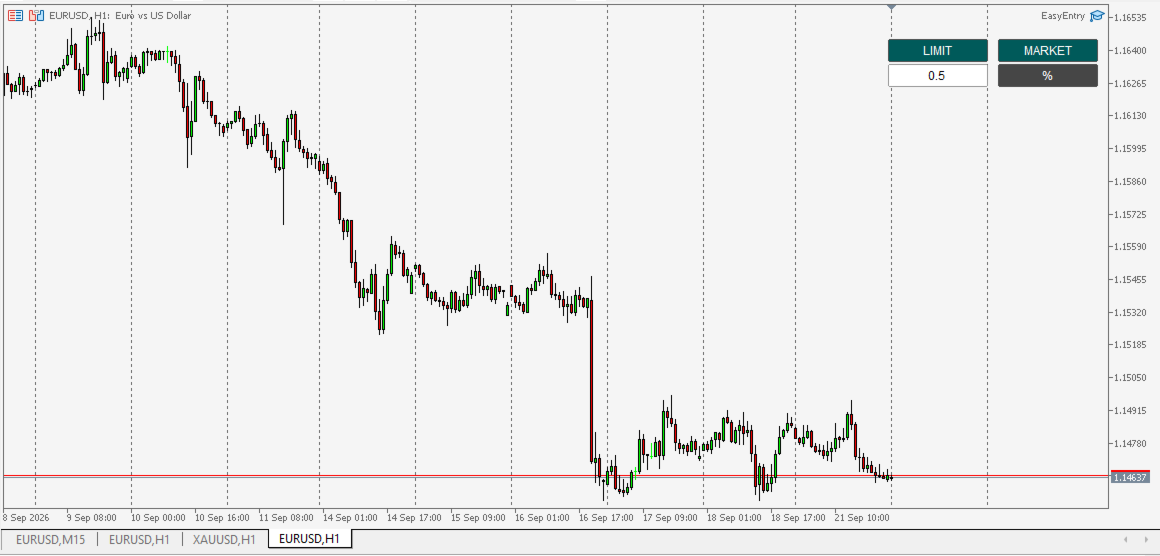
Placing a trade shouldn't mean typing a lot size into a calculator, then typing it again into the order ticket. Easy Entry puts two buttons on your chart — LIMIT and MARKET — and lets you set your stop and take-profit by simply clicking on the chart. The lot size is worked out for you from your risk %, and the order only goes out once you've confirmed exactly what it will do.
**How it works.** Click MARKET or LIMIT, then click on the chart to place your Stop, then your Take, then — for LIMIT — your entry price. A confirmation line shows you the exact direction, order type, lot size, risk in your account currency, and the SL/TP distance in pips before anything is sent. Nothing is placed until you press Confirm.
**Smart, not rigid.** Direction (Buy/Sell) is worked out automatically from where your Stop and Take sit relative to price — there's no separate Buy/Sell button to pick wrong. For LIMIT, the exact order type (Limit vs. Stop) is resolved the same way, so a single button correctly places a Buy Limit, Sell Limit, Buy Stop, or Sell Stop depending on where you draw your entry line — no manual order-type selection, no chance of picking the wrong ticket type.
**Key features:**
- **One-click MARKET and LIMIT entry**, with SL/TP/entry set by clicking directly on the chart.
- **Automatic lot sizing from risk %** — calculated from your real account balance or equity and the instrument's real tick value, so it's correct on JPY pairs, gold, and indices, not just "$10-per-pip forex". A fixed-lot mode is also available with one tap of the %/$ toggle.
- **Confirmation screen before every order** — direction, order type, lot size, risk in money, and SL/TP distance in pips, shown plainly before you commit.
- **Live line-following** — the SL/TP/entry line tracks your mouse until you click to lock it in, so you can place it precisely without guessing coordinates.
- **Bilingual interface** (English/Russian), fully configurable panel corner, position and size.
- **Works alongside the True Bias indicator** (recognizes its panel and aligns next to it automatically) but does not require it — Easy Entry works standalone on any chart.
- **You stay in control** — nothing is sent to the server until you press Confirm, and every step can be cancelled with Esc.
**Recommended use:** any symbol your broker offers (forex, metals, indices). Works on any timeframe — it's a manual execution aid, not a signal generator, so it fits naturally alongside whatever analysis or indicator you already trade with.
**Important notes:** this is an order-placement convenience tool, not financial advice, and it does not guarantee any trading result. It only sends an order when you explicitly press Confirm — it never trades on its own. Always test on a demo account first, and use proper risk management. Requires "Allow Algo Trading" enabled in the terminal to place orders.