Clean Trade Pro
- ユーティリティ
- バージョン: 1.10
- アップデート済み: 26 5月 2026

Clean Trade Pro
Most trade managers bury you in tabs, toggles and forty inputs you will never touch. Clean Trade Pro does the opposite. Drop it on any chart, drag three lines, and trade. Your setup is ready in under a minute.
Clean Trade Pro is a focused, visual trade panel for discretionary traders who want speed and clarity, not a Swiss-army knife. Every position is built the same way: drag your Entry, Stop Loss and Take Profit lines on the chart, watch the lot size and risk calculate in real time, and click once to execute. No menus, no guesswork.
Why traders choose it
- Setup in 60 seconds. Attach it to any symbol and start. There is nothing to configure before your first trade.
- See your risk in real money. The panel shows exactly how much you lose if your stop is hit, in your account currency — not just an abstract percentage.
- Risk warning, built in. If your position risk climbs past your chosen limit, the number turns red before you click. Protection without a single pop-up.
- Universal sizing. Works on forex, indices, metals and crypto. The lot size is calculated from real tick value, so it is correct on every instrument.
Three ways to size a trade
Pick the method that matches how you think:
- Risk % — classic risk management. Set a percentage of balance and the lot is calculated for you.
- Fixed Lot — for traders who always trade the same size, or follow prop-firm rules.
- Fixed Money — risk a fixed amount per trade (for example, exactly 50 in your account currency).
Built-in trade management
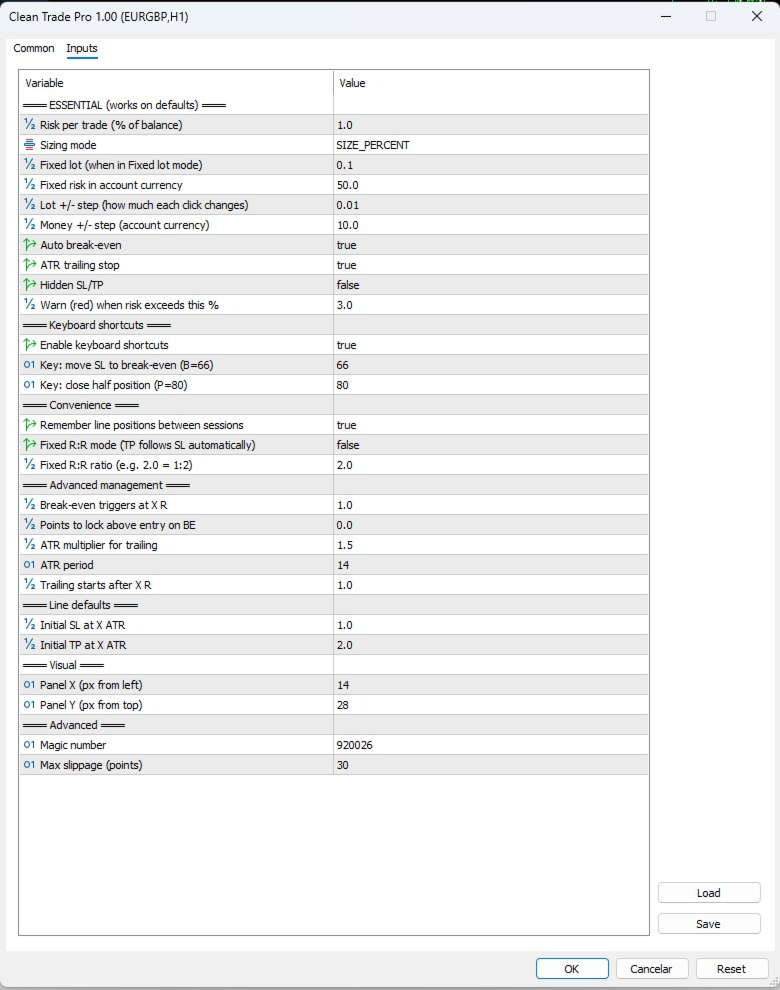
- Auto break-even — moves your stop to entry once the trade reaches your chosen R-multiple.
- ATR trailing stop — follows price as your trade runs, locking in profit automatically.
- Fixed R:R mode — drag your stop and the take profit follows to keep your ratio (for example 1:2).
- One-key actions — press B for instant break-even, P to close half the position. No reaching for the mouse.
Designed to stay out of your way
The panel uses a clean, high-contrast layout that is easy to read at a glance. Each line carries its own label showing the money and R-multiple at that level. When a trade is open, the EA lines step aside so your live position is never cluttered. The panel is draggable, can be minimised, and remembers your line positions between sessions.
Clean Trade Pro only ever touches its own trades. Other positions on the same chart — manual or from another EA — are never modified.
Good to know
- Works on any symbol and timeframe.
- Single-file, no external DLLs.
- Market orders execute instantly; pending orders are placed with a clear two-step confirm.
- With ATR trailing enabled, your stop is managed automatically — sit back and let it work.