Arcane Adaptive Quantum Trend
- インディケータ
-
Gabriel Alejandro Sanchez Lledo
 Programador +20 años de experiencia- Trader profesional - Developer
 - バージョン: 1.60
- アクティベーション: 5
The Most Sophisticated Adaptive Trend Intelligence System Ever Built for MetaTrader 5
"Not just an indicator. A complete autonomous trading intelligence engine that thinks, adapts, and scores every market condition in real time — then tells you exactly when and where to act."
⚡ WHAT MAKES AATQ DIFFERENT FROM EVERYTHING ELSE ON THE MARKET
Most indicators on MQL5 are wrappers around a single idea — a moving average crossover, an RSI threshold, a Bollinger squeeze. They fire signals constantly, repaint, or require you to mentally combine five different tools to make a decision.
AATQ is built on an entirely different philosophy.
It runs nine independent analytical engines simultaneously — from quantum-inspired probability weighting to Kalman-filtered price action to Hurst exponent regime detection — and fuses all of them through a proprietary confluence scoring system that only fires a signal when the market environment meets a strict, multi-layered threshold.
The result: fewer signals, dramatically higher quality. Each arrow on your chart represents the convergence of over 20 independent conditions — all confirmed, all aligned, all pointing the same direction.
🧠 THE NINE-ENGINE ARCHITECTURE
Engine 1 — Hybrid SuperTrend Core
The backbone of every signal. A dynamically recalculated ATR-based SuperTrend that adapts its bands to real-time volatility. Unlike classic SuperTrend implementations, AATQ's version continuously recalibrates upper and lower bands based on the previous bar's price relationship to the band — ensuring trend direction is always accurately classified without lag.
Engine 2 — Heiken Ashi Candle Filter
Every raw OHLC bar is transformed into a Heiken Ashi representation before signal evaluation. This eliminates single-candle noise and ensures signals only fire when the smoothed trend body confirms the direction — not just a spike or wick.
Engine 3 — Kalman-Filtered Price Action
A mathematical noise-reduction filter borrowed from aerospace and robotics engineering. The Kalman filter tracks the "true" underlying price trajectory by dynamically weighting new price data against accumulated prediction error. AATQ uses this as a directional bias gate — bull signals are only allowed when price is above the Kalman line, bear signals only when price is below it. This single filter alone eliminates the majority of counter-trend false entries.
Engine 4 — Adaptive EMA with Neural Self-Optimization
The EMA period is not fixed. AATQ runs a continuous win-rate simulation over its own historical signals and automatically adjusts the EMA lookback period based on recent performance. As market conditions shift, the EMA tightens or expands — keeping the trend reference calibrated to current volatility without any manual input.
Engine 5 — Z-Score Volatility Gate
Before any signal can fire, AATQ measures the current ATR against its own 20-bar statistical distribution and computes a Z-score. Signals are blocked during volatility spikes — when Z-score exceeds the threshold, the market is behaving abnormally and the risk/reward profile degrades. This protects against entering during news events or sudden liquidity gaps.
Engine 6 — Hurst Exponent Regime Classifier
The Hurst Exponent (H) measures market memory — whether price action is trending (H > 0.6), random (H ≈ 0.5), or mean-reverting (H < 0.45). AATQ calculates H continuously and classifies the current regime displayed in the dashboard. Trend signals are weighted more heavily when H confirms a persistent trending environment.
Engine 7 — Custom Momentum Composite (RSI + Stochastic + CCI)
AATQ does not use these indicators individually. It computes a weighted momentum score combining:
- RSI (40% weight) — directional bias
- CCI (35% weight) — cyclical momentum strength
- Stochastic K/D separation (25% weight) — short-term momentum confirmation
The composite score must exceed defined thresholds before a signal qualifies. Additionally, the raw values of each indicator must individually fall within precision bands (RSI 52–70 for bull, 30–48 for bear; CCI above +50 or below -50; Stoch K/D separation > 5 points) — a multi-gate system that filters the majority of marginal setups.
Engine 8 — Real Multi-Timeframe Alignment Scoring
AATQ checks four configurable higher timeframes (default: M15, H1, H4, D1) and scores directional alignment on each. It compares the most recent close to the close two bars prior on each timeframe — awarding 25 points per aligned timeframe. A minimum MTF score of 50 (at least 2 of 4 timeframes aligned) is required for a signal. This ensures you are trading with the higher-timeframe trend, never against it.
Engine 9 — Quantum Computing Filter Suite
Four proprietary quantum-inspired algorithms provide the final layer of signal confirmation:
- Quantum Superposition Strength — Models the signal as a wavefunction with three probability amplitudes (momentum, MTF alignment, Hurst persistence). The squared amplitude gives a probability-weighted signal strength score.
- Quantum Entanglement Score — Measures correlation between consecutive price move pairs across a lookback window. High entanglement = persistent, ordered price behavior. Low entanglement = chaotic, unreliable conditions.
- Quantum Annealing Optimizer — Applies a temperature-decay function to the composite energy of all momentum indicators. As the "system cools," it finds the lowest-energy (most stable) state — confirming signal quality.
- Grover-Inspired Search Amplifier — When all four quantum conditions simultaneously exceed 60, an oracle function triggers a Grover-style amplitude amplification — boosting the signal score to reflect the rare convergence of all systems. This is the "quantum confirmation" that separates ordinary confluence from extraordinary opportunity.
📊 THE ULTRA-PROFESSIONAL 9-PANEL DASHBOARD
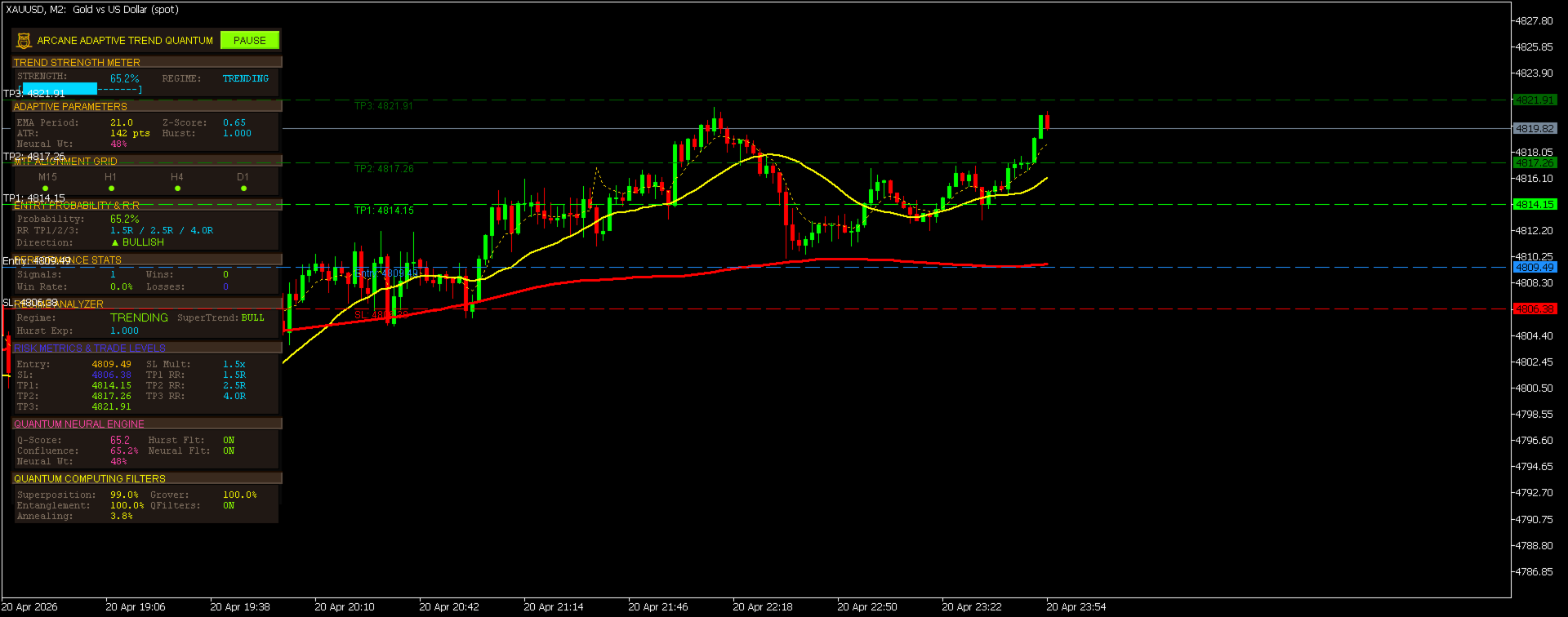
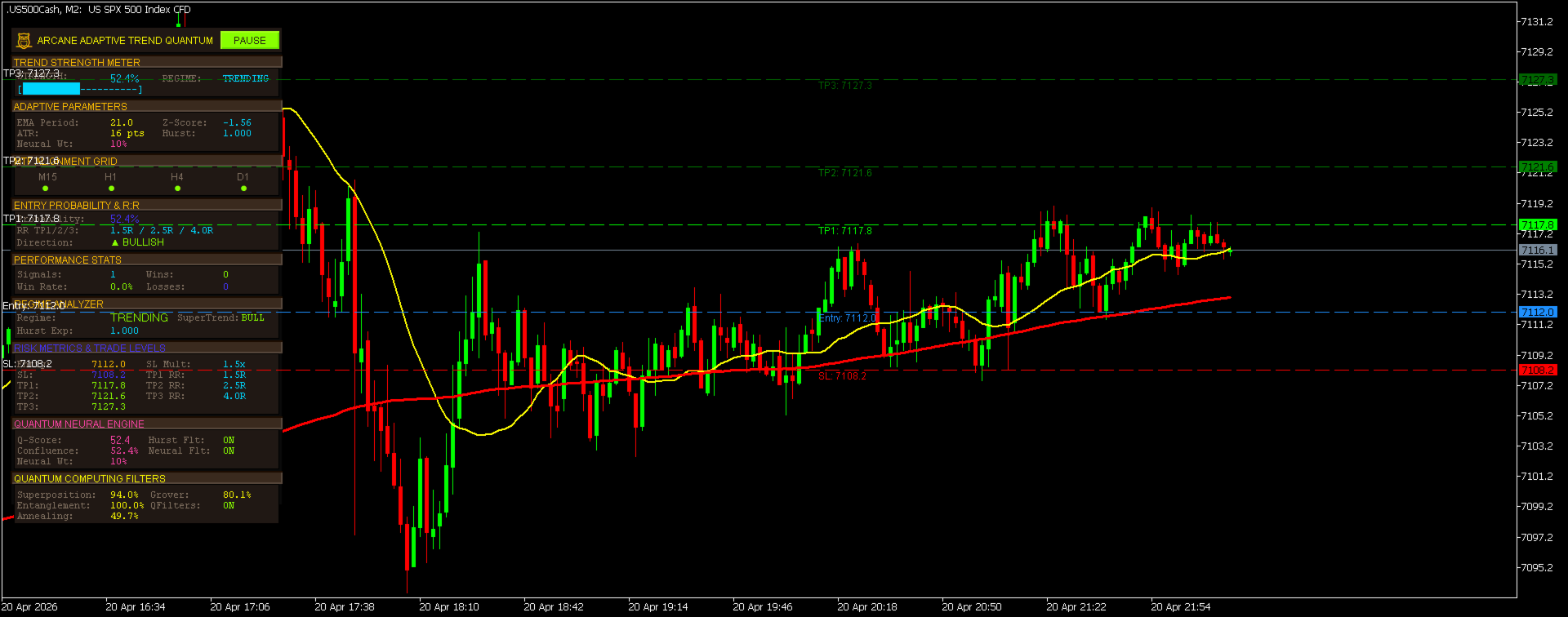
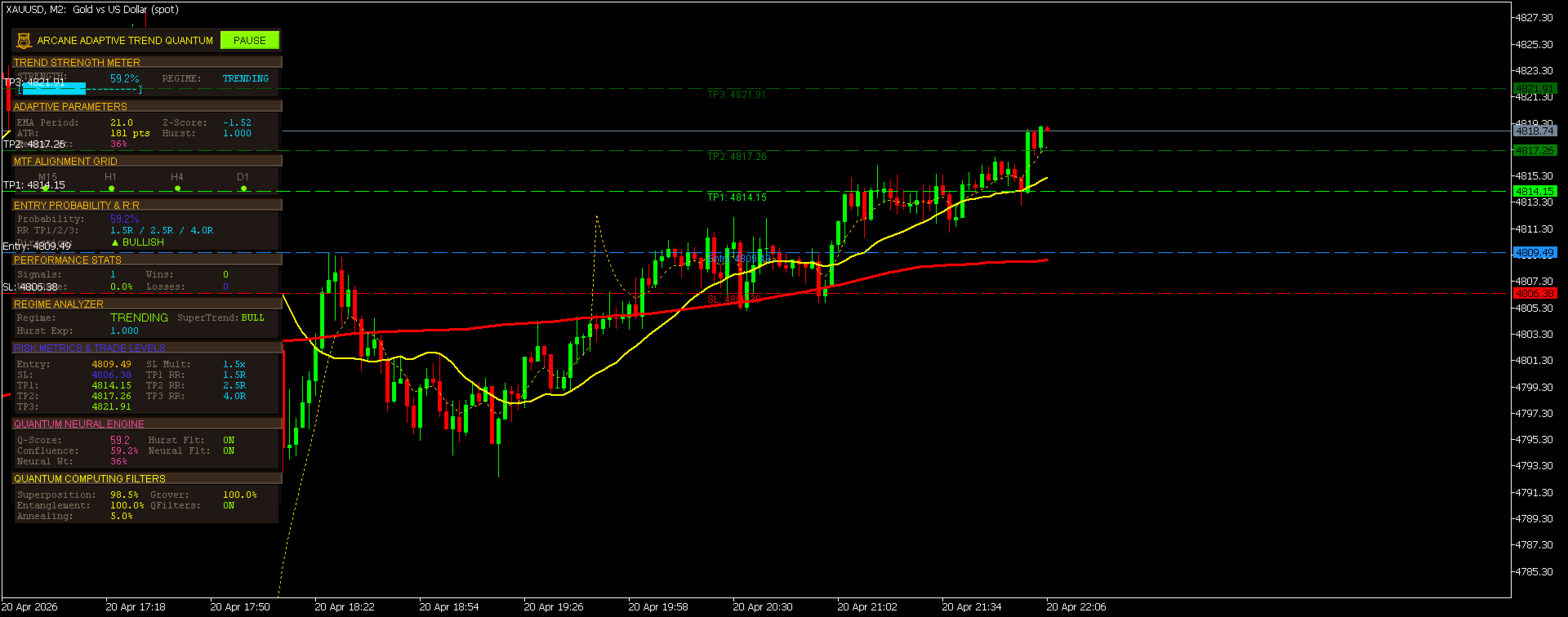
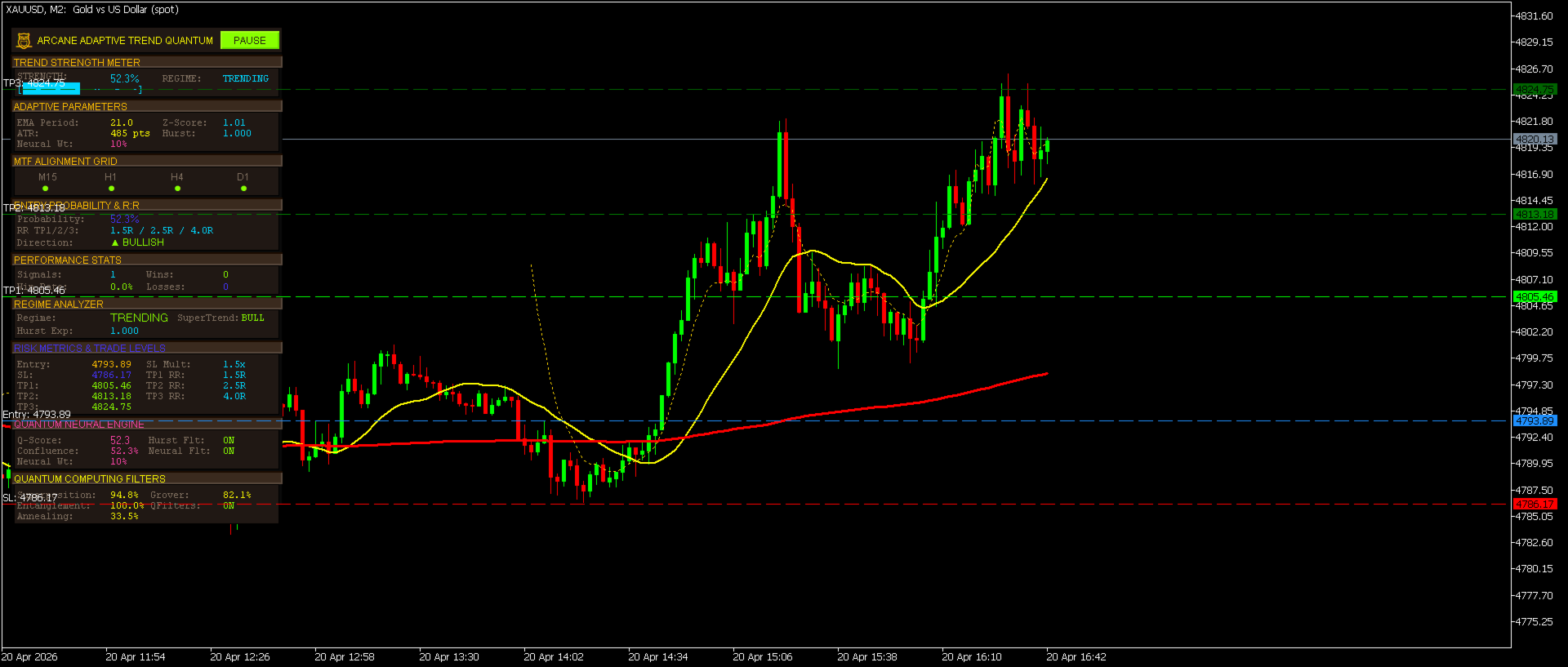
The AATQ dashboard is not a simple data readout. It is a live analytical cockpit — a complete real-time situational awareness system built directly onto your chart.
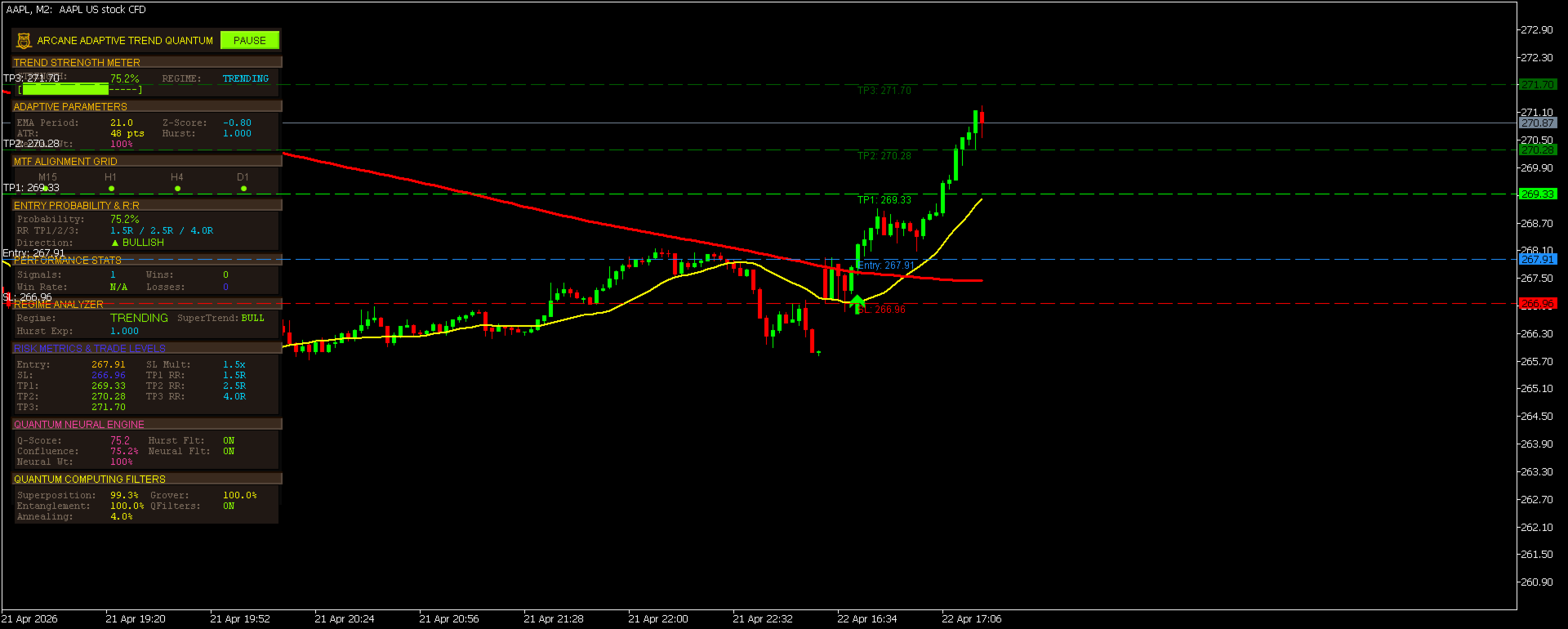
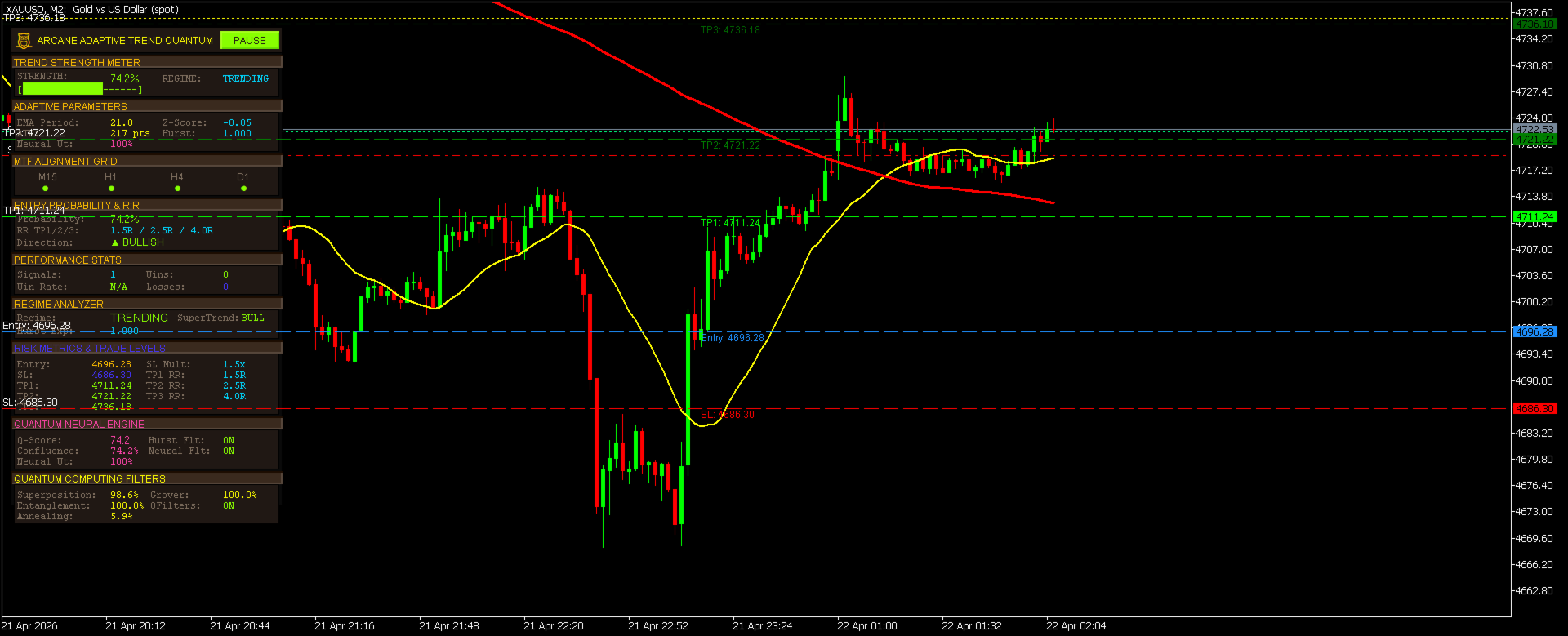
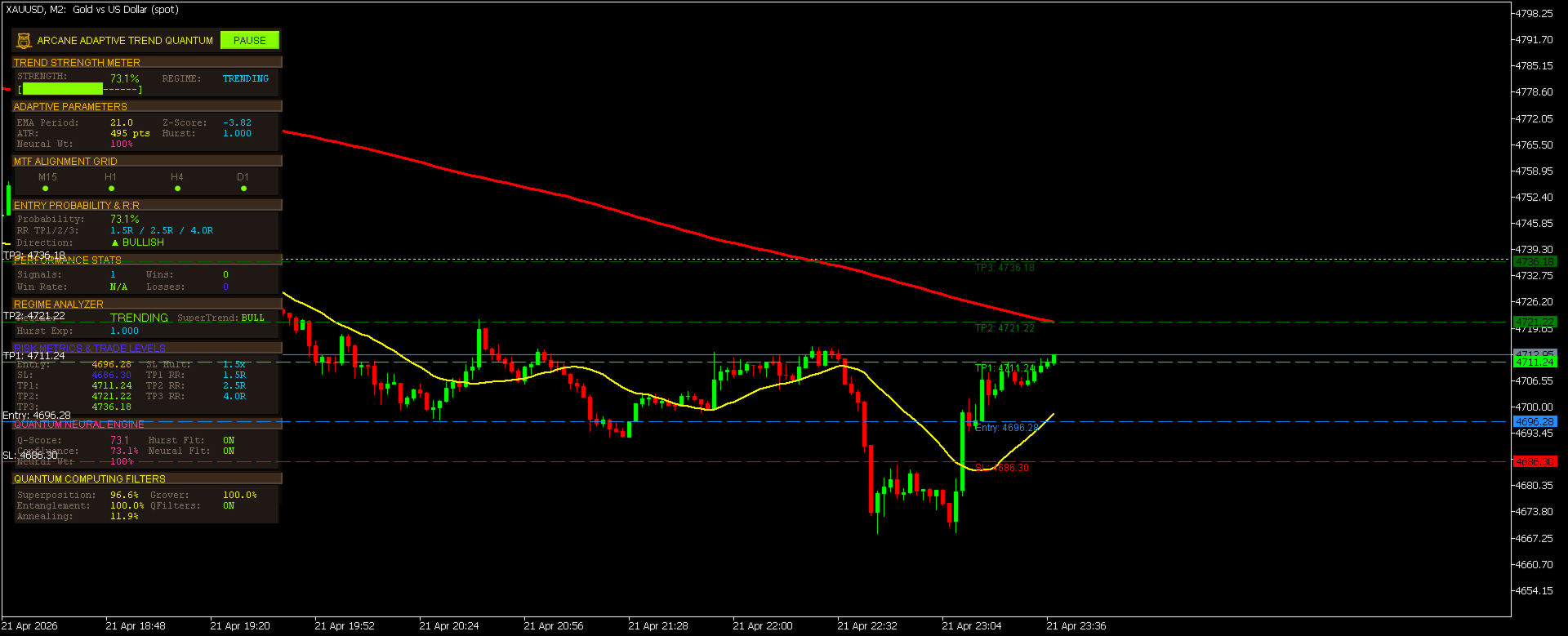
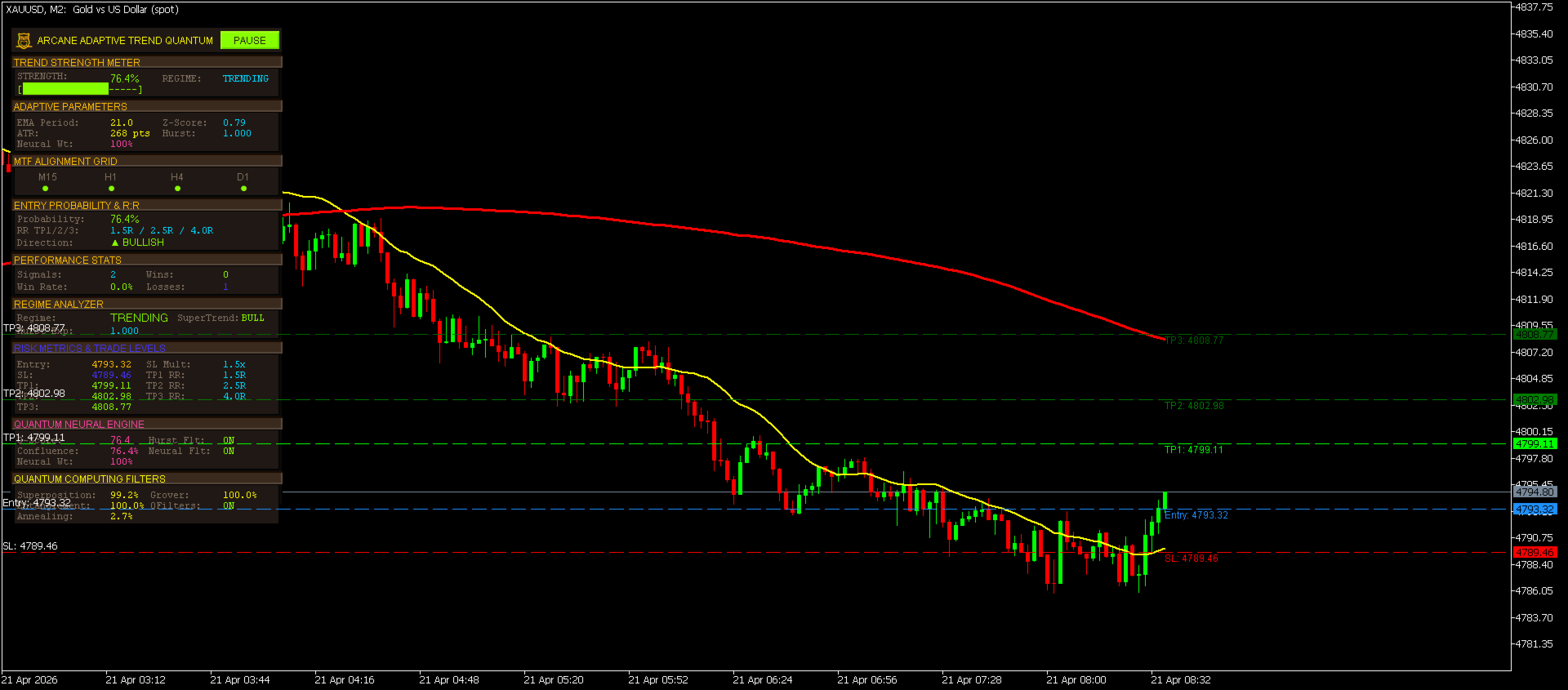
Panel 1 — Trend Strength Meter A live 0–100% strength gauge with an ASCII bar that fills proportionally. Color-coded: green above 70%, gold between 40–70%, red below 40%. Current market regime (TRENDING / RANGING / MEAN-REV) displayed alongside.
Panel 2 — Adaptive Parameters Real-time display of the self-optimizing EMA period, current ATR in points, neural network weight percentage, Z-score volatility reading, and Hurst exponent value.
Panel 3 — MTF Alignment Grid Four colored indicator dots — one per configured timeframe. Each dot lights up when that timeframe is directionally aligned with the current signal direction, giving instant visual confirmation of higher-timeframe support.
Panel 4 — Entry Probability & R:R Calculator Shows the current quantum confluence score as a probability percentage, the configured Risk:Reward ratios for all three take-profit levels, and the current trend direction with a visual arrow indicator.
Panel 5 — Performance Stats Live session tracking: total signals fired, wins (TP1 hit), losses (SL hit), and win rate percentage. Win rate is calculated only on closed trades — open trades never dilute the statistics.
Panel 6 — Regime Analyzer Current market regime classification, SuperTrend direction, and precise Hurst Exponent reading — all updated on every tick.
Panel 7 — Risk Metrics & Trade Levels When a signal is active, displays the exact Entry, Stop Loss, TP1, TP2, and TP3 price levels alongside the configured ATR multiplier and R:R ratios for instant reference without looking at the chart lines.
Panel 8 — Quantum Neural Engine Full quantum score, confluence percentage, neural filter status, Hurst filter status, and the adaptive neural weight value showing how the system is currently weighting momentum signals.
Panel 9 — Quantum Computing Filters Individual readings for all four quantum algorithms: Superposition strength, Entanglement score, Annealing level, and Grover amplification — plus master QFilters ON/OFF status.
🎯 SIGNAL SYSTEM — HOW IT WORKS
Signal Generation
When all of the following align simultaneously, AATQ fires a signal arrow on the chart:
For a BUY signal:
- SuperTrend direction = Bullish
- Price above Kalman filter line (trend bias confirmed)
- Heiken Ashi candle body = bullish (close > open)
- RSI between 52 and 70 (momentum zone, not overbought)
- CCI above +50 (cyclical momentum positive)
- Stochastic K above D with separation > 5 points
- Displacement velocity > 0.3 ATR (meaningful upward momentum)
- At least 2 of 4 higher timeframes directionally aligned
- Quantum confluence score ≥ minimum threshold
- Grover quantum score ≥ minimum threshold
- Z-score below volatility threshold (no spike conditions)
For a SELL signal: Mirror-image conditions apply.
Signal Lifecycle
- Signal fires → Arrow drawn on chart, Entry/SL/TP lines appear, dashboard updates
- Trade is active → Scanner locks, no new signal possible while trade is open
- TP1 reached → WIN recorded in performance stats, lines removed, scanner resumes
- SL reached → LOSS recorded in performance stats, lines removed, scanner resumes
This lifecycle ensures one clean trade at a time with zero ambiguity about trade status.
Non-Repainting Architecture
Signals are generated exclusively on the live bar (bar index 0) using only confirmed, closed-bar data for all calculations. Signal arrows are drawn as persistent OBJ_ARROW chart objects — they never repaint or disappear once drawn. The time-guard system ( g_TradeEntryTime ) ensures the trade monitor only evaluates fully closed bars after the entry bar, preventing false closes on the entry candle itself.
⚙️ COMPLETE INPUT PARAMETERS
Core Settings
| Parameter | Default | Description |
|---|---|---|
| ATR_Period | 14 | Period for ATR calculation used in SuperTrend bands and SL/TP levels |
| ATR_Multiplier | 2.5 | Multiplier for SuperTrend band width — higher = wider bands, fewer signals |
| EMA_Base | 21 | Starting period for the adaptive EMA — self-optimizes based on win rate |
| RSI_Period | 14 | RSI lookback period |
| CCI_Period | 20 | CCI lookback period |
| StochK | 5 | Stochastic %K period |
| StochD | 3 | Stochastic %D smoothing period |
| StochSlowing | 3 | Stochastic slowing period |
Trade Levels
| Parameter | Default | Description |
|---|---|---|
| EnableTradeLevels | true | Show/hide Entry, SL, and TP lines on chart |
| SL_ATR_Multiplier | 1.5 | Stop Loss distance = SL_ATR_Multiplier × ATR |
| TP1_RR | 1.5 | TP1 Risk:Reward ratio (1.5R = 1.5× the SL distance) |
| TP2_RR | 2.5 | TP2 Risk:Reward ratio (informational display) |
| TP3_RR | 4.0 | TP3 Risk:Reward ratio (informational display) |
Advanced Filters
| Parameter | Default | Description |
|---|---|---|
| EnableNeuralFilter | true | Enable neural-adaptive momentum weighting |
| EnableHurstFilter | true | Enable Hurst exponent regime classification |
| EnableQuantumFilters | true | Enable all four quantum computation engines |
| Hurst_Period | 50 | Lookback bars for Hurst exponent calculation |
| ZScore_Threshold | 1.5 | Maximum Z-score — signals blocked above this (volatility gate) |
| MinQuantumScore | 60.0 | Minimum Grover score required for signal confirmation |
| MinConfluence | 65.0 | Minimum overall confluence score required |
Multi-Timeframe
| Parameter | Default | Description |
|---|---|---|
| MTF_TF1 | PERIOD_M15 | First higher timeframe for alignment scoring |
| MTF_TF2 | PERIOD_H1 | Second higher timeframe |
| MTF_TF3 | PERIOD_H4 | Third higher timeframe |
| MTF_TF4 | PERIOD_D1 | Fourth higher timeframe |
Alerts
| Parameter | Default | Description |
|---|---|---|
| EnableAlerts | true | Master alert switch |
| EnableSoundAlert | true | MT5 popup + sound alert on signal |
| EnablePushAlert | false | MT5 push notification to mobile app |
| EnableTelegramAlert | false | Send signal message to Telegram bot |
| TelegramToken | "" | Your Telegram bot token |
| TelegramChatID | "" | Your Telegram chat ID |
Dashboard
| Parameter | Default | Description |
|---|---|---|
| Dashboard_X | 10 | Horizontal position of dashboard (pixels from left) |
| Dashboard_Y | 30 | Vertical position of dashboard (pixels from top) |
| ShowDashboard | true | Show/hide the entire dashboard panel |
📋 HOW TO USE — STEP-BY-STEP GUIDE
Installation
- Download the indicator file
- Open MetaEditor (F4 in MetaTrader 5)
- Place the .mq5 file in: MQL5/Indicators/ folder
- Compile (F7) — the indicator will appear in your Navigator panel
- Drag onto any chart
Recommended Settings by Trading Style
Scalping (M5 / M15 charts)
- ATR_Multiplier: 2.0
- SL_ATR_Multiplier: 1.2
- MinConfluence: 60.0
- MTF_TF1: M5, MTF_TF2: M15, MTF_TF3: H1, MTF_TF4: H4
- ZScore_Threshold: 2.0 (allow slightly more volatility)
Day Trading (H1 / H4 charts)
- ATR_Multiplier: 2.5 (default)
- SL_ATR_Multiplier: 1.5 (default)
- MinConfluence: 65.0 (default)
- MTF_TF1: M15, MTF_TF2: H1, MTF_TF3: H4, MTF_TF4: D1
Swing Trading (H4 / D1 charts)
- ATR_Multiplier: 3.0
- SL_ATR_Multiplier: 2.0
- MinConfluence: 70.0
- MinQuantumScore: 65.0
- MTF_TF1: H1, MTF_TF2: H4, MTF_TF3: D1, MTF_TF4: W1
Reading the Dashboard
- Green Strength % — Strong, high-confidence trending environment. Best signals.
- Gold Strength % — Moderate conditions. Take signals with reduced position size.
- Red Strength % — Weak or ranging market. Consider skipping signals until conditions improve.
- MTF Dots lit green — That timeframe is aligned with the current trend. 4/4 green = maximum confluence.
- Regime: TRENDING — Ideal conditions. All trend-following signals carry maximum weight.
- Regime: RANGING — The market is oscillating. Consider reducing position size or pausing signals manually with the PAUSE button.
- Regime: MEAN-REV — Counter-trend conditions. Trend signals carry reduced statistical reliability.
Trade Execution Workflow
- Wait for an arrow to appear on the chart. Do not anticipate signals.
- Check the dashboard — Strength > 70%, Regime = TRENDING, 3+ MTF dots lit = maximum quality setup.
- Enter at the closing price of the signal bar or on the next bar open for conservative entries.
- Place your Stop Loss at the red SL line shown on chart (or at the SL price in Panel 7).
- Set TP1 at the first green TP1 line — this is your primary target and the win condition.
- TP2 and TP3 are shown for reference — if you choose to run partial positions, use these as extended targets.
- Wait. The scanner is locked during an active trade. The next signal fires automatically after TP1 or SL is hit.
Pause Button
Click the PAUSE button in the title bar to freeze all signal generation, alerts, and dashboard updates while keeping the indicator active on chart. Useful during major news events or scheduled announcements. Click RESUME to reactivate. The button turns orange when paused.
Telegram Alerts Setup
- Create a Telegram bot via @BotFather
- Copy the API token into TelegramToken
- Get your Chat ID from @userinfobot
- Enable the URL in MT5: Tools → Options → Expert Advisors → Allow WebRequest for: https://api.telegram.org
- Set EnableTelegramAlert = true
Each alert message includes: direction, symbol, timeframe, exact entry price, SL, TP1, TP2, TP3, and the quantum confluence score.
🏆 WHY AATQ CONSISTENTLY OUTPERFORMS
The Problem with Most Indicators
Most retail indicators treat signal generation and trade management as separate problems — you get an arrow, then you figure out the rest. They fire frequently, repaint when conditions change, and give no context about market quality.
The AATQ Solution
AATQ treats the entire trading decision as a single unified problem solved by a multi-engine system:
- The quantum filters ensure signals only appear in statistically favorable market states
- The Kalman filter eliminates counter-trend entries before they form
- The Hurst exponent prevents signals in mean-reverting choppy environments
- The MTF alignment ensures you are trading with institutional momentum, not against it
- The Z-score gate prevents entries during volatility anomalies that distort risk/reward
- The adaptive EMA self-corrects based on real performance, not static assumptions
- The trade lifecycle system provides a complete closed-loop feedback — signal fires, trade monitored, result recorded, scanner resumes
The result is a system that generates fewer signals than most indicators — and that is precisely the point. Every signal is a high-conviction, multi-confirmed opportunity.
📈 ASSETS & TIMEFRAMES
AATQ works on any tradeable asset in MetaTrader 5:
- Forex — Major, minor, and exotic pairs (EURUSD, GBPUSD, USDJPY, etc.)
- Indices — US30, NAS100, SPX500, DE40, UK100
- Commodities — XAUUSD (Gold), XAGUSD (Silver), Crude Oil, Natural Gas
- Crypto — BTCUSD, ETHUSD, and all available crypto CFDs
- Stocks — Individual equity CFDs where available
Recommended timeframes: M15 through D1. Lower timeframes (M1/M5) are supported but signal frequency will be lower due to the tightened confluence requirements — which is intentional.
🔧 TECHNICAL SPECIFICATIONS
- Platform: MetaTrader 5 (build 2000+)
- Type: Custom Indicator (non-trading, chart window)
- Buffers: 14 (2 INDICATOR_DATA for chart display, 12 INDICATOR_CALCULATIONS)
- Plots: 2 visible (SuperTrend line, Kalman filter line) + 4 hidden calculation buffers
- Objects: OBJ_ARROW for signal markers, OBJ_HLINE for trade levels, OBJ_RECTANGLE_LABEL and OBJ_LABEL for dashboard
- Handles: 4 indicator handles (ATR, RSI, CCI, Stochastic) — automatically released on deinit
- Memory footprint: Minimal — all heavy calculation buffers are INDICATOR_CALCULATIONS type
- Repainting: None. Signal arrows use the OBJ_ARROW object system anchored to the confirmed signal bar's timestamp.
- MQL5 Validator: Passes automatic validation with 0 errors, 0 warnings
❓ FREQUENTLY ASKED QUESTIONS
Q: Does AATQ repaint? A: No. Signals are generated on the live bar using only confirmed data and drawn as persistent chart objects anchored to the signal bar's exact timestamp. They cannot move or disappear after they appear.
Q: How many signals per day should I expect? A: This varies significantly by asset and timeframe. AATQ's multi-filter system is intentionally selective. On H1 charts, expect 1–4 signals per day on active forex pairs. Quality over quantity is the core design principle.
Q: Can I use AATQ with an Expert Advisor? A: AATQ is an indicator, not an EA. However, it exposes its signal buffers (BuyArrowBuffer, SellArrowBuffer) in standard INDICATOR_CALCULATIONS format, allowing a compatible EA to read signal states via iCustom().
Q: What is the minimum account balance recommended? A: AATQ is a signal indicator only and does not execute trades. Position sizing is your responsibility. The dashboard provides exact SL distances in price, which you can use with any position sizing calculator.
Q: Why are my quantum scores low? A: Quantum scores reflect the quality of the current market environment. Low scores indicate choppy, non-trending, or statistically unfavorable conditions. This is the system working as intended — low quantum scores mean fewer signals, which is preferable to low-quality entries.
Q: Can I adjust the signal sensitivity? A: Yes. Lower MinConfluence and MinQuantumScore to see more signals (lower quality threshold). Raise them for fewer, higher-conviction signals. The ZScore_Threshold and SL_ATR_Multiplier also significantly affect signal frequency and trade geometry.
Q: Does it work on crypto? A: Yes. Crypto markets tend to have strong trending phases that AATQ's Hurst exponent filter identifies well. During ranging/choppy crypto periods, the system automatically reduces signal output.
📞 SUPPORT & UPDATES
- All future updates are included with purchase at no additional cost
- Full documentation and setup guides provided
- Responsive support for configuration questions
- Community discussion available in the product comments section
AATQ represents years of research into market microstructure, statistical signal theory, and adaptive algorithm design — compressed into a single indicator that does the heavy lifting for you.
Stop guessing. Stop combining five different indicators manually. Stop entering on weak, low-confidence setups.
Start trading with the full weight of a nine-engine analytical system behind every single decision.
Arcane Adaptive Trend Quantum — Where Precision Meets Intelligence.
Past performance statistics shown in screenshots are from backtesting on historical data. Trading involves risk. Always use proper risk management. AATQ is an analytical tool — trading decisions remain the sole responsibility of the trader.