MomentumRadar
- インディケータ
- Hicham Mahmoud Almoustafa
- バージョン: 2.31
- アップデート済み: 25 4月 2026
- アクティベーション: 10
Momentum Trend Radar ELITE — Multi-Asset Scanner with Trend-Momentum Fusion
Momentum Trend Radar ELITE is a professional multi-asset scanning indicator for MetaTrader 5. It combines momentum analysis with trend detection to identify trading opportunities across multiple symbols and timeframes from a single chart.
The indicator scans up to 28 currency pairs plus custom symbols (indices, crypto) in real-time. It calculates a unique Fusion Score that combines momentum, trend alignment, and volume data into a single 0-100 value. Each signal is assigned a Quality Grade (A+, A, B, C) based on the confluence of multiple technical factors.
Core Features
The indicator provides six independent analysis modules working together.
Momentum Engine: Calculates a composite momentum score (0-100) from RSI, Momentum oscillator, ATR ratio, and volume ratio. Detects unusual spikes when momentum, volatility, and volume simultaneously exceed configurable thresholds.
Trend Engine: Uses EMA 21, EMA 50, and EMA 200 alignment combined with ADX directional strength to determine trend state. Five states are identified: Strong Uptrend, Uptrend, Flat/Ranging, Downtrend, and Strong Downtrend.
Fusion Score: Combines Momentum Score (40%), Trend Score (35%), Volume Factor (15%), and ADX Bonus (10%) into a single value. When momentum and trend agree, the score moves further from 50, indicating higher conviction.
Quality Grades: Each signal receives a grade based on confluence. A+ requires perfect EMA alignment, strong ADX, high volume, and extreme Fusion Score. Lower grades indicate progressively fewer confirming factors.
On-Chart Signals: Non-repainting BUY and SELL arrows appear on the chart when the Fusion Score exceeds configurable thresholds and the trend direction confirms. Each signal includes Entry, Stop Loss (ATR-based), TP1, and TP2 levels drawn directly on the chart.
Entry Zone Calculator: Detects nearest swing high and swing low levels around the current price. Calculates suggested stop loss placement beyond the nearest structure level with an ATR buffer.
Dashboard
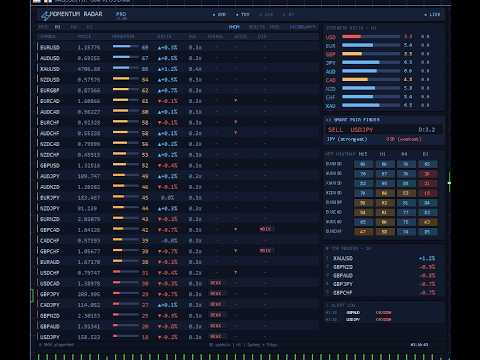
The main dashboard displays all scanned symbols in a sortable table with the following columns: Symbol, Price, Momentum Score (with visual bar), Delta, Volume Ratio, Signal Status, Acceleration, Divergence, Trend State, Fusion Score, and Quality Grade.
The right sidebar includes:
- Currency Strength panel with delta change
- Smart Pair Finder suggesting the pair with the largest strength differential
- Multi-Timeframe Heatmap showing momentum across M15, H1, H4, and D1
- Top Movers panel
- Alert Log
- Alert Configuration status
Users can sort by any column, switch timeframes, and click any row to navigate to that symbol. Keyboard shortcuts are available: S for sort, T for timeframe, R for refresh.
Signal Queue for Telegram
Indicators in MetaTrader 5 cannot send HTTP requests directly. To solve this, the indicator writes signals to a shared CSV queue file. A free companion Expert Advisor (MTR_TelegramBridge) reads this queue and forwards signals to Telegram channels via the Bot API.
The Bridge EA supports the following features:
- Formatted messages with Entry, SL, TP1, TP2, Fusion Score, and Quality Grade
- Channel branding with custom name and optional logo
- Configurable quality filter per channel (e.g., send only A+ and A signals to VIP)
- Support for two channels simultaneously (VIP and Free)
- Follow-up notifications when TP1, TP2, or SL levels are hit
- Automated daily performance summary with signal count and results
- Signal numbering for tracking and reference
- Configurable cooldown to prevent message flooding
- Toggle for each signal type (BUY/SELL, Spikes, Crosses, Divergences, Smart Pair)
The Bridge EA is included free with every purchase. A setup guide with screenshots is provided.
Supported Symbols
FREE version: 8 major pairs (EURUSD, GBPUSD, USDJPY, AUDUSD, USDCAD, NZDUSD, XAUUSD, EURJPY)
PRO/ELITE version: 28 currency pairs including all majors and crosses, plus optional custom symbols for indices (SP500, Dow, Nasdaq, Russell), Bitcoin, and two user-defined symbols. The indicator auto-detects broker symbol naming conventions.
Technical Details
The indicator uses built-in MT5 functions: iRSI, iMomentum, iATR, iMA, and iADX. All signals are calculated on closed candles only (non-repainting). The dashboard uses a smart update system that modifies only changed values instead of recreating all objects, reducing CPU load.
Calculation is distributed across timer intervals using a batch processing approach. Entry zone calculations run at a lower frequency for the current chart symbol only. These optimizations allow the indicator to scan 28+ symbols without affecting terminal performance.
Input Parameters
Parameters are organized into logical groups:
- General: calculation bars, refresh interval, broker prefix/suffix
- Momentum Engine: RSI period, Momentum period, ATR period, volume lookback
- Spike Detection: ATR multiplier, volume multiplier, momentum thresholds
- Divergence: lookback bars, enable/disable
- Alerts: toggle for each alert type, popup, sound, push, email
- Telegram Bridge: enable signal queue (Bridge EA handles the rest)
- Trend Engine: EMA periods (21/50/200), ADX period, strength thresholds
- Fusion Score: weight distribution, signal thresholds
- On-Chart Signals: enable/disable, SL/TP multipliers, max signals, colors
- Display: theme (Dark/Midnight/Light), dashboard position, column visibility
Color Themes
Three built-in themes are available: Dark, Midnight Blue, and Light. Each theme applies to the dashboard, chart background, and all visual elements including heatmap colors and signal badges.
Recommended Usage
Attach the indicator to any chart. The dashboard will scan all configured symbols regardless of the current chart. For on-chart signals, the indicator generates arrows only on the symbol currently displayed. Use the Fusion Score and Quality Grade columns to identify the strongest opportunities. Click on any row in the dashboard to switch the chart to that symbol.
For Telegram integration, attach the Bridge EA to a separate chart and configure your Bot Token and Channel Chat ID. Enable the Signal Queue in the indicator settings. The setup guide provides detailed instructions with screenshots.
What is Included
- Momentum Trend Radar ELITE indicator (compiled)
- MTR_TelegramBridge Expert Advisor (compiled, free)
- Telegram Setup Guide (PDF with screenshots)
Changelog
Version 2.00:
- Added Trend Engine (EMA 21/50/200 + ADX)
- Added Fusion Score combining momentum and trend
- Added Quality Grades (A+, A, B, C)
- Added on-chart BUY/SELL signals with SL/TP levels
- Added Entry Zone calculator with swing detection
- Added TREND, FUSION, and GRADE columns to dashboard
- Added two new sort modes (Trend, Fusion)
- Added free Bridge EA for Telegram integration
- Improved dashboard performance with smart update system
- Improved calculation performance with batched processing
- Removed direct WebRequest from indicator (moved to Bridge EA)
Version 1.01:
- Initial release with momentum scanner, spike detection, and Smart Pair Finder