
Telegram to Copier foreXnomi
- ユーティリティ
- Abdurahim Aras
- バージョン: 18.0
- アップデート済み: 6 5月 2026
foreXnomi - Telegram to Copier
The Ultimate Institutional-Grade Trade Operations Center & finaX AI Trading Assistant for MetaTrader 5 & Telegram to Copier
foreXnomi - Telegram to Copier is not just an ordinary signal copier; it is a paradigm shift in automated trading. Built upon an enterprise-grade architecture, this system seamlessly bridges Telegram, MetaTrader 5, and State-of-the-Art (SOTA) Artificial Intelligence. Whether you are following signals, managing a prop-firm account, or executing complex portfolio management, foreXnomi transforms your MT5 into a highly intelligent, voice and text-command-ready command center.
Core Capabilities & Innovations
1. Dual-Core Telegram Signal Engine
Our system features a brilliant dual-directional signal copying approach designed to offer you both blistering speed and supreme flexibility:
-
⚡ The foreXnomi Advantage (Zero-Latency Auto-Copy): When you enable the AutoCopy feature, our system continuously monitors our official public channel, foreXnomi. The moment a signal is published from our systems, the Expert Advisor (EA) bypasses standard webhook delays and executes the trade directly on your MT5 terminal in milliseconds. Fully automated, seamless, and lightning-fast.
-
🧠 Universal VIP Parser (Manual Forwarding): Are you subscribed to other VIP Telegram groups or private channels? Simply forward any signal message (no matter how complex the formatting is) from those groups to your own foreXnomi Telegram Bot. Our AI, finaX, instantly intercepts the forwarded text, magically extracts the critical details (Symbol, Direction, Entry, SL, TP), compiles a clean summary, and politely asks you: "Should I execute this trade?" You reply "Yes," and the trade is instantly routed to the market. It is like having a personal assistant who reads and filters all your complex VIP channels for you.
2. ZenoX Fast-Execution Protocol
For private communities and algorithmic signal providers, the system natively supports the proprietary ZenoX ultra-fast execution string: [ZX|BUY|XAUUSD|Entry|SL|TP] It features deep disk-level memory to prevent duplicate ticket copying and supports instant execution across all order types (Market, Limit, Stop) with absolute zero AI processing delay.
3. finaX: The Elite Financial AI Assistant
This is the absolute heart of the system. finaX is a State-of-the-Art Financial AI, Quantitative Analyst, and Behavioral Coach living directly inside your MT5.
What makes finaX extraordinary?
-
Enterprise Multi-AI Architecture: finaX is not dependent on a single provider. It supports the world's most advanced Large Language Model (LLM) infrastructures: OpenAI, Groq, Claude, DeepSeek, Gemini, and OpenRouter. The system utilizes the most stable and advanced versions provided by these institutions as its "default models."
-
Total Control & Interchangeable Models: When a brand new AI model is released or you want to test another model's analytical capabilities, you do not need to wait for a software update. You can easily update the default models by chatting directly with finaX (e.g., "Change the default Groq model to model X").
-
Smart Key Rotation (Burn Protection): If an API key hits its rate limit, finaX instantly and automatically switches to the next available API key or provider on your list. Your assistant never goes down.
-
O.O.D.A. Loop Cognition: Before making any move, finaX utilizes a military-grade Observe, Orient, Decide, Act cognitive loop. It reads your floating PnL, balance, open positions, and the economic calendar before drafting a response to you.
-
Behavioral Trading Coach: If you are in a massive drawdown and send panic-filled messages (e.g., "I'm losing everything, close it all!"), finaX detects the emotional tilt. Rather than blindly liquidating your account, it offers logical alternatives like "partial risk-off closures" or "hedging" to give you breathing room and lock in floating value.
-
Native Multi-Language Support: Speak to finaX in English, Turkish, Spanish, French, or any language of your choice. It processes complex MT5 terminal commands in pure English in the background but converses with you flawlessly in your native tongue.
4. Advanced Natural Language Trade Management
Forget the era of clicking through clunky MT5 menus. With finaX, you manage your entire portfolio by chatting with your Telegram bot or using the on-chart GUI. You just say what you want, and finaX executes.
finaX understands deep, complex, and multi-layered commands:
-
Precision Execution: "Open a 0.50 lot BUY on EURUSD."
-
Granular Portfolio Control: "List my open trades. Close half of my profitable Gold positions and move the Stop Loss of ticket #12345 to breakeven."
-
Emergency Interventions: "The market is crashing! Hedge all my open EURUSD positions right now." OR "Reverse my losing GBPUSD trade immediately (Stop and Reverse)."
-
Bulk Modifications: "Change the Take Profit for all my open crypto trades to 65000."
-
System Configuration: "Set my daily target to 5%, turn on account trailing stop starting at $500 with $100 steps, and block all new trades 60 minutes before major news."
Safety First (The Confirmation Protocol): When you request a high-risk action (opening/closing trades, modifying SL/TP), finaX prepares the action in the background but explicitly asks for your final confirmation before sending it to the market. Harmless commands, like changing settings or pulling reports, are executed silently and instantly.
5. Transparent File Architecture & Manual Customization
foreXnomi is not a closed black-box. For advanced users, it offers full control and transparency through MetaTrader 5's native Files folder.
As the EA runs in the background, it creates transparent text ( .txt ) files in your MQL5\Files directory that act as the system's brain:
-
FnAI_Keys_[Provider].txt : Hosts your API keys.
-
FnAI_Model_[Provider].txt : Stores the exact name of the active AI model used for that provider.
-
foreXnomi_settings_v12_[MagicNumber].txt : A complete backup of all your risk, lot, and system settings.
-
foreXnomi_ZX_History.txt : The memory file for processed ZenoX tickets (to prevent duplicate trades).
Total User Freedom: You can open these .txt files with any standard text editor (like Notepad) at any time. You can delete API keys, copy-paste new ones, manually type in new model names, or copy your settings files to port them to another terminal in seconds. The full power of finaX is at your fingertips.
6. Dynamic Symbol Matching & Anti-Duplicate Armor
Brokers have complex and varying suffixes (e.g., XAUUSDm , GOLD.pro , EURUSD# ). You do not need to configure this manually. Just send the word "GOLD" or "EURUSD", and the system dynamically scans your broker's Market Watch to automatically find the correct tradable asset. Furthermore, an integrated 60-second cooldown memory ensures that delayed or double-sent signals never result in duplicate trades.
7. Institutional Risk & Money Management
Calculate your lots like a hedge fund manager:
-
Fixed Lot
-
Risk % per Trade
-
Lot per $1,000 Balance Assign specific lot sizes and maximum spread protections across 4 distinct symbol groups (e.g., Forex, Metals, Crypto, Indices) to flawlessly manage volatility exposure across different asset classes.
8. Macro-Economic News Filter (O.O.D.A. Integration)
finaX is directly integrated with the MT5 Economic Calendar.
-
It can automatically block trades X minutes before and after high-impact news events (CPI, FOMC, NFP, etc.) that directly match the relevant currency pair. finaX will also actively remind you of impending slippage risks during news hours if you attempt to place a manual trade.
9. 3-Dimensional Trade Management & Prop-Firm Readiness
-
Breakeven & Trailing Stop: Lock in and trail your profits across 3 different dimensions: Individual positions, Symbol groups, or Total account equity.
-
Daily Target & Loss %: Vital for prop-firm funded traders. Once you hit your daily profit target (e.g., +5%) or daily drawdown limit (e.g., -4%), the EA ruthlessly closes all open trades, deletes pending orders, and hard-locks the terminal from opening new trades until midnight.
-
End-of-Day (EOD) Close: Reduce overnight swap fees and weekend gap risks by auto-closing All, Winning, or Losing trades at a specific hour/minute, or strictly on Fridays.
10. VPS Headless Mode & Professional GUI
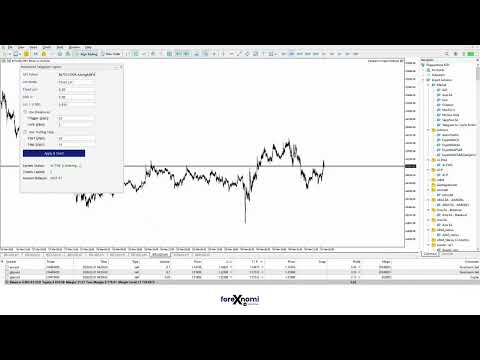
Operating on a low-resource VPS? Enable Headless Mode to disable the visual panel and save RAM/CPU. Using it on your desktop? Enjoy the massive, interactive, drag-and-drop on-chart Professional GUI that houses all your real-time reports and quick-control toggles without ever having to open the EA's properties window.
Installation & Setup Guide
-
Install the EA: Drag and drop the foreXnomi - Telegram to Copier file onto any chart in MetaTrader 5.
-
Enable Algo Trading: Ensure the "Algo Trading" button on the MT5 top toolbar is green.
-
Configure WebRequests (CRITICAL STEP): You MUST allow the system to communicate with Telegram and the AI Providers. Go to MT5 -> Tools -> Options -> Expert Advisors . Check the box for "Allow WebRequest for listed URL". Add the following URLs exactly as written:
-
Link Telegram: Input your Telegram Bot Token and your personal User Chat ID in the EA settings.
-
AI Setup (Optional but Highly Recommended): Paste your AI API Key(s) into the settings or directly via the on-chart GUI. The system will automatically detect the provider based on the key structure and save it securely to your Files folder.
-
Set Your Risk: Choose your Lot Mode, set your Spread Limits, and configure your Daily Targets.
-
Start Chatting: Open your Telegram bot and type "Report Status" or forward a signal to see the magic happen.
Important Disclaimer
foreXnomi - Telegram to Copier is a highly advanced trading automation and execution tool. It does not guarantee profits. Financial markets are inherently risky, and performance depends entirely on market conditions, broker liquidity, slippage, and your personal risk settings. Always test this Expert Advisor extensively on a Demo Account before deploying it on live capital. Employ strict risk management and never risk capital you cannot afford to lose.
Our Corporate Telegram Signal & News Channel
Our Corporate Telegram Group - You can talk to all users and all our AI assistants
My name is Abdurahim Aras. I will always be here to support you. You can always contact me for installation and support.
Phone: +90 533 375 5032
Telegram: @abdurrahimaras























































ユーザーは評価に対して何もコメントを残しませんでした