M1 Scalper Sniper
- インディケータ
- バージョン: 1.0
- アクティベーション: 10

M1 Scalper Sniper: The Ultimate Trend & Volume Visualizer
Trading the 1-minute (M1) timeframe can be a nightmare of market noise and "fakeouts," especially on volatile assets like Gold (XAUUSD) and Bitcoin (BTCUSD). The M1 Scalper Sniper was engineered to solve this problem by combining institutional volume analysis with ultra-smoothed price action.
Unlike standard indicators that lag or clutter your screen, the M1 Scalper Sniper uses a wickless "brick" system to show you the "meat" of the trend, allowing you to stay in winning trades longer and exit before the reversal hits.
Key Advantages:
- Noise-Free Visuals: Uses a double-smoothed Heikin Ashi algorithm to remove distracting wicks and shadows. You see the trend performance, not the volatility.
- The 3-Color Intelligence System:
- Neon Green: High-probability Bullish trend.
- Orange Red: High-probability Bearish trend.
- Slate Gray: "Wait Zone." Detects institutional "churn" where volume is high but price is stalling—perfect for avoiding traps.
- Dual-Layer Confirmation: Signals are only generated when a trend change is confirmed by two consecutive "performance bricks" AND a momentum recovery from the Stochastic Oscillator.
- Built for Volatility: Optimized specifically for the fast-paced movements of Gold, Crypto, and Major Forex Pairs.
- Multi-Timeframe Ready: While it excels on M1, the smoothing logic remains robust on M5, M15, and H1 timeframes.
How to Trade with M1 Scalper Sniper?
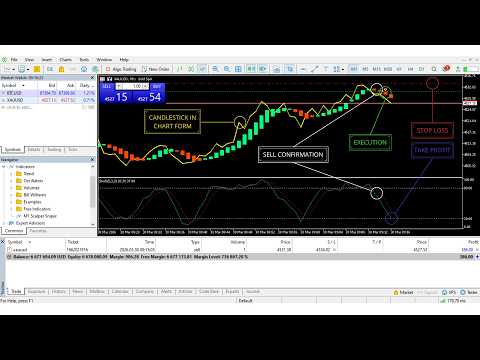
- Change Candlestick to Chart Form to see the indicator working properly and see the chart cleanly.
- Identify the Setup: Wait for the candles to turn Gray, indicating the previous move is exhausted.
- Wait for the Sniper Alert: The indicator will notify you when two trend-colored bricks appear and the Stochastic moves out of the "Oversold" (20) or "Overbought" (80) zones.
- Execute & Exit: Enter on the alert. Exit as soon as a Gray brick appears, securing your profit before the market moves against you.
- Faster Scalping Method:
- Faster Scalp Buy: Enter Buy when two green candles appear and are confirmed by the Stochastic Oscillator moving upwards from the Oversold level (20) towards the Overbought area (80). Place a Stop Loss at the nearest Lower Low and Take Profit/Exit when the Main Signal Stochastic Oscillator (Blue) touches the Overbought line (20).
- Faster Scalp Sell: Enter Sell when two red candles appear and are confirmed by the Stochastic Oscillator moving downwards from the Overbought level (80) towards the Oversold area (20). Place a Stop Loss at the nearest Higher High and Take Profit/Exit when the Main Signal Stochastic Oscillator (Blue) touches the Oversold line (20).
Input Parameters:
- Smooth Period (5): Controls the "Noise Filter." Higher values make the chart smoother; lower values make it faster.
- Stochastic %K (5): The period for the main Stochastic line.
- Stochastic %D (3): The period for the Stochastic signal line.
- Stoch Slowing (3): Controls the sensitivity of the Stochastic momentum filter.
- Volume Multiplier (2.0): Sensitivity for detecting "Smart Money" activity. Higher = fewer, stronger reversal zones.
- Play Sounds (True): Enables/Disables audio alerts and popup notifications on your terminal.
Product Specifications:
- Platform: MetaTrader 5 (MT5)
- Asset Class: Forex, Gold (XAUUSD), Crypto (BTCUSD), Indices.
- Timeframe: Optimized for M1; compatible with all.
- Repainting: Non-Repainting. Signals confirm at the close of the candle.