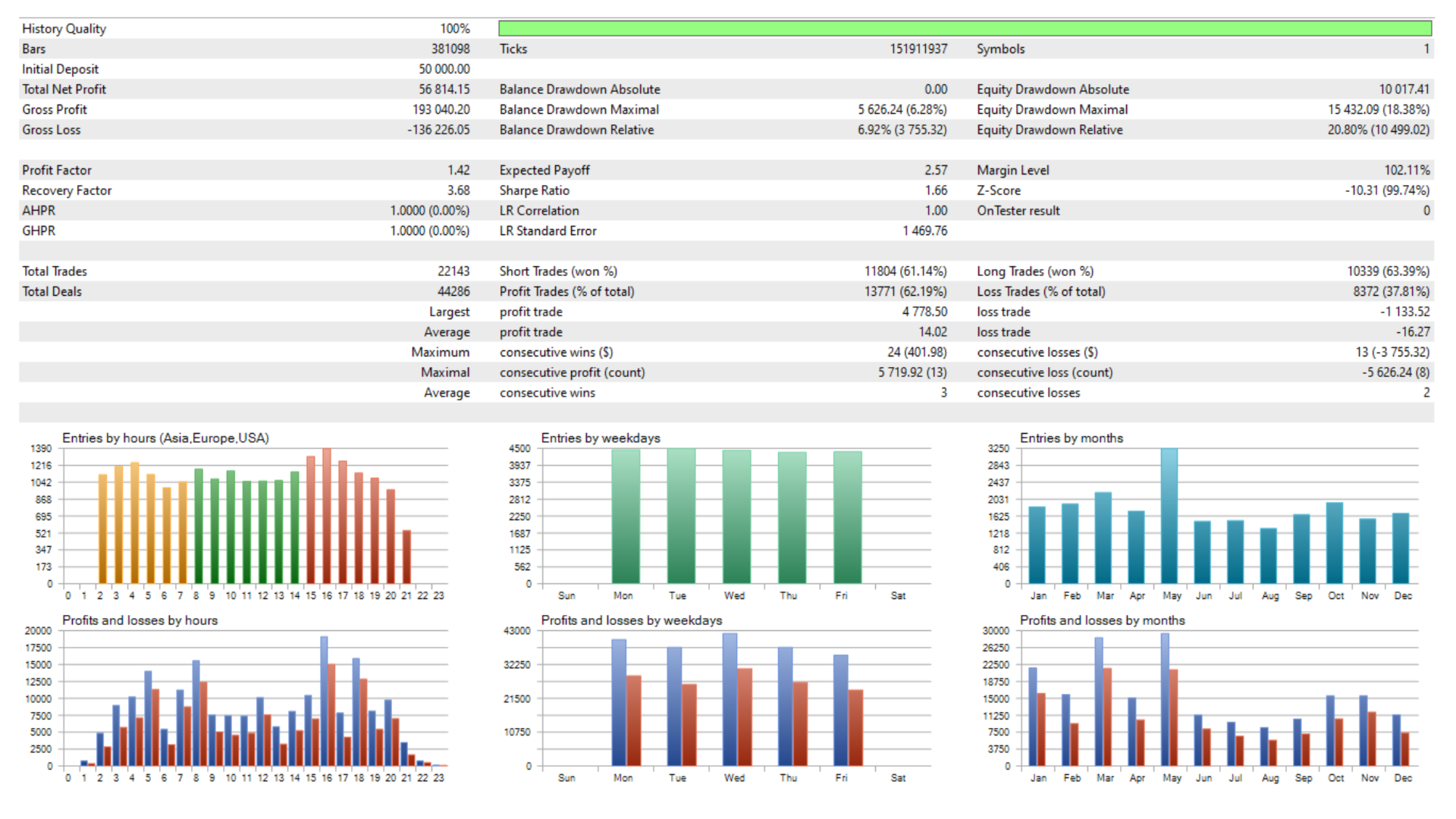
Dai Dai is a fully automated grid Expert Advisor for MetaTrader 5, built based on Stochastic divergence entries and a dynamically spaced grid that adapts to live market volatility. It opens the first position only when a confirmed divergence signal appears, then manages the open basket automatically — adding grid orders as price moves against it and closing the entire basket the moment a combined profit target in dollars is reached.
The EA offers a choice between Martingale lot scaling and a fixed-lot grid, a deep drawdown recovery mode that tightens the profit target when the basket grows large, and a hard equity stop that protects your account if losses reach a defined threshold. All execution is live-trade ready: the EA respects broker spread conditions, checks available margin before every order. A configurable session time filter controls when new entries are permitted, while basket management and closing remain active at all times.
HOW IT WORKS
At every tick, the EA reads the Stochastic oscillator and scans recent price highs and lows for a divergence pattern. A bullish divergence — where price makes a lower low but Stochastic makes a higher low below the 20 level — opens a Buy basket. A bearish divergence — price making a higher high while Stochastic makes a lower high above the 80 level — opens a Sell basket. Only one basket per direction is active at a time. Once a basket is open, the EA monitors distance from the last entry. When price moves against the position by a grid step calculated from the ATR (Average True Range), a new order is added. The grid step automatically widens in volatile markets and narrows during quiet periods, always respecting a configurable minimum. Lot sizes either stay fixed or scale up with each additional order using a configurable Martingale multiplier capped at a maximum lot size. The basket closes in full as soon as the combined floating profit of all positions in that direction reaches the dollar target. If the order count exceeds the recovery threshold, the profit target drops to breakeven, allowing the EA to exit the basket at zero loss instead of waiting for the full target. A hard equity stop closes all positions instantly if the account drawdown reaches a set percentage.
KEY FEATURES
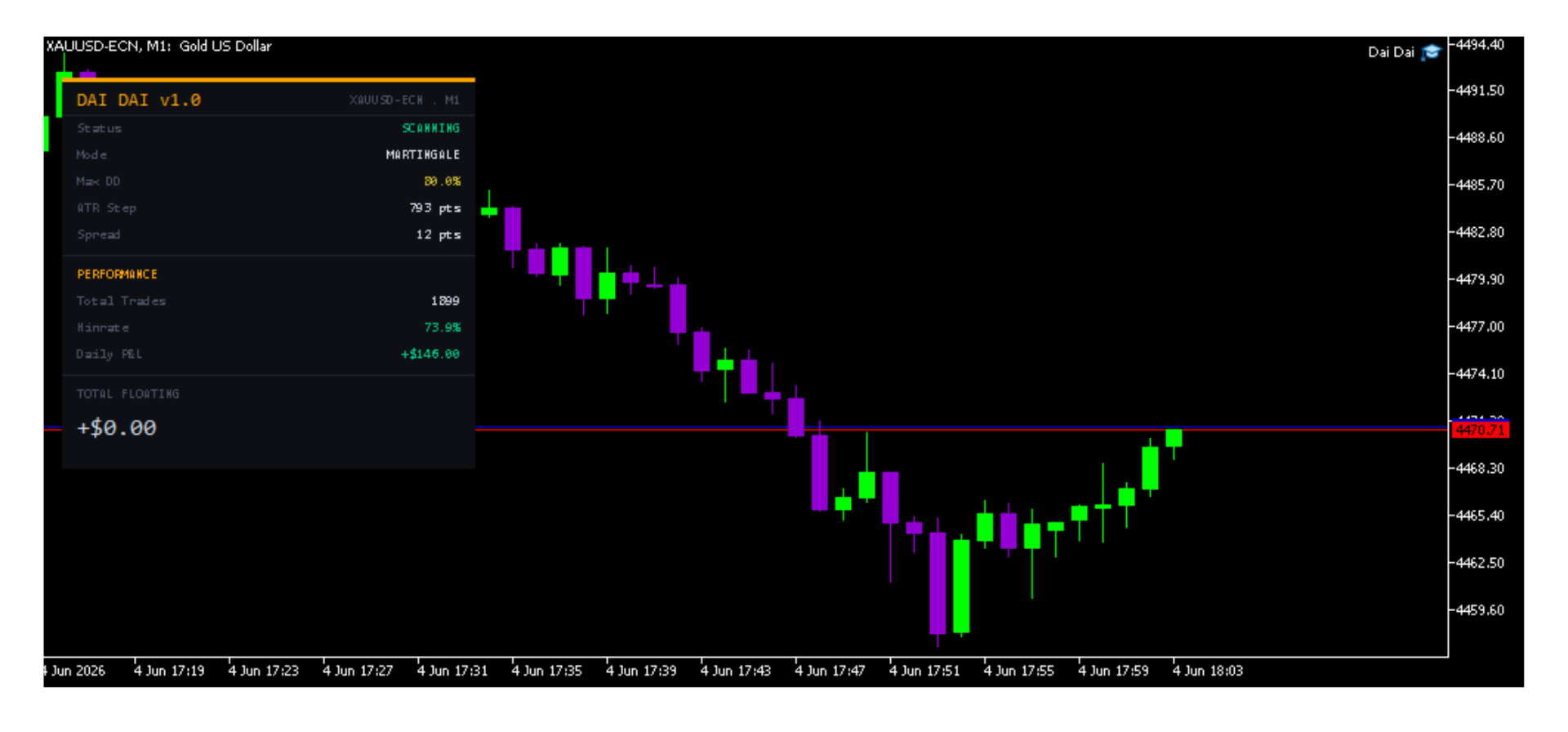
Stochastic Divergence Entry — opens the first position only on a confirmed divergence signal between price action and the Stochastic oscillator, filtering out random noise and entering only at statistically meaningful turning points. ATR Dynamic Grid Spacing — grid step distance is calculated from the current ATR multiplied by a configurable factor, so the EA spaces orders further apart in fast-moving markets and tighter in calm ones. A minimum step floor prevents orders from stacking too closely. Martingale or Fixed Lot Grid — switch between Martingale lot scaling (each new grid order multiplied by a configurable factor) and a flat fixed-lot grid with a single toggle. A maximum lot cap limits exposure regardless of how deep the basket goes. Basket Profit Target — all positions in a direction are closed simultaneously the moment their combined floating profit reaches the configured dollar target. Closing is permitted at any time of day, independent of the session filter. Deep Drawdown Recovery Mode — when the number of open orders in a basket reaches a configurable threshold, the profit target automatically drops to zero, allowing the EA to exit at breakeven and stop the drawdown from compounding further. Hard Equity Stop — if account equity falls below a defined percentage of balance, all positions are closed immediately and the EA prints an alert. Set to 0 to disable. Spread Filter — new entries and grid additions are blocked when live spread exceeds the configured maximum. Basket closing is never blocked by spread. Session Time Filter — new entries are restricted to a configurable server-time window with minute-level precision. A separate cutoff parameter stops new grid orders a set number of minutes before the session ends, preventing late additions that cannot be managed. Margin Check — before every order, the EA calculates the margin required and compares it to free margin. If insufficient, the order is skipped cleanly with a log message rather than failing at the broker. Live On-Chart Dashboard — a compact panel displays system status, lot mode, max drawdown setting, current ATR grid step, live spread, total closed trades, win rate, daily P&L, and total floating profit — all colour-coded for instant reading. The panel is automatically disabled during backtesting to avoid interference. Daily P&L Tracking — equity baseline resets automatically each new day, providing an accurate intraday profit and loss figure at all times. 2-Digit to 5-Digit Broker Compatibility — all point-based inputs are automatically scaled to the broker's decimal precision at startup. Multi-EA Isolation — configurable magic number allows multiple instances to run on different symbols or timeframes simultaneously without interference.
RECOMMENDED SETUP Timeframe: M1 Pair: XAUUSD (Gold) Account type: ECN or STP with low spreads Recommended brokers: VT MARKETS or a Cent 2-digit broker (ROBOFOREX)
2 decimal price quota for GOLD
Account type: Hedging
Minimum balance Cent Account: $500 (recommended $1,000+ for Martingale mode), if balance $500 in Cent Account you will get $50,000 Minimum balance Standard Account: $50,000
VPS: strongly recommended for uninterrupted basket management
INPUT PARAMETERS --- GRID & RISK SETTINGS --- InpMagicNumber — Unique identifier for this EA's orders. Change when running multiple instances on the same account. Default: 888. InpMaxSpread — Maximum allowed spread in 2-digit points. New entries and grid additions are blocked above this level. Default: 30. InpUseMartingale — When true, each additional grid order is multiplied by InpSmartMultiplier. When false, every grid order uses InpBaseLot. Default: true. InpBaseLot — The lot size of the first order in each basket, and the fixed lot size for all grid orders when Martingale is disabled. Default: 0.01. InpMaxLot — Hard cap on any single order's lot size. Prevents Martingale scaling from producing excessively large orders deep in the grid. Default: 2.00. InpSmartMultiplier — Multiplier applied to the previous lot size for each new Martingale grid order. Only active when InpUseMartingale is true. Default: 1.5. InpBasketProfitUSD — Dollar profit target for the combined basket. When total floating profit across all positions in one direction reaches this value, the basket is closed in full. Default: $5.00. InpMaxDrawdown — Maximum allowed drawdown as a percentage of account balance. All positions are closed immediately if this level is breached. Set to 0 to disable. Default: 80.
--- DEEP DRAWDOWN RECOVERY --- InpRecoveryOrderCount — When the number of open orders in a basket reaches this count, the profit target is changed to $0.00 (breakeven), allowing the EA to exit without requiring a full recovery. Set to 0 to disable. Default: 7.
--- DYNAMIC ATR GRID SETTINGS --- InpATRPeriod — Number of bars used to calculate the Average True Range. A longer period produces a smoother, slower-reacting grid step. Default: 14. InpATRMultiplier — Scales the ATR value to produce the grid step distance. Higher values space orders further apart. Default: 2.0. InpMinGridStep — Minimum allowed grid step in points, regardless of what ATR calculates. Prevents orders from being placed too close together in very low-volatility conditions. Default: 150.
--- STOCHASTIC SETTINGS --- InpStochK — K period of the Stochastic oscillator used for divergence detection. Default: 14. InpStochD — D period (signal line smoothing) of the Stochastic oscillator. Default: 3. InpStochSlowing — Slowing parameter of the Stochastic oscillator. Default: 3.
--- TRADING TIME (SERVER TIME) --- InpStartHour — Server hour when the EA begins placing new entries and grid orders. Default: 2. InpStartMinute — Minute within the start hour when the session opens. Default: 0. InpEndHour — Server hour when the EA stops placing new entries. Existing baskets continue to be managed after this point. Default: 22. InpEndMinute — Minute within the end hour when the session closes. Default: 0. InpStopNewOrdersBeforeEndMinutes — Stops all new entries and grid additions this many minutes before the session end time. Prevents late orders from being opened without enough time to recover. Default: 30.
Note:
- Always test on a demo account first before going live. Grid strategies carry significant risk if parameters are not matched to your broker and symbol.
- Martingale mode requires adequate account balance to sustain multiple grid levels. Reduce InpBaseLot if your balance is limited.
- Use a Cent account if starting with a small balance.
- A VPS is strongly recommended to ensure all open baskets are managed continuously without interruption.
- This EA does not need any file set to run, just make sure it runs on 2 digit broker.
- Get user manual settings guide inside our Telegram group.