M1 Hft Oco
- エキスパート
- バージョン: 1.0
- アクティベーション: 10

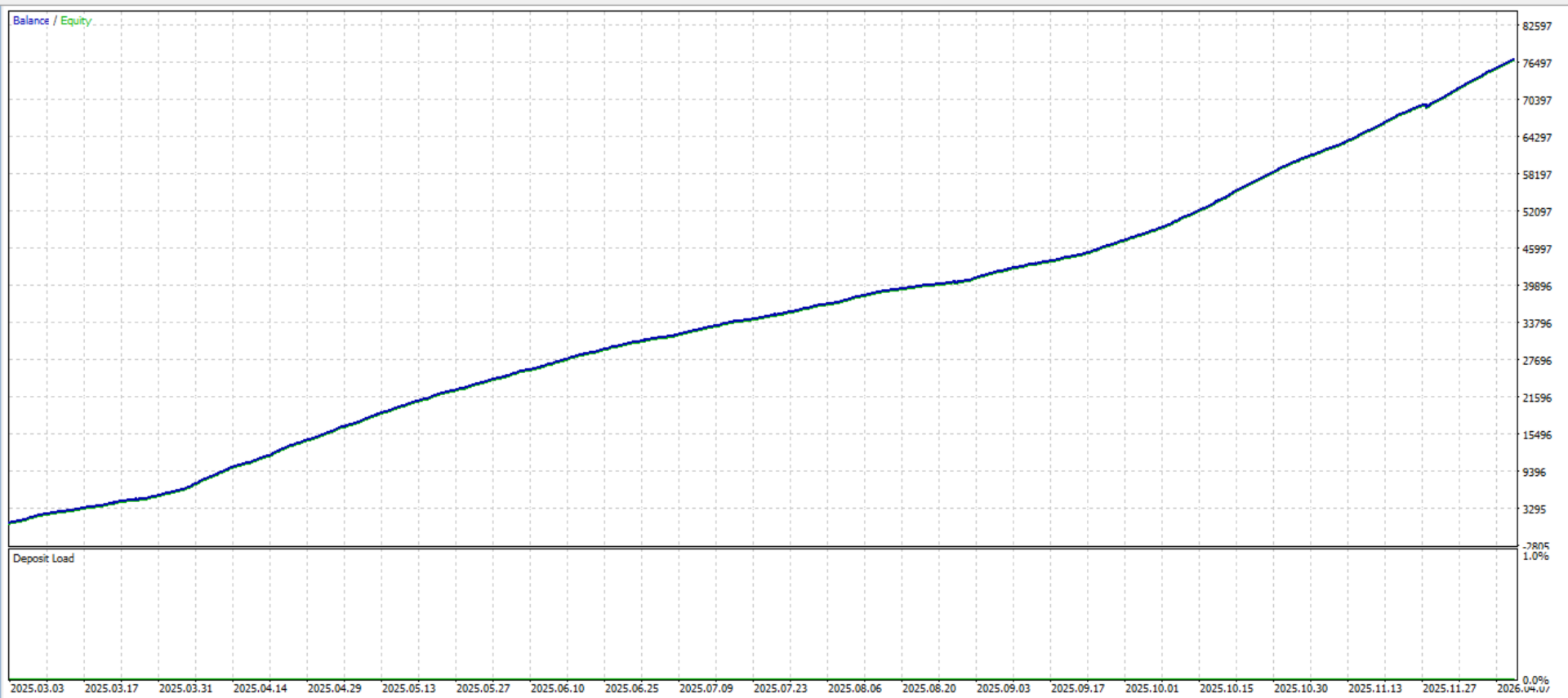
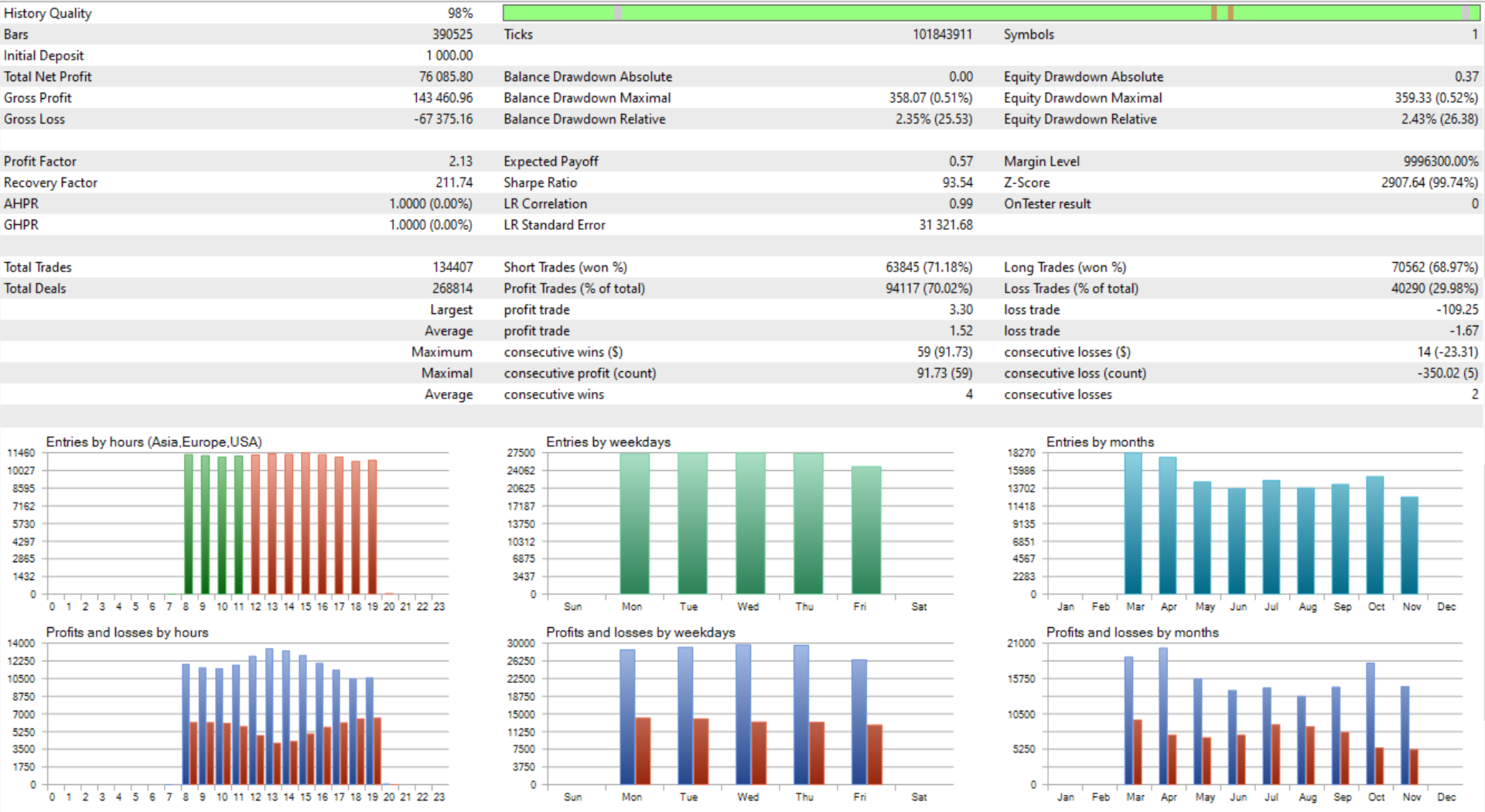
M1 HFT OCO is a fully automated scalping Expert Advisor for MetaTrader 5, non-martingale strategy and designed to trade any symbol on the M1 timeframe. It places a pair of pending Buy Stop and Sell Stop orders at the start of every new candle, captures the breakout in whichever direction price moves, and manages the trade automatically from entry through to exit — including a smart trailing stop that locks in profit as the move continues.
Every feature was designed with live execution in mind. The EA respects broker stop levels, freeze levels, and dynamic spreads automatically, checks available margin before placing any order, and is compatible with any-digit brokers out of the box. Proper setting of input parameters is required for each change of broker and pair.
HOW IT WORKS
At the open of each new M1 candle, the EA reads the previous candle's high and low. It places a Buy Stop a configurable number of points above the high and a Sell Stop below the low. The moment one order fills, the remaining pending order is cancelled automatically (One-Cancels-Other). The active position is then managed through a configurable Stop Loss, Take Profit, and — if enabled — a step-by-step trailing stop that advances the SL as price moves in your favour. Automatically delete pending orders if they are not executed within 2 minutes.
KEY FEATURES
OCO Pending Orders — one Buy Stop and one Sell Stop placed each candle. When one fills, the other cancels automatically. Smart Trailing Stop — advances the Stop Loss step-by-step as price moves in profit. Configurable distance and step size. Fixed or Risk-Based Lot Sizing — use a fixed lot or let the EA size the position automatically as a percentage of account equity. Broker-Safe Execution — respects STOPS_LEVEL and FREEZE_LEVEL on every order. A configurable safety buffer handles dynamic spread conditions. Margin Check — verifies free margin before placing any order. Skips the trade if margin is insufficient rather than failing at execution. Session Time Filter — restricts new entries to a configurable hourly window. Open positions continue to be managed outside trading hours. One Trade Per Candle — a candle gate prevents multiple OCO sets from firing on the same bar. Live On-Chart Dashboard — compact panel showing Balance, Equity, Free Margin, Session status, open Position direction, Daily P&L (realised + floating), and pending order count. 2-Digit to 5-Digit Broker Compatibility — all point-based inputs work identically regardless of broker precision. Multi-EA Isolation — configurable magic number so multiple instances can run on different symbols simultaneously. Configurable Dashboard Position — move the panel anywhere on the chart with X/Y pixel inputs.
Timeframe: M1 Pair: XAUUSD (Gold) Account type: ECN or STP with tight spreads Minimum balance: $500 (recommended $1,000+) VPS: strongly recommended for 24/5 uptime
--- TRADE SETTINGS ---
InpLotSize — Fixed lot size used when risk-based sizing is disabled. Default: 0.01. InpRiskPercent — Percentage of account equity to risk per trade. Set to 0 to use the fixed lot size. Default: 0.0. InpStopLoss — Stop Loss distance in points from the entry price (10 points = 1 pip on 5-digit brokers). Default: 150. InpTakeProfit — Take Profit distance in points from the entry price. Default: 150. InpOffset — Additional offset in points added above the previous candle high (Buy Stop) and subtracted below the low (Sell Stop), to avoid triggering on noise. Default: 10. InpMagic — Unique magic number to identify this EA's orders. Change this when running multiple instances. Default: 123456.
InpUseTrailing — Enable or disable the trailing stop feature. Default: true. InpTrailingStop — Distance in points from the current price at which the trailing SL is maintained. Default: 120. InpTrailingStep — Minimum price improvement in points required before the SL is advanced. Prevents excessive modification calls to the broker. Default: 30. InpSafetyBuffer — Extra cushion in points added on top of the broker minimum stop level to handle spread spikes. Default: 50.
InpStartHour — Broker server hour (0–23) when the EA begins placing new orders. Default: 8. InpEndHour — Broker server hour (0–23) when the EA stops placing new orders. Active positions continue to be managed after this hour. Default: 20.
InpDashX — Horizontal pixel position of the dashboard panel from the left edge of the chart. Default: 12. InpDashY — Vertical pixel position of the dashboard panel from the top edge of the chart. Default: 28.
Every feature was designed with live execution in mind. The EA respects broker stop levels, freeze levels, and dynamic spreads automatically, checks available margin before placing any order, and is compatible with any-digit brokers out of the box. Proper setting of input parameters is required for each change of broker and pair.
HOW IT WORKS
At the open of each new M1 candle, the EA reads the previous candle's high and low. It places a Buy Stop a configurable number of points above the high and a Sell Stop below the low. The moment one order fills, the remaining pending order is cancelled automatically (One-Cancels-Other). The active position is then managed through a configurable Stop Loss, Take Profit, and — if enabled — a step-by-step trailing stop that advances the SL as price moves in your favour. Automatically delete pending orders if they are not executed within 2 minutes.
KEY FEATURES
--- TRADE SETTINGS ---
Note:
- Always test on a demo account first to understand the EA's behaviour before going live.
- Use a Cent account if you are starting with a small balance.
- A VPS is strongly recommended to ensure orders are managed 24/5 without interruption.
- Get the file set and settings guide inside our Telegram group.
- Contact & support: https://t.me/eadevgold
- Join our community: https://t.me/m1goldscalper