Phantom Snap
- エキスパート
-
Domantas Juodenis
 Are you looking for a reliable and skilled EA developer who can bring your trading ideas to life with precision and performance?
 - バージョン: 3.0
- アクティベーション: 10
═══════════════════════════════════════════════════════════════
PHANTOM SNAP EA v3.0
Advanced CRT + TBS Automated Trading System
MetaTrader 5 | Multi-Symbol | Netting
═══════════════════════════════════════════════════════════════
─────────────────────────────────────────────────────────────
OVERVIEW
─────────────────────────────────────────────────────────────
Phantom Snap EA is a professional algorithmic trading system
built on two of the most powerful Smart Money concepts in
modern trading — Candle Range Theory (CRT) and Turtle Body
Snap (TBS). The strategy identifies institutional liquidity
sweeps where price fakes out beyond a defined range, then
snaps back with force — the "Phantom Snap."
The EA is fully automated, works on any symbol and any
timeframe (recommended M5 and above), and is optimised for
low-latency execution on netting accounts.
─────────────────────────────────────────────────────────────
THE STRATEGY — HOW IT WORKS
─────────────────────────────────────────────────────────────
STEP 1 — CRT RANGE FORMATION
The EA scans a configurable number of completed candles
(default: 3) and defines the High and Low of that range.
This range represents a zone of resting liquidity —
stop losses and pending orders placed by retail traders.
STEP 2 — PHANTOM SWEEP (Liquidity Grab)
The EA detects when a candle breaks outside the defined
range — sweeping the liquidity above the High (bear setup)
or below the Low (bull setup) — but critically CLOSES
BACK INSIDE the range on the same bar. This is the
institutional footprint: price hunts liquidity then
immediately reverses.
STEP 3 — TBS CONFIRMATION (Turtle Body Snap)
After a valid sweep, the EA waits for the next candle to
confirm the reversal with a strong-bodied candle (body/range
ratio ≥ 0.55 by default). A second confirmation candle in
the same direction is also required — this 2-bar filter
eliminates weak or false setups and dramatically reduces
over-trading.
STEP 4 — ENTRY EXECUTION
On confirmation, the EA places either:
• Pending Limit Order (default) — entry at a precise offset
from the signal price for optimal fill
• Market Order (optional) — immediate execution
All pending orders automatically expire after 8 hours if
not triggered, keeping the book clean.
STEP 5 — TRADE MANAGEMENT
Every position is managed with pre-calculated Stop Loss and
Take Profit levels. Optional trailing stop, auto-close, and
martingale functions are available as clickable toggles.
─────────────────────────────────────────────────────────────
COMPONENTS
─────────────────────────────────────────────────────────────
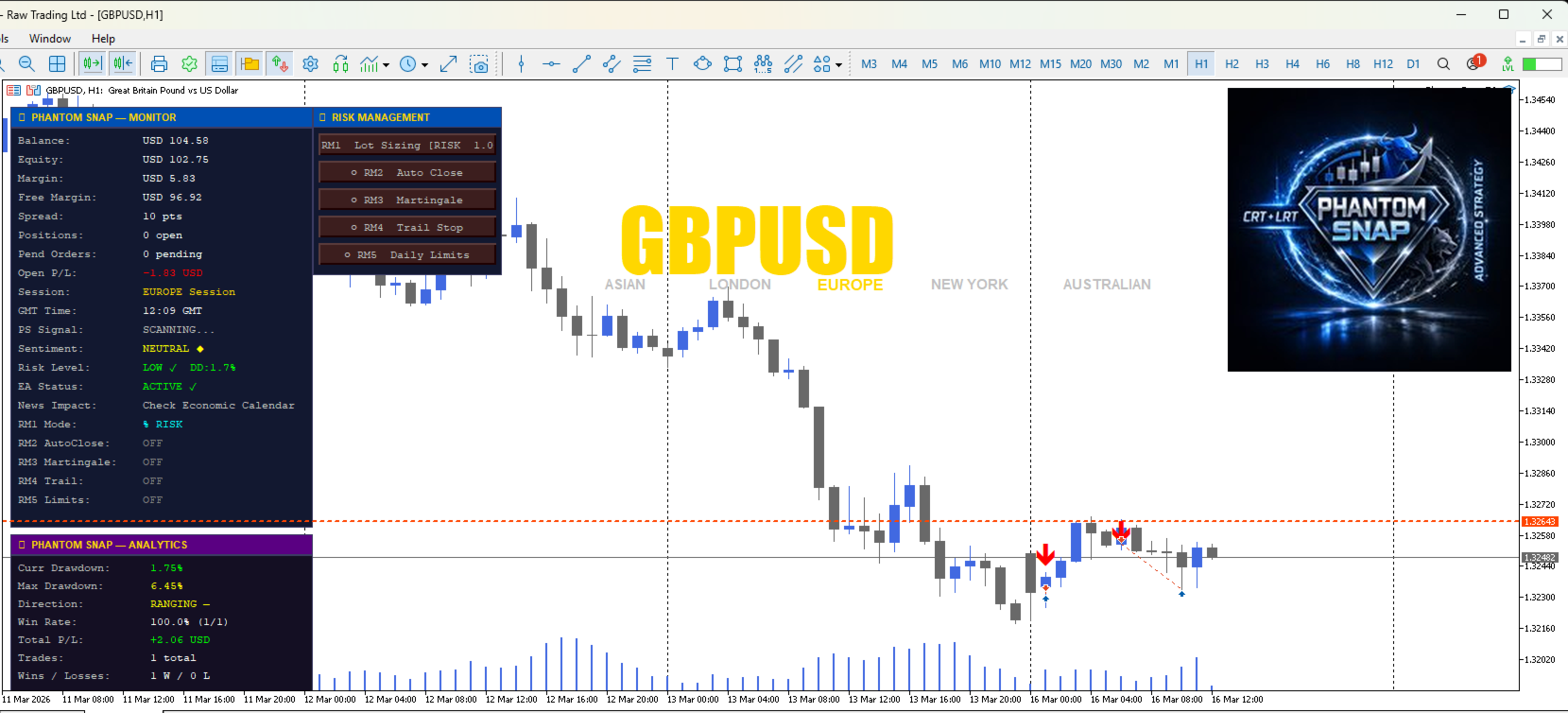
DUAL DASHBOARD SYSTEM
Dashboard 1 — PHANTOM SNAP MONITOR
├ Live Balance, Equity, Margin, Free Margin
├ Current Spread in points
├ Open Positions & Pending Orders count
├ Real-time Open P/L
├ Active Trading Session & GMT Time
├ EA Signal Status (Scanning / CRT Bull / CRT Bear)
├ Market Sentiment (SMA20 vs SMA50 bias)
├ Risk Level with live Drawdown %
├ EA Status (Active / Halted)
├ News Impact reminder
└ Live status of all 5 Risk Management modules
Dashboard 2 — PHANTOM SNAP ANALYTICS
├ Current & Maximum Drawdown %
├ Market Direction Bias (Higher Highs/Lows detection)
├ Win Rate % with trade count
├ Total Net P/L
├ Wins / Losses breakdown
├ Average Win & Average Loss
├ Risk-to-Reward Ratio
├ Profit Factor
├ Daily P/L
├ Martingale Level tracker
└ Next Pending Order expiry time
5 CLICKABLE RISK MANAGEMENT BUTTONS
All 5 modules are toggled ON/OFF by clicking directly
on the button panel — no need to open settings.
Each button displays its current value when active.
RM1 — LOT SIZING
Toggle between % Risk mode (auto-calculates lot based on
account balance and stop loss distance) and Fixed Lot mode.
Default: % Risk at 1.0% per trade.
RM2 — AUTO CLOSE [Default: OFF]
Automatically closes a position if it reaches a defined
pip loss threshold. Protects against runaway losses when
trailing stop is not active. Default threshold: 10 pips.
RM3 — MARTINGALE [Default: OFF]
Multiplies lot size after a losing trade up to a
configurable maximum level. Configurable multiplier
(default 2.0x) and max levels (default 3).
Use with caution — risk management discipline required.
RM4 — TRAILING STOP [Default: OFF]
Dynamically moves the Stop Loss to lock in profits as
price moves in favour. Configurable trail distance
and step size in pips.
RM5 — DAILY LIMITS [Default: OFF]
Halts all trading for the rest of the day when either
the daily loss % or total drawdown % threshold is hit.
Automatically resets at the start of each new trading day.
SESSION DISPLAY
Five trading sessions displayed directly on the chart:
ASIAN · LONDON · EUROPE · NEW YORK · AUSTRALIAN
The currently active session highlights in gold.
PAIR LABEL
The traded symbol is displayed in large gold letters
in the centre of the chart for instant identification —
ideal for traders monitoring multiple charts.
CHART VISUAL SYSTEM
• Bull candles: Royal Blue
• Bear candles: Dark Gray
• Background: Clean White, no grid
• CRT sweep lines drawn automatically on detection
• TBS entry arrows painted at signal bars
LOGO DISPLAY [Default: OFF]
The Phantom Snap logo can be enabled in Settings
(Vis_ShowLogo = true) and will appear in the top-right
corner of the chart.
For the Version with full logo pre-enabled,
contact the developer directly.
─────────────────────────────────────────────────────────────
SUPPORTED SYMBOLS & TIMEFRAMES
─────────────────────────────────────────────────────────────
All Forex pairs (EURUSD, GBPUSD, USDJPY, etc.)
Gold (XAUUSD) and Silver (XAGUSD)
Indices and Commodities
Crypto pairs
Recommended timeframes: M5, M15, M30, H1, H4, D1
Account types: Netting and Hedging
─────────────────────────────────────────────────────────────
KEY SETTINGS
─────────────────────────────────────────────────────────────
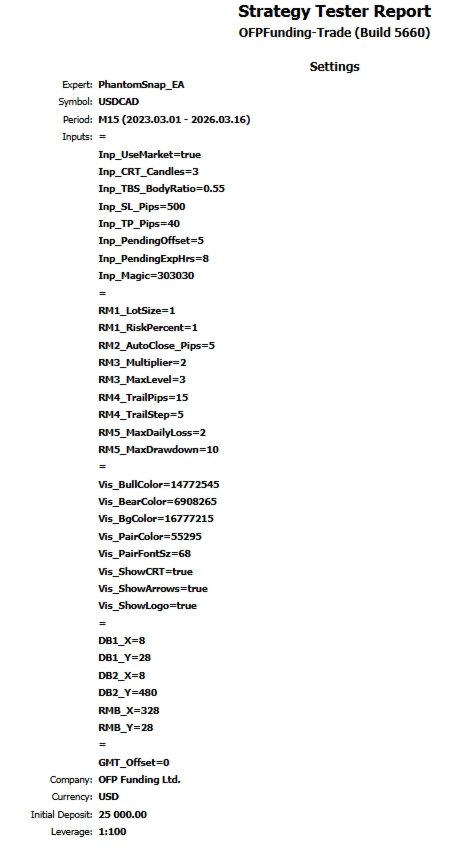
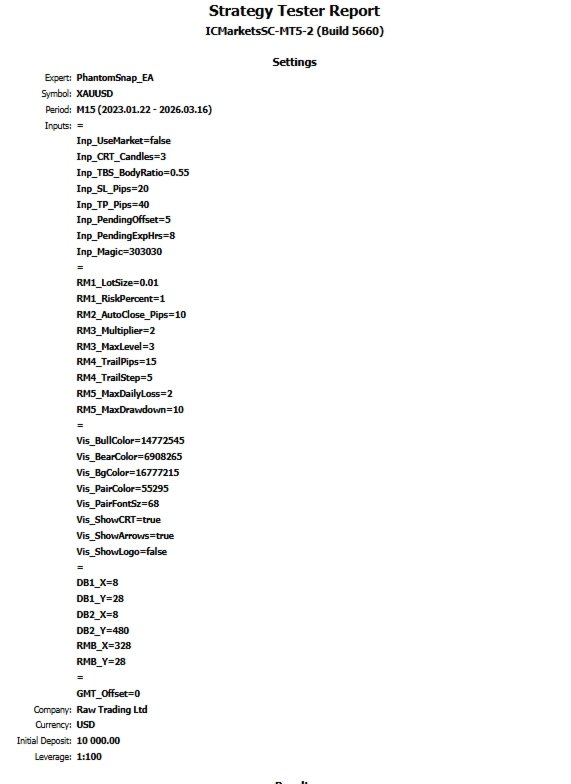
Inp_UseMarket — Pending (default) or Market execution
Inp_CRT_Candles — Range lookback bars (default: 3)
Inp_TBS_BodyRatio — Minimum body strength (default: 0.55)
Inp_SL_Pips — Stop Loss in pips (default: 20)
Inp_TP_Pips — Take Profit in pips (default: 40)
Inp_PendingExpHrs — Pending order expiry hours (default: 8)
GMT_Offset — Broker GMT offset for session display
─────────────────────────────────────────────────────────────
PERFORMANCE NOTES
─────────────────────────────────────────────────────────────
• Maximum 1 trade open at a time — controlled, disciplined
• 2-bar TBS confirmation prevents low-quality entries
• Pending orders auto-expire after 8 hours
• All GUI and visual operations are completely bypassed
in Strategy Tester for maximum backtest speed
• Compatible with all broker execution models
─────────────────────────────────────────────────────────────
For the Version with full logo pre-enabled,
contact the developer directly.