
GDXM Period Separador
- インディケータ
- バージョン: 1.1

Contextualize the Narrative: Multi-Timeframe Structure Simplified
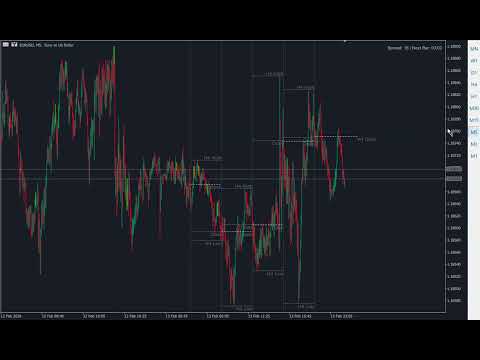
The HTF Period Cycles is a high-performance visualization tool designed for traders who need to anchor their intraday analysis to Higher Timeframe (HTF) levels without the friction of switching tabs. By projecting the Open, High, Low, and Close (OHLC) of completed HTF cycles directly onto your lower timeframe (LTF) chart, you can maintain a crystal-clear bias while executing in the "now."
Why This belongs in Your Toolkit
Successful trading is about context. If you are trading the M5 or M15, the Highs and Lows of the Previous Day (PDH/PDL) or Previous Week (PWH/PWL) are your most critical liquidity pools. This indicator automates the mapping of these institutional levels, ensuring you never miss a HTF "stop run" or a "rejection" at a key cycle level.
Core Features & Technical Sophistication
1. Dynamic Period Separation & Logic Unlike standard MT5 separators that simply draw vertical lines, this tool distinguishes between Active and Closed periods:
-
The Active Period: Displays only the vertical separator (Starting Point), keeping your current price action clean and focused on the immediate delivery.
-
Closed Periods: Automatically renders the OHLC structure for historical cycles once they are finalized.
2. Intelligent Object Rendering (Anti-Flicker) Built with a "Smart Update" engine, the indicator avoids the common pitfall of "flickering" or disappearing objects during high volatility (common in assets like US30). It utilizes high-performance OBJ_TREND and OBJ_VLINE objects that move with the price rather than being deleted and recreated every tick.
3. Customizable "Extended Narrative" (ContinuePeriods) The indicator allows you to project HTF levels into the "future" area of the chart. By adjusting the ContinuePeriods input, you can extend the High/Low lines forward, allowing you to see exactly where current price action stands in relation to historical institutional levels.
4. Precision OHLC Visualization
-
Independent Level Control: Set unique colors and styles (Solid, Dash, Dot) for Open, High, Low, and Close lines.
-
Clean Labeling: Optional on-chart text labels identify each level (e.g., "H: 38450.50") with adjustable font sizes and colors, anchored for maximum readability.
-
Smart Lookback: Control exactly how many historical periods are displayed to keep your chart optimized and free of clutter.
Technical Settings & Inputs
-
Higher Timeframe: Choose your anchor TF (from M1 to Monthly).
-
Lookback: Define the number of historical cycles to visualize.
-
ShowOHLCOfOpenCandle: Toggle between seeing the levels of the currently forming candle or keeping it clean until closure.
-
LinesWidth & Styles: Full aesthetic control to match your dark or light theme perfectly.
How to Use for ICT/SMC Analysis
-
Identify Liquidity: Use the HighColor and LowColor lines to mark your "Buy-side" and "Sell-side" liquidity pools from the Daily or H4 timeframe.
-
The Opening Price: Monitor the OpenColor line (The "Power of 3" starting point) to determine if you are trading in the "premium" or "discount" of the current cycle.
-
Execute on LTF: Once the HTF level is projected, drop to the M1 or M5 to find your Change of Character (ChoCh) or Fair Value Gap (FVG) entries.
Tip: It's better combined with GDXM Fractal PO3 Custom HTF for more higher time frame bias precision.
Build your narrative. Identify your draw on liquidity. Trade with HTF precision.








































MARAVILHA MOSTRA LEGAL OS CICLOS DO TEMPO OU PELO MENOS EU ADAPTEI COM OS CICLOS DO ICT PARABENS É UM OUTRO NIVEL DE PROGRAMAÇÃO BEM LEVE SHOW DE BOLA MESMO !!!