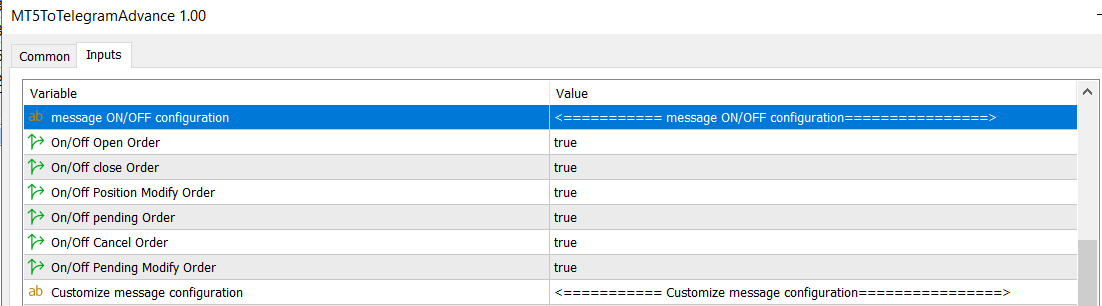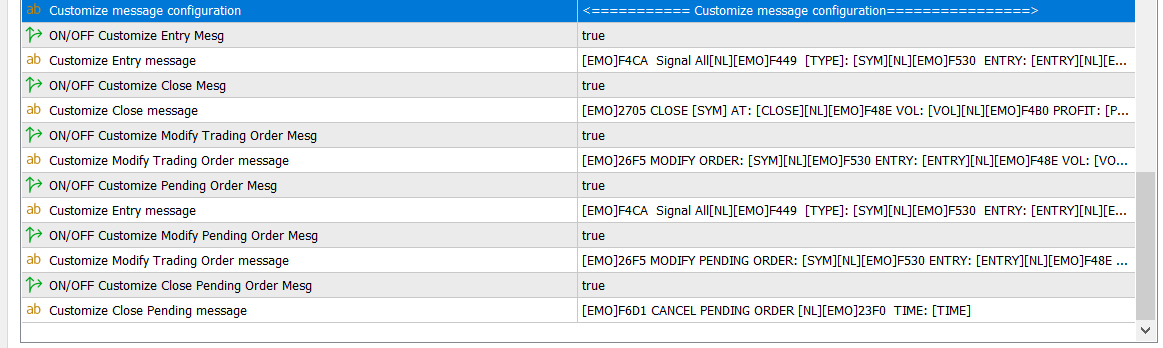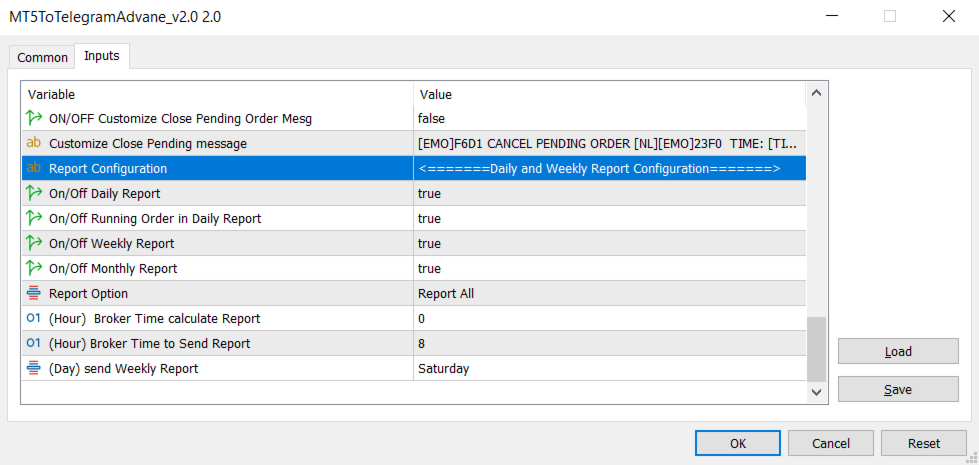
MT5 To Telegram Advance

4.67

AIP – MT4/MT5 To Telegram

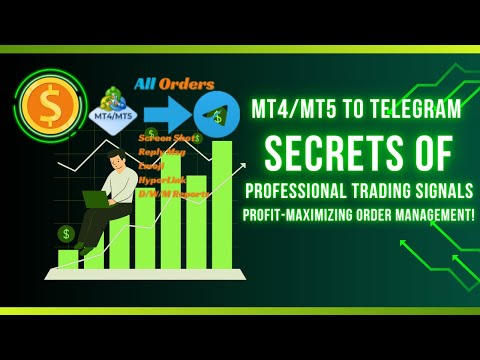
1         Main features of MT4/MT5 EA To Telegram:

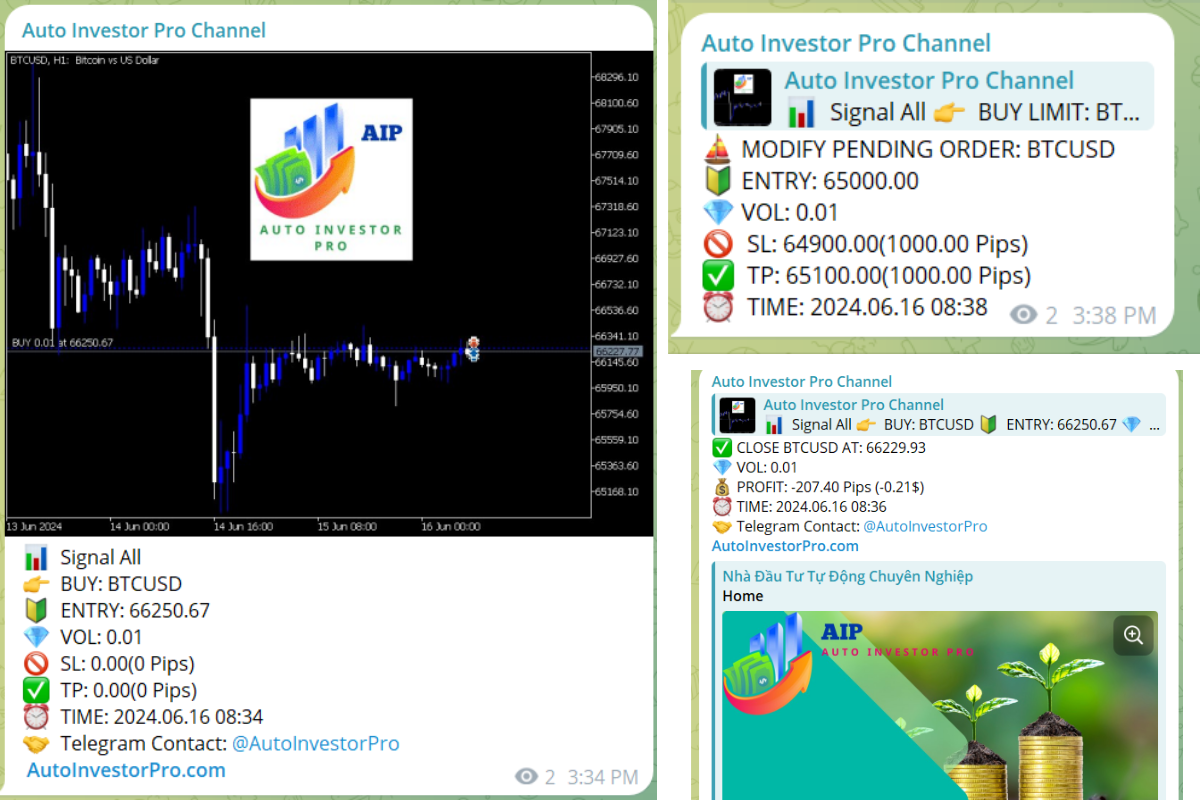
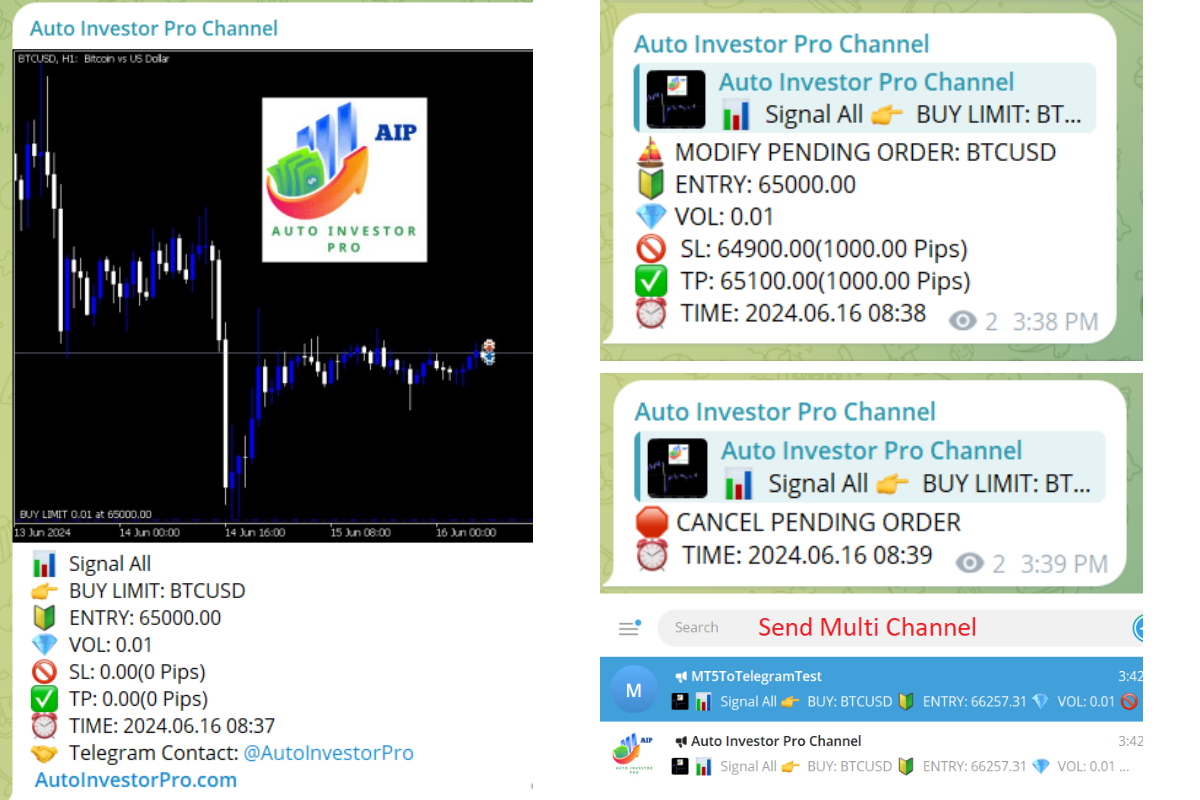
  • Send all types of orders (Open Order/Close Order/Modify Order/Pending Order/Delete Order)
  • Close and Modify Order with replies to the corresponding Open Order
  • Support sending to both private, public channels and group, topic group
  • Support sending to multiple channels simultaneously
  • Send Chart Screenshots
  • Manage all symbols with a single EA on one terminal
  • Automatic loading of templates, logos, and screenshots
  • Support sending Icon Emojis
  • Embed Hyperlinks into messages
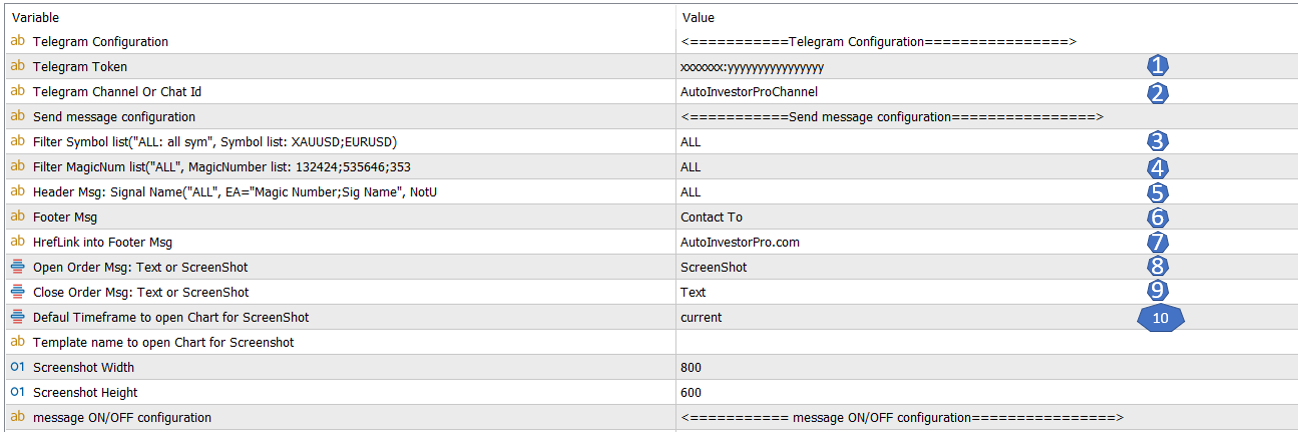
  • Filter messages for each EA based on the desired MagicNumber
  • Filter orders by symbol or magic number
  • Filter Close Orders(Send all orders or only positive profit order)
  • Customize the message format according to preferences
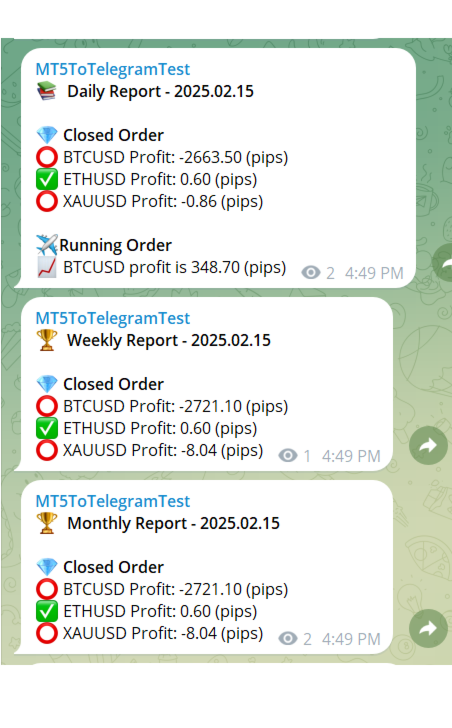
  • Send Daily/Weekly/Monthly summary report in pips or usd
  • The EA does not support MT5 on MAC OS

2         How To Install Setup and Configuration

Please ref detailed at  https://www.mql5.com/en/blogs/post/761025

-> MT4 Version: https://www.mql5.com/en/market/product/120770


レビュー 6
Alan Gilberto Pirovino
828
Alan Gilberto Pirovino 2025.10.26 18:04 
 

⭐ 5-Star Review for Vu Thi Thu – EA Expert Developer ⭐ I am extremely impressed with the work of Vu Thi Thu! Every request I made was fully understood and implemented very quickly. She not only listened carefully to all my needs, but also informed me in advance about what improvements she would add when she had the time — showing professional dedication and a strong sense of responsibility. Her skills as a developer are outstanding: reliable, fast-responding and highly determined to achieve the best result. I am truly happy with the support received and I will definitely keep working with her for any future updates or new developments. Thank you again for the excellent support — you absolutely deserve the maximum rating! 👏✨

AnimeG TVc
28
AnimeG TVc 2025.08.16 18:07 
 

Amazing bot. It perfect and precise.

Zack Zulkefly
29
Zack Zulkefly 2025.03.24 12:09 
 

Good Product, function so nice, Seller also will guide you well until success. So Far Recommended Product.

おすすめのプロダクト
Close Simple MT5
TRUONG DINH THANG Trương
This is an EA that supports simple order closing on MT5. EA Close MT5 (Homemade ) - EA closes orders when profit >= x$ - EA closes orders when loss >= -x$ - EA closes orders when Equity >= x$ - EA closes orders when Equity <= x$ - EA closes orders for all currency pairs or pairs using EA If you have any questions, please contact me: https://t.me/EAForexFree_Channel
TradeTech Titanエキスパートアドバイザー(EA)は、取引を開始するための標準的なインディケータの多様なセットを活用します。取引の条件が整った場合、最適なエントリーポイントを確保するために、さらに調整可能なフィルタまたはしきい値のレイヤーが追加されます。これらのしきい値は1から100まで調整可能で、取引フィルタリングをカスタマイズすることができます。 すべての取引は、バーチャルストップロスおよびバーチャルテイクプロフィット値で保護されます。EAは、マーチンゲールシステムなどのリスクの高い戦略や、ロットサイズを増加させる方法を避け、1回に1つの注文を開くことで、測定された制御された取引を確保します。 使用されるインディケータには、アクセレレータオシレーター、アダプティブムービングアベレージ、オーサムオシレーター、ベアーズパワー、ブルズパワー、商品チャネル指数、デマーカー、ダブルEMA、エンベロープス、フラクタル適応MA、MACD、ムービングアベレージ、パラボリックSAR、RSI、相対活力指数、ストキャスティクス、トリックス、TEMA、ウィリアムズパーセントレンジが含まれます。
Bollinger Precision EA is a fully automated trading system for MetaTrader 5 that combines Bollinger Bands strategy with advanced risk and position management . It is designed for both beginner and professional traders who want consistent, controlled, and low-risk trading . Features: Automatically opens Buy/Sell positions based on Bollinger Bands signals Adaptive Lot calculation based on account balance and risk Stop Loss and Take Profit management Advanced risk scaling : partial close at 50% & 7
StopLoss and TakeProfit Utility MT5 for automatic setting of stop loss and take profit levels. Created by a professional trader for traders.   The utility   works with any market orders opened by a trader manually or using advisors. Can filter trades by magic number. The utility can work with any number of orders simultaneously. WHAT THE UTILITY CAN DO: Set virtual stop loss and take profit from 1 pip Real   stop loss and take profit W ork with each order separately (   stop loss and take prof
EA Settings Guide 1. StopLoss What it does: Sets a protective stop loss in pips. Default behavior: If set to 0 , the EA will not apply a stop loss. Example: If you set StopLoss = 30 , every trade without a stop loss will automatically be given a 30-pip stop loss. 2. TakeProfit What it does: Sets a take profit target in pips. Default behavior: If set to 0 , the EA will not apply a take profit. Example: If you set TakeProfit = 50 , trades without a take profit will automatically be given a 50-
The Gold Bot Father
Chibuzor Daniel Obasi
5 (1)
The Gold Bot Father V1.2(フォレスト・ゴールド・トレーディングボット) Gold Bot Father は、金(XAUUSD)の取引に特化して設計・最適化された自動売買ロボット(EA)です。高度な計算により、トレードのエントリーから管理までを自動で行います。このEAは、非常に低いドローダウンで金(XAUUSD)の取引に優れた成果を上げており、安定性を追求したスマートなトレードロジックを搭載。正確なトレンドフォロー戦略により、安定した成長と最小限の損失を目指します。スイングトレーダーでも、短期取引を好む方でも、このEAは高度なアルゴリズムを使って現在の時間足で動作しながら、上位足の分析も行い、市場の流れに柔軟に対応します。 最適化された損切り(SL)と利確(TP): リアルタイムのボラティリティデータを使用して、損切り(ストップロス)と利確(テイクプロフィット)レベルを動的に計算します。これにより、各取引が最大限の利益を目指しつつ、リスクも最小限に抑えられます。 動的リスク管理: EAは市場構造を常に監視しており、トレンドの反転が検出されると、自動的にポジショ
This utility sends notification to trader’s MT5 (for MT4 version, checkout this link ) mobile app, to remind traders about their open positions. Super useful for part time traders to keep track and not forget any positions. To turn on notification, please visit   this link   (https://www.metatrader4.com/en/trading-platform/help/setup/settings_notifications) Features Keep track on open orders (pending orders, running orders) Customize time to send notification Customize notification interval (se
SQXHK presents: Portfolio Peak2Valley Preserver EA (MAE/MFE Enhanced) Take absolute control of your portfolio's exit strategy with Profit Taker EA . Designed as a utility expert advisor, this tool continuously monitors your account's aggregate open positions and pending orders, executing an institutional-grade, mathematical exit sequence based on your strategy's historical or desired MAE (Maximum Adverse Excursion) and MFE (Maximum Favorable Excursion) metrics. Whether you trade manually or depl
This is the HFT Flame Ea....This is a complex Expert Advisor that basically pick trades from price movements, it is also a none-martingale mechanism with netting strategy that makes this Ea more interested and profitable throughout your trading journey. The HFT Flame EA can be super consistent on profits depending on the inputs selected for your style of trading. This is a hand free trading robot that can trade your way to success while you are away from the charts, another perfect advantage abo
ProBridger
Marius Ovidiu Sunzuiana
How Traders and Analysts Can Use the Data Export Bridge to Improve Their Analytics The MQL Data Export Bridge unlocks a new level of analytical power by transforming MetaTrader into a real‑time data provider for any external research environment. Here are the most impactful ways different users can apply the bridge to enhance their trading performance. Build Predictive Models with Machine Learning Who benefits: Quantitative traders, data scientists, algorithm developers How it helps: Export t
Smart breakout grid EA with trailing pending orders, trailing stop, session/news filters, drawdown protection, and netting-safe execution for MT5. GridTrailingEA is a smart pending-order grid Expert Advisor with trailing pending orders, trailing stop, session filter, news-time filter, drawdown protection, and market-safe validation for MT5. GridTrailingEA is a MetaTrader 5 Expert Advisor designed for traders who want a clean and controlled grid-style pending order system. The EA places Buy Stop
Simple DCA EA - Advanced Dollar Cost Averaging Expert Advisor Overview Simple DCA EA is an Expert Advisor designed to support Dollar Cost Averaging (DCA) strategies on the MetaTrader 5 platform. This EA can work with both manual and automated orders, helping traders optimize risk management and maximize profits through an intelligent DCA system. Key Features 1. Intelligent DCA System The EA uses an advanced DCA algorithm with the following characteristics: Trigger Condition : DCA only executes w
Vanguard Precision Scalper   is a high-logic Expert Advisor for MetaTrader 5, designed for traders who demand precision, safety, and transparency. This EA is built on a Triple-Confirmation Engine , ensuring it only enters the market when trend, momentum, and oscillators align perfectly. Unlike "black-box" systems, this EA is powered by a robust risk management framework that includes Daily Drawdown Protection and an Integrated News Filter , making it suitable for both personal accounts and Prop
Fvg In Fvg
Claudiu-georgian Zavera
FVG In FVG EA — From Learn to Earn. The most-watched imbalance on any chart, taken where you have not seen it before: a Fair Value Gap confirmed inside a Fair Value Gap. A GAP EVERYONE WATCHES. AN EXECUTION NO ONE ELSE HAS. The EA detects the Fair Value Gap — the 3-candle imbalance — on a higher timeframe, then requires a second FVG, formed inside the first, on the timeframes you choose. Only an overlap above your threshold validates the zone: Most Powerful Overlap FVG Zones — rigorously selec
GPT Trade Manager — Semi-Automatic Trading Dashboard by theponz.eth | gpttrading.info Overview GPT Trade Manager is a powerful semi-automatic Expert Advisor for MetaTrader 4 that puts a full trading control panel directly on your chart. It combines one-click order execution across 5 independent trading profiles with automatic Trailing Stop and Break-Even management — all from a single, always-visible dashboard. Designed for traders who want speed and control without giving up discretion. You dec
DowJones Hammer
Jayesh Chandran Kalli Valappil
DowJones Hammer Overview US30 Range Break is an automated Asia-session breakout system for the US30 (Dow Jones) on the M30 timeframe. It brackets the Asian range with pending stop orders and manages every trade with a defined stop-loss and take-profit, a daily trade cap, and built-in spread, slippage, and range filters. Set it on the chart and let it run — no manual intervention required. If not profitable, total refund !!! (must use recommended settings) Key features Asia opening-range breakou
One of the main goals in the development of this Expert Advisor was ease of use. As a result, this EA has a minimum of parameters, which are easy to understand. At the same time, it is very flexible and customizable for almost for any instrument (currency pair). The logic According to the given algorithm, the EA determines local support and resistance levels (at startup, the previous quotes are disregarded). When a candle closes beyond any level, a deal is opened in the same direction. By defau
SAB Advance Assistant は、MetaTrader 5 向けの手動トレード管理パネルです。すべてのトレードを チャート上で視覚的に組み立て、リスクを正確にコントロールし、内蔵エンジンに部分利確・建値 (ブレークイーブン)・トレーリングを任せられます。すべては、すっきりとしたサイズ変更可能な 1つのパネルから。 表計算に頼らず精度を求める裁量トレーダーおよび ICT/SMC トレーダー向けに設計。 主な機能 - ドラッグ可能な Entry・Stop Loss・TP1〜TP5・Final TP ライン、ライブ表示付き(pips、金額、   R:R、%、価格) - 残高のリスク%または固定金額からロットを自動計算 - 最大5つの部分利確(TP ごとに%または正確なロットで配分)+残りを決済する Final TP - 移動可能な建値ライン(TP1 または SL 基準でトリガー)、マウスで調整 - %または pips のトレーリングストップ、TP1 到達後に作動 - Link モード:完全なセットアップを用意し、R:R を保ったままブロック全体(Entry+SL+TP)を
BulkOp Trade Manager
Ahmed Jumaa Saif Ali Almheiri
BulkOp Trade Manager Trade faster. Manage smarter. Close with confidence. BulkOp Trade Manager is a powerful MT5 utility EA built for traders who need speed, control, and clean execution directly from the chart. It is designed for active manual traders, scalpers, gold traders, and anyone who wants to manage multiple positions with less delay and fewer clicks. Why BulkOp? Ultra-fast Buy and Sell execution One-click Bulk Close Profit One-click Bulk Close Loss Keyboard trading control Bulk order e
This EA is fully automated , it is built based on  the method of catching the pop-up Alert event and Open Market Orders (BUY/SELL) . Download trial version here:  https://www.mql5.com/en/blogs/post/761360 ***NOTE:   It is recommended to remove the available filter settings, only install the filter for your indicator. Parameters of the EA: -------- <EA Settings> -------- Magic Number:   The identifying (magic) number of the currently selected order. Allow Open trade:   Enable/ Disable Open Trade
KS Multiple Independent Strategies Auto Trading 1.9 EA 概要 本EA(Expert Advisor)は、MetaTrader 5(MT5)上でのゴールド取引(XAUUSD)を主眼に設計された、プロフェッショナルグレードのMQL5自動売買システムです。複数の独立した取引戦略、高度なリスク管理機能、およびパフォーマンスを最適化するための多彩なフィルター機能を搭載しています。自動化、利益の保護、そしてTelegramやDiscordといった外部ツールとの連携を重視して開発されました。あらゆる時間足で稼働可能ですが、特定の市場セッションや重要ニュース発表時などに合わせて動作をカスタマイズすることも可能です。主な機能は以下の通りです。 **主要な取引戦略** 本EAでは、1つまたは複数の独立した戦略を同時に有効化して運用することが可能です(入力パラメータにて設定)。 - **Persistence/Anti-Persistence(持続性/反転性)**: 過去一定期間(例:7本)のバーパターンを分析し、特定の比率閾値に基づいてトレンドの継
This script analyzes all symbols in Market Watch for a set timeframe. The result is displayed on the Experts tab and in the specified file. For more convenient viewing and editing, the result is displayed in a csv file. For the calculation, the Pearson formula is used. The value of the correlation coefficient of pairs close to 1 means that the pairs move almost identically. A value close to -1 means that the pairs move in the same way. This tool will be useful to those who use hedging due to the
Risk Manager is an MT5 Expert Advisor that opens a market order with a precisely sized lot at the cursor’s vertical level as Stop-Loss, using a single hotkey. Side is detected automatically: SL below price → BUY, SL above price → SELL. Risk is computed in account currency via OrderCalcProfit, so it works correctly on FX, metals, indices, and crypto. Why traders use it Eliminates mental math and lot calculators. Turns any discretionary setup into a consistent, risk-fixed execution in one keystr
Time saving and fast execution Whether you’re traveling or sleeping, always know that Telegram To MT5 performs the trades for you. In other words, Our   Telegram MT5 Signal Trader  will analyze the trading signals you receive on your selected Telegram channels and execute them to your Telegram to MT5 account. Reduce The Risk Telegram To Mt5   defines the whole experience of copying signals from   Telegram signal copier to MT5 platforms. Users not only can follow all instructions from the signal
CatchPositionByStopOrder取引専門家は、取引の方向が知られているときにトレンド市場で動作するように設計されています,あなたはSELLSTOPとBUYSTOPの注文の両方を取引することができます,そして、あなたは方向を選択するために専門家自身を信頼することができます. セット中止の発注の動きやその背後に価格を決定する最も効果的な入力です。 取引のための推奨される時間枠はM5/M15/H1です。 Expert Advisorでは、固定されたS/lとT/pだけでなく、トロール網の助けを借りて作業することができます。 T/p=0の場合、s/l位置トロールは自動的に有効になり、まず損益分岐点ゾーンに移動し、有効距離で正の範囲で価格の後ろに移動して、トレンドの最大利益  私達に索引、在庫、または用具の名前を言えば私達は私達のロボットのためのセットファイル(最適の設定)をのために送りますfree.777basil@mail.ru    通信のための連絡先777basil@mail.ru 私たちはあなたの仕事のための指標である専門家を準備します。 Параметры: s
Position Prime
Mariana Cordeiro Neves Fernandes
今すぐ無料デモ版をダウンロードして、購入前にストラテジーテスターのすべてのリスク管理機能をテストしてください! Position Prime は、MetaTrader 5 (MT5) 向けの機関投資家レベルの視覚的実行アシスタントおよびリスクマネージャーです。スピードと精度を求めるトレーダーのために開発され、手動でのロット計算の手間を省き、チャートを真のトレーディングデスクに変えます。ほんの数秒で取引の計画、実行、そして資金の保護が可能です。 ️ リスク管理と自動ロット計算 動的計算 (Dynamic Calculation): リスクを金額($)または口座残高のパーセンテージ(%)で設定します。チャート上でストップロス(SL)のラインをドラッグすると、パネルが正確なロットサイズを自動的に計算します。 リアルタイム予測: 注文を開く前に、リスクリワード(RR)、予想利益、潜在的な損失を画面上で直接視覚化します。 1日の損失ロック (Daily Loss): 1日の最大損失額の制限を設定します。この制限に達すると、パネルが新規取引をブロックし、オーバートレードや感情的なミスから
Gold Citadel
Marco Alexandre Ferreira Feijo
Gold Citadel — Institutional Supply and Demand EA for XAUUSD Small Stop Loss. Large Take Profit. Real protection on every trade. Gold Citadel trades the way institutions do: identify where smart money places orders, enter at those levels, and target a reward multiple times the risk. No grid. No martingale. No hidden tricks. Just clean asymmetric trading on gold. The Core Principle Most EAs chase small profits with wide stop losses — they win often but one bad trade erases weeks of gains. Gold Ci
37$ for 3 month TRY THIS  ORION – Constellation Trading Engine Multi-currency grid EA that distributes positions across correlated symbols instead of stacking on one pair. Three-Regime Signal Engine Constellation Grid Profit Drain ️ Risk Managemen Cross-Symbol Nettin Virtual Trailing Stop ORION HUD Dashboard ️ Setup:  Hedging account | H1 | Any liquid forex pairs | Single chart | VPS recommended
Master Control via Telegram can help you perform some management tasks on MT4/MT5 remotely via your Telegram by one click, easy to set up & use. Demo here (see more  Master Close     Master Notify  ) ************************************************************************************ LIST OF COMMANDS: info_acc -  Get account info info_pos -   Get positions details price -   Get symbol price buy  -   Open a buy position sell  -   Open a sell position inst_set  -   Set parameters for instant trade
Expert was built on the basis of Trap . EA can trade in automatic and semi-automatic mode. In automatic mode, it will place pending orders. However, in semi-automatic mode, it will wait for the first manually opened order. It will then go into automatic mode. Before starting work, the expert will download 28 currency pairs:         "AUDCAD","AUDCHF","AUDJPY","AUDNZD","AUDUSD","CADCHF","CADJPY",         "CHFJPY","EURAUD","EURCAD","EURCHF","EURGBP","EURJPY","EURNZD",         "EURUSD","GBPAUD","GBP
このプロダクトを購入した人は以下も購入しています
Trade Assistant MT5
Evgeniy Kravchenko
4.43 (214)
取引 ごとのリスクの 計算、新規注文 の 簡単 な 設置、部分的 な 決済機能 を 持 つ 注文管理、 7 種類 のトレーリングストップなど 、便利 な 機能 を 備 えています 。 追加の資料と説明書 インストール手順   -   アプリケーションの手順   -   デモアカウント用アプリケーションの試用版 ライン機能 チャート上にオープニングライン、ストップロス、テイクプロフィットを表示します。この機能により、新規注文を簡単に設定することができ、注文を出す前にその特徴を確認することができます。   リスク計算 リスク計算機能は、設定されたリスクとストップロス注文のサイズを考慮して、新規注文のボリュームを計算します。ストップロスの大きさを自由に設定できると同時に、設定したリスクを守ることができます。 Lot calc ボタン - リスク 計算 を 有効 / 無効 にします 。 Risk フィールドでは 、必要 なリスクの 値 を 0 から 100 までのパーセンテージまたは 預金通貨 で 設定 します 。 設定」 タブで 、 リスク 計算 の 種類 を 選択 します :「 $ 通
Trade Manager EAへようこそ。これは、取引をより直感的、正確、そして効率的にするために設計された究極の リスク管理ツール です。これは単なるオーダー実行ツールではなく、包括的な取引計画、ポジション管理、リスク管理のためのソリューションです。初心者から上級者、迅速な実行を必要とするスキャルパーまで、Trade Manager EAはあらゆるニーズに対応し、為替、指数、商品、暗号通貨などさまざまな市場で柔軟に対応します。 Trade Manager EAを使用すると、複雑な計算が過去のものになります。市場を分析し、エントリーポイント、ストップロス、テイクプロフィットのレベルをチャート上のラインでマークし、リスクを設定するだけで、Trade Managerが最適なポジションサイズを即座に計算し、SLとTPをピップ、ポイント、口座通貨でリアルタイムに表示します。すべての取引が簡単かつ効果的に管理されます。 主な機能: ポジションサイズ計算機 :定義されたリスクに基づいて取引サイズを瞬時に決定します。 簡単な取引計画 :エントリー、ストップロス、テイクプロフィットを設定するためのド
TradePanel MT5
Alfiya Fazylova
4.88 (162)
Trade Panelは多機能なトレーディングアシスタントです。アプリには手動取引用の50以上のトレーディング機能が搭載されており、ほとんどの取引作業を自動化することができます。 購入前に、デモアカウントでアプリのデモ版をテストすることができます。デモアカウント用のアプリの試用版をダウンロードするには、次のリンクをご利用ください: https://www.mql5.com/en/blogs/post/750865 。 完全な手順 こちら 。 取引。 ワンクリックで取引操作を行うことができます: リスクを自動計算して指値注文やポジションを開く。 複数の注文やポジションをワンクリックで開く。 注文のグリッドを開く。 保留中の注文やポジションをグループごとに閉じる。 ポジションの方向を反転(Buyを閉じてSellを開く、またはSellを閉じてBuyを開く)。 ポジションをブロックする(不足している量のポジションを開くことでBuyとSellのポジション量を等しくする)。 すべてのポジションを部分的にワンクリックで閉じる。 すべてのポジションの利食い(Take Profit)および損切り(Sto
ベータリリース Telegram to MT5 Signal Trader はまもなく正式なアルファ版をリリースします。いくつかの機能はまだ開発中で、小さな不具合に遭遇する可能性があります。問題が発生した場合はぜひご報告ください。皆さまのフィードバックがソフトウェア改善に役立ちます。 Telegram to MT5 Signal Trader は、 Telegram のチャンネルやグループからの取引シグナルを自動的に MetaTrader 5 にコピーする強力なツールです。 パブリックおよびプライベートの両方のチャネルに対応し、複数のシグナル提供元を複数のMT5口座に接続可能です。ソフトウェアは高速で安定し、すべての取引を細かく制御できます。 インターフェースは直感的で、ダッシュボードとチャートは見やすく設計されており、リアルタイムで動作状況をモニターできます。 必要環境 MQL の制限により、EA は Telegram と通信するためのデスクトップアプリが必要です。 インストーラーは公式の インストールガイド にあります。 主な機能 マルチプロバイダー: 複数の Telegram
================================================================================ POC BREAKOUT - V20.72. Full Professional Grade Toolkit ================================================================================ POC Breakout is a full MetaTrader 5 trading dashboard for discretionary traders who want breakout signals, Point of Control (POC) context, volume profiles, order flow, market structure, news, alerts, and advanced trade planning in one professional workspace. Attached directly to you
Farmed Hedge Yield Farming | All Markets (Manual - Hybrid - Semi/Automated EA) MULTI-ASSET SUPPORT Trade any asset available on your broker - Forex: Major, Minor, Exotic pairs - Crypto: BTC, ETH, XRP, SOL, BNB - Stocks: Apple, Tesla, Amazon, Google, etc. - Commodities: Gold, Silver, Oil, Gas - Indices: US30, NAS100, SPX500, DAX40 - Any CFD your broker offers VERIFIED TRADING RESULTS - Farmed Hedge Yield Axi Copy:  https://www.mql5.com/en/signals/2356376 - Farmed Hedge Yield Exn Copy:   https:/
Power Candles Strategy Scanner - 自動最適化型マルチシンボル設定ファインダー パワーキャンドル・ストラテジー・スキャナーは 、パワーキャンドル・インジケーターを駆動するのと全く同じ自己最適化エンジンを、マーケットウォッチに登録されているすべての銘柄に対して並行して実行します。1つのパネルで、現在統計的に取引可能な銘柄、各銘柄で勝率の高い戦略、最適なストップロス/テイクプロフィットの組み合わせが表示され、新たなシグナルが発生した瞬間に通知が届きます。 このツールは、Stein Investmentsのエコシステムの一部です。  18種類以上のツールをすべて閲覧し、AIを活用したセットアップの推奨を受け取り、  https://stein.investments でコミュニティに参加しましょう 市場動向を網羅。銘柄ごとに3,000件以上の自動最適化。2種類のアラート。ワンクリックでチャートを切り替えて即座にアクション。 なぜこれが必要なのか 多くのマルチ銘柄スキャナーは、 価格の動き (ボラティリティ、変動率、銘柄ごとのRSI)を表示するだけです。それ
YuClusters
Yury Kulikov
4.93 (43)
Attention: You can view the program operation in the free version  YuClusters DEMO .  YuClusters is a professional market analysis system. The trader has unique opportunities to analyze the flow of orders, trade volumes, price movements using various charts, profiles, indicators, and graphical objects. YuClusters operates on data based on Time&Sales or ticks information, depending on what is available in the quotes of a financial instrument. YuClusters allows you to build graphs by combining da
Anchor: The EA Manager Run your full EA portfolio without conflicts, without stacked risk, and without watching every chart yourself. Anchor coordinates up to 64 Expert Advisors on a single account, including daily loss protection built for prop firm rules. Attach Anchor to any chart. Type your EA names and magic numbers in one line. Click OK. Anchor begins coordinating immediately. Built for portfolios. Built for prop firms. Built for discipline. The Problem Running multiple EAs on the same acc
Footprint Chart Pro — Professional OrderFlow EA for MetaTrader 5 Version 6.34 | Professional tool for real traders | Institutional-Grade Visualization DEMO USERS - PLEASE SELECT EVERY TICK / REAL TICK WHEN TESTING AND YOU HAVE DOWNLOADED HISTORICAL DATA. IF YOU SEE A WAITING SCREEN AND IT IS NOT DOWNLOADING, IT MEANS YOU HAVE LOW HISTORICAL DATA. TRY 1 MIN AND 5 MIN FIRST ON 1 DAY DATA. ONE DAY DATA SHOULD BE THE NEWEST AND MOST CURRENT DATE. PLEASE WAIT UNTIL THE MARKET HAS ROLLED OVER PERIOD.
Trade Manager は、リスクを自動的に計算しながら、取引を迅速に開始および終了するのに役立ちます。 過剰取引、復讐取引、感情的な取引を防止する機能が含まれています。 取引は自動的に管理され、アカウントのパフォーマンス指標はグラフで視覚化できます。 これらの機能により、このパネルはすべてのマニュアル トレーダーにとって理想的なものとなり、MetaTrader 5 プラットフォームの強化に役立ちます。多言語サポート。 MT4バージョン  |  ユーザーガイド + デモ Trade Manager はストラテジー テスターでは機能しません。 デモについてはユーザーガイドをご覧ください。 危機管理 % または $ に基づくリスクの自動調整 固定ロットサイズを使用するか、ボリュームとピップに基づいた自動ロットサイズ計算を使用するオプション RR、Pips、または価格を使用した損益分岐点ストップロス設定トレーリングストップロス設定 目標に達したときにすべての取引を自動的に終了するための 1 日あたりの最大損失 (%)。 過度のドローダウンからアカウントを保護し、オーバートレードを防ぎます
Telegram to MT5 Multi-Channel Copier は、Telegram チャンネルのトレードシグナルを MetaTrader 5 に自動的に直接コピーします。ボットも、ブラウザ拡張機能も、手動コピーも不要。Telegram でシグナルを受信すると、EA が数秒でターミナル上でトレードをオープンします。 本製品は 2 つのコンポーネントで構成されています:Telegram チャンネルを監視する Windows アプリケーションと、MT5 ターミナルでシグナルを実行するこの Expert Advisor です。MT4 版も利用可能です。 セットアップガイドとアプリケーションのダウンロード: https://www.mql5.com/en/blogs/post/768988 動作原理 Windows アプリケーションは、ボットではなくあなた自身の API 認証情報を使用して Telegram に接続します。つまり、プライベートおよび VIP チャンネルを含む、購読しているあらゆるチャンネル、グループ、トピックを読み取ることができます。シグナルを検出すると、それを解析し
EA Auditor
Stephen J Martret
5 (4)
EA Auditor is an independent analysis tool for traders evaluating Expert Advisors and trading signals on MetaTrader 5. It audits backtest reports, reviews posted developer signals, and cross-verifies the two against each other to help traders assess strategies before committing capital. The MQL5 market offers a wide range of Expert Advisors from many developers, with varying approaches, quality, and transparency. EA Auditor provides a consistent, data-driven framework for reviewing them, answer
EASY Insight AIO – スマートで手間いらずな取引のオールインワンソリューション 概要 数秒で市場全体——FX、ゴールド、暗号資産、指数、さらには株式まで——を、手作業のチャート確認や複雑なセットアップ・インジケーター導入なしにスキャンできたらどうでしょうか? EASY Insight AIO はAIトレードのための究極のプラグ&プレイ型エクスポートツールです。市場全体のスナップショットを、クリーンなCSVファイルで一括出力。ChatGPT、Claude、Gemini、Perplexityなど、さまざまなAIプラットフォームで即座に解析できます。 ウィンドウの切り替えやグラフのごちゃごちゃしたオーバーレイはもう不要。自動エクスポートされる純粋で構造化されたインサイトだけで、無駄なチャート監視に悩まされず、スマートなデータ主導の判断に集中できます。 なぜEASY Insight AIOなのか? 本当のオールインワン • セットアップ不要、インジケーターのインストール不要、チャートへのオーバーレイ不要。インストールして起動し、エクスポートするだけです。 マルチアセット対
LIMITED SUMMER SALE -40% ! ONLY $470 insead of $790!  Maximum real discount! ONLY UNTIL 08/22 The core idea: using the user interface, you configure the parameters the chart must meet before entering a position (or positions), choose which entry models to use, and set the rules for when trading and planning should end. Lazy Trader  handles the rest: it  takes over all the routine chart watching and execution! full description  :: 3 key videos [1] ->  [2]   ->  [3] What can it do? - Understand
Quant AI Agents are independent trading Expert Advisors. Instead of trading using a fixed strategy like other conventional EAs, Quant AI Agents   is a   multi-agent AI trading framework   that turns natural-language strategy prompts into live.  WANT THE SAME RESULTS AS MY LIVE SIGNAL?   Use the exact same brokers I do:   IC MARKETS , IC TRADING   .  Unlike the centralized stock market, Forex has no single, unified price feed.  Every broker sources liquidity from different providers, creating un
FUTURES ORDERFLOW FOOTPRINT CHART Professional OrderFlow EA for MetaTrader 5 Version 1.01| Professional tool for real traders | Institutional-Grade Visualization STRATEGY TESTER USERS - PLEASE SELECT EVERY REAL TICK WHEN TESTING AND YOU HAVE DOWNLOADED HISTORICAL DATA. IF YOU SEE A WAITING SCREEN AND IT IS NOT DOWNLOADING, IT MEANS YOU HAVE LOW HISTORICAL DATA. TRY 1 MIN AND 5 MIN FIRST ON 1 DAY DATA. ONE DAY DATA SHOULD BE THE NEWEST AND MOST CURRENT DATE. PLEASE WAIT UNTIL THE MARKET HAS ROL
The product will copy all telegram signal to MT5 ( which you are member) , also it can work as remote copier.  Easy to set up, copy order instant, can work with almost signal formats, image signal,  s upport to translate other language to English Work with all type of channel or group, even channel have "Restrict Saving Content", work with  multi channel, multi MT5 Work as remote copier: with signal have ticket number, it will copy exactly via ticket number. Support to backtest signal. How to s
Timeless Charts
Samuel Manoel De Souza
5 (7)
Timeless Charts is an all-in-one trading utility for professional traders. It combines custom chart types such as Seconds Charts and Renko with advanced order flow analysis using Footprints , Clusters , Volume Profiles , VWAP studies, and anchored analysis tools for deeper market insight. Trading and position management are handled directly from the chart through an integrated trade management panel , while Market Replay and Virtual Accounts provide environments for practicing trading skills and
ManHedger MT5
Peter Mueller
4.83 (6)
THIS EA IS A SEMI-AUTO EA, IT NEEDS USER INPUT. Manual & Test Version Please TEST this product before BUYING  and watch my video about it. The price of the ManHedger will increase to 250$ after 20 copies sold. Contact me for user support or bug reports or if you want the MT4 version! MT4 Version  I do not guarantee any profits or financial success using this EA. With this Expert Advisor, you can: Implement your own Zone Recovery strategy to capitalize on trending markets. Create Grid trading s
この製品は、ニュースタイム中にすべてのエキスパートアドバイザーと手動チャートをフィルタリングするため、急激な価格変動によるマニュアルトレードのセットアップの破壊や他のエキスパートアドバイザーによって入力された取引について心配する必要はありません。この製品には、ニュースのリリース前にオープンポジションとペンディングオーダーを処理できる完全な注文管理システムも付属しています。 The News Filter  を購入すると、将来のエキスパートアドバイザーのためにビルトインのニュースフィルターに頼る必要はなく、今後はすべてのエキスパートアドバイザーをここからフィルタリングできます。 ニュース選択 ニュースソースは、Forex Factoryの経済カレンダーから取得されます。 USD、EUR、GBP、JPY、AUD、CAD、CHF、NZD、CNYなど、任意の通貨数に基づいて選択できます。 Non-Farm(NFP)、FOMC、CPIなどのキーワード識別に基づいて選択することもできます。 影響レベルによってフィルタリングするニュースを選択することができ、低、中、高の影響範囲から選択できます。
Trader Evolution
Siarhei Vashchylka
5 (7)
" Trader Evolution " - A utility designed for traders who use wave and technical analysis in their work. One tab of the utility is capable of money management and opening orders, and the other can help in making Elliott wave and technical analysis. Manual (Be sure to read before purchasing) | Version for MT4 Advantages 1. Trading in a few clicks. Immediate and pending orders are available in the panel 2. Money management. The program automatically selects the appropriate lot size 3. Simplifies
EA Performance Tracker (AESTracker) A clean, modern dashboard that shows exactly how your trades and EAs are performing — right on your chart. It reads your full account history automatically and breaks down the numbers by magic number / strategy. Display only — it does not place any trades. What it shows - Account header: live Balance, Equity, and Open (floating) P/L - Profit summary: gross profit, net profit, and the exact commission & swap deducted - Key stats: win rate, profit factor, exp
Premium Trade Manager - コーチ内蔵型トレードパネル Premium Trade Manager は、AIトレーディングコーチをあなたのチャートの中に置き、その下に完全な執行エンジンを備えたツールです。いつも通りにトレードをセットアップし、あなた専任のAIトレーディングコーチ Max にそのセットアップをそのまま読み取らせて、発注前に率直な見解を伝えてもらいましょう。ストップの幅が規律あるアプローチに合っているか、リスクサイズは適切か、高影響のニュースイベントが数分後に迫っていないか、プロップファームの制限に近づいていないか。その下には、クリックの後をすべて処理するエンジンが備わっています。ワンクリックのリスクサイズ計算による発注、チャート上でドラッグして組み立て、発注後も動かせるプラン、最大4段階の分割利確、7種類のトレール方式、リアルタイムのプロップファームコンプライアンス、ニュースガード、そしてコストを自ら採点するスプレッド機能。判断はあなたが下す。Max がもう一度確認する。後のことはすべてパネルが担う。 購入前に実際に触れて試せます。 ブラウザ上でライブ
TradeMirror は、MT4/MT5プラットフォーム向けに開発されたローカル注文同期ツールで、リアルタイム取引をサポートします。 チュートリアル Trademirror チュートリアル のリンクをクリックして、さらにチュートリアルをご覧ください。 製品の特長 金融ソフトウェアにおけるセキュリティ・安定性・プライバシー保護の高基準に準拠し、以下の3つの核心領域を最適化しました: 直感的なグラフィカルインターフェースで操作が容易 金融シナリオにおける機密データ分離のための強化されたプライバシー保護 ミリ秒単位の注文同期で信号遅延ゼロを実現 MT4/MT5完全互換、多様な取引環境にシームレス対応 システム監視機能とメール通知による取引安定性管理 主要機能 本製品には以下のプロフェッショナルコピー機能を搭載: 複数アカウント並列接続 リアルタイムメール通知 ロットサイズカスタマイズ 信号フィルタリング機構 逆方向コピーモード テイクプロフィット/ストップロス再設定 無料デモ手順 購入前に以下の手順で全機能を体験可能: ページ内の「無料デモ」ボタンをクリック 「MetaTrader 4/5
TelegramからMT5へ: 究極のシグナルコピーソリューション Telegram to MT5 を使えば、取引がシンプルになります。DLL を必要とせず、Telegram のチャンネルやチャットから MetaTrader 5 プラットフォームに取引シグナルを直接コピーできる最新ツールです。この強力なソリューションは、正確なシグナル実行、豊富なカスタマイズオプション、時間の節約、そして効率性の向上を実現します。 [ Instructions and DEMO ] 主な特徴 直接的なTelegram API統合 電話番号とセキュアコードで認証します。 ユーザーフレンドリーな EXE ブリッジを通じてチャット ID を簡単に管理できます。 複数のチャネル/チャットを追加、削除、更新して、同時に信号をコピーします。 高度なフィルターによる信号解析 例外的な単語 (例: 「レポート」、「結果」) を含む不要な信号をスキップします。 柔軟な SL および TP 形式 (価格、ピップ、ポイント) をサポートします。 価格ではなくポイントを指定するシグナルのエントリ ポイントを自動的に計算します。
VirtualTradePad PRO SE MT5 — MetaTrader 5向けプロフェッショナル取引コントロールセンター VirtualTradePad PRO SE は、 MetaTrader 5 向けのプレミアムなチャートベースの取引パネルであり、トレード管理ワークスペースです。より速い執行、明確なポジション管理、構造化されたトレード管理、視覚的なレベル計画、そしてチャート上で完結するプロフェッショナルなワークフローを求めるトレーダー向けに設計されています。 これは単なる BUY / SELL パネルではありません。PRO SE は、手動取引、予約注文、ポジション管理、部分決済、バスケット損益管理、平均化レベル、ATMルール、シグナル監視、リアルタイム市場情報、ストラテジーテスター (Strategy Tester) ワークフロー、VPS向け運用を、1つの連携されたインターフェースに統合します。 MT4版 | 完全な説明とスクリーンショット | 購入方法 | インストール方法 | ログファイルの取得方法 | テストと最適化の方法 | Expforex のすべての製品 PRO
Auto Trade Copier is designed to copy trades to multiple MT4, MT5 and cTrader accounts/terminals with 100% accuracy. The provider and receiver accounts must be on the same PC/VPS. With this tool, you can copy trades to receiver accounts on the same PC/VPS. All trading actions will be copied from provider to receiver perfectly. This version can be used on MT5 accounts only. For MT4 accounts, you must use Auto Trade Copier (for MT4). Reference: - For MT4 receiver, please download Trade Receiver Fr
Trade Builder Pro
Mostafa Saad Saeed Shawara
製品名 Trade Builder Pro - チャート上のインタラクティブ・ビジュアル・トレードマネージャー&リスクアシスタント 簡単な説明 Trade Builder Pro を使用して取引を簡素化しましょう。これは、非常にインタラクティブなトレードアシスタント ( Trade Assistant ) およびトレードマネージャー ( Trade Manager ) です。チャート上で直接エントリー、ストップロス、およびテイクプロフィットを設定すると、ロット数とリスクリワード比 ( risk reward ratio ) がリアルタイムで自動計算されます。 概要 効果的なトレード管理 ( Trade Management ) は、長期的な取引の成功に不可欠です。 Trade Builder Pro は、MetaTraderチャート上にドラッグ可能なビジュアルダッシュボードを提供することで、手動のリスク計算を不要にします。ラインを調整するだけで、ツールが瞬時にリスク計算を処理し、ワンクリック取引またはホットキーでの実行が可能になります。 主な機能: インタラクティブ・ビジュアル・トレー
作者のその他のプロダクト
EaMinhonVN – TradeManagement The main functions of Ea TradeManagement 1. GUI o      Interact with running EAs o      GUI for placing orders o      Closing orders by Ticket o      Closing orders by MagicNumber o      Closing all orders o      Delete Pending orders 2.  General management: o      Management based on Symbol, manually orders , orders from the EA, and orders from other EAs o      User-friendly trade interface with the ability to drag and drop SL,TP,Entry o      Support backtest 3. 
Strategy: The strategy will follow the high   Timeframe   trend and find spikes in the smaller Timeframe. Stoploss and Takeprofit orders from 1-3 days. Maximum 3 Orders, the strategy uses a combination of EMA, Stochatic, Volatility, and Strength indicators Real Signal:   https://www.mql5.com/en/signals/2244878 Symbol:    The best Symbol (BTCUSD and Crypto) Volume: suggestion 0.05lot/1000$, dropdown about 30% Stoploss: Fixed or   according to   Signal Takeprofit:    Fixed or   according to signa
AIP – MT4/MT5 To Telegram 1         Main features of MT4/MT5 EA To Telegram: Send all types of orders (Open Order/Close Order/Partial Close/Modify Order/Pending Order/Delete Order) Close and Modify Order with replies to the corresponding Open Order   Support sending to both private, public channels and group, topic group  Support sending to multiple channels simultaneously Send Chart Screenshots Manage all symbols with a single EA on one terminal Automatic loading of templates, logos, and screen
AIP – TradeManagement The main functions of Ea TradeManagement 1. GUI o      Interact with running EAs o      GUI for placing orders o      Closing orders by Ticket o      Closing orders by MagicNumber o      Closing all orders o      Delete Pending orders 2.  General management: o    Management based on Symbol, manually orders , orders from the EA, and orders from other EAs o    User-friendly trade interface with the ability to drag and drop SL,TP,Entry o      Support backtest 3.  Stoploss man
Strategy: The strategy will follow the high Timeframe trend and find spikes in the smaller Timeframe. Stoploss and Takeprofit orders from 1-3 days. Maximum 3 Orders, the strategy uses a combination of EMA, Stochatic, Volatility, and Strength indicators Real Signal:   https://www.mql5.com/en/signals/2244878 Symbol:  The best Symbol (BTCUSD and Crypto) Volume: suggestion 0.05lot/1000$, dropdown about 30% Stoploss: Fixed or according to Signal Takeprofit:  Fixed or according to signal Auto Trailin
フィルタ:
Alan Gilberto Pirovino
828
Alan Gilberto Pirovino 2025.10.26 18:04 
 

⭐ 5-Star Review for Vu Thi Thu – EA Expert Developer ⭐ I am extremely impressed with the work of Vu Thi Thu! Every request I made was fully understood and implemented very quickly. She not only listened carefully to all my needs, but also informed me in advance about what improvements she would add when she had the time — showing professional dedication and a strong sense of responsibility. Her skills as a developer are outstanding: reliable, fast-responding and highly determined to achieve the best result. I am truly happy with the support received and I will definitely keep working with her for any future updates or new developments. Thank you again for the excellent support — you absolutely deserve the maximum rating! 👏✨

Vu Thi Thu
813
開発者からの返信 Vu Thi Thu 2025.11.01 08:08
Thank you so much for your kind words and detailed feedback! 🌟
I truly appreciate your trust and support. It was a pleasure working with you, and I’m always here to help with any future updates or new projects. 🙏😊
AnimeG TVc
28
AnimeG TVc 2025.08.16 18:07 
 

Amazing bot. It perfect and precise.

Vu Thi Thu
813
開発者からの返信 Vu Thi Thu 2025.08.17 07:53
Thank you so much for your kind words! 🙏 I’m glad the EA is working perfectly for you. Wishing you many successful trades 🚀.
Zack Zulkefly
29
Zack Zulkefly 2025.03.24 12:09 
 

Good Product, function so nice, Seller also will guide you well until success. So Far Recommended Product.

Vu Thi Thu
813
開発者からの返信 Vu Thi Thu 2025.04.06 07:52
Thank you so much for your feedback
Mr Aleksandar Aleksandrov
504
Mr Aleksandar Aleksandrov 2025.03.22 00:20 
 

I purchased the program. It works great and the developer is very nice and responsive. I highly recommend it

Vu Thi Thu
813
開発者からの返信 Vu Thi Thu 2025.03.22 00:22
Hi Mr. Aleksandar, Thank you for purchasing the product, if there is any problem or need improvement please inbox me
Volatility Signal
55
Volatility Signal 2024.12.23 15:45 
 

working to send notification in private channel. thanks

Vu Thi Thu
813
開発者からの返信 Vu Thi Thu 2024.12.23 16:10
Hi,I just tested the private telegram channel, it still works fine. Please recheck the setup. The private channel will have the format -1002226893485 with -100 at the beginning. Please check the detailed setup at https://autoinvestorpro.com/send-orders-from-mt4-mt5-to-telegram/
Retail Trading Realities LTD
1385
Philip Kym Sang Nelson 2024.09.11 12:07 
 

Just now set up the bot, instructions were nice and easy . The developer is a TOP bloke, very helpful and accommodated my suggestions .

Vu Thi Thu
813
開発者からの返信 Vu Thi Thu 2025.03.22 07:33
Hi Mr. Philip, Thank you for purchasing the product
レビューに返信