 MetaTrader 5
 エキスパート
 インディケータ
 ライブラリ
 ユーティリティ
 ウィジェット
 ルール
YouTubeにあるマーケットチュートリアルビデオをご覧ください
ロボットや指標を購入する
仮想ホスティングで
EAを実行
ロボットや指標を購入前にテストする
マーケットで収入を得る
販売のためにプロダクトをプレゼンテーションする方法
MetaTrader 5用取引ユーティリティ - 61
 以下はMetaTrader5での取引を簡素化する取引プログラムです。ユーティリティにカーソルを合わせると、その説明と目的が表示されます。

• Please test the product in the Strategy Tester before purchasing to understand how it works.
• If you face any issues, contact me via private message—I’m always available to help.
• After purchase, send me a screenshot of your order to receive a FREE EA as a gift. One-Click Trader Utility for MT5
Professional Trading at Your Fingertips
One-Click Trader Utility is a premium MT5 tool designed for active traders who need lightning-fast execution and real-time performance metrics. For just $3

• Please test the product in the Strategy Tester before purchasing to understand how it works.
• If you face any issues, contact me via private message—I’m always available to help.
• After purchase, send me a screenshot of your order to receive a FREE EA as a gift. SL-TP Manager Utility for MT5 - Professional Risk Management Tool
Advanced Position Protection & Profit Management
SL-TP Manager Utility is a powerful, intuitive tool designed for traders who want precise control over their risk
• Please test the product in the Strategy Tester before purchasing to understand how it works.
• If you face any issues, contact me via private message—I’m always available to help.
• After purchase, send me a screenshot of your order to receive a FREE EA as a gift. Hidden SL-TP Manager for MT5
Protect Your Trades from Stop Hunting with Invisible SL/TP Levels
Price: $30 USD What is Hidden SL-TP Manager?
Hidden SL-TP Manager is an advanced MetaTrader 5 utility that creates invisible stop los
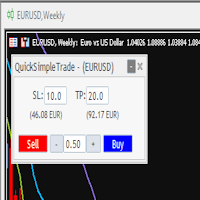
Quick Simple Trade is a very simple order panel for MT5 to quickly open a trade specifyng Stop Loss and Take Profit calculating and showing the price values. The panel can be also minimized to not interfere with the chart. When the order is open you can instantly move SL and TP directly on the chart. It makes up for one of the shortcomings of MT5, which I find most annoying.

Trending Gold is one of the straightforward tool to analysis the volatile market of Gold with demands precision, in-depth analysis, strong risk management and eliminating the need for constant market monitoring. Trending Gold will find the good trade position with precise risk management on all market conditions on Gold. Trending Gold plug-and-play functionality means you can get started with minimal effort, Simply install me and let me handle the rest. We will diligently monitor the market

************************************************ *********************************************** GoldMine Train は、ゴールドのトレンド取引戦略 EA です。
オペレーターは主要なトレンドの方向を決定し、トレインに指示を出します。
トレインはその方向で継続的に売買します。ロット数は、アカウント残高と事前設定されたレバレッジ比率によって異なります。
オペレーターがトレンドの方向を変更すると、トレインは停止し、利益を固定します。
ユーザーはチャート上のボタンを使用してトレンドの方向を簡単に選択できます。 ************************************************ ***********************************************

EA one click innesta was born with the purpose of helping traders to be more convenient and faster in transactions. There are functions that operate like oneclick with buying or selling positions with market orders, with pending orders, setting quick stoploss for all positions, total volume, closing orders quickly Close all oneclick. Calculate risks converted to USD for all positions. EA manages the trade orders magically to be able to run for many different assets. I am running with BTCUSD
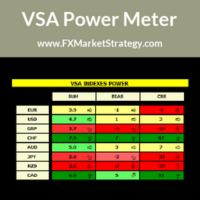
VSA Power Meter very powerful analysis method uses volume spread analysis to determine strongest currency and weakest currency and then gives signals based on it.
VSA Power Meter System Features Analyze all available instruments. Clear panel that determines stronges and weakest currencies. Clear buy and sell signals. You can use it as independent trading system or as filter. VSA Power Meter Trading Rules
You can use VSA in two ways: Enter VSA signals. Use it as filter to determine strongest
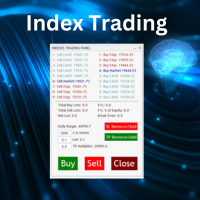
Nasdaq Future is a Semi Automated Trading Expert.
How does it work ?
Simply Identify a strong trend, Up trend on Nasdaq for Example.
Click Buy, the Expert will open 9 trades
1. Market Execution
3. Buy Stop at Higher prices distanced space 0.5X from eachother
5. Buy limits orders below the Market price distanced 1X
What is X ?
X is the distance between two orders, for example in nasdaq, recomended to use between 50-70 points.
Can I control X ?
Yes, in the control panel there is

Trading Keyboard (FastTrade Hotkeys) EA is an advanced tool designed for traders who want to execute trades quickly and efficiently using their keyboard. It allows users to place, modify, and close orders with customizable hotkeys, making trading as fast and intuitive as possible. Whether you're a scalper, day trader, or swing trader, this EA enhances your trading experience by reducing manual clicks and improving reaction time. Key Features: Hotkey-Based Trading – Execute trades, modify posit

### **ProScalpingToolEA.mq5 Analysis & Description**
**Overview:** The `ProScalpingToolEA.mq5` script is an Expert Advisor (EA) for MetaTrader 5, designed to assist with automated trading. It includes features for placing, managing, and monitoring trades.
---
### **Key Functionalities:**
1. **Trade Execution & Management:** - Uses the `CTrade` class from `Trade.mqh` to manage trading operations. - Allows placing buy and sell orders with a configurable lot size. - Trades are iden

Dear traders and investors! We present to you the MT5 Optimization Booster – an innovative product that will revolutionize your optimization experience on MetaTrader 5!
The MT5 Optimization Booster is based on the innovative Quantum Swap Protocol (QSP) algorithm – a unique proprietary optimization strategy that forms the core of the product and elevates the process of finding optimal solutions to a new level.
After the purchase , be sure to contact me . The product is designed to enhance the ca

• Please test the product in the Strategy Tester before purchasing to understand how it works.
• If you face any issues, contact me via private message—I’m always available to help.
• After purchase, send me a screenshot of your order to receive a FREE EA as a gift. MT5 Drawdown Tracker & Auto Screenshot Utility Professional Trading Session Monitor & Risk Management Tool Price: $30.00 - Lifetime license with updates Overview The MT5 Drawdown Tracker & Auto Screenshot Utility is an all-in-on

Copiador – La Mejor Herramienta para Copiar Operaciones en MetaTrader 4 Este no es un simple copiador de operaciones que únicamente permite copiar transacciones de forma local entre diferentes cuentas de MetaTrader 4 en cualquier dirección y cantidad. ¡Por supuesto que lo hace! ¡Pero Copiador hace mucho más! Descubre sus características y beneficios a continuación FUNCIONALIDADES DESTACADAS: Copiado entre brokers diferentes : Puedes copiar operaciones desde una cuenta e

Meta2Tel: Bridging MetaTrader 5 and Telegram in Real-Time
Meta2Tel is an elegant Expert Advisor for MetaTrader 5 that creates a seamless connection between your trading platform and Telegram. This powerful utility instantly relays crucial trading information directly to your specified Telegram channels or groups.
**Instant Trade Notifications** Experience real-time awareness of your trading activity with immediate notifications whenever trades are opened, modified, or closed on your MT5 plat

トレーリング ドローダウン モニターは、会社のパーセンテージ (例: 6%) に基づいてトレーリング ドローダウンを記録するツールです。ライブ マーケットでアカウントに残っている金額を優先します。更新のためにプロップファームの Web サイトを更新する必要はありません。ライブでアカウントに残っている金額を追跡して、ロット サイズを調整したり、過剰取引を止めたりすることができます。 開始時に、会社に基づいてドローダウン パーセンテージを調整します。初期残高と最高エクイティを入力します。実行中の最大/最高エクイティは、取引時に自動的に更新されます。 ブローカー/プロップファームが最高エクイティ マークを提供していない場合は、MT5 を終了した後の次の取引セッションで使用するために、取引終了時に最高エクイティを記録します。

"Tired of watching the charts 24/7? Missing profits because of poor risk management? Losing trades when you could’ve secured a win?" This is the ultimate automated assistant that protects your gains and limits your risks, and gives you time to focus on other important things. Key Features Break-Even Plus – Locks in your gains and moves your stop-loss automatically. Automatic Stop-Loss & TP – No more emotional trading, just smart execution. Trailing Stop – Ride the trend
• Please test the product in the Strategy Tester before purchasing to understand how it works.
• If you face any issues, contact me via private message—I’m always available to help.
• After purchase, send me a screenshot of your order to receive a FREE EA as a gift. Hedge Fragmentation Utility - Comprehensive Product Description Overview The Hedge Fragmentation Utility is a professional-grade MetaTrader 5 tool designed for forex traders who employ hedging strategies. This sophisticated util
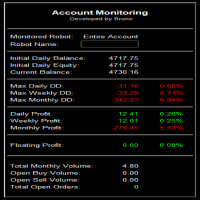
Summary of the Advanced Account Monitoring for MT5 The Advanced Account Monitoring for MT5 is a powerful tool designed for advanced account monitoring, offering traders detailed insights into their trading performance. This indicator provides a comprehensive dashboard to track drawdowns, profits, and trading volumes across different timeframes. Below is an overview of its key functions: Account and Robot Monitoring The indicator allows users to monitor either the entire account or a specific Ex

Add Magic Order EA – Smart Trade Scaling with Ease Add Magic Order EA is a sleek and efficient Expert Advisor designed to automatically add trades based on floating drawdown. Whether you're scaling into positions or enhancing an existing strategy, this tool gives you precise control and smart automation. Key Features: Optional Magic Number Filtering – Monitor a specific strategy by magic number, or apply logic to all trades. Drawdown Triggers – Automatically adds more orders when yo

Limited Offer!
販売開始記念セールを行なっています。
通常$200のこちらの商品を、しばらくの間$40にて販売します。
代わりに、ツールを使ってみて、正直な使用感などをレビューにお寄せください。
まずはあなたに使ってみてほしいです。
きっと手放すことの出来ない相棒になります。 Trend Line Trader – トレンドラインを使用したトレードツール ・指値を時まで限定で置いておきたい ・高値の切り下げをブレイクしたら買いエントリー ・時に決済 ・この時間帯価格帯を超えたら裁量トレードしたいから通知を飛ばしてほしい など、裁量トレーダーのニーズにしっかり答えるトレードツールを開発しました。
極端な話、 朝起きてラインを引いておく だけで1日中 裁量トレードをしているのと変わらない 成果を得ることが可能です。
あなたのトレードをシンプルに、そしてしっかりとサポートします!
ツール概要 出来ること メニューを操作し、様々なラインをチャートに引くことができます。 チャートがラインにぶつかると、線の種類によってエントリーしたり決済したり、スマホに通知を飛ば

Risk Properly with FXPosition Size Calculator which calculated the optimal Lot sSize based on your desired Risk Percentage and Stop-Loss, ensuring precise Risk Management. Enter your account balance, risk percentage, and Stop-Loss(either in points or price levels), and the calculator instantly determines the required lot size so that you don't risk too much. Protect your capital and trade with confidence with Accurate Position Sizing and Simplicity.

Symbol Information The Symbol Info indicator provides an intuitive panel on the chart that displays essential information about the current trading symbol. This includes basic trading data, instrument properties, and trading rules, all designed to give traders a clear view of the market conditions and product specifications. Key Features: Symbol Name and Description:
The indicator displays the name and a detailed description of the current trading symbol, helping users identify the instrume

Pionex Live MT5 Data and History -- APIアドレスを ツール > エキスパートアドバイザー に追加 api.pionex.com ws.pionex.com 手順: シンボルの作成 CreateSymbols = true を選択 MT5ターミナルを再起動 ( 重要! ) マーケットウォッチでシンボルを選択 し、履歴とリアルタイムデータをロード モード: LiveUpdate – チャートにユーティリティを追加し、取引データを取得 History – 過去の履歴データを指定した日付と時間まで埋める 設定: MaxDate – 更新したい履歴の日付を選択 ALL – 指定した日付から履歴を埋める AutoUpdate = true – MT5を再起動するたびに履歴を自動更新

Telegram Signals Hunter Bot is a Telegram bot which you can run on you PC, it's connected to your MT5 through the Expert Adviser. The main goal of this automated process is to track trading signals coming from Telegram channels/groups then execute orders on MT5. The Bot is powered by AI to analyze extract data from each signal, then execute orders automatically and safely on your MT5. We have developed the MT4 version before the MT5, you will notice that the demo video was recorded on the MT4, t
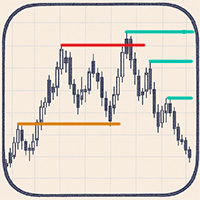
Automatic Marking of Key Price Levels
Each of you spends a huge amount of time every day manually marking and updating key price levels.
Every missed important level can lead to an unpredictable market reaction! This tool keeps your chart constantly up to date — removing outdated levels and adding new relevant ones in real time
Liquidity levels – target zones for price movement Reversal and reaction zones – break levels or likely turning points Liquidity grabs and price reversals You choose th

TradeGainViewer Utility for Blogging Activities Name: TradeGainViewer
Indicator Type: Informational (Graphical)
Category: Utilities Who is this indicator for? TradeGainViewer is designed for traders who actively engage in blogging, live streaming, or recording videos about trading on MetaTrader (MT5). It is ideal for: Trader-bloggers who want to visually display their current profit or loss in real-time to their audience. Streamers conducting live trading sessions, allowing viewers to see trade

MT5 CCI Notification – Stay Ahead of Market Trends! Enhance your trading strategy with MT5 CCI Notification , a powerful tool that alerts you instantly when the Commodity Channel Index (CCI) hits key levels. No more missed opportunities—get real-time notifications on your MT5 platform or mobile device. Whether you're a scalper, day trader, or swing trader, this smart alert system keeps you informed and ready to act. Real-time alerts for overbought/oversold conditions
Customizable settings to

Overview
The Wave Statistics Scanner is a specialized MQL5 tool for MetaTrader 5 that performs statistical analysis of price volatility across multiple financial instruments.It focuses on identifying and measuring price waves(high-low ranges)within individual price bars,allowing traders to quantify market volatility and identify potential trading opportunities based on statistical patterns.
#Key Features
-Multi-symbol Scanning:Analyze volatility across multiple trading instruments
-Volatili

Advanced Wave Statistics Scanner
The Advanced Wave Statistics Scanner is an enhanced MQL5 tool for MetaTrader 5 that combines traditional price volatility analysis with ATR(Average True Range)indicator analysis.This sophisticated tool provides deeper insights into market volatility patterns by comparing standard price wave measurements with ATR-based volatility metrics,enabling traders to identify abnormal market conditions and potential trading opportunities with greater precision.
#Key Feat

Trend Wave Analyzer
Overview
The Trend Wave Analyzer is a specialized MQL5 tool designed for MetaTrader 5 that identifies,analyzes,and visualizes price trend cycles in financial markets.It detects complete up/down/sideways price movements by identifying key turning points(peaks and troughs)in price action,providing traders with valuable insights into market behavior patterns.
#Key Features
-Multi-symbol Analysis:Analyze multiple trading instruments simultaneously
-Trend Identification:Auto

GOLD robot4trade(FTMO対応エディション)v1.5
Robot4Trade.com 提供|AI強化・チャレンジ対応 概要
Advanced Forex EAは、FTMO、MyForexFundsなどのプロップファームの要件に完全対応した、次世代型の高性能・安定型アルゴリズム自動売買ツールです。 このEAは、信頼性の高い古典的インジケーター(MA、RSI、ATR)を現代的なリスク管理・資金保護と組み合わせ、日次ドローダウン監視、進化型エントリーロジック、リアルタイム統計ダッシュボードなどを搭載しています。 デモチャレンジでも、実際の資金運用でも—このEAはあなたのオールインワン自動売買ソリューションです。 ️ ストラテジーロジック 移動平均クロスオーバー(高速SMA&低速SMA) RSIフィルター:買われすぎ/売られすぎゾーンでのエントリーを回避 ATRベースのSL/TP:市場のボラティリティに自動対応 固定またはリスクベースのロットサイズ設定 ステップ距離とマルチプライヤー:価格が一定以上動いたときのみ再エントリー、ロットは段階的に増加 時間フィル
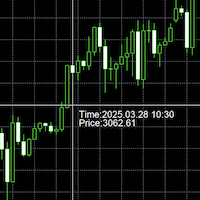
This tool is a time conversion tool that converts the time of the bar where the mouse is located (server time) into the time of the local computer's time zone and displays it at the bottom right of the cursor's position.
How to Set Up: Apply this program to the icon. The program has a variable that controls whether the time is displayed, with the default setting being displayed. If you temporarily do not want the time to be displayed, you can change the variable to False and move the mouse; th

Origin of EA Security Guard Due to unknown bugs in EA, account funds can unexpectedly drop from tens of thousands of dollars to zero within a day. To prevent such incidents, the ultimate purpose of EA Security Guard is: To prevent random opening/closing of orders due to unknown EA bugs that could lead to account fund depletion. EA Security Guard User Guide What is baoan-gj (Security Guard Tool)
This is a security tool designed for traders, primarily aimed at monitoring and preventing abnormal tr

The script allows you to quickly control positions from the keyboard.: Arrow ↑ → Open BUY Arrow → Open a SELL Arrow → → Close ALL positions
Key functions: Automatic closing of opposing positions When a BUY is opened, all SALES are closed, and vice versa. Positions in the same direction remain intact (they can be accumulated).
Flexible settings: LotSize. Take Profit in points (TP_Points). Stop Loss is disabled (but can be added if necessary).
Safety: Checking the connection to the market. Sup

This is a Universal Arrow EA, that can work with different arrow indicators. The original version uses our popular ChannelSignals PRT indicator, which you can very easily change yourself with one of our arrow indicators or any other that meets the technical requirements for their use in this EA.
Please note that the indicator name and buffers must be specified correctly. You can find them in the settings of the indicator you are using. You also need to place this indicator in your MT5 Termin

Prop Assistant – Your All-in-One Trading Co-pilot for Prop Firm Success Preparing for FTMO, MyFundedFX, or any other prop firm challenge?
Prop Assistant puts everything you need directly on your chart – no hidden menus, no complex layers, no distractions. Key Features: Max Drawdown Control: Automatically stops trading or closes all positions when your maximum drawdown is reached. Daily Profit & Loss Management : Set your daily profit/loss limits and let the assistant manage your risk. Ov

EA Emotion is not a traditional Expert Advisor that places trades automatically – instead, it’s a psychological checkpoint that helps you manage trading discipline and emotional control . Designed especially for discretionary traders, prop firm challengers, and anyone serious about improving consistency, EA Emotion asks a series of custom questions right after you open a trade , such as: Did you follow your trading plan? Are you in the right mental state? Is this trade part of your set

Prop Firm Drawdown Guard EA – Documentation (MT5 Version)
Version: 1.00 Platform: MetaTrader 5 (MT5) Author: Branko Balog Website: https://www.mql5.com
️ Purpose This Expert Advisor (EA) helps prop firm traders adhere to drawdown rules by monitoring daily and total account equity loss and enforcing restrictions when thresholds are breached.
It performs the following actions: - Monitors account equity in real-time - Closes all open positions when drawdown limits are hit - Blocks opening of

Bulk Order - Your one-click MT5 control panel for managing multiple trades. When markets move quickly, managing positions one ticket at a time is slow, repetitive, and error-prone. Bulk Order puts the actions you use most on the chart: open multiple market orders, manage pending orders, apply Stop Loss and Take Profit levels, and close positions in bulk. It is built for traders who make their own decisions and want a faster way to execute them. You choose every action; Bulk Order simply makes th

Account Risk Hedge Bot
...hedge your trades with confidence.
Safeguard Your Investments with Account Risk Hedge Bot, stay ahead of market volatility with our cutting-edge risk management solution. Account Risk Hedge Bot is designed to safeguard your investments with automated precision, helping you navigate market uncertainty, ensuring you minimize losses and maximize returns.
Note: Account Risk Hedge Bot does

FX Auto Risk Management TP SL and Out Stop v3.10
Strengths of the Script 1. Comprehensive Risk Management Automated Take Profit and Stop Loss with customizable percentage-based settings Trailing Stop with two adjustable modes (Normal and Aggressive) Stop Out based on floating loss/profit percentage 2. Advanced Features Multi-mode trailing stop with different parameters for each mode Slippage control for more realistic order execution API request limit to prevent server overload 3.
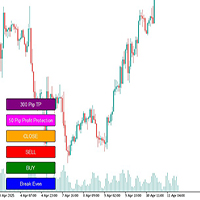
# Megathron Buttons EA User Guide
## 1. Overview Megathron Buttons EA is a helper tool designed for manual traders. It provides quick and easy trading through various buttons on the chart.
## 2. Installation 1. Install the EA on your MetaTrader 5 platform 2. Drag and drop it onto your desired chart 3. Configure the EA settings (detailed below)
## 3. Buttons and Their Functions
### Main Buttons 1. **BUY Button** (Green) - Opens a buy position with specified lot size - Automatically cal

Утилита (советник) помогает торговать на валютной паре EURGBP, использует для входов и выходов настроение индекса Еврозоны STOXX50, Великобритании FTSE100, Японии Nikkei225. Для каждой сделки устанавливается тейкпрофит. Выход из сделки по тейкпрофиту или при смене настроений индексов. Перед тестированием убедитесь, что в терминале есть индексы Евро50 (STOXX50, EU50, EuroStoxx50), Великобритании FTSE100 (UK100, UK100.spot и т.д.), Японии Nikkei225 (NIKK225, JP225, NKI225 и т.д.) Напишите в настр
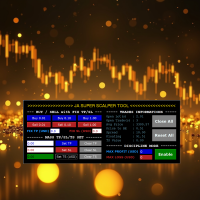
JA Super Scalper & Discipline Tool - REBORN (V3.0): Turbocharge Your Trading Efficiency with new Reborn (V3.0) version.
Introducing the Super Scalper & Discipline Tool - Reborn (V3.0). A simple tool designed for rapid entry and exit strategies. Reborn Version (V3.x) has better user interface. The interface on the video still the older V2.x version. Maximize your trading potential with optimized performance, robust risk management, and seamless market execution tailored for high-frequency scalp
Local Trade Copier is an advanced tool designed for efficiently copying trades between accounts in the local mode. It allows for lightning-fast order replication from a master account to a slave account. In local mode, trades are copied instantly, while in remote mode, the copying process takes less than 1 second. MT4 Version MT5 Full Version (Local & Remote) MT4 Full Version (Local & Remote) Local mode refers to both MetaTrader platforms being installed on the same system. It fully suppo


The Time Zone indicator allows users to set specific time periods for major trading sessions (Asian, European, North American) and display them with distinct colors on the chart. Users can choose how many days of trading zones to show, set the start and end times for each session, and define the color to represent each trading period. The chart refreshes at user-defined intervals to ensure the time zone data is accurate and current. Key Features: Display Trading Zones: Users can choose to
Notify MT5 Indicator - Full Description Overview The Notify MT5 Indicator is a powerful notification tool designed to alert traders about important changes in their trading account activity. It monitors various order events across all symbols and provides real-time notifications through multiple channels including on-screen pop-ups, and customizable sound alerts. Key Features Comprehensive Order Monitoring Order Closure Tracking : Notifies when market orders are close d Customizable Sound Alerts

Easy Trade – シンプルかつ強力なスマートトレード管理 Easy Trade は、リスクを適切にコントロールし、スムーズな取引執行を実現したい MetaTrader ユーザーのためのオールインワン・トレードマネジメントソリューションです。
トレーダーの声をもとにゼロから設計された Easy Trade は、複数シンボルの取引を簡単に実行・監視・管理できるようにし、作業フローを複雑にしません。 手動スキャルピングでも、少数のセットアップを管理するポートフォリオでも、Easy Trade は賢明な判断と安定した成果に集中できるようサポートします。
⸻
なぜ Easy Trade を使うべきか? 精密なリスク管理:固定ロットサイズまたはパーセンテージによるリスク設定が可能。リアルタイムでリスクとリワード情報を確認。 バスケット型トレーリング:複数の取引の利益を監視。目標到達で部分利益を自動確保。 取引の自動記録:各取引をスクリーンショットで記録。ジャーナル記録やパフォーマンス分析に最適。 時限クローズ機能:指定日時での自動クローズ設定が可能。週末前や取引終了時に便利。 カス
Advantages of the Trading Therapist EA Enforces Trading Discipline
Before executing a trade, the EA walks you through a personalized checklist — keeping you accountable to your trading plan every time. Reduces Emotional Trading
Say goodbye to FOMO, revenge trading, and impulsive entries. The EA encourages patience and clarity by requiring confirmation of all pre-set conditions. Fully Customizable Checklists
Add up to 10 pre-trade questions based on your personal strategy — whether

This trading utility is designed for intraday traders who open a large number of transactions. It implements trading via hot keys, with automatic stop-loss setting for the minimum or maximum of the previous candle and take-profit at certain levels. Certain levels are the maximum and minimum of yesterday and their range measured from the maximum up and from the minimum down. The main elements that are necessary when working within a day are displayed at the top of the chart. This is a timer that

CloseOrders EA v1.06 - Professional One-Click Order Management Panel for MetaTrader 5
CloseOrders EA is an essential, high-performance order management tool for MetaTrader 5 traders and scalpers. It places a clean, responsive control panel directly onto your chart, allowing instant, selective execution for closing market positions and canceling pending limit orders with a single click.
================================================== KEY FEATURES ============================================

MQL5ブログ: https://www.mql5.com/en/blogs/post/761446 MT4版: https://www.mql5.com/en/market/product/136790 MT5版: https://www.mql5.com/en/market/product/136791
Time Wizardは、スピード、タイミング、そして執行コントロールを一つの洗練されたダッシュボードで実現したいトレーダーのために開発された、プロフェッショナルなトレーディングアシスタントです。
このエキスパートアドバイザーは、イベントベースのトレーディング、スケジュール執行、そして高速な半自動注文管理のために設計されています。注文を事前に準備し、正確な執行時間を設定し、複数の指値注文を発注し、ストップロスとテイクプロフィットでリスクを管理し、チャート上のコンパクトなインターフェースからすべてを監視できます。
経済イベント、セッション開始、ブレイクアウト、あるいは独自のカスタムスケジュールなど、どのようなタイミングで取引を行う場合でも、Time Wizardは構造と規律に

A multi-timeframe trend and entry confirmation system with the following components: Trend Signals: Each trend is analyzed on two timeframes: 5-minute and 15-minute Strength (STRENGTH : HIGH | LOW) — possibly indicating volatility or volume strength across timeframes. Entry Confirmations Final Trade Signal (TRADE SIGNAL: BUY/SELL) — suggesting a potential long (buy)/short (sell) opportunity

This indicator clearly and efficiently displays the evolution of your total equity, as well as separate BUY and SELL curves. You can filter by magic number and date range, making it easy to compare different EAs or strategies over specific periods. Everything is shown in a single subwindow, giving you a dashboard-like view of your accumulated performance by asset and trade type. Detailed Description Magic Number Filtering Strategy Selection : Enter the magic number of your robot (or leave it at

概要
EagleFXはMetaTrader 5向けの自動売買エキスパートアドバイザー(EA)であり、複数の銘柄を対象に24時間アルゴリズムトレードを高精度で実行します。感情を排除し、すべてのシグナルを徹底的にバックテストし、リスクパラメータを動的に調整し、機械学習由来のメモリーモジュールを活用してパフォーマンスを絶えず最適化します。 連続的かつ感情に左右されない実行
疲労知らずで価格変動を監視し、事前設定された条件が満たされ次第、即時に売買を実行します。 実証済みのバックテスト戦略
ATR、EMA、RSIなどのテクニカル指標に基づいたエントリー/エグジットルールを、長期間のデータで検証し、過度適合を回避します。 高度なアーキテクチャと適応力
ハンドルベースのインジケーター呼び出しと多層メモリー構造により、リアルタイムで戦略を最適化します。 堅牢なリスク・マネジメント
Kelly基準に基づく動的なポジションサイズ調整、日次・週次ドローダウン制限を備え、ブローカー制約を自動処理します。 広範なマーケット対応と信頼性
FX通貨ペアだけでなくCFD、株価指数、商品にも対応し、ログと

Waiting for Tsunami EA waiting for a sudden price change to occur. If the conditions defined as Tsunami occur, the program sends a message to the Meta Trader 5 application installed on the phone or to email. Program parameters: - change price in one tick, - first time period in minutes, - change price in first period, - second time period in minutes, - change price in second period, - third time period in minutes, - change price in third period - target high(upper price), - target low (lower pr

Boost your forex profits with Blues Protector, an advanced MQL5 Expert Advisor designed for MetaTrader 5. This automated trading bot dynamically manages your stop-loss levels to secure gains and reduce risks. Blues Protector EA - User Manual (For MT5 - Ready-to-Use EX5 File) 1. What This EA Does The Blues Protector EA automatically secures your profits by smartly adjusting stop-loss levels when your trade reaches a predefined profit level. It works silently in the background, protecting

Ultimate MT5 Trade Panel – Full Control at Your Fingertips Take your trading to the next level with the Ultimate MT5 Trade Panel – a powerful, fully customizable tool designed for speed, precision, and complete control over your trades. Whether you manage a few positions or hundreds across multiple symbols, this panel will make your life easier! Key Features: Multiple Close Options Close All Positions & Orders with One Click Close Only Buy Positions Close Only Sell Positions Close All Pr
Key Note: Easy Install Instructions below. What's New: What’s New in StrategySuccessAnalyzer v2.0 – Major Upgrades Interactive GUI Dashboard
Visualize strategy health in real time with dynamic score gauges, equity projections, and color-coded performance alerts — directly on your MT5 chart. 30-Day Forward Performance Projection
Forecast equity growth, drawdown risk, and net PnL over the next month using realistic trade simulations and optional compounding logic. One-Click CSV Export
Save fu

NY Open Breakout EA is a fully automated trading robot specifically designed to capture strong breakouts during the New York trading session, focusing on major forex pairs and indices correlated with the US Dollar. Key Features: Automatically defines the trading zone based on customizable time settings. Opens trades when the price breaks above or below the identified zone. Smart built-in risk management with automatic stop loss and take profit settings. Advanced Martingale loop system to reco

Are you looking for an easy and effective way to keep your trading signals up-to-date? With TradeLink, you can now send all your MQL5 trading signals directly to Telegram with ease! Why is TradeLink the right choice for you? Ease of use: No technical expertise required. Just enter your token and start sending alerts. Ultra-fast: Instant alerts as soon as signals appear on MQL5. High security: Connectivity is via the encrypted and trusted Telegram API. Time saving: Never miss a trading op

Drawdown Guardian Pro (v2.8) - MT5用の強化された口座保護ツール! 壊滅的な損失が発生する前に阻止しましょう!「Drawdown Guardian Pro」は、MetaTrader 5口座を継続的に監視し、事前に定義された制限に達すると自動的に安全対策を適用する包括的なリスク管理ツールです。制御不能なEA、市場のボラティリティ、または感情的な手動取引からの保護に最適です。 主な機能 (v2.8): 多彩なドローダウン制限:固定(日次/全体、%または通貨単位)およびトレーリングドローダウンを監視。 絶対的なエクイティレベル:最小および最大の閾値を設定。 柔軟な時間フィルター:特定の時間帯や曜日に取引を許可またはブロック。 動的なリスク可視化:チャートがインジケーターに!背景色の変化と中央テキストが危険レベルを即座に通知。 カスタマイズ可能な主要アクション:管理対象の全/損失/利益ポジションを決済、新規取引をブロック、通知。 待機注文の削除:制限に達した場合に管理対象の待機注文を自動的に削除するオプション。 アクティブな事後ブロック:ブロック 後 に開かれた

Copy signals from Telegram channel to MT4/MT5 (Telegram bot must be added as an Admin in the channel) Input * Telegram bot token: Get your bot token by chatting with @BotFather * Multi- order for multi-tp signals * Signals filter by "not included text" * Option to Modify/Close by Reply message * Range Entry Mode: No open order if the price is out of range Setup on your MT4/MT5: - MT4/MT5 => Tools => Options => Expert Advisors => Tick on Allow Algo Trading & Allow WebRequest, add API Telegram

Momentum Echo – Real-Multi Currency Alert System Overview: Momentum Echo is a real-time alert system designed to monitor price with precision. It identifies aggressive market moves, capturing critical moments when price moves against the normal range signifying possible: Never miss a retracement even when away from your trading computer Stop hunts to eliminate retail positions Volatility breaks out of consolidation zones Price luring traders into premature entries Momentum surges confirm market
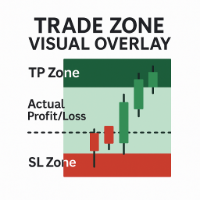
Trade Zone Visual Overlay – MT5対応のリアルタイム取引ゾーン表示ツール 手遅れになる前に、取引の状況を即座に可視化。 Trade Zone Visual Overlay は、現在の保有ポジションの重要なゾーンをチャート上に直接表示する強力なチャートツールです。明確な視認性を重視する裁量トレーダーのために設計されており、以下のゾーンを表示します: テイクプロフィットゾーン(TP) – 利益目標範囲をハイライト ストップロスゾーン(SL) – リスク範囲を明確に表示 実際の損益ゾーン – 手数料差引後のリアルタイムな損益進行状況を視覚化 カスタマイズ可能なカラーと手数料を考慮した閾値により、以下のような正確なスナップショットを得られます: 現在の取引が実質的に利益か損失か(コスト差引後) 現在価格がSLやTPからどれだけ離れているか リスクとリワードのバランスがチャート上で一目瞭然 機能: 現在の保有ポジションを自動検出 エントリーポイントから先を予測してゾーンを描画 手数料とスプレッド を考慮して実際の損益を反映 シンプルで邪魔にならないオーバーレイ – 取
CYP Trade Manager Pro MT5: The Trader's Edge in Position Management
Transform How You Manage Trades - Focus on What Matters Why Most Traders Fail - And How CYP Trade Manager Pro Solves It
Many traders have solid entry strategies but lack proper trade management - the key difference between professionals and amateurs. CYP Trade Manager Pro handles the critical "after entry" phase of trading that most EAs ignore, giving you the edge that institutional traders use every day. Who Is It For Manual
TickData Recorder (v1.3): Real Ticks Recording for Reliable Backtesting in MT5 Elevate the accuracy of your strategy testing significantly! Tired of unrealistic backtest results on standard MetaTrader 5 data that don't match your broker's conditions? "TickData Recorder" is your tool to solve this problem. This Expert Advisor meticulously records every single tick price change (time with milliseconds, Bid, Ask, Last, Volume) directly from your broker's server (FTMO, RoboForex, IC Markets,

Flow – Hotkey Tool for Discretionary Traders Take full control of MT5 with your keyboard and mouse.
Flow is a powerful hotkey-based assistant designed specifically for discretionary traders who want to place orders, draw tools, and operate charts with speed and precision. No more right-click menus or wasting time. Just trade.
Key Features Order Execution Place pending Buy/Sell orders (limit or stop) instantly with just a mouse click. Stop Loss and Take Profit lines are automatically attac
MetaTraderマーケットはMetaTraderプラットフォームのためのアプリを購入するための便利で安全な場所を提供します。エキスパートアドバイザーとインディケータをストラテジーテスターの中でテストするためにターミナルから無料のデモバージョンをダウンロードしてください。
パフォーマンスをモニターするためにいろいろなモードでアプリをテストし、MQL5.community支払いシステムを使ってお望みのプロダクトの支払いをしてください。

取引の機会を逃しています。
- 無料取引アプリ
- 8千を超えるシグナルをコピー
- 金融ニュースで金融マーケットを探索