 MetaTrader 5
 Experts
 지표
 라이브러리
 유틸리티
 위젯
 규칙
MetaTrader 5용 트레이딩 유틸리티 - 61
 다음은 MetaTrader 5의 거래를 단순화하는 거래 프로그램입니다. 유틸리티의 설명과 목적을 읽으려면 유틸리티 위에 마우스를 놓으십시오.
• Please test the product in the Strategy Tester before purchasing to understand how it works.
• If you face any issues, contact me via private message—I’m always available to help.
• After purchase, send me a screenshot of your order to receive a FREE EA as a gift. Hedge Fragmentation Utility - Comprehensive Product Description Overview The Hedge Fragmentation Utility is a professional-grade MetaTrader 5 tool designed for forex traders who employ hedging strategies. This sophisticated util
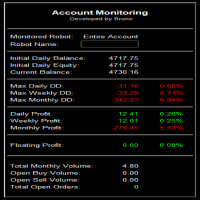
Summary of the Advanced Account Monitoring for MT5 The Advanced Account Monitoring for MT5 is a powerful tool designed for advanced account monitoring, offering traders detailed insights into their trading performance. This indicator provides a comprehensive dashboard to track drawdowns, profits, and trading volumes across different timeframes. Below is an overview of its key functions: Account and Robot Monitoring The indicator allows users to monitor either the entire account or a specific Ex

Add Magic Order EA – Smart Trade Scaling with Ease Add Magic Order EA is a sleek and efficient Expert Advisor designed to automatically add trades based on floating drawdown. Whether you're scaling into positions or enhancing an existing strategy, this tool gives you precise control and smart automation. Key Features: Optional Magic Number Filtering – Monitor a specific strategy by magic number, or apply logic to all trades. Drawdown Triggers – Automatically adds more orders when yo

LIMITED OFFER! We're having a sale to celebrate the launch of our products. This product, which normally costs $200, is on sale for $40 for a limited time. In exchange, we'd like you to try out the tool and leave us an honest review about your experience. So we want you to give it a try. It's sure to become a companion you'll never want to let go of.
Trend Line Trader – A Trading Tool Using Trend Lines ・Want to place a limit order only until a specific time ・Buy entry if the downtrend line is

Risk Properly with FXPosition Size Calculator which calculated the optimal Lot sSize based on your desired Risk Percentage and Stop-Loss, ensuring precise Risk Management. Enter your account balance, risk percentage, and Stop-Loss(either in points or price levels), and the calculator instantly determines the required lot size so that you don't risk too much. Protect your capital and trade with confidence with Accurate Position Sizing and Simplicity.

Symbol Information The Symbol Info indicator provides an intuitive panel on the chart that displays essential information about the current trading symbol. This includes basic trading data, instrument properties, and trading rules, all designed to give traders a clear view of the market conditions and product specifications. Key Features: Symbol Name and Description:
The indicator displays the name and a detailed description of the current trading symbol, helping users identify the instrume

Pionex Live MT5 Data and History -- API 주소를 도구 > 전문가 어드바이저 에 추가 api.pionex.com ws.pionex.com 단계: 심볼 생성 CreateSymbols = true 설정 MT5 터미널을 다시 시작 ( 매우 중요! ) 마켓 워치에서 심볼 선택 후, 실시간 및 히스토리 데이터 불러오기 모드: LiveUpdate – 차트에 유틸리티 추가 후 실시간 거래 데이터 가져오기 History – 특정 날짜 및 시간까지 히스토리 데이터 채우기 설정: MaxDate – 업데이트할 날짜 선택 ALL – 선택한 날짜부터 히스토리 채우기 AutoUpdate = true – MT5를 다시 시작할 때마다 자동 업데이트 Pionex Live MT5 Data and History -- API 주소를 도구 > 전문가 어드바이저 에 추가 api.pionex.com ws.pionex.com 단계: 심볼 생성 CreateSymbols = true 설정 MT5 터미

Telegram Signals Hunter Bot is a Telegram bot which you can run on you PC, it's connected to your MT5 through the Expert Adviser. The main goal of this automated process is to track trading signals coming from Telegram channels/groups then execute orders on MT5. The Bot is powered by AI to analyze extract data from each signal, then execute orders automatically and safely on your MT5. We have developed the MT4 version before the MT5, you will notice that the demo video was recorded on the MT4, t
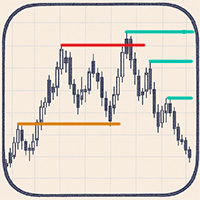
Automatic Marking of Key Price Levels
Each of you spends a huge amount of time every day manually marking and updating key price levels.
Every missed important level can lead to an unpredictable market reaction! This tool keeps your chart constantly up to date — removing outdated levels and adding new relevant ones in real time
Liquidity levels – target zones for price movement Reversal and reaction zones – break levels or likely turning points Liquidity grabs and price reversals You choose th

TradeGainViewer Utility for Blogging Activities Name: TradeGainViewer
Indicator Type: Informational (Graphical)
Category: Utilities Who is this indicator for? TradeGainViewer is designed for traders who actively engage in blogging, live streaming, or recording videos about trading on MetaTrader (MT5). It is ideal for: Trader-bloggers who want to visually display their current profit or loss in real-time to their audience. Streamers conducting live trading sessions, allowing viewers to see trade

MT5 CCI Notification – Stay Ahead of Market Trends! Enhance your trading strategy with MT5 CCI Notification , a powerful tool that alerts you instantly when the Commodity Channel Index (CCI) hits key levels. No more missed opportunities—get real-time notifications on your MT5 platform or mobile device. Whether you're a scalper, day trader, or swing trader, this smart alert system keeps you informed and ready to act. Real-time alerts for overbought/oversold conditions
Customizable settings to

Overview
The Wave Statistics Scanner is a specialized MQL5 tool for MetaTrader 5 that performs statistical analysis of price volatility across multiple financial instruments.It focuses on identifying and measuring price waves(high-low ranges)within individual price bars,allowing traders to quantify market volatility and identify potential trading opportunities based on statistical patterns.
#Key Features
-Multi-symbol Scanning:Analyze volatility across multiple trading instruments
-Volatili

Advanced Wave Statistics Scanner
The Advanced Wave Statistics Scanner is an enhanced MQL5 tool for MetaTrader 5 that combines traditional price volatility analysis with ATR(Average True Range)indicator analysis.This sophisticated tool provides deeper insights into market volatility patterns by comparing standard price wave measurements with ATR-based volatility metrics,enabling traders to identify abnormal market conditions and potential trading opportunities with greater precision.
#Key Feat

Trend Wave Analyzer
Overview
The Trend Wave Analyzer is a specialized MQL5 tool designed for MetaTrader 5 that identifies,analyzes,and visualizes price trend cycles in financial markets.It detects complete up/down/sideways price movements by identifying key turning points(peaks and troughs)in price action,providing traders with valuable insights into market behavior patterns.
#Key Features
-Multi-symbol Analysis:Analyze multiple trading instruments simultaneously
-Trend Identification:Auto

GOLD robot4trade (FTMO 전용 에디션) v1.5
Robot4Trade.com 제공 | AI 탑재 & 챌린지 대응 완비 개요
Advanced Forex EA 는 FTMO, MyForexFunds 등 다양한 펀딩 트레이딩 챌린지 요건을 완벽히 충족하도록 설계된 차세대 자동매매 알고리즘입니다. 이 EA는 전통적인 신뢰 지표 (MA, RSI, ATR)를 기반으로 하여, 현대적인 리스크 관리와 자산 보호 기능을 결합하였습니다. 일일 손실 감시, 점진적 진입 로직, 실시간 통계 정보를 제공하는 온차트 대시보드를 포함합니다. 모의 챌린지 계좌든, 실거래든 — 이 EA는 당신의 종합 자동매매 솔루션이 될 것입니다. ️ 전략 로직 이동 평균 교차(MA Crossover) : 빠른 SMA & 느린 SMA RSI 필터 : 과매수/과매도 구간에서의 진입 회피 ATR 기반 SL/TP : 시장 변동성에 따라 자동 조정 고정 또는 리스크 기반 로트 사이징 지원 계단식 재진입
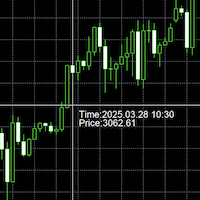
This tool is a time conversion tool that converts the time of the bar where the mouse is located (server time) into the time of the local computer's time zone and displays it at the bottom right of the cursor's position.
How to Set Up: Apply this program to the icon. The program has a variable that controls whether the time is displayed, with the default setting being displayed. If you temporarily do not want the time to be displayed, you can change the variable to False and move the mouse; th

Origin of EA Security Guard Due to unknown bugs in EA, account funds can unexpectedly drop from tens of thousands of dollars to zero within a day. To prevent such incidents, the ultimate purpose of EA Security Guard is: To prevent random opening/closing of orders due to unknown EA bugs that could lead to account fund depletion. EA Security Guard User Guide What is baoan-gj (Security Guard Tool)
This is a security tool designed for traders, primarily aimed at monitoring and preventing abnormal tr

The script allows you to quickly control positions from the keyboard.: Arrow ↑ → Open BUY Arrow → Open a SELL Arrow → → Close ALL positions
Key functions: Automatic closing of opposing positions When a BUY is opened, all SALES are closed, and vice versa. Positions in the same direction remain intact (they can be accumulated).
Flexible settings: LotSize. Take Profit in points (TP_Points). Stop Loss is disabled (but can be added if necessary).
Safety: Checking the connection to the market. Sup

This is a Universal Arrow EA, that can work with different arrow indicators. The original version uses our popular ChannelSignals PRT indicator, which you can very easily change yourself with one of our arrow indicators or any other that meets the technical requirements for their use in this EA.
Please note that the indicator name and buffers must be specified correctly. You can find them in the settings of the indicator you are using. You also need to place this indicator in your MT5 Termin

Prop Assistant – Your All-in-One Trading Co-pilot for Prop Firm Success Preparing for FTMO, MyFundedFX, or any other prop firm challenge?
Prop Assistant puts everything you need directly on your chart – no hidden menus, no complex layers, no distractions. Key Features: Max Drawdown Control: Automatically stops trading or closes all positions when your maximum drawdown is reached. Daily Profit & Loss Management : Set your daily profit/loss limits and let the assistant manage your risk. Ov

EA Emotion is not a traditional Expert Advisor that places trades automatically – instead, it’s a psychological checkpoint that helps you manage trading discipline and emotional control . Designed especially for discretionary traders, prop firm challengers, and anyone serious about improving consistency, EA Emotion asks a series of custom questions right after you open a trade , such as: Did you follow your trading plan? Are you in the right mental state? Is this trade part of your set

Prop Firm Drawdown Guard EA – Documentation (MT5 Version)
Version: 1.00 Platform: MetaTrader 5 (MT5) Author: Branko Balog Website: https://www.mql5.com
️ Purpose This Expert Advisor (EA) helps prop firm traders adhere to drawdown rules by monitoring daily and total account equity loss and enforcing restrictions when thresholds are breached.
It performs the following actions: - Monitors account equity in real-time - Closes all open positions when drawdown limits are hit - Blocks opening of

Bulk Order - Your one-click MT5 control panel for managing multiple trades. When markets move quickly, managing positions one ticket at a time is slow, repetitive, and error-prone. Bulk Order puts the actions you use most on the chart: open multiple market orders, manage pending orders, apply Stop Loss and Take Profit levels, and close positions in bulk. It is built for traders who make their own decisions and want a faster way to execute them. You choose every action; Bulk Order simply makes th

Account Risk Hedge Bot
...hedge your trades with confidence.
Safeguard Your Investments with Account Risk Hedge Bot, stay ahead of market volatility with our cutting-edge risk management solution. Account Risk Hedge Bot is designed to safeguard your investments with automated precision, helping you navigate market uncertainty, ensuring you minimize losses and maximize returns.
Note: Account Risk Hedge Bot does

FX Auto Risk Management TP SL and Out Stop v3.10
Strengths of the Script 1. Comprehensive Risk Management Automated Take Profit and Stop Loss with customizable percentage-based settings Trailing Stop with two adjustable modes (Normal and Aggressive) Stop Out based on floating loss/profit percentage 2. Advanced Features Multi-mode trailing stop with different parameters for each mode Slippage control for more realistic order execution API request limit to prevent server overload 3.
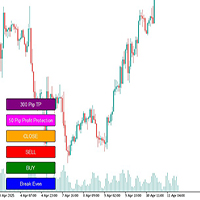
# Megathron Buttons EA User Guide
## 1. Overview Megathron Buttons EA is a helper tool designed for manual traders. It provides quick and easy trading through various buttons on the chart.
## 2. Installation 1. Install the EA on your MetaTrader 5 platform 2. Drag and drop it onto your desired chart 3. Configure the EA settings (detailed below)
## 3. Buttons and Their Functions
### Main Buttons 1. **BUY Button** (Green) - Opens a buy position with specified lot size - Automatically cal

Утилита (советник) помогает торговать на валютной паре EURGBP, использует для входов и выходов настроение индекса Еврозоны STOXX50, Великобритании FTSE100, Японии Nikkei225. Для каждой сделки устанавливается тейкпрофит. Выход из сделки по тейкпрофиту или при смене настроений индексов. Перед тестированием убедитесь, что в терминале есть индексы Евро50 (STOXX50, EU50, EuroStoxx50), Великобритании FTSE100 (UK100, UK100.spot и т.д.), Японии Nikkei225 (NIKK225, JP225, NKI225 и т.д.) Напишите в настр
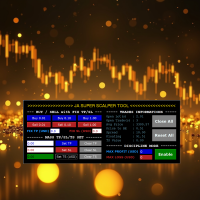
JA Super Scalper & Discipline Tool - REBORN (V3.0): Turbocharge Your Trading Efficiency with new Reborn (V3.0) version.
Introducing the Super Scalper & Discipline Tool - Reborn (V3.0). A simple tool designed for rapid entry and exit strategies. Reborn Version (V3.x) has better user interface. The interface on the video still the older V2.x version. Maximize your trading potential with optimized performance, robust risk management, and seamless market execution tailored for high-frequency scalp
Local Trade Copier is an advanced tool designed for efficiently copying trades between accounts in the local mode. It allows for lightning-fast order replication from a master account to a slave account. In local mode, trades are copied instantly, while in remote mode, the copying process takes less than 1 second. MT4 Version MT5 Full Version (Local & Remote) MT4 Full Version (Local & Remote) Local mode refers to both MetaTrader platforms being installed on the same system. It fully suppo

SmartClose Pro is a powerful, user-friendly Expert Advisor (EA) designed for MetaTrader 5 that gives traders complete control over grouped position management across multiple symbols. Whether you're looking to lock in profits or limit losses across several trades, SmartClose Pro streamlines the process with smart automation, precision, and safety. With SmartClose Pro, you can select any open positions from the intuitive top-level table and add them to a dedicated monitoring list below. You can

The Time Zone indicator allows users to set specific time periods for major trading sessions (Asian, European, North American) and display them with distinct colors on the chart. Users can choose how many days of trading zones to show, set the start and end times for each session, and define the color to represent each trading period. The chart refreshes at user-defined intervals to ensure the time zone data is accurate and current. Key Features: Display Trading Zones: Users can choose to
Notify MT5 Indicator - Full Description Overview The Notify MT5 Indicator is a powerful notification tool designed to alert traders about important changes in their trading account activity. It monitors various order events across all symbols and provides real-time notifications through multiple channels including on-screen pop-ups, and customizable sound alerts. Key Features Comprehensive Order Monitoring Order Closure Tracking : Notifies when market orders are close d Customizable Sound Alerts

Easy Trade – 스마트하고 간단하며 강력한 트레이드 관리 Easy Trade는 리스크를 철저히 관리하고 실행을 더욱 원활하게 하려는 MetaTrader 사용자들을 위한 올인원 트레이드 관리 솔루션입니다.
트레이더들의 피드백을 바탕으로 처음부터 설계된 Easy Trade는 여러 종목의 거래를 간단하게 실행, 모니터링 및 관리할 수 있도록 하며, 작업 흐름을 복잡하게 만들지 않습니다. 수동 스캘핑이든, 소규모 전략 포트폴리오 관리든, Easy Trade는 트레이더가 현명한 판단과 안정적인 수익에 집중할 수 있도록 돕습니다.
⸻
Easy Trade를 사용해야 하는 이유 정밀한 리스크 관리: 고정 로트 또는 퍼센트 기반 리스크 설정 가능. 실시간 리스크 및 수익률 정보 제공. 바스켓 기반 트레일링: 여러 거래의 수익을 모니터링하고 목표 달성 시 이익을 부분 확정 가능. 군집 진입에 이상적. 거래 캡처: 각 거래를 스크린샷으로 기록 가능 – 트레이딩 저널 및 성과 분석에 적합.
Advantages of the Trading Therapist EA Enforces Trading Discipline
Before executing a trade, the EA walks you through a personalized checklist — keeping you accountable to your trading plan every time. Reduces Emotional Trading
Say goodbye to FOMO, revenge trading, and impulsive entries. The EA encourages patience and clarity by requiring confirmation of all pre-set conditions. Fully Customizable Checklists
Add up to 10 pre-trade questions based on your personal strategy — whether

This trading utility is designed for intraday traders who open a large number of transactions. It implements trading via hot keys, with automatic stop-loss setting for the minimum or maximum of the previous candle and take-profit at certain levels. Certain levels are the maximum and minimum of yesterday and their range measured from the maximum up and from the minimum down. The main elements that are necessary when working within a day are displayed at the top of the chart. This is a timer that

CloseOrders EA v1.06 - Professional One-Click Order Management Panel for MetaTrader 5
CloseOrders EA is an essential, high-performance order management tool for MetaTrader 5 traders and scalpers. It places a clean, responsive control panel directly onto your chart, allowing instant, selective execution for closing market positions and canceling pending limit orders with a single click.
================================================== KEY FEATURES ============================================

MQL5 블로그: https://www.mql5.com/en/blogs/post/761446 MT4 버전: https://www.mql5.com/en/market/product/136790 MT5 버전: https://www.mql5.com/en/market/product/136791
Time Wizard는 속도, 타이밍, 실행 제어 기능을 하나의 깔끔한 대시보드에서 필요로 하는 트레이더를 위해 설계된 전문 트레이딩 어시스턴트입니다.
이 Expert Advisor는 이벤트 기반 트레이딩, 예약 실행, 빠른 반자동 주문 관리 기능을 제공합니다. 주문을 미리 준비하고, 정확한 실행 시간을 지정하고, 계층형 대기 주문을 설정하고, 손절매 및 이익 실현으로 위험을 관리하고, 차트의 간편한 인터페이스에서 모든 것을 모니터링할 수 있습니다.
경제 이벤트, 개장 시간, 돌파 시점 또는 사용자 지정 일정 등 어떤 시점을 기준으로 거래하든 Time Wizard는 체계적이고 규율 있는 실행을

A multi-timeframe trend and entry confirmation system with the following components: Trend Signals: Each trend is analyzed on two timeframes: 5-minute and 15-minute Strength (STRENGTH : HIGH | LOW) — possibly indicating volatility or volume strength across timeframes. Entry Confirmations Final Trade Signal (TRADE SIGNAL: BUY/SELL) — suggesting a potential long (buy)/short (sell) opportunity

This indicator clearly and efficiently displays the evolution of your total equity, as well as separate BUY and SELL curves. You can filter by magic number and date range, making it easy to compare different EAs or strategies over specific periods. Everything is shown in a single subwindow, giving you a dashboard-like view of your accumulated performance by asset and trade type. Detailed Description Magic Number Filtering Strategy Selection : Enter the magic number of your robot (or leave it at

요약
EagleFX는 MetaTrader 5 전용 완전 자동화 EA로, 다양한 상품을 대상으로 24시간 알고리즘 거래를 고정밀도로 실행합니다. 감정 개입을 배제하고, 모든 신호를 엄격히 백테스트하며, 리스크 파라미터를 동적으로 조정하고, 머신러닝 기반 메모리 모듈을 활용해 성과를 지속 개선합니다. 끊임없는 감정 없는 실행
피로 없이 시장을 모니터링하고, 조건 충족 즉시 거래를 실행합니다. 검증된 백테스트 전략
ATR, EMA, RSI 같은 지표 기반 규칙을 다년간 데이터로 검증해 오버핏팅을 방지합니다. 고급 아키텍처 및 적응력
핸들 기반 지표 호출과 다계층 메모리 설계로 실시간 전략 최적화를 지원합니다. 견고한 리스크 및 자금 관리
Kelly 기준에 따른 동적 포지션 조정, 일간/주간 손실 한도 설정, 브로커 제약 자동 처리. 넓은 시장 범위 및 안정성
FX뿐 아니라 CFD, 지수, 원자재까지 확장 가능하며, 로깅과 오류 처리로 안정적 운영을 보장합니다.

Waiting for Tsunami EA waiting for a sudden price change to occur. If the conditions defined as Tsunami occur, the program sends a message to the Meta Trader 5 application installed on the phone or to email. Program parameters: - change price in one tick, - first time period in minutes, - change price in first period, - second time period in minutes, - change price in second period, - third time period in minutes, - change price in third period - target high(upper price), - target low (lower pr

Boost your forex profits with Blues Protector, an advanced MQL5 Expert Advisor designed for MetaTrader 5. This automated trading bot dynamically manages your stop-loss levels to secure gains and reduce risks. Blues Protector EA - User Manual (For MT5 - Ready-to-Use EX5 File) 1. What This EA Does The Blues Protector EA automatically secures your profits by smartly adjusting stop-loss levels when your trade reaches a predefined profit level. It works silently in the background, protecting

Ultimate MT5 Trade Panel – Full Control at Your Fingertips Take your trading to the next level with the Ultimate MT5 Trade Panel – a powerful, fully customizable tool designed for speed, precision, and complete control over your trades. Whether you manage a few positions or hundreds across multiple symbols, this panel will make your life easier! Key Features: Multiple Close Options Close All Positions & Orders with One Click Close Only Buy Positions Close Only Sell Positions Close All Pr
Key Note: Easy Install Instructions below. What's New: What’s New in StrategySuccessAnalyzer v2.0 – Major Upgrades Interactive GUI Dashboard
Visualize strategy health in real time with dynamic score gauges, equity projections, and color-coded performance alerts — directly on your MT5 chart. 30-Day Forward Performance Projection
Forecast equity growth, drawdown risk, and net PnL over the next month using realistic trade simulations and optional compounding logic. One-Click CSV Export
Save fu

NY Open Breakout EA is a fully automated trading robot specifically designed to capture strong breakouts during the New York trading session, focusing on major forex pairs and indices correlated with the US Dollar. Key Features: Automatically defines the trading zone based on customizable time settings. Opens trades when the price breaks above or below the identified zone. Smart built-in risk management with automatic stop loss and take profit settings. Advanced Martingale loop system to reco

Are you looking for an easy and effective way to keep your trading signals up-to-date? With TradeLink, you can now send all your MQL5 trading signals directly to Telegram with ease! Why is TradeLink the right choice for you? Ease of use: No technical expertise required. Just enter your token and start sending alerts. Ultra-fast: Instant alerts as soon as signals appear on MQL5. High security: Connectivity is via the encrypted and trusted Telegram API. Time saving: Never miss a trading op

Drawdown Guardian Pro (v2.8) - MT5를 위한 향상된 계정 보호자! 치명적인 손실이 발생하기 전에 막으세요! "Drawdown Guardian Pro"는 MetaTrader 5 계정을 지속적으로 모니터링하고 사전 정의된 한도에 도달하면 자동으로 안전 조치를 적용하는 포괄적인 위험 관리 도구입니다. 통제 불능 EA, 시장 변동성 또는 감정적인 수동 거래로부터 보호하는 데 이상적입니다. 주요 특징 (v2.8): 다양한 손실 제한: 고정 (일일/전체, % 또는 통화 기준) 및 트레일링 손실 제한 모니터링. 절대 자산 수준: 최소 및 최대 임계값 설정. 유연한 시간 필터: 특정 시간 및 요일에 거래 허용 또는 차단. 동적 위험 시각화: 차트가 지표가 됩니다! 배경색 변경 및 중앙 텍스트가 위험 수준을 즉시 알립니다. 사용자 정의 가능한 주요 조치: 모든/손실/수익 관리 포지션 청산, 신규 거래 차단, 알림. 지정가 주문 삭제: 한도 도달 시 관리 지정가 주문 자동 삭

Copy signals from Telegram channel to MT4/MT5 (Telegram bot must be added as an Admin in the channel) Input * Telegram bot token: Get your bot token by chatting with @BotFather * Multi- order for multi-tp signals * Signals filter by "not included text" * Option to Modify/Close by Reply message * Range Entry Mode: No open order if the price is out of range Setup on your MT4/MT5: - MT4/MT5 => Tools => Options => Expert Advisors => Tick on Allow Algo Trading & Allow WebRequest, add API Telegram

Momentum Echo – Real-Multi Currency Alert System Overview: Momentum Echo is a real-time alert system designed to monitor price with precision. It identifies aggressive market moves, capturing critical moments when price moves against the normal range signifying possible: Never miss a retracement even when away from your trading computer Stop hunts to eliminate retail positions Volatility breaks out of consolidation zones Price luring traders into premature entries Momentum surges confirm market
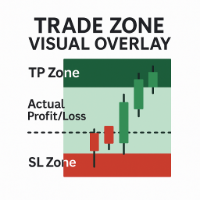
Trade Zone Visual Overlay – MT5용 실시간 거래 구역 표시 도구 늦기 전에 거래 성과를 즉시 시각화하세요. Trade Zone Visual Overlay 는 현재 보유 중인 포지션의 핵심 구역을 차트에 직접 표시하는 강력한 차트 도구입니다. 명확성을 중시하는 재량 거래자를 위해 설계된 이 인디케이터는 다음을 보여줍니다: 이익 실현 구역 (Take Profit Zone) – 전체 목표 수익 범위를 강조 표시 손절 구역 (Stop Loss Zone) – 리스크 노출 구간을 명확하게 표시 실제 손익 구역 – 수수료를 반영한 실시간 거래 진행 상황을 시각화 사용자 정의 가능한 색상과 수수료 조정 임계값을 통해 다음과 같은 정확한 스냅샷을 제공합니다: 거래가 실제로 이익인지 손실인지 (비용 차감 후) 현재 가격이 손절 또는 이익 실현 지점에서 얼마나 떨어져 있는지 실시간 위험 대비 보상이 차트에 명확히 표시됨 주요 기능: 현재 열려 있는 포지션을 자동으로 감지 진입 지
CYP Trade Manager Pro MT5: The Trader's Edge in Position Management
Transform How You Manage Trades - Focus on What Matters Why Most Traders Fail - And How CYP Trade Manager Pro Solves It
Many traders have solid entry strategies but lack proper trade management - the key difference between professionals and amateurs. CYP Trade Manager Pro handles the critical "after entry" phase of trading that most EAs ignore, giving you the edge that institutional traders use every day. Who Is It For Manual
TickData Recorder (v1.3): Real Ticks Recording for Reliable Backtesting in MT5 Elevate the accuracy of your strategy testing significantly! Tired of unrealistic backtest results on standard MetaTrader 5 data that don't match your broker's conditions? "TickData Recorder" is your tool to solve this problem. This Expert Advisor meticulously records every single tick price change (time with milliseconds, Bid, Ask, Last, Volume) directly from your broker's server (FTMO, RoboForex, IC Markets,

Flow – Hotkey Tool for Discretionary Traders Take full control of MT5 with your keyboard and mouse.
Flow is a powerful hotkey-based assistant designed specifically for discretionary traders who want to place orders, draw tools, and operate charts with speed and precision. No more right-click menus or wasting time. Just trade.
Key Features Order Execution Place pending Buy/Sell orders (limit or stop) instantly with just a mouse click. Stop Loss and Take Profit lines are automatically attac

Risk Management EA - Advanced Trading Tool with Visual Controls Description: This comprehensive Risk Management EA transforms your trading experience with an intuitive visual interface directly on your chart. Take full control of your trades with precise risk calculation, customizable entry/exit points, and one-click order execution. Key Features: Visual Trade Management : Drag-and-drop SL/TP lines with real-time profit/loss calculations Automated Risk-Based Position Sizing : Instantly calculate

ATR RiskMaster – Lot Size Calculator Based on ATR Volatility ATR RiskMaster 1.00 is a powerful utility (runs as an Expert Advisor or Indicator) designed to automate lot size calculation, stop-loss, and take-profit levels based on market volatility using the Average True Range (ATR). Perfect for traders who prioritize consistent risk management and precision. Inputs & Features Explained ️ RiskPercent (1.0%)
Defines the percentage of your account you want to risk per trade. For example, with

️ PropShield is your automated guardian for proprietary trading firm challenges and funded accounts. If you've ever failed a challenge by exceeding the daily drawdown limit by just a few dollars, or if you struggle to enforce your own risk rules during volatile markets, PropShield is built for you. This is not a trading strategy - it's a safety system that watches your account 24/7, automatically closes positions when risk limits are breached, and keeps you on track to pass challenges and keep

Description: Advanced Position Closer EA monitors your open market orders per symbol, displays the counts directly on your chart, and automatically closes orders when configurable thresholds are met. It supports both global and per-symbol settings for direction, profit/loss filtering, and whether to close all matching orders or only those that passed your filters.
External Parameters:
1. GlobalMaxOpenOrders (int) - Sets a single maximum number of open market orders for every symbol. - 0

MetaTrader 5의 제한으로 EA는 전략 테스터 모드에서 작동하지 않습니다. 작동 방식을 확인하려면 데모 버전을 다운로드할 수 있습니다. 이 EA를 사용하는 기본적인 두 단계는 다음과 같습니다: How To Use EA를 원하는 종목 차트에 로드하고, 입력값을 Constructor로 설정합니다.
이후 생성된 사용자 정의 심볼에 EA를 로드하고, 입력값을 Controller로 설정합니다. Overview MT5 Bar Replay Pro는 TradingView의 Bar Replay 기능에 대응하는 MetaTrader 5 도구입니다. MT5의 모든 21개 시간 프레임을 완벽히 지원하며, 브로커의 데이터가 허용하는 한 과거로 돌아갈 수 있습니다. 전략 연습을 위한 내장 리스크 관리 도구와 보조용 그래픽 객체도 포함되어 있습니다. 각 연습 세션은 종목, 수익, 핍스, 총 거래 수, 승률, 수익 인자, 최대 손실, 회복 인자, 기대 수익 등의 데이터를 기록하며, 이 데이터는

RexCatch EA is designed to recognize all forms of boxes or rectangles with the specified color which will later be used for order execution, both buy and sell in the form of Supply and demand. This EA is also able to read indicators installed on the chart that display box or rectangle shapes, such as the Supply Demand indicator or boxes and rectangles that are made manually by giving them the color as specified in the EA setting.
Can only open 1 order and will reopen the order when the active o
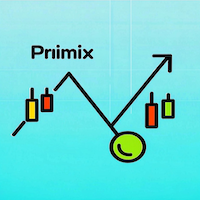
DYJ NetPilot is an Expert Advisor (Utilities) developed for the MetaTrader5 platform, designed to optimize trade exits by dynamically calculating the weighted average price (Pmix) of all open positions and adjusting exit levels accordingly. Key Features: Pmix Calculation: Computes the weighted average price (Price Mix) of open positions, providing a clear reference point for trade management. Dynamic Exit Strategy: Identify the prevailing direction (long/short positions) within open orders

Advanced Take-profit Stop-loss EA v1.00 — Expert Advisor Description ===================================================================
Overview: --------- This Expert Advisor (EA) automatically monitors and closes positions based on overall profit or loss levels. Its primary goal is to help traders manage risk and lock in gains by defining thresholds for take-profit and stop-loss either globally or per individual symbol.
Key Features: ------------- 1. **Global and Per-Symbol Thresholds:*
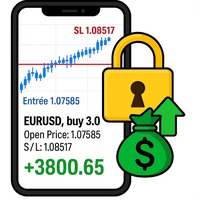
Auto SL/TP Manager EA – Gestion Automatique Intelligente Auto SL/TP Manager EA est un Expert Advisor conçu pour automatiser la gestion des commandes avec une efficacité maximale et une grande discrétion. Il gère automatiquement : Le Stop Loss (SL) et le Take Profit (TP) Le Profit Lock (verrouillage progressif des bénéfices) Le Trailing Stop avec plusieurs méthodes avancées L' affichage masqué du SL et du TP pour plus de discrétion (non visible par le courtisan) C'est l'outil idéal pour les

Main Features Auto Entry & Exit
Automatically enters and closes positions when price reaches a trendline or horizontal line you draw.
Note: Your PC and MT5 must remain running. Quick & Easy Setup
Configure everything via on-chart input fields and buttons. Advanced Entry Controls
Includes trigger lines to refine entry conditions, invalidation lines to block unwanted entries, trailing stops, entry-time restrictions, and time-specified exits. How to Set Up Lines Draw your desired entry, exit, t

Overview Breakout Meter is a price action tool that identifies key breakout zones based on recent daily price activity. It highlights areas where momentum is likely to trigger, helping traders anticipate breakouts or reversals with minimal configuration. How It Works The EA analyzes a user-defined number of recent daily candles and marks high and low zones where price has shown strong reactions. It automatically updates levels with new data and removes outdated zones to keep charts clear. Users
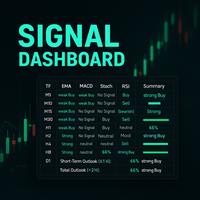
Description:
This powerful script provides traders with a comprehensive, real-time signal overview across multiple timeframes using some of the most trusted technical indicators. Designed as a clean, compact on-chart table, it displays actionable insights for 9 timeframes — from M5 to D1 — helping traders make well-informed decisions based on momentum, trend strength, and market conditions.
How it works:
For each timeframe (M5, M10, M15, M30, H1, H2, H4, H8, D1), the script calculates
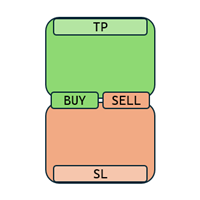
Enough with all these complex and confusing trade assistants and trade managers! Go simple and user-friendly! With One Click Order you set your risk, prepare your long or short trade and submit, DONE in seconds!
One Click Order is very easy to use Set your default risk (in % or amount) Select if you want to go long or short Drag the Open Price to your desired level, or leave as is for market orders Drag the SL to your desired Stop Loss Drag the TP to your desired Take Profit The tool will calcu

Sentinel PRO — RixiRoo의 자본 보호 도구
자본 보호의 마지막 해답입니다. Sentinel PRO는 Sentinel의 전체 버전입니다.
자본 보호에는 제한이 없습니다. 구매 전에 사용해보고 싶으신가요?
무료 버전을 확인해보세요 Sentinel Equity Protector Mini MT5 한 번의 실수가 마진콜로 이어질 수 있습니다.
Sentinel은 Authorooty로 당신의 자본을 보호합니다.
자본이 설정한 임계값 아래로 떨어지면, Sentinel은 즉시 완전 종료를 실행합니다. Sentinel의 기능: 모든 활성 거래를 종료합니다.
모든 대기 주문을 취소합니다.
모든 열린 차트를 닫습니다 (다른 EA를 비활성화함).
푸시 알림을 전송합니다 (활성화된 경우). Sentinel을 사용하는 이유: 단 하나의 입력값: EquityToProtect.
복잡한 설정 없음 – 연결하고 보호만 하면 됩니다.
속도와 신뢰성을

GoldScalper Script Category: Utilities (Script)
Version: 1.00
Author: Alfred Jaftha
Product Type: MQL5 Script Overview GoldScalper Script is a one‑click pending‑order generator for XAUUSDm, designed to lock in potential scalping entries based on H1 trend confirmation and M1 Bollinger Bands/ATR levels. Unlike an EA, this script executes a single trade setup when launched, making it ideal for traders who prefer manual control combined with algorithmic precision. Key Features Trend Confirmation: U

NoSwapEA MT5 - Trade Smart, Avoid Swaps Overview
NoSwapEA is a smart and efficient Expert Advisor designed to help traders avoid overnight swap charges by automatically closing and reopening trades based on a customizable schedule. Developed by NeonTrade, this EA is perfect for traders who want to optimize their trading strategy while minimizing costs. Key Features
Swap-Free Trading : Automatically closes trades before swap charges are applied and reopens them the next day, saving you money
MetaTrader 플랫폼 어플리케이션 스토어에서 MetaTrader 마켓에서 트레이딩 로봇을 구매하는 방법에 대해 알아 보십시오.
MQL5.community 결제 시스템은 페이팔, 은행 카드 및 인기 결제 시스템을 통한 거래를 지원합니다. 더 나은 고객 경험을 위해 구입하시기 전에 거래 로봇을 테스트하시는 것을 권장합니다.
