 MetaTrader 5
 エキスパート
 インディケータ
 ライブラリ
ライブラリ
 ユーティリティ
 ウィジェット
 ルール
ルール
YouTubeにあるマーケットチュートリアルビデオをご覧ください
ロボットや指標を購入する
仮想ホスティングで
EAを実行
EAを実行
ロボットや指標を購入前にテストする
マーケットで収入を得る
販売のためにプロダクトをプレゼンテーションする方法
MetaTrader 4用取引ユーティリティ - 48
 以下はMetaTrader4での外国替取引を簡素化する取引プログラムです。以下のリストのユーティリティにカーソルを合わせて、説明と目的をご覧ください。
Drawdown Detective Overview: Drawdown Detective is a utility script for MetaTrader 4 designed to help traders analyze their open and closed positions. It calculates key metrics including open position risk, potential profit/loss, the number of trades without Stop Loss or Take Profit, as well as monthly performance statistics such as net profit and maximum drawdown. Key Features: Open Trade Analysis: Automatically detects all currently traded instruments. Calculates net lot exposure per symbol. E

Savdo maslahatchisiga yordamchi Ushbu EA assistant sizga order ochganizdan keyin TP, SL va boshqa etaplardagi ishlarni amalga oshirishda yordamchi hsioblanadi Yordamchi EA sizga vaqtingizni tejagan holda, savdo tizimiga to`liq rioya qilgan holda: order masofasi, order hajmi, SL masofasi, TP masofasi, order uchun komment va boshqa turdagi ishlarni avtomatik amalga oshiradi

Happy Way Panel — это отличный, многофункциональный торговый помощник. Приложение содержит более 30 торговых функций для ручной торговли и позволяет автоматизировать большинство торговых операций. Это не просто инструмент для размещения ордеров, это комплексное решение для удобного планирования торгов, управления позициями и усиленного контроля над рисками. Независимо от того, начинающий вы трейдер, опытный специалист или скальпер, нуждающийся в быстром исполнении торговых операций с любыми
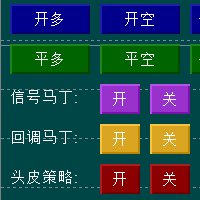
Hello everyone, I would like to introduce an AI intelligent trading control strategy that combines Martin's position adding and opportunistic position adding strategies. The parameters can be changed at any time on the trading interface according to market changes, and a single strategy can also be activated. When the market is shaking, Martin's strategy can be activated, and opportunistic strategies can be activated when there is a possibility of a one-sided market. This greatly helps traders t

Easy Lot Size Calculator – MT4 Risk and Position Size Utility Overview The Easy Lot Size Calculator is an on-chart tool designed for MetaTrader 4. It calculates position size based on a user-defined risk percentage and the stop-loss distance measured from a Fibonacci retracement object. The tool provides a structured way to view risk information directly on the chart and includes optional trade management features. The calculator reads the distance and direction of a Fibonacci retracement object

BreakEven Grid Utility for MT4
BreakEven Grid is a powerful utility for manual trade management on the MetaTrader 4 platform. It provides a convenient on-screen panel with buttons to help you manage your open positions with a single click.
Features:
Set BE+Profit: Automatically sets Take Profit to breakeven + desired profit in pips or money. Close BUY/SELL: Instantly close all Buy or Sell orders for the current symbol. Close +$/-$/Old/New: Close only profitable, losing, oldest or newest tra

Raw Tick Recorder EA for MetaTrader 4 For full setup instructions and demo version that works on chart (not just Strategy Tester), visit: Full User Guide – Raw Tick Recorde r Public channel: CLICK HERE
Raw Tick Recorder EA is a non-trading Expert Advisor that records every incoming market tick with high-precision timestamps. It saves bid/ask data to disk in multiple formats for further analysis, model training, or broker verification. Ideal for traders, analysts, quants, and developers w

Custom Alerts AIO:マルチマーケット監視を一括で実現 — 設定不要ですぐに使えるインテリジェントツール 概要
Custom Alerts AIO は、追加のインジケーター設定が不要で、インストール後すぐに利用できる高機能マーケットスキャナーです。FX Power、FX Volume、FX Dynamic、FX Levels、IX Power を内部にすべて統合し、主要なすべての資産クラス(為替、金属、指数、暗号資産)を一括監視できます。MetaTrader の仕様により、株式は個別のシンボルとして追加可能ですが、一般的には利用頻度は低めです。 1. なぜ Custom Alerts AIO を選ぶべきか 追加ライセンス不要
• 必要なすべての Stein Investments インジケーターが内蔵されており、すぐに使用可能です。
• チャートに表示されるグラフィックは省略されており、アラート生成に特化した構成です。 市場を広範囲にカバー
• 為替、金属、暗号資産、株価指数に対応(株式は手動追加可能)。
• シンボル名を入力する必要はなく、プロパティで資産クラス

Automate Risk Management with Smart Trailing Stop Manager for MetaTrader 4 Looking for MetaTrader 5 version? I t is available separately in the Market: Smart Trailing Stop Manager MT5 Full User Guide – Public channel: CLICK HERE Struggling with manually adjusting stops and securing profits?
Smart Trailing Stop Manager MT4 is an intelligent utility for MetaTrader 4 that automates trailing stops, break-even management, partial closes, and auto SL. Optimized specifically for MT4 users, it e

️ XTRIM CycleGuard Trading Bot – Your Silent Risk Manager ️
XTRIM CycleGuard is your ultimate trading companion , built to complement and protect your primary strategy. It specializes in detecting trade cycles, minimizing exposure, and safeguarding equity through intelligent hedging and cycle-based entries . Whether you're running aggressive bots or complex grids, CycleGuard acts like a seatbelt— quiet, efficient, and life-saving when it matters most . Designed for support,

Break Even Helper for MT4 – Simple SL to Entry Utility Break Even Helper for MetaTrader 4 is a compact and effective tool that helps traders protect their open trades by automatically moving the Stop Loss (SL) to the entry price when a trade reaches a user-defined profit level (in points). Designed for risk-conscious traders, this utility simplifies SL management without relying on complex trailing systems or custom strategies. Looking for MetaTrader 5 version? I t is available separately in the

Si eres un proveedor de señales o simplemente te interesa enviar notificaciones de tus trades a Telegram, entonces este es el EA perfecto para tí. Ha sido probado con MT4 4.00 build 1441 Características principales: Envía alertas automáticas a Telegram cada vez que se abre, cierra o modifica una operación (SL/TP), en tiempo real. Monitorea todas las operaciones de la cuenta , sin importar en qué gráfico esté montado el EA. ️ Captura y envía un screenshot del gráfico correspondiente al sí
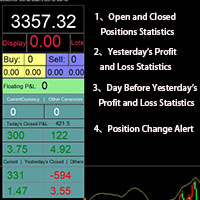
Smart Trading Monitor - Real-Time Position Tracking, P/L Analysis & Alert System Real-Time Monitoring: Automatically tracks open/closed positions, clearly displays yesterday's/previous day's P/L - no more manual calculations!
Smart Alerts (Premium only): Instant push notifications + sound alerts for position changes - never miss a trading opportunity!
Simple & Intuitive: One-click installation with key data displayed directly on charts for faster decision making
High Compatibility: Su

Track Account and All EA’s metrics EA
This EA will record the following account metrics Balance, Equity, Margin, Free Margin, Margin Level, Drawdown And all of the following metrics for each of your trading eas Date and time , Net Profit, Floating Profit (Drawdown),number of open trades, total lots of open trades, magic number and cumulative profit This EA will record all of these metrics at the interval in minutes that you specify from 1 minute , 5 minutes, 15 minutes, 30 minutes, hourly, da

Virtual SL TP Trailing Pro for MT4 – Client-Side Stop Loss / Take Profit and Trade Management Looking for MetaTrader 5 version? I t is available separately in the Market: Virtual SL TP Trailing Pro MT5 Public channel: CLICK HERE
Virtual SL TP Trailing Pro for MT4 is a trade management utility that keeps Stop Loss (SL) and Take Profit (TP) levels on the client side instead of sending them to the trading server. It is designed to help you manage exits in a structured way using a clear on-cha

This expert advisor is particularly beneficial for traders using paid indicators that include built-in backtesting features. This expert advisor does automation and refreshes charts. With this feature, your indicator's built-in backtest function will do a backtest in the time that you put in 'input' settings. You will have a fresh backtest every time with this expert advisor. It's very necessary for indicators like it. You can set the time you want it to refresh the backtest or the time you want

Introduction Copytrade Online is a powerful EA tool that helps you automatically copy trades from a Master account to Slave accounts on MetaTrader 4/5 (MT4/MT5) platforms. The EA ensures fast, secure, and easy trade transmission, suitable for both individuals and trading groups. Copy online via the internet from an MT4/MT5 account on one computer to MT4/MT5 accounts on multiple other computers. Key Features Automatically copy trades from the Master account to multiple Slave accounts. Supports b

Double Top & Bottom Strategy (Manual Trading Plan) Description:
The Double Top & Bottom Strategy is a powerful trend-following manual trading system designed for precision entries during major market reversals. Built on classic price action principles, this strategy helps traders capitalize on high-probability setups with clearly defined rules. Key Features: Trend Confirmation: Uses Daily and 4H charts to identify dominant market direction. Entry Signal: Enter after rejection of the second

User Manual - TradePannelAdvanced v2.00 Table of Contents Introduction Installation and Setup Panel Description Customizable Inputs and Parameters Control Buttons and Functionality Order Management Trailing Stop and Break Even Functions SL/TP Visualization with Labels Profit Display Practical Examples FAQ Support Contacts 1. Introduction TradePannelAdvanced v2.00 is an Expert Advisor for MetaTrader 4 that offers an intuitive graphical panel for quick and easy management of trading orders, includ

Auto SLTP Risk Assistant は、MetaTrader 5 向けに設計された自動取引ツールで、トレーダーが1回の取引ごとの固定リスクに基づいて、ストップロス(SL)とテイクプロフィット(TP)を正確に設定できるよう支援します。 シンプルでインタラクティブなインターフェースにより、チャート上で SL ラインをドラッグするだけで、選択したリスクリワード比率に基づいてロットサイズと TP を自動的に計算し、BUY または SELL の注文を即座に実行します。 ️ 主な機能: 固定リスク(例:1回の取引につき $10)に基づいたロットサイズ自動計算 柔軟な SL ライン:戦略に合わせて自由にドラッグ可能 チャート上でリスクおよびリスクリワード比を直接入力可能 パネルからワンクリックで BUY、SELL、CLOSE ALL を実行 スキャルピングやスイングトレードに最適な、クリーンで反応の良いUI ロック機能(手動ヘッジ): LOCK ボタンでポジションを手動でロック セント口座および標準口座に対応 ️ 入力パラメータ: RiskPerTrade :1回

BreakevenBoostは、現在のシンボルにおけるすべてのオープン注文のテイクプロフィットレベルを、損益分岐価格に指定されたポイントオフセットを加えた値に自動的に設定します。新しい注文がオープンされるたびに、ユーティリティはすべてのポジションのテイクプロフィットレベルを、加重エントリー価格の合計に基づいて再計算し、更新します。 主な特徴 買い注文と売り注文をサポート 指定されたマジックナンバーで注文をフィルタリングします 注文数が変わるたびにTPを自動的に再計算して適用します 成功メッセージとエラーを端末ジャーナルに記録します コミュニティに参加する MQL5 と TG で結果、質問、フィードバックを共有してください。 MQL5チャンネル TGチャンネル @AlgoTrader_Sergey
入力パラメータ ProfitOffsetPoints — 損益分岐点からのポイントオフセット(デフォルト: 150) ConsiderBuyOrders — 計算に買い注文を含める(true/false、デフォルト:true) ConsiderSellOrders — 売り注文を計算

利益獲得戦略の防御策!
孫子の言葉にある通り:敗北を防ぐには防御戦術を、敵を打ち破るには攻勢を取ることを要する。
エキスパートアドバイザー(EA)の不具合による馬鹿げたドローダウンを止めたいですか? 勝敗を記録し、リスク管理を真剣に考えたいですか?次のプロップファーム口座やEAを購入する前に、ちょっと待ってください。まず、おめでとうございます!私はあなたのために「取引における予期せぬ損失に対する最初の防衛ライン」を開発しました。この強力なツールは、1日の利益目標または1日のドローダウンが設定した限界に達すると、自動的に口座をロックし、感情的な判断、変動の激しい市場、または不具合のあるEAから資本を保護します。このツールを取引の武器庫に加え、自信を持って取引しましょう!
MT5版: https://www.mql5.com/en/market/product/145639
主な機能:
自動取引停止: 1日の純資産損失または利益目標額に達すると、全ての取引活動を停止します。 リアルタイム監視: 取引時間中、常に資金残高とドローダウンを追跡。 日次リセット:ドロ

SAY GOODBYE TO FOREX CALCULATORS!
Risk management is everything. Order Scheduler is the ideal tool to signals channels followers or for those traders who had their own analisys and know exactly where to place their orders, stops and targets. Just type the Entry price, Stop Loss price and Target price, and this EA will schedule the order for you, calculating the Lot Size based on the Risk Percentual you choose for the order. If you decide to cancel the schedule, just set the MaxOrders input to z

Prop Trader's Guardian: The Ultimate Risk Manager
(Product for MetaTrader 4)
Protect your capital and secure your funded account with the Prop Trader's Guardian. This is not just another drawdown checker; it's an account-level circuit breaker designed specifically for the strict rules of proprietary trading firms. When your daily limit is hit, it doesn't just close trades—it locks down your entire terminal to prevent any further activity until the next trading day.
The Prop Firm Trader's Dil

Catégorie : Robot de gestion automatique des profits.
Marché : Tous symboles / Tous timeframes (testé en M1, M5, H1…)
Objectif : Fermer automatiquement tous les trades gagnants à chaque nouvelle bougie et afficher un bilan clair de la bougie précédente. Fonctionnement : À chaque nouvelle bougie détectée, le robot ferme les positions BUY ou SELL en profit si elles dépassent le seuil MinProfit . Il scanne ensuite les trades clôturés durant la bougie précédente . Le pann

Trade Assistance EA – Manual Trade Control Panel for MetaTrader 4 Trade Assistance EA is a lightweight and intuitive manual trading tool designed to give you full control over your trades directly from the chart. It helps traders execute, manage, and exit trades with just a click — no coding or complex setup required. ️ Key Features One-Click Buy/Sell Buttons
Instantly open market buy or sell orders with preset lot size, Stop Loss, and Take Profit. Smart SL & TP Input Boxes
Easily modify and

Utility TimeLs Close Positions は、MetaTrader 5 においてポジションの管理と自動決済を行うためのツールです。 時間、シンボル、方向、マジックナンバー、コメントに基づいて、オープンポジションをいつどのように決済するかを柔軟に制御できます。 特定の曜日に取引を無効にできます
すべてのポジションを決済する特定の時刻を設定できます
シンボル、方向(買い/売り)、マジックナンバー、コメントでフィルタリングが可能です
「取引1」「取引2」「取引3」の最大3つの単発決済イベントを日付と時刻で設定できます
現在の設定と今後の決済イベントを表示する情報パネルをチャート上に表示するか選べます
チャート上の文字サイズと色をカスタマイズできます

Expert Advisor: Breakout_Recovery_V2 Version: 2.3 Symbol: XAUUSD Timeframe: M15 (recommended) Strategy Type: Breakout + Smart Recovery (Bi-directional Martingale) Platform: MetaTrader 4 (MT4) Description: Breakout_Recovery_V2 is a smart trading system that detects real breakout opportunities and uses a controlled recovery mechanism (martingale) when the market moves against the initial entry. Features: *Real breakout entry logic using a custom supply/demand

Have You Ever Experienced This? You've done the perfect analysis. Your entry is flawless. Your position is showing a significant profit... and then, in an instant, the market reverses and all of your hard-earned gains vanish. The frustration of "giving back profits to the market" is one of the biggest challenges in trading. It's not about a flawed analysis; it's about a lack of optimal post-entry management. Introducing Pro Scaler Panel : a trading panel specifically designed to transform you fr
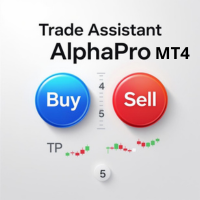
Transform your trading with the ultimate MT4 trade management solution. Trade Assistant AlphaPro EA is an essential tool that eliminates manual trading errors and maximizes your results through intelligent automation. Every trader needs this powerful assistant to achieve consistent, professional-level trade management. Supports: All asset classes ( Forex, Gold, Oil, Indices, Crypto, etc.). The EA can manage orders and positions opened from a mobile terminal (smartphone). - For automated position

Auto Symbol Switcher for MT4 – Watchlist Rotation for Market Watch Symbols Auto Symbol Switcher for MetaTrader 4 is a chart navigation utility that automatically rotates the active chart through a list of symbols. It is designed for discretionary traders, scalpers and analysts who want an organised way to scan markets without manually switching symbols in the Market Watch window. The tool is navigation-only: it does not open, modify or close any orders and it does not change your account in any

Meet GridRepeaTrain — Your Pending Orders Wingman! This EA’s here to back up your trading game with smart, repeatable pending orders.
It’s got two modes : --------------------------------------------------------------------- [1] Single Mode and [2] Double Mode . Think of it like this: · Single Mode = only LONG or only SHORT pending orders (pick one and repeat it). · Double Mode = LIMIT or STOP pending orders (working both sides of the range). [1] Single Mode – The One-Sided

MT4 Hotkeys – 注文およびポジション管理ツール
このツールは、MetaTrader 4 プラットフォーム上でキーボードショートカットを使用して注文およびポジションを管理できるように設計されています。注文執行、ポジションのクローズ、トレーリングストップの調整、リスク管理といった機能をカスタマイズ可能な設定を通じてサポートします。 主要コマンド
「B」:買い注文を発注。
「S」:売り注文を発注。
「C」:開いているすべてのポジションをクローズ。
「X」:特定のポジションをクローズ(最古または最新、設定に応じて)。
「T」:トレーリングストップを有効化し、買い注文の場合は前のバーの安値、売り注文の場合は前のバーの高値に追従。
「P」:開いているポジションの設定可能な割合をクローズ(デフォルト:50 %)。
「K」:すべてのオープンポジションのストップロスをブレークイーブン(建値)に移動。
注:コマンドは大文字で入力する必要があります。 リスク管理オプション
ユーザーは次のいずれかを選択できます:
固定ロットサイズによる取引。
前のバーおよびユーザー定義設定に基づき自動計算さ

Who Should Use This EA Manual Traders Perfect for traders who execute trades manually but need automated protection Protects against emotional trading decisions Enforces discipline when under pressure Prevents revenge trading after losses Provides emergency position closure via mobile Prop Firm Traders Essential protection for funded traders with strict rules Automatically enforces daily loss limits Prevents account violations that could result in funding loss Real-time risk monitoring to stay w
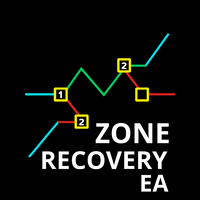
The Zone Recovery Hedge strategy works by creating a price zone between two levels (above and below the current entry price). Instead of closing a losing position at a stop loss, the system opens an opposite (hedging) position when price moves against the trade. This creates a "zone" in which future movements can help recover the loss. Initial Trade : A buy or sell order is placed. Zone Definition : A fixed distance (in pips) from the entry is set to trigger a hedge order in the opposite directi
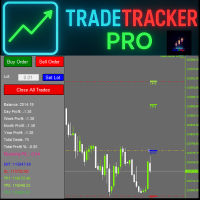
TradeTracker Pro – Smart Trade Tracking & Management Utility Take control of your trading with TradeTracker Pro – the ultimate utility for monitoring, analyzing, and managing your trades in real time . Whether you’re a scalper, day trader, or swing trader, this powerful tool helps you track performance, set smart take profits & stop losses, and visualize every deal directly on your chart . Key Features Real-Time Trade Tracking – Monitor all open and closed trades with full details on profits, lo

Watch your account Protect your capital with precision alerts for Balance, Equity, Margin, Margin level . Introducing: Balance, Equity, Margin, Margin level, Telegram Alerts and more expert advisor, A smart Expert Advisor for Meta Trader 4 that monitors your account in real time and sends instant alerts when critical thresholds are breached. What Makes This EA Different? Balance 1 Alerts: When your balance drops to 75% or 50% or any percent you want. Balance 2 Alerts: When your balance drops t

Drawdown Protector EA は、MetaTrader 4 用に設計された包括的なリスク管理およびアカウント保護システムです。この先進的なエキスパートアドバイザー(EA)は、複数の安全メカニズム、利益確定機能、および時間ベースのコントロールを通じて、取引アカウントの自動監視と保護を提供します。デイトレーダー、スウィングトレーダー、またはアルゴリズムトレーダーであっても、この EA は究極のセーフティネットおよび利益ガーディアンとして機能します。 コア保護機能 ドローダウン保護 最大日次ドローダウン %: 指定されたパーセンテージを超える日次損失が発生した場合、すべての取引を自動的にクローズ 最大総ドローダウン %: アカウントの最高エクイティピークからの全体的なドローダウンを保護 リアルタイム監視: アカウントのエクイティを継続的に追跡し、ドローダウンを計算 スマート計算: 日次ドローダウンは各取引日の開始時に自動的にリセット 利益保護 最大日次利益 %: 目標に到達した場合、すべての取引をクローズして日次利益を確保 最大総利益 %: 総利益目標に到達した場合、全体的な

本エキスパートアドバイザ(EA)は、以下の条件をすべて満たした注文が決済された場合に、自動的に同一内容の注文を再設定します。 対象となるのは指値注文または逆指値注文で、必ずテイクプロフィット(TP)とストップロス(SL)が設定されているものです。 そして、その注文がTPまたはSLによって決済された際、同じロット数・価格・TP・SL・有効期限などの条件を引き継いだ注文を自動で再発注します。 これにより、一度設定した戦略を継続的に適用でき、裁量判断なしに取引を繰り返すことが可能となります。 ただし、ブローカーによっては再注文時にスリッページが発生する場合がありますので、必ずご利用環境をご確認の上、自己責任でお使いください。

1 つのチャートで完全な制御を実現。 各チャートのオブジェクト、色、設定を個別に管理する時間を無駄にする必要はありません。 チャート同期マネージャーを 使用すると、 すべてのMetaTraderチャートを同期、コピー、制御します たった 1 つのパネルといくつかのショートカットを使用して、瞬時に実行できます。 一度描いたら、どこでも更新。チャートをワンクリックで開閉。ワークスペースを整理整頓。 シンボルベースのオブジェクト管理 。重要な詳細を見逃すことはありません。 スプレッド表示、カウントダウンタイマー、ローソク足クローズアラートなど。 時間を節約し、エラーを減らし、よりスマートに取引します。 Chart Sync Manager インストールと入力ガイド EA に関する通知を受け取りたい場合は、URL ( http://www.betasoft.dev ) MT4/MT5 ターミナル (スクリーンショットを参照) を追加します。 MT4バージョン https://www.mql5.com/en/market/product/1484

NEXT price Actions - Order Manager This EA have multiple Order Managements that can be used with FliPA Indicators have a look at Screenshots for more clear understanding of it use. It also includes the Auto BreakEven, Auto BreakEven Trailing, TakeProfit, and StopLoss. All this functionality is Customizable at the EA Setting Parameters. All or order managements can also be adjusted directly at the chart.

Bank Your Profits & Secure Your Trade in One Click The Ultimate "Scale Out" Tool for Professional Traders. Close Partial (MT4 Utility) is designed for traders who want to lock in profits without killing the trend. With a single click, you can bank a percentage of your profit instantly. New Feature (Auto-Secure): Stop wasting time dragging your Stop Loss after taking profit. This manager can now automatically move your Stop Loss to Break-Even the moment you click the "Close Partial" butt

スキャルピングの速度;体系的規律 ニルヴァーナで決断;計算と安全ブレーキは我々が。 驚かないでください;金融市場で最大の柔軟性を提供する最先端かつ知的な資本管理ツールです。 勝つトレードは「良い分析」だけではありません;「スムーズな実行」と「規律」が鍵です。ニルヴァーナは実行アシスタント:リアルタイムリスク/ボリューム計算、ワンクリックでR:R設定、リスクと利益のライブプレビュー、「日次リスクロック」は安全キーのようなもの。結果?繰り返しの計算から解放され、決断の質に集中できます。 ツールの心理学 メンタルノイズの低減:リスク%に基づく自動ロット計算、クリック前の躊躇なし。 結果ではなくプロセスに焦点:エントリー前にR:Rを確認し、計画に従って修正、感情ではない。 悪い日の自動ブレーキ:日次リスクロックは損失限界に近づくと全てを閉じ、指定時間まで取引をブロック。 小さくても高コストなミス防止:800msの注文クリックデバウンスで意図しないダブルクリックを防止。 意思決定のスピードをどう上げるか? リスク%に基づくポジションサイズ:エントリーとSLから安全にロットを計算、リアルタイム

Position EA – User Manual 1. Overview The Position EA is a semi-automatic trade manager for MT4.
It helps you: · Calculate lot size based on risk and stop loss. · Place market, limit, or stop orders quickly. · Manage risk with auto break-even and trailing stop . · Take profits in tiers (TP1, TP2, TP3) with partial closes. · Manually close half or all with a button. 2. Panel Layout 2.1 Top Bar · Type [MARKET/LIMIT/STOP] o Switches order type. o MARKET → entry auto-syncs with

Ping: Ваш незаменимый инструмент для надёжной торговли Ваш интернет-провайдер и VPS обещают стабильное соединение, но действительно ли вы можете им доверять? В мире, где каждая миллисекунда имеет значение, медленное или нестабильное соединение может обернуться упущенной прибылью или убытками. Ping позволяет вам: * Принимать осознанные решения: Наглядно сравнивайте скорость разных VPS-серверов и брокеров, чтобы выбрать самое быстрое и надёжное соединение для вашей стратегии. * Исключить риски: О

Multi Indicator EA – Flexible Signal Confirmation Expert Advisor Multi Indicator EA is a fully automated Expert Advisor designed to trade based on signals from multiple external indicators.
It allows you to combine up to 8 custom indicators , each with its own settings (timeframe, buffer index, signal direction, and threshold).
Once a predefined number of indicators ( MinConfirm ) agree on the same direction, the EA automatically opens a Buy or Sell order. Key Features: Use up to 8 external

トレーディングスペシャル – 40%オフ
Advanced Trade Manager – より速く、よりスマートに、より安全に手動取引を行うための究極のオールインワンソリューション。
NextGen Trade Manager AIで手動取引を変革しましょう。これは、即時執行、視覚的な取引プランニング、そして強力なリスク管理を1つの直感的なツールに統合した、プロフェッショナルなオンチャートパネルです。チャートを離れることなく、注文執行、リスク管理、そして利益確保をかつてないほど迅速に行うことができます。取引の精度と効率性を高めたいすべてのトレーダーに最適です。 MT4ストラテジーテスターでリスクなしでテスト デモ版をダウンロードして、ペーパートレード機能をご利用ください。本番運用前に、安全なシミュレーション環境で執行の練習、リスク管理ルールのテスト、そして戦略の改良を行うのに最適な方法です。
完全なユーザーマニュアルとステップバイステップガイドについては、 https://www.mql5.com/en/blogs/post/764217 をご覧ください。
主なメリット:

Automate Your Trading with Intelligence and Control Introducing "OrderManagerV200" , a cutting-edge Expert Advisor (EA) for MetaTrader 4 designed to transform your trading approach. Say goodbye to stressful manual trading and rushed decisions. With OrderManagerV200, you can leverage a fully automated and intelligent order management system combined with unprecedented manual control. Whether you're a novice or an experienced trader, this tool provides the precision and reliability needed to navi

TSC_Pannello_Professionale.mq4 – Documentation Overview This Expert Advisor (EA) is designed for professional order management in MetaTrader 4.
It integrates a graphical panel that allows intuitive control of trading operations and includes automatic functions such as Trailing Stop, Break Even, and Profit Management. The EA is optimized for EUR-based money management (Stop Loss, Take Profit, BE, TS in €) and can be applied to any symbol. Main Features Graphical Control Panel : Buttons for manual
Introduction Loop Pending Trader EA is a professional-grade order management tool for MetaTrader 4 that automates the placement of Buy Limit and Sell Limit orders in a structured “ladder” after every trade closure. It is designed for traders who want precise control over scaling into positions , whether on Forex, Gold, or Bitcoin . With flexible spacing models, risk guardrails, and cycle tracking, this EA gives you the power of advanced order laddering with the safety of exposure management.

Guardian Angel is designed to provide the trader with portfolio-level trailing stop-losses. Users are able to configure the portfolio profit 'trigger' level at which a LockProfit 'floor' gets activated and applied to the portfolio - in the event that portfolio profit falls back to the portfolio LockProfit level, then all open trades in the portfolio will close. In the event that portfolio profit continues to grow, then the portfolio LockProfit will trail the portfolio profit at a rate configur
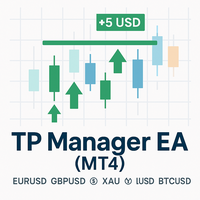
TP Manager EA (MT4)
A simple, no-nonsense trade assistant that sets Take Profit by money (USD), not by pips. Tell the EA how many dollars you want to bank per symbol and per direction (Buy/Sell). It reads your current open positions, computes the weighted average price, and moves TP so that when price hits, your net position closes for approximately that USD target. No strategy curve-fitting, no grid, no martingale—just clean TP management.
---
What it does
USD Target TP per Symbol & Direc
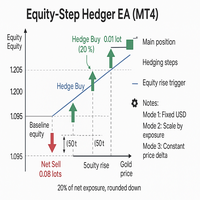
Equity Step Hedger
Equity Step Hedger is a professional Expert Advisor for MetaTrader 4, designed for traders who want intelligent hedging and equity-based step management instead of static grids or martingales.
This EA automatically monitors your account equity or symbol-based profit/loss and places hedge trades in the opposite direction once your profit has advanced by a configurable step. Each hedge can be managed with a USD profit target ladder, ensuring controlled exits and reduced risk

Telegram Ultimate Manager MT4 Use Cases: Manager Order (open, close, modify order) Publish open and close order to Telegram Channel Open trade based on Forex Factory News
Requirement: Telegram Chat ID Telegram Bot API Token Telegram Channel ID
Please read the guide This tools can not be backtested Free n8n workflow template to : 1. Import Forex Factory news to Google Calendar 2. Send chat to Telegram bot about news release. Is it good or bad for the currency Inputs: Telegram Bot Token : your T
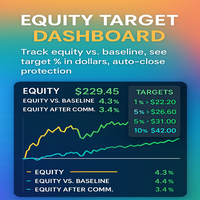
Equity Target Dashboard Your all-in-one equity manager, profit protector, and trading informer. Why Traders Love This Tool Hands-free profit protection → Automatically closes all open trades when your profit target (after commission) is hit. Precision targets → Works with exact % vs Baseline (1%, 3%, 5%, 10% … or custom values). Protects against drawdown → Commission is ignored when below baseline, applied only when equity > baseline. Crystal-clear dashboard → See Equity, Ba
SMARTTARGETLINES – PRECISION TARGET VISUALIZER FOR MT4 The ultimate tool for traders who want to see exactly where price must go to hit their profit or equity targets — for BUY , SELL , and NET positions. KEY BENEFITS ️ Draws dynamic BUY , SELL , and NET TARGET LINES
️ Shows real-time price targets based on your equity or profit goals
️ Displays distance-to-target in points , dollars , or both
️ Includes a glowing corner label that changes color as you approach your goal
️ Clean des

Auto Close Manager EA – Equity & Account Protection Utility Overview Auto Close Manager EA is a risk management utility for MetaTrader 4 designed to automatically close all open positions when a predefined floating profit or floating loss level is reached. This Expert Advisor does NOT open trades.
It only monitors account equity and manages existing positions. The EA works with manual trades and can optionally include trades opened by other Expert Advisors.
How It Works The EA continuously moni

TradePilot Expert Advisor (EA) for MetaTrader 4 TradePilot is a professional and user-friendly Expert Advisor (EA) for MetaTrader 4 (MT4) . It simplifies automated trading , risk management , and trade execution using a smart trading panel . Perfect for beginners and experienced traders looking for a reliable trade manager EA with automated lot size calculation . Key Advantages User-Friendly Trading Panel: Customizable panel with buttons and hotkeys. Smart Risk Management: Supports percen
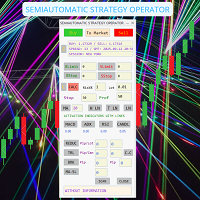
SEMIAUTOMATIC STRATEGY OPERATOR – El copiloto inteligente para tu trading ¿Quieres operar con más precisión, menos errores y mayor control?
SEMIAUTOMATIC STRATEGY OPERATOR es un asistente profesional que combina automatización y control manual, ayudándote a ejecutar tus estrategias semiautomáticas con la máxima eficiencia utilizando Pullback & Breakout a líneas horizontales o tendenciales insertadas en el gráfico, además puede utilizar Pullback a una Media móvil definida por el usuario. Solici

Telegram Alert With Emoji Description and User Manual
EA Description Purpose:The Telegram Alert With Emoji sends real-time trading notifications to a Telegram chat or group for all trading activities in MT4, including new Positions (BUY/SELL), Pending Orders (BUY LIMIT, SELL LIMIT, BUY STOP, SELL STOP), Stop Loss/Take Profit (SL/TP) triggers, and closed Positions with profit/loss details. It includes a Rainbow Display on the chart and uses Global Variables to prevent duplicate notifications. [

Советник представляет собой многофункциональную торговую систему BBMA Oma Ally с интеграцией Telegram для удаленного управления и получения уведомлений. Основная специализация - анализ паттернов ценового действия и автоматическое оповещение о торговых возможностях. Основные функции
1. Система оповещений через Telegram
Управление командами: Отслеживание и выполнение команд из Telegram Уведомления: Мгновенные оповещения о торговых сигналах Удаленное управление: Возможность управления советнико

BasketCloser — Intelligent basket close by profit or loss
Take control of outcomes: set a money target to close all positions when the basket reaches that profit, and a global loss cap to stop bad streaks early. Works per symbol or across the whole account, with an option to include pending orders. A clean on-chart panel shows orders, total lots, and aggregated P/L in real time. Does not open trades. It only manages exits: fast and consistent.
Why choose it Consistent results: clo

Short Description:
Prop Firm Protector EZ MT4 is an EA designed to protect your funded account by managing risk and ensuring compliance with the Prop Firm's trading rules. This EA automatically monitors equity levels, closes trades when profit targets or drawdown limits are reached, and provides a visual display of key account metrics. The EA features a Super Easy setup, is simple to use, and works with all different Prop Firm service providers.
Overview:
Prop Firm Protector EZ MT4 is an Draw

Risk Panel VIP (MT4) Risk Panel VIP is a professional Tool for MetaTrader 4 designed for fast, disciplined execution. It calculates position size from your balance risk and places Stop Loss / Take Profit accordingly. This is a trade management utility; it does not provide trading signals and does not guarantee any profit. Main functions Draggable Stop Line : place the stop on chart; the panel auto-calculates lot size from your configured risk % of balance (default 2%, editable). Context-aware a

SmartTrader Pro — Advanced Order Management Panel
Type: Order Management Platform: MetaTrader 4 Version: 1.0 Created by: HANI MABAD * 2025
---
Overview
SmartTrader Pro is a professional multi-order launcher and manager designed for traders who want precise USD-based control over profits and losses. It enables you to open, manage, and close trades with a single click — across market and pending orders — while keeping full visibility through an integrated smart panel.
Whether you tra

Telegram Trading Panel – MT4 utility for order control via Telegram Purpose
Utility for MetaTrader 4 to open/close orders, set SL/TP, create pending orders, and view position info directly from Telegram using inline keyboards. Designed for mobile/VPS use without direct terminal access. Key features Telegram panel with inline keyboards: Open BUY/SELL market orders Close single order or “Close all” Pending orders: Buy/Sell Limit and Buy/Sell Stop with price and expiry Assisted Break Even: set SL a

SFG Telegram Trade Notifier for MT4 is a professional notification system that sends instant messages to your Telegram group or channel every time a trade is opened or closed on your MT4 account. MAIN FEATURES Sends notifications for every trade open and close
Compatible with Telegram Groups, Channels, and Topics (threads)
️ Customizable scan frequency and filters
Persistent memory (no duplicate messages after restart)
Ignores trade history — sends only new events
️ 100% safe: no

Becktester Telegram Signals — Turn Telegram Signals into Real Backtests Automatically read signals from real Telegram channels , parse them (Buy/Sell/Entry/SL/TP), and backtest in MetaTrader 4 Strategy Tester . Verify parsing first with Live Parsing Test Mode . Important Information After purchasing the product, please leave a comment on the product page, and I will send you the Telegram Signal History Parser file. This file is not publicly available at the moment and is provided only to verifi

RiskMaster Pro X – Your Professional Trading Assistant “ RiskMaster Pro X – Think. Analyze. Click. We handle the rest. ” Simple. Clear. Efficient.
RiskMaster Pro X is not an overloaded robot, but a smart trading assistant – built for traders who value precision, structure, and control. It brings discipline into your manual trading – no more guessing lot sizes or calculating risk.
With just a few clicks, the EA automatically calculates your exact lot size, Stop Loss, and Take Profit – fast, re

[Regarding Investment Issues]
Question 1:
When market opportunities arise, most investors tend to place orders frantically. However, when placing orders in such a frantic manner, you have no way of knowing whether you will be liquidated. The only reference is the margin ratio, but the margin ratio cannot accurately determine whether you will be liquidated.
If the order quantity is large or the product order quantity is even larger, you cannot calculate the loss and profit. If there is a t
MetaTraderマーケットは自動売買ロボットとテクニカル指標を販売するための最もいい場所です。
魅力的なデザインと説明を備えたMetaTraderプラットフォーム用アプリを開発するだけでいいのです。マーケットでプロダクトをパブリッシュして何百万ものMetaTraderユーザーに提供する方法をご覧ください。

取引の機会を逃しています。
- 無料取引アプリ
- 8千を超えるシグナルをコピー
- 金融ニュースで金融マーケットを探索