 MetaTrader 5
 エキスパート
 インディケータ
 スクリプト
 ライブラリ
 ストレージ
無料でロボットをダウンロードする方法を見る
Twitter上で私たちを見つけてください。
私たちのファンページに参加してください
私たちのファンページに参加してください
スクリプトを気に入りましたか?MetaTrader 5ターミナルの中でそれを試してみてください。

SuperTrend Port - Pine Script v6 to MQL5 line by line (PineCompat) - MetaTrader 5のためのインディケータ

- ビュー:
- 31
- パブリッシュ済み:
-
 取引の機会を逃しています。
- 無料取引アプリ
- 8千を超えるシグナルをコピー
- 金融ニュースで金融マーケットを探索
-
 このコードに基づいたロボットまたはインジケーターが必要なら、フリーランスでご注文ください
フリーランスに移動


OVERVIEW
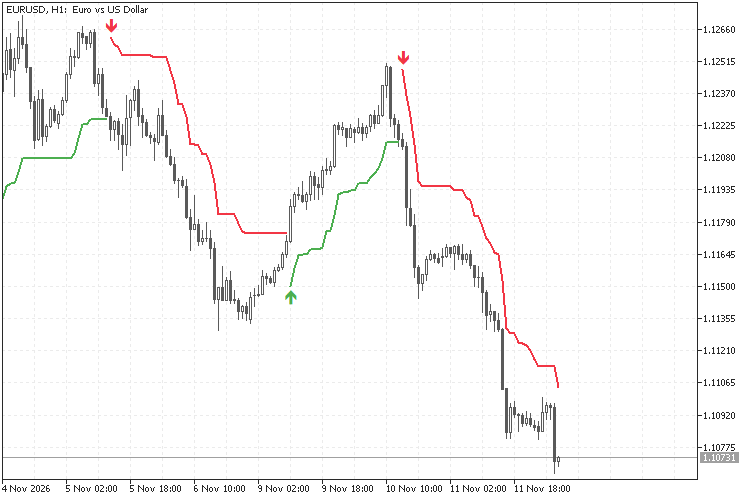
SuperTrendPort is a worked example of porting a TradingView Pine Script v6 indicator to MetaTrader 5. The Pine script is a short SuperTrend indicator based on the built-in ta.supertrend(factor, atrPeriod). The MQL5 version writes out the body of ta.supertrend step by step, and every block carries a comment with the Pine line it comes from:
// Pine: lowerBand := lowerBand > prevLowerBand or close[1] < prevLowerBand ? lowerBand : prevLowerBand
so the two versions can be read side by side. The Pine source is printed at the end of this page.
The Pine-style helpers (ta.atr, na, nz, x[1]) come from PineCompat.mqh, a free include library published separately on MQL5 CodeBase ("PineCompat - TradingView Pine Script ta.* functions for MQL5"). PineCompat has no supertrend function, which is why the algorithm is written out here.
FILES AND INSTALLATION
- SuperTrendPort.mq5 - the indicator. Put it in MQL5\Indicators\.
- PineCompat.mqh - the include library (same file as in the PineCompat publication). Put it in MQL5\Include\. If you already have it there, you do not need a second copy.
Compile SuperTrendPort.mq5 in MetaEditor. Without PineCompat.mqh in MQL5\Include\ the compiler reports that the include file cannot be opened.
WHAT IT SHOWS
- An up-trend line (green) below price while the direction is up, and a down-trend line (red) above price while the direction is down. The line breaks for one bar at each change, as in Pine (plot.style_linebr).
- A small arrow on the bar where the direction changes (optional).
- Optional alerts when the direction has changed on a closed bar.
The indicator only draws. It does not open, modify or close trades.
INPUTS
SuperTrend
- Factor: 3.0 (0.01 to 100) - Pine: input.float(3.0, "Factor")
- ATR Period: 10 (1 to 5000) - Pine: input.int(10, "ATR Period")
Style
- Up trend color, Down trend color (Pine color.green #4CAF50 and color.red #F23645)
- Show trend-change arrows: true
Alerts (closed bars only, once per bar)
- Alert on direction change: false (off by default)
- Pop-up alert: true
- Push notification: false (push must be set up in the terminal)
Values outside the ranges stop the indicator from loading ("incorrect parameters").
BUFFERS (for iCustom)
0 - SuperTrend value (the raw ta.supertrend result)
1 - Direction, with the Pine sign: -1 = up trend, +1 = down trend
2 - Up Trend line (EMPTY_VALUE while the direction is down)
3 - Down Trend line (EMPTY_VALUE while the direction is up)
4 - Turn Up arrow price (EMPTY_VALUE = no change on this bar)
5 - Turn Down arrow price (EMPTY_VALUE = no change on this bar)
The arrow buffers are filled even when the arrows are hidden.
Input order for iCustom (input groups count as parameters): "", Factor, ATR Period, "", Up color, Down color, Show arrows, "", Alert on, Pop-up, Push.
HOW THE PORT FOLLOWS PINE
- Bar order: all arrays are series arrays (index 0 = newest bar). Pine x[1] on bar i is x[i+1]. The loop runs from the oldest bar to bar 0, so the recursive values are built in the same order as in Pine.
- ATR: ta.atr is Wilder's RMA of the true range, seeded with the SMA of the first atrPeriod true ranges. MT5 iATR is a simple moving average of the true range and gives different values, so the port uses Pine::AtrOnArray from PineCompat.
- na: PINE_NA (= EMPTY_VALUE). Every comparison that can involve na is guarded so it is false, as in Pine. nz(band[1]) seeds the bands with 0, and the direction is +1 while atr[1] is na, as in Pine.
- Previous bands: lowerBand[1] and upperBand[1] are the final (already adjusted) bands of the previous bar, so they are kept in calculation buffers.
- Tie rule: strict < and >. A close exactly on the band does not change the direction.
- The very first bar returns 0 (from the nz seed). Like the Pine script (barstate.isfirst ? na : st), the port does not draw it.
- Line-by-line mapping: the comments in SuperTrendPort.mq5 quote the Pine line above each block.
CHECKED AGAINST TRADINGVIEW
- With the same OHLC data as TradingView, the SuperTrend value and direction matched on every bar for three Factor / ATR Period settings (differences 1e-15 or less in our tests).
- The bars where the direction changes matched TradingView's built-in Supertrend indicator.
- On the same symbol but with price data from a different data source, about 8 in 10 direction changes fell on the same bar, and about 9 in 10 within one bar. This comes from differences in the price data (bar prices and the first bar of the history), not from the formula.
- Because the ATR is recursive, the values also depend on where the loaded history starts. When both charts use the same prices, they converge after the ATR warm-up (a few hundred bars).
REPAINTING AND ALERTS
- Closed bars never change. The forming bar (index 0) is recalculated on every tick, exactly as in Pine, so its line, direction and arrow can change or disappear until the bar closes.
- If you read the buffers from an EA or script and need values that do not change, use index 1 or higher.
- Alerts look only at the last closed bar, once per bar. This is the same as a TradingView alert created with "Once Per Bar Close".
- No alert is sent on the first calculation, on a full recalculation, or for bars that had already closed when the indicator was loaded. No alerts in the Strategy Tester.
- No request.security, no lookahead, no future data.
NOTES
- Like any trailing line based on the ATR, SuperTrend changes direction only after price has moved by some multiple of the ATR. In sideways markets the direction can change often. The arrows mark a change of the calculated direction only.
- Direction sign: -1 means up and +1 means down, the same as Pine. Keep this in mind when you read buffer 1.
- No DLLs, no files, no web requests.
PINE SCRIPT V6 SOURCE (reference)
//@version=6
indicator("SuperTrend v6 (port reference)", shorttitle = "SuperTrend v6", overlay = true)
factor = input.float(3.0, "Factor", minval = 0.01, step = 0.01)
atrPeriod = input.int(10, "ATR Period", minval = 1)
upColor = input.color(color.green, "Up trend color")
downColor = input.color(color.red, "Down trend color")
showArrows = input.bool(true, "Show trend-change arrows")
[st, dir] = ta.supertrend(factor, atrPeriod)
stPlot = barstate.isfirst ? na : st
turnUp = dir < 0 and dir[1] > 0
turnDown = dir > 0 and dir[1] < 0
plot(dir < 0 ? stPlot : na, "Up Trend", color = upColor, linewidth = 2, style = plot.style_linebr)
plot(dir > 0 ? stPlot : na, "Down Trend", color = downColor, linewidth = 2, style = plot.style_linebr)
plotshape(showArrows and turnUp ? stPlot : na, "Turn Up", shape.triangleup, location.absolute, upColor, size = size.small)
plotshape(showArrows and turnDown ? stPlot : na, "Turn Down", shape.triangledown, location.absolute, downColor, size = size.small)
alertcondition(turnUp, "SuperTrend turned up", "SuperTrend turned UP on {{ticker}} {{interval}}")
alertcondition(turnDown, "SuperTrend turned down", "SuperTrend turned DOWN on {{ticker}} {{interval}}")
alertcondition(turnUp or turnDown, "SuperTrend direction change", "SuperTrend direction changed on {{ticker}} {{interval}}")
DISCLAIMER
SuperTrendPort is a free programming example that shows how a Pine Script indicator can be ported to MQL5. It shows the calculated trend direction for chart analysis only. It gives no investment advice or trading signals and does not suggest any future price movement or result. Trading involves risk; use it at your own responsibility.
TradingView and Pine Script are trademarks of TradingView, Inc. MetaTrader is a trademark of MetaQuotes Ltd. This project is not affiliated with or endorsed by TradingView, Inc.
 London Breakout EA:シンプルで透明性が高い/London Breakout EA:シンプルで透明性が高い
無料ブレイクアウトEA:アジアレンジ、ロンドンブレイクアウト、1日1トレード、常にストップロスを設定、ロットはリスク率に基づいて決定。 グリッド戦略なし、マーチンゲール戦略なし。 / 無料EA:ロンドンセッションにおけるアジアレンジのブレイクアウト、1日1トレード、常にストップロス設定、ロットはリスク率に基づいて決定。グリッド戦略およびマーチンゲール戦略は採用していません。
Gold MT5 Fractal Breakout EA
過去のスイング高値・安値のブレイクアウトを基にしたMetaTrader 5(MT5)用エキスパートアドバイザー(EA)です。このEAは、確認されたフラクタル構造の周辺に指値注文を出し、あらかじめ定義されたストップロス、テイクプロフィット、およびオプションのポジション管理ルールに基づいて各取引を管理します。
ATRモニター — 日次、週次、月次のレンジ
日次、週次、月次のATR、現在の高値・安値の範囲、ATRに対するその範囲の割合、および各期間の始値からの価格変動を表示します。
Monday Dip EA- Index Mean Reversion D1
「Monday Dip EA」は、主に完全な日次履歴を持つ主要株価指数CFD(US500、UK100など)向けに設計された、時間軸に基づく定量的なロングオンリー取引戦略です。これは、トレンドフォロー型の指標ではなく、純粋に時間制限付きの「押し目買い」システムとして機能します。