 MetaTrader 5
 エキスパート
 インディケータ
 スクリプト
 ライブラリ
 ストレージ
無料でロボットをダウンロードする方法を見る
Telegram上で私たちを見つけてください。
私たちのファンページに参加してください
私たちのファンページに参加してください
スクリプトを気に入りましたか?MetaTrader 5ターミナルの中でそれを試してみてください。

Session Range Boxes - Asia, London, New York with breakout alerts - MetaTrader 5のためのインディケータ

- ビュー:
- 15
- パブリッシュ済み:
-
 取引の機会を逃しています。
- 無料取引アプリ
- 8千を超えるシグナルをコピー
- 金融ニュースで金融マーケットを探索
-
 このコードに基づいたロボットまたはインジケーターが必要なら、フリーランスでご注文ください
フリーランスに移動


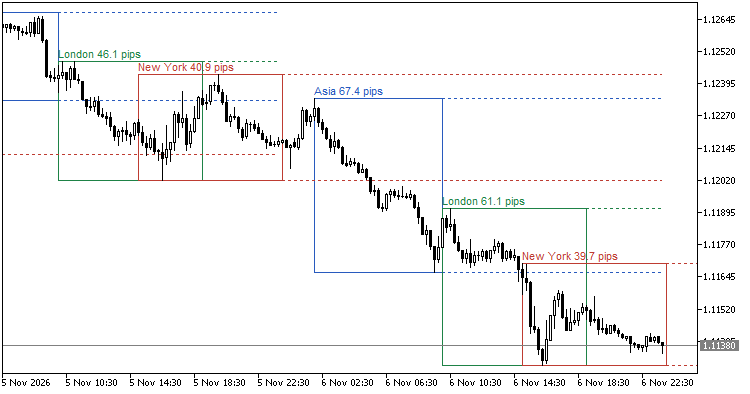 Overview
Session Range Boxes marks the high and low of up to three trading sessions on the chart. Each session is drawn as a box that grows while the session is running. After the session ends, its high and low can be extended as lines until a time you choose, and a label shows the session name and the range size. Optional alerts tell you once when price moves beyond the range of the latest finished session.
The indicator is a display tool. It does not open, modify or close trades.
Features
- Up to three sessions, each with its own name, start/end time, color and box fill. Defaults: Asia 02:00-10:00, London 10:00-19:00, New York 15:00-00:00.
- Session times can be entered in broker server time (default) or in GMT with a manual server GMT offset.
- Sessions that cross midnight are supported (for example 22:00-06:00).
- The box of a running session extends with every new bar until the session ends.
- High/low lines of finished sessions can be extended until a set time (HH:MM, or 24:00).
- Label with the session name and range size in Auto, Pips, Points or Price difference.
- Breakout alerts: popup, sound and/or push notification, once per session and direction. All alert types are off by default.
- Number of days to show (1-100). Weekends and holidays without bars are skipped.
- Hidden on H4 and higher by default (adjustable).
- All objects use a name prefix, so several copies can run on one chart.
- Objects that are deleted by hand are redrawn on the next bar. All objects are removed when the indicator is removed.
- No DLLs, no files, no web requests.
Inputs
Time settings
- Session times are entered in: Broker server time / GMT (uses server GMT offset). Default: Broker server time.
- Server GMT offset, hours (GMT mode only): -12 to 14. Default: 2.
- Number of days to show: 1 to 100. Default: 5.
- Hide on this timeframe and higher: default H4.
Session 1 / Session 2 / Session 3
- Enable: default true for all three.
- Name: Asia / London / New York. An empty name becomes "Session 1", "Session 2" or "Session 3".
- Start time (HH:MM): 02:00 / 10:00 / 15:00.
- End time (HH:MM): 10:00 / 19:00 / 00:00. 24:00 is also accepted. Start and end must be different.
- Color.
- Fill box: default true.
Box and lines
- Box border style: default solid.
- Box border width (1-5): default 1.
- Extend high/low lines after the session: default true.
- Extend lines until (HH:MM or 24:00, same time base): default 23:59.
- Line style: default dot.
- Line width (1-5): default 1.
Labels
- Show labels (name and range size): default true.
- Range size unit: Auto / Pips / Points / Price difference. Default: Auto.
- Label font size (6-30): default 8.
Breakout alerts
- Breakout is detected by: Close of a completed bar / Current price (intrabar). Default: Close of a completed bar.
- Popup alert: default false.
- Sound alert: default false.
- Sound file: default alert.wav.
- Push notification: default false (requires push notifications to be set up in the terminal).
Objects
- Object name prefix: default SRB_. Must not be empty.
Invalid values (for example a time that is not HH:MM) stop the indicator from loading, and the terminal reports "incorrect parameters".
Important notes
Time base
- By default, session times are read as broker server time. The default values assume a server at GMT+2 (GMT+3 during US summer time), which aligns the day change with the New York close. If your broker uses a different server time, adjust the session times.
- Europe and the US switch to and from summer time on different dates. During those few weeks (twice a year), sessions defined in server time can be one hour off from the local market hours.
- GMT mode uses one fixed offset for all dates. Past days with a different summer-time state will be shifted by one hour. Update the offset (or the times) when the season changes.
How bars are assigned
- A bar belongs to a session when its open time is within [start, end). The end time itself is not included.
- If a session time is not a multiple of the chart timeframe, the box can be off by up to one bar. M1 to M15 charts are recommended.
- A session that crosses midnight belongs to the day it starts. An end time of 00:00 (or 24:00) means the end of the start day.
- The box of a running session changes until the session ends. A session is treated as finished when the first bar at or after its end time appears.
Breakout alerts
- Alerts are checked only for the latest finished instance of each session, from its end until the next instance of the same session starts. Each direction (above the high / below the low) alerts at most once.
- Breakouts that already happened in history are not alerted when the indicator is loaded or recalculated.
- For a Friday New York session, the alert window starts with the first bar on Monday.
- "Current price" mode uses the chart price (Bid). It can alert on a bar that later closes back inside the range. "Close of a completed bar" alerts once the bar has closed.
- Alerts are not sent in the Strategy Tester.
- An alert means only that price moved beyond a past session's high or low. It is not a recommendation to buy or sell.
Range size unit
- Auto shows pips when the symbol uses the Forex calculation mode, and price difference otherwise.
- Some brokers set metals (for example gold) to the Forex calculation mode. In that case Auto shows a large "pips" number. Choose Points or Price difference by hand for such symbols.
Several copies on one chart
- Use a different object prefix for each copy. Copies with the same prefix delete each other's objects.
Disclaimer
This indicator is a free display tool provided for charting and programming purposes. It does not give investment advice or trading signals, and nothing in it suggests future price movement or results. Trading involves risk; use it at your own responsibility.
 PineCompat - TradingView Pine Script ta functions for MQL5
An include library that brings Pine Script ta functions (crossover, valuewhen, barssince, highest, pivothigh, ema, rma, rsi, atr, request.security and more) to MQL5 with the same meaning, so Pine-to-MT5 ports can be written and checked line by line. Includes a demo indicator.
VelaMayor MTF - Higher Timeframe Candle Overlay
カスタマイズ可能な実体、独立した枠線、正確なヒゲを備え、高時間足のローソク足を低時間足のチャートに直接重ねて表示できます。 画面を切り替えることなく、マクロ的なトレンドの方向性、セッションの始値、流動性の範囲を簡単に把握できます。 ボックス境界が分離された超軽量エンジンと、堅牢なチャート変更時の自動復旧機能を搭載しています。
 EA Template - signal-agnostic MT5 Expert Advisor framework (risk sizing, SL and TP, trailing, filters)
A reusable Expert Advisor template for MT5. Write your own entry logic in one function (GetSignal returns +1, -1 or 0); the template handles lot sizing, SL/TP with stop-level checks, break-even, trailing stop, spread / time / weekday / news filters, order filling, retries and netting / hedging accounts. The included MA cross is an example signal only, not a trading strategy.
Accelerator Oscillator (AC)
アクセルレーション/デセレレーションインジケーター(AC)は現在の市場を動かす力の加速と減速を測ります。