SynapticTrendline
- Indicatori
-
Shi Yuan Wang
 Sviluppo indicatori personalizzati, Expert Advisor (EA), script e strumenti di trading per MetaTrader 4 e MetaTrader 5, nonché indicatori per TradingView (Pine Script).
Cosa posso fare per te: - Versione: 1.49
SynapticTrendline — Automatic Trendlines with Touch and Break Statistics
Overview
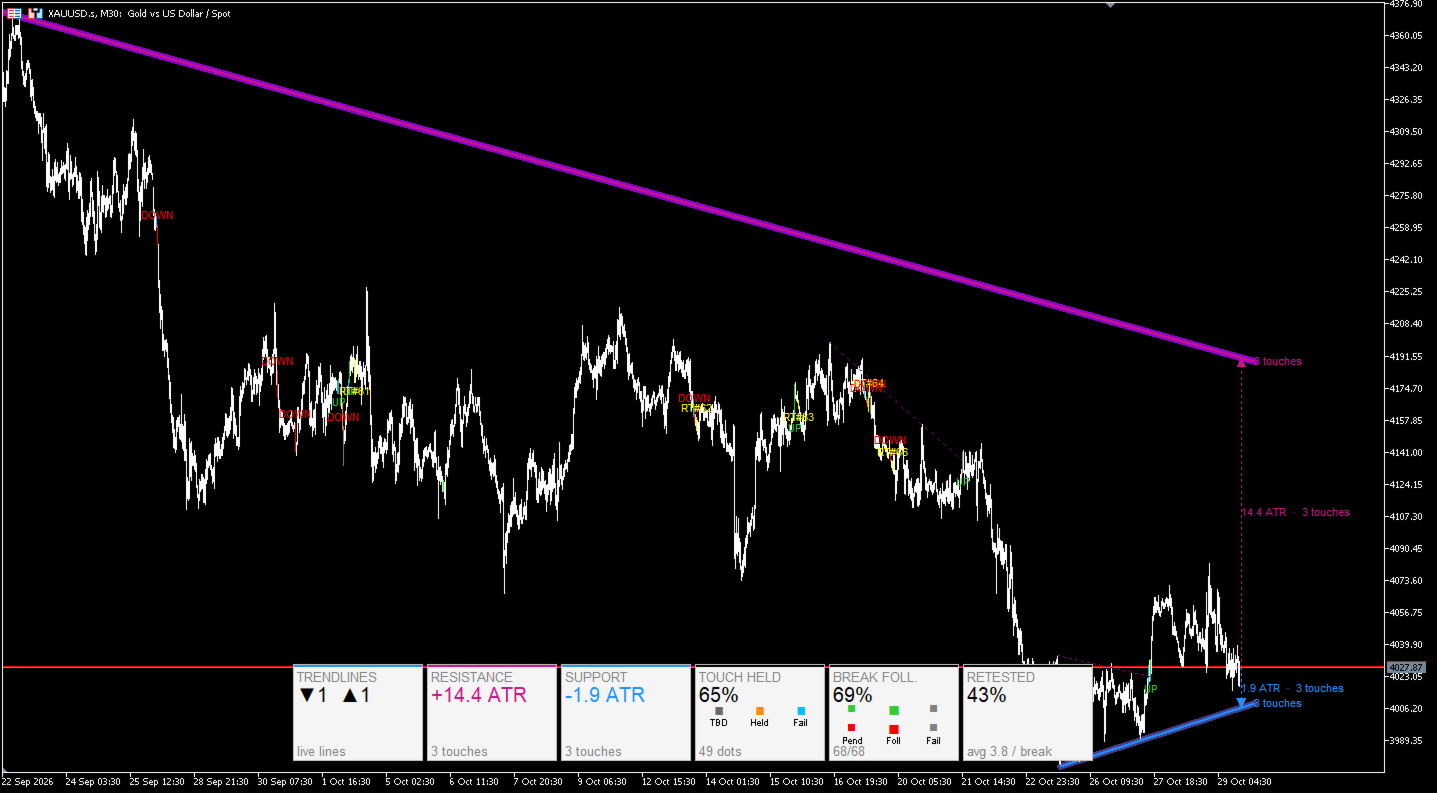
SynapticTrendline is a chart-window indicator for MetaTrader 5. It automatically detects and draws support and resistance trendlines, then tracks how price interacts with them: touches, held or failed touches, breakouts, follow-through or failure, and retests. Selected candles can be colored, and a compact panel summarizes the current statistics.
This indicator is designed as an analysis and education tool. It does not provide investment advice, trading signals, or any guarantee of trading results.
Main features
-
Automatic support and resistance trendline detection with configurable sensitivity.
-
Touch tracking with states for pending, held, failed, and timeout.
-
Breakout tracking for upward and downward breaks.
-
Follow-through and breakout-failure evaluation.
-
Retest detection with event labels.
-
Candle highlighting for touch states, breakouts, breakout failures, and retests.
-
Compact statistics panel for live lines, nearest support/resistance distance in ATR, touch-held rate, breakout follow-through rate, retest rate, and average touches per break.
-
Nearest-line markers showing ATR distance and touch count.
-
Optional alerts for new trendline, breakout, and touch events. All alerts are disabled by default.
-
English input names and chart output text.
-
No DLL calls, no WebRequest, no external links, no personal data collection, and no account-based restrictions.
How to use
-
Attach the indicator to a normal MetaTrader 5 chart.
-
Allow history and ATR data to load.
-
In the “Trendlines” group, adjust detection sensitivity, minimum touches, maximum active lines, and maximum line span.
-
In the “Measurement” group, set the ATR move threshold and evaluation window used for touch/breakout judgment.
-
In the “Drawing” group, choose whether to show event labels, touch labels, touch-state candle colors, and breakout-result candle colors.
-
In the “Panel” group, enable or disable the statistics panel, nearest-line markers, and legend.
-
Optional alerts can be enabled in the “Alerts” group. They are off by default.
-
Read the panel and candle colors to review trendline interactions.
Panel and legend
-
TRENDLINES: number of live support/resistance lines.
-
RESISTANCE / SUPPORT: nearest live line distance in ATR and its touch count.
-
TOUCH HELD: percentage of evaluated touches that held versus failed.
-
BREAK FOLL.: percentage of evaluated breakouts that followed through versus failed.
-
RETESTED: retest percentage and average touches per break.
-
TBD / Held / Fail: touch-state legend.
-
Pend / Foll / Fail: breakout-state legend.
Input parameters
| Group | Parameter | Default | Purpose |
|---|---|---|---|
| Trendlines | InpPivLen | 8 | Pivot sensitivity for trendline detection. |
| Trendlines | InpMaxPer | 3 | Maximum active lines per side. |
| Trendlines | InpLookPiv | 6 | Number of recent pivots considered during line search. |
| Trendlines | InpTolAtr | 0.25 | Touch tolerance in ATR. |
| Trendlines | InpBrkAtr | 0.10 | Breakout confirmation buffer in ATR. |
| Trendlines | InpMinLen | 10 | Minimum bars between anchor points. |
| Trendlines | InpMinTch | 3 | Minimum touches required to keep a line. |
| Trendlines | InpMaxBars | 6000 | Maximum history bars processed. |
| Trendlines | InpMaxLineSpan | 2000 | Maximum trendline span in bars. |
| Measurement | InpMoveAtr | 1.00 | Move-away threshold in ATR for touch/breakout evaluation. |
| Measurement | InpEvalBar | 20 | Evaluation window in bars. |
| Drawing | InpExtR | 15 | Right extension length in bars. |
| Drawing | InpKeepBrk | 2 | Number of broken lines kept on chart. |
| Drawing | InpMaxEventMarks | 500 | Maximum retained event labels; oldest deleted first. |
| Drawing | InpShowEv | true | Show breakout and retest labels. |
| Drawing | InpShowTch | true | Show touch-count labels on lines. |
| Drawing | InpShowTchMk | true | Color candles to mark touch state. |
| Drawing | InpShowBrkRes | true | Color candles to mark breakout result. |
| Marker Offsets | InpArrowOffPts | 50 | Legacy parameter retained for template compatibility. |
| Marker Offsets | InpLabelOffPts | 100 | Label offset in points. |
| Marker Offsets | InpDotOffPts | 50 | Legacy parameter retained for template compatibility. |
| Marker Offsets | InpRTLabelOffPts | 100 | Retest label offset in points. |
| Candle Colors | InpBearCandle / InpBullCandle | clrNONE | Bear/bull candle colors. Default NONE keeps normal chart focus; set colors if needed. |
| Candle Colors | InpBrkUpCandle / InpBrkDnCandle | LimeGreen / Red | Breakout candle colors. |
| Candle Colors | InpBrkFailCandle | Gray | Breakout-failure candle color. |
| Candle Colors | InpRetestCandle | Yellow | Retest candle color. |
| Candle Colors | InpTouchPend / InpTouchHeld / InpTouchFail / InpTouchTimeout | Various | Touch-state candle colors. |
| Panel | InpShowTbl | true | Show statistics panel. |
| Panel | InpShowNear | true | Show nearest support/resistance markers. |
| Panel | InpShowLegend | true | Show panel legends. |
| Alerts | InpAlBrk | false | Alert on breakout. |
| Alerts | InpAlNew | false | Alert on new trendline. |
| Alerts | InpAlTch | false | Alert on touch. |
| Trendline Colors | InpColSup / InpColRes | DodgerBlue / MediumVioletRed | Support/resistance line colors. |
| Trendline Colors | InpColPanel / InpColText / InpColBorder | Various | Panel background, text, and border colors. |
Notes and limitations
-
This product is an analysis and education tool. It does not provide investment advice and does not guarantee profit.
-
Results depend on symbol, timeframe, history, volatility, and user settings. Past market interactions do not guarantee future behavior.
-
ATR data is used for tolerance, breakout confirmation, distance display, and event evaluation. Please allow the chart to load sufficient history.
-
Alerts are optional and disabled by default.
-
All input parameter names and chart output messages are in English.
-
The product does not contain DLL calls, WebRequest, external links, third-party support links, or personal data collection.
Release plan
At the current stage, the product is available without charge on MQL5 Market. When Market downloads exceed 500, the author plans to change the product page to a subscription/rental service using terms supported by MQL5 Market. This plan applies to the future acquisition method. Existing users follow MQL5 Market rules and the valid activation count. Final terms will be shown on the product page.