LiveFX

LiveFX — AI Trading Agent (MCP Bridge) for MetaTrader 5

Version 2.02 · livefx.info

Chat with market, AI trade for you.

FREE for DEMO accounts.
Real-account licenses are available for $5 / month at https://livefx.info

What LiveFX is for

LiveFX is a lightweight Expert Advisor that gives an AI assistant direct access to your MetaTrader 5 account. It does not trade on its own and it does not hide anything: it is a secure bridge between your terminal and the AI you choose.

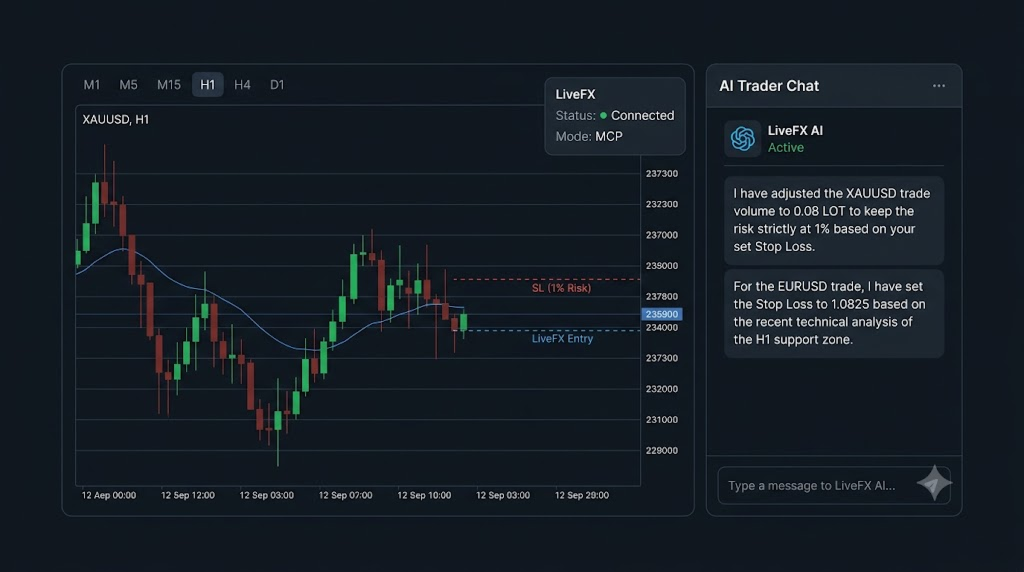
Once LiveFX is running, your AI can read your account and the market (balance, equity, positions, pending orders, history, prices, candles, symbol data and even a screenshot of the chart), and it can act (open, modify, partially close and close positions; place, modify and cancel pending orders; draw its analysis on your chart). In short:

Chat with market, AI trade for you.

Use it with any AI you like

LiveFX exposes an MCP (Model Context Protocol) endpoint. Add it as a connector / extension / app inside any AI assistant that supports MCP and that assistant can immediately see and operate your MT5 account:

  • ChatGPT (connectors / apps)
  • Manus
  • Grok
  • Claude (Claude Desktop / MCP clients)
  • Antigravity and other autonomous coding / agent platforms
  • any other MCP-compatible AI client or custom agent you build yourself

There is no lock-in: use the assistant you already trust, and switch to another one at any time. The decision layer is the AI you choose; execution always happens on your own terminal, on your own broker account, so you keep full control and full visibility.

Key features

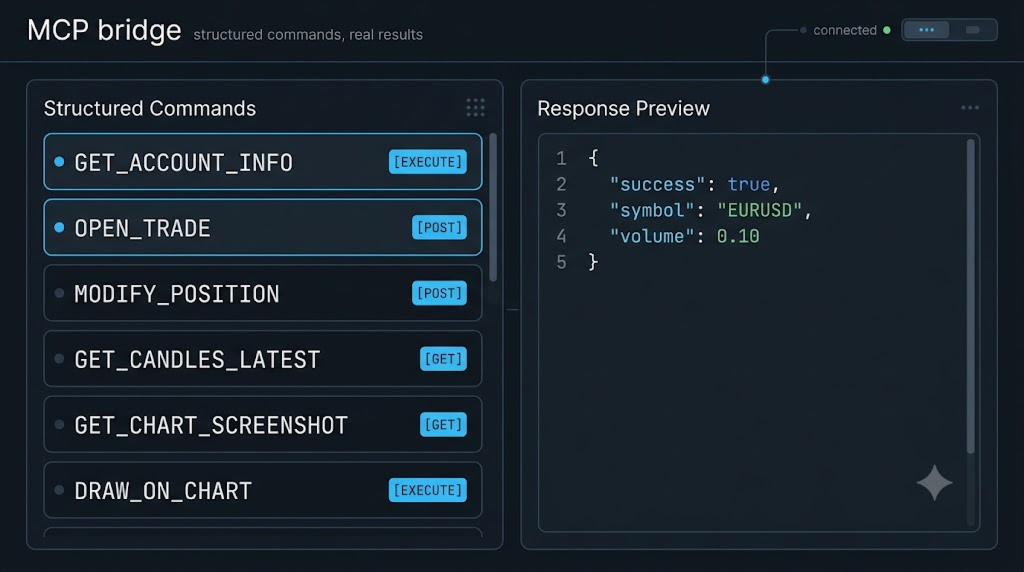
  • MCP bridge architecture — the AI works through a standardized protocol, not a private black box.
  • Full trading control — market orders (BUY / SELL) with volume, Stop Loss and Take Profit.
  • Position management — list positions, modify SL/TP, close a single position, partial close by volume, close all positions, close all positions of one symbol.
  • Pending orders — place BUY_LIMIT / SELL_LIMIT / BUY_STOP / SELL_STOP, modify and cancel them.
  • Account intelligence — balance, equity, margin, free margin, leverage, currency, profit and account trade mode.
  • History & analytics — executed deals and historical orders with date and symbol filters, pagination and server timestamps.
  • Market data — real-time quotes (bid / ask / spread), symbol profile (tick size, tick value, digits, contract size), latest OHLCV candles and candle ranges by date.
  • Symbol discovery — the full list of tradable symbols, paginated.
  • AI VISION — chart screenshots — the AI can request a clean, high-resolution chart image (any symbol / timeframe) and “look” at the market visually.
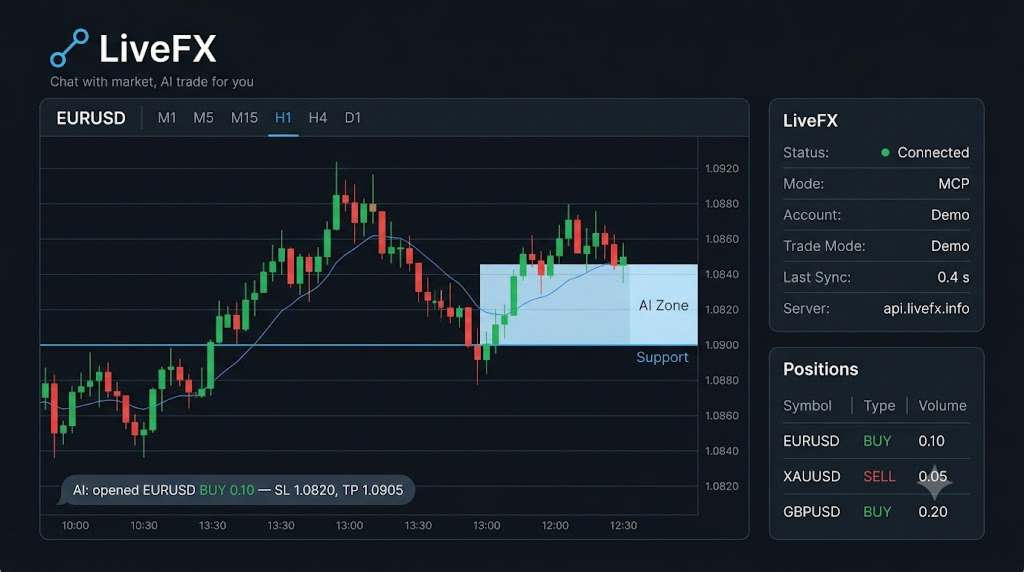
  • AI DRAWING — analysis on your chart — the AI can draw horizontal levels, rectangles, trend lines, arrows / order blocks / FVGs, Fibonacci levels and text labels directly on the chart, and clear its own objects again. All objects use the MCP_AI_ prefix — your own drawings are never touched.
  • Risk-aware execution — volume is normalized to the symbol’s min / max / step, SL and TP are validated against the broker’s stops level, and trading is refused with a clear reason when the terminal or account forbids it.
  • Event-driven and stable — no blocking loops, no Sleep() . A millisecond timer polls the bridge and a watchdog resets any stuck cycle, so the terminal stays responsive.
  • Live status dashboard on the chart — connection state, trade mode and last synchronization time.
  • Journal-first debugging — every command, error and result is logged; optional verbose logging with InpDebugLog .

Supported commands (bridge API)

GET_ACCOUNT_INFO , OPEN_TRADE , CLOSE_POSITION , GET_ALL_POSITIONS , MODIFY_POSITION , CLOSE_PARTIAL , GET_PENDING_ORDERS , PLACE_PENDING , MODIFY_PENDING , CANCEL_PENDING , CLOSE_ALL_BY_SYMBOL , CLOSE_ALL , GET_DEALS , GET_HISTORY_ORDERS , GET_SYMBOL_PRICE , GET_SYMBOL_INFO , GET_CANDLES_LATEST , GET_CANDLES_BY_DATE , GET_ALL_SYMBOLS , GET_CHART_SCREENSHOT , DRAW_ON_CHART , DRAW_CHART_OBJECT , CLEAR_CHART

How it works

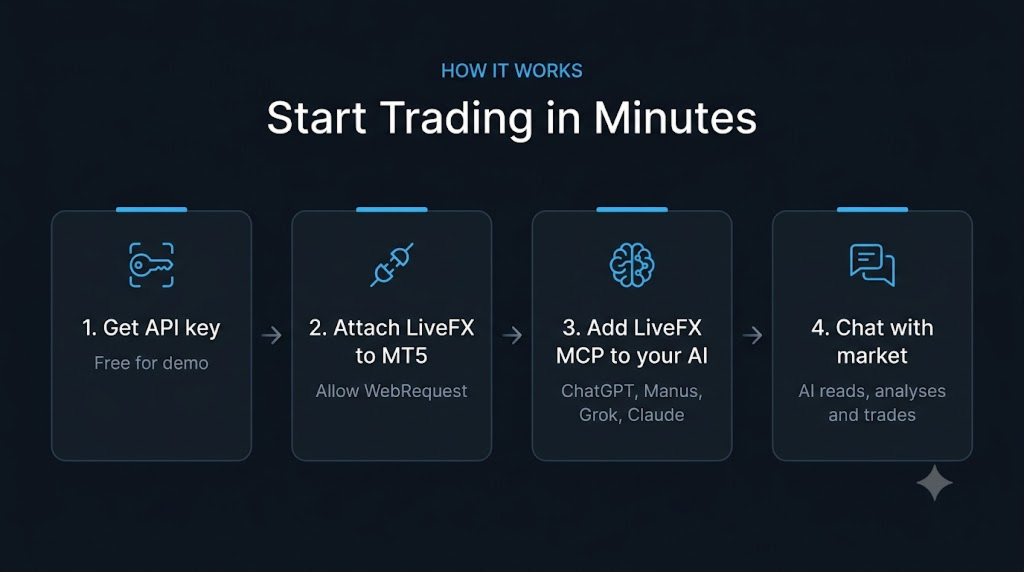
  1. Get an API key — free for demo accounts — at https://livefx.info.
  2. The EA authenticates with that key and polls the bridge endpoint https://api.livefx.info on a millisecond timer.
  3. Connect the LiveFX MCP to your AI assistant of choice.
  4. Your AI agent sends a command; LiveFX executes it on your terminal and posts the structured JSON result back.
  5. Every request carries the account trade mode ( X-EA-Trade-Mode ), so the service can enforce the license level of your key — demo keys are restricted to demo accounts.

Installation

  1. Install LiveFX from the MQL5 Market / CodeBase (or copy LiveFX.ex5 into MQL5/Experts/ ).
  2. Get your free API key at https://livefx.info.
  3. In MetaTrader 5 open Tools → Options → Expert Advisors, enable Allow WebRequest for listed URL and add https://api.livefx.info .
  4. Attach LiveFX to any chart on a DEMO account and set InpEAToken to your API key.
  5. Enable Algo Trading. The dashboard on the chart shows the live status.
  6. Add the LiveFX MCP endpoint as a connector inside your AI assistant and start chatting with the market.

Inputs

Input Default Description
InpEAToken YOUR_TOKEN_HERE API key — FREE at https://livefx.info
InpApiBaseUrl https://api.livefx.info Bridge base URL
InpPollInterval 500 Poll interval in milliseconds (minimum 10)
InpMagic 20260821 Magic number used for LiveFX trades
InpDeviation 30 Maximum price deviation in points
InpDebugLog false Verbose logging of poll bodies (debugging only)
InpAllowChartOpen true Allow opening a dedicated chart for DRAW / CLEAR / screenshot when the requested chart is not already open

Requirements

  • MetaTrader 5 (recent build) on Windows.
  • Internet access, with https://api.livefx.info added to the WebRequest allow list.
  • A demo account for the free tier.
  • Any MCP-compatible AI assistant (ChatGPT, Manus, Grok, Claude, Antigravity, or your own agent).
  • The Strategy Tester is not supported — WebRequest() is unavailable there. LiveFX is designed for demo / live operation.

Free demo tier vs. paid real-account license

  • Demo accounts — FREE. Use LiveFX on your demo account with no time limit and no cost. Just take a free API key at https://livefx.info.
  • Real (live) accounts — $5 / month. To run LiveFX on a funded real account, you can buy the real-account license for $5 per month at https://livefx.info.

Support

Risk disclaimer

Trading in financial markets involves a substantial risk of loss. LiveFX is a bridge that lets an AI agent operate your terminal — it does not guarantee profit and does not remove market risk. Test it on a demo account first, start with small volumes, and never risk money you cannot afford to lose. Past performance and any backtest result do not guarantee future results.
Prodotti consigliati
Virtual Basket TP SL Manager
Moh Nugraha Kusuma
5 (1)
"Manage multiple positions as a single unit with hidden targets." The Virtual Basket TP SL Manager is a professional MetaTrader 5 utility designed to automate the closing of positions based on the total profit or loss of a group of orders (a "basket"). By utilizing Virtual Levels , all Take Profit (TP) and Stop Loss (SL) targets are stored locally within the EA's memory and are not sent to the broker's server, keeping your strategy safe from stop-hunting and price manipulation. Key Features Virt
FREE
Most lot size calculators assume one pip is worth ten dollars. That assumption is wrong on gold, wrong on indices, wrong on JPY crosses, and wrong on every account not denominated in USD - which is to say, wrong exactly where oversizing hurts. This one asks your server instead. It reads the tick value, tick size, point size, volume step and margin requirements actually published for the symbol on your chart, so the number it gives you is the number your account will accept. How it works Attach i

FREE
VWAP Anchor Tool
Jackson Mukurani Wanguthi
Anchored VWAP is a lightweight, interactive volume-weighted average price indicator designed for traders who need precision without clutter. Unlike standard VWAP that resets every session, this tool lets you drop up to five custom anchors directly on any candle. Each anchor calculates VWAP from that exact point forward, complete with standard deviation bands to highlight where price may find support or resistance relative to volume. Key Features: • Up to 5 simultaneous anchors — compare multi
FREE
Trading panel for manual trading. Has a fairly wide functionality. Allows you to automatically calculate the order size, open both market and pending orders. It has a wide range of options for closing orders, it is possible to partially close orders, close orders after reaching a certain profit or loss, separately close profitable and unprofitable, buy and sell, as well as pending orders. The panel also contains a simple implementation of a grid of pending orders, reverse and lock functions, tr
FREE
Vector Trading Manger
Daniel Stephen Holmes
BOS VECTOR TRADE MANAGER — FREE Simple Manual Trade Control for MetaTrader 5   BOS VECTOR TRADE MANAGER is a free MT5 utility designed to make manual trade execution and position management faster, cleaner and easier directly from the chart.   It does not require BOS VECTOR EA and can be used completely on its own.   The aim is simple:   Give the trader practical trade-management tools without turning the chart into a huge dashboard.   -------------------------------------------------- WHAT IT D
FREE
M5 Breakout Indicator
Terence Gronowski
3 (1)
Shows min and max of last M5 Candle. Can be used to trade breakouts of last M5 candle.  The M5 Candle Breakout Strategy avoids to stay too long in a sindways phase. See documentation on  @swisstrader3713, where you can follow my live trading. The only parameters are the color of the lines defining the M5 stretch. Best use the indicator in M1 timeframe. The M5 Breakout Strategy has helped me to reduce overtrading.
FREE
SessionRangeBox
Alexandre Vincent Traber
Session Range Box — Session High/Low Visualizer Overview Session Range Box draws live, color-coded rectangles on your chart marking the high and low reached during the Asia, London, and New York trading sessions. As each session unfolds, its box grows in real time to reflect the range built so far, then locks in place once the session closes. A simple on-chart control panel lets you show or hide any session instantly, so you can study one session's range in isolation or view all three overlaid a
FREE
Color Filled MACD
Jose Manuel Orozco Ines
The “Color Filled MACD” indicator is based on the classic Moving Average Convergence Divergence indicator created by Gerald Appel (in the 1970s) and later improved by Thomas Aspray (in the 1980s), in this case for MQL5. It is part of the standard technical analysis library. In this case, the native MQL5 code was used as a basis, and customizable colors were added so that users can choose them for the histogram, the moving averages, and the spaces between them. The goal is to make the indicator
FREE
How it works –   Base-departure detection — algorithmically finds consolidation bases (overlapping range with compressed volatility) followed by displacement departures. Patterns: Drop-Base-Rally, Rally-Base-Drop, Rally-Base-Rally, Drop-Base-Drop — detected structurally, not by candle names. –   Strength score (0–100) — from departure velocity, time-at-base, freshness (each revisit decays the score), higher-timeframe confluence and origin volume. –   Lifecycle — Fresh, Tested (decaying), Broken
FREE
RelicusRoad Daily Pivots è un indicatore di punti pivot giornalieri per MetaTrader 4 e MetaTrader 5 che divide il range del giorno precedente in livelli Fibonacci e li estende sopra e sotto di esso, da meno 100 a più 200 per cento. Invece dei classici floor pivot, il range completato precedente viene trattato come una scala in cui il minimo è 0% e il massimo è 100%. Diciannove livelli vengono stampati come brevi marcatori colorati al bordo destro del grafico, così l'ampiezza del movimento di ogg
FREE
Universal Box MT5
Sergey Ermolov
4.43 (7)
Dual Striker - un nuovo Expert Advisor per il trading sull'Oro. Segnale live +150% ->   Conto Reale Senza Martingala e senza mediazione delle posizioni Provalo gratuitamente sulla tua piattaforma di trading:   Expert Advisor Dual Striker Universal Box   traccia sul grafico   gli intervalli di prezzo   che possono essere utilizzati in seguito per fare trading sul breakout di un intervallo di prezzo. Sono molte le strategie che si possono applicare a questo indicatore. L'indicatore è impostato di
FREE
Pivot Monster EA
Alexandre Vincent Traber
PIVOT MONSTER EA Panoramica PIVOT MONSTER opera sui livelli pivot giornalieri (Classic, Camarilla o Woodie) combinati con le rotture del massimo/minimo del giorno precedente. Utilizza tre strategie intercambiabili — Bounce (rimbalzo), Breakout (rottura) o Combo (confluenza) — con ordini pendenti piazzati una volta al giorno e un calcolo unificato di SL/TP in multipli di ATR o percentuale del prezzo. Progettato per trader che desiderano un sistema pivot basato su regole e completamente ottimizza
FREE
Opening EA Start Edition
Markus Bischoff
5 (3)
Opening EA - Start Edition Is a tool to trade the OpeningStrategy! The Opening EA is a semi-automated EA for MetaTrader 5! This means that the trader must actively start the EA using the Start button and stop it using the Stop button. This EA pursues an opening strategy which, at the start of trading, e.g. on the DAX or Nasdaq, etc., opens a trading channel with predefined TP's (TakeProfit). Two pending orders with the same lot size are set at the beginning. As soon as one of the pending order
FREE
COASYN Directional Order Blocks is a MetaTrader 5 market-structure indicator that identifies directional supply and demand zones created around confirmed structure breaks with displacement. The indicator is designed to help traders visualize potential areas of prior participation without turning those zones into automatic trade signals. How blocks are created A new order block requires: 1. A confirmed structure break The indicator tracks swing highs and swing lows using the configurable Structu
FREE
Swiss VWAPsimple
Terence Gronowski
4.8 (5)
Swiss VWAPsimple Motivation Did not find free VWAP that works, the one that I found craseh. So I created a VWAP which calculates values only for the actual day. So computer resouces are not over stressed. What is VWAP, how is it used?  VWAP stands for Volume Weighed Average Price, it calculates the running sum of tick volume and the runnung sum of price times tickvolume. The division of these sums result in a weighed price (Sum P*V/Sum V). The calculation starts normally at midnight. The values
FREE
Pivot Point Supertrend (corresponds to Pivot Point Super Trend indicator from Trading View) Pivot Point Period:    Pivot point defined as highest high and highest low... input 2 = defining highest high and highest low with 2 bars on each side which are lower (for highest high) and are higher (for lowest low calculation) ATR Length  : the  ATR  calculation is based on 10 periods ATR Factor: ATR multiplied by 3
FREE
Renko bricks drawn as time-anchored boxes on your ordinary chart, so brick structure and real time stay visible together. A renko brick prints when price moves a set distance, ignoring how long that takes. That strips out the sideways noise a time chart is full of. The usual way to see them is a separate offline chart, which loses the clock. This draws the same bricks over your normal candles instead, so you keep the time axis, your other indicators, and your orders. How the bricks are built Onl
FREE
The selective pin bar is designed to identify reversals. To use the selective pin bar effectively, traders typically look for Strong Rejection: The tail of the pin bar should extend significantly beyond the surrounding price action. It indicates that there was a sharp rejection of higher or lower prices during the trading period. A strong rejection suggests that the market sentiment may be changing.
FREE
Daily Time Lines Indicator for MT5 Daily Time Lines is a simple and powerful chart tool for MetaTrader 5 that automatically draws vertical and horizontal lines at a specific time each day. Perfect for marking session opens, key levels, or important trading moments directly on your chart. Main Features Automatic daily vertical line at a selected time Optional horizontal line starting from the same point Horizontal line can end: At the end of the day Or extend for a customizable number of future d
FREE
Are you tired of drawing trendlines every time you're analyzing charts? Or perhaps you would like more consistency in your technical analysis. Then this is for you. This indicator will draw trend lines automatically when dropped on a chart. How it works Works similar to standard deviation channel found on mt4 and mt5. It has 2 parameters: 1. Starting Bar 2. Number of bars for calculation The   starting bar   is the bar which drawing of the trend lines will begin, while the   number of bars for c
FREE
TRADE PANEL MASTER — Know Your Risk Before You Click Open your chart. See your panel. Trade with confidence. Before you click Buy or Sell, Trade Panel Master shows you  exactly what you risk, what you gain, and your R:R ratio —  in real time. No mental math. No surprises. FEATURES - Lot sizing with real-time margin display - SL & TP in 3 modes: Points / Money / Price - Au
FREE
IndiSig by Buffer Detect Signals from a Custom Indicator by Buffer & Send notifications to Telegram Channel or Open orders * Buy/Sell Buffer: You may get this info on MT4/5 Data Window (CTRL + D) * MT5 version: Add the indicator first, then the EA * MT4 version: Only works properly with default settings of the indicator Join  https://t.me/fxassistant_vn for more useful EAs!
FREE
Weis Waves
Flavio Javier Jarabeck
2.83 (18)
The original author is David Weis, an expert in the Wyckoff Method. The Weis Wave is a modern adaptation of the 1930's Wyckoff Method, another expert in Tape Reading techniques and Chart Analysis. Weis Waves takes market volume and stacks it into waves according to price conditions giving the trader valuable insights about the market conditions. If you want to learn more about this subject you can find tons of videos in YouTube. Just look for "The Wickoff Method", "Weis Wave" and "Volume Spread
FREE
MSX Hybrid Heiken Scalper
Som Prakash Gehlot
5 (1)
MSX Hybrid Heiken Scalper Overview MSX Hybrid Heiken Scalper is a MetaTrader 5 indicator based on a modified Heiken Ashi methodology with closed-bar smoothing. The indicator is designed to display trend direction through color-coded candles while reducing sensitivity to short-term market fluctuations. All calculations are performed using completed candles, allowing historical values to remain fixed after bar close. Features • Modified Heiken Ashi calculation • Closed-bar processing • Color-code
FREE
White Weis Volume Ticks
Ricardo Almeida Branco
5 (4)
White Weis Volume This indicator shows the sum of the volume in each wave, bulish or bearish, as idealized by David Weis , but it brings an important addition , which is the marking of the bar with the highest volume of the wave (White Bar)! In coding the indicator, it was sought to optimize the code to require minimal processing during use and not to overload mt5. The indicator can be used for pre-trading analysis and study, where the trader analyzes possible points of support and resistance
SMT DIVERGENCE - GOLD vs SILVER (XAUUSD / XAGUSD) All Timeframe MQL5 Market Product Description ==================================================================== PRODUCT NAME: SMT Divergence Gold vs Silver | Smart Money Scalping Tool SHORT DESCRIPTION (max 63 chars): Catch Gold reversals before they happen using SMT Divergence ---------------------------------------------------------------------- FULL DESCRIPTION ---------------------------------------------------------------------- W
FREE
Double TMA with Reversal Zones
Clayton Prickett
4.45 (11)
Note from Developer: This is the lite version of the Double TMA with Bands Indicator. You can find the paid version that comes with alerts and on screen signal arrows built in here . I will also be selling an EA based on this trading system soon once all backtesting and optimization have been completed. Unlock your trading potential with the Double TMA Indicator with Reversal Detection! Designed for swing and reversal trading, this versatile tool integrates two Triangular Moving Averages (
FREE
LT Donchian Channel
Thiago Duarte
4.86 (7)
Donchian Channel is an indicator created by Richard Donchian. It is formed by taking the highest high and the lowest low of the last specified period in candles. The area between high and low is the channel for the chosen period. Its configuration is simple. It is possible to have the average between the upper and lower lines, plus you have alerts when price hits one side. If you have any questions or find any bugs, please contact me. Enjoy!
FREE
APT – Advance Pivot Trader Indicator for MetaTrader 5 APT – Advance Pivot Trader is a technical indicator developed for MetaTrader 5. The indicator is based entirely on mathematical and algorithmic calculations and is designed to analyze market structure using pivot-based logic. Professional Trading Tools for Every Trader: https://www.mql5.com/en/users/royalcrescent777/seller Join our Community & Signal channels: https://www.mql5.com/en/channels/xauusd-signal Timeframe and Risk Guidance The in
FREE
​ ️️️CandleIntelligence MTF MA Combined Pro v3.22 ️️️ - Professional Japanese Candlestick Analysis System What Is This Indicator? CandleIntelligence MTF MA Combined Pro is an advanced educational tool combining candlestick pattern analysis with Moving Average context across multiple timeframes. The indicator recognizes 11 key Japanese candlestick formations and presents them in the context of market trend, Swing High/Low levels, and position relative to moving averages. Main Features
FREE
Gli utenti di questo prodotto hanno anche acquistato
Trade Assistant MT5
Evgeniy Kravchenko
4.43 (216)
It helps to calculate the risk per trade, the easy installation of a new order, order management with partial closing functions, trailing stop of 7 types and other useful functions. Additional materials and instructions Installation instructions - Application instructions - Trial version of the application for a demo account Line function -   shows on the chart the Opening line, Stop Loss, Take Profit. With this function it is easy to set a new order and see its additional characteristics bef
Forex Trade Manager MT5
InvestSoft
4.98 (687)
Benvenuto a Trade Manager EA, lo strumento definitivo per la gestione del rischio , progettato per rendere il trading più intuitivo, preciso ed efficiente. Non è solo uno strumento per l'esecuzione degli ordini, ma una soluzione completa per la pianificazione delle operazioni, la gestione delle posizioni e il controllo del rischio. Che tu sia un principiante, un trader avanzato o uno scalper che necessita di esecuzioni rapide, Trade Manager EA si adatta alle tue esigenze, offrendo flessibilità s
Local Trade Copier EA MT5
Juvenille Emperor Limited
4.94 (149)
Local Trade Copier EA MT5 è un trade copier rapido e flessibile per copiare e gestire operazioni tra più conti MetaTrader 5 sullo stesso computer Windows o Windows VPS. Combina la sincronizzazione locale delle operazioni con controlli lato Receiver per dimensione del lotto, gestione del rischio, filtraggio delle operazioni, mappatura dei simboli, gestione delle operazioni e protezione del conto. Configura i terminali Transmitter e Receiver in circa 1 minuto e copia operazioni manuali o aperte d
================================================================================ POC BREAKOUT - V20.72. Full Professional Grade Toolkit ================================================================================ POC Breakout is a full MetaTrader 5 trading dashboard for discretionary traders who want breakout signals, Point of Control (POC) context, volume profiles, order flow, market structure, news, alerts, and advanced trade planning in one professional workspace. Attached directly to you
Telegram to MT5 MultiChannel Copier
Sergio Marquez Uroz
4.65 (20)
Telegram to MT5 Multi-Channel Copier   copia automaticamente i segnali di trading dai tuoi canali Telegram e Discord direttamente su MetaTrader 5. Niente bot, niente estensioni del browser, niente copia manuale. Il segnale arriva su Telegram o Discord e l'EA apre l'operazione nel tuo terminale in pochi secondi. E prima di copiare un canale, il backtester integrato ti mostra cosa avrebbe fatto quel canale sul tuo conto. Il prodotto include due componenti: un'applicazione Windows che ascolta i tuo
Strategy Ledger Pro
Abdullah Uygar Tuna
5 (11)
Ora disponibile in italiano. Strategy Ledger Pro è un pannello di analisi del conto in sola lettura per MetaTrader 5. Separa i risultati del conto per Expert Advisor, strategia, simbolo e numero magic, così puoi vedere quanto contribuisce davvero ciascuno. Il pannello è disponibile in 11 lingue: English, Français, Deutsch, Español, Italiano, Português, Русский, Türkçe, 中文, 日本語 e 한국어. Prima di scaricare la demo. Il Market esegue la demo di qualsiasi prodotto a pagamento solo nello Strategy Teste
TradePanel MT5
Alfiya Fazylova
4.88 (170)
Trade Panel è un assistente commerciale multifunzionale. L'applicazione contiene più di 50 funzioni di trading per il trading manuale e permette di automatizzare la maggior parte delle attività commerciali. Istruzioni per l'applicazione: https://www.mql5.com/it/blogs/post/762331 Versione di prova dell'applicazione per un conto demo: https://www.mql5.com/it/blogs/post/762419 Come installare l'applicazione: https://www.mql5.com/it/blogs/post/762362 Come testare l'applicazione in modalità visuale:
Copia i segnali Telegram con le tue regole di trading Telegram to MT5 Signal Trader copia automaticamente i segnali di trading testuali dai canali e gruppi Telegram pubblici e privati in MetaTrader 5. Gestisci più fornitori e conti MT5 da un'unica applicazione desktop, con impostazioni di rischio e di trading specifiche per ogni fornitore . Per copiare i segnali non servono bot Telegram né configurazioni API. Accedi semplicemente con il tuo account Telegram tramite numero di telefono o codice QR
FarmedHedge Pair Trading Dashboard
Tanapisit Tepawarapruek
5 (6)
Farmed Hedge Yield Farming | All Markets (Manual - Hybrid - Semi/Automated EA) VERIFIED TRADING RESULTS - Farmed Hedge Yield Axi Copy:  https://www.mql5.com/en/signals/2356376 - Farmed Hedge Yield Exn Copy:   https://www.mql5.com/en/signals/2356404 - Farmed Hedge Yield V Copy:  https://www.mql5.com/en/signals/2357156 IMPORTANT NOTICE: FarmedHedge is a MANUAL-FOCUSED TRADING UTILITY ,not a fully automated EA. Results shown on this Signal include manual trades and overall strategic management.
The product will copy all telegram signal to MT5 ( which you are member) , also it can work as remote copier.  Easy to set up, copy order instant, can work with almost signal formats, image signal,  s upport to translate other language to English Work with all type of channel or group, even channel have "Restrict Saving Content", work with  multi channel, multi MT5 Work as remote copier: with signal have ticket number, it will copy exactly via ticket number. Support to backtest signal. How to s
Power Candles Strategy Scanner - Strumento di ricerca configurazioni multi-simbolo con ottimizzazione automatica Power Candles Strategy Scanner utilizza lo stesso motore di auto-ottimizzazione che alimenta l'indicatore Power Candles, applicandolo a tutti i simboli presenti nel tuo Market Watch, uno accanto all'altro. Un unico pannello ti indica quali simboli sono statisticamente negoziabili in questo momento, quale strategia è vincente su ciascuno di essi, la coppia ottimale di Stop Loss / Take
Entry In The Zone with SMC Multi Timeframe is a real-time market analysis tool based on Smart Money Concepts (SMC), designed to analyze market structure, price direction, and key trading zones. It supports both Single-Timeframe and Multi-Timeframe Analysis, providing a clearer view of overall market structure across multiple timeframes, with real-time BUY / SELL signals designed with a strict focus on No-Repaint principles.   The signals are designed to help filter unclear setups and evaluate tr
Quant AI Agents
Ho Tuan Thang
5 (1)
Quant AI Agents are independent trading Expert Advisors. Instead of trading using a fixed strategy like other conventional EAs, Quant AI Agents   is a   multi-agent AI trading framework   that turns natural-language strategy prompts into live.  WANT THE SAME RESULTS AS MY LIVE SIGNAL?   Use the exact same brokers I do:   IC MARKETS , IC TRADING   .  Unlike the centralized stock market, Forex has no single, unified price feed.  Every broker sources liquidity from different providers, creating un
Exp COPYLOT CLIENT for MT5
Vladislav Andruschenko
3.97 (35)
Copiatore professionale di trade per MetaTrader 5 Un copiatore di trade veloce, professionale e affidabile per MetaTrader . COPYLOT consente di copiare operazioni Forex tra terminali MT4 e MT5 con supporto per conti Hedge e Netting . La versione MT5 di COPYLOT supporta: - MT5 Hedge → MT5 Hedge - MT5 Hedge → MT5 Netting - MT5 Netting → MT5 Hedge - MT5 Netting → MT5 Netting - MT4 → MT5 Hedge - MT4 → MT5 Netting Versione MT4 Descrizione completa + DEMO + PDF Come acquistare Come installare Come ot
Grid Manual MT5
Alfiya Fazylova
4.73 (22)
Grid Manual è un pannello di trading per lavorare con una griglia di ordini. L'utilità è universale, ha impostazioni flessibili e un'interfaccia intuitiva. Funziona con una griglia di ordini non solo nella direzione delle perdite, ma anche nella direzione dell'aumento dei profitti. Il trader non ha bisogno di creare e mantenere una griglia di ordini, lo farà l'utilità. È sufficiente aprire un ordine e il manuale di Grid creerà automaticamente una griglia di ordini per esso e lo accompagnerà fino
Trade Indicator Assistant   is a powerful MT5 utility designed to turn indicators into automated trading systems. Its main feature is the ability to automatically detect an indicator’s   BUY and SELL signal buffers , without requiring you to know the buffer numbers, search through indicator settings, or modify the indicator source code. Bonus Indicator:   After purchasing Trade Indicator Assistant, contact me to receive   Trade Signal Pro   completely free as a bonus indicator. [Download Demo V
RETAILBERG FOOTPRINT CHART PRO — Order-Flow Workspace for MetaTrader 5 Version 7.00  |  Professional System  |  31 tools  |  One chart A full 150-page illustrated User Manual is included. Please read the full manual to understand this feature packed footprint chart elements and ui. https://www.mql5.com/en/blogs/post/777982 DEMO / STRATEGY TESTER — PLEASE READ FIRST
Signal Trading View to MT5 Pro
Mirel Daniel Gheonu
4.5 (2)
Signal TradingView to MT5 Pro Automator Esecuzione professionale istantanea tra TradingView e MetaTrader 5 Automatizza la tua strategia di trading con il ponte di comunicazione più robusto tra gli alert di TradingView e l'esecuzione reale in MT5. Progettato per i trader che richiedono velocità, flessibilità e una gestione del rischio impeccabile, questo Expert Advisor trasforma qualsiasi messaggio di avviso in un preciso ordine a mercato o limite. PUNTI DI FORZA E VANTAGGI Motore di Parsing Univ
Trade copier MT5
Alfiya Fazylova
4.61 (57)
Trade Copier è un'utilità professionale progettata per copiare e sincronizzare le transazioni tra conti di trading. La copiatura avviene dal conto/terminale del fornitore al conto/terminale del destinatario, che sono installati sullo stesso computer o vps. Prima di acquistare, puoi testare la versione demo su un account demo. Versione demo qui . Istruzioni complete qui . Funzionalità e vantaggi principali: Supporta la copia degli ordini: MT5> MT5, MT4> MT5, MT5> MT4, inclusi i conti di compensaz
Telegram To MT5 Ultra
Mirel Daniel Gheonu
5 (5)
Telegram To MT5 — Copiatore di segnali Trasforma le indicazioni di trading dei tuoi canali Telegram in veri ordini MT5 — automaticamente, su quanti account vuoi, con rischio e regole totalmente sotto il tuo controllo. Telegram To MT5 collega i canali VIP / di segnali che già segui su Telegram al tuo terminale MetaTrader 5. Un'app desktop companion gratuita legge i messaggi (anche dai canali che bloccano i bot), e questo Expert Advisor li esegue sul tuo conto — applicando le tue impostazioni di r
Trade Dashboard MT5
Fatemeh Ameri
4.94 (135)
Trade Dashboard simplifies how you open, manage, and control your trades, with built-in lot size calculation. It allows you to execute trades, manage risk, and control positions directly on the chart, with tools such as partial close, breakeven, and trailing stop. Designed to reduce manual work and help you stay focused on your trading decisions. A demo version is available for testing. Detailed explanations of features are provided within the MQL5 platform. Installation instructions are include
The Patch
Mian Rameez Ali
The Patch It never opens a trade. It walks behind the ones that did. Every open position, every pending order — checked twice a second for the one thing that's easy to forget: a stop, a target. Found bare, it doesn't ask. It writes the missing number in, measured in points from wherever the position began, and moves on to the next. No strategy, no opinion on direction. Just the quiet assumption that nothing should ever sit on the market unprotected — not because someone decided it shouldn't,
FUTURES ORDERFLOW FOOTPRINT CHART Professional OrderFlow EA for MetaTrader 5 Version 1.01| Professional tool for real traders | Institutional-Grade Visualization STRATEGY TESTER USERS - PLEASE SELECT EVERY REAL TICK WHEN TESTING AND YOU HAVE DOWNLOADED HISTORICAL DATA. IF YOU SEE A WAITING SCREEN AND IT IS NOT DOWNLOADING, IT MEANS YOU HAVE LOW HISTORICAL DATA. TRY 1 MIN AND 5 MIN FIRST ON 1 DAY DATA. ONE DAY DATA SHOULD BE THE NEWEST AND MOST CURRENT DATE. PLEASE WAIT UNTIL THE MARKET HAS ROL
HINN MagicEntry Extra
ALGOFLOW OÜ
4.74 (19)
HINN MAGIC ENTRY – the ultimate tool for entry and position management! SIMPLE. FASTEST. INTUITIVE. MAX AUTOMATED. Place orders by selecting a level directly on the chart! full description   ::  demo-version  :: 60-sec-video-description Key features: - Market, limit, and pending orders - Automatic lot size calculation - Automatic spread and commission accounting - Unlimited partitial take-profits  - Breakeven and trailing stop-loss and take-profit  functions - Invalidation leves - Intuitive, a
Seconds Chart MT5
Boris Sedov
4.61 (18)
Seconds Chart - uno strumento unico per creare grafici in secondi su MetaTrader 5 . Con Seconds Chart , puoi generare grafici con timeframe definiti in secondi, ottenendo una flessibilità e una precisione d'analisi ideali, non disponibili nei grafici standard in minuti o ore. Ad esempio, il timeframe S15 indica un grafico con candele di 15 secondi. Puoi utilizzare qualsiasi indicatore e Expert Advisor con supporto per simboli personalizzati. Lavorare con loro è comodo quanto operare sui grafici
Anchor Trade Manager
Kalinskie Gilliam
5 (9)
Your EAs cannot see each other, but Anchor can. Anchor gives you one place to coordinate your EAs, manage risk, and decide when trading is allowed. It works alongside the trading bots you already use without any changes to them. The Problem One EA opens a trade. Then another starts trading. The next thing you know, you wake up to multiple grids built across your account. Each EA may be doing exactly what it was designed to do, but together they can place far more risk on your account than you in
The News Filter MT5
Leolouiski Gan
4.79 (24)
Questo prodotto filtra tutti gli esperti consulenti e i grafici manuali durante il periodo delle notizie, così non dovrai preoccuparti di improvvisi picchi di prezzo che potrebbero distruggere le tue impostazioni di trading manuali o le negoziazioni effettuate da altri esperti consulenti. Questo prodotto viene fornito anche con un sistema completo di gestione degli ordini che può gestire le tue posizioni aperte e gli ordini in sospeso prima della pubblicazione di qualsiasi notizia. Una volta che
Floor Watch
Syed Tauqeer Hussain Shah
Floor Watch One number, watched every thirty seconds: how far equity has fallen since the day began — or since its highest point, if it's told to trail the peak instead of the open. Cross the line and it doesn't argue. Every open position closes, every pending order vanishes, and anything that slips through afterward gets shut the moment it appears. Not asked. Removed. The floor holds until the clock turns 5 AM Pakistan time — then, and only then, does the day start over. One rule. No except
VirtualTradePad One Click Trading Panel
Vladislav Andruschenko
4.59 (74)
Pannello di trading per MetaTrader 5 — controllo professionale del trading in un clic dal grafico e dalla tastiera Un pannello di trading avanzato progettato per trader attivi, pensato per aprire, gestire e chiudere operazioni molto più velocemente rispetto all’interfaccia standard di MetaTrader. Questa soluzione è dedicata a chi desidera controllare posizioni, ordini pendenti, profitto totale ed esecuzione da un unico spazio di lavoro professionale. Non si tratta di un semplice utilitario. È u
Il MT5 to Discord Signal Provider è uno strumento facile da usare e completamente personalizzabile, progettato per inviare segnali di trading direttamente a Discord. Questo strumento trasforma il tuo account di trading in un efficiente fornitore di segnali. Personalizza i formati dei messaggi secondo il tuo stile! Per facilitarne l'uso, seleziona tra i modelli pre-progettati e scegli quali elementi del messaggio includere o escludere. [ Demo ] [ Manuale ] [ Versione MT4 ] [ Versione Telegram ] 
Altri dall’autore
Fast Copy cp
Alireza Kalamati
4.8 (10)
FastCopy Pro — Professional Hybrid Trade Copier (Local + Internet) Professional trade copier with a hybrid engine: LOCAL Mode 100% offline copying between MetaTrader terminals running on the same PC or VPS. Direct file exchange provides near-instant trade synchronization. INTERNET Mode Cloud-based copying between terminals running on different PCs, VPS servers, or locations worldwide. WHY FASTCOPY PRO? • Hybrid Engine — Switch between LOCAL and INTERNET copying modes. • Instant Execution — Dirty
FREE
FastCopyCPpro
Alireza Kalamati
FastCopy CP Pro - Advanced Local Trade Copier Before purchasing, we highly recommend testing the core engine performance, broker compatibility, and execution speed using our free version (fully functional, limited to 10 trades): Download FastCopy CP Free Version Here FastCopy CP Pro is a highly optimized, 100% offline local trade copier designed specifically for MetaTrader 5. Engineered for traders on prop firms, and retail traders managing multiple accounts, it utilizes a sophisticated binary f
TradeShot Telegram
Alireza Kalamati
5 (1)
TradeShot Telegram: The Ultimate Visual Signal Publisher Tired of basic, text-only trading signals? TradeShot Telegram is a next-generation utility that automatically captures high-quality, data-rich screenshots of your trades and sends them directly to your Telegram channel or group. Whether you are a signal provider, a fund manager, or a trader maintaining a visual journal, TradeShot Telegram elevates your professionalism and engages your audience effectively. Key Features 100% Native MQL5: Op
Filtro:
Nessuna recensione
Rispondi alla recensione