Tick Data HTTP Exporter NZDUSD

Tick Data HTTP Exporter NZDUSD

This free version exports NZDUSD only; the full version, Tick Data HTTP Exporter, exports any symbol.

Description

The EA turns your terminal into a historical/realtime tick data provider for your application.
There are many market data providers on the internet, but in practice, the data provided is not always of good quality. Moreover, these services are often more expensive and typically require monthly subscription fees per each symbol.
With this EA, you can feed your application with exactly the same tick data that you see in the terminal, the same data on which you base your trades and market analysis.
Together with the Candle Data HTTP Exporter, which provides rates data (OHLC, candles), a complete data set necessary for market analysis is offered.

Capabilities

  • Enables the transmission of tick data to a pre-configured external HTTP URL.
  • Guarantees the delivery of every tick, with the capability to resume from the last sent tick in case of disruptions.
  • Offers two storage options for tick timestamp offsets:
    • Local files (default, managed automatically)
    • HTTP endpoint (for integration with applications)
  • Ensures reliable delivery of ticks, with retry mechanisms for HTTP request failures.
  • Allows for data transfer with configurable batching.

Configuration

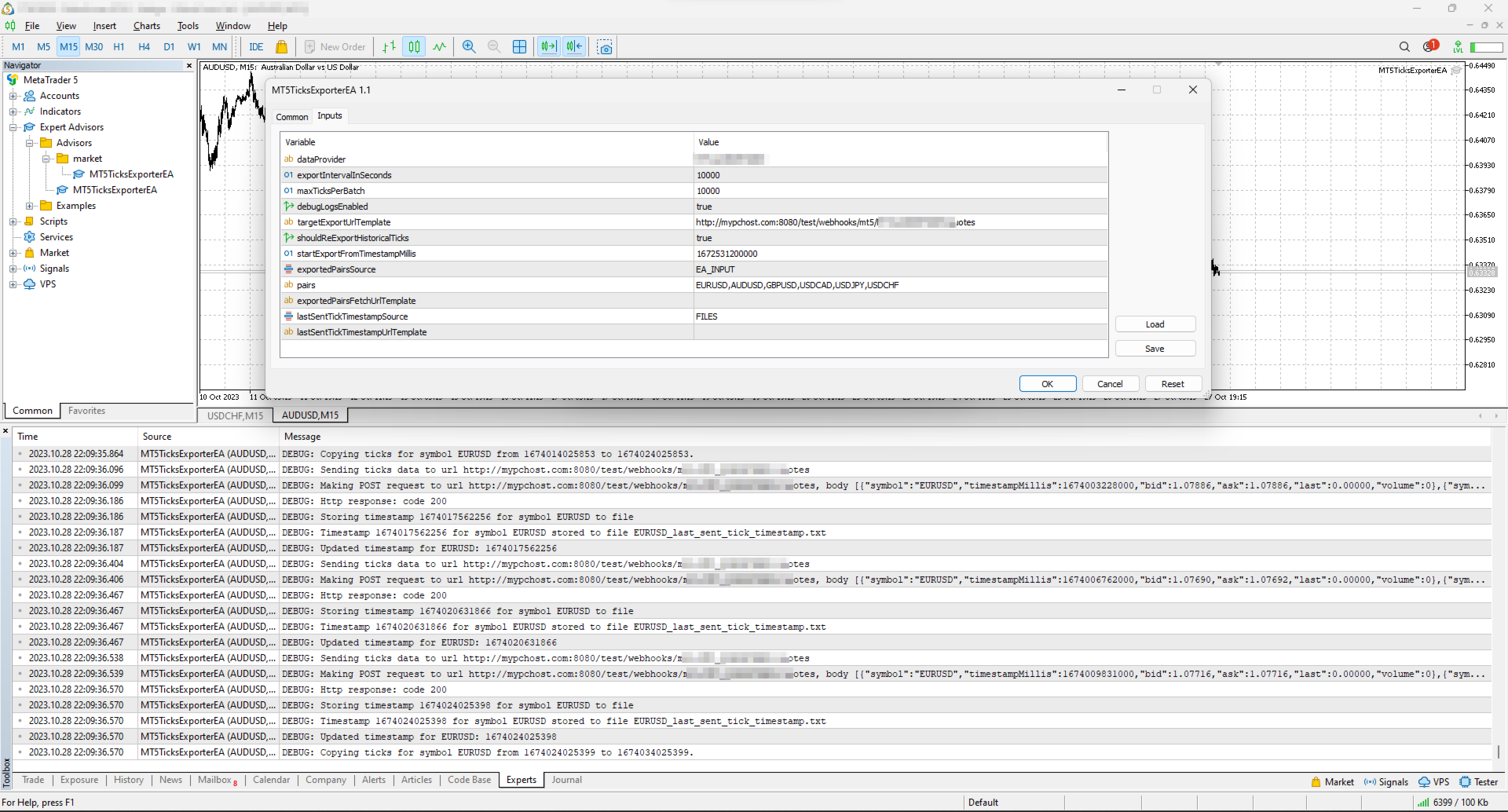
Input Description Default
dataProvider Specifies the name of the data provider.
This name can then be used in URL templates as {dataProvider}.
-
tickQueryingIntervalDurationSeconds Interval for querying ticks from the broker, in seconds. 10000 seconds
maxTicksPerBatch Maximum number of ticks that can be sent in a single batch. 10000 ticks
debugLogsEnabled Whether to enable debug logs. false
dataSendingIntervalMilliseconds Period for querying ticks and sending them to an external URL. 10000 milliseconds
targetExportUrlTemplate URL template for the endpoint where the tick data will be sent.
Supported placeholders: dataProvider.
-
shouldReExportHistoricalTicks Option to re-export ticks starting from a specific value, as specified in the startExportFromTimestampMillis input. false
startExportFromTimestampMillis If shouldReExportHistoricalTicks is set to true, ticks will be sent starting from the timestamp specified in milliseconds (on the server clock, the time the terminal shows). 1672531200000 (2023-01-01 00:00:00)
exportedSymbolsSource Not available in this version: it always exports NZDUSD.
Source for the symbols for which ticks will be exported. Options are: 'HTTP_ENDPOINT' or 'EA_INPUT'.
EA_INPUT
symbols Not available in this version: it always exports NZDUSD.
In cases where exportedSymbolsSource is set to 'EA_INPUT', this setting specifies for which symbols ticks will be exported.
EURUSD,AUDUSD,GBPUSD,USDCAD,USDJPY,USDCHF
exportedSymbolsFetchUrlTemplate Not available in this version: it always exports NZDUSD.
URL template to fetch the symbols. Used in case exportedSymbolsSource='HTTP_ENDPOINT'.
Supported placeholders: dataProvider.
-
lastSentTickTimestampSource Source for the timestamp of the last sent tick. Options are: 'HTTP_ENDPOINT' or 'FILES'. FILES
lastSentTickTimestampUrlTemplate URL template to fetch/store the timestamp of the last sent tick. Used in case lastSentTickTimestampSource='HTTP_ENDPOINT'.
Supported placeholders: dataProvider, symbol.
-
serverTimeZoneMode The server clock, used to convert tick times to UTC. AUTO (default) detects the server clock; or choose it explicitly: US_DST (New York close), EU_DST (Eastern European), NO_DST, MANUAL (manualServerGmtOffsetMinutes) — an explicit choice gives exact timestamps for the whole history. AUTO
manualServerGmtOffsetMinutes Server offset from GMT in minutes, used with MANUAL. 120

EA Workflow Description

Upon initialization, the Expert Advisor (EA) performs the following operations:

  1. Reset Offset Check: The EA checks the shouldReExportHistoricalTicks variable to determine if there's a need to export historical tick data from a specific timestamp. If a re-export is required, it:

    • Establishes the startExportFromTimestampMillis value as the new timestamp offset.
    • Saves this offset securely, either locally in a file or by sending it to a designated HTTP endpoint, based on the configuration set by lastSentTickTimestampSource.
  2. Periodic Tick Data Harvesting and Sending: The EA is programmed with a timer set to activate at intervals defined by dataSendingIntervalMilliseconds. Upon each activation, the EA:

    • Requests tick data from the broker, starting from the last stored offset (the most recent tick timestamp) to the present moment.
    • Converts the acquired tick data into JSON and sends it to the predefined URL derived from the targetExportUrlTemplate input.

By executing these steps, the EA ensures a continuous and automated stream of the most recent tick data for external use, keeping your application or analysis tools supplied with up-to-the-minute market information.

Usage

Below are the minimum actions required for the EA to start exporting ticks to your configured URL:

  • Implement an HTTP endpoint that handles a POST request on a URL derived from the targetExportUrlTemplate. This endpoint should:

    • Accept tick data with the JSON structure described below.
    • Respond with a 200 status code if the reception is successful.
  • Allow the terminal to send data to your server: open Tools > Options > Expert Advisors, tick the box "Allow WebRequest for listed URL" and add your server address, e.g. https://data.example.com.

    • If you are testing locally on localhost, create a hostname in 'C:\Windows\System32\drivers\etc\hosts' on Windows or '/etc/hosts' on Linux-based systems. Use this hostname in the targetExportUrlTemplate.
  • Attach the EA to any chart in the terminal and configure the following inputs:

    • dataProvider and targetExportUrlTemplate: required; the EA does not start without them.
    • startExportFromTimestampMillis: set the timestamp from which you need to get ticks.
    • shouldReExportHistoricalTicks: this must be set to true on the first run so that the EA creates all necessary files for tracking the last sent tick timestamp. After the first run set it back to false, otherwise every restart sends everything again from startExportFromTimestampMillis.

Note: the EA does not work in the Strategy Tester, because the tester blocks sending data over the internet.

Offset Management

The EA maintains the timestamp (offset) of the last successfully sent tick in order to continue the export process in the event of disruptions or a terminal restart.
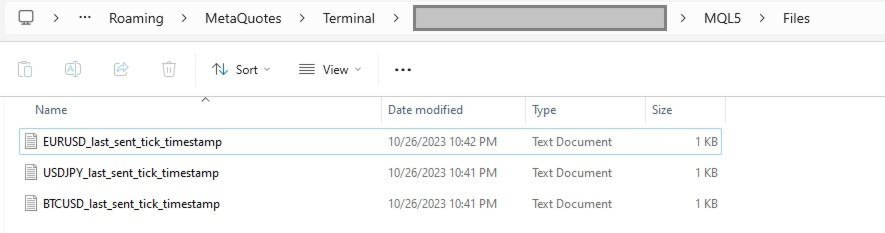
By default, timestamps are stored in files that are automatically created in the terminal's MQL5\Files folder. There is a separate file for each symbol.

Additionally, there is an option to use separate HTTP endpoints for reading/storing the offset instead of files.
To use this feature, set lastSentTickTimestampSource to 'HTTP_ENDPOINT' and implement HTTP endpoints based on the URL defined in lastSentTickTimestampUrlTemplate.
As a backend solution, you can choose to store offsets in a database (such as PostgreSQL). If you need to re-export ticks for a specific symbol, you would only need to update the timestamp values in the database table.

What the offset is. The offset is the time of the last delivered tick, in milliseconds since 1970-01-01 on the broker's server clock (the time the terminal shows), not UTC. If you keep offsets on your server, return exactly the number the EA posted.

EA External Management

If you set lastSentTickTimestampSource to 'HTTP_ENDPOINT', you can start a re-export without any actions in the terminal.

REST API Specification for Application Integration

HTTP Endpoint Description Method Request Response
targetExportUrlTemplate URL for sending tick data.
timestampMillis is the tick time in UTC.
POST Headers:
Content-Type: application/json
Body
[
    {
        "symbol": "NZDUSD",
        "bid": 0.61200,
        "ask": 0.61215,
        "last": 0.61210,
        "volume": 1234.56,
        "timestampMillis": 1625135912000
    },
    ...
]
Response Code 200 in case ticks are obtained successfully
exportedSymbolsFetchUrlTemplate Not available in this version: it always exports NZDUSD.
The URL is used to retrieve the list of symbols that the EA will export to the URL derived from 'targetExportUrlTemplate'.
GET   Headers:
Content-Type: text/plain
Body (comma separated list of symbols)
EURUSD,GBPUSD,AUDUSD,BTCUSD
lastSentTickTimestampUrlTemplate The URL is utilized to fetch the specific timestamp from which the export process should begin.
The body is the offset exactly as the EA posted it.
GET   Headers:
Content-Type: text/plain
Body
1625135912000
lastSentTickTimestampUrlTemplate The URL is used to store the timestamp of the last successful POST request made to the URL derived from 'targetExportUrlTemplate'.
The body is the offset.
POST Headers:
Content-Type: text/plain
Body
1625135912000
 

IMPORTANT: Before using this EA, please verify that your broker supports exporting historical tick data. Availability and depth of tick data vary across brokers.

Tags: ticks, tick, quotes, quote, stream, streaming, export, exporting, webhook, webhooks, integration, http, rest, forex, crypto, data, historical, realtime, rest api, provider, data feed
Prodotti consigliati
Chinggey Untung
Saiful Izham Bin Hassan
Chinggey Untung è un Expert Advisor multi-strategia di livello istituzionale progettato per la piattaforma MetaTrader 5. Combina un motore di tendenza neurale con un sistema di recupero a matrice quantistica per gestire la volatilità del mercato con assoluta precisione tecnica. Il sistema utilizza una matrice di correlazione statistica a 3 vettori per monitorare gli squilibri del mercato e applica un circuito di protezione del capitale per salvaguardare il patrimonio durante eventi ad alto imp
FREE
Steady Runner NP EA
Theo Robert Gottwald
2.5 (2)
Introducing Steady Runner NP EA (Free Version): Precision Trading for GBPUSD M5 What is Steady Runner NP EA? Steady Runner NP EA is a   mathematically designed Expert Advisor (EA)   exclusively crafted for the   GBPUSD M5 timeframe . Built with advanced algorithms and statistical models, this EA automates your trading strategy to deliver   precision, consistency, and discipline   in every trade. Whether you're a seasoned trader or just starting out, Steady Runner NP EA is your reliable par
FREE
Guida dell’utente NEXA Pivot Scalper PRO Panoramica NEXA Pivot Scalper PRO è un sistema di trading automatico (Expert Advisor) progettato per la piattaforma MetaTrader 5. Il programma analizza il comportamento del prezzo vicino ai livelli Pivot e valuta le condizioni di mercato a breve termine utilizzando indicatori tecnici. Le operazioni vengono aperte automaticamente quando più condizioni di trading sono soddisfatte. L’Expert Advisor funziona secondo regole di trading e di gestione del rischio
FREE
Micro Volume
Aleksandr Goryachev
Volumes  ******************* Volumes для платформы секундных графиков Micro . ********************* Секундный график на порядок увеличит точность ваших входов и выходов. Секундный период , в привычном формате,   позволит увидеть то, что ранее было скрыто. Бесплатные индикаторы, дополнят визуальную картину, что, в совокупности выведет вашу торговлю на новый уровень. Идеально подходит как скальперам, так и трейдерам торгующим внутри дня.  Индикатор Volumes  для платформы Micro. Входные парам
FREE
An updated version is now available free of charge. Ver. 034.33   is available. Basics Currency Pair: EUR-USD 5 Minute Display and set the 5-minute chart of EUR-USD. Adjustments may be necessary depending on the broker. In particular, entry is controlled by " エンベロープミドル偏差"  and the ATR 1H value. About Envelope Middle Deviation " エンベロープミドル偏差" is closer to 1.0, the easier it is to enter the market, but at the same time, the rate of being cut-risk increases. About  ATR EntryLimit   ATR Entry Li
FREE
Strike Zone EA MT5
Matteo Schizzerotto
Strike Zone è un Expert Advisor basato su un pattern grafico a candele OHLC, tutti i backtest si basano su 10 anni di attività di Expert. Per i backtest sono stati utilizzati parametri fissi: 1 coppia, capitale di $ 10.000 e un ingresso sul mercato di 0,1 lotti. dopo giorni di test, questo Expert Advisor si è rivelato redditizio con le seguenti coppie e tempi: AUDCAD H4 NAS100 NZDCAD H1 USDCAD H1 I backtest non sono una garanzia di profitti futuri, qualsiasi utilizzo di questo strumento è di
FREE
Secura Gold Wave
KINGSLEY IFEANYI IWUFRED
4.5 (2)
Secura Gold Wave EA v1.0 Institutional-Grade Pullback Trading System for Higher Timeframes Trade with the rhythm of the market using   Secura Gold Wave EA , a professional expert advisor built for patient, higher-timeframe traders. It systematically identifies high-probability pullback entries within a confirmed trend, using a multi-moving-average framework for precision. Core Strategy: Identifies price retracements to a dynamic moving average, waiting for a strong confirmation candle to signa
FREE
MT Monster
MASSINISSA AINOUZ
This EA has been backtested with real ticks since January 2012 untill March 2025, with no delay in execution, and then with a delay of 1000ms, the backtest showed a drawdown of 30% with a 10k USD backtest account. The EA default parameters are optimised to work best on EURUSD pair, but can work on other currencies and metals like XAUUSD. Before using this EA and in order to not lose all your money make sure you have at least 5000USD in your account. Do not use another EA with this one on the sam
TulipUltra è un expert advisor di tipo portafoglio. Una sola istanza, su un solo grafico, gestisce 48 sottostrategie su 12 strumenti e tre timeframe intragiornalieri (M15 / M30 / H1). L'oro è lo strumento di riferimento del portafoglio. L'oro al centro del portafoglio XAUUSD viene negoziato a dimensione piena e non viene mai ridotto dalle regole di ponderazione del portafoglio. Gli altri undici strumenti — XAGUSD, BTCUSD, EURUSD, GBPUSD, USDJPY, EURJPY, GBPJPY, CHFJPY, AUDJPY, AUDUSD, GBPAUD
FREE
Raizin001
Seira Yokota
RAIZIN è un EA martingala con "selettore di simbolo": un grafico opera UN simbolo. Scegli uno dei 10 simboli (EURGBP / EURUSD / GBPUSD / AUDJPY / NZDCAD / AUDCAD / EURJPY / USDJPY / GOLD / BTCUSD) dal menu ExtSymbol e l'EA applica automaticamente le impostazioni verificate di quel simbolo (magic number, filtro orario, distanze). Edizione gratuita: lotto fisso 0.01, senza interesse composto. Avviso di rischio importante: questo EA usa martingala/mediazione SENZA stop loss. Drawdown flottanti pr
FREE
Vantage Breakout
Alexandre Vincent Traber
Trasforma le espansioni di volatilità in prese di profitto strutturate e scaglionate — Vantage Breakout opera breakout adattivi basati su ATR/SMA e gestisce ogni posizione con un disciplinato sistema di uscita a 3 livelli, validato sulle principali coppie Forex e sull'Oro. Panoramica Vantage Breakout è un EA di breakout della volatilità adattivo. Apre una posizione quando il prezzo chiude al di fuori di una banda dinamica costruita a partire da una media mobile semplice (SMA) spostata di un mult
FREE
Market Beacon — Il Contesto di Mercato a Colpo d’Occhio, sviluppato da GOLDEXA️ Market Beacon è un dashboard di mercato completamente gratuito per MetaTrader 5, progettato per aiutare i trader a comprendere più rapidamente le condizioni attuali del mercato riducendo allo stesso tempo il disordine sul grafico. Invece di passare continuamente da un timeframe all'altro, tra indicatori e orari delle sessioni, Market Beacon riunisce le informazioni di mercato più utili in un unico HUD pulito e prof
FREE
Binance Futures Risk Calculator Binance Futures Risk Calculator is a free utility for calculating position size and trade risk for Binance USD-M Futures. The calculator helps you estimate the key parameters of a futures trade before opening a position manually. Binance Futures Risk Calculator — Setup and Usage Guide Main Features Long and Short trade calculation Position size calculation Risk calculation in USDT or percentage Entry, Stop Loss and Take Profit planning Risk/Reward calculation Adj
FREE
This Expert Advisor uses statistical arbitrage to trade cryptocurrency pairs (e.g., BTCUSD & ETHUSD). It identifies mispricings and executes trades based on deviations from historical correlations. The EA employs mean reversion, pair trading, and cointegration analysis. It features advanced risk management, including dynamic position sizing, ATR-based stop-loss/take-profit, equity protection, and drawdown limits. It also includes smart order handling, real-time position verification, and statis
FREE
This indicator uses a different approach from the previous version to get it's trendlines. This method is derived from Orchard Forex, and the process of making the indicator is demonstrated in there video   https://www.youtube.com/watch?v=mEaiurw56wY&t=1425s . The basic idea behind this indicator is it draws a   tangent line   on the highest levels and lowest levels of the bars used for calculation, while ensuring that the lines don't intersect with the bars in review (alittle confusing? I know
FREE
Price Predictor Pro
Emma-ekong Ben Eshiet
Price Predictor Pro Turn Market Patterns into Predictable Profits! Are you tired of guessing where the market will go next? With Price Predictor Pro , you’ll trade with confidence by spotting powerful chart patterns and receiving precise price projections —directly on your MT5 chart. What Price Predictor Pro Does: ️ Detects high-probability chart patterns like Double Tops, Double Bottoms, Head & Shoulders, Flags, Pennants, and more . ️ Instantly projects the next price target using adv
FREE
CANDLE TIMER — Professional Market Description CANDLE TIMER is a lightweight and professional MetaTrader 5 indicator designed to help traders clearly see the remaining time before the current candlestick closes . Knowing when a candle will close is important for traders who analyze Price Action, SMC, Supply & Demand, Breakout, and Candlestick Patterns , because many trading decisions depend on the candle's closing price. KEY FEATURES ️ Real-Time Candle Countdown Displays the remaining time
FREE
Phoenix Drawdown Meter
PHOENIX GLOBAL INVESTMENTS LTD
Le regole di rischio delle società di trading e dei trader privati sono solitamente basate su una misura specifica di drawdown (il più delle volte un limite giornaliero, azzerato a un orario prestabilito), ed è facile perdere di vista la propria posizione esatta rispetto a tale limite mentre si fa trading. Phoenix Drawdown Meter monitora il drawdown come percentuale del saldo del conto all’inizio della giornata di trading (azzeramento a mezzanotte), non come drawdown variabile o storico, in
FREE
PEAK MASTER LITE – PRECISION RESISTANCE NAVIGATOR Peak Master Navigator is a non-repainting technical indicator designed to accurately identify and visualize structurally confirmed resistance levels in real time. It detects valid swing highs based on market structure confirmation rules, ensuring that only meaningful and reliable resistance points are displayed on the chart. By filtering out weak or premature highs, Peak Master Navigator helps traders focus on true price reaction zones , improvi
FREE
# MiniBull Guard v1.30 ## Never trade without a stop again. **You open the trade. MiniBull Guard sets the stop, shows the risk and keeps your head clear.** - **No more naked positions.** Every new trade gets a stop loss within moments, even when you forget, hesitate or trade from your phone. - **A stop the market can breathe around.** Sized from real volatility (ATR) by default, or from a distance you choose. - **Know your loss before it happens.** In money and in percent of your equity, not
FREE
My Chart Control
Trade The Volume Waves Single Member P.C.
Important: Do not download or install My Chart Control unless you already own My Chart Generator service. My Chart Control is not a standalone chart generator. It is designed to work together with the custom charts produced by My Chart Generator. Your Range/Volume chart, optimized for your indicator — automatically.   My Chart Control is the on-chart dashboard and intelligence interface for My Chart Generator. Attach it to your My Chart custom symbol chart and it gives you complete control over
FREE
Institutional Momentum Stochastic Index
Agustinus Biotamalo Lumbantoruan
4 (1)
The Stochastic Momentum Index (SMI), developed by William Blau and featured in the January 1993 edition of Technical Analysis of Stocks & Commodities magazine, introduces a unique perspective to trading analysis. Distinguished from the conventional Stochastic Oscillator, which evaluates the current close in relation to the recent x-period high/low range, the SMI assesses the close's position relative to the midpoint of this range. This innovation yields an oscillator with a range of +/- 100, re
FREE
Nova Auto Pitchfork Premium Give market structure a clearer framework. Price often moves through rising or falling channels, but choosing meaningful anchors manually can be inconsistent. Nova Auto Pitchfork Premium identifies confirmed swing points and constructs a pitchfork that helps you evaluate trend direction, channel boundaries, and price reactions. Its value is a repeatable structural map: a way to judge where price sits within the selected channel and recognise when it rejects or moves b
FREE
HTF Candle Plus Timer Migliora la tua esperienza di trading con HTF Candle Plus Timer, un indicatore intelligente che mostra le candele dei timeframe superiori direttamente sul tuo grafico attuale. Ti permette di rimanere allineato con il quadro generale del mercato concentrandoti sul tuo timeframe preferito. Caratteristiche Principali: Candele di timeframe superiori: Disegna candele personalizzate di timeframe superiori (HTF) come H1, H4, D1, W1 o MN direttamente sui grafici di timeframe inferi
ICT Quant Flow
Enrique Valeros Muriana
ICT Quant Flow is an automated trading system that blends modern ICT concepts with a clean quantitative execution model. Instead of relying on randomness or aggressive lot manipulation, the EA follows a structured process: understand where price is trying to go, wait for efficient retracements, and manage risk with discipline. The goal is consistency, not noise. The strategy focuses on three core areas: market structure, Fair Value Gaps and liquidity behaviour. ICT Quant Flow analyses recent swi
FREE
VIX Momentum Pro EA - Ürün açıklaması Genel bakış VIX Momentum Pro, VIX75 Sentetik Endeksleri için özel olarak tasarlanmış sofistike bir algoritmik ticaret sistemidir. Algoritma, sentetik volatilite piyasasında yüksek olasılıklı ticaret fırsatlarını tanımlamak için özel momentum tespit teknikleri ile birleştirilmiş gelişmiş çoklu zaman dilimi analizi kullanır. Ticaret stratejisi Expert Advisor, birden fazla zaman diliminde fiyat hareketlerini analiz eden kapsamlı momentum tabanlı bir yaklaşımla
1. The principle of UnbalanceEurUsdAud2 intelligent trading system:  The three currency hedge unbalanced arbitrage is the extension and continuation of the triangle arbitrage. As a common arbitrage method, triangle arbitrage has been used by many investors in foreign exchange trading. Triangle arbitrage is based on cross exchange rates, which is the basis of triangle arbitrage. The so-called cross exchange rate refers to the price of a non-US dollar currency expressed by another non-US dollar c
FREE
1. The principle of InequationEurUsdChf4 intelligent trading system:   The three currency hedge unbalanced arbitrage is the extension and continuation of the triangle arbitrage. As a common arbitrage method, triangle arbitrage has been used by many investors in foreign exchange trading. Triangle arbitrage is based on cross exchange rates, which is the basis of triangle arbitrage. The so-called cross exchange rate refers to the price of a non-US dollar currency expressed by another non-US dollar
FREE
1. The principle of ImbalanceEurUsdCad3 intelligent trading system:  The three currency hedge unbalanced arbitrage is the extension and continuation of the triangle arbitrage. As a common arbitrage method, triangle arbitrage has been used by many investors in foreign exchange trading. Triangle arbitrage is based on cross exchange rates, which is the basis of triangle arbitrage. The so-called cross exchange rate refers to the price of a non-US dollar currency expressed by another non-US dollar c
FREE
ELTRA Guardian EA
Aziz Maulidi Wimantara
Proven consistent performance — backtested from 2021 to 2025 with steady growth every week, month, and year. ELTRA Guardian EA is a fully automated Expert Advisor exclusively optimized for trading XAU/USD (Gold) . It combines precise level-based entries with EMA trend filtering to deliver consistent performance in volatile gold markets. Key Features: Gold-Only Strategy: Specifically designed and tuned for XAU/USD. Fixed Price Levels: Executes trades only when price touches 4-point interv
Gli utenti di questo prodotto hanno anche acquistato
Trade Assistant MT5
Evgeniy Kravchenko
4.43 (216)
It helps to calculate the risk per trade, the easy installation of a new order, order management with partial closing functions, trailing stop of 7 types and other useful functions. Additional materials and instructions Installation instructions - Application instructions - Trial version of the application for a demo account Line function -   shows on the chart the Opening line, Stop Loss, Take Profit. With this function it is easy to set a new order and see its additional characteristics bef
Forex Trade Manager MT5
InvestSoft
4.98 (686)
Benvenuto a Trade Manager EA, lo strumento definitivo per la gestione del rischio , progettato per rendere il trading più intuitivo, preciso ed efficiente. Non è solo uno strumento per l'esecuzione degli ordini, ma una soluzione completa per la pianificazione delle operazioni, la gestione delle posizioni e il controllo del rischio. Che tu sia un principiante, un trader avanzato o uno scalper che necessita di esecuzioni rapide, Trade Manager EA si adatta alle tue esigenze, offrendo flessibilità s
Local Trade Copier EA MT5
Juvenille Emperor Limited
4.94 (149)
Local Trade Copier EA MT5 è un trade copier rapido e flessibile per copiare e gestire operazioni tra più conti MetaTrader 5 sullo stesso computer Windows o Windows VPS. Combina la sincronizzazione locale delle operazioni con controlli lato Receiver per dimensione del lotto, gestione del rischio, filtraggio delle operazioni, mappatura dei simboli, gestione delle operazioni e protezione del conto. Configura i terminali Transmitter e Receiver in circa 1 minuto e copia operazioni manuali o aperte d
Telegram to MT5 MultiChannel Copier
Sergio Marquez Uroz
4.63 (19)
Telegram to MT5 Multi-Channel Copier   copia automaticamente i segnali di trading dai tuoi canali Telegram e Discord direttamente su MetaTrader 5. Niente bot, niente estensioni del browser, niente copia manuale. Il segnale arriva su Telegram o Discord e l'EA apre l'operazione nel tuo terminale in pochi secondi. E prima di copiare un canale, il backtester integrato ti mostra cosa avrebbe fatto quel canale sul tuo conto. Il prodotto include due componenti: un'applicazione Windows che ascolta i tuo
================================================================================ POC BREAKOUT - V20.72. Full Professional Grade Toolkit ================================================================================ POC Breakout is a full MetaTrader 5 trading dashboard for discretionary traders who want breakout signals, Point of Control (POC) context, volume profiles, order flow, market structure, news, alerts, and advanced trade planning in one professional workspace. Attached directly to you
Strategy Ledger Pro
Abdullah Uygar Tuna
5 (11)
Ora disponibile in italiano. Strategy Ledger Pro è un pannello di analisi del conto in sola lettura per MetaTrader 5. Separa i risultati del conto per Expert Advisor, strategia, simbolo e numero magic, così puoi vedere quanto contribuisce davvero ciascuno. Il pannello è disponibile in 11 lingue: English, Français, Deutsch, Español, Italiano, Português, Русский, Türkçe, 中文, 日本語 e 한국어. Prima di scaricare la demo. Il Market esegue la demo di qualsiasi prodotto a pagamento solo nello Strategy Teste
The Patch
Mian Rameez Ali
The Patch It never opens a trade. It walks behind the ones that did. Every open position, every pending order — checked twice a second for the one thing that's easy to forget: a stop, a target. Found bare, it doesn't ask. It writes the missing number in, measured in points from wherever the position began, and moves on to the next. No strategy, no opinion on direction. Just the quiet assumption that nothing should ever sit on the market unprotected — not because someone decided it shouldn't,
TradePanel MT5
Alfiya Fazylova
4.88 (170)
Trade Panel è un assistente commerciale multifunzionale. L'applicazione contiene più di 50 funzioni di trading per il trading manuale e permette di automatizzare la maggior parte delle attività commerciali. Istruzioni per l'applicazione: https://www.mql5.com/it/blogs/post/762331 Versione di prova dell'applicazione per un conto demo: https://www.mql5.com/it/blogs/post/762419 Come installare l'applicazione: https://www.mql5.com/it/blogs/post/762362 Come testare l'applicazione in modalità visuale:
Floor Watch
Syed Tauqeer Hussain Shah
Floor Watch One number, watched every thirty seconds: how far equity has fallen since the day began — or since its highest point, if it's told to trail the peak instead of the open. Cross the line and it doesn't argue. Every open position closes, every pending order vanishes, and anything that slips through afterward gets shut the moment it appears. Not asked. Removed. The floor holds until the clock turns 5 AM Pakistan time — then, and only then, does the day start over. One rule. No except
Copia i segnali Telegram con le tue regole di trading Telegram to MT5 Signal Trader copia automaticamente i segnali di trading testuali dai canali e gruppi Telegram pubblici e privati in MetaTrader 5. Gestisci più fornitori e conti MT5 da un'unica applicazione desktop, con impostazioni di rischio e di trading specifiche per ogni fornitore . Per copiare i segnali non servono bot Telegram né configurazioni API. Accedi semplicemente con il tuo account Telegram tramite numero di telefono o codice QR
Power Candles Strategy Scanner - Strumento di ricerca configurazioni multi-simbolo con ottimizzazione automatica Power Candles Strategy Scanner utilizza lo stesso motore di auto-ottimizzazione che alimenta l'indicatore Power Candles, applicandolo a tutti i simboli presenti nel tuo Market Watch, uno accanto all'altro. Un unico pannello ti indica quali simboli sono statisticamente negoziabili in questo momento, quale strategia è vincente su ciascuno di essi, la coppia ottimale di Stop Loss / Take
Welcome to ENTRY IN THE ZONE with SMC MULTI TIMEFRAME SPECIAL BENEFIT / FOR OUR MQL5 CUSTOMERS FREE ACCESS TO THE NEW TOOL  — COMING SOON — Learn more on our official website  : https://www.fableedge.net Entry In The Zone with SMC Multi Timeframe is a real-time market analysis tool based on Smart Money Concepts (SMC), designed to analyze market structure, price direction, and key trading zones. It supports both Single-Timeframe and Multi-Timeframe Analysis, providing a clearer view of overall ma
Grid Manual MT5
Alfiya Fazylova
4.73 (22)
Grid Manual è un pannello di trading per lavorare con una griglia di ordini. L'utilità è universale, ha impostazioni flessibili e un'interfaccia intuitiva. Funziona con una griglia di ordini non solo nella direzione delle perdite, ma anche nella direzione dell'aumento dei profitti. Il trader non ha bisogno di creare e mantenere una griglia di ordini, lo farà l'utilità. È sufficiente aprire un ordine e il manuale di Grid creerà automaticamente una griglia di ordini per esso e lo accompagnerà fino
The product will copy all telegram signal to MT5 ( which you are member) , also it can work as remote copier.  Easy to set up, copy order instant, can work with almost signal formats, image signal,  s upport to translate other language to English Work with all type of channel or group, even channel have "Restrict Saving Content", work with  multi channel, multi MT5 Work as remote copier: with signal have ticket number, it will copy exactly via ticket number. Support to backtest signal. How to s
Un solo acquisto. Tutti i miei indicatori MT4 e MT5, disponibili oggi e pubblicati in futuro, senza costi aggiuntivi. Dopo l’acquisto, contattami per sapere come riceverli. È previsto un aumento di 50$ ogni 10 acquisti, fino a 999$. Si applica il prezzo del Market al momento del pagamento. Mantieni l’indicatore di cui ti fidi. Automatizza il lavoro che lo circonda. Il tuo segnale. Le tue regole. La tua esecuzione. Hai già un indicatore MT5 su cui fai affidamento, ma devi ancora sorvegliare il g
Quant AI Agents
Ho Tuan Thang
5 (1)
Quant AI Agents are independent trading Expert Advisors. Instead of trading using a fixed strategy like other conventional EAs, Quant AI Agents   is a   multi-agent AI trading framework   that turns natural-language strategy prompts into live.  WANT THE SAME RESULTS AS MY LIVE SIGNAL?   Use the exact same brokers I do:   IC MARKETS , IC TRADING   .  Unlike the centralized stock market, Forex has no single, unified price feed.  Every broker sources liquidity from different providers, creating un
Daily Trading Limiter
AL MOOSAWI ABDULLAH JAFFER BAQER
5 (8)
• Please test the product in the Strategy Tester before purchasing to understand how it works. • If you face any issues, contact me via private message—I’m always available to help. • After purchase, send me a screenshot of your order to receive a FREE EA as a gift. Daily Trading Limiter — the rule you cannot break Every trader knows the number. Three trades. Two percent. One bad day and stop. And every trader has watched themselves take the fourth trade anyway. The problem was never knowing th
Exp5 VirtualTradePad PRO SE for MT5
Vladislav Andruschenko
5 (1)
VirtualTradePad PRO SE MT5 — centro di controllo professionale per il trading su MetaTrader 5 VirtualTradePad PRO SE è un pannello di trading premium basato sul grafico e un ambiente di gestione delle operazioni per MetaTrader 5 . È progettato per i trader che desiderano esecuzione più rapida, controllo più chiaro delle posizioni, gestione strutturata delle operazioni, pianificazione visiva dei livelli e un workflow professionale direttamente dal grafico. Non è soltanto un semplice pannello BUY
FUTURES ORDERFLOW FOOTPRINT CHART Professional OrderFlow EA for MetaTrader 5 Version 1.01| Professional tool for real traders | Institutional-Grade Visualization STRATEGY TESTER USERS - PLEASE SELECT EVERY REAL TICK WHEN TESTING AND YOU HAVE DOWNLOADED HISTORICAL DATA. IF YOU SEE A WAITING SCREEN AND IT IS NOT DOWNLOADING, IT MEANS YOU HAVE LOW HISTORICAL DATA. TRY 1 MIN AND 5 MIN FIRST ON 1 DAY DATA. ONE DAY DATA SHOULD BE THE NEWEST AND MOST CURRENT DATE. PLEASE WAIT UNTIL THE MARKET HAS ROL
MT5 to Telegram Signal Provider è un'utilità facile da usare e completamente personalizzabile che consente l'invio di segnali specificati a una chat, canale o gruppo Telegram, rendendo il tuo account un fornitore di segnali. A differenza della maggior parte dei prodotti concorrenti, non utilizza importazioni DLL. [ Dimostrativo ] [ Manuale ] [ Versione MT4 ] [ Versione Discord ] [ Canale Telegram ]  New: [ Telegram To MT5 ] Configurazione Una guida utente passo-passo è disponibile. Nessuna cono
Exp COPYLOT CLIENT for MT5
Vladislav Andruschenko
3.97 (35)
Copiatore professionale di trade per MetaTrader 5 Un copiatore di trade veloce, professionale e affidabile per MetaTrader . COPYLOT consente di copiare operazioni Forex tra terminali MT4 e MT5 con supporto per conti Hedge e Netting . La versione MT5 di COPYLOT supporta: - MT5 Hedge → MT5 Hedge - MT5 Hedge → MT5 Netting - MT5 Netting → MT5 Hedge - MT5 Netting → MT5 Netting - MT4 → MT5 Hedge - MT4 → MT5 Netting Versione MT4 Descrizione completa + DEMO + PDF Come acquistare Come installare Come ot
Trade copier MT5
Alfiya Fazylova
4.61 (56)
Trade Copier è un'utilità professionale progettata per copiare e sincronizzare le transazioni tra conti di trading. La copiatura avviene dal conto/terminale del fornitore al conto/terminale del destinatario, che sono installati sullo stesso computer o vps. Prima di acquistare, puoi testare la versione demo su un account demo. Versione demo qui . Istruzioni complete qui . Funzionalità e vantaggi principali: Supporta la copia degli ordini: MT5> MT5, MT4> MT5, MT5> MT4, inclusi i conti di compensaz
Trade Manager DaneTrades
Levi Dane Benjamin
4.23 (30)
Trade Manager per aiutarti a entrare e uscire rapidamente dalle operazioni calcolando automaticamente il tuo rischio. Incluse funzionalità che ti aiutano a prevenire l'eccessivo trading, il vendetta trading e il trading emotivo. Le operazioni possono essere gestite automaticamente e i parametri di performance del conto possono essere visualizzati in un grafico. Queste caratteristiche rendono questo pannello ideale per tutti i trader manuali e aiuta a migliorare la piattaforma MetaTrader 5. Suppo
The News Filter MT5
Leolouiski Gan
4.78 (23)
Questo prodotto filtra tutti gli esperti consulenti e i grafici manuali durante il periodo delle notizie, così non dovrai preoccuparti di improvvisi picchi di prezzo che potrebbero distruggere le tue impostazioni di trading manuali o le negoziazioni effettuate da altri esperti consulenti. Questo prodotto viene fornito anche con un sistema completo di gestione degli ordini che può gestire le tue posizioni aperte e gli ordini in sospeso prima della pubblicazione di qualsiasi notizia. Una volta che
Footprint Chart Pro — Professional OrderFlow EA for MetaTrader 5 Version 6.34 | Professional tool for real traders | Institutional-Grade Visualization DEMO USERS - PLEASE SELECT EVERY TICK / REAL TICK WHEN TESTING AND YOU HAVE DOWNLOADED HISTORICAL DATA. IF YOU SEE A WAITING SCREEN AND IT IS NOT DOWNLOADING, IT MEANS YOU HAVE LOW HISTORICAL DATA. TRY 1 MIN AND 5 MIN FIRST ON 1 DAY DATA. ONE DAY DATA SHOULD BE THE NEWEST AND MOST CURRENT DATE. PLEASE WAIT UNTIL THE MARKET HAS ROLLED OVER PERIOD.
Trade Indicator Assistant   is a powerful MT5 utility designed to turn indicators into automated trading systems. Its main feature is the ability to automatically detect an indicator’s   BUY and SELL signal buffers , without requiring you to know the buffer numbers, search through indicator settings, or modify the indicator source code. Bonus Indicator:   After purchasing Trade Indicator Assistant, contact me to receive   Trade Signal Pro   completely free as a bonus indicator. [Download Demo V
Telegram To MT5 Ultra
Mirel Daniel Gheonu
5 (5)
Telegram To MT5 — Copiatore di segnali Trasforma le indicazioni di trading dei tuoi canali Telegram in veri ordini MT5 — automaticamente, su quanti account vuoi, con rischio e regole totalmente sotto il tuo controllo. Telegram To MT5 collega i canali VIP / di segnali che già segui su Telegram al tuo terminale MetaTrader 5. Un'app desktop companion gratuita legge i messaggi (anche dai canali che bloccano i bot), e questo Expert Advisor li esegue sul tuo conto — applicando le tue impostazioni di r
Seconds Chart MT5
Boris Sedov
4.61 (18)
Seconds Chart - uno strumento unico per creare grafici in secondi su MetaTrader 5 . Con Seconds Chart , puoi generare grafici con timeframe definiti in secondi, ottenendo una flessibilità e una precisione d'analisi ideali, non disponibili nei grafici standard in minuti o ore. Ad esempio, il timeframe S15 indica un grafico con candele di 15 secondi. Puoi utilizzare qualsiasi indicatore e Expert Advisor con supporto per simboli personalizzati. Lavorare con loro è comodo quanto operare sui grafici
Astro Trade MT5
Indra Maulana
5 (8)
25% discount on the release of the tool: only for the next 3 buyers Send a message to receive a demo version. AstroTrade Trading Assistant AstroTrade is a comprehensive multi-functional trading utility developed for the MetaTrader 5 platform. It integrates essential tools for trade execution, risk management, and technical monitoring into a single unified interface. The application is designed to assist traders in managing their daily operations through a visual and structured environment. Vi
Premium Trade Manager - Il pannello di trading con un coach integrato Premium Trade Manager porta un coach di trading direttamente nel tuo grafico, con un motore di esecuzione completo al di sotto. Imposta il trade come fai sempre, poi lascia che Max, il tuo coach di trading IA, legga esattamente quel setup rispetto al tuo conto live e ti dia un verdetto chiaro prima che tu confermi: lo stop rispetta un approccio disciplinato, il rischio è ragionevole, c'è un evento ad alto impatto tra pochi min
Altri dall’autore
Candle Data HTTP Exporter NZDUSD This free version exports NZDUSD only; the full version, Candle Data HTTP Exporter , exports any symbol. Description The EA turns your terminal into a historical/realtime rates (OHLC, candles) data provider for your application. There are many market data providers on the internet, but in practice, the data provided is not always of good quality. Moreover, these services are often more expensive and typically require monthly subscription fees per each symbol. Wit
FREE
Candle Data HTTP Exporter Description The EA turns your terminal into a historical/realtime rates (OHLC, candles) data provider for your application. There are many market data providers on the internet, but in practice, the data provided is not always of good quality. Moreover, these services are often more expensive and typically require monthly subscription fees per each symbol. With this EA, you can feed your application with exactly the same rates data that you see in the terminal, the same
Tick Data HTTP Exporter Description The EA turns your terminal into a historical/realtime tick data provider for your application. There are many market data providers on the internet, but in practice, the data provided is not always of good quality. Moreover, these services are often more expensive and typically require monthly subscription fees per each symbol. With this EA, you can feed your application with exactly the same tick data that you see in the terminal, the same data on which you b

Filtro:
Nessuna recensione
Rispondi alla recensione