TradeManager ChartSteer

ChartSteer Trade Manager for MT5

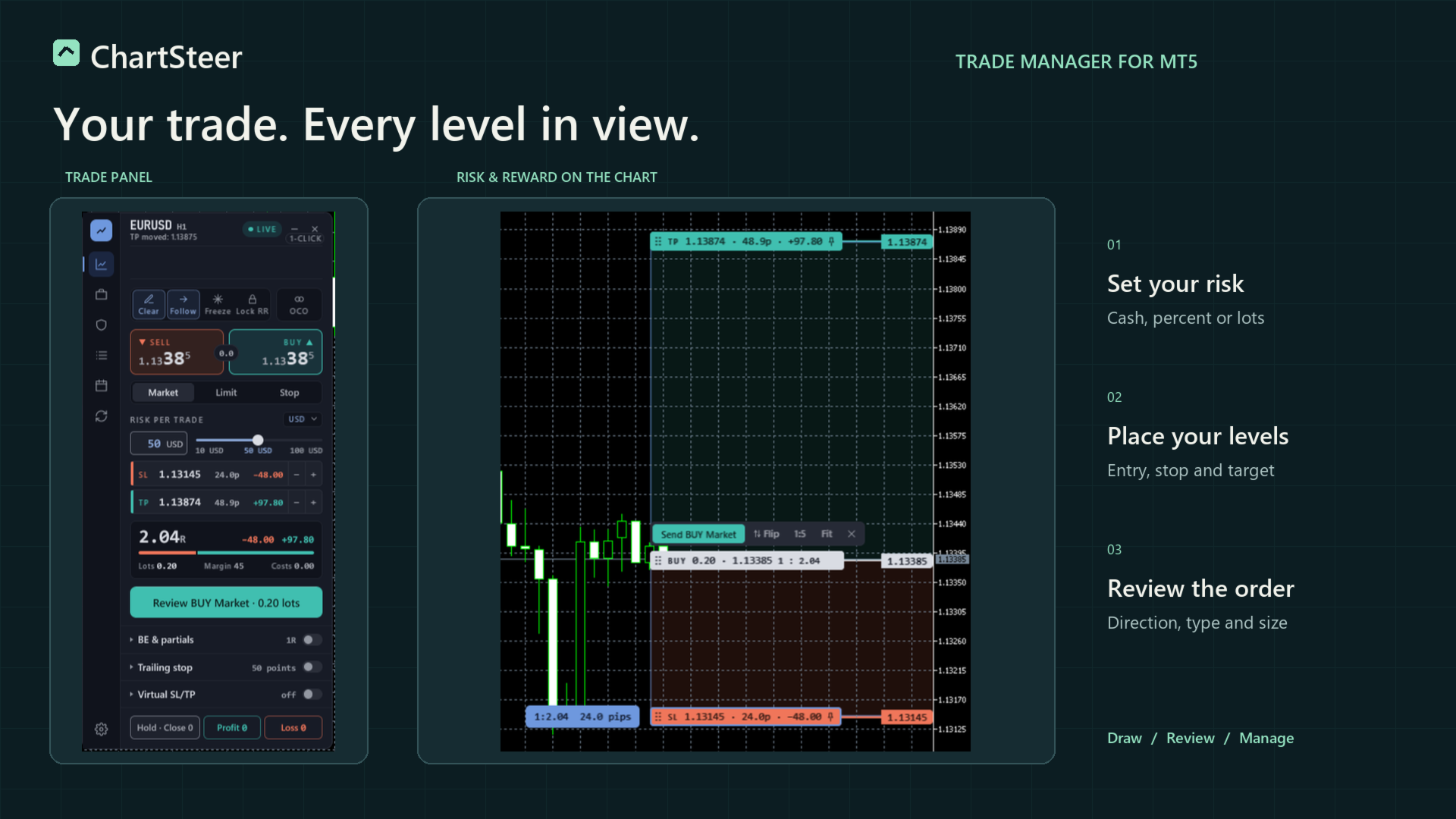
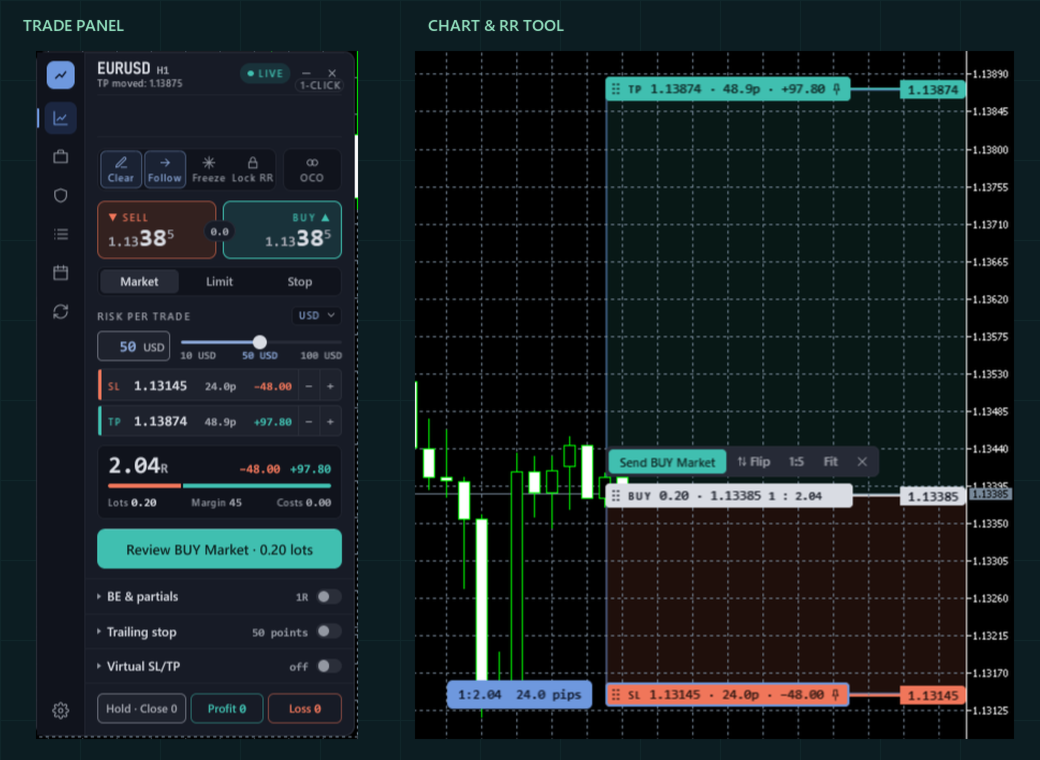
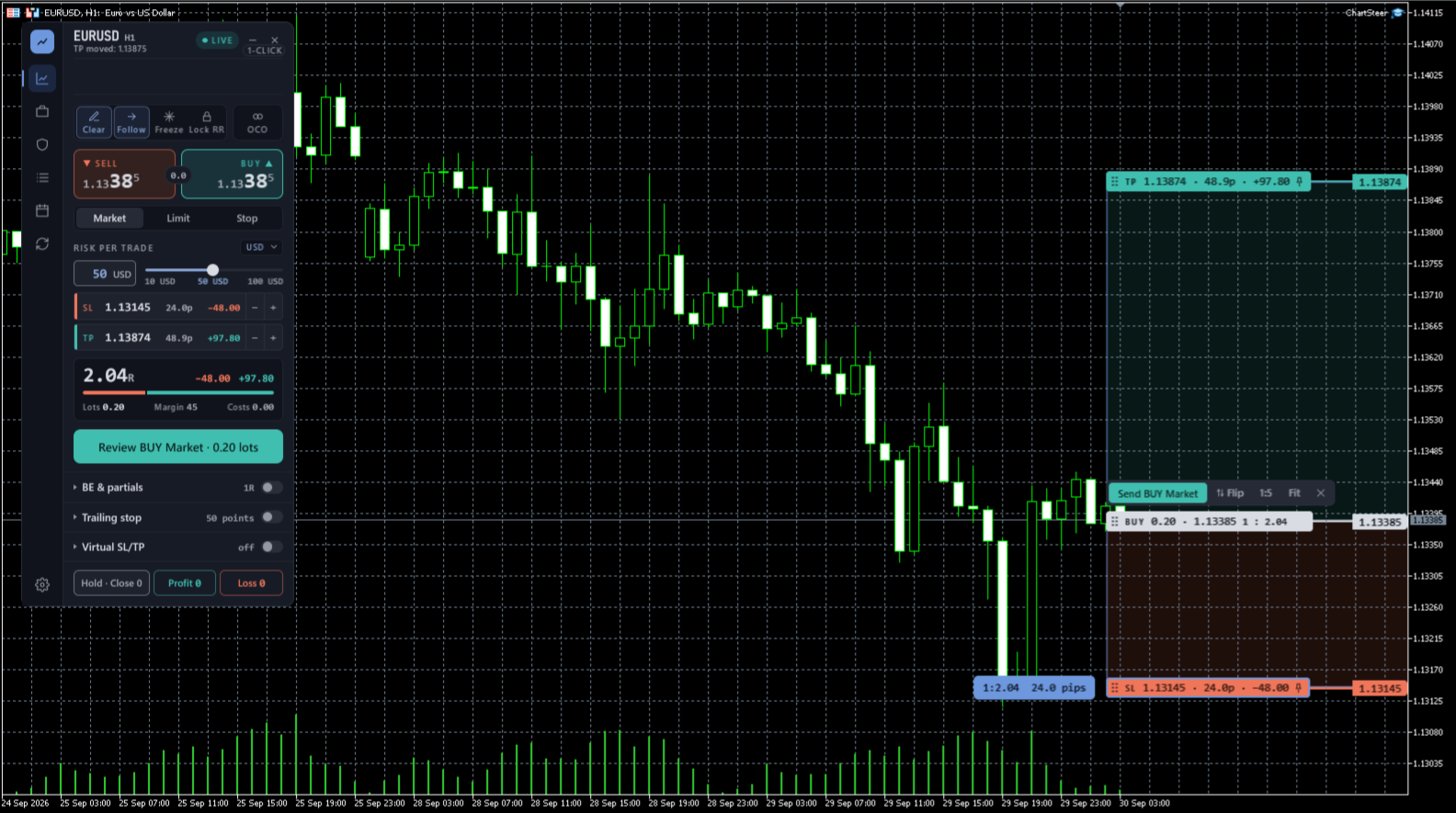
Plan entry, stop loss and take profit on the chart. Choose your risk, review the calculated lot size, then manage the position from the same panel. ChartSteer is built for traders who choose their own entries and want a clear view of the order and its management rules.

Plan the trade and see the risk

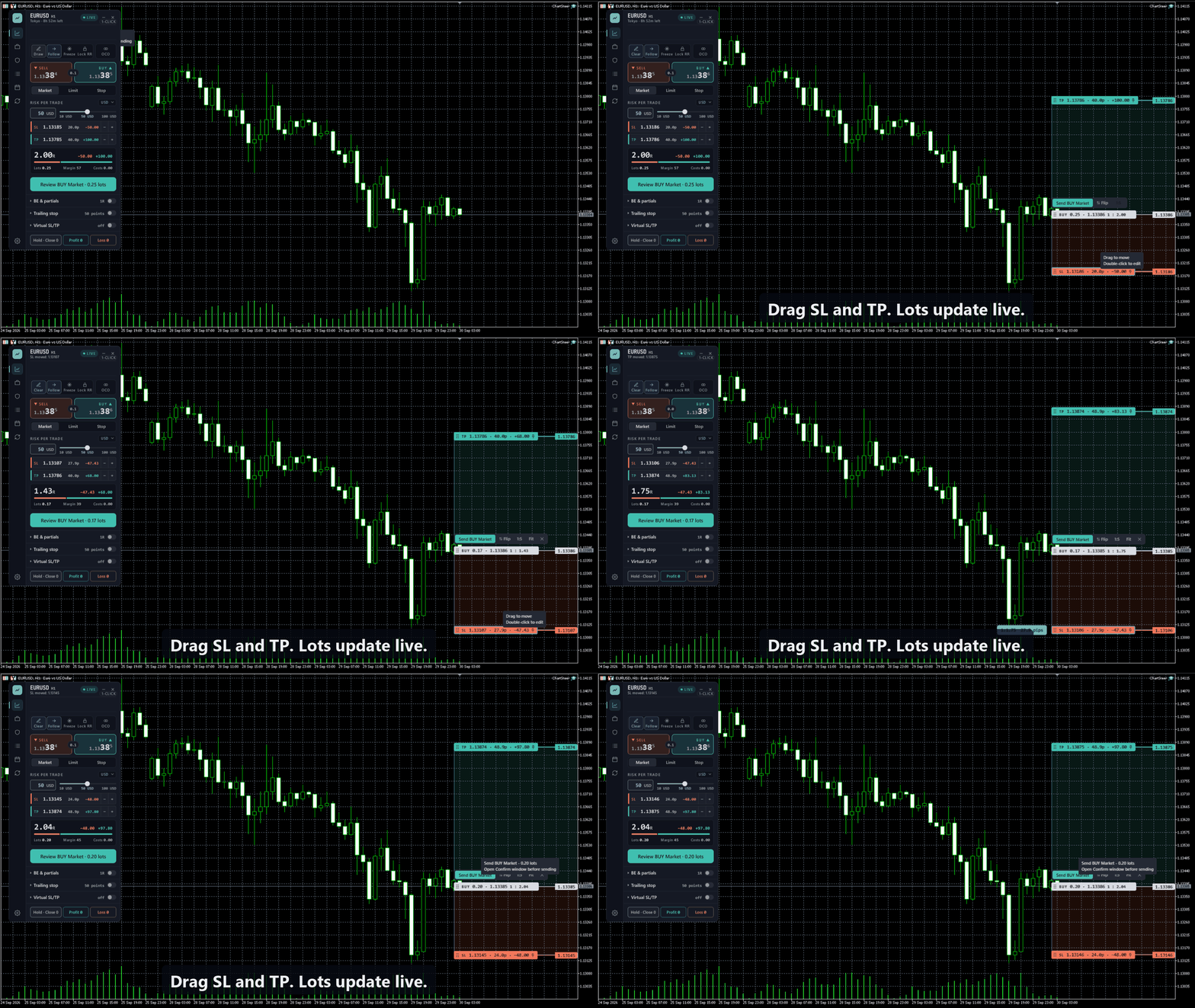
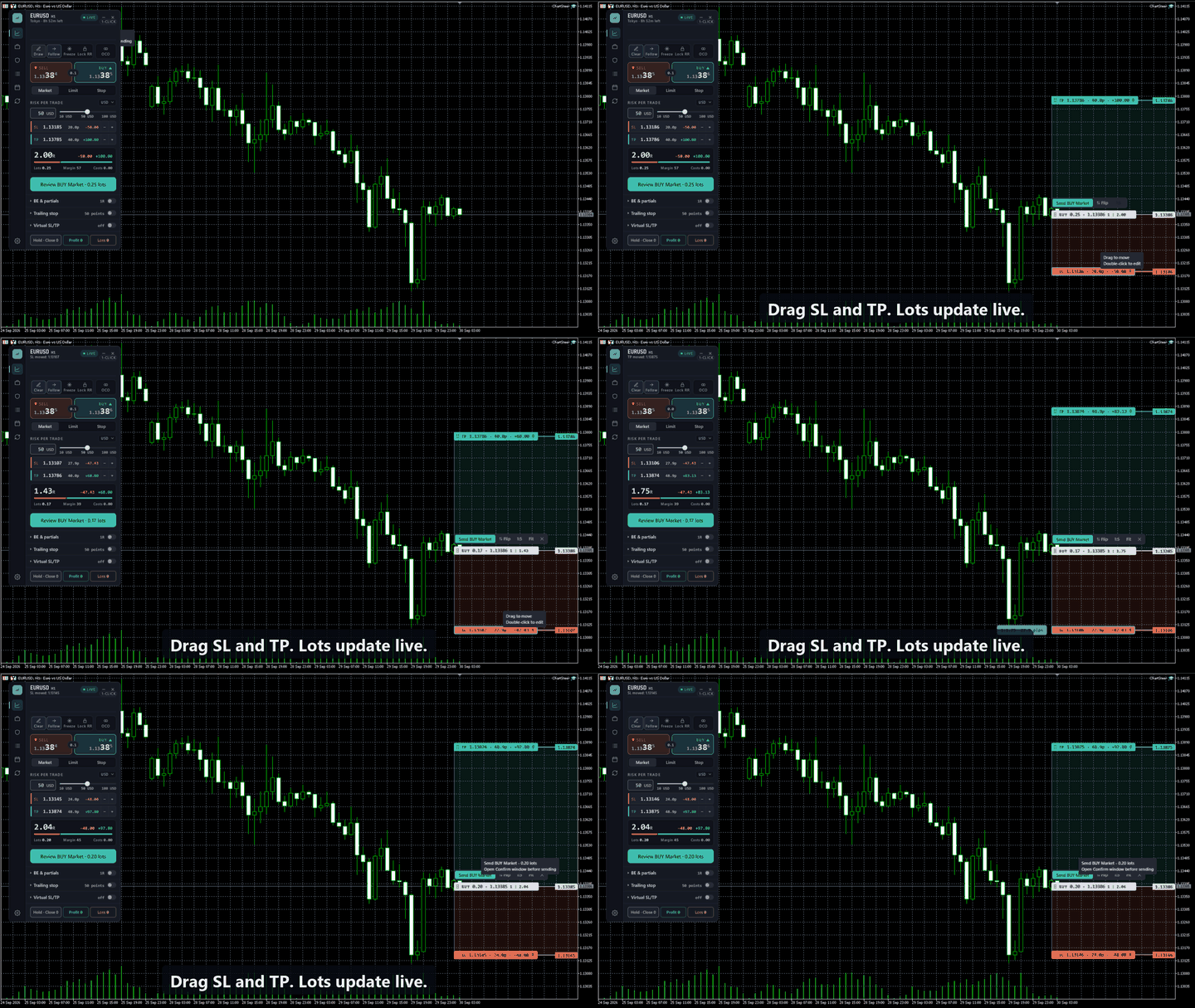
  • Risk-based lot sizing: choose cash risk, a percentage of balance or equity, or fixed lots. Risk-based modes recalculate volume when the stop changes.
  • Visual risk and reward: drag entry, SL and TP. Read prices, distances, estimated money values and the planned R:R together. Double-click a tag to edit an exact level.
  • Follow, Freeze and Lock R:R: Follow keeps a market entry at the quote. Freeze holds SL and TP prices when entry moves. Lock R:R links the levels at the chosen ratio; Freeze takes priority when both are enabled and entry moves.
  • ATR draft levels: start a new plan with ATR-based stop and target distances, then review and adjust the prices.

Place and manage orders

  • Market and pending orders: plan market, limit and stop entries. Check the full order type on the Send control before confirming.
  • Large-order splitting: split a larger order into broker-sized parts while keeping the planned levels.
  • OCO groups: link pending orders so that, when one activates, ChartSteer requests cancellation of the remaining orders in the group.
  • Bulk actions: manage selected trades or filter actions by profitable positions, losing positions, BUYs or SELLs. Review the affected trades before confirming.

Manage exits in stages

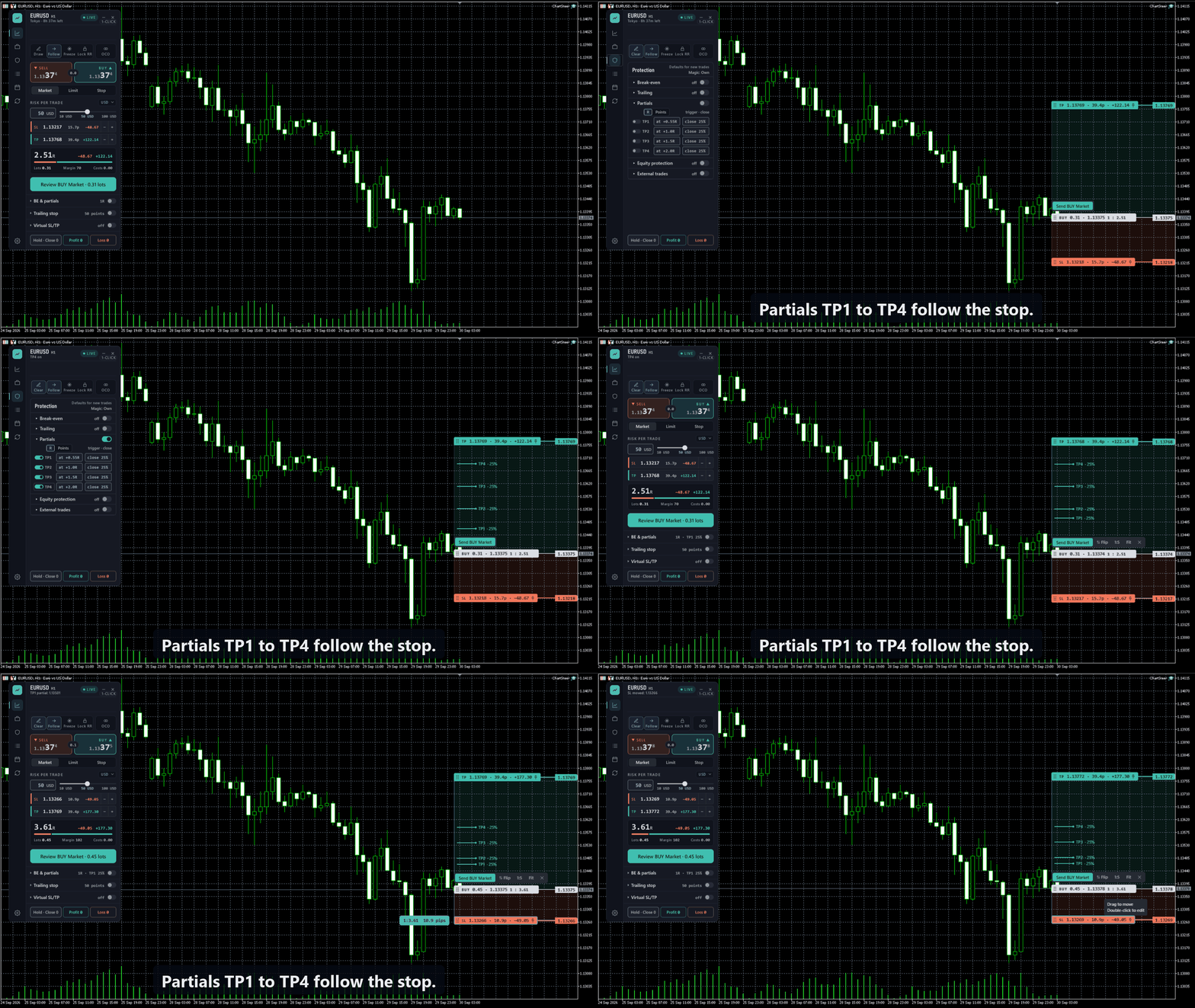
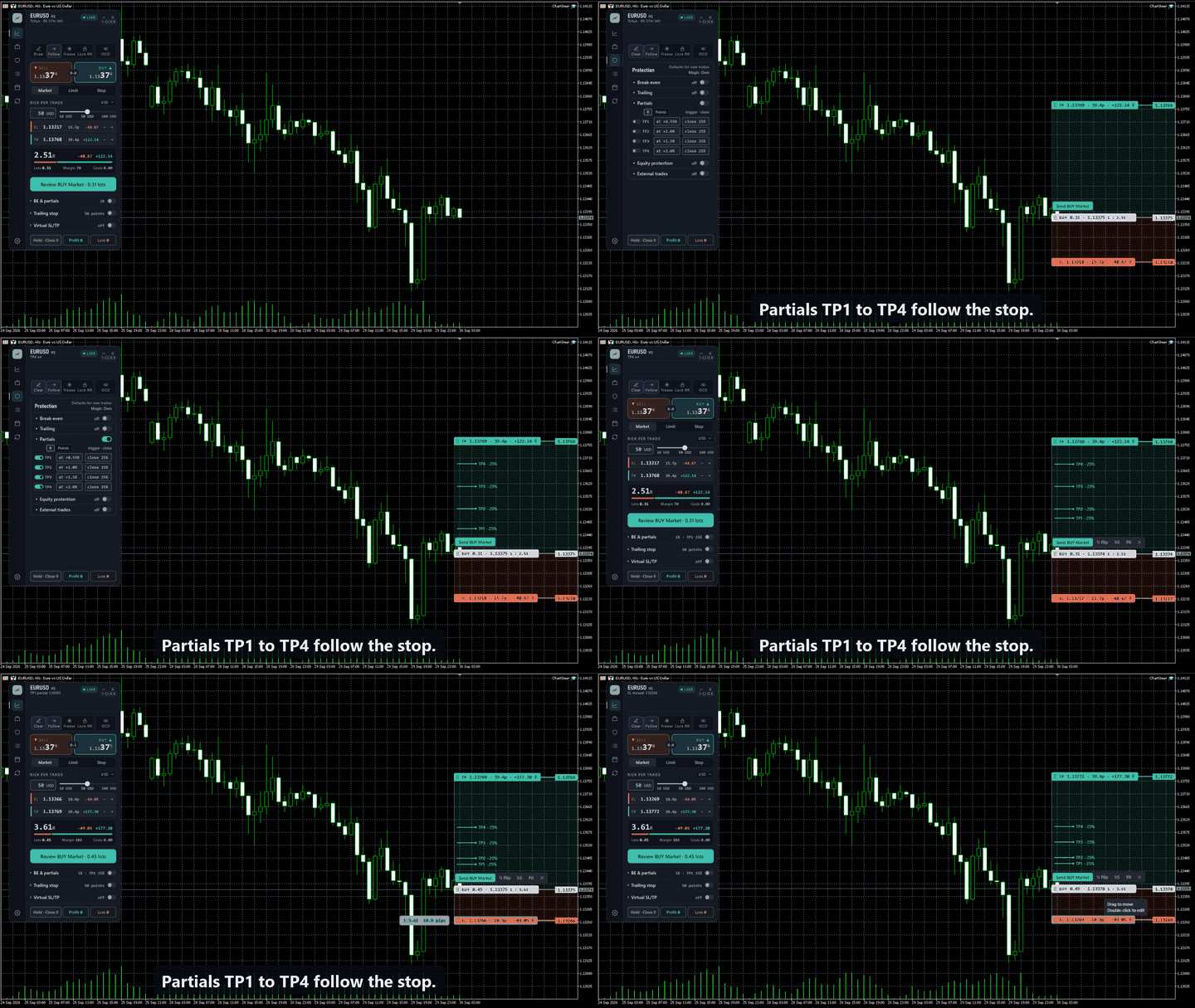
  • TP1–TP4 partial exits: configure up to four stages, each with its own trigger and closing amount. Show or hide the chart marks while retaining the saved settings.
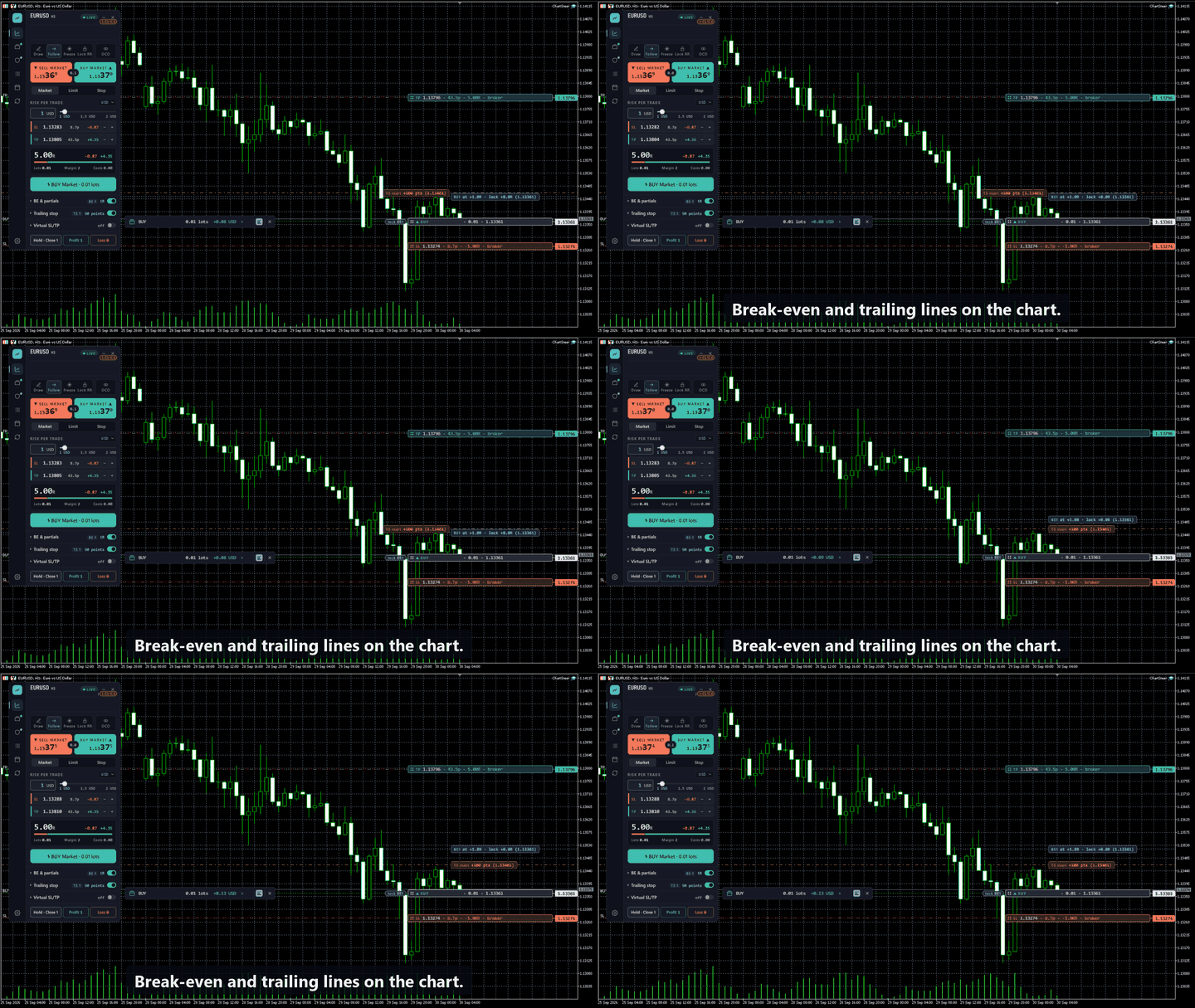
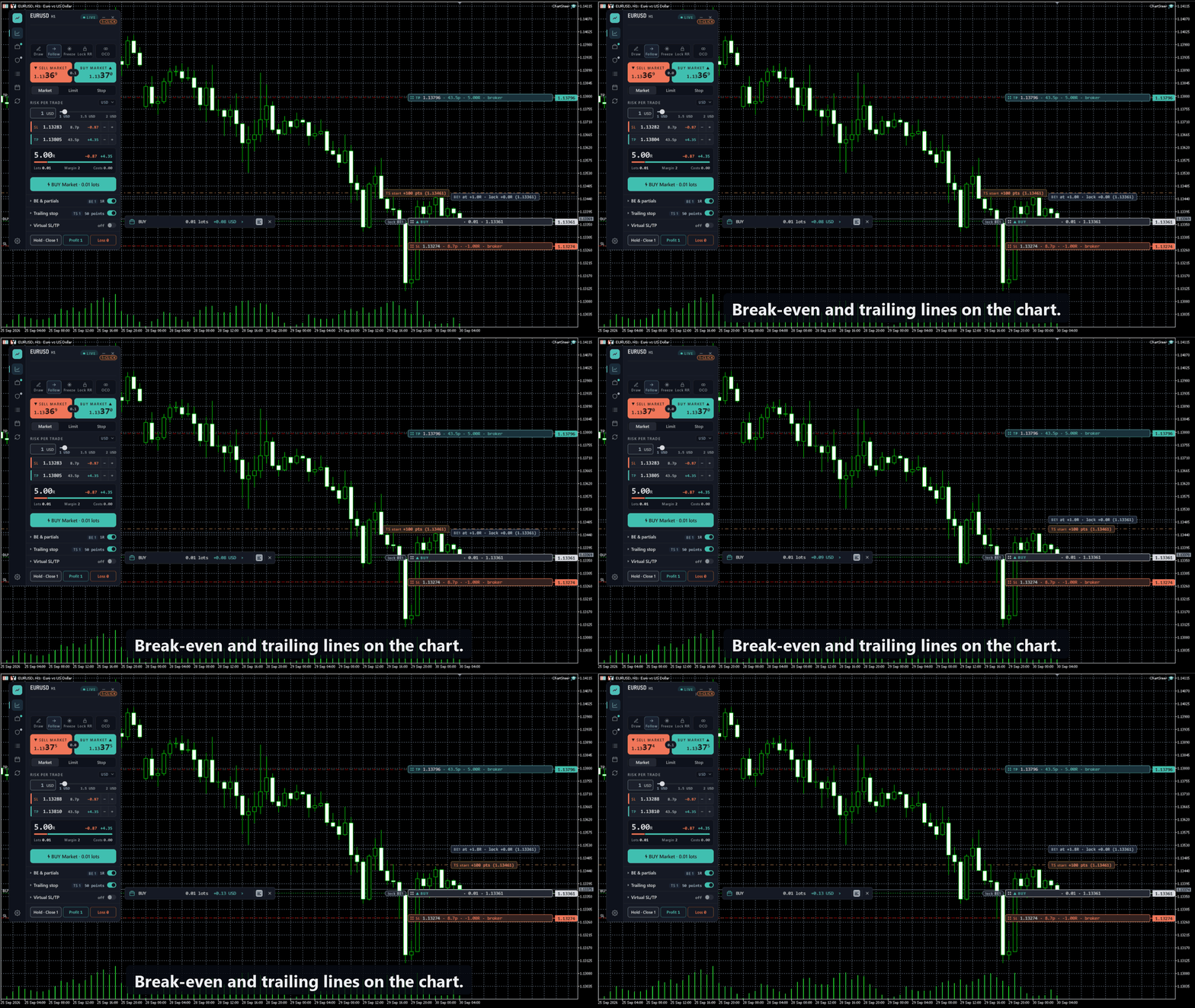
  • Break-even: set when a stage becomes eligible and where it should move the stop. The trigger line and the requested stop level are different.
  • Trailing stop: choose the start, distance and step. Use the position’s Rules editor to change an existing trade.
  • Broker or virtual levels: inspect the execution mode for entry and protective levels before applying a change.
  • Equity controls: set profit and loss thresholds to pause new ChartSteer orders, or close trades in the selected scope and pause.
  • External trades: optionally include manually or externally opened positions in the management scope. Check which trades the setting covers.

Set up your workspace

Choose Night desk, Day desk, Graphite or Deep ocean. Adjust panel scale, text, density and RR colours. Floating RR tag hints are optional. Configure chart hotkeys for common actions. Filter the economic calendar by currency and impact, with forecast, previous and actual figures when available.

See it before you buy

The animations below show RR planning, partial exits and break-even/trailing lines. For hands-on use on a broker demo account, the one-month rental provides the full product. The Market’s free demo download is limited to Strategy Tester; it is not a trial for normal demo-account charts. For compatibility or setup questions, contact the developer through the MQL5 profile.

Start with a plan

  1. Install ChartSteer from the MT5 Market and attach it to a chart.
  2. Set EnableTrading = false to practise drawing and sizing without sending orders.
  3. Choose the side and risk mode, draw the levels, then read the lots, risk and order type.
  4. Review before confirming. Confirmations are enabled by default; one-click mode is optional.

MetaTrader 5 for Windows is required. DLL imports are not required. Check your broker’s volume limits, order restrictions and execution settings before trading.

How management runs

Keep ChartSteer attached, MT5 running and connected, and trading permissions enabled for virtual triggers, automatic partials, break-even, trailing, OCO cancellation and equity close-outs. Accepted broker SL/TP remains at the broker. Management requests depend on broker acceptance; fast markets can fill both OCO orders before cancellation.

Break-even and trailing defaults apply to trades opened afterwards; edit existing positions through their Rules. Automatic partial percentages use original volume and remain subject to minimum-lot and volume-step restrictions.

ChartSteer does not choose entries or promise returns. Planned risk is an estimate: costs, gaps, slippage and execution restrictions can change the result.
Prodotti consigliati
Trade Manager MVP MT5 is a chart-based position sizing, order execution and trade management tool designed to help manual traders plan setups, control risk and manage positions from one compact panel. Define Entry, Stop Loss, TP1, TP2 and Final TP using draggable chart lines. Set your preferred risk percentage, and the EA calculates the position size from the Stop Loss distance. Moving the Entry line automatically moves the other levels while preserving their configured pip distances. Key Featur
EAs Manager
Abdeljalil El Kedmiri
5 (2)
Are you running multiple EAs on the same MT5 account and losing sleep over stacked risk? EAs Manager Pro is the central risk-control layer for your entire MT5 account. Attach it to one chart, and it automatically detects every EA you're running by  Magic Number — no source code changes, no per-EA setup. It then monitors every  position, automated or manual, and enforces the risk rules you set across your whole account, not just one strategy at a time. Built for traders running scalpers, breakout
Grid Trading EA is a semi-automated one-click trading EA for both Normal Trading and Grid/Martingale Trading . Normal Trading Simply click Buy or Sell directly from the chart. The EA will automatically manage trades by: Setting Stop Loss and Take Profit Managing Trailing Stop Grid / Martingale Trading (For Hedging Account Type Only) When Grid Trading mode is enabled, the EA will automatically open additional grid orders at specified distances while increasing the lot size based on your settings.
DGem Trade Manager Panel
Damien Jean Michel Gremillet
Trade Manager Panel ## Short description  Manage your manual trades with one click: automatic break-even, trailing stop, two-level partial close and risk-based lot sizing — all from a single on-chart panel. --- ## Full description Trade Manager Panel is an on-chart utility that takes care of your open trades so you can focus on the market instead of the order ticket. Drop it on any chart and it manages every position on that symbol automatically, while an interactive panel lets you size new
no Trade operation, Robot Set auto SL to every manually Trade from a Phone Automatic Phone TradeManager Need just Set on 1 Symbol Auto BE Trigger is added that immediately sets a stop-loss for every () But does NOT calculate position size based on risk, allows the fixed  SL to   adjusted dynamically drag on Chart or Menu. It protects capital around the clock, reduces emotional mistakes, and ensures consistent risk management.
FREE
Synchronizer
PATRICK PAARSCH
This Expert Advisor monitors all open positions across all symbols in MetaTrader 5. Whenever a Stop Loss (SL) or Take Profit (TP) is manually set or adjusted on any position, the EA automatically applies that value to all other open positions , regardless of symbol or order type (Buy/Sell). This ensures consistent and synchronized SL and TP levels across your account. Perfect for mobile trading via tablet or smartphone!
**Forex Trade Manager Pro MT5** **Trade Manager MT5** è un utility completa per la gestione delle operazioni di trading per MetaTrader 5 che ti offre il controllo totale su ogni aspetto della tua posizione, dal momento in cui pianifichi un'operazione al momento in cui la chiudi. È progettato per i trader che prendono sul serio il rischio, dal principiante che costruisce disciplina allo scalper professionista che necessita di esecuzione immediata su più posizioni. Lo strumento si aggancia a qu
Time-Based Auto-Close Order Management Tool (MT5) — Technical Description Overview This is an automated order management EA based on time-algorithm logic. Its core function is to automatically execute preset closing operations when user-defined holding periods expire, aiming to help traders enforce predetermined rules mechanically and reduce emotional interference. Core Closing Modes Closing Mode Functional Definition Close All Closes all eligible positions when the set time is reached. Close
AZ Trade Recovery Assistant MT5 combines manual trading flexibility with intelligent automated management.This advanced on-chart panel isn’t just for trade execution — it’s a complete trade management assistant. You can open or close positions instantly, adjust lot size, manage trailing stops, and modify Take Profit or Stop Loss — all directly from the panel. It’s built for traders who want full control of their trades with smart automation running in the background. What truly makes this assist
Apex StopLoss Manager
Muhammad Hassan Muhammad Ahmad Atiyah
Apex StopLoss Manager MT5 Script – Stop Loss Control Utility Overview Apex StopLoss Manager is a trade management script for MetaTrader 5 designed to provide precise, rule-based control over Stop Loss behavior on existing open positions . The script focuses on manual execution and accuracy. It does not use automated trading logic, does not open trades, and runs once per attachment . Core Functionality The script provides two independent Stop Loss control functions, both enabled only through exp
Open Trade MT5
Frank William Jr Colbert
A basic entry and position management EA that opens trades on multiple currency pairs at specific times. It includes its own internal trailing stop and take-profit logic, as well as integrated "end-of-day" and "Friday" profit-close features from the other scripts. Features: Opens trades on user-defined `PairsSet1` through `Set6` at specific `TradeTime` inputs. Configurable position sizing (`Lots`), Stop Loss, and Take Profit. Includes its own `TrailOrders` function that trails both SL and TP b
Check an MQL5 signal before you subscribe. A signal can look convincing on the provider page and still be a poor fit for your account. Different symbol names, minimum lots, leverage, hedging or netting, copy latency and a fixed monthly fee can materially change what happens on your account. MT5 Signal Sentinel is not a trading robot and not a signal. It does not trade. It analyzes available data and explains technical and historical risks in plain language. Why this tool was created Many problem
This tool will perform Trailing stop loss and Break even management for orders. Helps you limit or reduce the time spend watching orders on the screen, especially when you need to go to sleep. Just add this EA to 1 chart, you can manage all pairs. You can filter orders by comment, magic number, symbol and order ticket number. When Breakeven it can add shift/offset pips (to cover the commission...). You can try in strategy tester before purchase. The EA will add Buy and Sell alternately, so you
Trade Panel HotKey – MT5 Scalping Utility Fast Trade Panel HotKey is a lightweight MT5 trading utility designed for traders who need to open, manage, and close positions as quickly as possible . The main purpose of this tool is to reduce the time between a trading decision and execution. Instead of moving the mouse, opening order windows, or manually modifying multiple positions, most important actions can be performed instantly through customizable keyboard hotkeys or directly from the compact
Smart Sl Tp Manager For Mt5 is a lightweight and reliable trading utility designed to help you manage risk automatically. It instantly sets Stop Loss and Take Profit levels for every manual trade you open, ensuring your positions are always protected. Perfect for traders who want more discipline, less stress, and consistent risk management. Key Advantages Automatic SL & TP for all manual trades Works with both Netting & Hedging accounts Re-applies SL/TP when you add new positions Simpl
FREE
How to Use the  Features           MT4 VERSION   TRADE COPIER Select Role: On the account sending trades, choose Sender (Master Account) . On the account receiving trades, choose Copier (Receiver Account) . Lot Size Mode: Same Lot Size as Master: Ignores multipliers, copies exactly what the Master has. Multiply Master Lot Size: Uses the "Lot Multiplier" field (e.g., Master 0.10, Multiplier 2.0 = Copier 0.20). Use Fixed Lot Size: Ignores Master's volume entirely, uses the "Fixed Lot Size" field f
Six18 Lot size calculator
Lesiba Sylvester Sebola
Six18 LOT SIZE CALCULATOR FOR MT5 LOT SIZE CALCULATOR + AUTOMATED TRADE EXECUTION Stop calculating your lot size manually. Let Six18 do the math for you. Want to risk   1%, 2%, 5% — or a specific dollar amount   on a trade? Simply enter your desired risk as a   percentage (%) or fixed dollar amount ($) . Six18 automatically calculates the appropriate lot size for your account and Stop Loss distance. NO MORE MANUAL LOT-SIZE CALCULATIONS. NO MORE GUESSING. Whether your account is   $1,000, $10,000
Prop Firm Shield Full
Pablo Adolfo Cantos
Prop Firm Shield is a risk management panel for MetaTrader 5, built for prop firm traders who need control over their daily limits. You configure each limit and the tool watches the account around the clock, acting automatically when a limit is reached: closing positions, deleting pending orders and blocking new trading until the next day. Features: - Daily Take Profit - three modes: fixed USD, percent of the day-start balance, or target balance - Daily Stop Loss - three modes: fixed USD, percen
Exit strategy
Samuel Njenga Nganga
Introducing Exit strategy EA – Smart Trade Manager for MT5, designed to save you screen time and manage your open trades. Set your own TP levels. SL adjustments. Lot size percentages. How It Works: Set up to 2 Take Profits for each trade (TP1,TP2). I can add more TP levels  At each target hit: 1. Automatically close a customizable percentage of your position e.g 50% close on TP1 2. Instantly adjust your Stop Loss to a predefined level e.g Move stop loss to breakeven at TP1 hit. Why Y
Trade Assistant MT5 — Trade Manager for Prop Firms Trade Manager for MT5 that calculates position size, manages risk, visualises your trade setup in real time and protects your account with built-in daily loss and trade limits — everything you need to trade with consistency and pass your prop firm challenge. > Trade Tab — Position Sizing & Execution **Automatic lot calculation** Enter your risk as a percentage of account balance or as a fixed dollar amount and the panel instantly calculates t
Telegram Notify MT5 Telegram Notify MT5 is an utility tool to bridge your MetaTrader 5 activities to your Telegram chat/channel. It is useful for monitoring your MetaTrader 5 account by sending a notification to your particular Telegram chat/channel when someone/EA is placing trades, modifying order's TP/SL, closing trades and etc. This EA does not place any trade for your account. This EA also could be a convenient tool for monitoring other's EA trading activities or a tool for publishing your
Firefly Position Manager V1
Archibold Martei Martey
Overview (main description) Stop guessing your lot size. Start trading with precision. Firefly Position Manager V1 is a chart-based position sizer and trade manager for MetaTrader 5. It gives you the same workflow serious traders use with professional sizing tools: set your entry, stop, and target, see exact risk and reward in money and R:R, then execute — without spreadsheets or mental math. Whether you scalp, swing, or manage multiple symbols, FPM keeps every decision visible on one clean pane
Trade Control Panel
Jerry Jilun Anak Liban
Trade Control Panel Function Normal One Click Function Close All Close All Profit Close All Loss Close All Pending Order Close All Sell Close All Buy Advance One Click Function 1.  Close Partial Lot Sell by Percent It will help you partial close for all open position by desire percent you wanted. No longer partial close one by one for every open position Manual input for desire percent 2. Close Partial Lot Buy by Percent It will help you partial close for all open position by desire percent
Key Benefits at a Glance: Lorentzian ML signal generation Majority voting across 3 timeframes Automatic market regime detection Smart equity recovery with group profit targets 1% risk‑based adaptive lot sizing ATR‑based dynamic SL/TP & trailing Emergency drawdown cut Live on‑chart info panel Hybrid Lorentzian Gold ML EA v2.0 – Intelligent Adaptive Trading for XAUUSD Next‑Gen Machine Learning Core A Lorentzian KNN classifier analyzes 5 normalized features (RSI, WaveTren
FREE
Advanced Risk Return Tool
Felipe Monteiro Rodrigues
Advanced Risk Return Tool è un'utilità visuale per la pianificazione e la gestione del Rischio/Rendimento in MetaTrader 5. Lo strumento consente di creare e gestire strutture di Acquisto e Vendita direttamente sul grafico, posizionando visivamente i livelli di Entrata, Target e Stop , oltre a mostrare il rapporto Rischio/Rendimento, le distanze in pip, il volume e i valori finanziari. Le strutture sono interattive e possono essere regolate direttamente con il mouse. Funzioni Principali Strutture
AZT Plocker
Ntobeko Zulu
The AZT Profit Locker is an advanced automated risk-management utility designed specifically for MetaTrader 5 (MT5) traders who want to remove emotional interference and protect their hard-earned profits. Traders aren't just fighting the Forex market, they're fighting their own biology. Fear, Greed and Anxiety lead to holding losers too long and cutting winners too early. The utility flips the script by removing emotion from risk management. Operating as a dedicated automated risk manager, this
Zone Trader is a professional semi-automated trading assistant designed to help manual traders execute precise grid strategies with built-in risk management. Instead of manually calculating lot sizes and placing individual pending orders, Zone Trader allows you to visually define your grid directly on the chart using drag-and-drop lines. With a single click, the EA calculates the risk, splits the volume across your specified layers, and places the necessary orders to fill the zone between your S
Copy Trade Pro MT5
Nitu Brijesh Yadav
MasterEA MT5 Premium – Professional Copy Trade Sender One Purchase. Unlimited Possibilities. MasterEA MT5 Premium is a professional MT5 trade broadcasting solution that instantly sends your trading activity to one or multiple receiving accounts. Buy only the Master EA. SlaveEA MT5 Premium (Trade Receiver) is included FREE with your purchase. No additional payment is required for the Receiver EA. What Can Be Copied? MasterEA automatically broadcasts: Market Buy Orders Market Sell Orders
SMT Trade Planner e un calcolatore di rischio professionale e pannello di esecuzione ordini direttamente sul grafico MetaTrader. Calcola la dimensione del lotto, mostra linee visuali di entrata, Stop Loss e Take Profit trascinabili sul grafico, valida il trade contro regole di rischio configurabili e permette l'esecuzione con un clic.   Come funziona Allega il Trade Planner a qualsiasi grafico. Il pannello mostra le informazioni del conto e pulsanti di selezione rapida del rischio. Tre linee ori
Bneu News Filter Pro
Marvinson Salavia Caballero
Bneu News Filter is a trading utility for MetaTrader 5 that monitors economic calendar events and manages trading activity during high-impact news releases. The utility provides automatic position protection, real-time spread monitoring, and optional news trading functionality through a visual panel interface. Main Functionality Economic Calendar Integration Automatic retrieval of economic calendar events from the MetaTrader 5 built-in calendar. Monitors 8 major currencies: USD, EUR, GBP, JP
Gli utenti di questo prodotto hanno anche acquistato
Trade Assistant MT5
Evgeniy Kravchenko
4.43 (216)
It helps to calculate the risk per trade, the easy installation of a new order, order management with partial closing functions, trailing stop of 7 types and other useful functions. Additional materials and instructions Installation instructions - Application instructions - Trial version of the application for a demo account Line function -   shows on the chart the Opening line, Stop Loss, Take Profit. With this function it is easy to set a new order and see its additional characteristics bef
Forex Trade Manager MT5
InvestSoft
4.98 (685)
Benvenuto a Trade Manager EA, lo strumento definitivo per la gestione del rischio , progettato per rendere il trading più intuitivo, preciso ed efficiente. Non è solo uno strumento per l'esecuzione degli ordini, ma una soluzione completa per la pianificazione delle operazioni, la gestione delle posizioni e il controllo del rischio. Che tu sia un principiante, un trader avanzato o uno scalper che necessita di esecuzioni rapide, Trade Manager EA si adatta alle tue esigenze, offrendo flessibilità s
Telegram to MT5 MultiChannel Copier
Sergio Marquez Uroz
4.61 (18)
Telegram to MT5 Multi-Channel Copier   copia automaticamente i segnali di trading dai tuoi canali Telegram direttamente su MetaTrader 5. Niente bot, niente estensioni del browser, niente copia manuale. Il segnale arriva su Telegram e l'EA apre l'operazione nel tuo terminale in pochi secondi. E prima di copiare un canale, il backtester integrato ti mostra cosa avrebbe fatto quel canale sul tuo conto. Il prodotto include due componenti: un'applicazione Windows che ascolta i tuoi canali Telegram, e
================================================================================ POC BREAKOUT - V20.72. Full Professional Grade Toolkit ================================================================================ POC Breakout is a full MetaTrader 5 trading dashboard for discretionary traders who want breakout signals, Point of Control (POC) context, volume profiles, order flow, market structure, news, alerts, and advanced trade planning in one professional workspace. Attached directly to you
TradePanel MT5
Alfiya Fazylova
4.88 (170)
Trade Panel è un assistente commerciale multifunzionale. L'applicazione contiene più di 50 funzioni di trading per il trading manuale e permette di automatizzare la maggior parte delle attività commerciali. Istruzioni per l'applicazione: https://www.mql5.com/it/blogs/post/762331 Versione di prova dell'applicazione per un conto demo: https://www.mql5.com/it/blogs/post/762419 Come installare l'applicazione: https://www.mql5.com/it/blogs/post/762362 Come testare l'applicazione in modalità visuale:
Copia i segnali Telegram con le tue regole di trading Telegram to MT5 Signal Trader copia automaticamente i segnali di trading testuali dai canali e gruppi Telegram pubblici e privati in MetaTrader 5. Gestisci più fornitori e conti MT5 da un'unica applicazione desktop, con impostazioni di rischio e di trading specifiche per ogni fornitore . Per copiare i segnali non servono bot Telegram né configurazioni API. Accedi semplicemente con il tuo account Telegram tramite numero di telefono o codice QR
Power Candles Strategy Scanner - Strumento di ricerca configurazioni multi-simbolo con ottimizzazione automatica Power Candles Strategy Scanner utilizza lo stesso motore di auto-ottimizzazione che alimenta l'indicatore Power Candles, applicandolo a tutti i simboli presenti nel tuo Market Watch, uno accanto all'altro. Un unico pannello ti indica quali simboli sono statisticamente negoziabili in questo momento, quale strategia è vincente su ciascuno di essi, la coppia ottimale di Stop Loss / Take
FarmedHedge Pair Trading Dashboard
Tanapisit Tepawarapruek
5 (5)
Farmed Hedge Yield Farming | All Markets (Manual - Hybrid - Semi/Automated EA) VERIFIED TRADING RESULTS - Farmed Hedge Yield Axi Copy:  https://www.mql5.com/en/signals/2356376 - Farmed Hedge Yield Exn Copy:   https://www.mql5.com/en/signals/2356404 - Farmed Hedge Yield V Copy:  https://www.mql5.com/en/signals/2357156 IMPORTANT NOTICE: FarmedHedge is a MANUAL-FOCUSED TRADING UTILITY ,not a fully automated EA. Results shown on this Signal include manual trades and overall strategic management.
Grid Manual MT5
Alfiya Fazylova
4.73 (22)
Grid Manual è un pannello di trading per lavorare con una griglia di ordini. L'utilità è universale, ha impostazioni flessibili e un'interfaccia intuitiva. Funziona con una griglia di ordini non solo nella direzione delle perdite, ma anche nella direzione dell'aumento dei profitti. Il trader non ha bisogno di creare e mantenere una griglia di ordini, lo farà l'utilità. È sufficiente aprire un ordine e il manuale di Grid creerà automaticamente una griglia di ordini per esso e lo accompagnerà fino
Footprint Chart Pro — Professional OrderFlow EA for MetaTrader 5 Version 6.34 | Professional tool for real traders | Institutional-Grade Visualization DEMO USERS - PLEASE SELECT EVERY TICK / REAL TICK WHEN TESTING AND YOU HAVE DOWNLOADED HISTORICAL DATA. IF YOU SEE A WAITING SCREEN AND IT IS NOT DOWNLOADING, IT MEANS YOU HAVE LOW HISTORICAL DATA. TRY 1 MIN AND 5 MIN FIRST ON 1 DAY DATA. ONE DAY DATA SHOULD BE THE NEWEST AND MOST CURRENT DATE. PLEASE WAIT UNTIL THE MARKET HAS ROLLED OVER PERIOD.
Welcome to ENTRY IN THE ZONE AND SMC MULTI TIMEFRAME /  Official Website :   https://www.fableedge.net Entry In The Zone and SMC Multi Timeframe is a real-time market analysis tool based on Smart Money Concepts (SMC), designed to analyze market structure, price direction, and key trading zones. It supports both Single-Timeframe Analysis and Multi-Timeframe Analysis, providing a clearer view of the overall market structure across multiple timeframes, with real-time BUY / SELL signals that do not
MT5 to Telegram Signal Provider è un'utilità facile da usare e completamente personalizzabile che consente l'invio di segnali specificati a una chat, canale o gruppo Telegram, rendendo il tuo account un fornitore di segnali. A differenza della maggior parte dei prodotti concorrenti, non utilizza importazioni DLL. [ Dimostrativo ] [ Manuale ] [ Versione MT4 ] [ Versione Discord ] [ Canale Telegram ]  New: [ Telegram To MT5 ] Configurazione Una guida utente passo-passo è disponibile. Nessuna cono
Premium Trade Manager - Il pannello di trading con un coach integrato Premium Trade Manager porta un coach di trading direttamente nel tuo grafico, con un motore di esecuzione completo al di sotto. Imposta il trade come fai sempre, poi lascia che Max, il tuo coach di trading IA, legga esattamente quel setup rispetto al tuo conto live e ti dia un verdetto chiaro prima che tu confermi: lo stop rispetta un approccio disciplinato, il rischio è ragionevole, c'è un evento ad alto impatto tra pochi min
Anchor Trade Manager
Kalinskie Gilliam
5 (9)
Your EAs cannot see each other, but Anchor can. Anchor gives you one place to coordinate your EAs, manage risk, and decide when trading is allowed. It works alongside the trading bots you already use without any changes to them. The Problem One EA opens a trade. Then another starts trading. The next thing you know, you wake up to multiple grids built across your account. Each EA may be doing exactly what it was designed to do, but together they can place far more risk on your account than you in
Trade Indicator Assistant   is a powerful MT5 utility designed to turn indicators into automated trading systems. Its main feature is the ability to automatically detect an indicator’s   BUY and SELL signal buffers , without requiring you to know the buffer numbers, search through indicator settings, or modify the indicator source code. Bonus Indicator:   After purchasing Trade Indicator Assistant, contact me to receive   Trade Signal Pro   completely free as a bonus indicator. [Download Demo V
Quant Panel
Kevin Craig E Gittins
QUANT PANEL Independent per-algo analytics, protected MT5 history and professional PDF reporting Quant Panel is built for traders who run several Expert Advisors or strategies on one MT5 account and need to know how each algo is actually performing. Instead of treating the terminal as one combined portfolio, Quant Panel groups closed positions by EA comment or magic number and calculates every strategy independently. It gives you one clear dashboard for comparing algos, finding weak systems and
YuClusters
Yury Kulikov
4.93 (43)
Attention: You can view the program operation in the free version  YuClusters DEMO .  YuClusters is a professional market analysis system. The trader has unique opportunities to analyze the flow of orders, trade volumes, price movements using various charts, profiles, indicators, and graphical objects. YuClusters operates on data based on Time&Sales or ticks information, depending on what is available in the quotes of a financial instrument. YuClusters allows you to build graphs by combining da
Trade Manager DaneTrades
Levi Dane Benjamin
4.23 (30)
Trade Manager per aiutarti a entrare e uscire rapidamente dalle operazioni calcolando automaticamente il tuo rischio. Incluse funzionalità che ti aiutano a prevenire l'eccessivo trading, il vendetta trading e il trading emotivo. Le operazioni possono essere gestite automaticamente e i parametri di performance del conto possono essere visualizzati in un grafico. Queste caratteristiche rendono questo pannello ideale per tutti i trader manuali e aiuta a migliorare la piattaforma MetaTrader 5. Suppo
DrawDown Limiter
Haidar Lionel Haj Ali
5 (23)
DrawDown Limiter v5.0 — Controller avanzato per la protezione del conto DrawDown Limiter v5.0 è un controller di protezione del conto lato client, progettato per monitorare il tuo conto di trading e reagire automaticamente quando vengono raggiunti i limiti configurati relativi a rischio, profitto, notizie, pianificazione, rollover o numero di posizioni. Può monitorare operazioni manuali, strategie automatizzate, più Expert Advisor, ordini pendenti e posizioni aperte da un unico grafico dedicato.
Smart Stop Scanner – Analisi multi-asset degli stop-loss basata sulla reale struttura di mercato Panoramica Smart Stop Scanner offre un monitoraggio professionale dei livelli di stop-loss su più mercati. Il sistema identifica automaticamente le zone di stop più rilevanti basandosi sulla reale struttura di mercato, sulle rotture significative e sulla logica del price action, presentando tutte le informazioni in un pannello chiaro, coerente e ottimizzato per schermi ad alta risoluzione (DPI-awar
Binance Quotes Updater
Andrey Khatimlianskii
5 (1)
This service is designed to stream online cryptocurrency quotes   from the Binance exchange to your MetaTrader 5 terminal. You will find it perfectly suitable if you want to see the quotes of cryptocurrencies in real time — in the Market watch window and on the MetaTrader 5 charts. After running the service, you will have fully featured and automatically updated  cryptocurrency charts in your MetaTrader 5. You can apply templates, color schemes, technical indicators and any non-trading tools to
The Expert Advisor will help you forward all alert from  MetaTrader 5 to Telegram channel/ group.  All alert must save to folder <Data folder>MQL5\Files\Alerts\ , text file with format *.txt and screenshot with format *.gif or *.png. Parameters: - Telegram Bot Token: - create bot on Telegram and get token. - Telegram Chat ID:  - input your Telegram user ID,  group / channel ID - Forward Alert: - default true, to forward alert. - Send message as caption of Screenshot: - default false, set true t
Prop Guardian Risk Manager MT5 – Drawdown, Risk & Hedge Protection for Prop Firm and Managed Accounts Prop Guardian Risk Manager is a professional risk-control utility for MetaTrader 5, designed for prop firm traders, money managers and anyone who wants strict account-level risk protection. It does not generate trading signals, strategy entries or trading decisions. Instead, it runs in the background, monitors your account risk and can automatically block new exposure, close managed positions or
Mentfx Mmanage mt5
Anton Jere Calmes
4.25 (8)
The added video will showcase all functionality, effectiveness, and uses of the trade manager. Drag and Drop Trade Manager. Draw your entry and have the tool calculate the rest. Advanced targeting and close portions of a trade directly available in tool (manage trades while you sleep). Market order or limit order on either side with factored spread. Just draw the entry, the tool does the rest. Hotkey setup to make it simple. Draw where you want to enter, and the stop loss, the tool calculates al
The product will copy all telegram signal to MT5 ( which you are member) , also it can work as remote copier.  Easy to set up, copy order instant, can work with almost signal formats, image signal,  s upport to translate other language to English Work with all type of channel or group, even channel have "Restrict Saving Content", work with  multi channel, multi MT5 Work as remote copier: with signal have ticket number, it will copy exactly via ticket number. Support to backtest signal. How to s
Trade Manager DashPlus
Henry Lyubomir Wallace
4.85 (13)
DashPlus è uno strumento avanzato di gestione delle operazioni progettato per migliorare l'efficienza e l'efficacia del trading sulla piattaforma MetaTrader 5. Offre una suite completa di funzionalità, tra cui calcolo del rischio, gestione degli ordini, sistemi di griglia avanzati, strumenti basati su grafici e analisi delle prestazioni. Caratteristiche Principali 1. Griglia di Recupero Implementa un sistema di griglia flessibile e di media per gestire le operazioni in condizioni di mercato avve
EA Overfitter
Stephen J Martret
5 (1)
That backtest looks great. But will it still be making money tomorrow, next week, next month? EA Overfitter re-runs your EA on 100 price histories it has never seen. One score tells you if the edge is real. A backtest tells you what an EA did on one price history — the one that happened to occur. What you cannot tell from it is how much of that result was the strategy and how much was the particular path. EA Overfitter answers that. It builds up to 100 synthetic price histories your EA has n
EasyInsight AIO MT5
Alain Verleyen
4.92 (12)
EASY Insight AIO – La soluzione all-in-one per un trading intelligente e senza sforzo Panoramica Immagina di poter analizzare l’intero mercato — Forex, Oro, Cripto, Indici e persino Azioni — in pochi secondi, senza dover controllare manualmente i grafici, installare indicatori o affrontare configurazioni complicate. EASY Insight AIO è il tuo strumento definitivo di esportazione per il trading alimentato dall’IA, pronto all’uso. Offre una panoramica completa del mercato in un unico file CSV pul
MT5 Trading Deck
Manuel Michiels
5 (2)
One button. One trade. MT5 Trading Deck is a hotkey trading panel for MetaTrader 5 that turns the platform into a keyboard-driven execution cockpit. Stop loss, take profit and lot size are pre-calculated for every key; the moment you press, a market order is live on the broker. A complete technical user manual is attached in the product Comments section. It documents every input parameter, the full hotkey map, the recommended Stream Deck XL layout, and the advanced workflows for Pre-Limit orders
VERON LINK MASTER MT5 — Real-time Multi-Account Dashboard & Sync Controller Veron Link Master is a high-performance, centralized monitoring and synchronization control center designed for MetaTrader 5. Built specifically for traders managing multiple accounts, prop firm portfolios, grid/martingale EAs, or client networks, Veron Link Master provides a seamless, ultra-modern dark-themed GUI dashboard directly on your MT5 terminal. ️ Important Requirement / System Usage: To use this system, yo
Filtro:
Nessuna recensione
Rispondi alla recensione