Zone Trader MT5
- Utilità
- Versione: 2.2
- Aggiornato: 9 gennaio 2026
- Attivazioni: 5

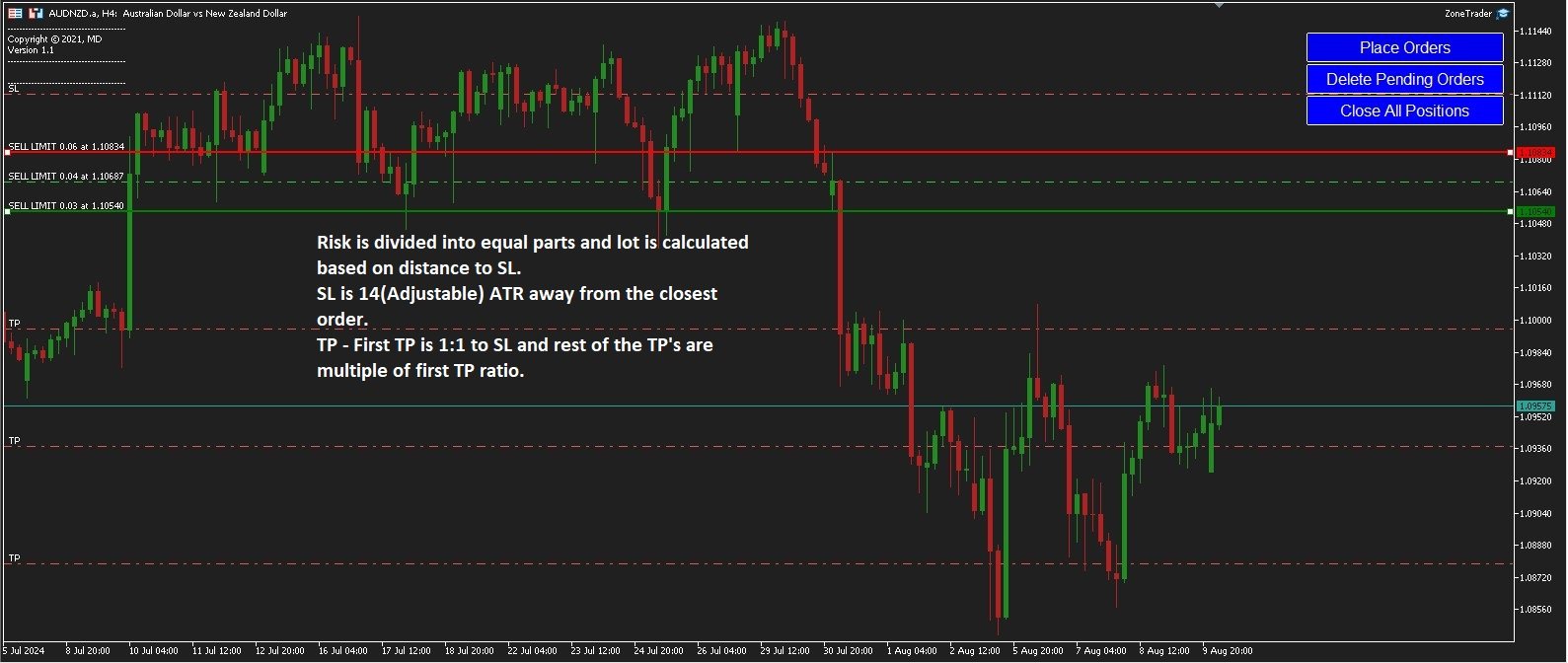
Instead of manually calculating lot sizes and placing individual pending orders, Zone Trader allows you to visually define your grid directly on the chart using drag-and-drop lines. With a single click, the EA calculates the risk, splits the volume across your specified layers, and places the necessary orders to fill the zone between your Start and End lines.
Key Features
-
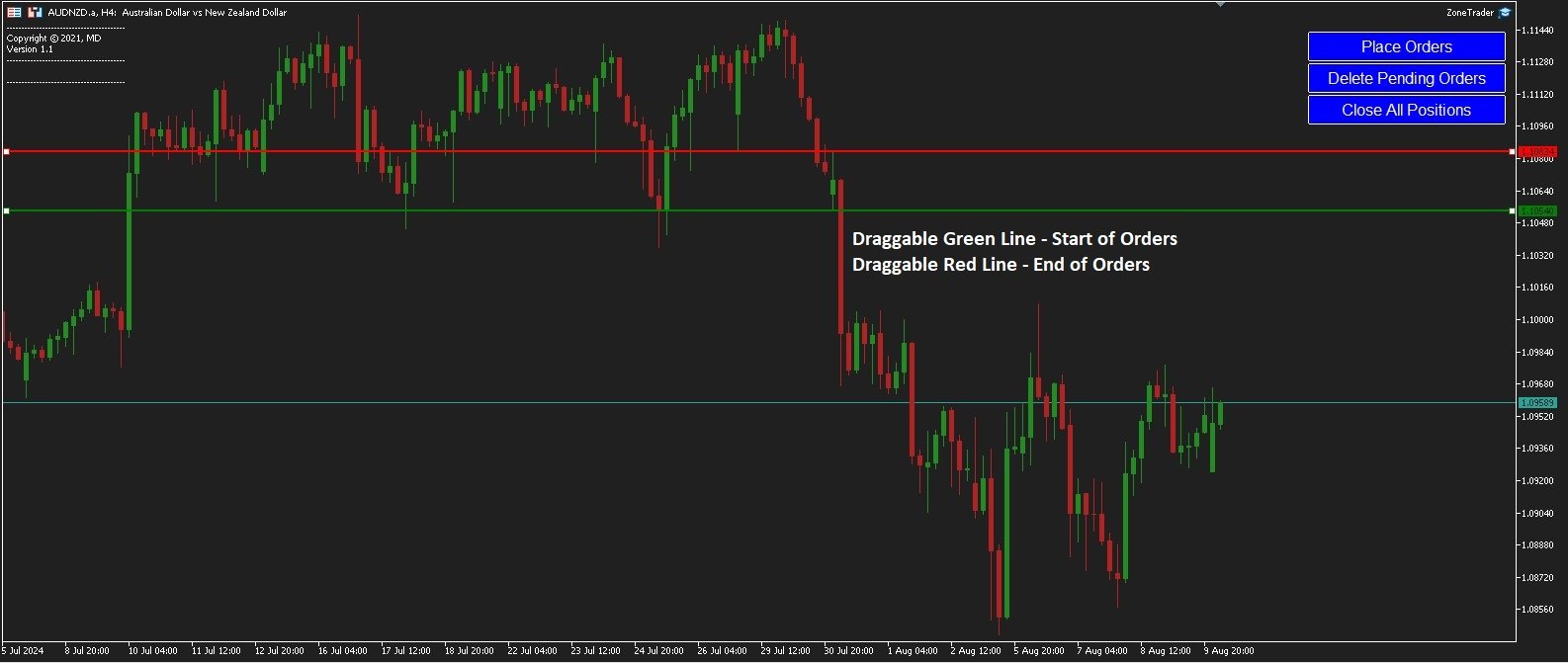
Visual Grid Definition: Simply drag the Green Line to set your Starting Price and the Red Line to set your Last Order Price. The EA automatically calculates the grid steps between these two levels.
-
Automated Stop Loss: No need to calculate pips manually. The Stop Loss is automatically placed at a safe distance (ATR + Spread) away from your Red Line (Last Order Price).
-
Smart Order Execution: Automatically determines whether to use Market, Limit, or Stop orders based on where the current price is relative to your Green (Start) line.
-
Risk-Based Lot Sizing: Calculates volume automatically based on a percentage of Account Equity and the specific risk distance of each trade layer.
-
Grid & Layering: Splits your trade idea into multiple "layers" (grid) to average the entry price, with specific Take Profit targets calculated for each layer.
-
Integrated Technical Analysis: Automatically plots Daily Pivot Points (P, R1-R3, S1-S3) and Yesterday’s High/Low to help identify key zones.
On-Chart Control Panel
The EA features a convenient dashboard to manage your trading session:
-
Place Orders: Executes the grid based on the current positions of the Green and Red lines.
-
Delete Pending: Quickly removes all pending orders associated with the EA.
-
Close All: Closes all open positions managed by the EA.
-
BreakEven: Manually moves the Stop Loss of open positions to the entry price (+ spread) to secure the trade.
-
Reset Lines: Re-aligns the Green/Red lines based on the previous candle's High/Low and ATR.
-
Show/Hide Controls: Toggles the visibility of Pivot points and Trade Lines to keep your chart clean.
How It Works
-
Setup: When loaded, the EA draws a Green Line and a Red Line on the chart.
-
Adjust:
-
Green Line (Start): Drag this to the price level where you want your first entry to be.
-
Red Line (End): Drag this to the price level where you want your last grid order to be.
-
-
Execute: Click "Place Orders."
-
The EA calculates the gap between the Green and Red lines and places your defined number of grid layers evenly within this zone.
-
Stop Loss: A hard Stop Loss is set automatically at (Red Line Price) ± (ATR + Spread) .
-
Take Profit: Targets are calculated relative to the risk of the trade.
-
Input Parameters
-
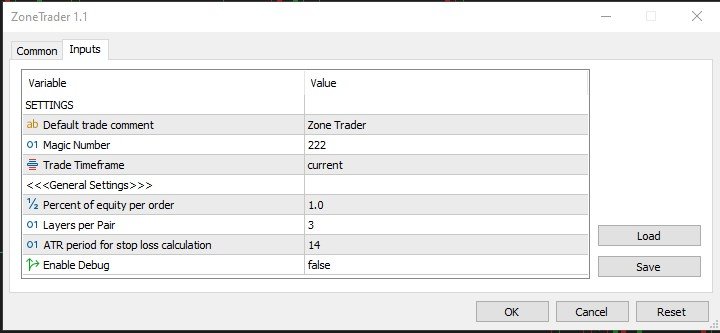
InpComment: Custom comment for trades generated by this EA.
-
InpMagicNumber: Unique identifier to manage specific trades.
-
InpTradeTF: The timeframe used for ATR calculations (for Stop Loss distance).
-
InpRiskPerTrade: Percentage of equity to risk per trade setup (default: 1.0%).
-
InpLayersCount: Number of positions to split the trade into (Grid layers).
-
InpATRPeriod: Period for Average True Range calculation (used for SL buffer).
-
InpDebugEnabled: Enable detailed logging in the "Experts" tab.
Recommendations
-
Account Type: Works on any account type (ECN/Standard).
-
Symbols: Suitable for all currency pairs, indices, and commodities.
-
Strategy: Ideal for traders who want to "fade" into a zone or scale into positions using a predefined area of interest.