Nomad SuperTrend Pro
- Indicatori
- Versione: 2.0
- Attivazioni: 10

Nomad SuperTrend Pro is a multi-timeframe SuperTrend indicator for MetaTrader 5. It draws any higher timeframe's trend on the chart you actually trade, shows six timeframes at once in a live on-chart dashboard, alerts you on reversals and on pullbacks to the line by popup, sound, mobile push and e-mail, and can restyle the whole chart with one input.
It shares its calculation core with SuperTrendNew, the free version on the Market since January 2022: same maths, same input names, same buffer layout. Pro is the edition that adds the higher timeframes, the second entry type, the visuals and the chart skin.
Non-repainting by default: signals are confirmed on the closed bar, so what you see in history is what you would have seen live.
1. Multi-timeframe engine
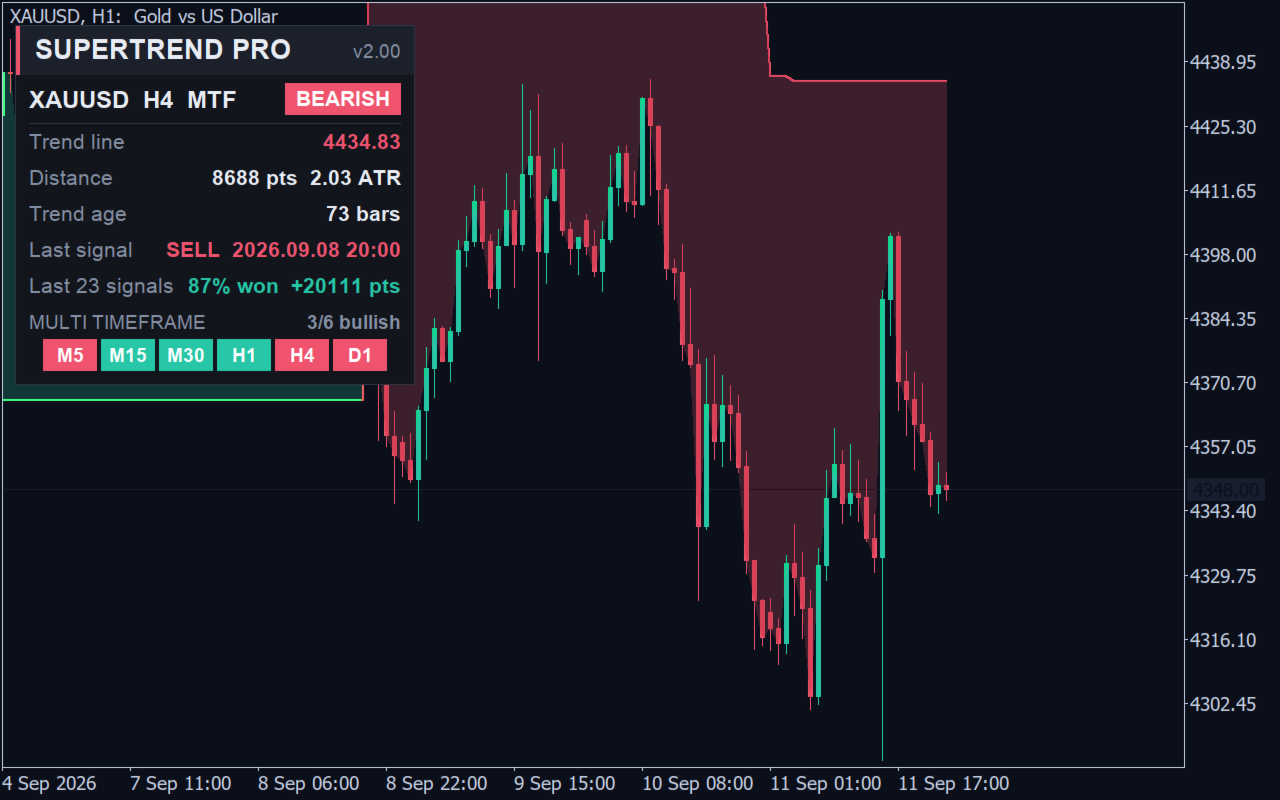
One input, Calculation timeframe (MTF), decides which timeframe the trend is calculated on. Set it to H4 while you sit on M15 and the H4 trend line, colour, arrows and alerts are drawn on your M15 chart, bar by bar, with the M15 candles still in place. The higher timeframe is calculated from its own bars, never resampled. Attach the indicator twice - once with H4 for the bias, once on Current for entries - and you have a complete two-timeframe setup in one window. The indicator never reloads your chart, so an Expert Advisor running next to it is never restarted.
2. Six-timeframe dashboard
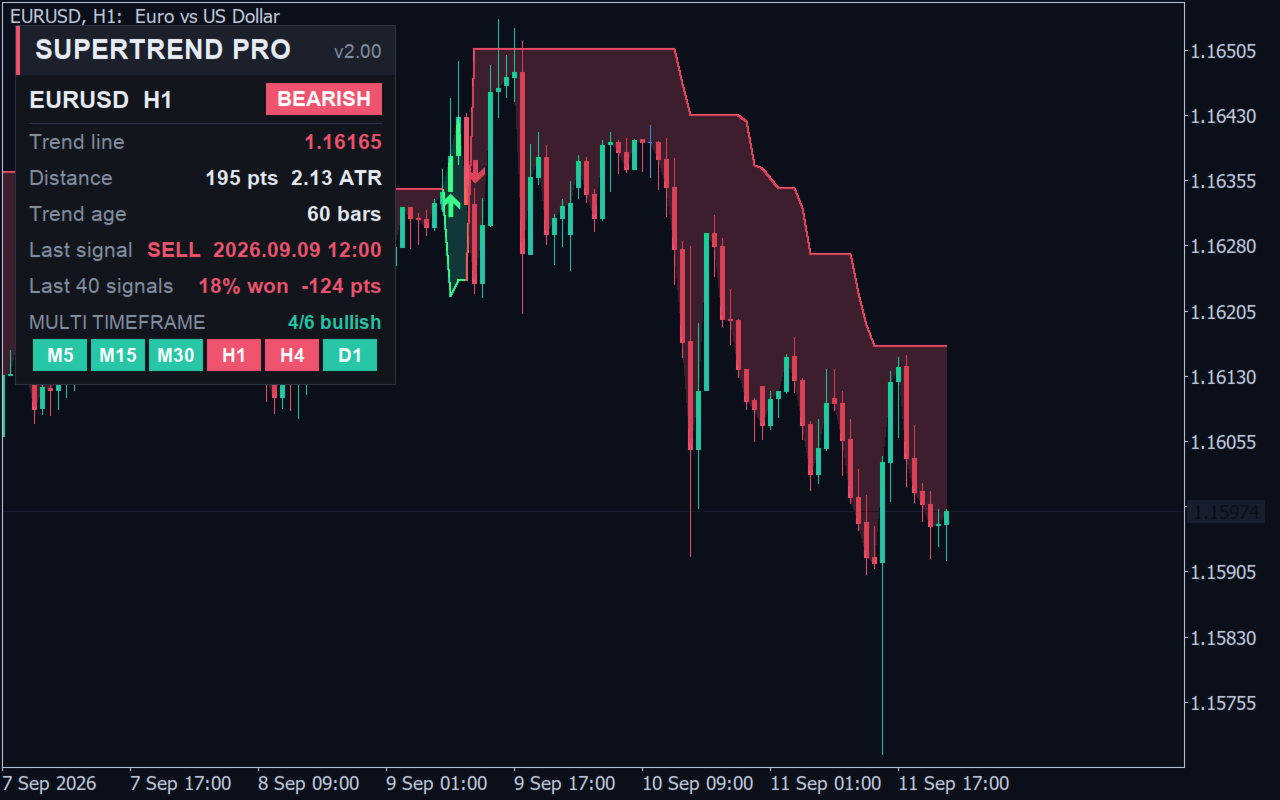
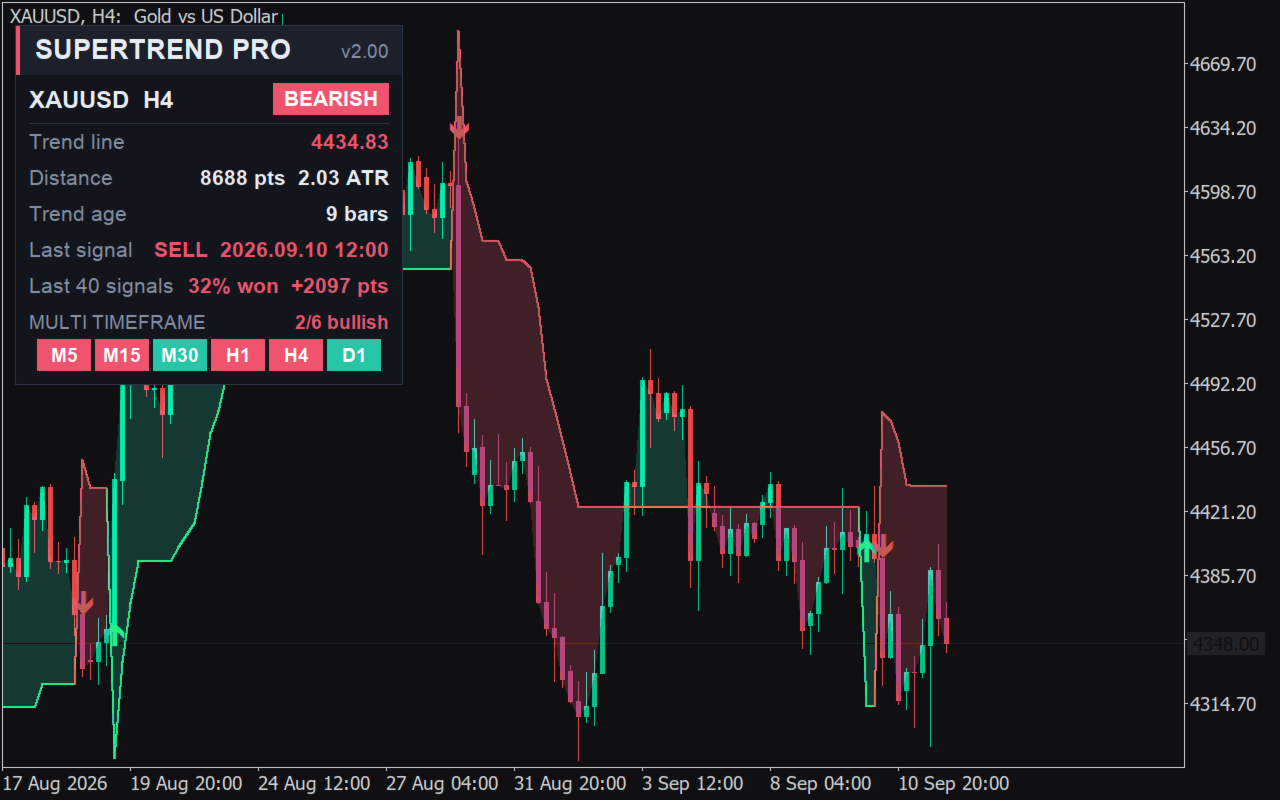
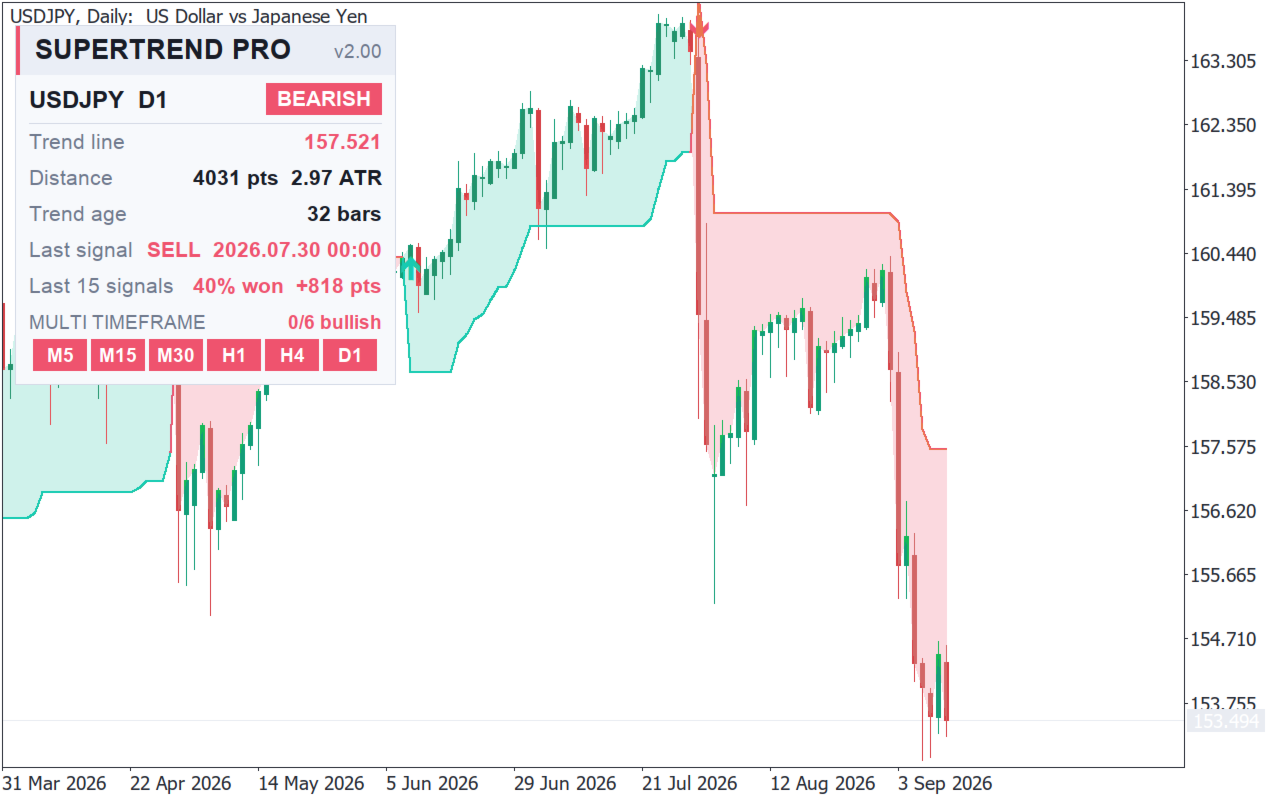
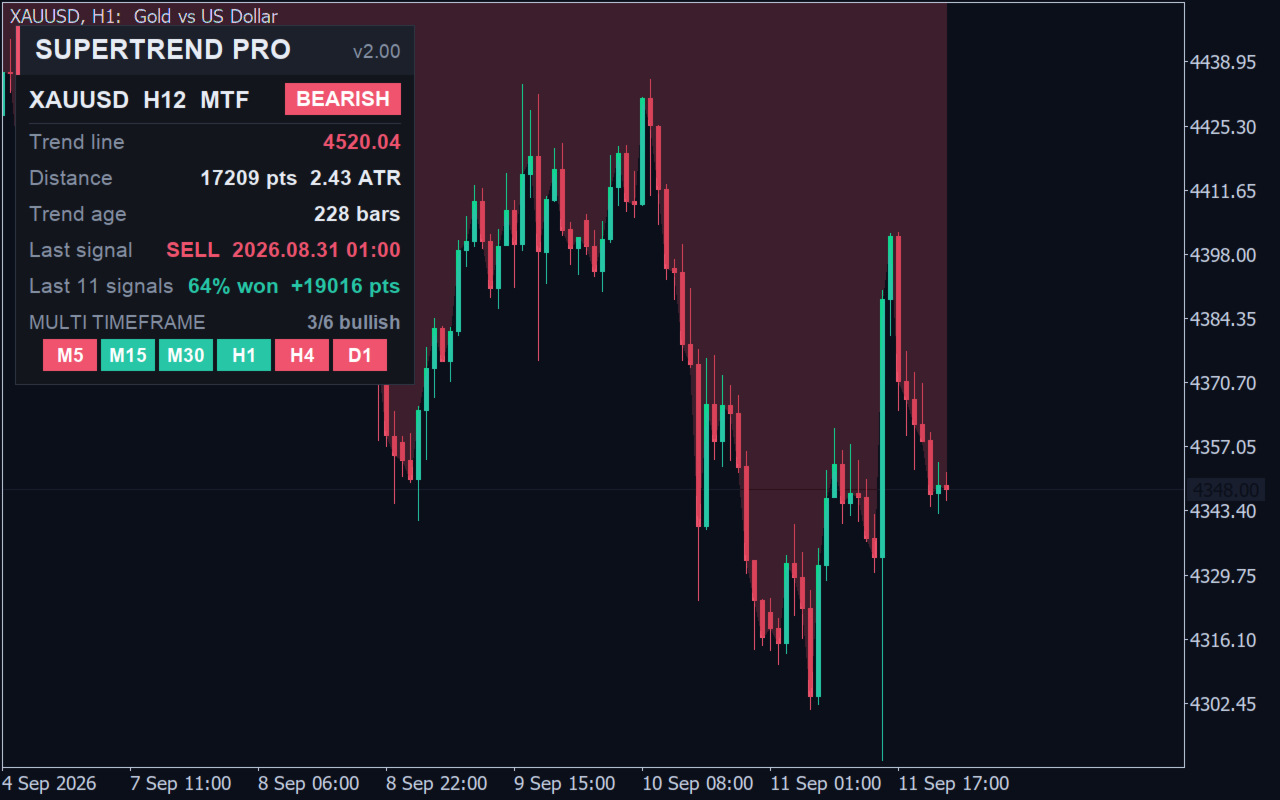
A row runs the same engine, with your settings, on M5, M15, M30, H1, H4 and D1 at once. Each cell is coloured by that timeframe's trend; the header carries a score such as "5/6 bullish", counting only the timeframes that have answered. Above it: symbol and timeframe, BULLISH / BEARISH badge, trend line price, distance to the line in points and in ATR, trend age in bars, last signal with time, and the statistics row. Dark or light theme, any corner, any font size - the layout measures itself, so it survives any DPI setting.
3. Pullback alerts
A reversal arrow is one entry per trend. Alert on pullback to the trend line gives you the other one: inside a running trend, when price comes back and touches the line, the alert chain fires with the line price - joining an established trend at the level it is already defending, with the stop right under the line. At most once per bar, never on the same bar as a reversal.
4. Trend cloud and trend-coloured candles
Fill the trend cloud shades the area between price and the line, blended into your chart background so the candles stay readable. Colour the candles by trend repaints the candles in the trend colour, readable from across the room.
5. Signal statistics
The statistics row counts the last completed trends on the chart in front of you (up to 40) and reports how many ended with a positive close-to-close move and the average move in points. It is a measurement of these settings on this symbol and history - no spread, no commission, not a backtest, not a forecast. It is there so you can compare two multipliers on the same chart in ten seconds.
6. Professional chart skin
Apply the pro chart skin restyles the chart in one step: Midnight (deep blue), Carbon (neutral black) or Daylight (clean white). All fifteen chart properties are saved first and put back exactly as they were the moment the indicator is removed.
7. Full alert chain
Every signal - reversal or pullback - can go out as terminal popup, a sound of your choice per direction, push notification to the MetaTrader 5 mobile app, e-mail, and a line in the Experts log. The message carries symbol, timeframe, direction, price, trend line level and bar time. Push needs your MetaQuotes ID (Tools > Options > Notifications); e-mail needs Tools > Options > Email. Alerts are suppressed during optimisation.
Free SuperTrendNew vs Nomad SuperTrend Pro
Both: Standard / SMA / CCI engines, non-repainting closed-bar confirmation, reversal arrows, popup + sound + mobile push alerts, dashboard (trend, line price, distance, age, last signal), buffers 4/5 for EAs with buffers 0-3 in the legacy order, dark/light panel in any corner.
Pro only: multi-timeframe calculation, live six-timeframe row with bullish score, pullback alerts, e-mail alerts, trend cloud, trend-coloured candles, signal statistics row, one-click chart skin (3 skins).
Every input name, type and position is identical in both editions, so a .set file saved in one loads in the other. In the free edition the Pro switches are visible but held off and the six-timeframe row is drawn greyed out, so you see exactly what you are buying. Nothing here is a time-limited trial.
Inputs
Trend engine: Calculation method [Standard / SMA based / CCI direction] · ATR period [10] · ATR multiplier [3.0] · SMA period [20] · CCI period [50] · CCI trigger level [0] · Calculation timeframe (MTF) [Current] · Bars to calculate [5000].
Signals: Signal confirmation [Closed bar / Live bar] · Show reversal arrows [true] · Buy / Sell arrow code [233 / 234] · Arrow distance in points [15].
Alerts: Alert on trend reversal [true] · Alert on pullback to the trend line [false] · Terminal popup [true] · Sound [true] with a terminal sound per direction · Push notification [true] · E-mail [false] · Write signals to the Experts log [true].
Visual: Draw the trend line [true] · Colour the candles by trend [false] · Fill the trend cloud [true] · Bullish / Bearish colour · Trend line width [2].
Dashboard: Show the dashboard [true] · Corner, X/Y offset · Theme [Dark / Light] · Font size [9] · Show the multi-timeframe row [true] · Show the signal statistics row [true].
Pro chart skin: Apply the pro chart skin [false] · Chart skin [Midnight / Carbon / Daylight].
How to trade it (H4 bias, M15 entries)
1. Open the M15 chart - the only chart you need.
2. Attach the indicator as the BIAS copy: Calculation timeframe = H4, cloud on, arrows and alerts off, dashboard off. The H4 cloud is your permission slip: green means longs only, red means shorts only.
3. Attach it again as the ENTRY copy: Calculation timeframe = Current, arrows and alerts on, pullback alert on, dashboard in another corner.
4. Read the six-timeframe row first. Six cells in one colour is a trending market; a 3/3 split is a market that has not decided, and those M15 arrows are the ones that cost money.
5. Take the M15 reversal arrow or the pullback alert, only in the direction of the H4 cloud.
6. Size with the Distance row - a fresh signal at 0.4 ATR is a tight stop; the same arrow forty bars late at 2.5 ATR is a different trade.
7. Manage with the line: it only moves in the direction of the trend, so it is already a trailing stop. Exit on the opposite arrow, or earlier if the H4 cloud flips.
Starting point, not a recommendation: Standard, ATR 10, multiplier 3.0, H4 bias over M15 or H1 entries. Test every setting on your own symbol and broker data before risking money.
For EA developers
Buffers: 0 up line, 1 down line, 2 buy arrow, 3 sell arrow (legacy order), 4 trend line value on every bar, 5 direction exactly +1 / -1. In MTF mode buffers 4 and 5 carry the higher timeframe's trend mapped onto the chart bars, so an EA on M15 reads the H4 trend without a second handle.
Warning: every "input group" line occupies one iCustom() parameter slot. The indicator has 38 inputs and 6 groups, so iCustom takes 44 parameters - pass a 0 for each group, in order, or every value after the first group lands one slot out. The sound inputs are enums so that every parameter can be passed as a plain number.
Honest limits
This is an indicator, not a trading system: it opens no orders. SuperTrend is trend-following and will flip repeatedly in a sideways market; a larger multiplier only slows that down. An MTF signal is final only once the higher timeframe bar that produced it has closed. The statistics row is a measurement, not a backtest. No profit claims or win rates are given here because none would be verifiable for your broker, spread and symbol. Alerts need the terminal running and connected.
More from this seller
Free edition of this indicator: SuperTrendNew - https://www.mql5.com/en/market/product/77231
TWAP Institutional (EA, USD 200) - https://www.mql5.com/en/market/product/195456
NomadAI (EA, USD 100) - https://www.mql5.com/en/market/product/110983
Nomad Grid (EA, USD 100) - https://www.mql5.com/en/market/product/158525
Stoploss Hunter (EA, USD 50) - https://www.mql5.com/en/market/product/88308
All products: https://www.mql5.com/en/users/etsogoo/seller
Questions, bug reports and feature requests are welcome - the alert engine in this generation came straight out of the comments on the free version.