ApexForge Trader Safety Dashboard
- Utilità
-
Po-hsiung Huang
 Founder and developer of ApexForge.
I develop practical trading tools for MetaTrader 5, focusing on usability, efficiency, stability, and low system resource usage. - Versione: 6.0
- Aggiornato: 10 settembre 2026
- Attivazioni: 5
ApexForge Trader Safety Dashboard
MT5 Economic Calendar | Avvisi eventi economici | One-Click Close | Rilevamento festività e chiusure anticipate | Mobile Push | Risk & Trade Manager
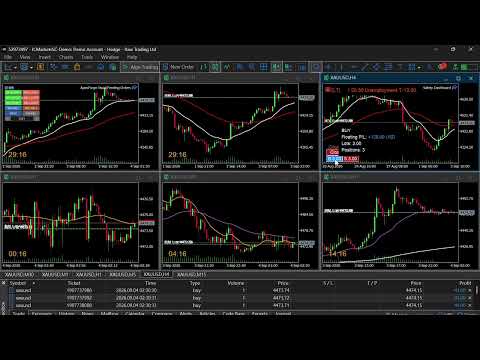
ApexForge Trader Safety Dashboard è uno strumento di gestione del rischio e delle operazioni per MetaTrader 5 che combina calendario economico, avvisi sugli eventi importanti, monitoraggio delle sessioni di trading e chiusura rapida delle posizioni.
L'obiettivo è semplice:
Mostrare le informazioni di rischio importanti direttamente sul grafico MT5 prima che il rischio si avvicini.
E quando hai già deciso di uscire dal mercato, offrire un modo rapido e diretto per chiudere le posizioni.
Non è una strategia di trading né un EA per ingressi automatici.
◆ Perché ho creato ApexForge Trader Safety Dashboard
Un venerdì stavo mantenendo una posizione Buy su Gold con leva elevata e volevo completare un ultimo trade prima del weekend.
Non mi ero accorto che negli Stati Uniti era un giorno festivo e che il mercato avrebbe chiuso prima del normale.
Quando la sessione terminò, la mia posizione era ancora aperta.
Alla riapertura di Gold si verificò un gap di circa $60. Il prezzo superò il mio Stop Loss originale, causando una perdita significativa.
Non era perché non avessi uno Stop Loss.
E nemmeno perché la mia analisi direzionale fosse sbagliata.
La ragione era molto più semplice:
Avevo dimenticato che giorno fosse.
ApexForge Trader Safety Dashboard è nato da questa esperienza.
◆ High-Speed One-Click Close
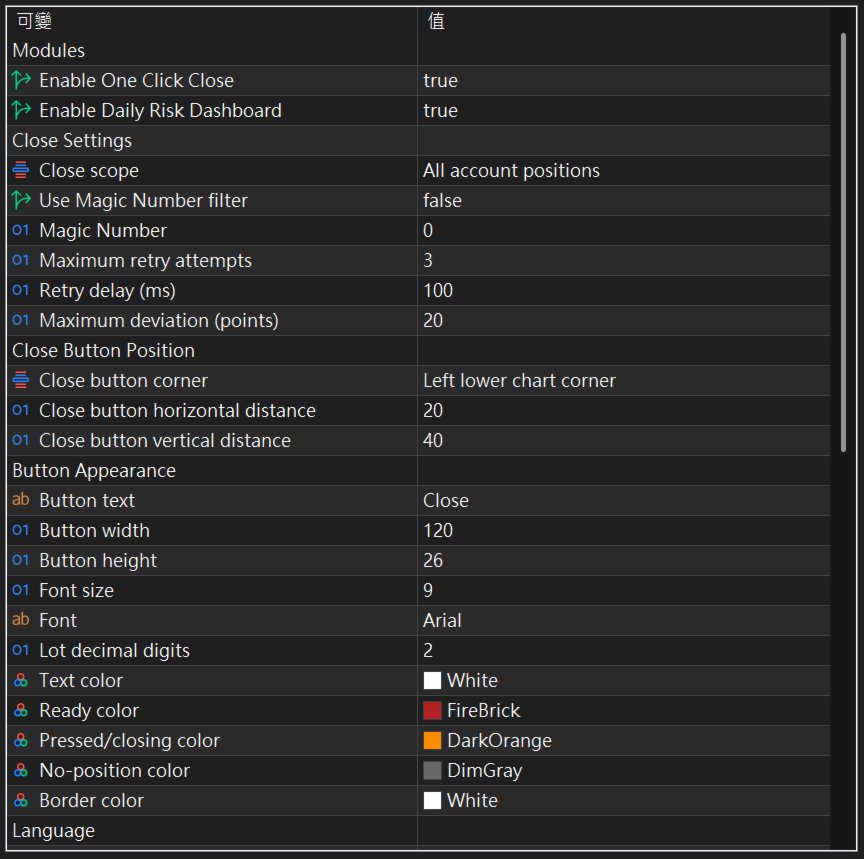
Premendo Close, l'EA invia rapidamente le richieste di chiusura per le posizioni corrispondenti, verifica quali posizioni sono realmente ancora aperte e ripete il tentativo soltanto per quelle rimaste aperte.
Supporta:
Close All Account
Close Current Symbol
Magic Number Filter
Maximum Retry
Maximum Deviation
Controllo dei permessi di trading e della connessione
Controlli direzionali:
B → chiude solo le Buy Positions
S → chiude solo le Sell Positions
Quando tutte le posizioni richieste risultano effettivamente chiuse, l'EA può riprodurre una sola volta:
ok.wav
La velocità e il prezzo effettivi di esecuzione dipendono da Broker, server di trading, rete, liquidità, slippage e condizioni di mercato.
◆ Floating P/L Colors
I pulsanti Close / B / S cambiano automaticamente colore in base al Floating P/L reale delle posizioni corrispondenti.
Default:
Profit → Blue
Loss → Red
No Position / Zero → Gray
I colori sono configurabili dall'utente.
◆ Hover Position Information
Passa il mouse su Close / B / S per visualizzare rapidamente:
Floating P/L
Lots
Positions
Mentre Hover è attivo, i valori possono aggiornarsi con i nuovi tick di mercato.
La finestra informativa adatta automaticamente le proprie dimensioni al contenuto visualizzato.
◆ Draggable Interface
Close / B / S:
Clic breve → Close Action
Tenere premuto circa 2 secondi → spostare l'intero gruppo di pulsanti
Risk Dashboard + / −:
Clic breve → Expand / Collapse
Tenere premuto circa 2 secondi → spostare l'intero Dashboard
I controlli cambiano colore durante il trascinamento e tornano allo stato normale dopo il rilascio.
◆ MT5 Economic Calendar
Il Dashboard legge direttamente i dati dal MT5 Economic Calendar integrato.
Principali valute supportate:
USD / EUR / GBP / JPY / AUD / CAD / CHF / NZD / CNY
Modalità di importanza:
HIGH
oppure:
MEDIUM + HIGH
Gli eventi futuri mostrano un conto alla rovescia in tempo reale.
Dopo la pubblicazione, tramite Hover è possibile visualizzare:
Actual
Forecast
Previous
◆ Optional MT5 Impact Reference
Default: OFF
Quando attivata, questa funzione può mostrare la direzione Impact fornita direttamente dal MT5 Economic Calendar.
Esempio:
USD Bearish
XAUUSD Bullish
Source: MT5
ApexForge non calcola autonomamente questa direzione confrontando Actual e Forecast e non la presenta come una propria previsione di mercato.
Provider differenti possono utilizzare valori Forecast o classificazioni Impact differenti.
Le informazioni Bullish / Bearish sono esclusivamente di riferimento e non costituiscono un segnale di trading.
Quando la funzione è disattivata:
Actual / Forecast / Previous rimangono disponibili.
◆ Holiday & Early Close
Le informazioni sulle festività possono essere visualizzate direttamente negli avvisi del Dashboard.
L'EA utilizza inoltre i dati Trading Session forniti dal Broker per aiutare a identificare:
Market Closed
Special Trading Schedule
Early-Close Risk
Gli orari effettivamente negoziabili dipendono sempre dal Broker dell'utente.
◆ Risk Alerts
Il Dashboard utilizza tre livelli di avviso:
Silver → Normal
Orange → Warning
Red → Urgent
Quando un importante evento economico o un Early Close entra nell'Urgent Window, l'EA può:
riprodurre un avviso sonoro sul computer
e:
inviare una MT5 Mobile Push Notification.
In questo modo è possibile ricevere avvisi importanti anche quando non si sta guardando direttamente il grafico.
◆ Time & Language
Modalità orarie:
Broker Server Time
Local PC Time
New York Time
Lingue dell'interfaccia:
AUTO
English
Traditional Chinese
Simplified Chinese
◆ Funzioni principali
- MT5 Economic Calendar
- Economic Event Countdown
- Actual / Forecast / Previous
- HIGH o MEDIUM + HIGH Event Filter
- Optional MT5 Impact Reference
- Holiday Detection
- Broker Trading Session
- Early-Close Risk Detection
- Market Closed Information
- High-Speed One-Click Close
- Close All Account
- Close Current Symbol
- Buy / Sell Directional Close
- Magic Number Filter
- Retry & Deviation Control
- Real-Time Floating P/L
- Profit / Loss Button Colors
- Hover Position Information
- MT5 Mobile Push Notifications
- Desktop Alert Sound
- Broker / Local / New York Time
- Draggable Interface
- Expand / Collapse Dashboard
- Risk Information + Trade Management
◆ Informazioni importanti
I dati economici provengono dal MT5 Economic Calendar.
La velocità di aggiornamento di Actual / Forecast / Previous dipende dalla sincronizzazione di MT5. ApexForge non può accelerare dati che MT5 non ha ancora aggiornato.
MT5 Impact Reference è disattivato per impostazione predefinita.
Le informazioni Bullish / Bearish non costituiscono consulenza finanziaria né un Buy / Sell Signal.
I dati Trading Session sono forniti dal Broker. Gli orari effettivi di trading dipendono quindi dal Broker e dal simbolo negoziato.
One-Click Close non può eliminare i rischi derivanti da gap, slippage, scarsa liquidità, problemi di rete o ritardi di esecuzione del Broker.
ApexForge Trader Safety Dashboard è uno strumento di Risk Information / Trade Management. Non garantisce profitti né può garantire la prevenzione delle perdite.
◆ Considerazione finale
Il rischio nel trading non esiste soltanto nei movimenti del prezzo.
A volte è nascosto nel calendario e nell'orologio.
Quel giorno il problema non era la direzione del mio trade.
Avevo anche uno Stop Loss.
Avevo semplicemente dimenticato:
che giorno fosse.
ApexForge Trader Safety Dashboard è stato creato per rendere questo tipo di rischio molto più difficile da ignorare.
MT5 Economic Calendar | Avvisi eventi economici | One-Click Close | Rilevamento festività e chiusure anticipate | Mobile Push | Risk & Trade Manager
ApexForge Trader Safety Dashboard è uno strumento di gestione del rischio e delle operazioni per MetaTrader 5 che combina calendario economico, avvisi sugli eventi importanti, monitoraggio delle sessioni di trading e chiusura rapida delle posizioni.
L'obiettivo è semplice:
Mostrare le informazioni di rischio importanti direttamente sul grafico MT5 prima che il rischio si avvicini.
E quando hai già deciso di uscire dal mercato, offrire un modo rapido e diretto per chiudere le posizioni.
Non è una strategia di trading né un EA per ingressi automatici.
◆ Perché ho creato ApexForge Trader Safety Dashboard
Un venerdì stavo mantenendo una posizione Buy su Gold con leva elevata e volevo completare un ultimo trade prima del weekend.
Non mi ero accorto che negli Stati Uniti era un giorno festivo e che il mercato avrebbe chiuso prima del normale.
Quando la sessione terminò, la mia posizione era ancora aperta.
Alla riapertura di Gold si verificò un gap di circa $60. Il prezzo superò il mio Stop Loss originale, causando una perdita significativa.
Non era perché non avessi uno Stop Loss.
E nemmeno perché la mia analisi direzionale fosse sbagliata.
La ragione era molto più semplice:
Avevo dimenticato che giorno fosse.
ApexForge Trader Safety Dashboard è nato da questa esperienza.
◆ High-Speed One-Click Close
Premendo Close, l'EA invia rapidamente le richieste di chiusura per le posizioni corrispondenti, verifica quali posizioni sono realmente ancora aperte e ripete il tentativo soltanto per quelle rimaste aperte.
Supporta:
Close All Account
Close Current Symbol
Magic Number Filter
Maximum Retry
Maximum Deviation
Controllo dei permessi di trading e della connessione
Controlli direzionali:
B → chiude solo le Buy Positions
S → chiude solo le Sell Positions
Quando tutte le posizioni richieste risultano effettivamente chiuse, l'EA può riprodurre una sola volta:
ok.wav
La velocità e il prezzo effettivi di esecuzione dipendono da Broker, server di trading, rete, liquidità, slippage e condizioni di mercato.
◆ Floating P/L Colors
I pulsanti Close / B / S cambiano automaticamente colore in base al Floating P/L reale delle posizioni corrispondenti.
Default:
Profit → Blue
Loss → Red
No Position / Zero → Gray
I colori sono configurabili dall'utente.
◆ Hover Position Information
Passa il mouse su Close / B / S per visualizzare rapidamente:
Floating P/L
Lots
Positions
Mentre Hover è attivo, i valori possono aggiornarsi con i nuovi tick di mercato.
La finestra informativa adatta automaticamente le proprie dimensioni al contenuto visualizzato.
◆ Draggable Interface
Close / B / S:
Clic breve → Close Action
Tenere premuto circa 2 secondi → spostare l'intero gruppo di pulsanti
Risk Dashboard + / −:
Clic breve → Expand / Collapse
Tenere premuto circa 2 secondi → spostare l'intero Dashboard
I controlli cambiano colore durante il trascinamento e tornano allo stato normale dopo il rilascio.
◆ MT5 Economic Calendar
Il Dashboard legge direttamente i dati dal MT5 Economic Calendar integrato.
Principali valute supportate:
USD / EUR / GBP / JPY / AUD / CAD / CHF / NZD / CNY
Modalità di importanza:
HIGH
oppure:
MEDIUM + HIGH
Gli eventi futuri mostrano un conto alla rovescia in tempo reale.
Dopo la pubblicazione, tramite Hover è possibile visualizzare:
Actual
Forecast
Previous
◆ Optional MT5 Impact Reference
Default: OFF
Quando attivata, questa funzione può mostrare la direzione Impact fornita direttamente dal MT5 Economic Calendar.
Esempio:
USD Bearish
XAUUSD Bullish
Source: MT5
ApexForge non calcola autonomamente questa direzione confrontando Actual e Forecast e non la presenta come una propria previsione di mercato.
Provider differenti possono utilizzare valori Forecast o classificazioni Impact differenti.
Le informazioni Bullish / Bearish sono esclusivamente di riferimento e non costituiscono un segnale di trading.
Quando la funzione è disattivata:
Actual / Forecast / Previous rimangono disponibili.
◆ Holiday & Early Close
Le informazioni sulle festività possono essere visualizzate direttamente negli avvisi del Dashboard.
L'EA utilizza inoltre i dati Trading Session forniti dal Broker per aiutare a identificare:
Market Closed
Special Trading Schedule
Early-Close Risk
Gli orari effettivamente negoziabili dipendono sempre dal Broker dell'utente.
◆ Risk Alerts
Il Dashboard utilizza tre livelli di avviso:
Silver → Normal
Orange → Warning
Red → Urgent
Quando un importante evento economico o un Early Close entra nell'Urgent Window, l'EA può:
riprodurre un avviso sonoro sul computer
e:
inviare una MT5 Mobile Push Notification.
In questo modo è possibile ricevere avvisi importanti anche quando non si sta guardando direttamente il grafico.
◆ Time & Language
Modalità orarie:
Broker Server Time
Local PC Time
New York Time
Lingue dell'interfaccia:
AUTO
English
Traditional Chinese
Simplified Chinese
◆ Funzioni principali
- MT5 Economic Calendar
- Economic Event Countdown
- Actual / Forecast / Previous
- HIGH o MEDIUM + HIGH Event Filter
- Optional MT5 Impact Reference
- Holiday Detection
- Broker Trading Session
- Early-Close Risk Detection
- Market Closed Information
- High-Speed One-Click Close
- Close All Account
- Close Current Symbol
- Buy / Sell Directional Close
- Magic Number Filter
- Retry & Deviation Control
- Real-Time Floating P/L
- Profit / Loss Button Colors
- Hover Position Information
- MT5 Mobile Push Notifications
- Desktop Alert Sound
- Broker / Local / New York Time
- Draggable Interface
- Expand / Collapse Dashboard
- Risk Information + Trade Management
◆ Informazioni importanti
I dati economici provengono dal MT5 Economic Calendar.
La velocità di aggiornamento di Actual / Forecast / Previous dipende dalla sincronizzazione di MT5. ApexForge non può accelerare dati che MT5 non ha ancora aggiornato.
MT5 Impact Reference è disattivato per impostazione predefinita.
Le informazioni Bullish / Bearish non costituiscono consulenza finanziaria né un Buy / Sell Signal.
I dati Trading Session sono forniti dal Broker. Gli orari effettivi di trading dipendono quindi dal Broker e dal simbolo negoziato.
One-Click Close non può eliminare i rischi derivanti da gap, slippage, scarsa liquidità, problemi di rete o ritardi di esecuzione del Broker.
ApexForge Trader Safety Dashboard è uno strumento di Risk Information / Trade Management. Non garantisce profitti né può garantire la prevenzione delle perdite.
◆ Considerazione finale
Il rischio nel trading non esiste soltanto nei movimenti del prezzo.
A volte è nascosto nel calendario e nell'orologio.
Quel giorno il problema non era la direzione del mio trade.
Avevo anche uno Stop Loss.
Avevo semplicemente dimenticato:
che giorno fosse.
ApexForge Trader Safety Dashboard è stato creato per rendere questo tipo di rischio molto più difficile da ignorare.