
Institutional Protector
- Utilità
- Versione: 2.30

Institutional Protector — Analytics Dashboard & Account Guard
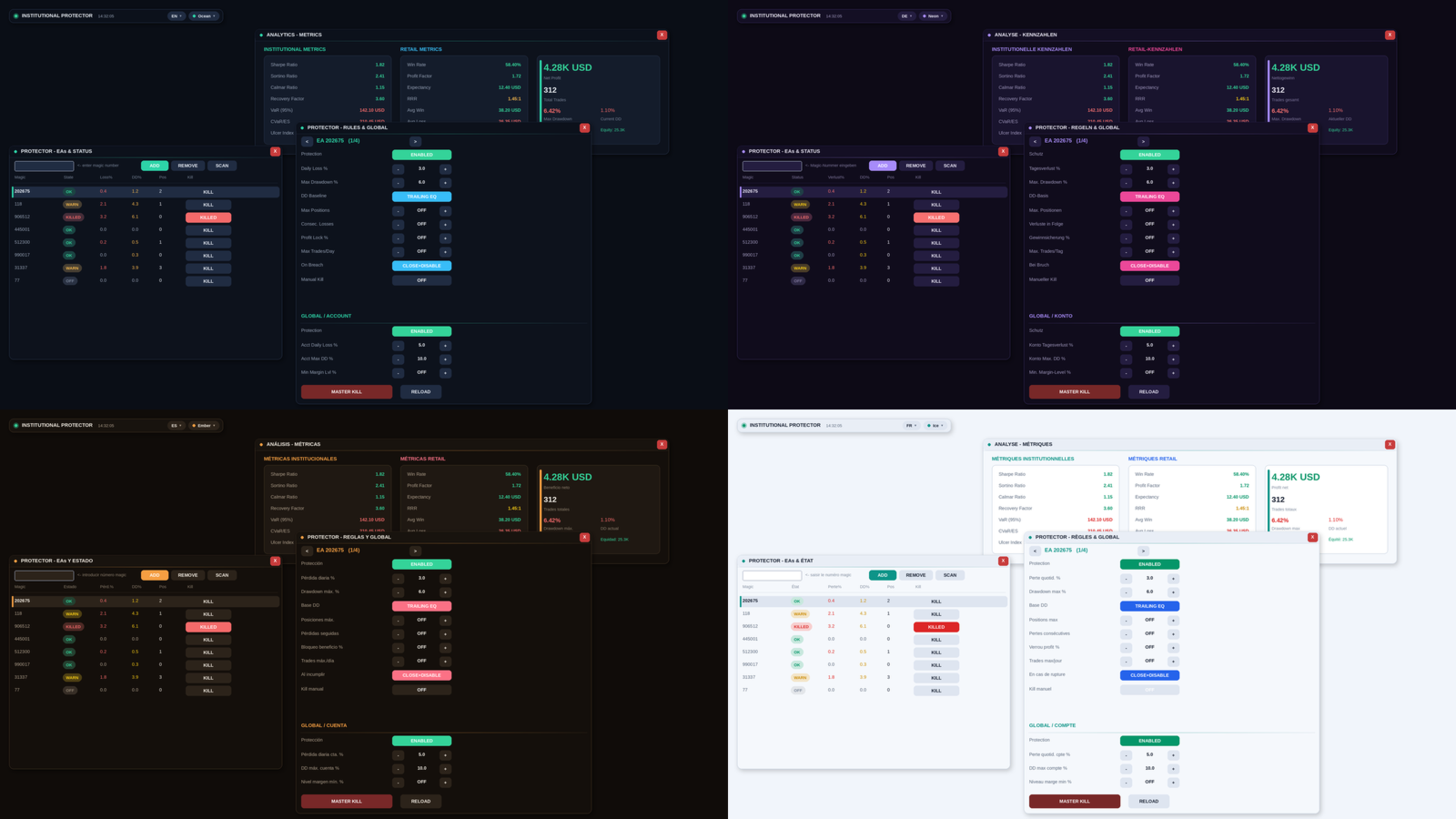
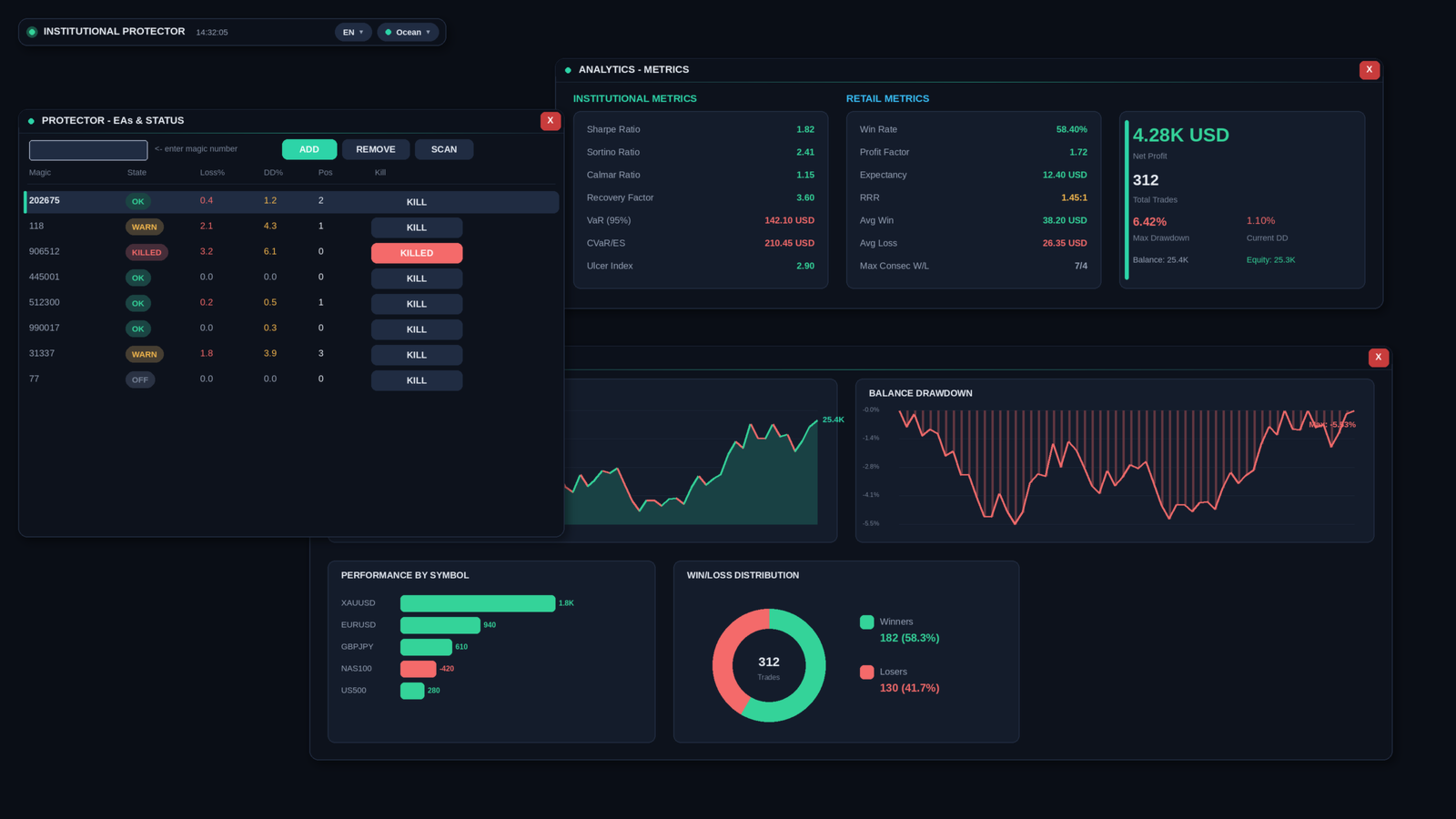
Institutional Protector combines two tools in one utility: a professional trading-analytics dashboard and a rule-based account protector (watchdog) that supervises every EA on your account by magic number. Everything lives in draggable floating windows with a modern, canvas-drawn interface.
🛡️ Account protection (watchdog)
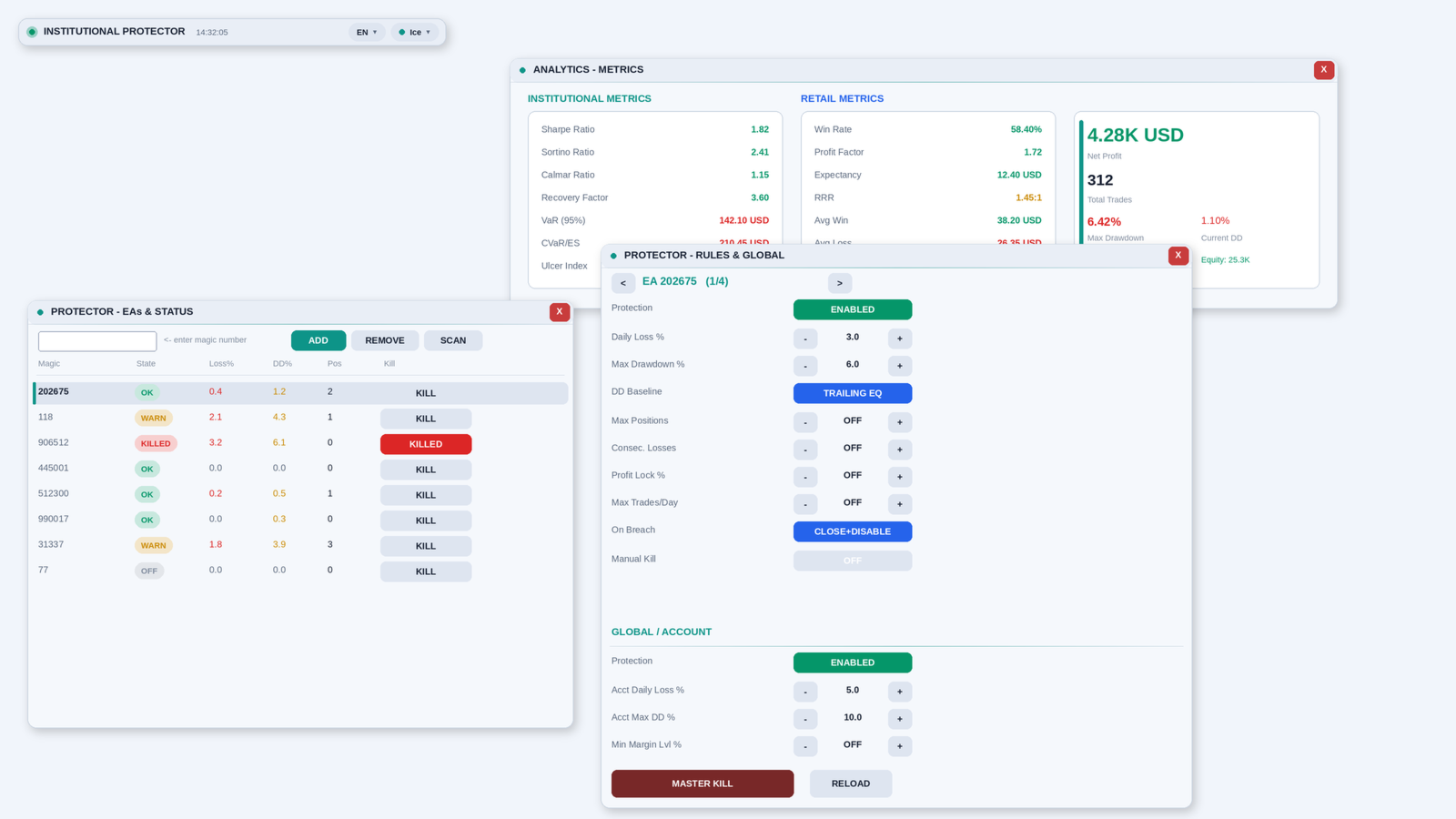
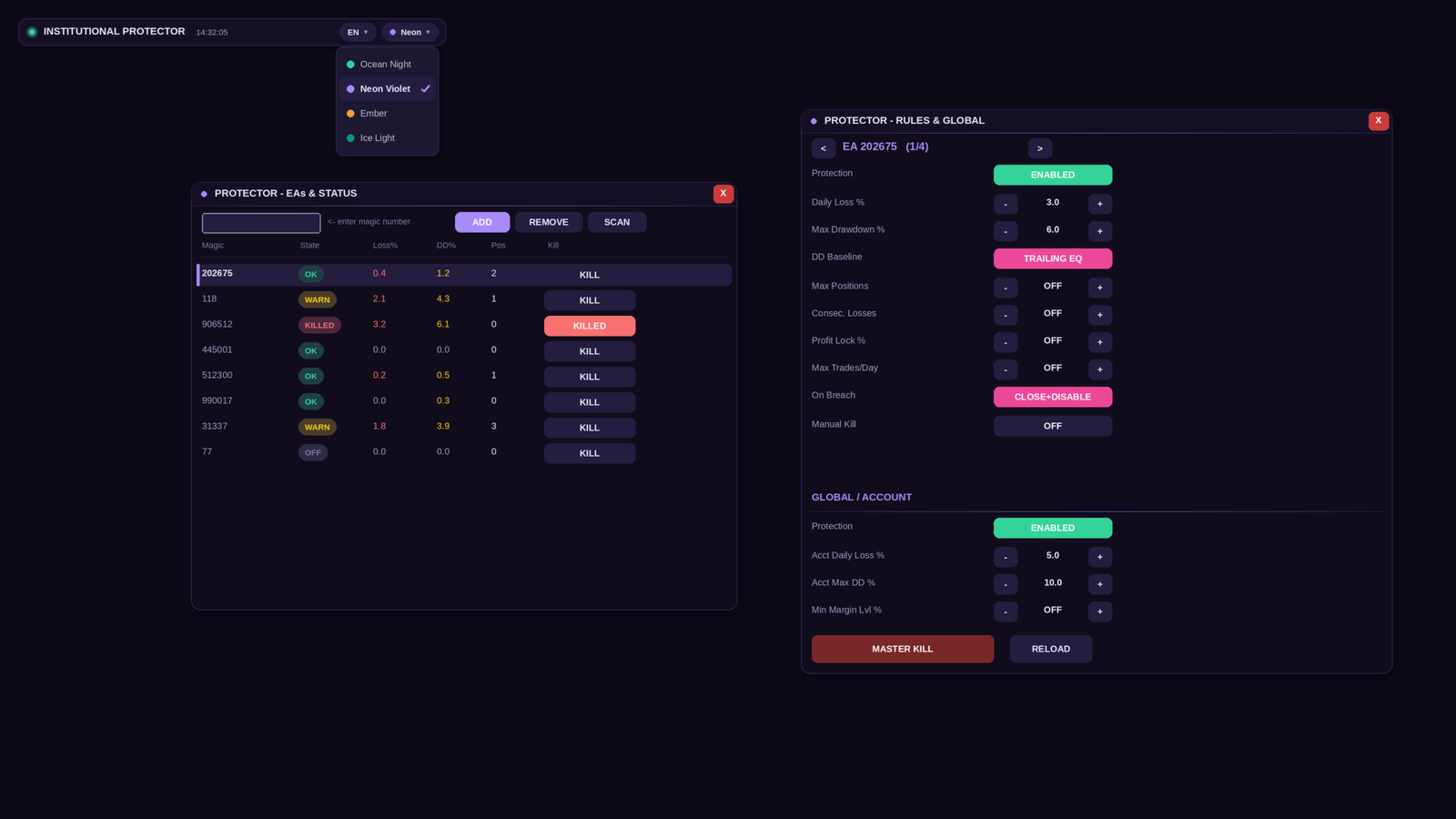
• Per-EA rules by magic number: daily loss %, max drawdown % (trailing-equity or balance based), max open positions, max total lots, max consecutive losses, daily profit lock, max trades per day
• Escalation per EA: block new activity, close all positions, or close + keep disabled until the daily reset
• Account-level rules: daily loss %, max trailing drawdown %, minimum margin level, master kill switch
• Manual kill switch per EA and for the whole account — one click closes everything
• Equity-based monitoring: works even if your EAs use no stop-losses
• Kill flags are published as global variables (AP_KILL_<magic>), so cooperative EAs can stop opening trades on their own
📊 Analytics
• Institutional metrics: Sharpe, Sortino, Calmar, Recovery Factor, VaR 95/99, CVaR/ES, Ulcer Index
• Retail metrics: win rate, profit factor, expectancy, RRR, average win/loss, streaks, largest win/loss
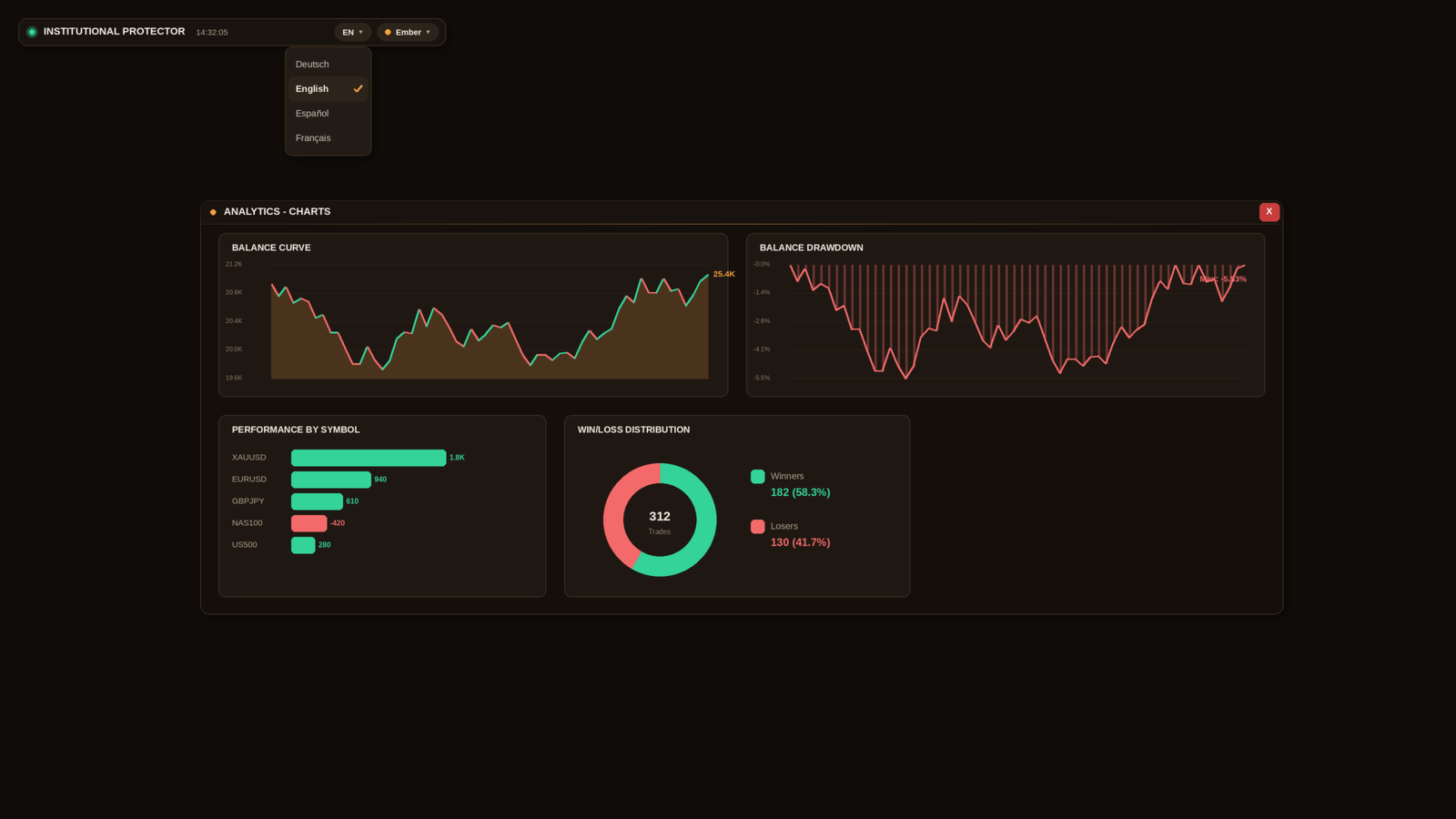
• Balance curve and drawdown curve (deposit/withdrawal aware), performance by symbol, win/loss donut
• Filter by symbol, magic number or EA comment; time periods from today to full history
🪟 Interface
• Four floating, draggable windows plus a launcher bar with a window menu
• Window positions, visibility, theme and language are saved and restored automatically
• Four color themes (Ocean Night, Neon Violet, Ember, Ice Light) — switchable via an on-chart dropdown
• Four languages (English, Deutsch, Español, Français) — switchable via an on-chart dropdown
• High-DPI aware (4K) plus a manual UI-scale input; the price chart is hidden while running and fully restored on removal
⚙️ How it works
• A timer cycle (default every 3 s) evaluates all rules; a fast tick-level check closes positions as soon as a kill flag is set
• Positions are closed with standard trade operations including retries and configurable slippage
• Configuration is stored in the common terminal folder; no DLLs are used
🛠️ Main inputs
• Filters (symbol / magic / comment), analysis period, metrics settings (risk-free rate, VaR confidence)
• Theme, language, font size, opacity, UI scale, refresh interval, hide-chart on/off
• Protector: protect unconfigured EAs, always-watch magic list, close retries, slippage, verbose log
📌 Notes
• Please attach the EA to its own chart; it hides the price chart while running.
• Positions are closed at market price. In fast markets or gaps the realized loss can exceed the configured limit — the protector reduces risk, it cannot guarantee exact exit levels.
• The free demo runs in the Strategy Tester only, where account history, other EAs and mouse interaction are not available; the panel will show empty values there. This is a limitation of the Market demo system, not of the product.
• If you have a question or an idea for the next version, please post it in the Comments tab.
Institutional Protector combines two tools in one utility: a professional trading-analytics dashboard and a rule-based account protector (watchdog) that supervises every EA on your account by magic number. Everything lives in draggable floating windows with a modern, canvas-drawn interface.
🛡️ Account protection (watchdog)
• Per-EA rules by magic number: daily loss %, max drawdown % (trailing-equity or balance based), max open positions, max total lots, max consecutive losses, daily profit lock, max trades per day
• Escalation per EA: block new activity, close all positions, or close + keep disabled until the daily reset
• Account-level rules: daily loss %, max trailing drawdown %, minimum margin level, master kill switch
• Manual kill switch per EA and for the whole account — one click closes everything
• Equity-based monitoring: works even if your EAs use no stop-losses
• Kill flags are published as global variables (AP_KILL_<magic>), so cooperative EAs can stop opening trades on their own
📊 Analytics
• Institutional metrics: Sharpe, Sortino, Calmar, Recovery Factor, VaR 95/99, CVaR/ES, Ulcer Index
• Retail metrics: win rate, profit factor, expectancy, RRR, average win/loss, streaks, largest win/loss
• Balance curve and drawdown curve (deposit/withdrawal aware), performance by symbol, win/loss donut
• Filter by symbol, magic number or EA comment; time periods from today to full history
🪟 Interface
• Four floating, draggable windows plus a launcher bar with a window menu
• Window positions, visibility, theme and language are saved and restored automatically
• Four color themes (Ocean Night, Neon Violet, Ember, Ice Light) — switchable via an on-chart dropdown
• Four languages (English, Deutsch, Español, Français) — switchable via an on-chart dropdown
• High-DPI aware (4K) plus a manual UI-scale input; the price chart is hidden while running and fully restored on removal
⚙️ How it works
• A timer cycle (default every 3 s) evaluates all rules; a fast tick-level check closes positions as soon as a kill flag is set
• Positions are closed with standard trade operations including retries and configurable slippage
• Configuration is stored in the common terminal folder; no DLLs are used
🛠️ Main inputs
• Filters (symbol / magic / comment), analysis period, metrics settings (risk-free rate, VaR confidence)
• Theme, language, font size, opacity, UI scale, refresh interval, hide-chart on/off
• Protector: protect unconfigured EAs, always-watch magic list, close retries, slippage, verbose log
📌 Notes
• Please attach the EA to its own chart; it hides the price chart while running.
• Positions are closed at market price. In fast markets or gaps the realized loss can exceed the configured limit — the protector reduces risk, it cannot guarantee exact exit levels.
• The free demo runs in the Strategy Tester only, where account history, other EAs and mouse interaction are not available; the panel will show empty values there. This is a limitation of the Market demo system, not of the product.
• If you have a question or an idea for the next version, please post it in the Comments tab.















































L'utente non ha lasciato alcun commento sulla valutazione.