Sar Manager MT4

SAR Manager

SAR Manager è un indicatore di segnali per MetaTrader 4 basato sull’algoritmo standard Parabolic SAR. L’indicatore rileva i cambiamenti di direzione del SAR, genera segnali virtuali BUY e SELL, calcola i livelli di Stop Loss e Take Profit e visualizza tutte le informazioni correlate direttamente sul grafico.

Il prodotto è destinato all’analisi del mercato e al supporto del trading manuale. Non apre, modifica o chiude ordini di trading reali.

Calcolo dei segnali

Un segnale BUY viene confermato quando i punti del Parabolic SAR passano da una posizione sopra il prezzo a una posizione sotto il prezzo. Un segnale SELL viene confermato quando i punti del SAR passano da una posizione sotto il prezzo a una posizione sopra il prezzo.

Un nuovo segnale viene calcolato solo dopo la chiusura della candela. La candela corrente ancora in formazione non viene utilizzata per confermare un ingresso. Il prezzo di ingresso virtuale viene determinato utilizzando il prezzo di apertura della candela successiva dopo la conferma del cambiamento di direzione del SAR.

L’indicatore monitora una sola posizione virtuale alla volta. Finché la posizione rimane attiva, non vengono generati nuovi ingressi. La posizione viene chiusa quando viene raggiunto lo Stop Loss o il Take Profit, quando compare un segnale opposto del Parabolic SAR oppure quando un gap di prezzo supera uno dei livelli specificati.

Stop Loss e Take Profit

Le distanze dello Stop Loss e del Take Profit vengono specificate in punti MetaTrader. Per un segnale BUY, lo Stop Loss viene posizionato sotto il prezzo di ingresso virtuale e il Take Profit sopra di esso. Per un segnale SELL viene utilizzato il posizionamento opposto.

I valori vengono specificati in punti e non in pip. La distanza effettiva del prezzo dipende dalla dimensione del punto dello strumento di trading selezionato.

Durante i calcoli storici, lo Stop Loss e il Take Profit possono trovarsi entrambi all’interno dell’intervallo della stessa candela. I dati della candela non permettono di determinare quale livello sia stato raggiunto per primo. Per gestire questa situazione è disponibile il parametro Same Bar Policy. L’utente può selezionare Stop Loss First oppure Take Profit First. Per impostazione predefinita viene utilizzato Stop Loss First.

Visualizzazione sul grafico

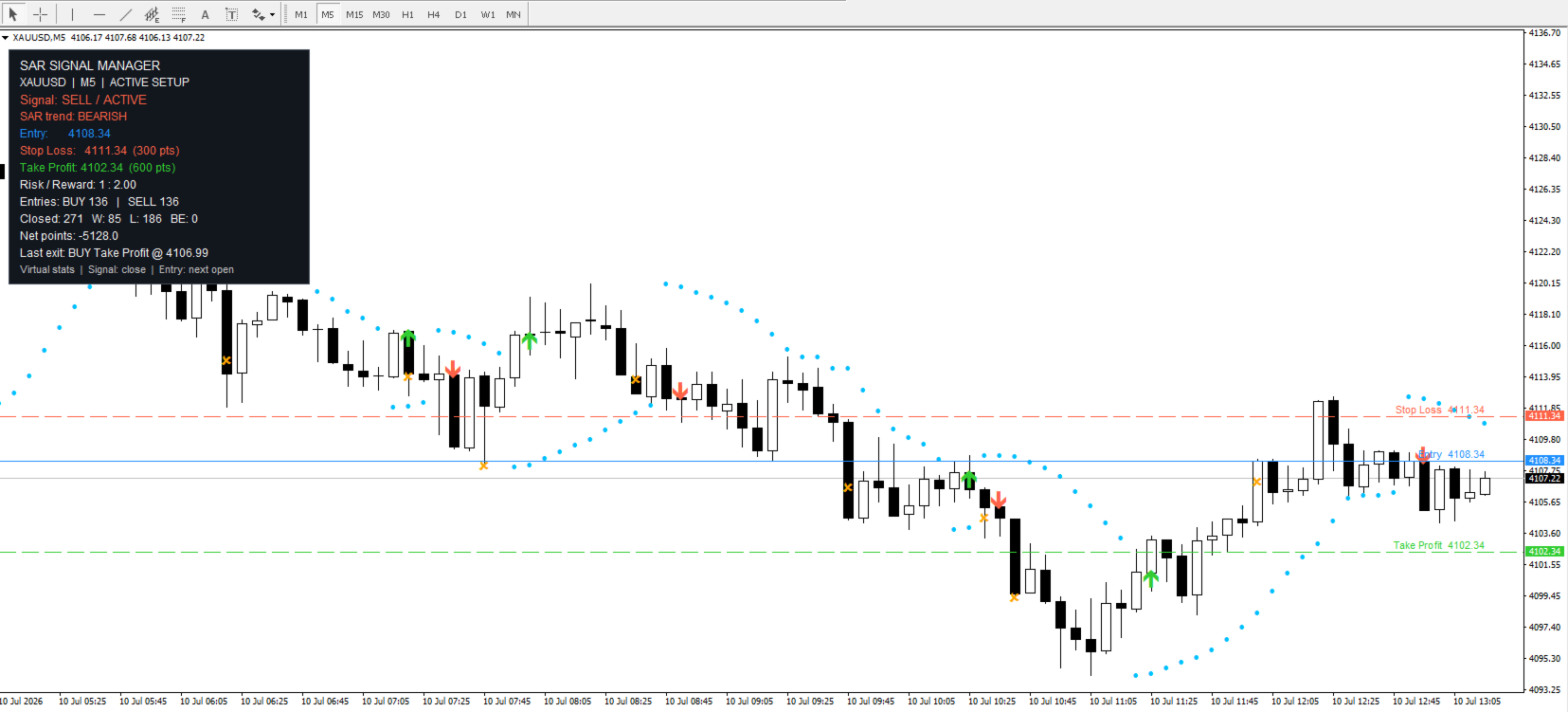
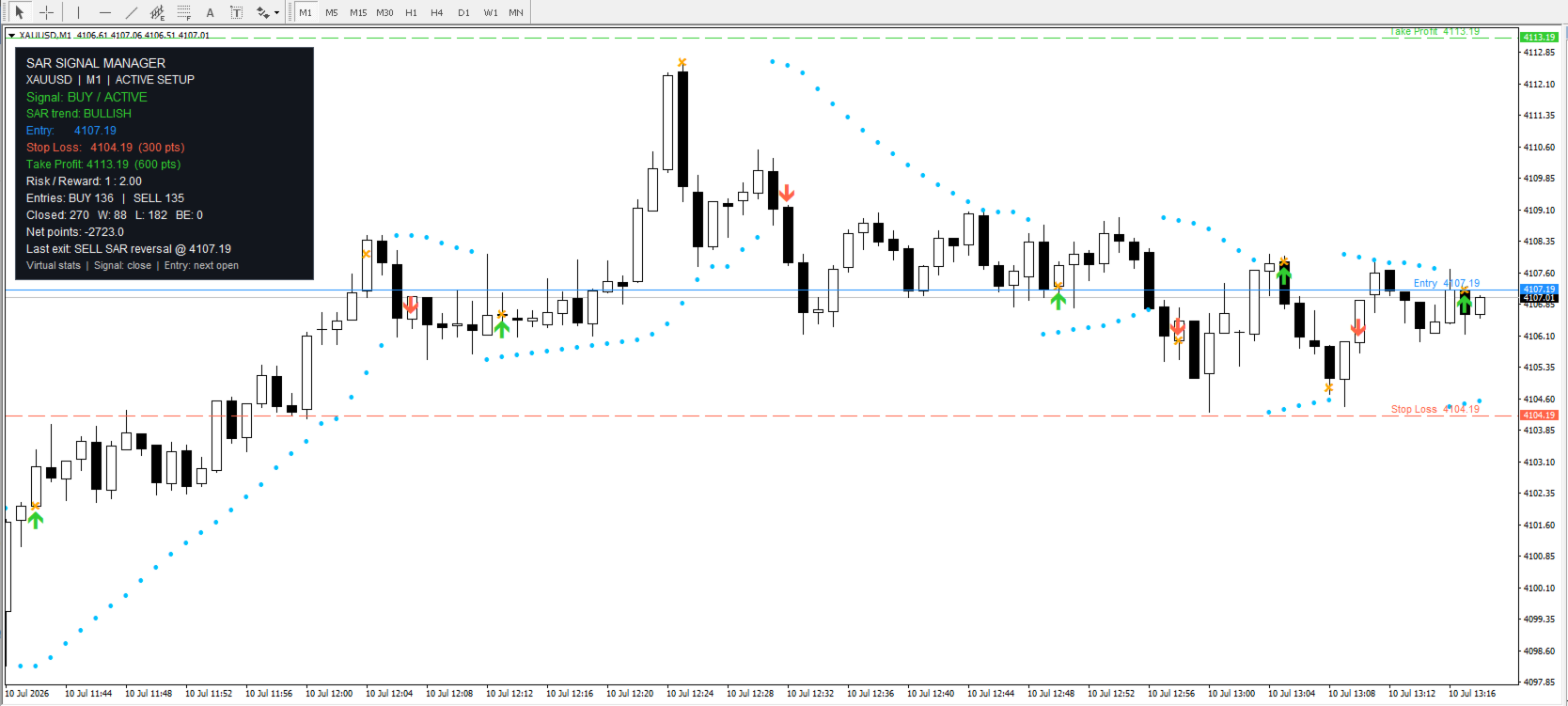
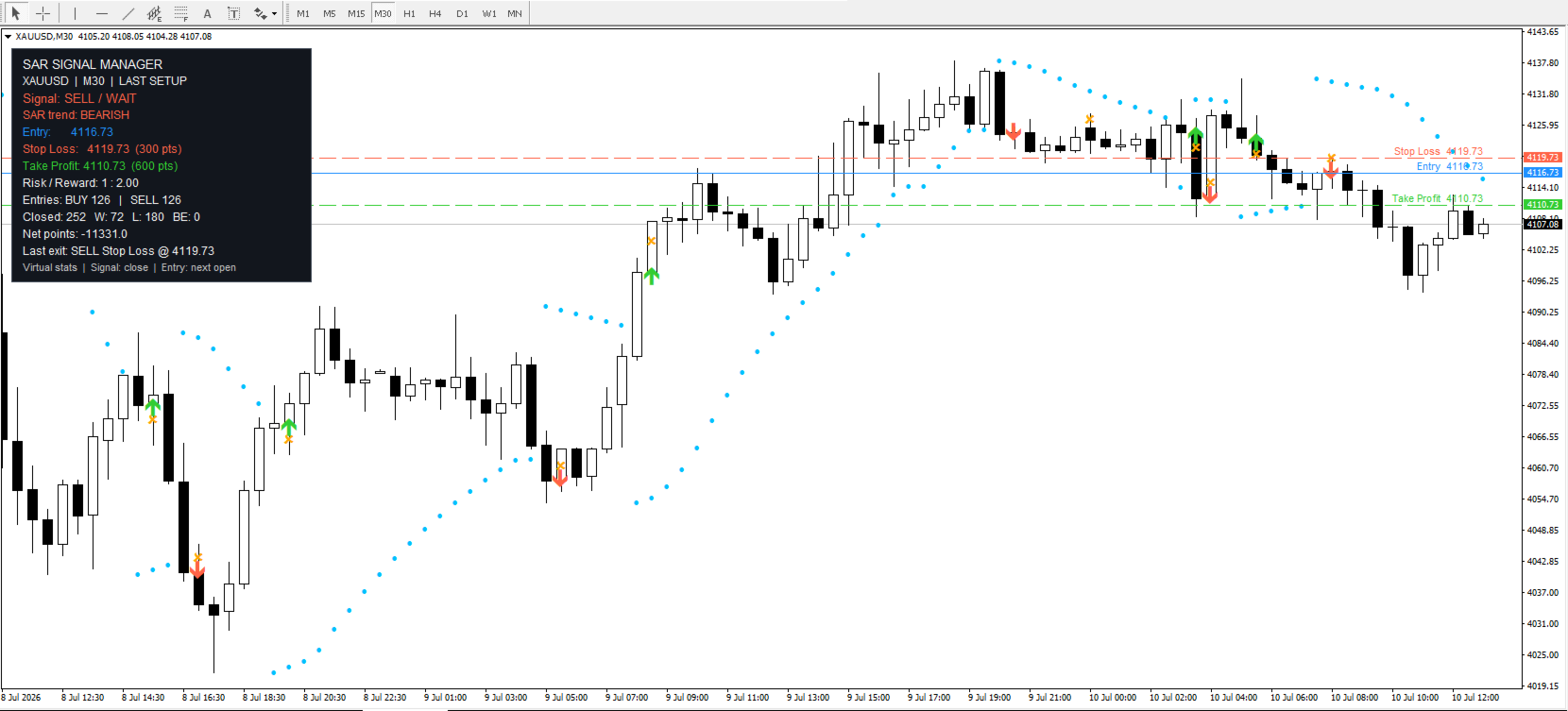
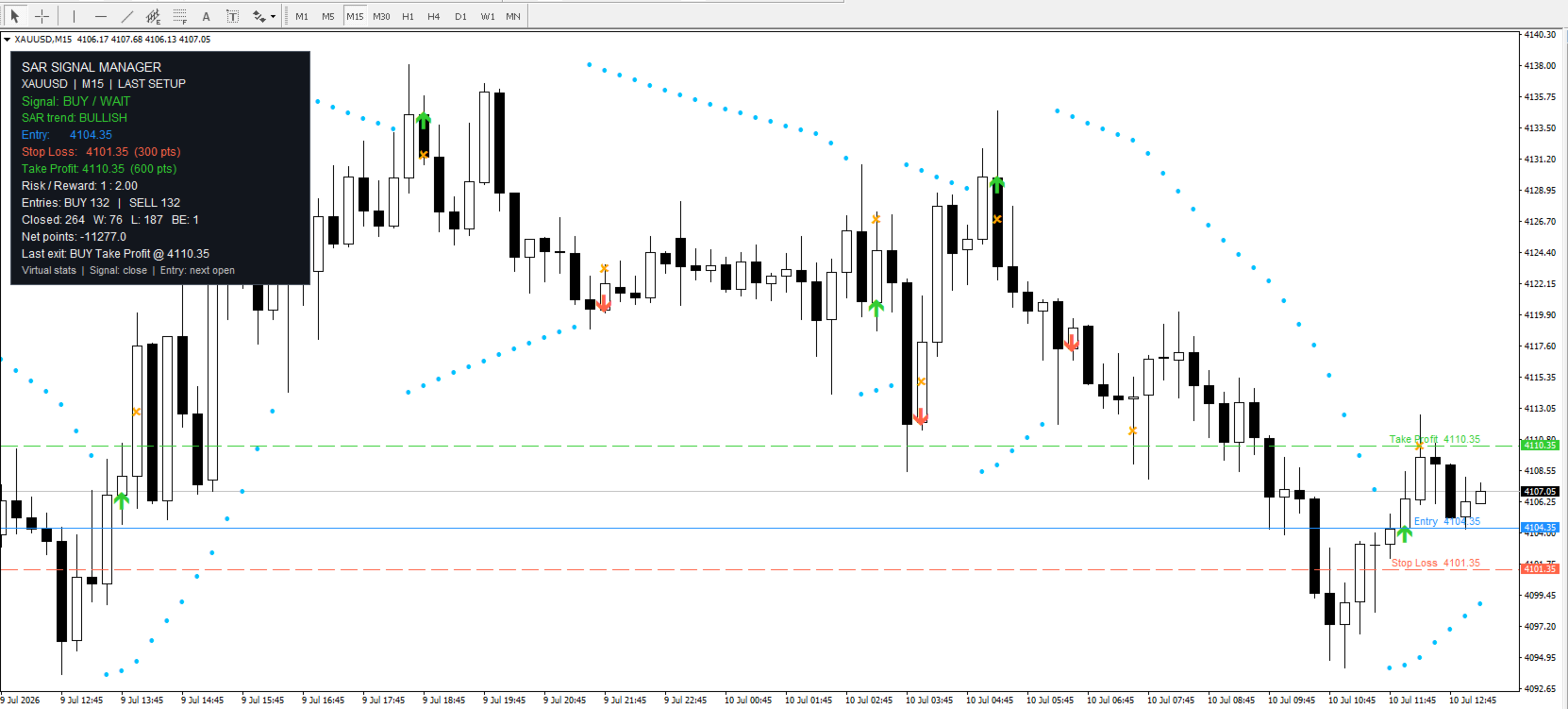
SAR Manager visualizza i punti del Parabolic SAR, le frecce virtuali di ingresso BUY e SELL, i marcatori di uscita dalla posizione e le linee orizzontali Entry, Stop Loss e Take Profit. Sul grafico possono essere visualizzati anche i nomi dei livelli e i relativi prezzi.

Le linee vengono visualizzate automaticamente quando è presente una posizione virtuale attiva. Dopo la chiusura della posizione, gli ultimi livelli possono essere mantenuti oppure rimossi in base alle impostazioni selezionate. È possibile modificare i colori dei segnali, delle linee, del testo e degli altri elementi del grafico.

Il numero di candele storiche elaborate dall’indicatore viene specificato nei parametri di input. Aumentare la profondità dello storico permette di visualizzare un maggior numero di segnali precedenti, ma può richiedere più tempo di calcolo.

Pannello informativo

L’indicatore visualizza un pannello informativo sul grafico. Il pannello mostra il simbolo e il timeframe correnti, il segnale attivo, lo stato della posizione virtuale e la direzione corrente del Parabolic SAR.

Quando è presente un segnale attivo, il pannello mostra il prezzo Entry, lo Stop Loss, il Take Profit e il rapporto rischio/rendimento calcolato. La sezione statistica mostra il numero di ingressi virtuali BUY e SELL, le chiusure positive, negative e in pareggio, il risultato virtuale totale in punti e le informazioni relative all’ultima uscita.

Le statistiche vengono calcolate esclusivamente sulla base dello storico caricato ed elaborato dall’indicatore. I valori visualizzati nel pannello possono cambiare quando viene modificato il numero di candele storiche.

Notifiche

L’indicatore può inviare notifiche quando compare un nuovo ingresso virtuale o quando viene chiusa una posizione virtuale. Le notifiche di ingresso e di uscita possono essere attivate separatamente.

I metodi di notifica supportati includono gli avvisi pop-up standard di MetaTrader, le notifiche push sui dispositivi mobili, i messaggi e-mail e gli avvisi sonori. Le funzioni push ed e-mail devono essere configurate nel terminale di trading prima di poter essere utilizzate.

Quando l’indicatore viene aggiunto per la prima volta a un grafico, non invia notifiche per i segnali storici precedenti. Ogni nuovo ingresso o uscita viene elaborato una sola volta per evitare notifiche ripetute dello stesso evento.

Parametri di input

Le impostazioni dell’indicatore sono suddivise in gruppi logici. Sono disponibili gruppi separati per i parametri del Parabolic SAR, le distanze virtuali di Stop Loss e Take Profit, la profondità del calcolo storico e l’ordine di elaborazione dei livelli all’interno della stessa candela storica.

Ulteriori gruppi contengono le impostazioni delle notifiche, le opzioni di visualizzazione delle linee e dei marcatori, il mantenimento degli ultimi livelli e i colori del pannello e degli oggetti del grafico. I parametri possono essere modificati nelle proprietà dell’indicatore prima dell’avvio o durante il suo funzionamento.

Utilizzo dell’indicatore

Aggiungere SAR Manager al grafico desiderato e configurare i parametri del Parabolic SAR. Successivamente, specificare le distanze dello Stop Loss e del Take Profit in punti, selezionare la profondità dello storico e regolare le impostazioni di visualizzazione del grafico.

Dopo la conferma di un nuovo segnale, l’indicatore mostra la sua direzione, il prezzo Entry virtuale e i livelli calcolati. Lo stato successivo della posizione, il motivo dell’uscita e le statistiche aggiornate vengono visualizzati sul grafico e nel pannello informativo.
Altri dall’autore
Astra BB RSI Arrows — Visual Trading Signals Based on Bollinger Bands and RSI Astra BB RSI Arrows is designed for traders who want a clear, visual, and practical tool for identifying potential market entries and exits. The indicator combines two well-known technical analysis tools: Bollinger Bands and RSI. Instead of constantly switching between indicators, checking overbought and oversold zones manually, and trying to catch every market reaction by eye, you get a ready-to-use visual signal syst
FREE
Turtle Path MT5 — an indicator for traders who want to see the market clearly Turtle Path MT5 is designed for traders who do not want to guess, but want to see the market structure directly on the chart. The indicator is based on the classic logic of the Turtle Trading system and helps quickly identify key breakout levels, signal direction, Take Profit zones, and Stop Loss zones. Every signal is displayed visually: channel lines, entry level, target, stop loss, and arrows on the chart. You do no
FREE
MA EMA Cross Risk EA is a trading Expert Advisor for MetaTrader 5, created for traders who want to trade using a clear, logical, and visually transparent moving average crossover strategy. The EA is based on one of the most well-known concepts in technical analysis: the crossover of fast and slow MA/EMA lines. When the market changes direction, moving averages can help identify this moment without unnecessary noise, emotions, or manual signal searching. The Expert Advisor automatically tracks Mo
FREE
Universal Trade Copier MT5 is a professional local trade copying utility designed to copy trades between MetaTrader 4 and MetaTrader 5 terminals on the same computer or VPS. The product supports multiple copying directions: MT4 → MT4 MT5 → MT5 MT4 → MT5 MT5 → MT4 To copy trades in MT4, you need to purchase  Universal Trade Copier MT4   The copier is suitable for traders who manage multiple accounts, use different MetaTrader terminals, work with different brokers, or need to copy trades betwee
Astra BB RSI Arrows — Visual Trading Signals Based on Bollinger Bands and RSI Astra BB RSI Arrows is designed for traders who want a clear, visual, and practical tool for identifying potential market entries and exits. The indicator combines two well-known technical analysis tools: Bollinger Bands and RSI. Instead of constantly switching between indicators, checking overbought and oversold zones manually, and trying to catch every market reaction by eye, you get a ready-to-use visual signal syst
FREE
MA EMA Cross Risk EA is a trading Expert Advisor for MetaTrader 4, created for traders who want to trade using a clear, logical, and visually transparent moving average crossover strategy. The EA is based on one of the most well-known concepts in technical analysis: the crossover of fast and slow MA/EMA lines. When the market changes direction, moving averages can help identify this moment without unnecessary noise, emotions, or manual signal searching. The Expert Advisor automatically tracks Mo
FREE
Turtle Path MT4 — an indicator for traders who want to see the market clearly Turtle Path MT4 is designed for traders who do not want to guess, but want to see the market structure directly on the chart. The indicator is based on the classic logic of the Turtle Trading system and helps quickly identify key breakout levels, signal direction, Take Profit zones, and Stop Loss zones. Every signal is displayed visually: channel lines, entry level, target, stop loss, and arrows on the chart. You do no
FREE
SAR Manager SAR Manager è un indicatore di segnali per MetaTrader 5 basato sull’algoritmo standard Parabolic SAR. L’indicatore rileva i cambiamenti di direzione del SAR, genera segnali virtuali BUY e SELL, calcola i livelli di Stop Loss e Take Profit e visualizza tutte le informazioni correlate direttamente sul grafico. Il prodotto è destinato all’analisi del mercato e al supporto del trading manuale. Non apre, modifica o chiude ordini reali. Calcolo dei segnali Un segnale BUY viene confermato q
FREE
Session Atlas — Professional Trading Session Map for MetaTrader 5 Session Atlas is a powerful visual session indicator for MetaTrader 5 that turns your chart into a clear, structured map of the trading day. The market does not move the same way throughout the day. Asian, European, and American sessions often have completely different behavior, volatility, liquidity, and price rhythm. Session Atlas helps you see this structure instantly — directly on your chart. No manual drawing. No checking ses
FREE
CandleCloseTimer — full control over candle closing time CandleCloseTimer is a compact utility for MetaTrader 5 that shows a countdown to the close of the current candle directly on the chart. The timer is placed near the current price, so the key information stays exactly where traders look most often — next to the price scale. The utility does not open trades, does not provide trading signals, and does not interfere with terminal operation. Its only purpose is to help you clearly see how much
FREE
Istruzioni per l’uso: aprire le istruzioni di Trade Assistant MT4/MT5 PRO Istruzioni per l’uso di Trade Assistant MT4/MT5 PRO Trade Assistant MT4/MT5 PRO è un pannello di trading professionale per MetaTrader 4/5, creato per i trader che hanno bisogno di un controllo rapido, comodo e visivamente chiaro sulle proprie operazioni. Il prodotto aiuta a ridurre le azioni ripetitive, velocizzare l’apertura e la gestione degli ordini, standardizzare la gestione del rischio e rendere il trading manuale pi
CandleCloseTimer — full control over candle closing time CandleCloseTimer is a compact utility for MetaTrader 4 that shows a countdown to the close of the current candle directly on the chart. The timer is placed near the current price, so the key information stays exactly where traders look most often — next to the price scale. The utility does not open trades, does not provide trading signals, and does not interfere with terminal operation. Its only purpose is to help you clearly see how much
FREE
Session Atlas — Professional Trading Session Map for MetaTrader 4 Session Atlas is a powerful visual session indicator for MetaTrader 4 that turns your chart into a clear, structured map of the trading day. The market does not move the same way throughout the day. Asian, European, and American sessions often have completely different behavior, volatility, liquidity, and price rhythm. Session Atlas helps you see this structure instantly — directly on your chart. No manual drawing. No checking ses
FREE
Universal Trade Copier MT4  is a professional local trade copying utility designed to copy trades between MetaTrader 4 and MetaTrader 5 terminals on the same computer or VPS. The product supports multiple copying directions: MT4 → MT4 MT5 → MT5 MT4 → MT5 MT5 → MT4 To copy trades in MT5, you need to purchase  Universal Trade Copier MT5   The copier is suitable for traders who manage multiple accounts, use different MetaTrader terminals, work with different brokers, or need to copy trades betwe
My products   User Guide   Multi-Currency Candlestick Pattern Scanner for MT4 Multi-Currency Candlestick Pattern Scanner for MT4 is a professional multi-currency and multi-timeframe Japanese candlestick pattern scanner for MetaTrader 4. The indicator analyzes multiple trading instruments and timeframes simultaneously, displays detected bullish and bearish candlestick patterns in a dashboard panel, and can also show arrows, text labels, and a Moving Average directly on the active chart. This tool
Istruzioni per l’uso:   aprire le istruzioni di Trade Assistant MT4/MT5 PRO Istruzioni per l’uso di Trade Assistant MT4/MT5 PRO Trade Assistant MT4/MT5 PRO è un pannello di trading professionale per MetaTrader 4/5, creato per i trader che hanno bisogno di un controllo rapido, comodo e visivamente chiaro sulle proprie operazioni. Il prodotto aiuta a ridurre le azioni ripetitive, velocizzare l’apertura e la gestione degli ordini, standardizzare la gestione del rischio e rendere il trading manuale
My products   Quantum SuperTrend AI is an indicator with AI-powered intelligent signal filtering: the indicator analyzes market conditions, filters out part of weak impulses, and helps traders see a cleaner market picture without unnecessary noise. Quantum SuperTrend AI is a professional trading indicator for MetaTrader 4, created for traders who need a clear visual tool for trend analysis, trading signals, and control of possible exit zones. The name Quantum SuperTrend AI reflects the core ide
PatternGuard VWAP Trader — a Smart Expert Advisor for Market Structure-Based Trading PatternGuard VWAP Trader is an advanced trading Expert Advisor designed to identify high-quality entry points after price exits a zone of market uncertainty. The strategy is based on a combination of VWAP logic, a NO TRADE zone, candlestick pattern confirmation, trend filtering, and flexible trade management. The EA does not open trades randomly. It analyzes market structure, waits for price to leave a consolida
Gold Wolf EA MT4
Andrei Strashko
Gold Wolf EA — Automated Gold Trading Expert Advisor for MT4 / MT5 Gold Wolf EA is an automated trading Expert Advisor for MetaTrader 4 and MetaTrader 5, developed for trading XAUUSD based on trend-following logic, market condition filtering, and controlled risk management. The EA is not designed for aggressive high-frequency trading. Its main objective is to identify suitable market conditions, avoid unnecessary entries, and trade only when the internal strategy conditions are met. Gold Wolf EA
Dream of the Golden Wolf EA The gold market moves fast, but not every movement is suitable for trading. Dream of the Golden Wolf EA is an automated trading Expert Advisor designed for XAUUSD and optimized for the M5 timeframe . The EA analyzes market structure, trend direction, momentum, price activity, and additional confirmation signals before opening a trade. The main goal of the EA is not to open as many trades as possible, but to identify higher-quality trading conditions where several fact
Golden Wolf Grid PRO is an Expert Advisor for MetaTrader 4 , designed for automated trading on Gold / XAUUSD using the M15 timeframe . The EA is based on a grid trading strategy and is created to work with market fluctuations, opening and managing trades automatically according to the selected parameters. Golden Wolf Grid PRO comes with optimized settings for XAUUSD M15 , so you can use the prepared configuration or perform your own optimization and forward testing according to your broker, acco
MPA Trend Dashboard — Multi-Symbol Market Scanner for MetaTrader 4 MPA Trend Dashboard is a multi-symbol technical analysis indicator for MetaTrader 4. It is designed to help traders monitor several trading instruments from one chart and quickly evaluate market direction using a combination of popular technical indicators. The indicator displays a compact signal dashboard directly on the chart. For each selected symbol, it shows BUY, SELL or WAIT signals based on multiple market analysis tools.
Golden Wolf SMC Trendline Alerts is a professional indicator for MetaTrader 4, designed for traders who want to analyze the market through price structure, liquidity, trendlines, and key areas of interest. The indicator is based on the Smart Money Concepts approach, widely known among traders as SMC. This analytical method helps traders look at the market not only through standard signals, but also through the logic of price movement: where structure is formed, where the character of movement c
BONUS: acquistando Golden Wolf GameChanger riceverai in regalo Trade Assistant MT5 PRO . Dopo l’acquisto, inviami un messaggio tramite MQL. Offerta limitata. Golden Wolf GameChanger è un potente Expert Advisor di trading per MetaTrader 5, creato per chi desidera trasformare i segnali dell’indicatore Game Changer in un sistema di trading automatico con gestione flessibile degli ordini, del rischio, delle serie di operazioni e degli algoritmi di protezione. L’Expert Advisor è stato creato e ottim
Second and Custom Timeframe Charts See the market between standard timeframes. Second and Custom Timeframe Charts is a professional chart utility for MetaTrader 4 that creates synthetic candles for non-standard timeframes directly from market data. It is designed for traders who need more flexibility than the default MT4 timeframe set can provide. Standard charts show only fixed periods. But the market does not always move in standard blocks. Sometimes the most important structure is visible on
My products   User Guide   Multi-Currency Candlestick Pattern Scanner for MT5 is a professional dashboard indicator that automatically scans multiple symbols and timeframes for Japanese candlestick patterns in real time. Instead of opening dozens of charts manually, you can monitor the entire market from one clean scanner panel. The indicator helps you quickly find bullish and bearish candlestick setups, check the active timeframe, and switch directly to the chart where the pattern appeared. Thi
My products   Quantum SuperTrend AI Alerts MT5- user guid   Quantum SuperTrend AI is an indicator with AI-powered intelligent signal filtering: the indicator analyzes market conditions, filters out part of weak impulses, and helps traders see a cleaner market picture without unnecessary noise. Quantum SuperTrend AI is a professional trading indicator for MetaTrader 5, created for traders who need a clear visual tool for trend analysis, trading signals, and control of possible exit zones. The na
PatternGuard VWAP Trader — A uthor's  Smart Trading Advisor for VWAP Breakout and Pattern-Based Entries PatternGuard VWAP Trader is a professional Expert Advisor for MetaTrader 5 designed to identify trading opportunities after price exits a dynamic NO TRADE zone based on VWAP and volatility bands. The main idea of the system is simple and effective: avoid trading inside uncertain, low-quality market zones and look for entries only when price breaks out of consolidation, confirms direction with
Gold Wolf EA
Andrei Strashko
Gold Wolf EA — Automated Gold Trading Expert Advisor for MT4 / MT5 Gold Wolf EA is an automated trading Expert Advisor for MetaTrader 4 and MetaTrader 5, developed for trading XAUUSD based on trend-following logic, market condition filtering, and controlled risk management. The EA is not designed for aggressive high-frequency trading. Its main objective is to identify suitable market conditions, avoid unnecessary entries, and trade only when the internal strategy conditions are met. Gold Wolf EA
Dream of the Golden Wolf EA The gold market moves fast, but not every movement is suitable for trading. Dream of the Golden Wolf EA is an automated trading Expert Advisor designed for XAUUSD and optimized for the M5 timeframe . The EA analyzes market structure, trend direction, momentum, price activity, and additional confirmation signals before opening a trade. The main goal of the EA is not to open as many trades as possible, but to identify higher-quality trading conditions where several fact
Filtro:
Nessuna recensione
Rispondi alla recensione